light Lexus GS350 2009 Repair Manual
[x] Cancel search | Manufacturer: LEXUS, Model Year: 2009, Model line: GS350, Model: Lexus GS350 2009Pages: 622, PDF Size: 17.98 MB
Page 164 of 622
163
2-3. Operating the lights and windshield wipers
2
When driving
GS_G_U (OM30B43U)
April 27, 2009 10:40 am
■If no windshield washer fluid sprays
Check that the washer nozzles are not blocked if there is washer fluid in the wind-
shield washer fluid reservoir.
■If the components get extremely hot or cold
The system will turn off if the components get extremely hot (more than 194 °F
[90 °C]) or cold (less than -22 °F [-30 °C]).
■Customization that can be configured at Lexus dealer
Settings (e.g. drip prevention function) can be changed.
(Customizable features → P. 5 9 3 )
CAUTION
■Caution regarding the use of windshield wipers in “AUTO” mode
The windshield wipers may operate unexpectedly if the sensor is touched or the
windshield is subject to vibration in “AUT O” mode. Take care that your fingers or
anything else do not become caught in the windshield wipers.
NOTICE
■When the windshield is dry
Do not use the wipers, as they may damage the windshield.
■When there is no washer fluid spray from the nozzle
Damage to the washer fluid pump may be caused if the lever is pulled toward you
and held continually.
GS_U_G.book Page 163 Monday, April 27, 2009 10:50 AM
Page 165 of 622
164
2-3. Operating the lights and windshield wipers
GS_G_U (OM30B43U)
April 27, 2009 10:40 am
Headlight cleaner switch∗
■The headlight cleaner can be operated when
The “ENGINE START STOP” switch is in IGNITION ON mode and the headlight
switch is turned ON.
NOTICE
■When the washer fluid tank is empty
Do not press the switch continually, as the washer fluid pump may overheat.
∗: If equipped
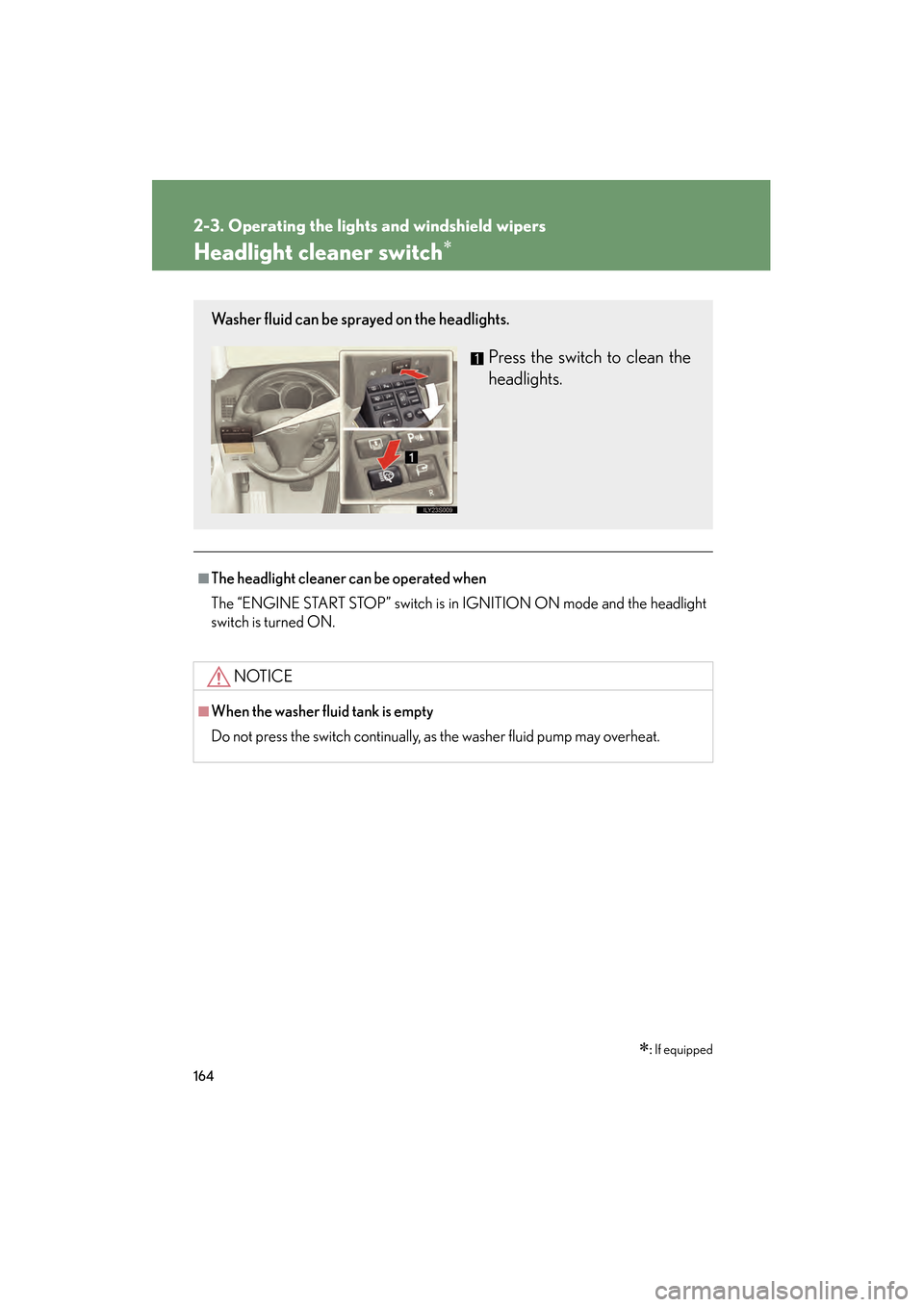
Washer fluid can be sprayed on the headlights.
Press the switch to clean the
headlights.
GS_U_G.book Page 164 Monday, April 27, 2009 10:50 AM
Page 167 of 622
166
2-4. Using other driving systems
GS_G_U (OM30B43U)
April 27, 2009 10:48 am
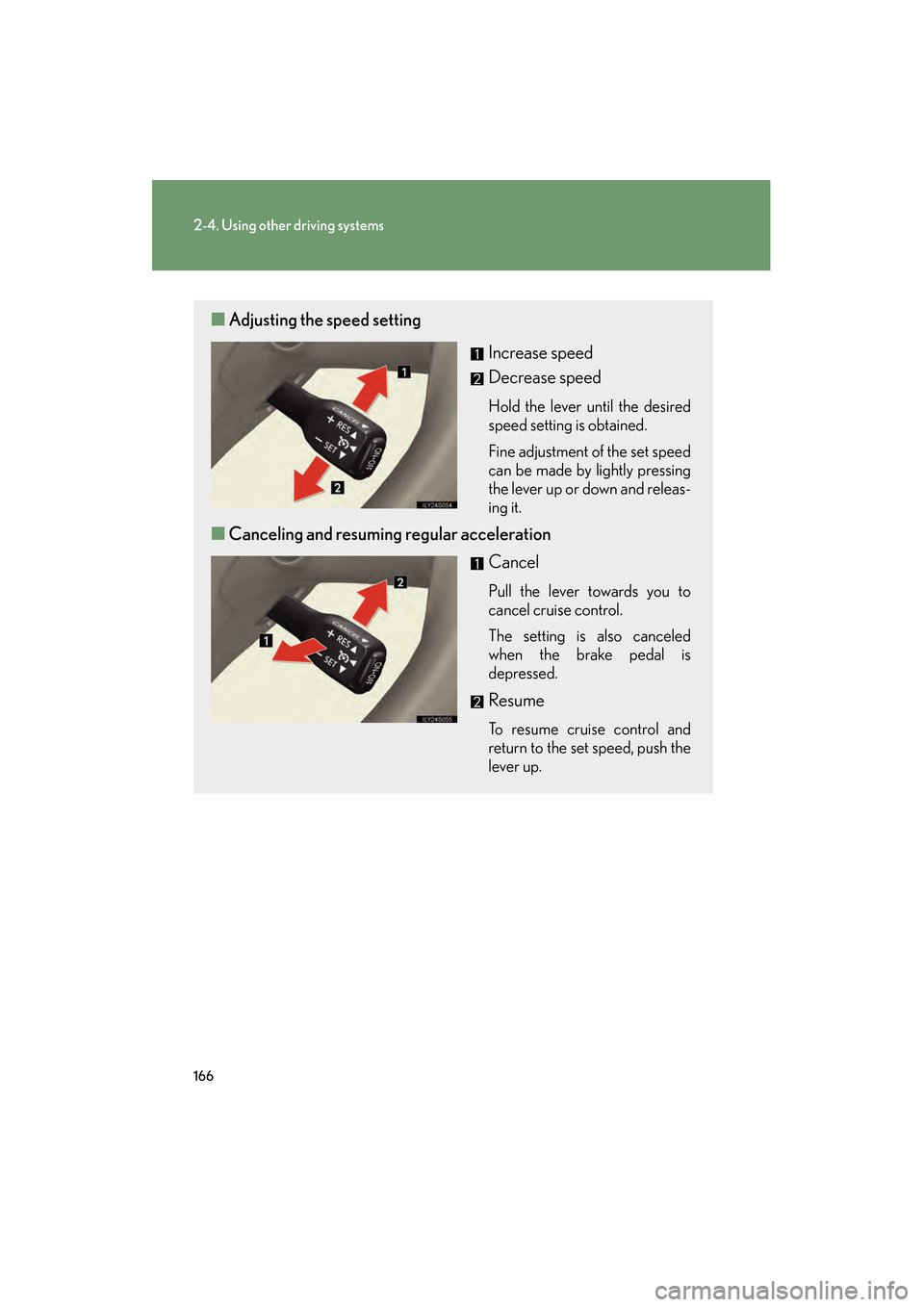
■Adjusting the speed setting
Increase speed
Decrease speed
Hold the lever until the desired
speed setting is obtained.
Fine adjustment of the set speed
can be made by lightly pressing
the lever up or down and releas-
ing it.
■Canceling and resuming regular acceleration
Cancel
Pull the lever towards you to
cancel cruise control.
The setting is also canceled
when the brake pedal is
depressed.
Resume
To resume cruise control and
return to the set speed, push the
lever up.
GS_U_G.book Page 166 Monday, April 27, 2009 10:50 AM
Page 168 of 622
167
2-4. Using other driving systems
2
When driving
GS_G_U (OM30B43U)
April 27, 2009 10:48 am
■Cruise control can be set when
●The shift lever is in the “D” or “4”, “5”, “6”, “7” or “8” (GS460) or “4”, “5”, or “6”
(GS350) range of “S”.
●Vehicle speed is between approximately 25 mph (40 km/h) and 125 mph
(200 km/h).
■Accelerating
The vehicle can be accelerated normally. After acceleration, the set speed
resumes.
■Automatic cruise control cancelation
The set speed is automatically canceled in any of the following situations.
●Actual vehicle speed falls more than 10 mph (16 km/h) below the preset vehicle
speed
At this time, the memorized set speed is not retained.
●Actual vehicle speed is below 25 mph (40 km/h)
●Enhanced VSC is activated
■If the cruise control indicator light flashes
Press the “ON-OFF” button off once, and then reactivate the system.
If the cruise control speed cannot be set or if the cruise control cancels immediately
after being activated, there may be a malfun ction in the cruise control system. Have
the vehicle inspected by your Lexus dealer.
GS_U_G.book Page 167 Monday, April 27, 2009 10:50 AM
Page 172 of 622
171
2-4. Using other driving systems
2
When driving
GS_G_U (OM30B43U)
April 27, 2009 10:48 am
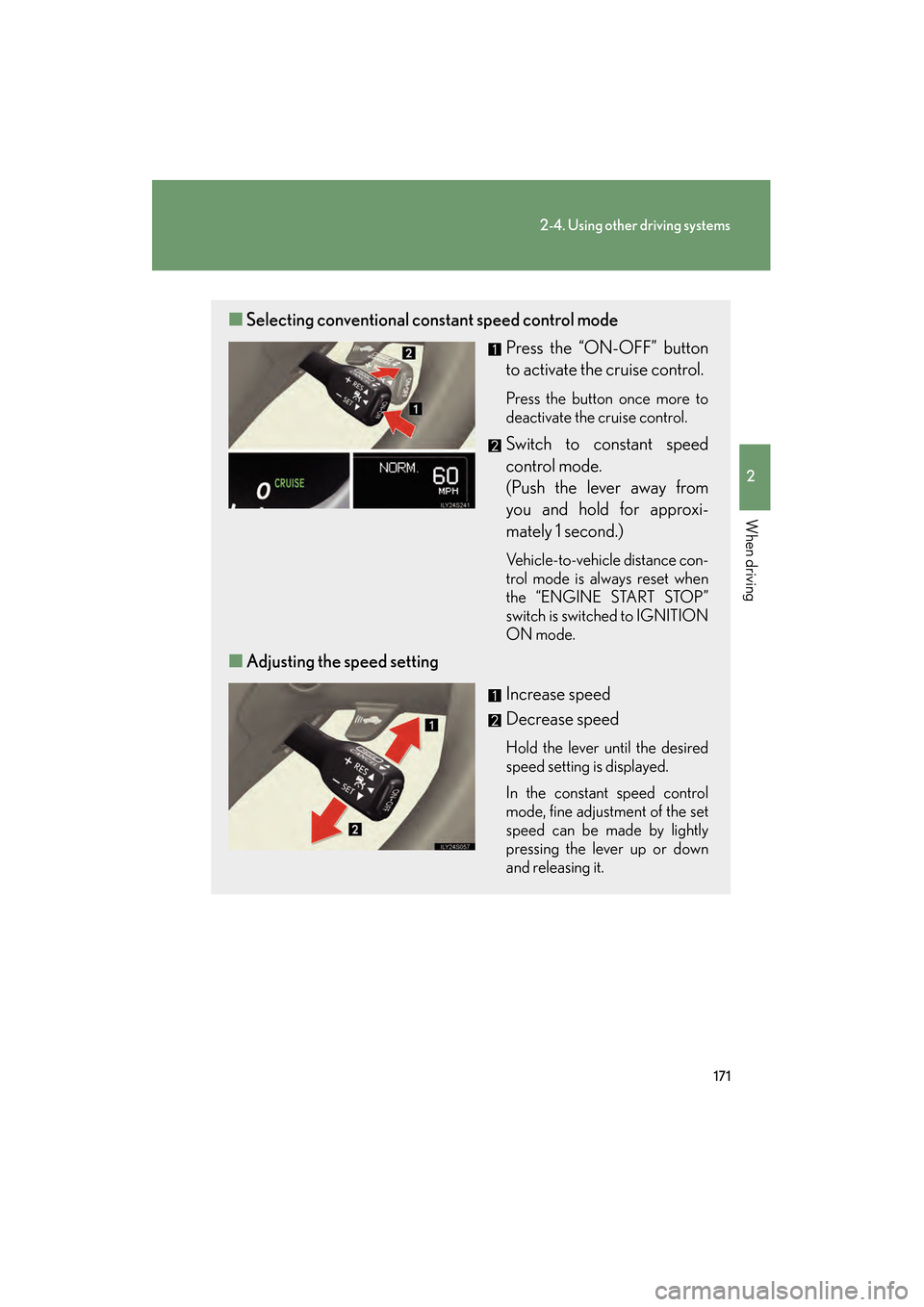
■Selecting conventional constant speed control mode
Press the “ON-OFF” button
to activate the cruise control.
Press the button once more to
deactivate the cruise control.
Switch to constant speed
control mode.
(Push the lever away from
you and hold for approxi-
mately 1 second.)
Vehicle-to-vehicle distance con-
trol mode is always reset when
the “ENGINE START STOP”
switch is switched to IGNITION
ON mode.
■Adjusting the speed setting
Increase speed
Decrease speed
Hold the lever until the desired
speed setting is displayed.
In the constant speed control
mode, fine adjustment of the set
speed can be made by lightly
pressing the lever up or down
and releasing it.
GS_U_G.book Page 171 Monday, April 27, 2009 10:50 AM
Page 175 of 622
174
2-4. Using other driving systems
GS_G_U (OM30B43U)
April 27, 2009 10:48 am
Example of follow-up cruising
When following a vehicle driving slower than the set speed
The system continues follow-up cruising while adjusting for changes in the
speed of the vehicle ahead in order to maintain the vehicle-to-vehicle dis-
tance set by the driver.
Example of acceleration
When there are no longer vehicles driving slower than the set speed in
the lane ahead
When the vehicle ahead of you executes a lane change, the system slowly
accelerates until the set vehicle speed is reached. The system then returns to
fixed speed cruising.
Approach warning
When your vehicle is too close to a vehicle ahead, and sufficient auto-
matic deceleration via th e cruise control is not po ssible, the display will
flash and a buzzer will soun d to alert the driver. An example of this would
be if another driver cuts in front of you while you are following a vehicle.
Apply the brakes to ensure an appr opriate vehicle-to-vehicle distance.
■Warning lights and messages for dynamic radar cruise control
Warning lights, messages and buzzers are us ed to indicate a system malfunction or
to inform the driver of the need for caution while driving. ( →P. 5 1 9 )
■Switching modes
The mode cannot be switched to constant speed control mode if vehicle-to-vehicle
distance control mode has been used. Th e mode also cannot be switched from
constant speed control to vehicle-to-vehic le control mode. Turn the system off by
pressing the “ON-OFF” button, and turn it on again.
GS_U_G.book Page 174 Monday, April 27, 2009 10:50 AM
Page 181 of 622
180
2-4. Using other driving systems
GS_G_U (OM30B43U)
April 27, 2009 10:48 am
CAUTION
■To ensure the radar sensor functions correctly
Do not do the following to the sensor or grille cover as doing so may cause the sen-
sor not to function correctly and could result in a serious or fatal accident.
●Stick or attach anything to them
●Leave them dirty
●Disassemble, subject them to strong shocks
●Modify or paint them
●Replace them with non-genuine parts
■Handling the radar sensor
Observe the following to ensure the cruise control system can function effectively.
●Keep the sensor and front grille clean at all times.
Clean the sensor and front grille with a soft cloth so you do not mark or damage
them.
●Do not subject the sensor or surrounding area to a strong impact.
If the sensor moves even slightly off position, the system may malfunction. If the
sensor or surrounding area is subject to a strong impact, always have the area
inspected and adjusted by a Lexus dealer.
●Do not disassemble the sensor.
●Do not attach accessories or stickers to the sensor, grille or surrounding area.
●Do not modify or paint the sensor and grille.
GS_U_G.book Page 180 Monday, April 27, 2009 10:50 AM
Page 183 of 622
182
2-4. Using other driving systems
GS_G_U (OM30B43U)
April 27, 2009 10:48 am
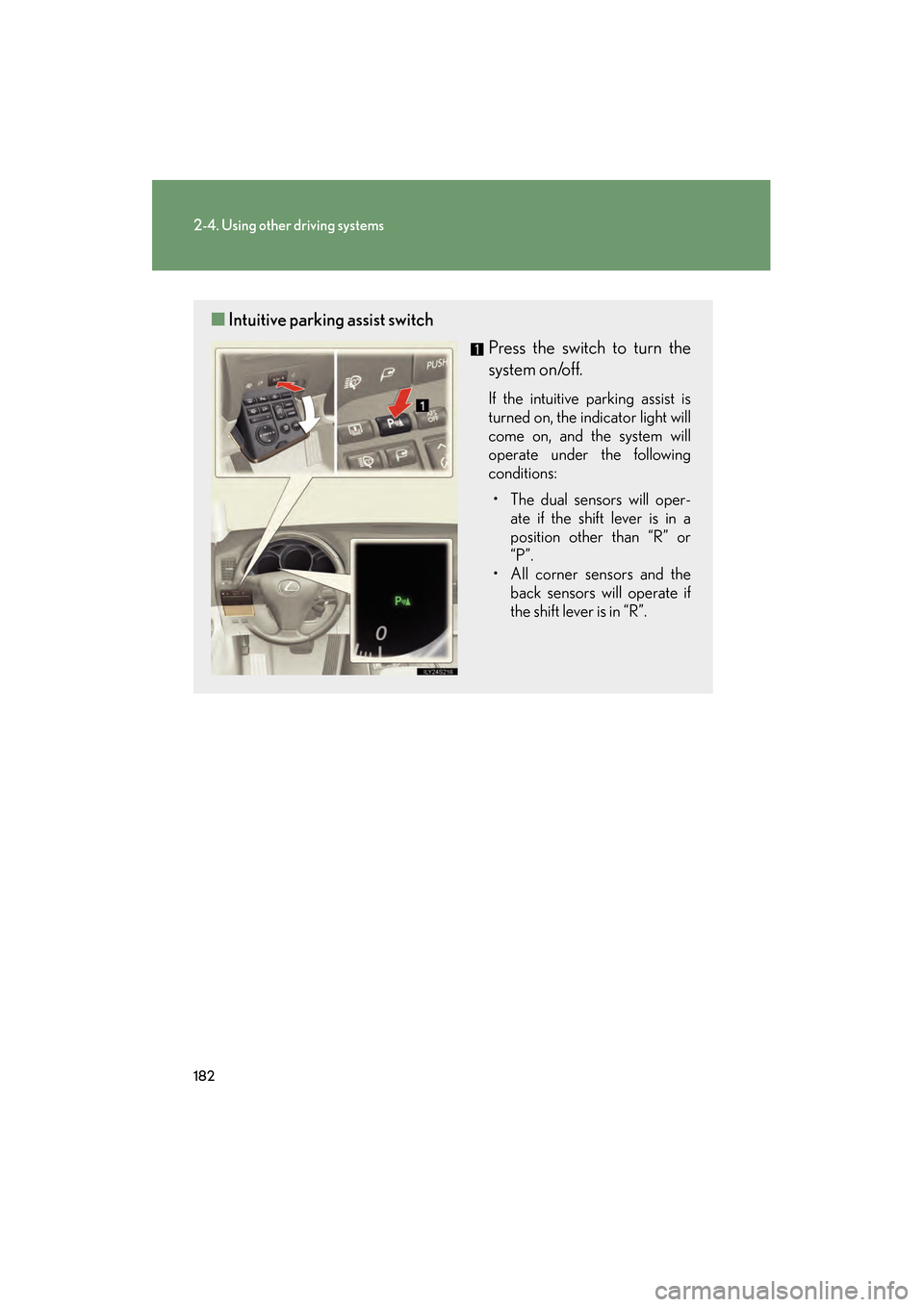
■Intuitive parking assist switch
Press the switch to turn the
system on/off.
If the intuitive parking assist is
turned on, the indicator light will
come on, and the system will
operate under the following
conditions:
• The dual sensors will oper- ate if the shift lever is in a
position other than “R” or
“P”.
• All corner sensors and the back sensors will operate if
the shift lever is in “R”.
GS_U_G.book Page 182 Monday, April 27, 2009 10:50 AM
Page 194 of 622
193
2-4. Using other driving systems
2
When driving
GS_G_U (OM30B43U)
April 27, 2009 10:48 am
●In the following situations, the intuitive parking assist may not function correctly,
possibly leading to an accident.
• There is ice, snow or mud on the sensors. (Wiping the sensors will resolve this
problem.)
• The sensor area is frozen. (Thawing the area will resolve this problem.) In especially cold weather, if a sensor is frozen the screen may show an abnor-
mal display, or obstacles may not be detected.
• The vehicle angle is especially wide.
• In harsh sunlight or intense cold weather.
• When driving on bumpy, sloped or gravel roads, or over grass.
• If there is something producing ultrasonic waves nearby, such as another vehicle’s horn, motorcycle engine nois e, air braking sound from heavy-duty
vehicles, or another vehicle using the intuitive parking assist.
• In heavy rain, or if water is splashed on the sensors.
• If a commercial fender pole or radio antenna is installed.
• If towing eyelet is installed on your vehicle.
• If moving towards a high curb or a curb corner.
• Objects such as signs may cause the detection distance to shorten.
• The area directly under the bumpers is not detected. Objects lower than the sens ors or thin stakes etc. may be detected initially,
but as they draw closer, they may cease to be detected.
• If obstacles draw too close to the sensor.
■Obstacles that may not be detected correctly
The following obstacles may not be detected.
●Thin objects such as wire, fencing or rope.
●Objects that absorb sound wave s, such as cotton or snow.
●Objects with sharp corners.
●Objects where the upper section projects out over the lower section.
●Low objects.
■If the display flashes and a message is displayed
→P. 5 2 6
GS_U_G.book Page 193 Monday, April 27, 2009 10:50 AM
Page 198 of 622
197
2-4. Using other driving systems
2
When driving
GS_G_U (OM30B43U)
April 27, 2009 10:48 am
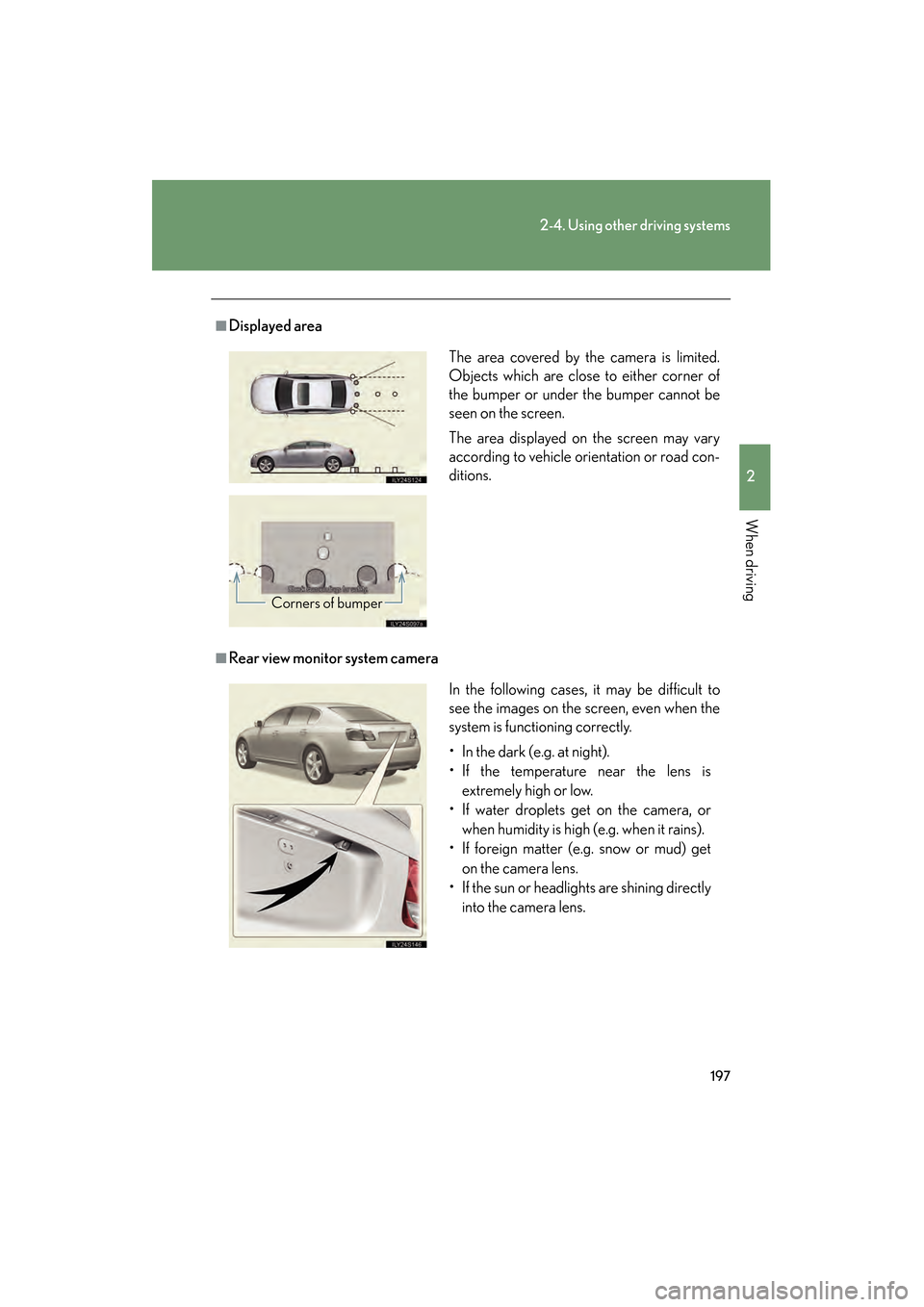
■Displayed area
■Rear view monitor system cameraThe area covered by the camera is limited.
Objects which are close to either corner of
the bumper or under the bumper cannot be
seen on the screen.
The area displayed on the screen may vary
according to vehicle orientation or road con-
ditions.
Corners of bumper
In the following cases, it may be difficult to
see the images on the screen, even when the
system is functioning correctly.
• In the dark (e.g. at night).
• If the temperature near the lens is
extremely high or low.
• If water droplets get on the camera, or
when humidity is high (e.g. when it rains).
• If foreign matter (e.g. snow or mud) get
on the camera lens.
• If the sun or headlights are shining directly into the camera lens.
GS_U_G.book Page 197 Monday, April 27, 2009 10:50 AM