interior lights Lexus GS350 2009 Owner's Manual
[x] Cancel search | Manufacturer: LEXUS, Model Year: 2009, Model line: GS350, Model: Lexus GS350 2009Pages: 622, PDF Size: 17.98 MB
Page 5 of 622
TABLE OF CONTENTSIndex
4
GS_G_U (OM30B43U)
May 1, 2009 1:17 pm
3-1. Using the touch screenTouch screen ................................. 226
Setting the touch screen .......... 230
3-2. Using the air conditioning system and defogger
Automatic air conditioning system ............................................ 235
Rear window and outside rear view mirror defoggers ............ 243
Windshield wiper de-icer ......... 244
3-3. Using the audio system Audio system type ....................... 245
Using the radio ............................. 248
Using the cassette player.......... 257
Using the CD player .................... 261
Playing MP3 and WMA discs.................................. 266
Using the DVD player................ 270
Playing DVD video/audio ........ 273
Playing video CD (with DVD player).................... 285
CD/DVD player and DVD video disc information ............ 289
Optimal use of the audio/video system ................... 301
Using the AUX adapter ........... 306
Using the steering switches ..... 307 3-4. Using the hands-free system
(for cellular phone)
Hands-free system (for cellular phone) .................... 310
Using the Bluetooth®
phone .............................................. 315
Setting the hands-free system ........................................... 330
3-5. Using the interior lights Interior lights list............................ 356
3-6. Using the storage features List of storage features.............. 359
3-7. Other interior features Sun visors......................................... 366
Vanity mirrors................................ 367
Clock ................................................ 368
Outside temperature display ............................................ 369
Ashtrays ........................................... 370
Cigarette lighter ............................ 371
Power outlet ................................... 372
Seat heaters/ventilators ............ 373
Armrest ............................................ 375
Rear sunshade ............................... 376
Floor mats........................................ 378
Trunk features................................ 379
Garage door opener................. 382
Compass......................................... 388
Lexus Link System ....................... 392
3Interior features
GS_U_G_TOC.fm Page 4 Friday, May 1, 2009 1:17 PM
Page 88 of 622
87
1-6. Theft deterrent system
1
Before driving
GS_G_U (OM30B43U)
April 20, 2009 4:34 pm
■Items to check before locking the vehicle
To prevent unintended triggering of the alarm and vehicle theft, make sure of the
following:
●Nobody is in the vehicle.
●The windows and moon roof are closed before the alarm is set.
●No valuables or other personal items are left in the vehicle.
■Tr i g g e r i n g o f t h e a l a r m
The alarm may be triggered in the following situations.
(Stopping the alarm deactivates the alarm system.)
●A person inside the vehicle opens a door, the trunk or hood.
●The 12 volt battery is recharged or replaced when the vehicle is locked.
■When the 12 volt battery is disconnected
Be sure to cancel the alarm system.
If the 12 volt battery is disconnected before canceling the alarm, the system may be
triggered when the battery is reconnected.
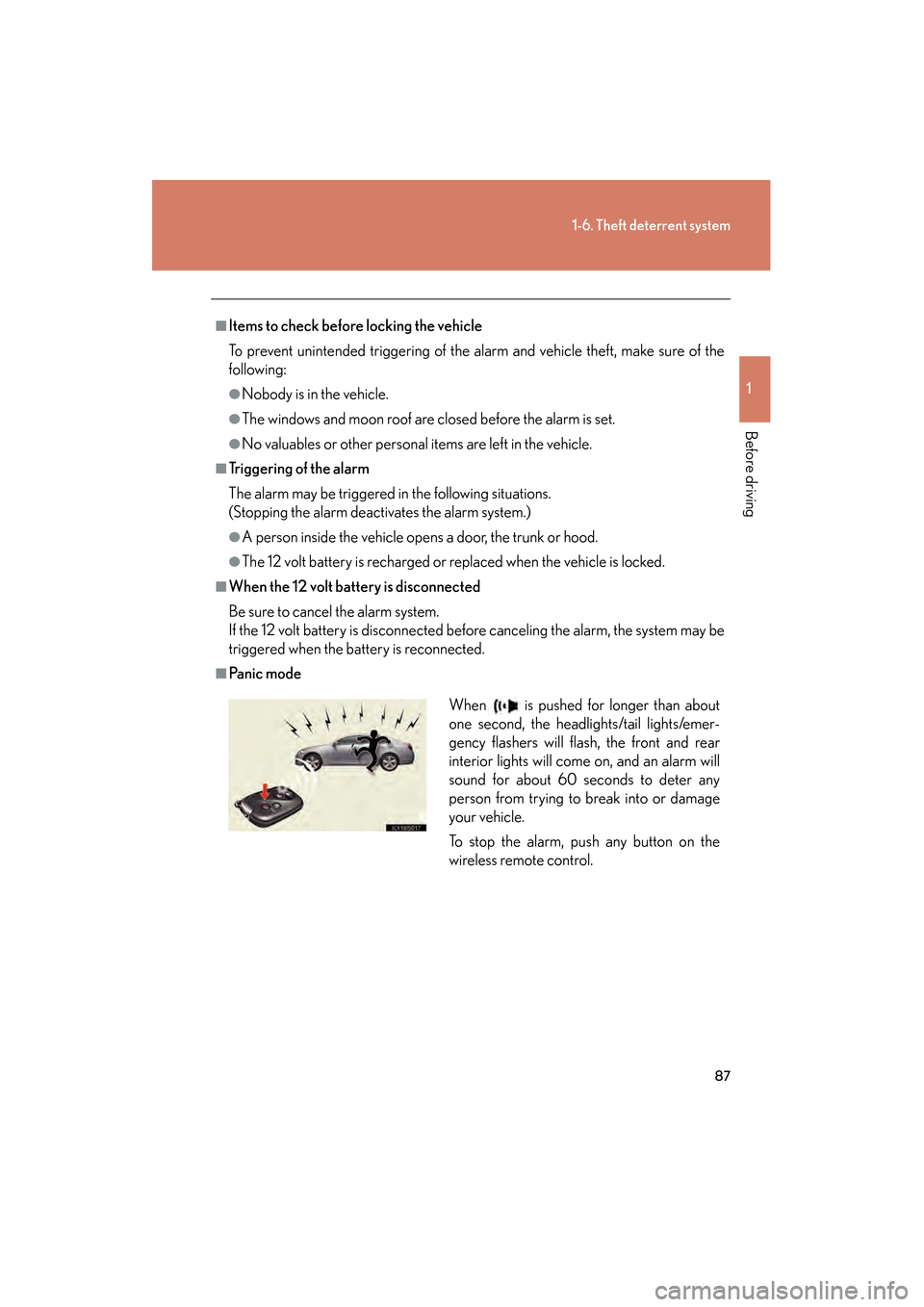
■Pa n i c m o d e
When is pushed for longer than about
one second, the headlights/tail lights/emer-
gency flashers will flash, the front and rear
interior lights will come on, and an alarm will
sound for about 60 seconds to deter any
person from trying to break into or damage
your vehicle.
To stop the alarm, push any button on the
wireless remote control.
GS_U_G.book Page 87 Monday, April 27, 2009 10:50 AM
Page 226 of 622
Interior features3
225
GS_G_U (OM30B43U)
April 27, 2009 10:42 am
3-3. Using the audio systemAudio system type.................. 245
Using the radio........................ 248
Using the cassette player .... 257
Using the CD player .............. 261
Playing MP3 and WMA discs............................ 266
Using the DVD player........... 270
Playing DVD video/audio .... 273
Playing video CD (with DVD player) .............. 285
CD/DVD player and DVD
video disc information ...... 289
Optimal use of the audio/video system ....... 301
Using the AUX adapter ....... 306
Using the steering switches .................................. 307
3-4. Using the hands-free system (for cellular phone)
Hands-free system (for cellular phone) .............. 310
Using the Bluetooth
®
phone ....................................... 315
Setting the hands-free system .................................... 330 3-5. Using the interior lights
Interior lights list .................... 356
3-6. Using the storage features List of storage features......... 359
3-7. Other interior features Sun visors ................................. 366
Vanity mirrors .......................... 367
Clock ......................................... 368
Outside temperature display..................................... 369
Ashtrays.................................... 370
Cigarette lighter ..................... 371
Power outlet ............................ 372
Seat heaters/ventilators ...... 373
Armrest .................................... 375
Rear sunshade ......................... 376
Floor mats ................................ 378
Trunk features ......................... 379
Garage door opener ............ 382
Compass .................................. 388
Lexus Link System ................. 392
GS_U_G.book Page 225 Monday, April 27, 2009 10:50 AM
Page 357 of 622
356
GS_G_U (OM30B43U)
April 27, 2009 10:48 am
3-5. Using the interior lights
Interior lights list
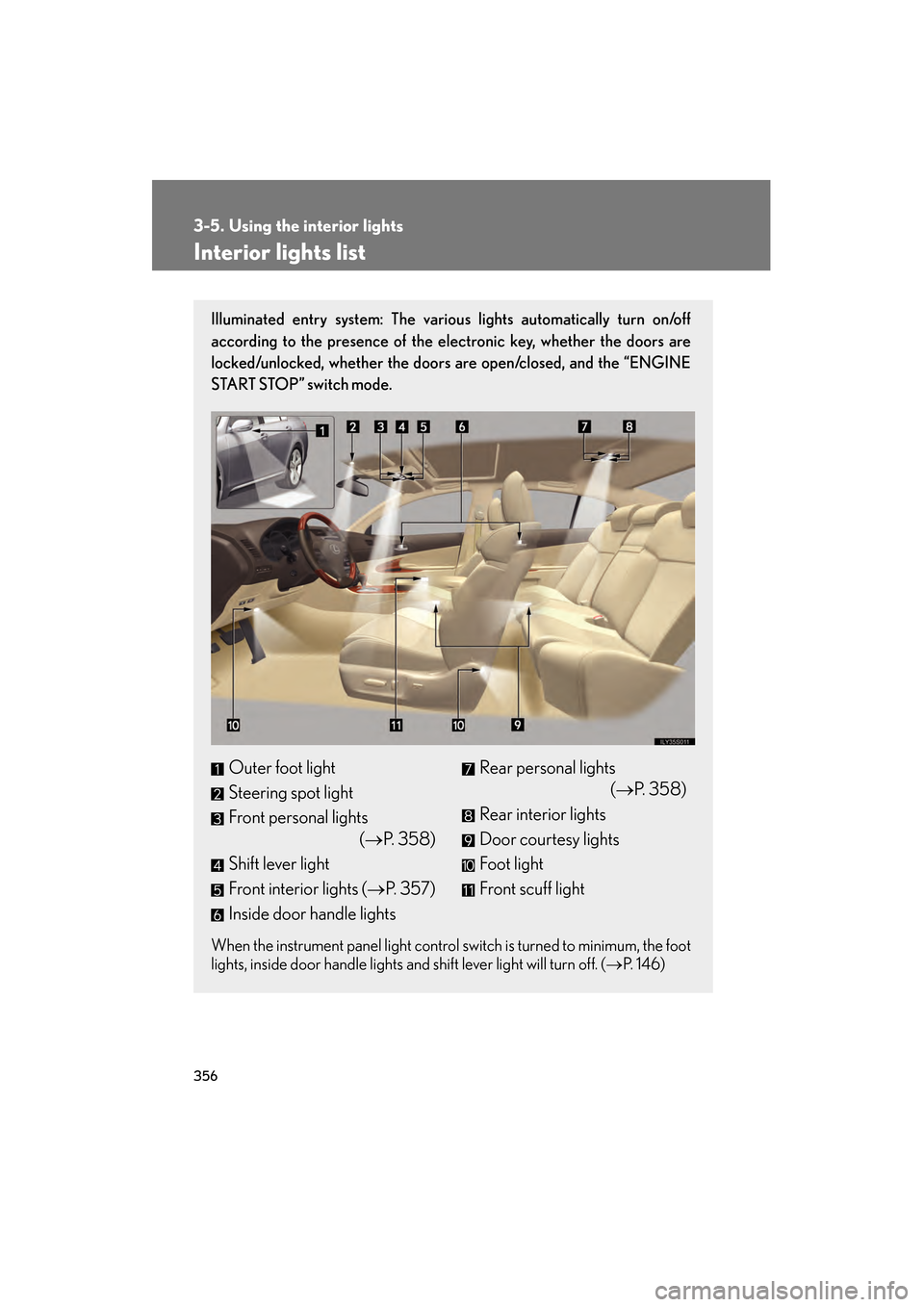
Illuminated entry system: The various lights automatically turn on/off
according to the presence of the electronic key, whether the doors are
locked/unlocked, whether the doors are open/closed, and the “ENGINE
START STOP” switch mode.
When the instrument panel light control switch is turned to minimum, the foot
lights, inside door handle lights and shift lever light will turn off. (→ P. 1 4 6 )
Outer foot light
Steering spot light
Front personal lights
(→P. 3 5 8 )
Shift lever light
Front interior lights (→ P. 3 5 7 )
Inside door handle lightsRear personal lights (→P. 3 5 8 )
Rear interior lights
Door courtesy lights
Foot light
Front scuff light
GS_U_G.book Page 356 Monday, April 27, 2009 10:50 AM
Page 358 of 622
357
3-5. Using the interior lights
3
Interior features
GS_G_U (OM30B43U)
April 27, 2009 10:48 am
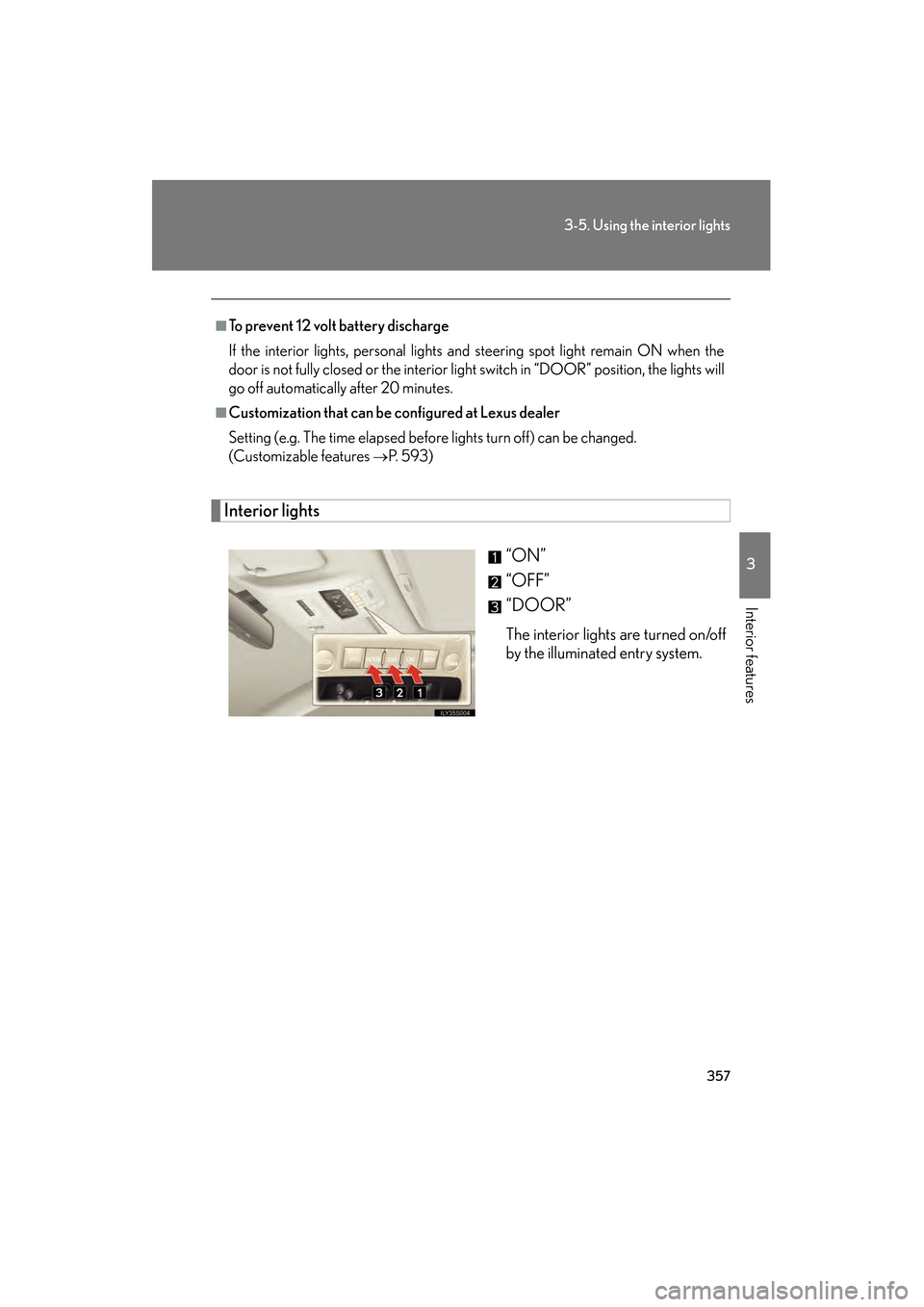
Interior lights“ON”
“OFF”
“DOOR”
The interior lights are turned on/off
by the illuminated entry system.
■To prevent 12 volt battery discharge
If the interior lights, personal lights and steering spot light remain ON when the
door is not fully closed or the interior light switch in “DOOR” position, the lights will
go off automatically after 20 minutes.
■Customization that can be configured at Lexus dealer
Setting (e.g. The time elapsed before lights turn off) can be changed.
(Customizable features
→P. 5 9 3 )
GS_U_G.book Page 357 Monday, April 27, 2009 10:50 AM
Page 359 of 622
358
3-5. Using the interior lights
GS_G_U (OM30B43U)
April 27, 2009 10:48 am
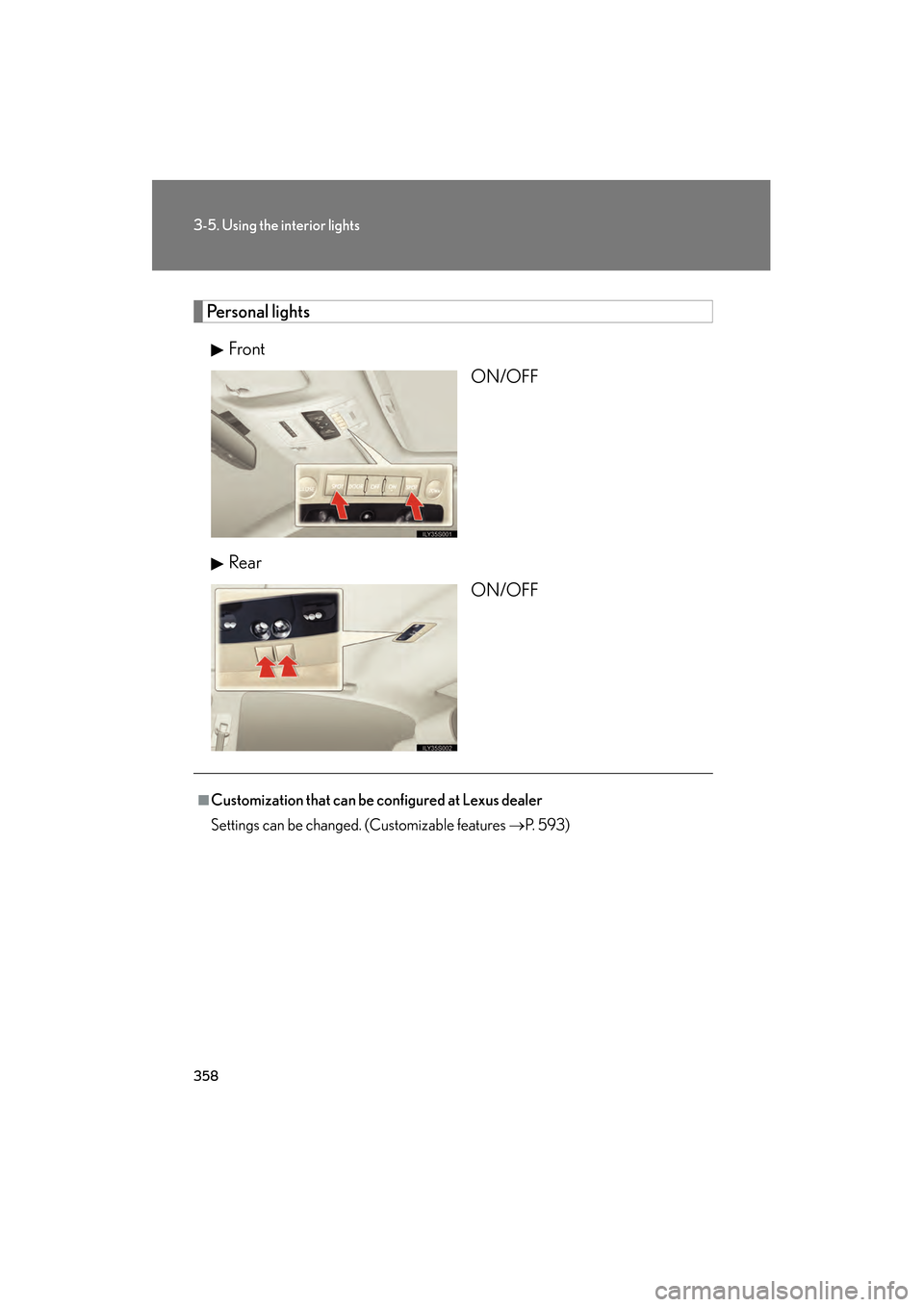
Personal lightsFront ON/OFF
Rear ON/OFF
■Customization that can be configured at Lexus dealer
Settings can be changed. (Customizable features →P. 5 9 3 )
GS_U_G.book Page 358 Monday, April 27, 2009 10:50 AM
Page 393 of 622
392
3-7. Other interior features
GS_G_U (OM30B43U)
April 27, 2009 10:48 am
Lexus Link System∗
∗: If equipped
The Lexus Link System is a communication service that uses Global Posi-
tioning System (GPS) data and cellular service to provide you with safety,
security and convenience. This system is only operational in GPS and cellu-
lar coverage areas. Button operation and voice commands are used to
operate the system. To operate the system, follow the voice guidance
instructions. For details about service and subscription, call the Lexus Link
Call Center at 1-800-25-LEXUS (1-800-255-3987) (toll-free).
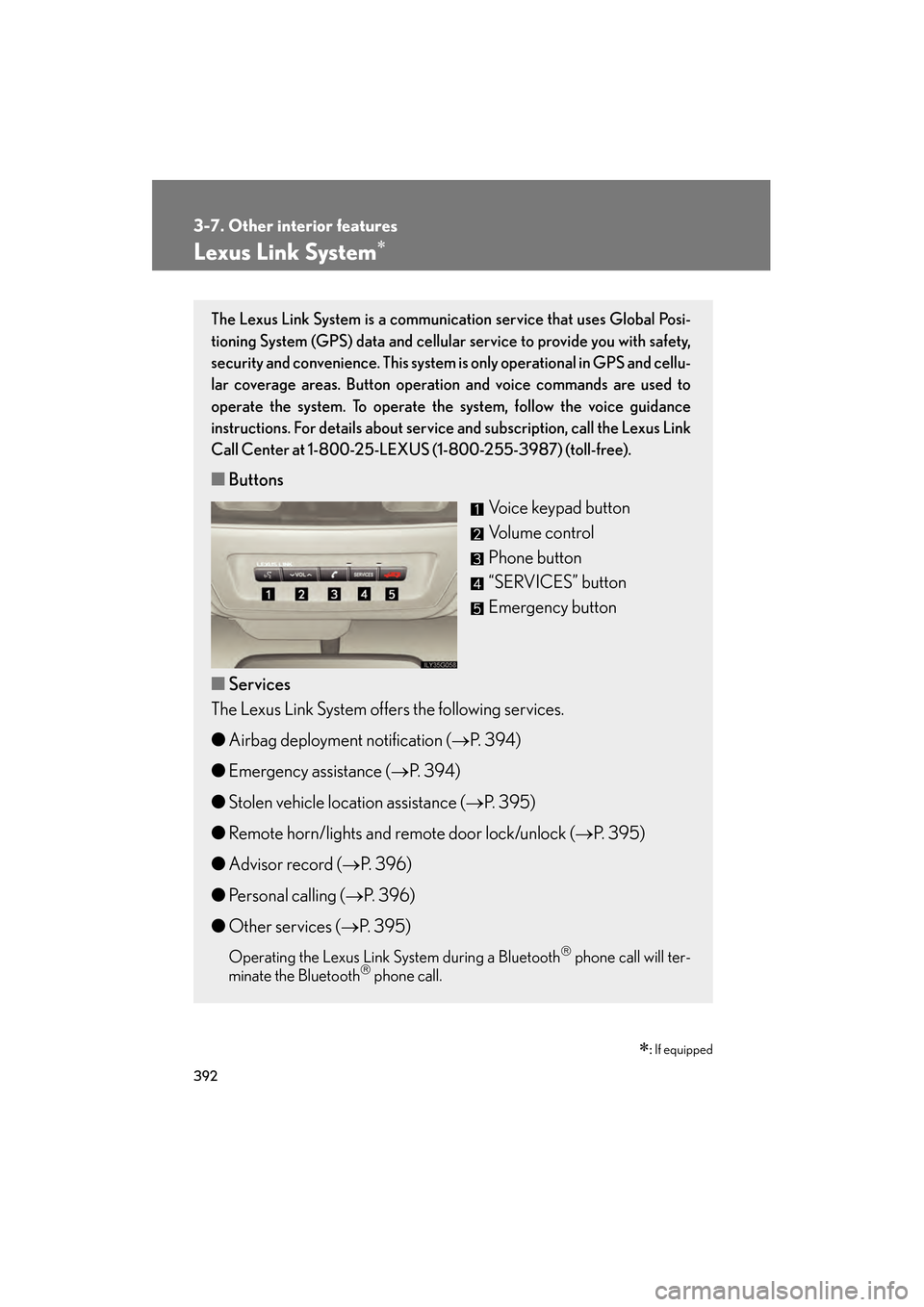
■ Buttons
Voice keypad button
Volume control
Phone button
“SERVICES” button
Emergency button
■ Services
The Lexus Link System offers the following services.
● Airbag deployment notification ( →P. 394)
● Emergency assistance ( →P. 394)
● Stolen vehicle location assistance ( →P. 395)
● Remote horn/lights and remote door lock/unlock (→ P. 395)
● Advisor record ( →P. 396)
● Personal calling ( →P. 396)
● Other services ( →P. 395)
Operating the Lexus Link Sy stem during a Bluetooth phone call will ter-
minate the Bluetooth phone call.
GS_U_G.book Page 392 Monday, April 27, 2009 10:50 AM
Page 395 of 622
394
3-7. Other interior features
GS_G_U (OM30B43U)
April 27, 2009 10:48 am
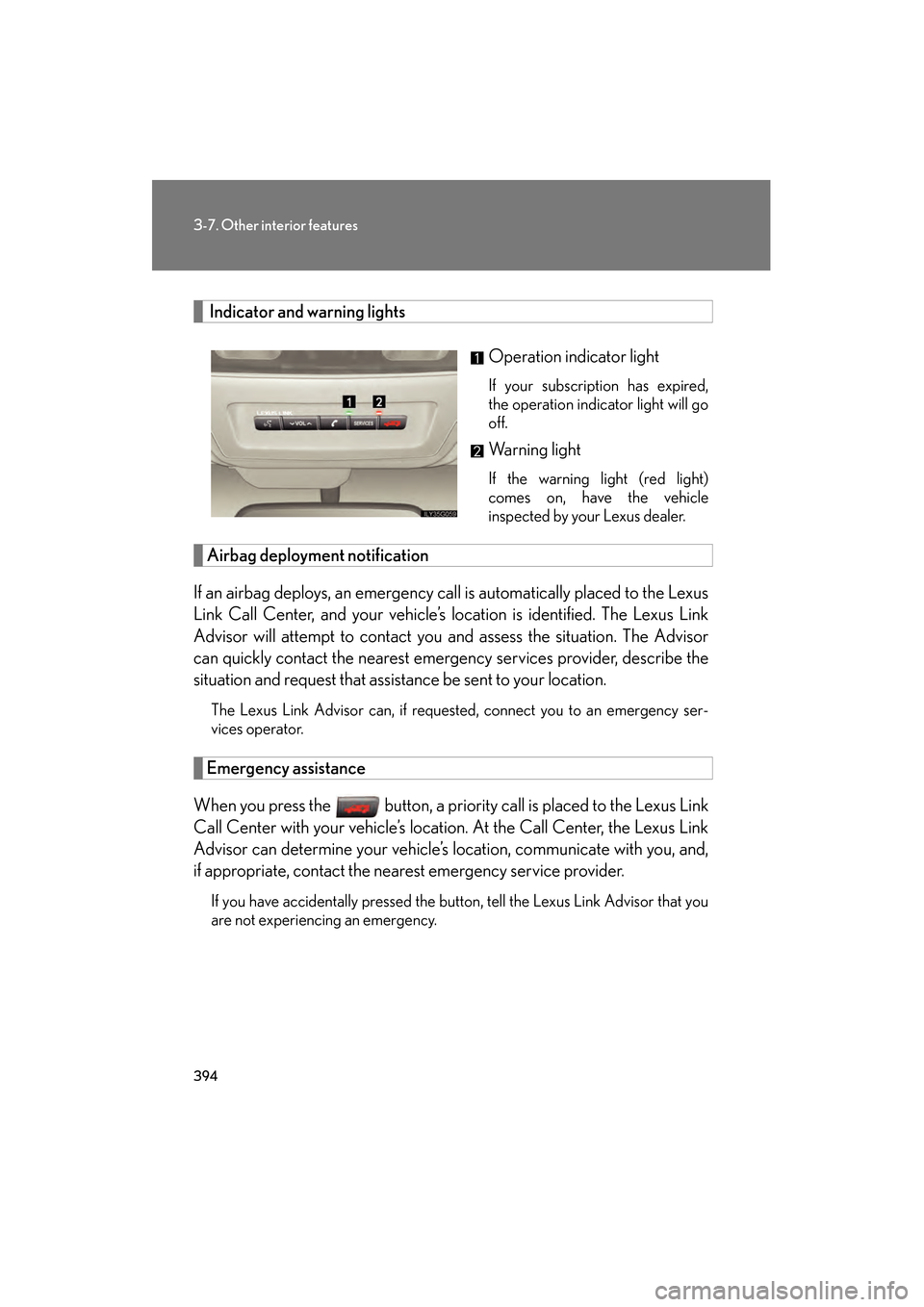
Indicator and warning lightsOperation indicator light
If your subscription has expired,
the operation indicator light will go
off.
Warning light
If the warning light (red light)
comes on, have the vehicle
inspected by your Lexus dealer.
Airbag deployment notification
If an airbag deploys, an emergency ca ll is automatically placed to the Lexus
Link Call Center, and your vehicle’s location is identified. The Lexus Link
Advisor will attempt to contact you and assess the situation. The Advisor
can quickly contact the ne arest emergency services provider, describe the
situation and request that assistance be sent to your location.
The Lexus Link Advisor can, if requeste d, connect you to an emergency ser-
vices operator.
Emergency assistance
When you press the button, a priori ty call is placed to the Lexus Link
Call Center with your vehicle’s locati on. At the Call Center, the Lexus Link
Advisor can determine your vehicle’s location, communicate with you, and,
if appropriate, contac t the nearest emergency service provider.
If you have accidentally pressed the button, tell the Lexus Link Advisor that you
are not experiencing an emergency.
GS_U_G.book Page 394 Monday, April 27, 2009 10:50 AM
Page 396 of 622
395
3-7. Other interior features
3
Interior features
GS_G_U (OM30B43U)
April 27, 2009 10:48 am
Stolen vehicle location assistance
If your vehicle is stolen, call the Lexus Link Call Center at 1-800-25-
LEXUS (1-800-255-3987) (toll-free) and select the option for Lexus Link.
To protect subscribers’ privacy, the location of a vehicle will not be provided to
anyone other than a law enforcement authority.
Remote horn/lights and remote door lock/unlock
The remote operations are performed by contacting the Lexus Link Call
Center from the outside of the vehicle. When necessary, call the Lexus Link
Call Center at 1-800-25-LEXUS (1-800-255-3987) (toll-free) and
select the option for Lexus Link.
● In the case that you forget to lock the vehicle or you are locked out, the
Lexus Link Call Center can send a sig nal to lock or unlock the vehicle
remotely.
● In the case that you forget where yo u parked the vehicle, such as in a
large parking lot, the Lexus Link Call Center can send a signal to flash the
headlights and sound the horn to help you locate the vehicle.
When contacting the Lexus Link Call Center from the outside of the vehicle,
you need the Lexus Link PIN (Personal Identification Number). Write the PIN
down and carry it with you.
Other services
Press the button in the vehicle or call the Lexus Link Call Center at 1-
800-25-LEXUS (1-800-255-3987) (toll- free), and then select the option
for Lexus Link. The services provided will depend on the service plan level.
GS_U_G.book Page 395 Monday, April 27, 2009 10:50 AM
Page 416 of 622
415
4-2. Maintenance
4
Maintenance and care
GS_G_U (OM30B43U)
April 27, 2009 10:48 am
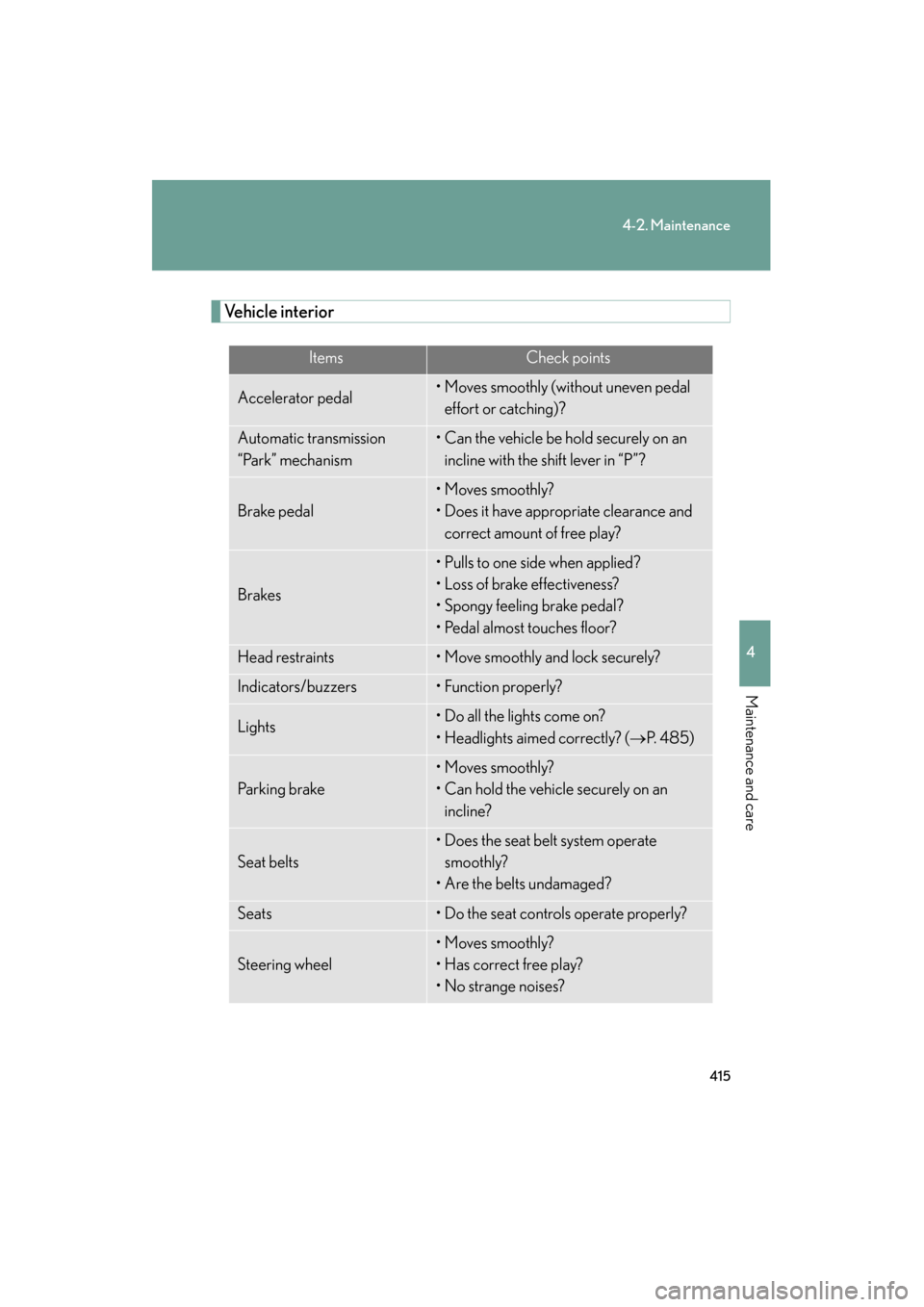
Vehicle interior
ItemsCheck points
Accelerator pedal• Moves smoothly (without uneven pedal effort or catching)?
Automatic transmission
“Park” mechanism• Can the vehicle be hold securely on an incline with the shift lever in “P”?
Brake pedal
• Moves smoothly?
• Does it have appropriate clearance and correct amount of free play?
Brakes
• Pulls to one side when applied?
• Loss of brake effectiveness?
• Spongy feeling brake pedal?
• Pedal almost touches floor?
Head restraints• Move smoothly and lock securely?
Indicators/buzzers• Function properly?
Lights• Do all the lights come on?
• Headlights aimed correctly? ( →P. 4 8 5 )
Pa r k i n g b r a ke
• Moves smoothly?
• Can hold the vehicle securely on an
incline?
Seat belts
• Does the seat belt system operate smoothly?
• Are the belts undamaged?
Seats• Do the seat controls operate properly?
Steering wheel
• Moves smoothly?
• Has correct free play?
• No strange noises?
GS_U_G.book Page 415 Monday, April 27, 2009 10:50 AM