brake Lexus GS350 2010 User Guide
[x] Cancel search | Manufacturer: LEXUS, Model Year: 2010, Model line: GS350, Model: Lexus GS350 2010Pages: 650, PDF Size: 15.04 MB
Page 133 of 650
132
2-1. Driving procedures
GS_G_U (OM30C80U)
January 27, 2010 4:47 pm
CAUTION
■When taking a nap in the vehicle
Always turn the engine off. Otherwise, you may accidentally move the shift lever or
depress the accelerator pedal, which could cause an accident or fire due to engine
overheating. Additionally, if the vehicle is parked in a poorly ventilated area, exhaust
gases may collect and enter the vehicle, leading to death or a serious health hazard.
■When braking the vehicle
●When the brakes are wet, drive more cautiously.
Braking distance increases when the brakes are wet, and may cause one side of
the vehicle to brake differently than the other side. Also the parking brake may
not securely hold the vehicle.
●If the brake actuator (GS460) or brake booster (GS350) does not operate, do
not follow other vehicles closely and avoid downhill or sharp turns that require
making.
In this case, braking is still possible, but it will require more force on the pedal than
usual. Braking distance may also increase.
●Do not pump the brake pedal if turning the engine off.
Each push on the brake pedal uses up the reserve for the power-assisted brakes.
●The brake system consists of 3 (GS460) or 2 (GS350) individual hydraulic sys-
tems: If one of the systems fails, the other will still operate. In this case, the brake
pedal should be depressed more firmly than usual and braking distance becomes
longer.
Do not drive your vehicle with only a single brake system. Have your brakes fixed
immediately.
■If the vehicle becomes stuck or bogged (4WD models)
Do not spin the wheels recklessly when any of the tires is up in the air, or stuck in
sand or mud, etc. This may damage the drive system components or propel the
vehicle forward (or in another direction) and cause an accident.
GS_U_G.book Page 132 Wednesday, January 27, 2010 4:48 PM
Page 134 of 650
133
2-1. Driving procedures
2
When driving
GS_G_U (OM30C80U)
January 27, 2010 4:47 pm
NOTICE
■While driving the vehicle
Do not use the accelerator pedal or depress accelerator and brake pedals together
to hold the vehicle on a hill.
■When parking the vehicle
Always put the shift lever in “P”. Failure to do so may cause the vehicle to move or
the vehicle may accelerate suddenly if the accelerator pedal is accidentally
depressed.
■Avoiding damage to vehicle parts
●Do not turn the steering wheel fully in either direction and hold it there for a long
time.
Doing so may damage the power steering motor.
●When driving over bumps in the road, drive as slowly as possible to avoid damag-
ing the wheels, underside of the vehicle, etc.
■If you hear a squealing or scraping noise (brake pad wear limit indicators)
Have your Lexus dealer check and replace the brake pads as soon as possible.
The rotor damage can result if the pads are not replaced when needed.
Front brake only: Moderate levels of the brake pad and disc wear allow enhanced
front braking power. As a result, the discs may wear more quickly than conventional
brake discs. Therefore, when replacing the brake pads, Lexus recommends that you
also have the thickness of the discs measured.
It is dangerous to drive the vehicle when the wear limits of the brake pads and/or
that of the brake discs are exceeded.
GS_U_G.book Page 133 Wednesday, January 27, 2010 4:48 PM
Page 135 of 650
134
2-1. Driving procedures
GS_G_U (OM30C80U)
January 27, 2010 4:47 pm
NOTICE
■If you get a flat tire while driving
A flat or damaged tire may cause the following situations. Hold the steering wheel
firmly and gradually press the brake pedal to slow down the vehicle.
●It may be difficult to control your vehicle.
●The vehicle will make abnormal sounds.
●The vehicle will behave abnormally.
Replace a flat tire with a new one. ( →P. 559)
■When encountering flooded roads
Do not drive on a road that has flooded after heavy rain etc. Doing so may cause the
following serious damage to the vehicle.
●Engine stalling
●Short in electrical components
●Engine damage caused by water immersion
In the event that you drive on a flooded road and the vehicle is flooded, be sure to
have your Lexus dealer check the following.
●Brake function
●Changes in quantity and quality of oil and fluid used for the engine, automatic
transmission, transfer (4WD models), differentials, etc.
●Lubricant condition for the propeller shaft, bearings and suspension joints (where
possible) and the function of all joints, bearings, etc.
GS_U_G.book Page 134 Wednesday, January 27, 2010 4:48 PM
Page 136 of 650
135
2-1. Driving procedures
2
When driving
GS_G_U (OM30C80U)
January 27, 2010 4:47 pm
Engine (ignition) switch
Performing the following operations when carrying the electronic key on
your person starts the engine or changes “ENGINE START STOP” switch
modes.
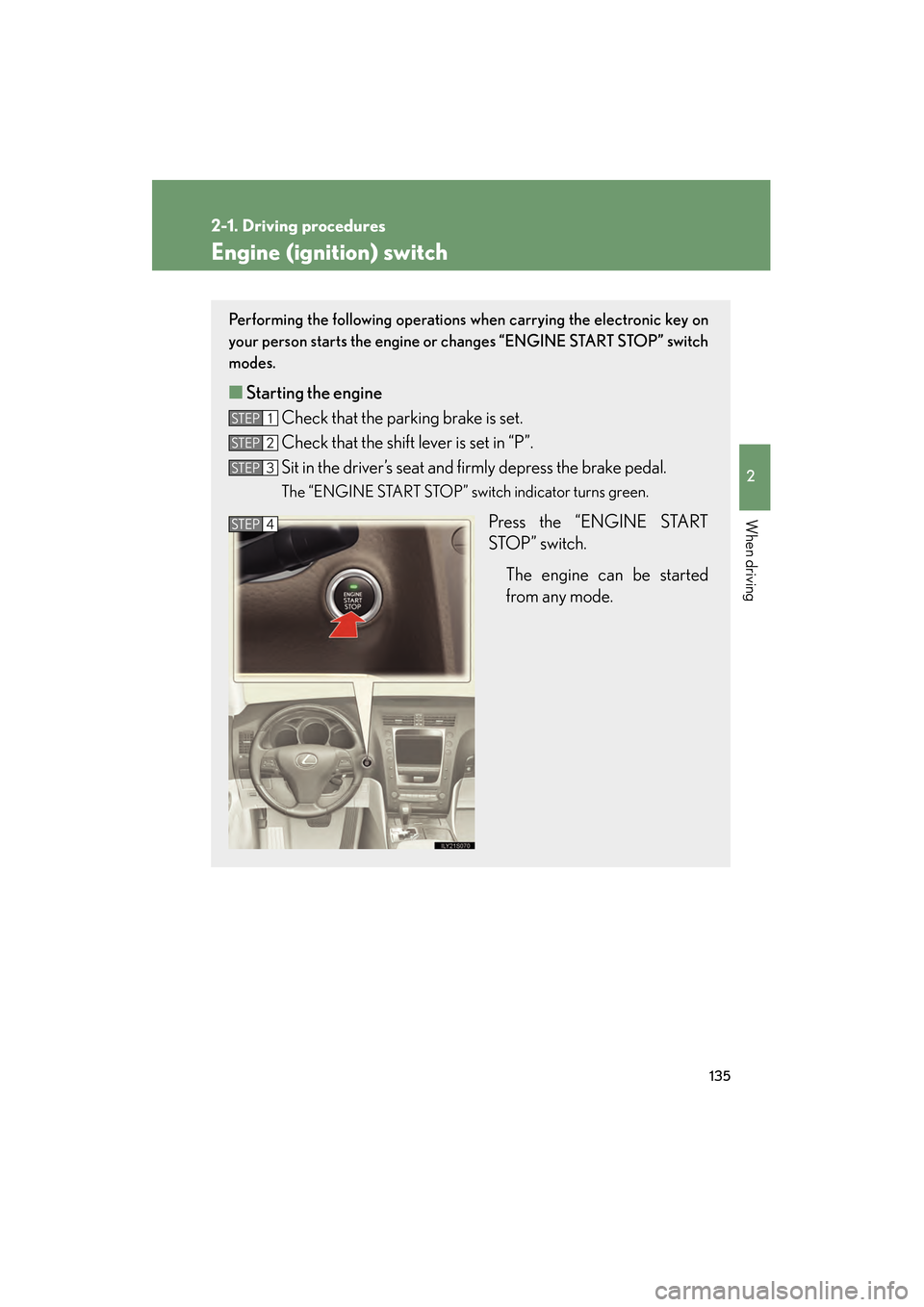
■ Starting the engine
Check that the parking brake is set.
Check that the shift lever is set in “P”.
Sit in the driver’s seat and firmly depress the brake pedal.
The “ENGINE START STOP” switch indicator turns green.
Press the “ENGINE START
STOP” switch.
The engine can be started
from any mode.
STEP1
STEP2
STEP3
STEP4
GS_U_G.book Page 135 Wednesday, January 27, 2010 4:48 PM
Page 137 of 650
136
2-1. Driving procedures
GS_G_U (OM30C80U)
January 27, 2010 4:47 pm
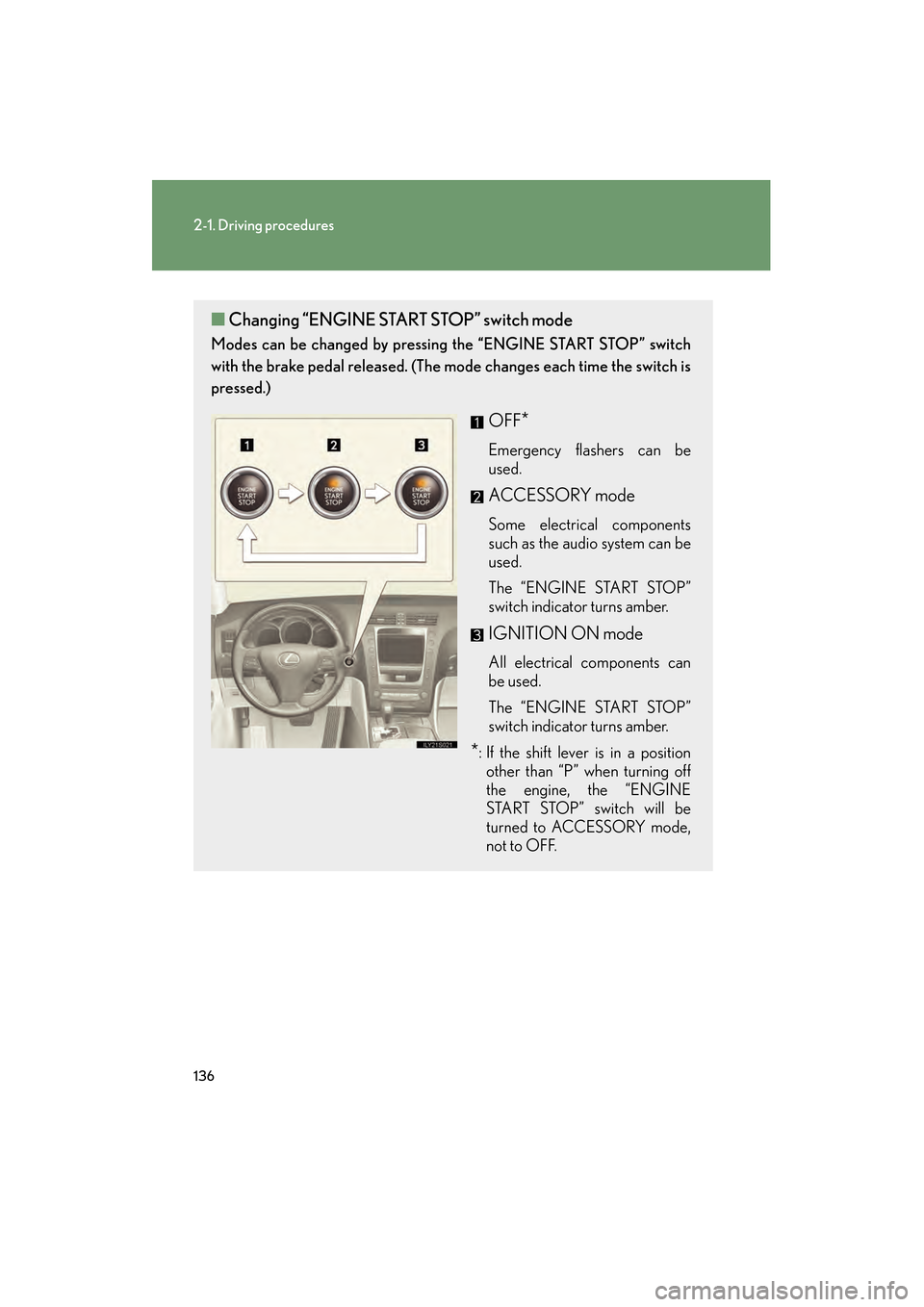
■Changing “ENGINE STAR T STOP” switch mode
Modes can be changed by pressing the “ENGINE START STOP” switch
with the brake pedal released. (The mode changes each time the switch is
pressed.)
OFF*
Emergency flashers can be
used.
ACCESSORY mode
Some electrical components
such as the audio system can be
used.
The “ENGINE START STOP”
switch indicator turns amber.
IGNITION ON mode
All electrical components can
be used.
The “ENGINE START STOP”
switch indicator turns amber.
*: If the shift lever is in a position other than “P” when turning off
the engine, the “ENGINE
START STOP” switch will be
turned to ACCESSORY mode,
not to OFF.
GS_U_G.book Page 136 Wednesday, January 27, 2010 4:48 PM
Page 140 of 650
139
2-1. Driving procedures
2
When driving
GS_G_U (OM30C80U)
January 27, 2010 4:47 pm
Automatic transmission
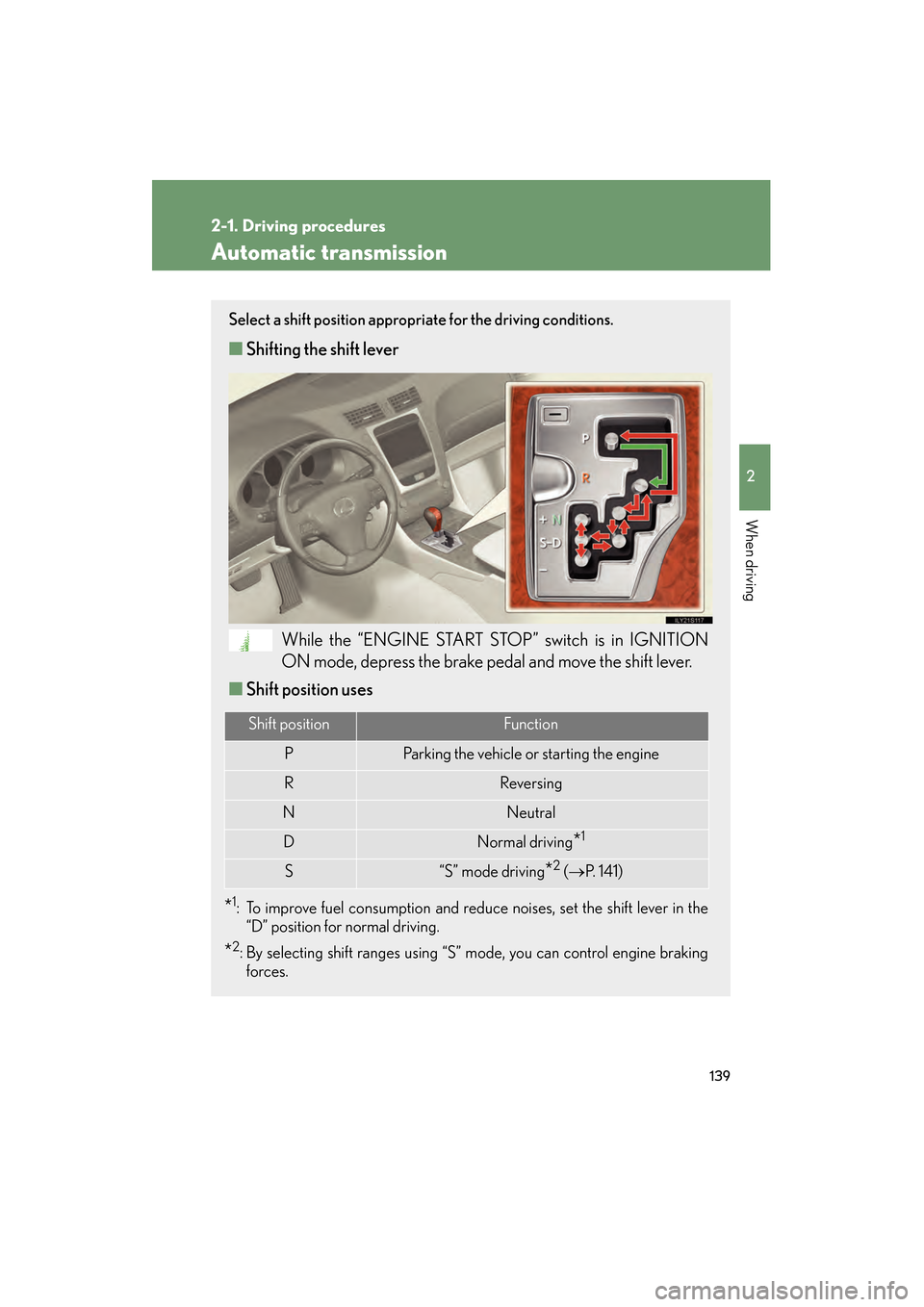
Select a shift position appropriate for the driving conditions.
■Shifting the shift lever
While the “ENGINE START STOP” switch is in IGNITION
ON mode, depress the brake pedal and move the shift lever.
■ Shift position uses
*1: To improve fuel consumption and reduce noises, set the shift lever in the
“D” position for normal driving.
*2: By selecting shift ranges using “S” mode, you can control engine braking forces.
Shift positionFunction
PParking the vehicle or starting the engine
RReversing
NNeutral
DNormal driving*1
S“S” mode driving*2 ( → P. 141)
GS_U_G.book Page 139 Wednesday, January 27, 2010 4:48 PM
Page 143 of 650

142
2-1. Driving procedures
GS_G_U (OM30C80U)
January 27, 2010 4:47 pm
■Shift ranges and their functions
●You can choose from 8 levels (GS460) or 6 levels (GS350) of
engine braking force.
● A lower shift range will provide greater engine braking force than a
higher shift range, and the engine revolutions will also increase.
● If you accelerate while in ranges “1” to “7” (GS460) or “1” to “5”
(GS350), the shift range may automatically range up in accordance
with the vehicle’s speed.
● A higher shift range is automatically selected when the automatic
transmission fluid temperature is high.
■“S” mode
●When the shift range is “6” (GS460) or “4” (GS350) or lower, holding the shift
lever toward “+” sets the shift range to “8” (GS460) or “6” (GS350).
●To prevent the engine from over-revving, upshifting may automatically occur.
■Downshifting restrictions warning buzzer (in the “S” mode)
To help ensure safety and driving performance, downshifting operation may some-
times be restricted. In some circumstances, downshifting may not be possible even
when the shift lever is operated. (The warning buzzer will sound twice.)
■When driving with the cruise control syst em (or dynamic radar cruise control sys-
tem)
The engine brake will not operate in the “S” mode, even when downshifting to “7”,
“6”, “5” or “4” (GS460) or “5” or “4” (GS350). ( →P. 167, 171)
■Snow mode automatic deactivation
Snow mode is automatically deactivated if the “ENGINE START STOP” switch is
turned to ACCESSORY or IGNITION ON mode after driving in snow mode.
■If the shift lever cannot be shifted from “P”
→ P. 5 6 9
GS_U_G.book Page 142 Wednesday, January 27, 2010 4:48 PM
Page 146 of 650
145
2-1. Driving procedures
2
When driving
GS_G_U (OM30C80U)
January 27, 2010 4:47 pm
Parking brake
■Usage in winter time
See “Winter driving tips” for parking brake usage in winter time. (→P. 219)
NOTICE
■Before driving
Fully release the parking brake.
Driving the vehicle with the parking brake set will lead to brake components over-
heating, which may affect braking performance and increase brake wear.
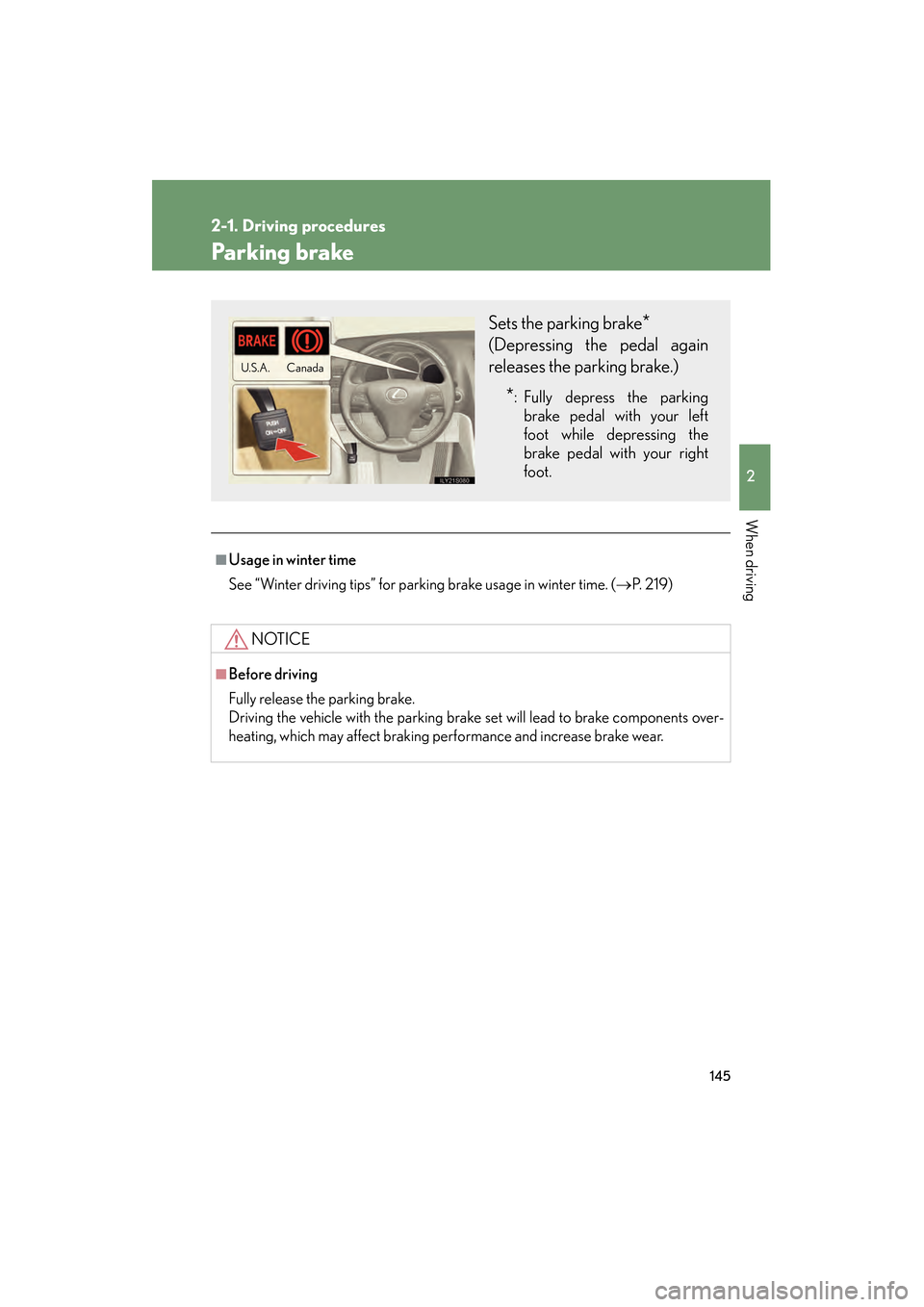
Sets the parking brake*
(Depressing the pedal again
releases the parking brake.)
*: Fully depress the parking
brake pedal with your left
foot while depressing the
brake pedal with your right
foot.
Canada
U.S.A .
GS_U_G.book Page 145 Wednesday, January 27, 2010 4:48 PM
Page 159 of 650
158
2-3. Operating the lights and windshield wipers
GS_G_U (OM30C80U)
January 27, 2010 4:47 pm
AFS (Adaptive Front lighting System) (if equipped)
AFS improves visibility at intersections and on curves by automatically
adjusting the level of the headlights according to vehicle speed and the
degree of the tire angle that are controlled by steering input.
Operates at speeds of 6 mph (10 km/h) or higher.
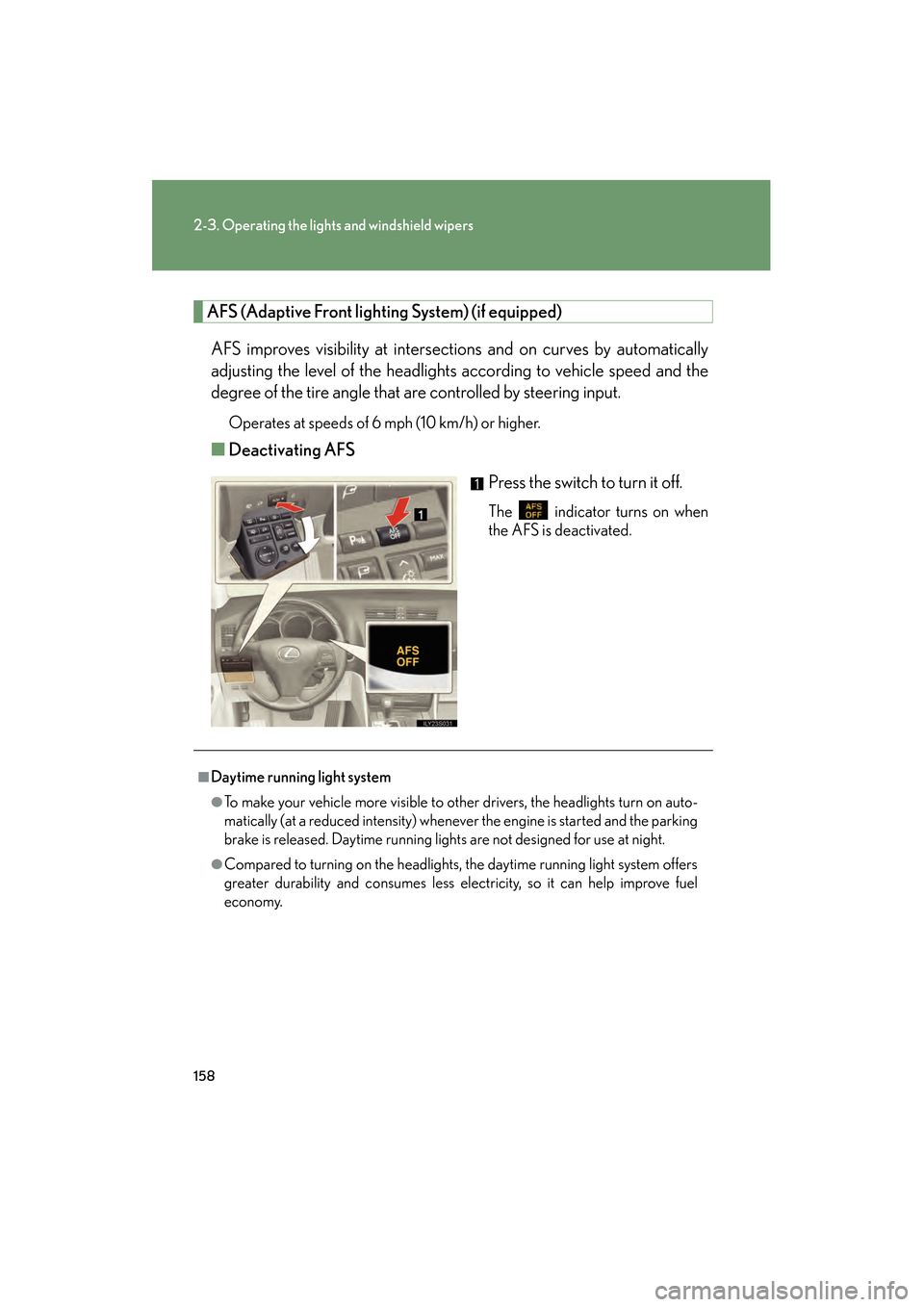
■ Deactivating AFS
Press the switch to turn it off.
The indicator turns on when
the AFS is deactivated.
■Daytime running light system
●To make your vehicle more visible to other drivers, the headlights turn on auto-
matically (at a reduced intensity) whenever the engine is started and the parking
brake is released. Daytime running lights are not designed for use at night.
●Compared to turning on the headlights, the daytime running light system offers
greater durability and consumes less electricity, so it can help improve fuel
economy.
GS_U_G.book Page 158 Wednesday, January 27, 2010 4:48 PM
Page 169 of 650
168
2-4. Using other driving systems
GS_G_U (OM30C80U)
January 27, 2010 4:47 pm
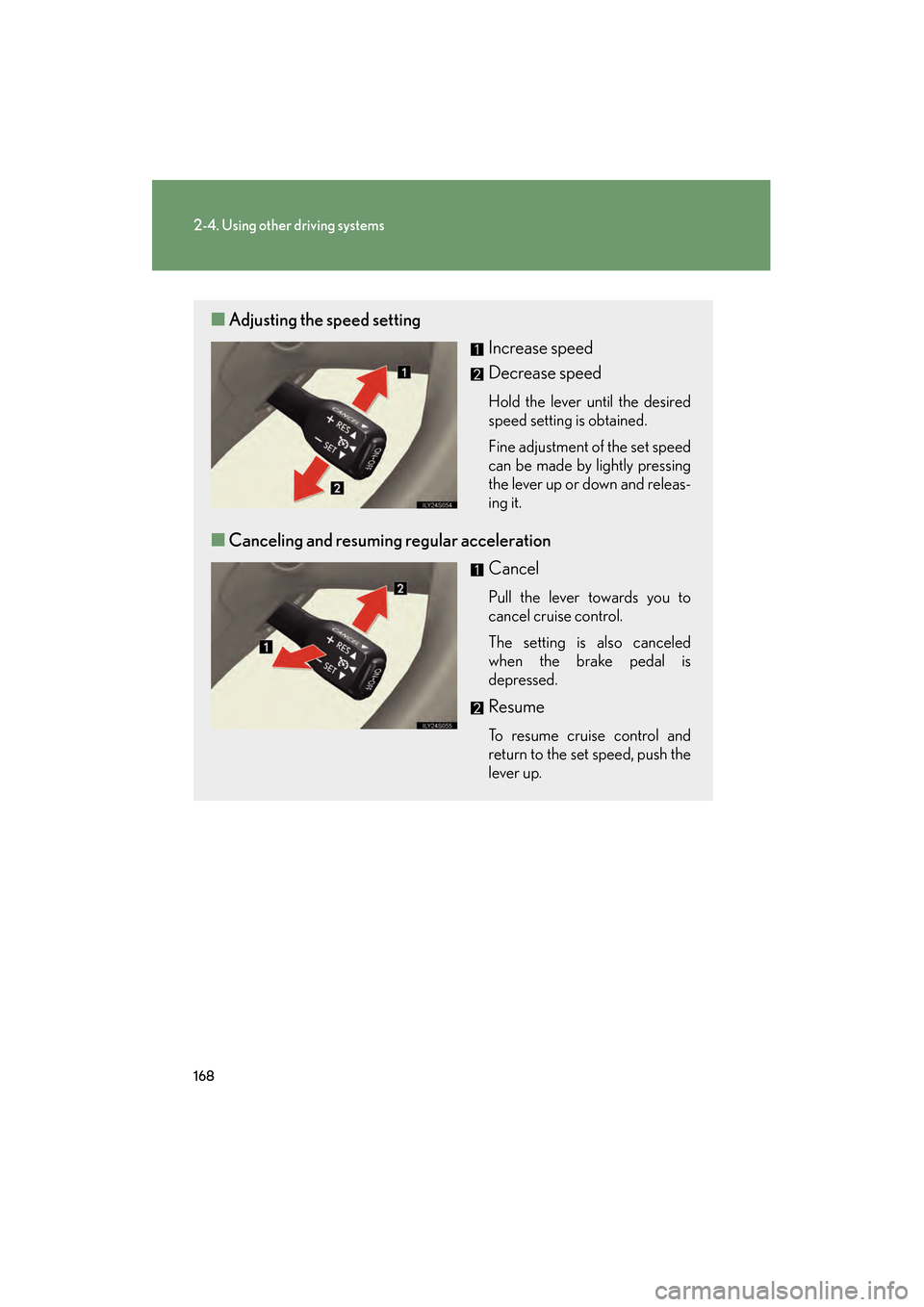
■Adjusting the speed setting
Increase speed
Decrease speed
Hold the lever until the desired
speed setting is obtained.
Fine adjustment of the set speed
can be made by lightly pressing
the lever up or down and releas-
ing it.
■Canceling and resuming regular acceleration
Cancel
Pull the lever towards you to
cancel cruise control.
The setting is also canceled
when the brake pedal is
depressed.
Resume
To resume cruise control and
return to the set speed, push the
lever up.
GS_U_G.book Page 168 Wednesday, January 27, 2010 4:48 PM