instrument panel Lexus GS350 2010 User Guide
[x] Cancel search | Manufacturer: LEXUS, Model Year: 2010, Model line: GS350, Model: Lexus GS350 2010Pages: 650, PDF Size: 15.04 MB
Page 158 of 650
157
2
When driving
GS_G_U (OM30C80U)
January 27, 2010 4:47 pm
2-3. Operating the lights and windshield wipers
Headlight switch
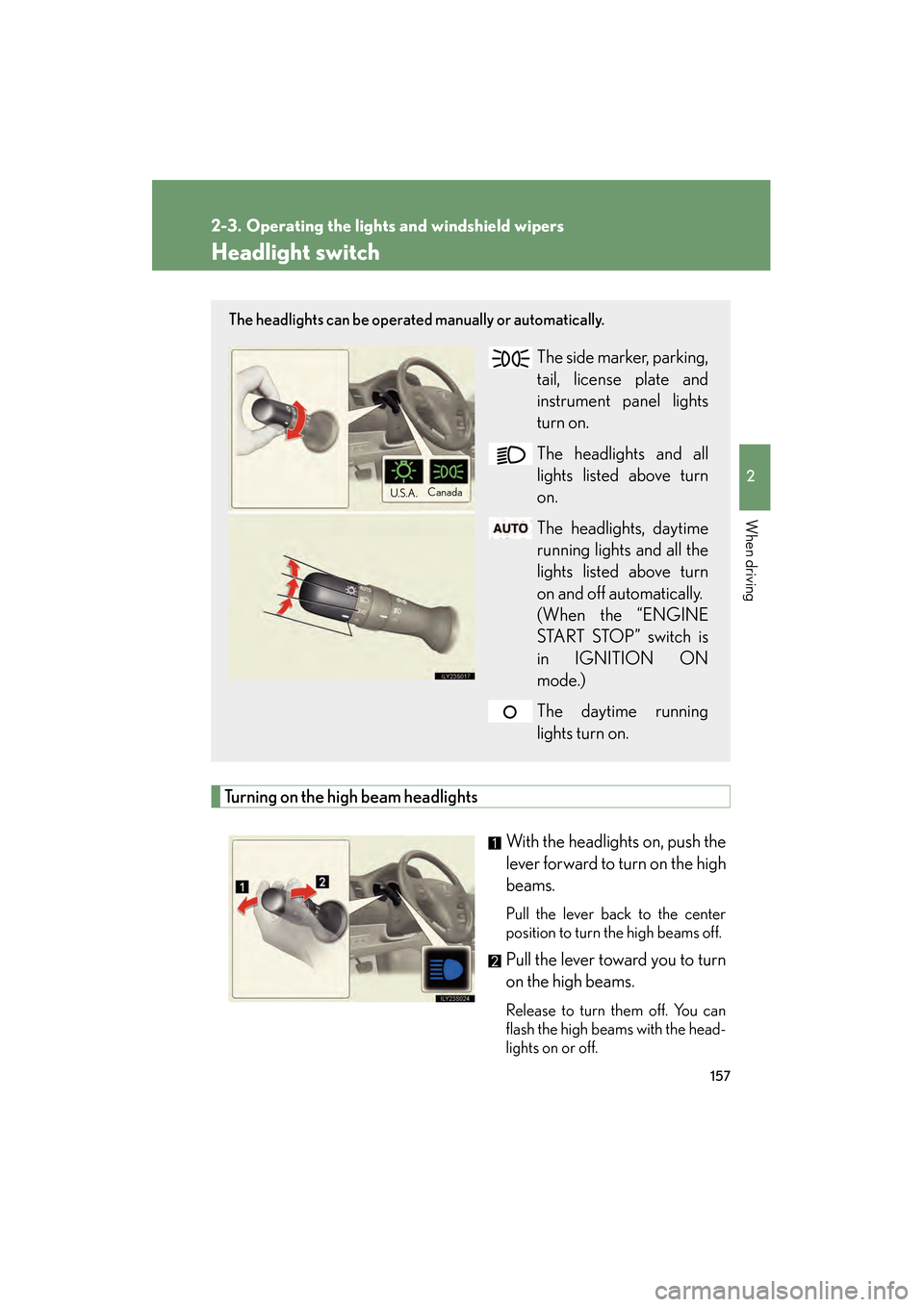
Turning on the high beam headlightsWith the headlights on, push the
lever forward to turn on the high
beams.
Pull the lever back to the center
position to turn the high beams off.
Pull the lever toward you to turn
on the high beams.
Release to turn them off. You can
flash the high beams with the head-
lights on or off.
The headlights can be operated manually or automatically.
The side marker, parking,
tail, license plate and
instrument panel lights
turn on.
The headlights and all
lights listed above turn
on.
The headlights, daytime
running lights and all the
lights listed above turn
on and off automatically.
(When the “ENGINE
START STOP” switch is
in IGNITION ON
mode.)
The daytime running
lights turn on.
U.S.A.Canada
GS_U_G.book Page 157 Wednesday, January 27, 2010 4:48 PM
Page 218 of 650
217
2-5. Driving information
2
When driving
GS_G_U (OM30C80U)
January 27, 2010 4:47 pm
CAUTION
■Things that must not be carried in the trunk
The following things may cause a fire if loaded in the trunk.
●Receptacles containing gasoline
●Aerosol cans
■Storage precautions
Observe the following precautions.
Failing to do so may result in death or serious injury.
●Do not place cargo or luggage in or on the following locations as the item may
get under the brake or accelerator pedal and prevent the pedals from being
depressed properly, block the driver’s vision, or hit the driver or passengers,
causing an accident.
•Driver’s feet
• Front passenger or rear seats (when stacking items)
• Package tray
• Instrument panel
•Dashboard
●Secure all items in the occupant compartment, as they may shift and injure some-
one during sudden braking, sudden swerving or an accident.
■We i g h t o f t h e l o a d
●Improper loading may cause deterioration of steering or braking control result-
ing in an accident which may cause death or serious injury.
●Do not exceed the maximum axle weight rating or the total vehicle weight rating.
●Even if the total load of occupant’s weight and the cargo load is less than the total
load capacity, do not apply the load unevenly. Improper loading may cause dete-
rioration of steering or braking control which may cause death or serious injury.
GS_U_G.book Page 217 Wednesday, January 27, 2010 4:48 PM
Page 234 of 650
233
3-1. Using the touch screen
3
Interior features
GS_G_U (OM30C80U)
January 27, 2010 4:47 pm
■To avoid damaging the touch screen
●Touch the screen lightly with your finger. If there is no response, remove your fin-
ger from the screen and try again.
●Remove any dirt on the screen by wiping with a soft cloth. Do not use detergent.
■When using the touch screen
●If the screen is cold, the display may be dark, or the system may seem to be
operating slightly slower than normal.
●The screen may seem dark and hard to see when viewed through sunglasses.
Change your angle of viewing, adjust the display on the “Display” screen or
remove your sunglasses.
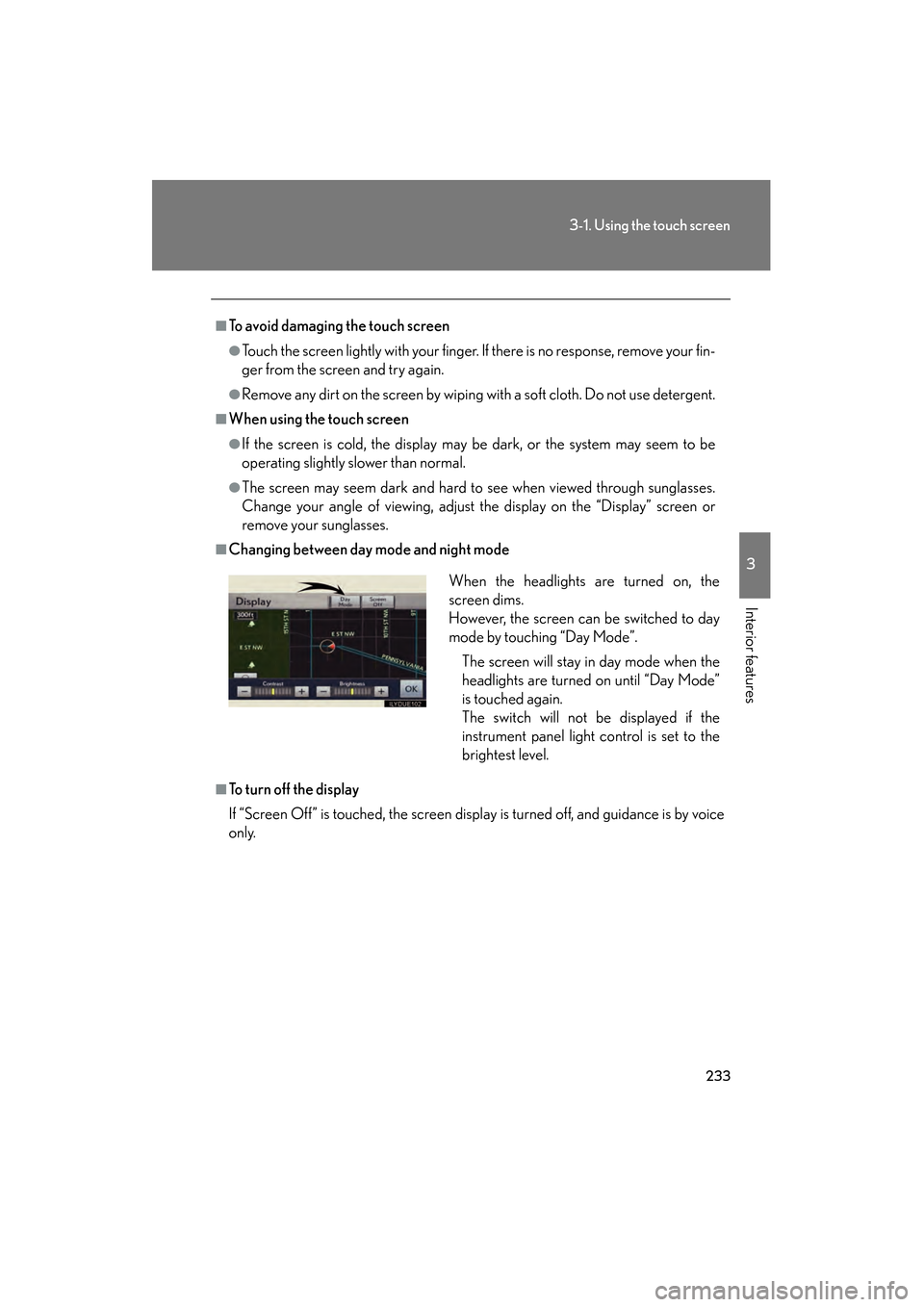
■Changing between day mode and night mode
■To turn off the display
If “Screen Off” is touched, the screen display is turned off, and guidance is by voice
only.When the headlights are turned on, the
screen dims.
However, the screen can be switched to day
mode by touching “Day Mode”.
The screen will stay in day mode when the
headlights are turned on until “Day Mode”
is touched again.
The switch will not be displayed if the
instrument panel light control is set to the
brightest level.
GS_U_G.book Page 233 Wednesday, January 27, 2010 4:48 PM
Page 314 of 650
313
3-3. Using the audio system
3
Interior features
GS_G_U (OM30C80U)
January 27, 2010 4:47 pm
■When using the Bluetooth® audio system
●In the following conditions, the system may not function.
• The portable player is turned off
• The portable player is not connected
• The portable player battery is low
●There may be a delay if phone connection is carried out during Bluetooth®
audio play.
●Depending on the type of portable player that is connected to the system, oper-
ation may differ slightly and certain functions may not be available.
■Bluetooth® antenna
The antenna is built into the instrument panel. If the portable player is behind the
seat or in the glove box or console box, or is touching or covered by metal objects,
connection status may deteriorate.
■Battery charge/signal status
This display may not correspond exactly with the portable player, and this system
does not have a charging function.
■About Bluetooth®
Bluetooth is a registered trademark of
Bluetooth SIG. Inc.
GS_U_G.book Page 313 Wednesday, January 27, 2010 4:48 PM
Page 383 of 650
382
GS_G_U (OM30C80U)
January 27, 2010 4:47 pm
3-5. Using the interior lights
Interior lights list
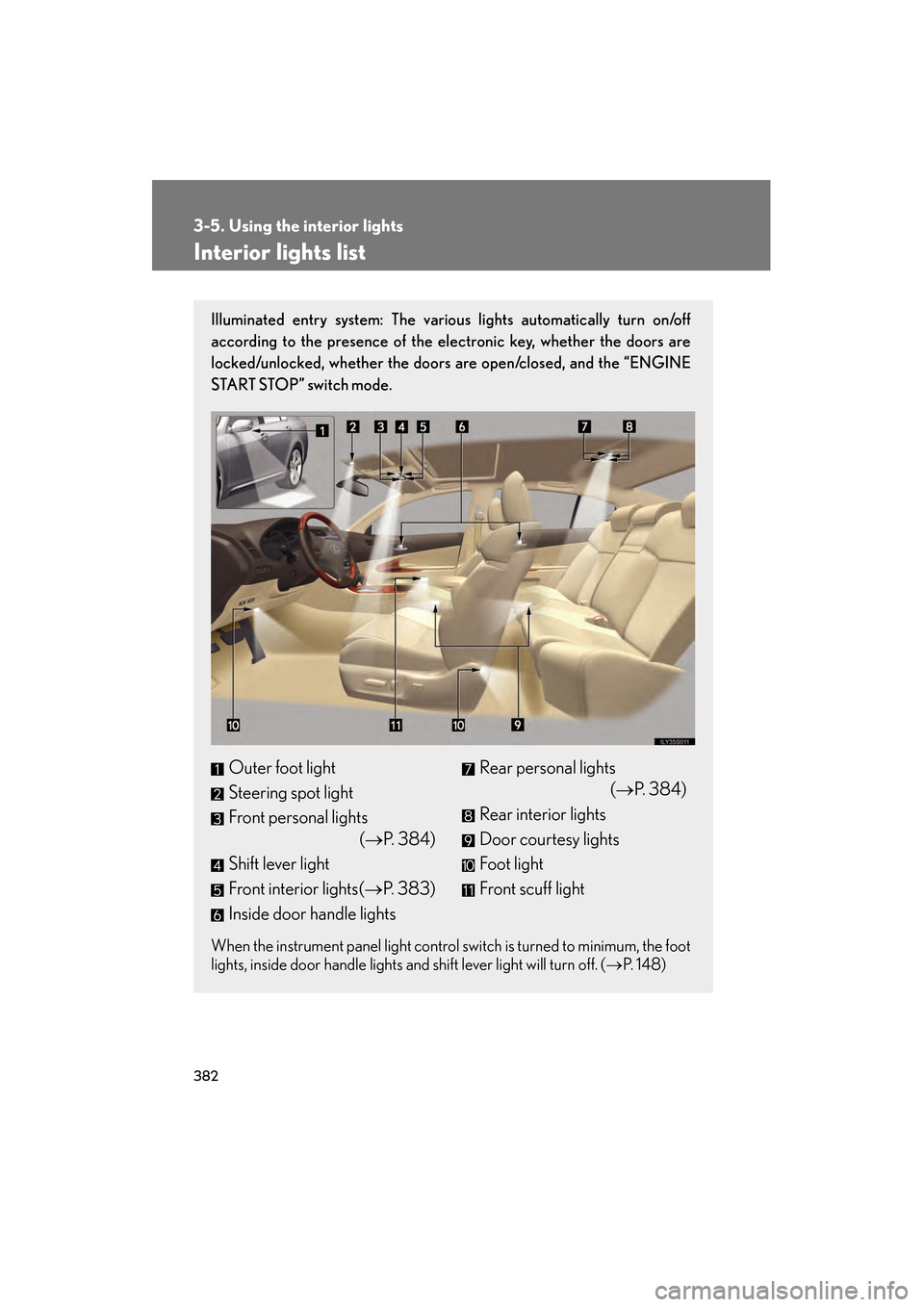
Illuminated entry system: The various lights automatically turn on/off
according to the presence of the electronic key, whether the doors are
locked/unlocked, whether the doors are open/closed, and the “ENGINE
START STOP” switch mode.
When the instrument panel light control switch is turned to minimum, the foot
lights, inside door handle lights and shift lever light will turn off. (→P. 1 4 8 )
Outer foot light
Steering spot light
Front personal lights
(→P. 384)
Shift lever light
Front interior lights( →P. 383)
Inside door handle lightsRear personal lights (→P. 384)
Rear interior lights
Door courtesy lights
Foot light
Front scuff light
GS_U_G.book Page 382 Wednesday, January 27, 2010 4:48 PM
Page 435 of 650
434
4-1. Maintenance and care
GS_G_U (OM30C80U)
January 27, 2010 4:47 pm
■Caring for leather areas
Lexus recommends cleaning the interior of the vehicle at least twice a year to main-
tain the quality of the vehicle’s interior.
■Shampooing the carpets
There are several commercial foaming-type cleaners available. Use a sponge or
brush to apply the foam. Rub in overlapping circles. Do not apply water. Excellent
results are obtained by keeping the carpet as dry as possible.
■Seat belts
Clean with mild soap and lukewarm water using a cloth or sponge. Also check the
belts periodically for excessive wear, fraying or cuts.
CAUTION
■Water in the vehicle
●Do not splash or spill liquid in the vehicle, such as on the floor or in the trunk.
Doing so may cause electrical components etc. to malfunction or catch fire.
●Do not get any of the SRS components or wiring in the vehicle interior wet.
(→ P. 9 4 )
Electrical malfunction may cause the airbags to deploy or not function properly,
resulting in death or serious injury.
■Cleaning the interior (especially instrument panel)
Do not use polish wax or polish cleaner. The instrument panel may reflect off the
windshield, obstructing the driver’s view and leading to an accident, resulting in
death or serious injury.
GS_U_G.book Page 434 Wednesday, January 27, 2010 4:48 PM
Page 436 of 650
435
4-1. Maintenance and care
4
Maintenance and care
GS_G_U (OM30C80U)
January 27, 2010 4:47 pm
NOTICE
■Cleaning detergents
●Do not use the following types of detergent, as they may discolor the vehicle inte-
rior or cause streaks or damage to painted surfaces.
• Non-seat portions: Organic substances such as benzene or gasoline, alkalineor acidic solutions, dye, or bleach.
• Seats: Acidic solutions, such as thinner, benzene, or alcohol.
●Do not use polish wax or polish cleaner. The instrument panel’s or other interior
part’s painted surface may be damaged.
■Preventing damage to leather surfaces
Observe the following precautions to avoid damage to and deterioration of leather
surfaces.
●Remove any dust or dirt on leather surfaces immediately.
●Do not expose the vehicle to direct sunlight for extended periods of time. Park
the vehicle in the shade, especially during summer.
●Do not place items made of vinyl, plastic, or that contain wax on the upholstery, as
they may stick to the leather surface if the vehicle interior heats up significantly.
■Water on the floor
Do not wash the vehicle floor with water.
Vehicle systems such as the audio system may be damaged if water comes into
contact with electrical components under the floor of the vehicle, and may also
cause the body to rust.
■Cleaning the inside of the rear window
●Do not use glass cleaner to clean the rear window, as this may cause damage to
the rear window defogger heater wires. Use a cloth dampened with lukewarm
water to gently wipe the window clean. Wipe the window in strokes running par-
allel to the heater wires.
●Be careful not to scratch or damage the heater wires or antenna.
GS_U_G.book Page 435 Wednesday, January 27, 2010 4:48 PM
Page 486 of 650
485
4-3. Do-it-yourself maintenance
4
Maintenance and care
GS_G_U (OM30C80U)
January 27, 2010 4:47 pm
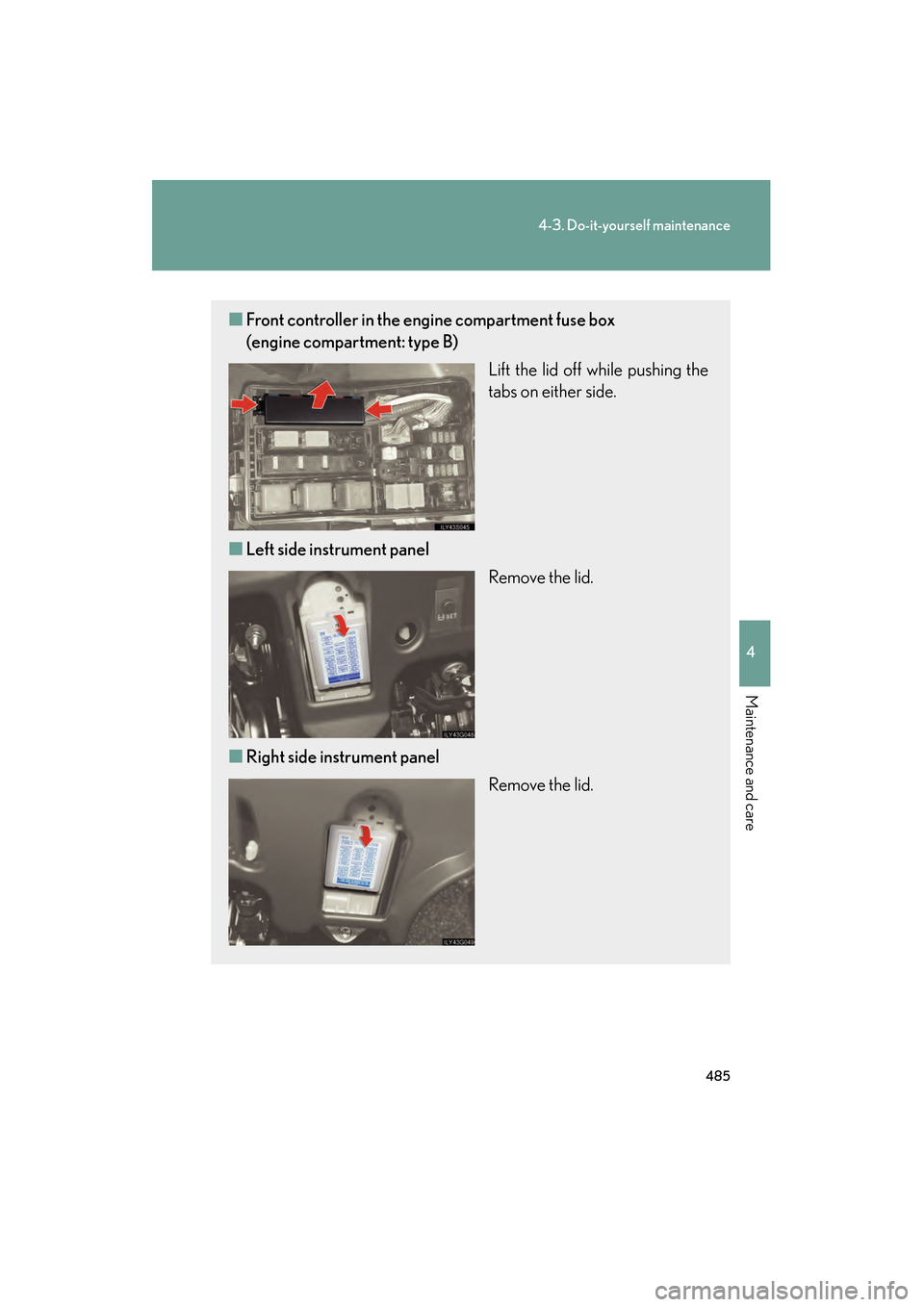
■Front controller in the engine compartment fuse box
(engine compartment: type B)
Lift the lid off while pushing the
tabs on either side.
■ Left side instrument panel
Remove the lid.
■ Right side instrument panel
Remove the lid.
GS_U_G.book Page 485 Wednesday, January 27, 2010 4:48 PM
Page 501 of 650
500
4-3. Do-it-yourself maintenance
GS_G_U (OM30C80U)
February 1, 2010 9:50 am
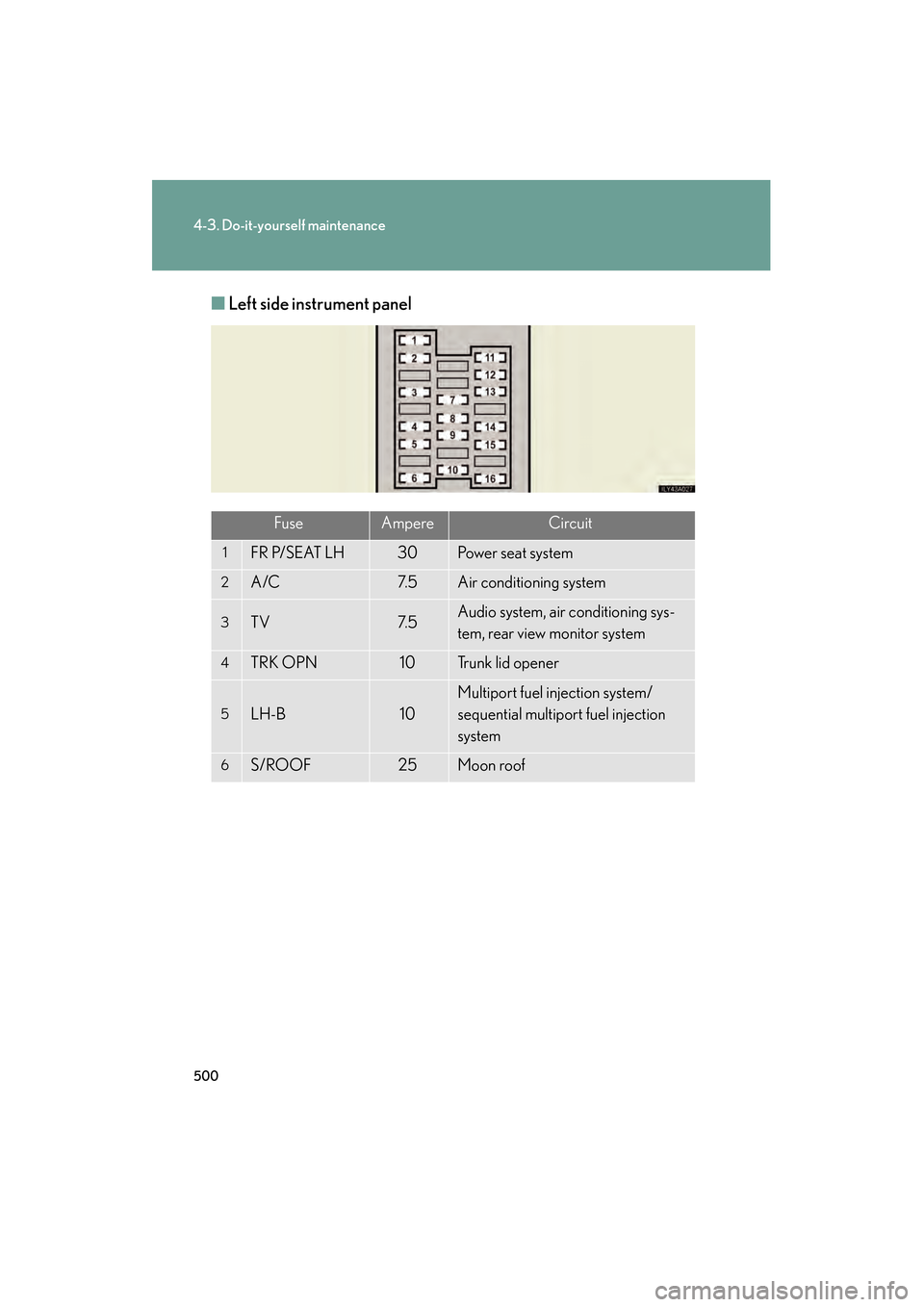
■Left side instrument panel
FuseAmpereCircuit
1FR P/SEAT LH30Power seat system
2A/C7. 5Air conditioning system
3TV7. 5Audio system, air conditioning sys-
tem, rear view monitor system
4TRK OPN10Tr u n k l i d o p e n e r
5LH-B10
Multiport fuel injection system/
sequential multiport fuel injection
system
6S/ROOF25Moon roof
sec_04_03.fm Page 500 Monday, February 1, 2010 9:55 AM
Page 504 of 650
503
4-3. Do-it-yourself maintenance
4
Maintenance and care
GS_G_U (OM30C80U)
January 27, 2010 4:47 pm
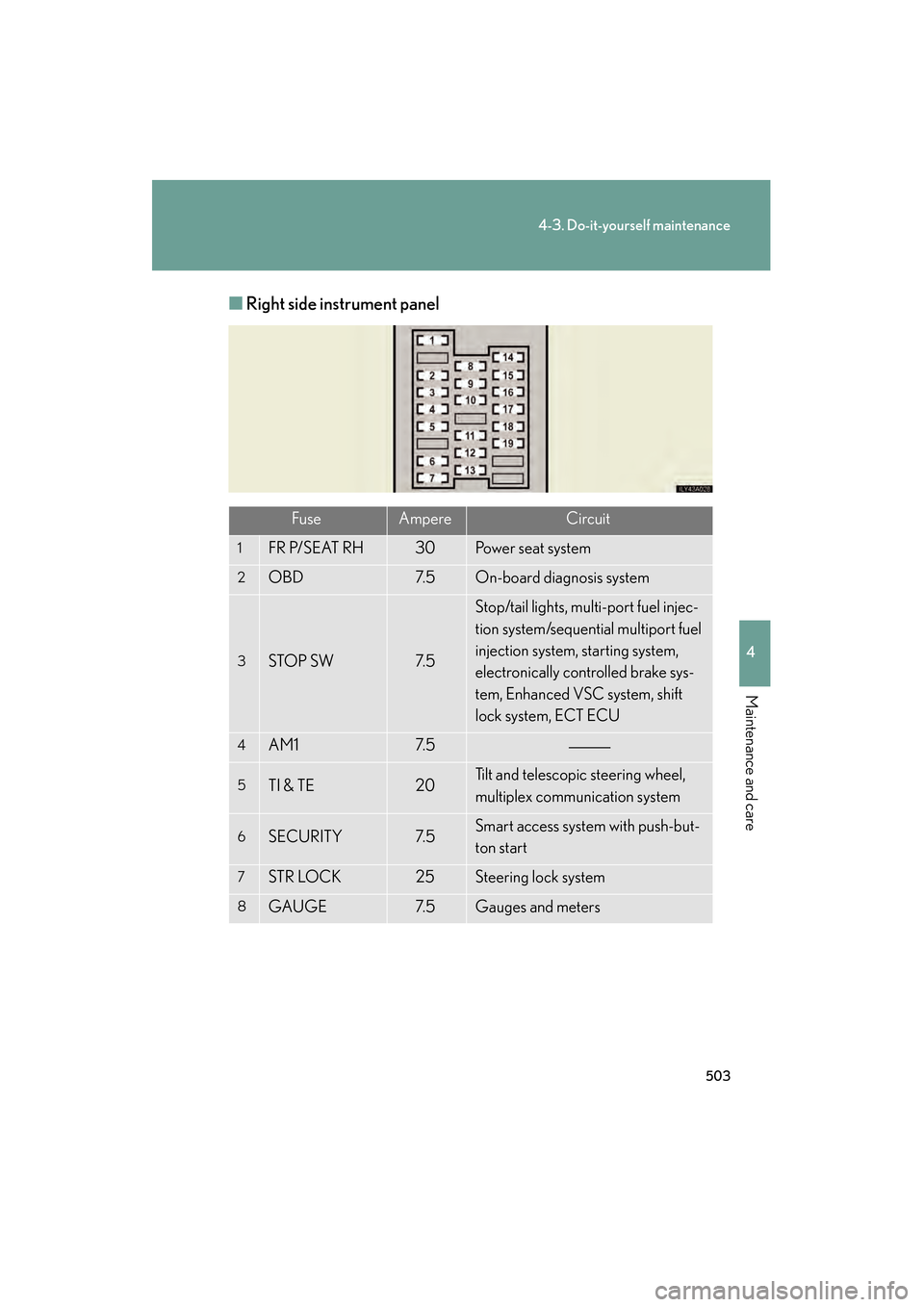
■Right side instrument panel
FuseAmpereCircuit
1FR P/SEAT RH30Power seat system
2OBD7. 5On-board diagnosis system
3STOP SW7. 5
Stop/tail lights, multi-port fuel injec-
tion system/sequential multiport fuel
injection system, starting system,
electronically controlled brake sys-
tem, Enhanced VSC system, shift
lock system, ECT ECU
4AM17. 5
5TI & TE20Tilt and telescopic steering wheel,
multiplex communication system
6SECURITY7. 5Smart access system with push-but-
ton start
7STR LOCK25Steering lock system
8GAUGE7. 5Gauges and meters
GS_U_G.book Page 503 Wednesday, January 27, 2010 4:48 PM