phone Lexus GS350 2010 Owner's Guide
[x] Cancel search | Manufacturer: LEXUS, Model Year: 2010, Model line: GS350, Model: Lexus GS350 2010Pages: 650, PDF Size: 15.04 MB
Page 351 of 650
350
3-4. Using the hands-free system (for cellular phone)
GS_G_U (OM30C80U)
January 27, 2010 4:47 pm
Receiving a call
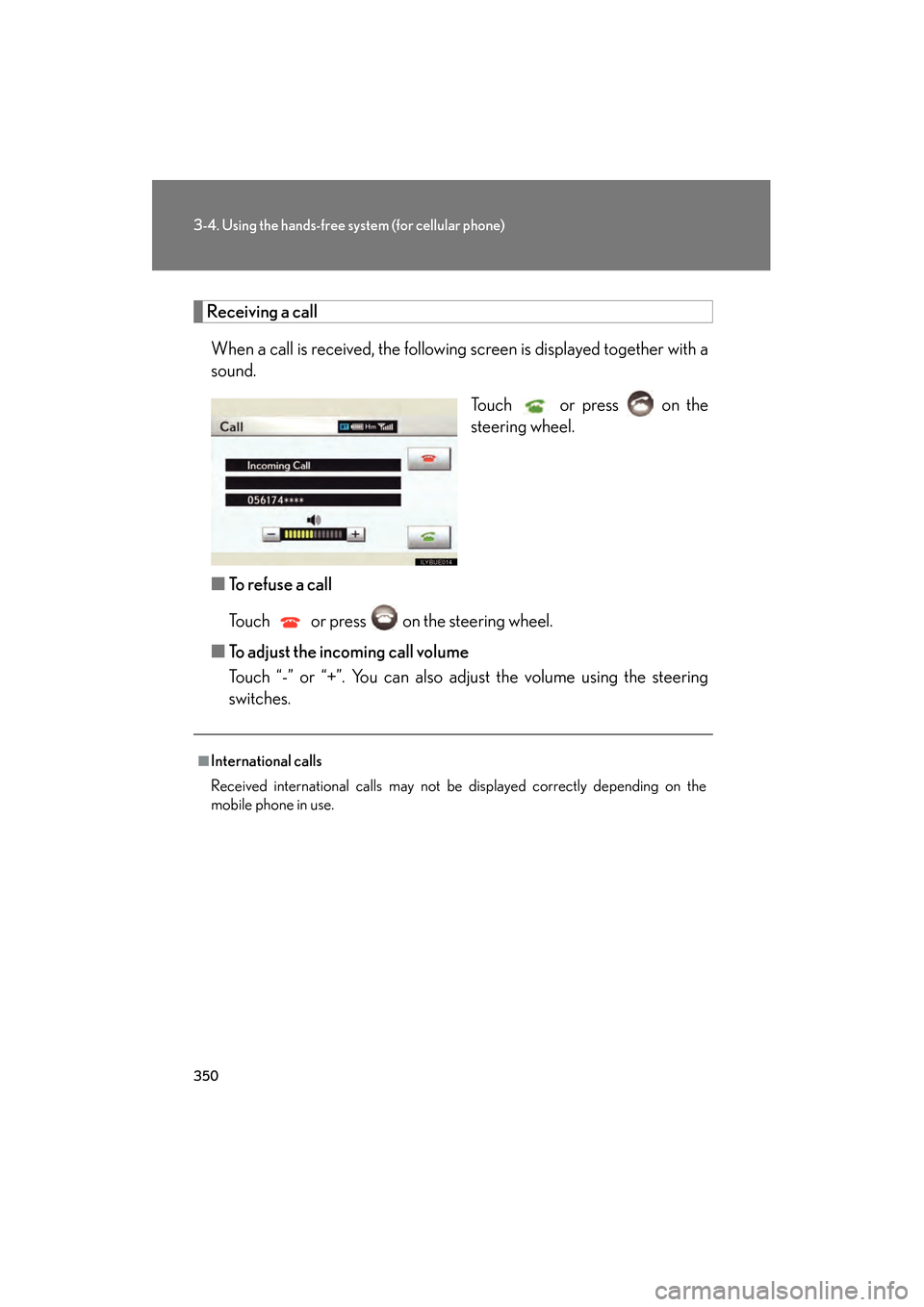
When a call is received, the following screen is displayed together with a
sound. Touch or press on the
steering wheel.
■ To refuse a call
Touch or press on the steering wheel.
■ To adjust the incoming call volume
Touch “-” or “+”. You can also adjust the volume using the steering
switches.
■International calls
Received international calls may not be displayed correctly depending on the
mobile phone in use.
GS_U_G.book Page 350 Wednesday, January 27, 2010 4:48 PM
Page 352 of 650
351
3-4. Using the hands-free system (for cellular phone)
3
Interior features
GS_G_U (OM30C80U)
January 27, 2010 4:47 pm
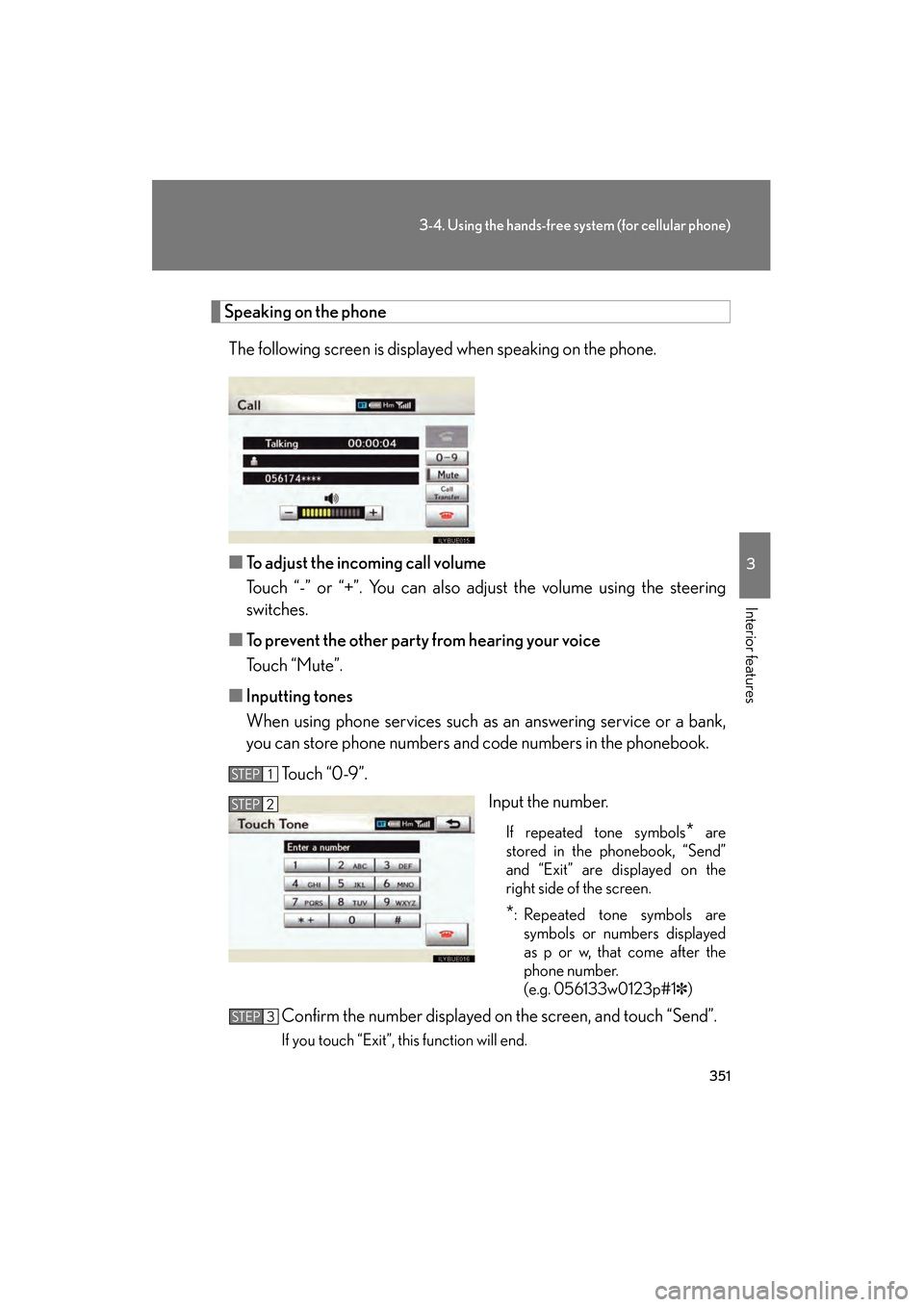
Speaking on the phoneThe following screen is displayed when speaking on the phone.
■ To adjust the incoming call volume
Touch “-” or “+”. You can also adjust the volume using the steering
switches.
■ To prevent the other party from hearing your voice
Touch “Mute”.
■ Inputting tones
When using phone services such as an answering service or a bank,
you can store phone numbers and code numbers in the phonebook.
To u c h “ 0 - 9 ” . Input the number.
If repeated tone symbols* are
stored in the phonebook, “Send”
and “Exit” are displayed on the
right side of the screen.
*: Repeated tone symbols are symbols or numbers displayed
as p or w, that come after the
phone number.
(e.g. 056133w0123p#1 ✽)
Confirm the number displayed on the screen, and touch “Send”.
If you touch “Exit”, this function will end.
STEP1
STEP2
STEP3
GS_U_G.book Page 351 Wednesday, January 27, 2010 4:48 PM
Page 353 of 650
352
3-4. Using the hands-free system (for cellular phone)
GS_G_U (OM30C80U)
January 27, 2010 4:47 pm
■To transfer a call
Touch “Call Transfer”.
■ To h a n g u p
Touch or press on the steering wheel.
■ Interrupt call
When the call is interrupted by the third party while talking, the incom-
ing call message will be displayed.
●To talk with the other party: Touch or press on the steering
wheel.
● To refuse the call: Touch or press on the steering wheel.
Everytime you touch or press on the steering wheel after a
call is interrupted, you will be switched to the other party.
If your cellular phone is not accepted in HFP Ver. 1.5, this function can-
not be used.
■Transferring calls
●It is not possible to transfer from hands-free to a mobile phone while driving.
●If you transfer from a mobile phone to hands-free, the hands-free screen will be
displayed, and you can operate the system using the screen.
●Transfer method and operation may vary according to the mobile phone used.
●For operation of the mobile phone in use, see the phone’s manual.
■While driving
Key input is unavailable.
■Voice recognition during a call
“Mute” and “Send Tones” can be operated by voice recognition. ( →P. 3 4 7 )
■Interrupt call operation
Interrupt call operation may differ from depending on your phone company and the
cellular phone.
GS_U_G.book Page 352 Wednesday, January 27, 2010 4:48 PM
Page 354 of 650
353
3-4. Using the hands-free system (for cellular phone)
3
Interior features
GS_G_U (OM30C80U)
January 27, 2010 4:47 pm
Setting the hands-free system (for cellular phone)
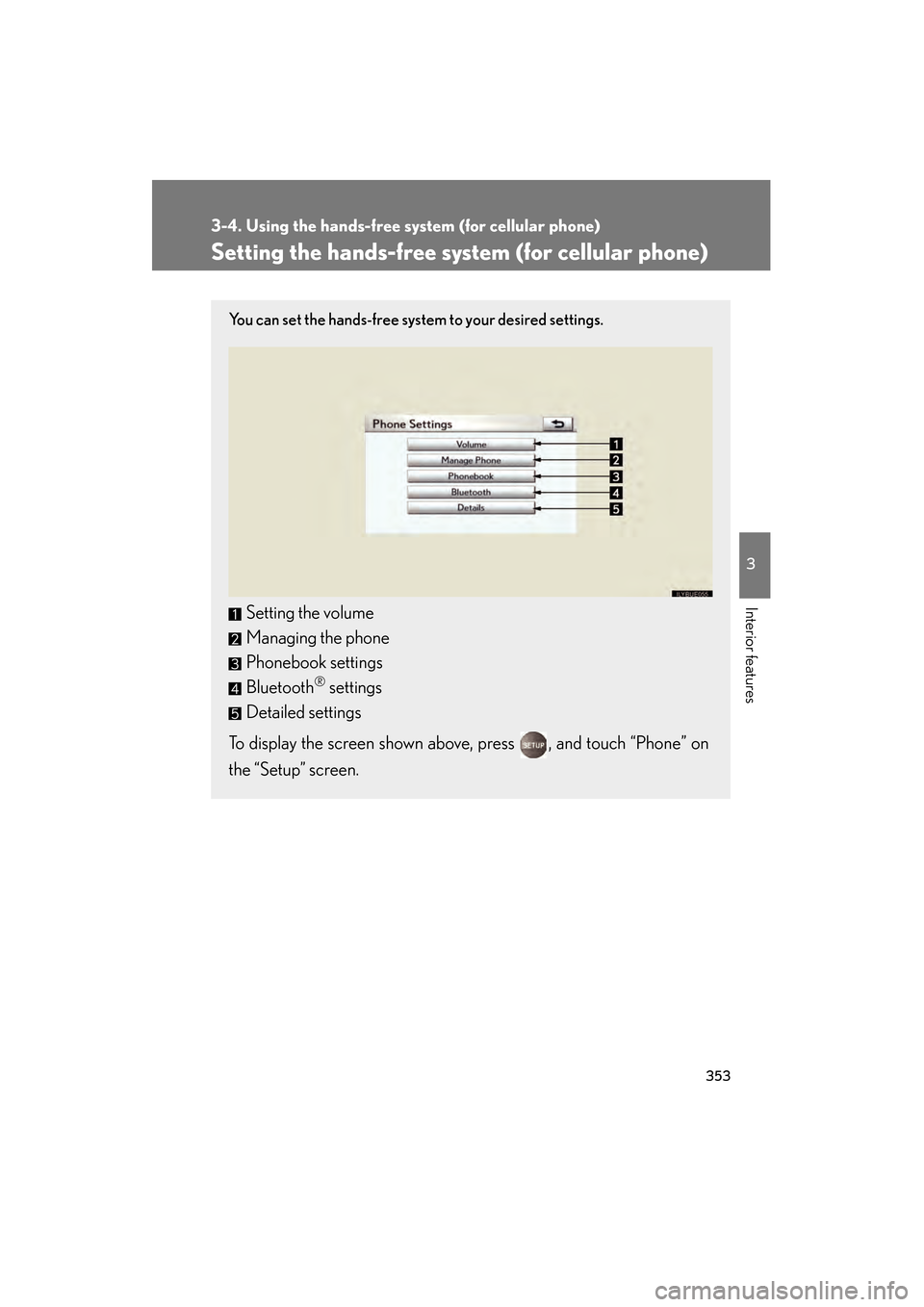
You can set the hands-free system to your desired settings.
Setting the volume
Managing the phone
Phonebook settings
Bluetooth
® settings
Detailed settings
To display the screen shown above, press , and touch “Phone” on
the “Setup” screen.
GS_U_G.book Page 353 Wednesday, January 27, 2010 4:48 PM
Page 355 of 650
354
3-4. Using the hands-free system (for cellular phone)
GS_G_U (OM30C80U)
January 27, 2010 4:47 pm
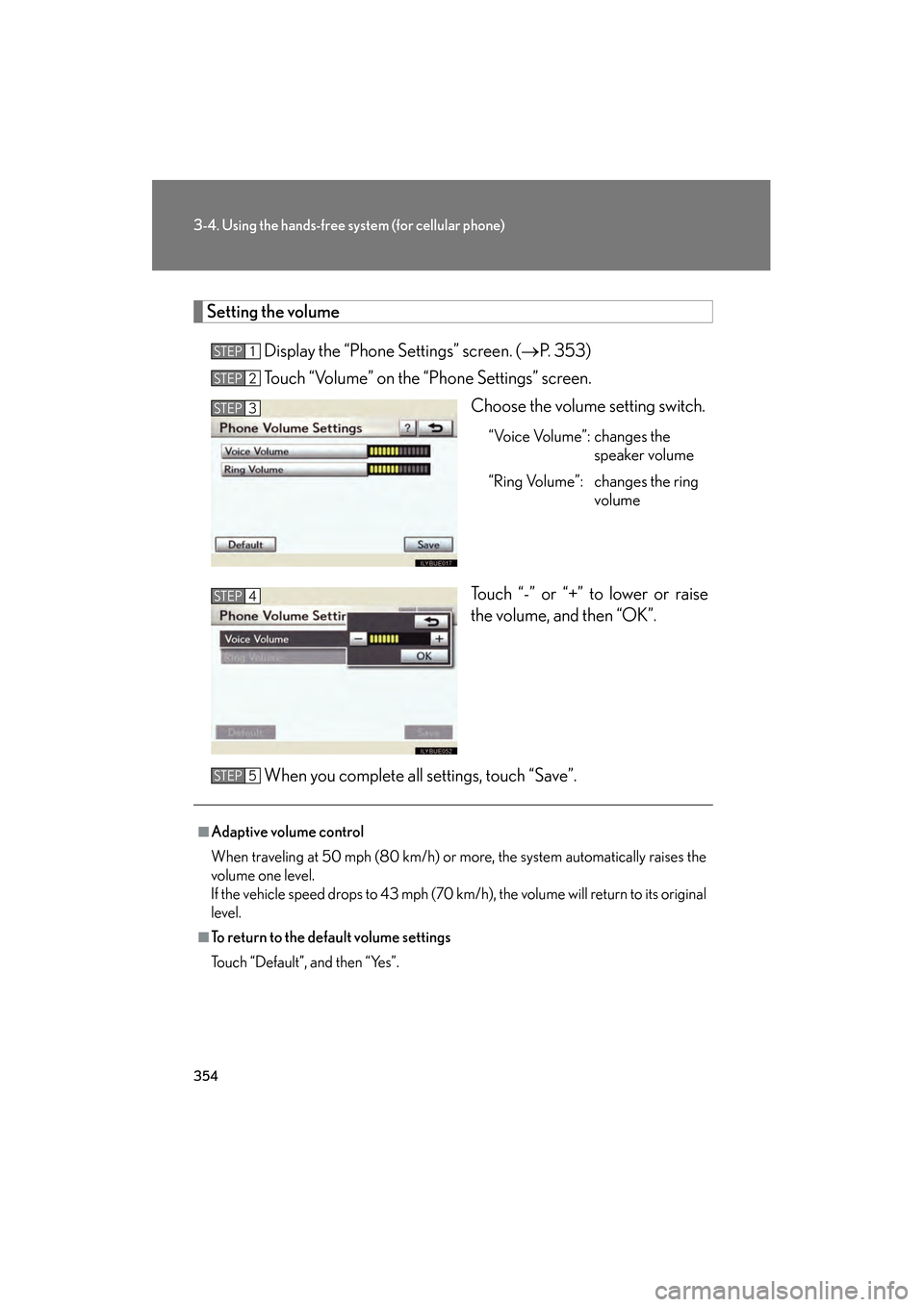
Setting the volume
Display the “Phone Settings” screen. ( →P. 353)
Touch “Volume” on the “Phone Settings” screen.
Choose the volume setting switch.
“Voice Volume”: changes the speaker volume
“Ring Volume”: changes the ring volume
Touch “-” or “+” to lower or raise
the volume, and then “OK”.
When you complete all settings, touch “Save”.
STEP1
STEP2
STEP3
STEP4
■Adaptive volume control
When traveling at 50 mph (80 km/h) or more, the system automatically raises the
volume one level.
If the vehicle speed drops to 43 mph (70 km/h), the volume will return to its original
level.
■To return to the default volume settings
Touch “Default”, and then “Yes”.
STEP5
GS_U_G.book Page 354 Wednesday, January 27, 2010 4:48 PM
Page 356 of 650
355
3-4. Using the hands-free system (for cellular phone)
3
Interior features
GS_G_U (OM30C80U)
January 27, 2010 4:47 pm
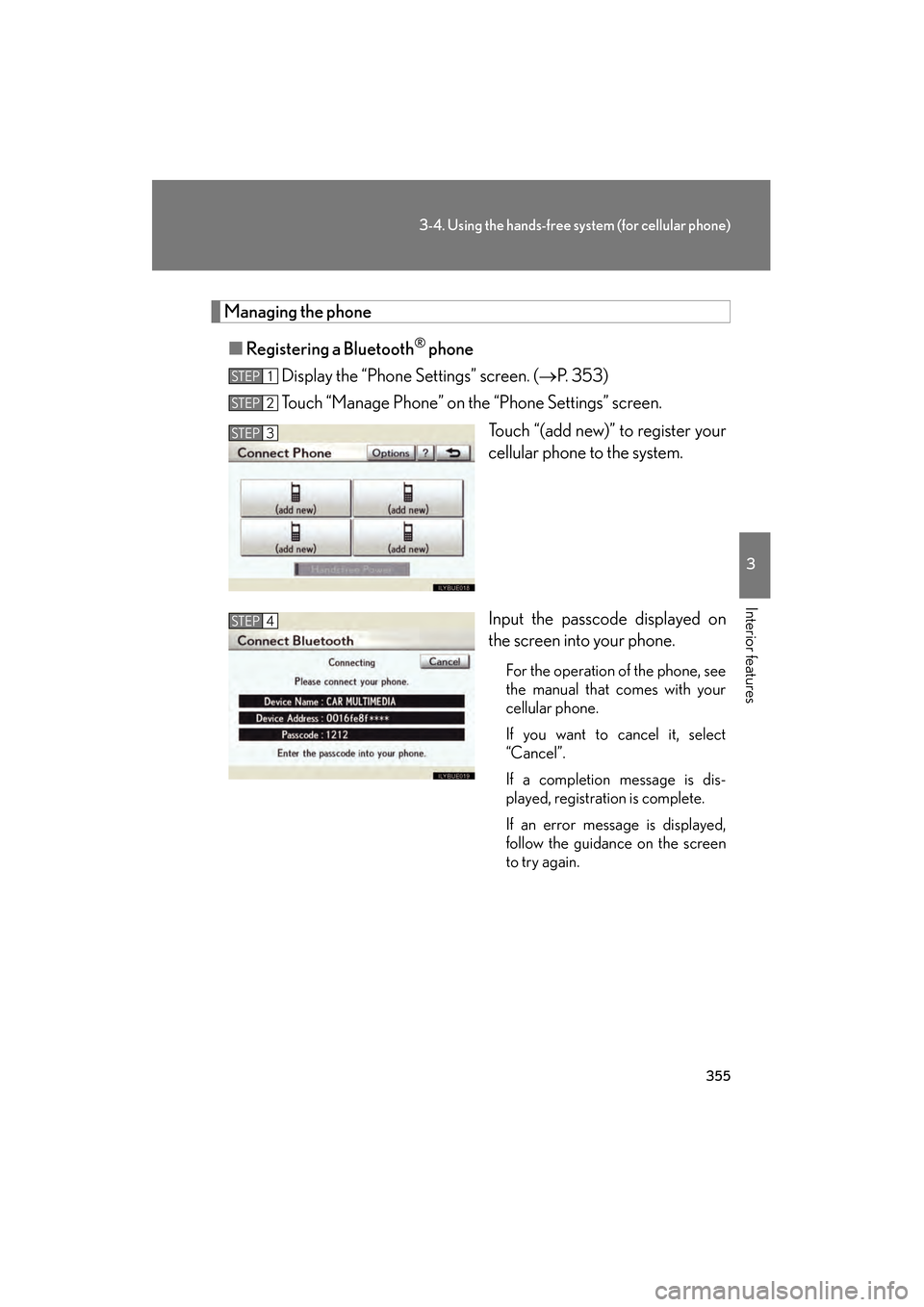
Managing the phone■ Registering a Bluetooth
® phone
Display the “Phone Settings” screen. ( →P. 353)
Touch “Manage Phone” on the “Phone Settings” screen.
Touch “(add new)” to register your
cellular phone to the system.
Input the passcode displayed on
the screen into your phone.
For the operation of the phone, see
the manual that comes with your
cellular phone.
If you want to cancel it, select
“Cancel”.
If a completion message is dis-
played, registration is complete.
If an error message is displayed,
follow the guidance on the screen
to try again.
STEP1
STEP2
STEP3
STEP4
GS_U_G.book Page 355 Wednesday, January 27, 2010 4:48 PM
Page 357 of 650
356
3-4. Using the hands-free system (for cellular phone)
GS_G_U (OM30C80U)
January 27, 2010 4:47 pm
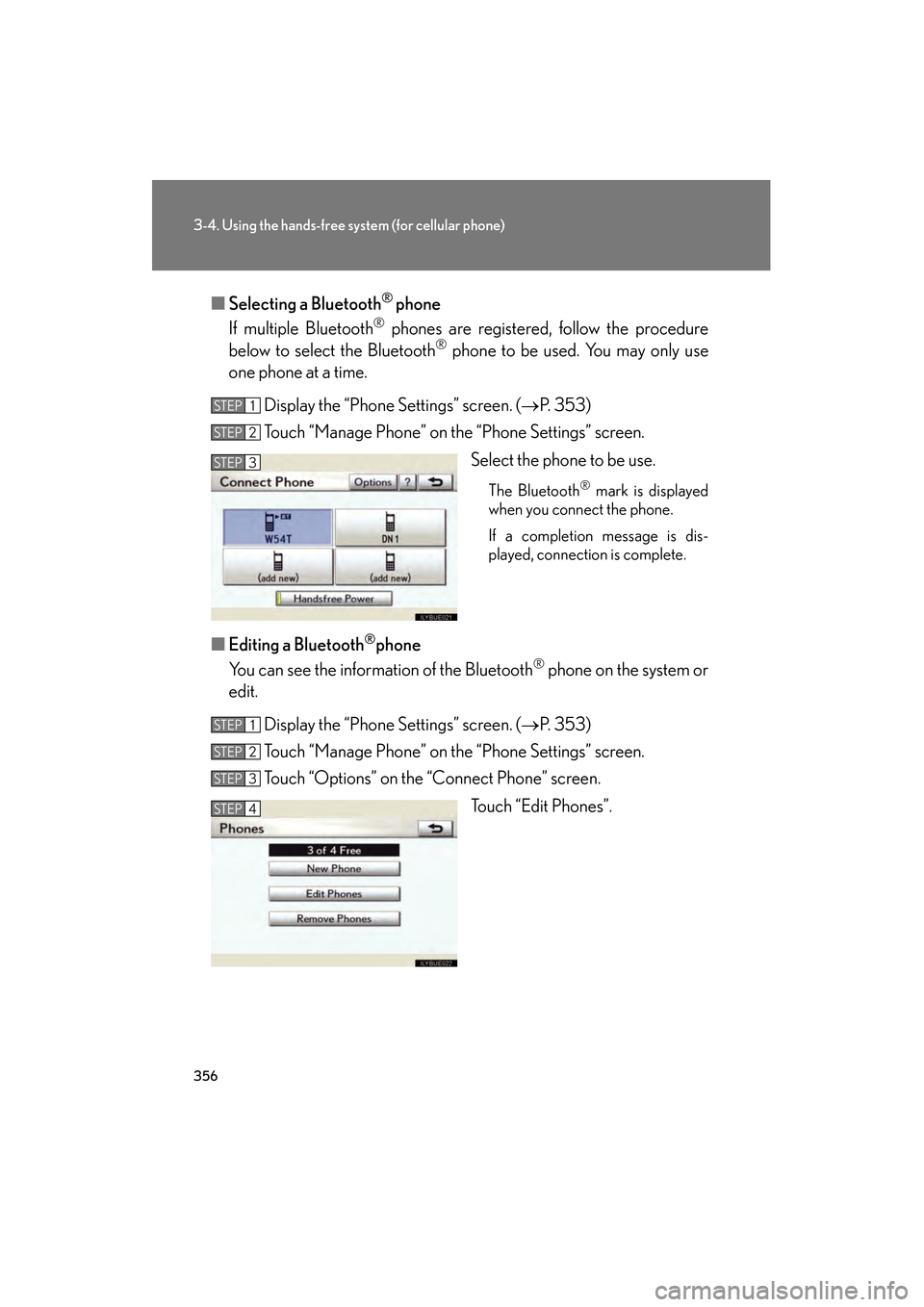
■Selecting a Bluetooth® phone
If multiple Bluetooth
® phones are registered, follow the procedure
below to select the Bluetooth® phone to be used. You may only use
one phone at a time.
Display the “Phone Settings” screen. ( →P. 353)
Touch “Manage Phone” on the “Phone Settings” screen.
Select the phone to be use.
The Bluetooth® mark is displayed
when you connect the phone.
If a completion message is dis-
played, connection is complete.
■ Editing a Bluetooth®phone
You can see the information of the Bluetooth
® phone on the system or
edit.
Display the “Phone Settings” screen. ( →P. 353)
Touch “Manage Phone” on the “Phone Settings” screen.
Touch “Options” on the “Connect Phone” screen.
Touch “Edit Phones”.
STEP1
STEP2
STEP3
STEP1
STEP2
STEP3
STEP4
GS_U_G.book Page 356 Wednesday, January 27, 2010 4:48 PM
Page 358 of 650
357
3-4. Using the hands-free system (for cellular phone)
3
Interior features
GS_G_U (OM30C80U)
January 27, 2010 4:47 pm
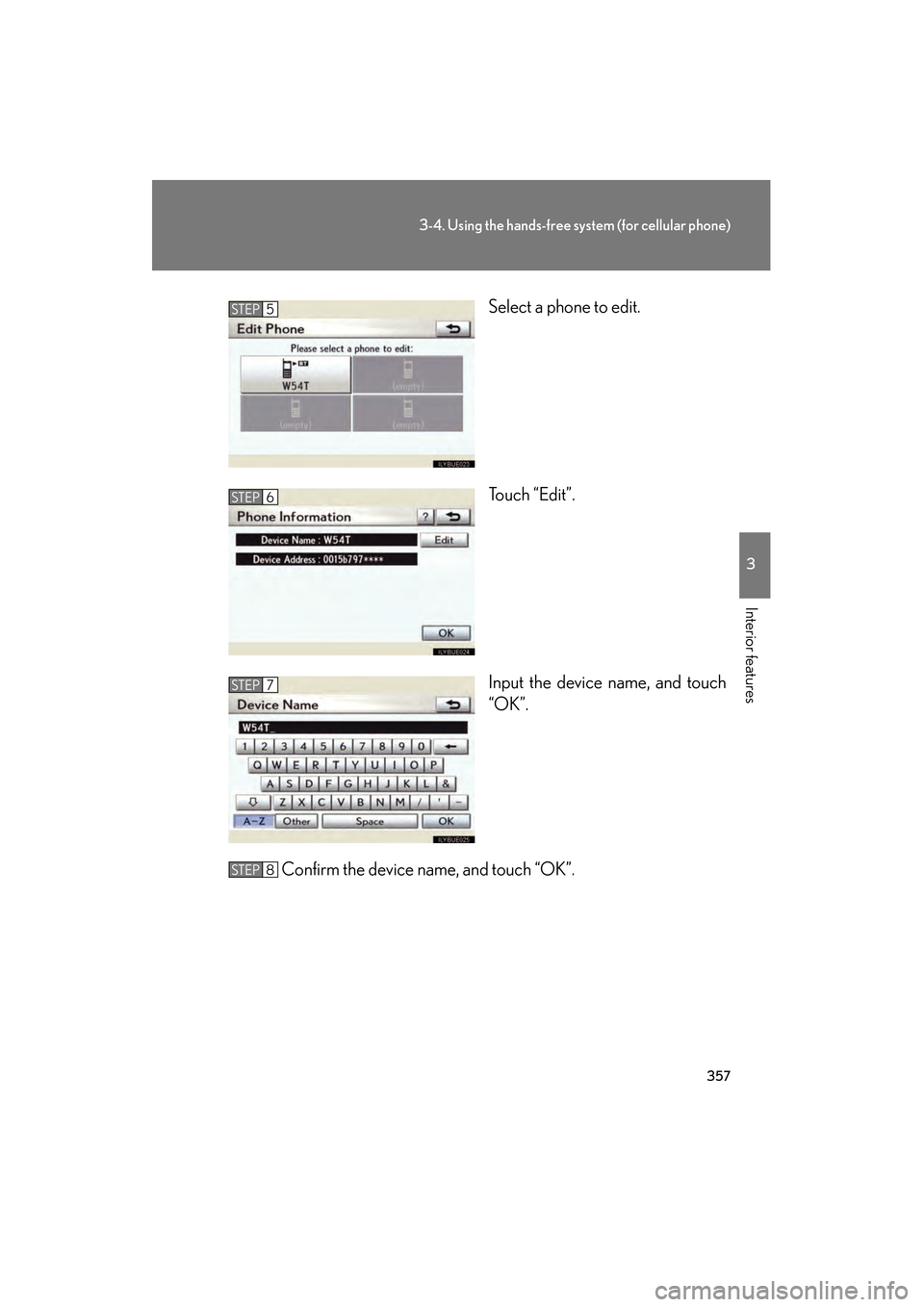
Select a phone to edit.
Touch “Edit”.
Input the device name, and touch
“OK”.
Confirm the device name, and touch “OK”.STEP5
STEP6
STEP7
STEP8
GS_U_G.book Page 357 Wednesday, January 27, 2010 4:48 PM
Page 359 of 650
358
3-4. Using the hands-free system (for cellular phone)
GS_G_U (OM30C80U)
January 27, 2010 4:47 pm
■Removing a Bluetooth®phone
Display the “Phone Settings” screen. ( →P. 353)
Touch “Manage Phone” on the “Phone Settings” screen.
Touch “Options” on the “Connect Phone” screen.
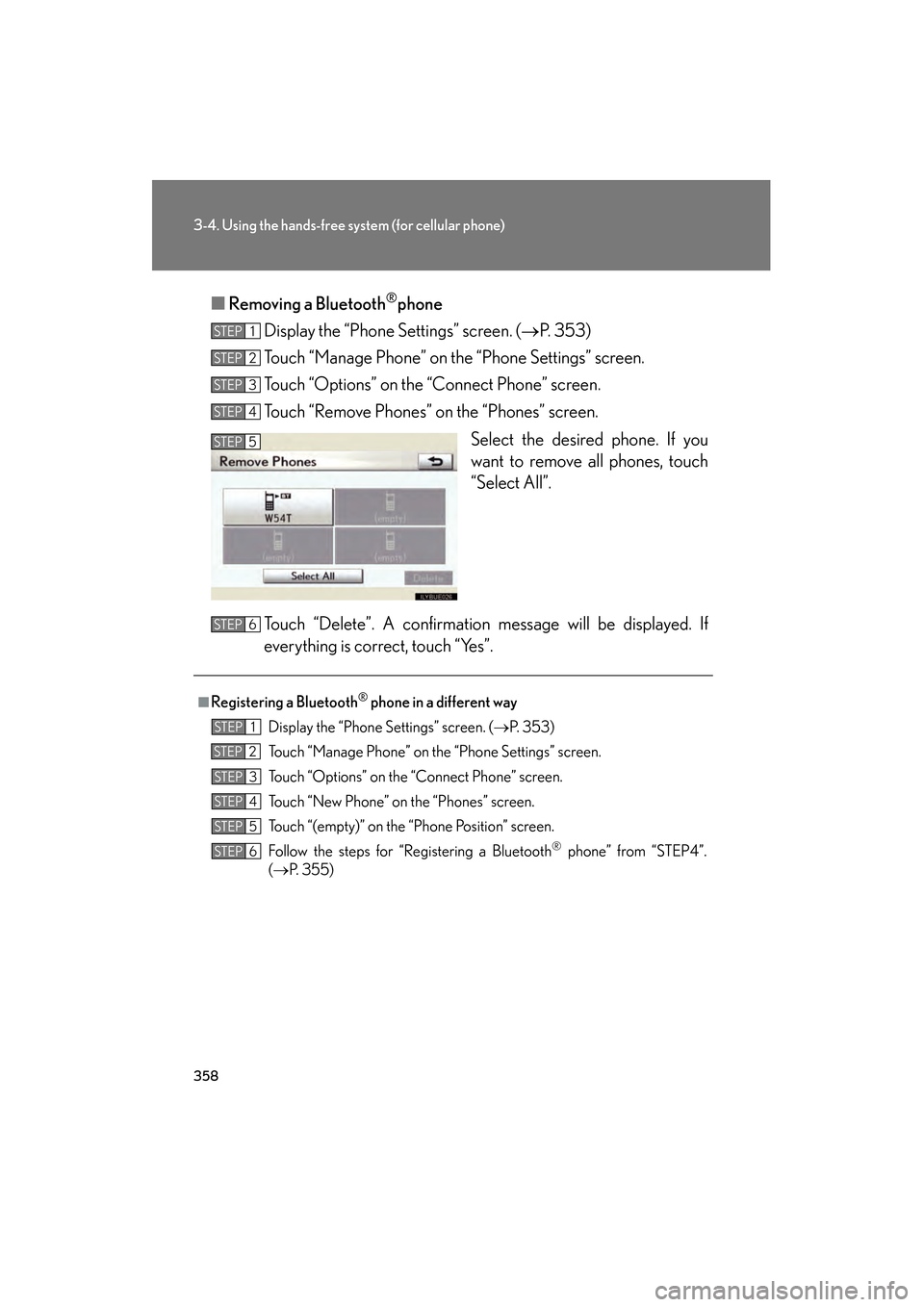
Touch “Remove Phones” on the “Phones” screen.
Select the desired phone. If you
want to remove all phones, touch
“Select All”.
Touch “Delete”. A confirmation message will be displayed. If
everything is correct, touch “Yes”.
STEP1
STEP2
STEP3
STEP4
STEP5
■Registering a Bluetooth® phone in a different way
Display the “Phone Settings” screen. ( →P. 3 5 3 )
Touch “Manage Phone” on the “Phone Settings” screen.
Touch “Options” on the “Connect Phone” screen.
Touch “New Phone” on the “Phones” screen.
Touch “(empty)” on the “Phone Position” screen.
Follow the steps for “Registering a Bluetooth
® phone” from “STEP4”.
( → P. 3 5 5 )
STEP6
STEP1
STEP2
STEP3
STEP4
STEP5
STEP6
GS_U_G.book Page 358 Wednesday, January 27, 2010 4:48 PM
Page 360 of 650
359
3-4. Using the hands-free system (for cellular phone)
3
Interior features
GS_G_U (OM30C80U)
January 27, 2010 4:47 pm
■When another Bluetooth® device is connected while registering or selecting a
phone
When another Bluetooth
® device is connected, a confirmation message will be dis-
played. If you want to disconnect it, touch “Yes”.
■When Bluetooth® audio is connected while registering a phone
When you register your phone, Bluetooth
® audio will disconnect. It will reconnect
automatically when you finish registration. It will not be reconnected depending on
the phone you are using.
■Connecting the phone while Bluetooth® audio is playing
Bluetooth
® audio will disconnect. It will reconnect automatically when you finish
registration. It will not be reconnected depending on the phone you are using.
■Setting the “Handsfree Power”
The state changes between “On” and “Off” every time you select “Handsfree
Power” on the “Connect Phone” screen. When “Handsfree Power” is “On”, the
Bluetooth
® phone is automatically connected when you turn the “ENGINE START
STOP” switch is in ACCESSORY or IGNITION ON mode.
■Editing the “Device Name”
If you change a device name, the name registered in your cellular phone is not
changed.
■About “Device Address”
This address is specific to the system and cannot be changed. If you have registered
two Bluetooth
® phones with the same device name and you cannot distinguish one
from the other, refer to this address.
■When you delete a Bluetooth® phone
The phonebook data will be deleted at the same time.
■Connecting the phone by voice recognition
“Connect Phone” includes “Select Phone”, “Add New Phone” and “Handsfree
Power Off (On)” can be operated by voice recognition. ( →P. 3 4 7 )
GS_U_G.book Page 359 Wednesday, January 27, 2010 4:48 PM