interior lights Lexus GS350 2010 Owner's Manual
[x] Cancel search | Manufacturer: LEXUS, Model Year: 2010, Model line: GS350, Model: Lexus GS350 2010Pages: 650, PDF Size: 15.04 MB
Page 4 of 650
1
2
3
4
5
6
7
3
GS_G_U (OM30C80U)
January 27, 2010 4:48 pm
2-1. Driving proceduresDriving the vehicle ........................ 126
Engine (ignition) switch .............. 135
Automatic transmission.............. 139
Turn signal lever ............................ 144
Parking brake ................................. 145
Horn.................................................... 146
2-2. Instrument cluster Gauges and meters ..................... 147
Indicators and warning lights................................................... 151
Multi-information display ........... 154
2-3. Operating the lights and windshield wipers
Headlight switch ............................ 157
Fog light switch .............................. 160
Windshield wipers and washer............................................... 161
Headlight cleaner switch ........... 166 2-4. Using other driving systems
Cruise control ................................. 167
Dynamic radar cruise control............................................... 171
Intuitive parking assist ................. 183
Rear view monitor system ......... 196
AVS (Adaptive Variable Suspension System) .................. 199
Driving assist systems................ 200
PCS (Pre-Collision System) ........... 207
2-5. Driving information Cargo and luggage ...................... 214
Vehicle load limits......................... 218
Winter driving tips ........................ 219
Trailer towing ................................. 224
Dinghy towing ............................... 225
3-1. Using the touch screen Touch screen ................................. 228
Setting the touch screen ........... 235
2When driving
3Interior features
GS_U_G.book Page 3 Wednesday, January 27, 2010 4:48 PM
Page 5 of 650
TABLE OF CONTENTSIndex
4
GS_G_U (OM30C80U)
January 27, 2010 4:48 pm
3-2. Using the air conditioning system and defogger
Automatic air conditioning system ............................................ 246
Rear window and outside rear view mirror defoggers ............ 255
Windshield wiper de-icer ......... 256
3-3. Using the audio system Audio system type ....................... 257
Using the radio ............................. 260
Using the CD/DVD player...... 269
Playing an audio CD................... 272
Playing MP3 and WMA discs.................................. 276
Playing DVD video/audio (with DVD player).................... 280
Playing a video CD (with DVD player)..................... 294
CD/DVD player and DVD video disc information ............. 297
Listening to Bluetooth
®
audio .............................................. 308
Listening to a USB memory/ iPod
®.............................................. 316
Optimal use of the audio/ video system................................ 326
Using the AUX port................... 328
Using the steering switches ..... 329 3-4. Using the hands-free system
(for cellular phone)
Hands-free system (for cellular phone) ................... 332
Using a Bluetooth
® phone ..... 338
Setting the hands-free system (for cellular phone) .................. 353
3-5. Using the interior lights Interior lights list........................... 382
3-6. Using the storage features List of storage features.............. 385
3-7. Other interior features Sun visors......................................... 393
Vanity mirrors................................ 394
Clock ................................................ 395
Outside temperature display ............................................ 396
Ashtrays ........................................... 397
Cigarette lighter .......................... 398
Power outlet ................................... 399
Seat heaters/ventilators ........... 400
Armrest ............................................ 402
Rear sunshade .............................. 403
Floor mats....................................... 406
Trunk features............................... 408
Garage door opener..................... 411
Compass........................................... 417
Safety Connect .............................. 421
GS_U_G.book Page 4 Wednesday, January 27, 2010 4:48 PM
Page 228 of 650

Interior features3
227
GS_G_U (OM30C80U)
January 27, 2010 7:28 pm
3-3. Using the audio systemAudio system type.................. 257
Using the radio........................ 260
Using the CD/DVD player ...................................... 269
Playing an audio CD ............. 272
Playing MP3 and WMA discs............................. 276
Playing DVD video/audio (with DVD player) .............. 280
Playing a video CD
(with DVD player) ............... 294
CD/DVD player and DVD video disc information ....... 297
Listening to Bluetooth
®
audio....................................... 308
Listening to a USB memory/
iPod
®....................................... 316
Optimal use of the audio/ video system ......................... 326
Using the AUX port ............. 328
Using the steering switches.................................. 329 3-4. Using the hands-free system
(for cellular phone)
Hands-free system (for cellular phone) ............. 332
Using a Bluetooth
®
phone ...................................... 338
Setting the hands-free system (for cellular phone) ............. 353
3-5. Using the interior lights Interior lights list .................... 382
3-6. Using the storage features List of storage features......... 385
3-7. Other interior features Sun visors ................................. 393
Vanity mirrors ......................... 394
Clock ......................................... 395
Outside temperature
display..................................... 396
Ashtrays.................................... 397
Cigarette lighter .................... 398
Power outlet ............................ 399
Seat heaters/ventilators ...... 400
Armrest .................................... 402
Rear sunshade ........................ 403
Floor mats ................................ 406
Trunk features ......................... 408
Garage door opener .............. 411
Compass .................................... 417
Safety Connect ....................... 421
Sec_03TOC.fm Page 227 Wednesday, January 27, 2010 7:28 PM
Page 234 of 650
233
3-1. Using the touch screen
3
Interior features
GS_G_U (OM30C80U)
January 27, 2010 4:47 pm
■To avoid damaging the touch screen
●Touch the screen lightly with your finger. If there is no response, remove your fin-
ger from the screen and try again.
●Remove any dirt on the screen by wiping with a soft cloth. Do not use detergent.
■When using the touch screen
●If the screen is cold, the display may be dark, or the system may seem to be
operating slightly slower than normal.
●The screen may seem dark and hard to see when viewed through sunglasses.
Change your angle of viewing, adjust the display on the “Display” screen or
remove your sunglasses.
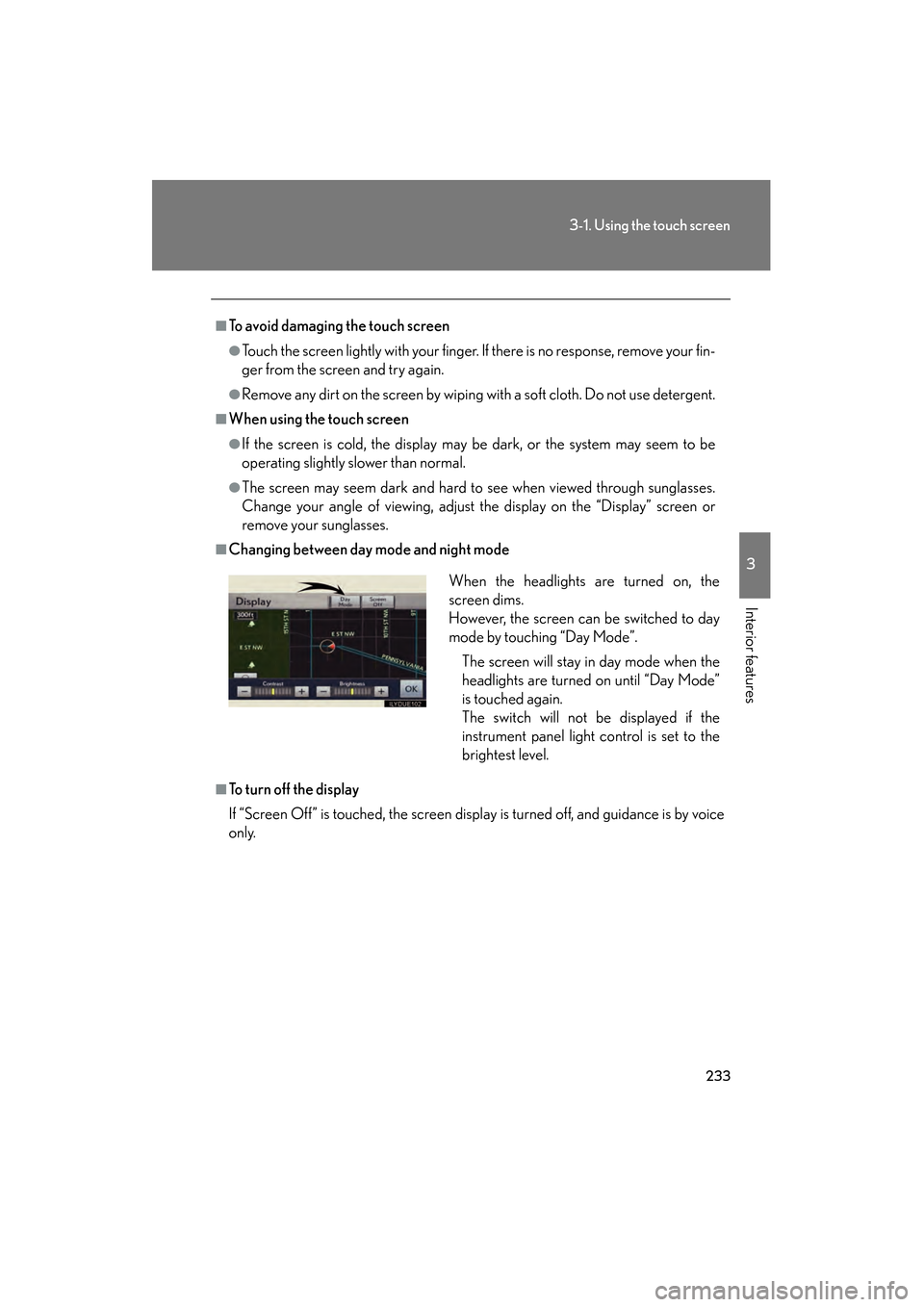
■Changing between day mode and night mode
■To turn off the display
If “Screen Off” is touched, the screen display is turned off, and guidance is by voice
only.When the headlights are turned on, the
screen dims.
However, the screen can be switched to day
mode by touching “Day Mode”.
The screen will stay in day mode when the
headlights are turned on until “Day Mode”
is touched again.
The switch will not be displayed if the
instrument panel light control is set to the
brightest level.
GS_U_G.book Page 233 Wednesday, January 27, 2010 4:48 PM
Page 383 of 650
382
GS_G_U (OM30C80U)
January 27, 2010 4:47 pm
3-5. Using the interior lights
Interior lights list
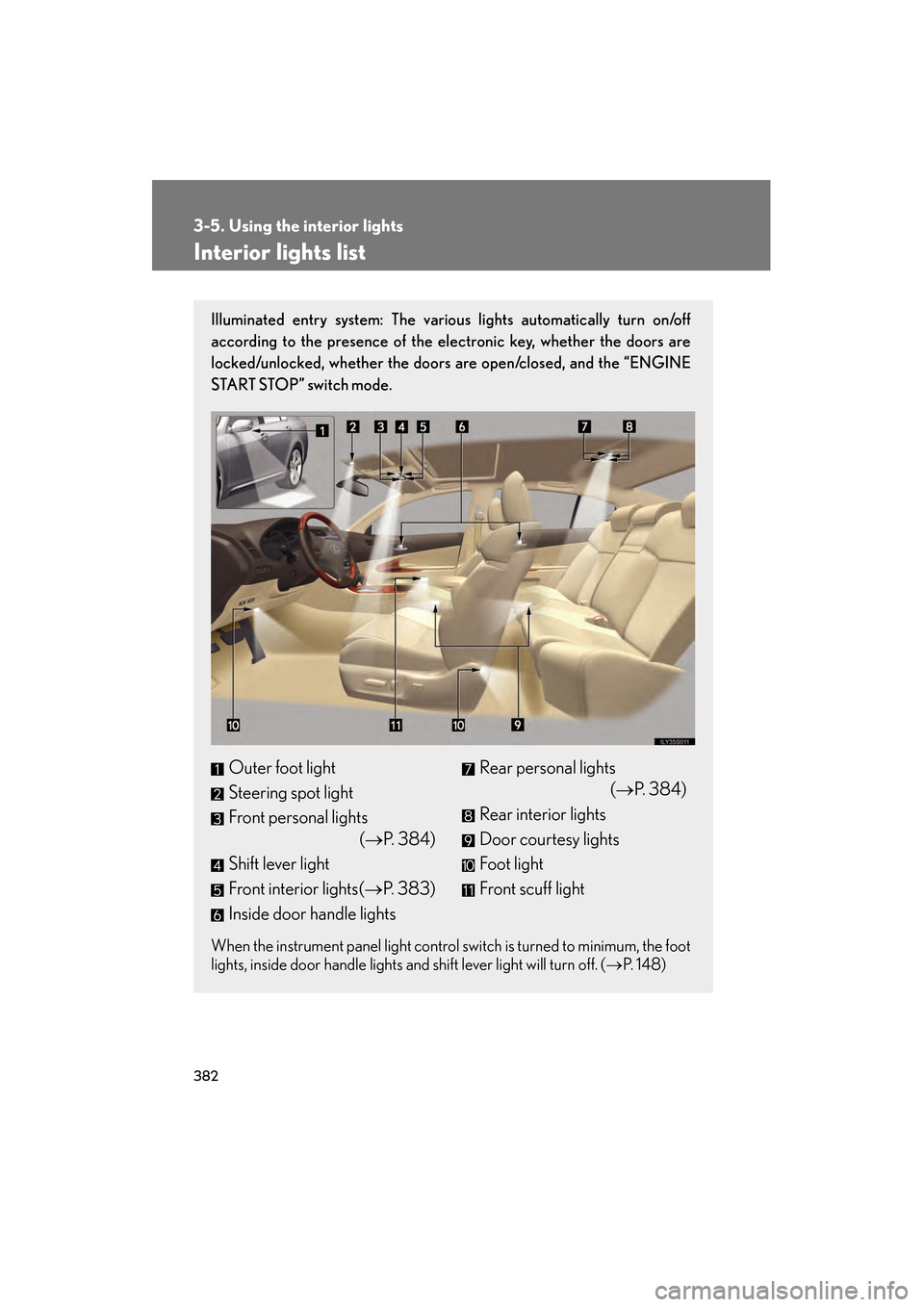
Illuminated entry system: The various lights automatically turn on/off
according to the presence of the electronic key, whether the doors are
locked/unlocked, whether the doors are open/closed, and the “ENGINE
START STOP” switch mode.
When the instrument panel light control switch is turned to minimum, the foot
lights, inside door handle lights and shift lever light will turn off. (→P. 1 4 8 )
Outer foot light
Steering spot light
Front personal lights
(→P. 384)
Shift lever light
Front interior lights( →P. 383)
Inside door handle lightsRear personal lights (→P. 384)
Rear interior lights
Door courtesy lights
Foot light
Front scuff light
GS_U_G.book Page 382 Wednesday, January 27, 2010 4:48 PM
Page 384 of 650
383
3-5. Using the interior lights
3
Interior features
GS_G_U (OM30C80U)
January 27, 2010 4:47 pm
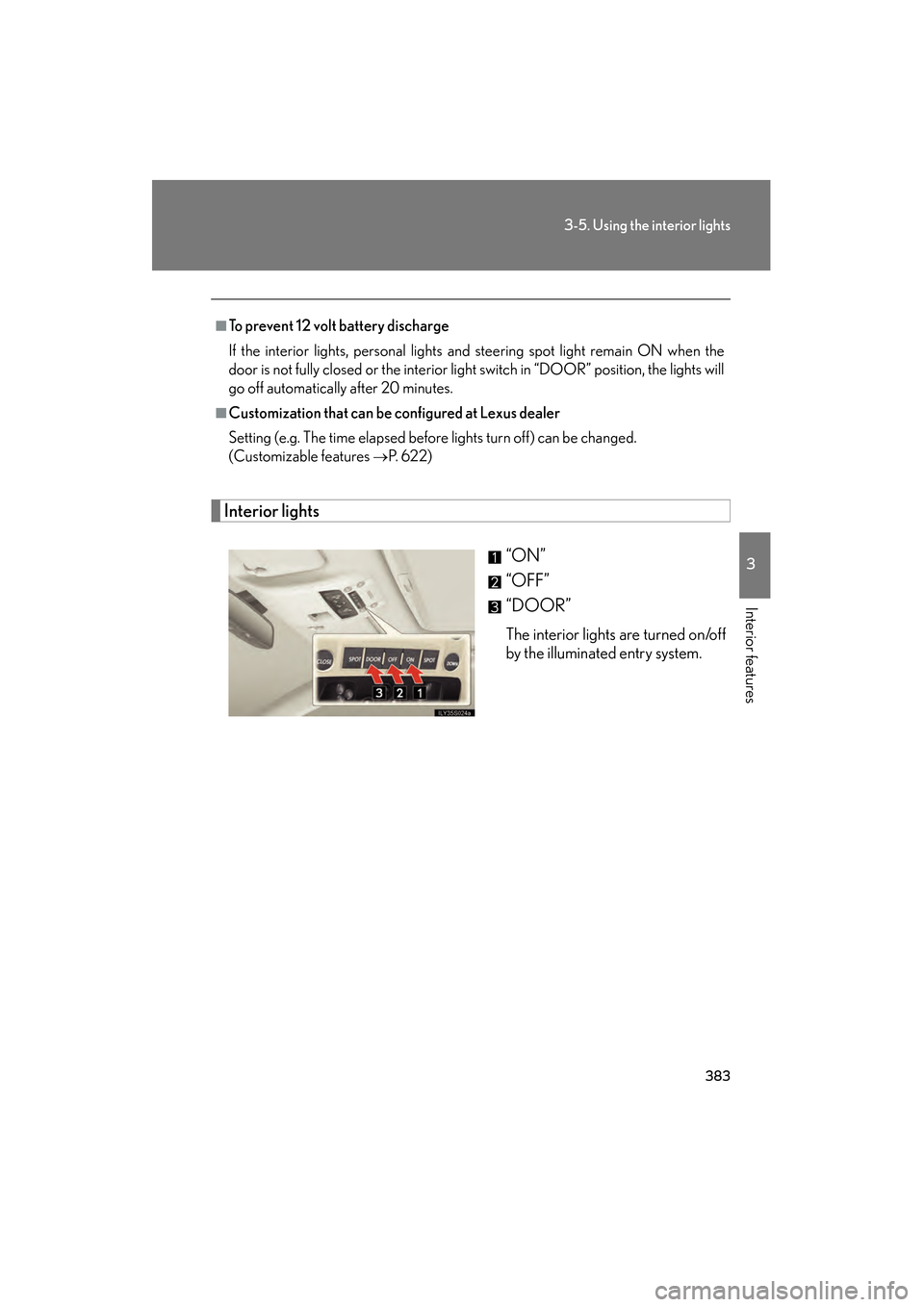
Interior lights“ON”
“OFF”
“DOOR”
The interior lights are turned on/off
by the illuminated entry system.
■To prevent 12 volt battery discharge
If the interior lights, personal lights and steering spot light remain ON when the
door is not fully closed or the interior light switch in “DOOR” position, the lights will
go off automatically after 20 minutes.
■Customization that can be configured at Lexus dealer
Setting (e.g. The time elapsed before lights turn off) can be changed.
(Customizable features
→P. 622)
GS_U_G.book Page 383 Wednesday, January 27, 2010 4:48 PM
Page 385 of 650
384
3-5. Using the interior lights
GS_G_U (OM30C80U)
January 27, 2010 4:47 pm
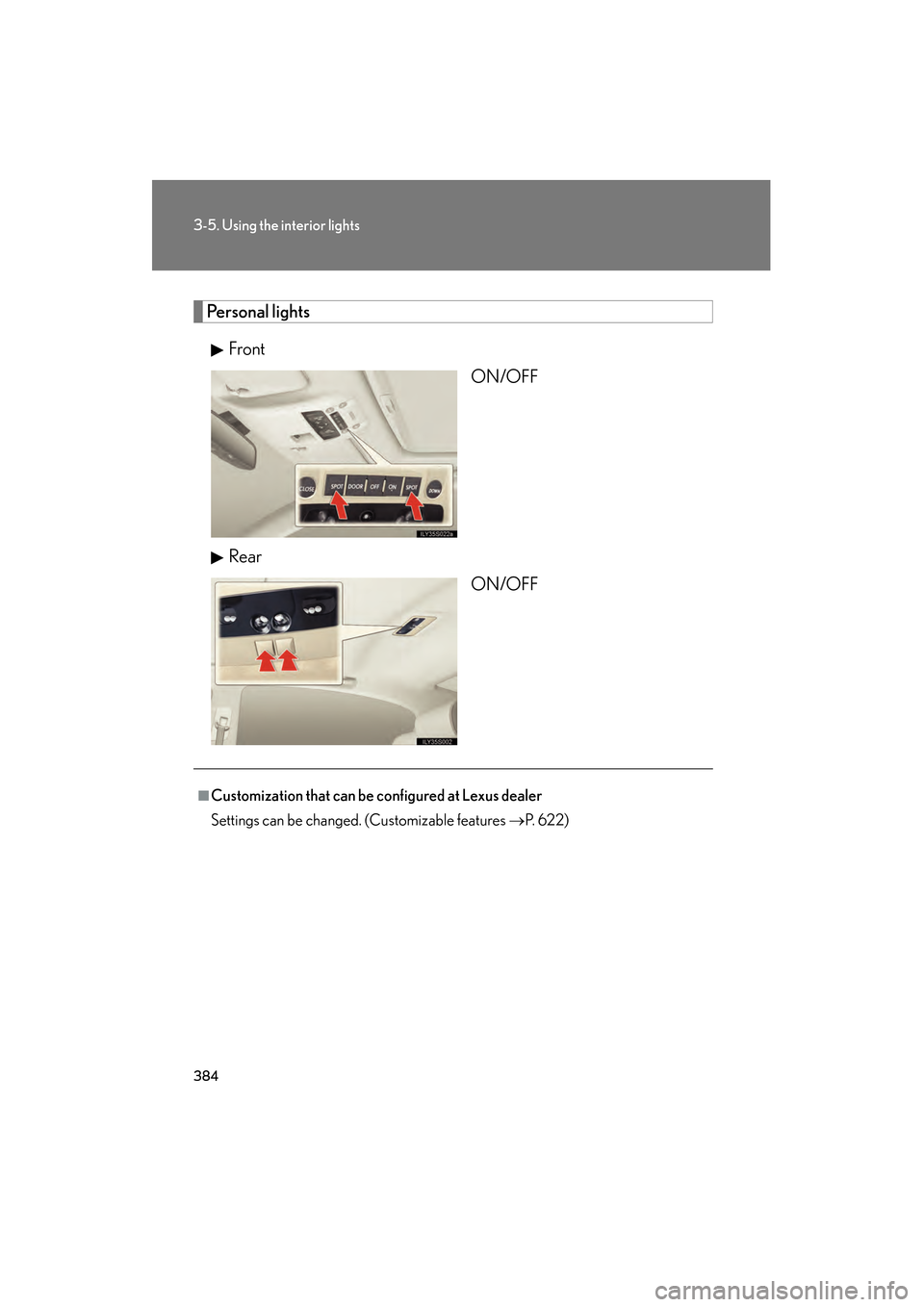
Personal lightsFront ON/OFF
Rear ON/OFF
■Customization that can be configured at Lexus dealer
Settings can be changed. (Customizable features →P. 622)
GS_U_G.book Page 384 Wednesday, January 27, 2010 4:48 PM
Page 395 of 650
394
3-7. Other interior features
GS_G_U (OM30C80U)
January 27, 2010 4:47 pm
Vanity mirrors
NOTICE
■To prevent battery discharge
Do not leave the vanity lights on for extended periods while the engine is off.
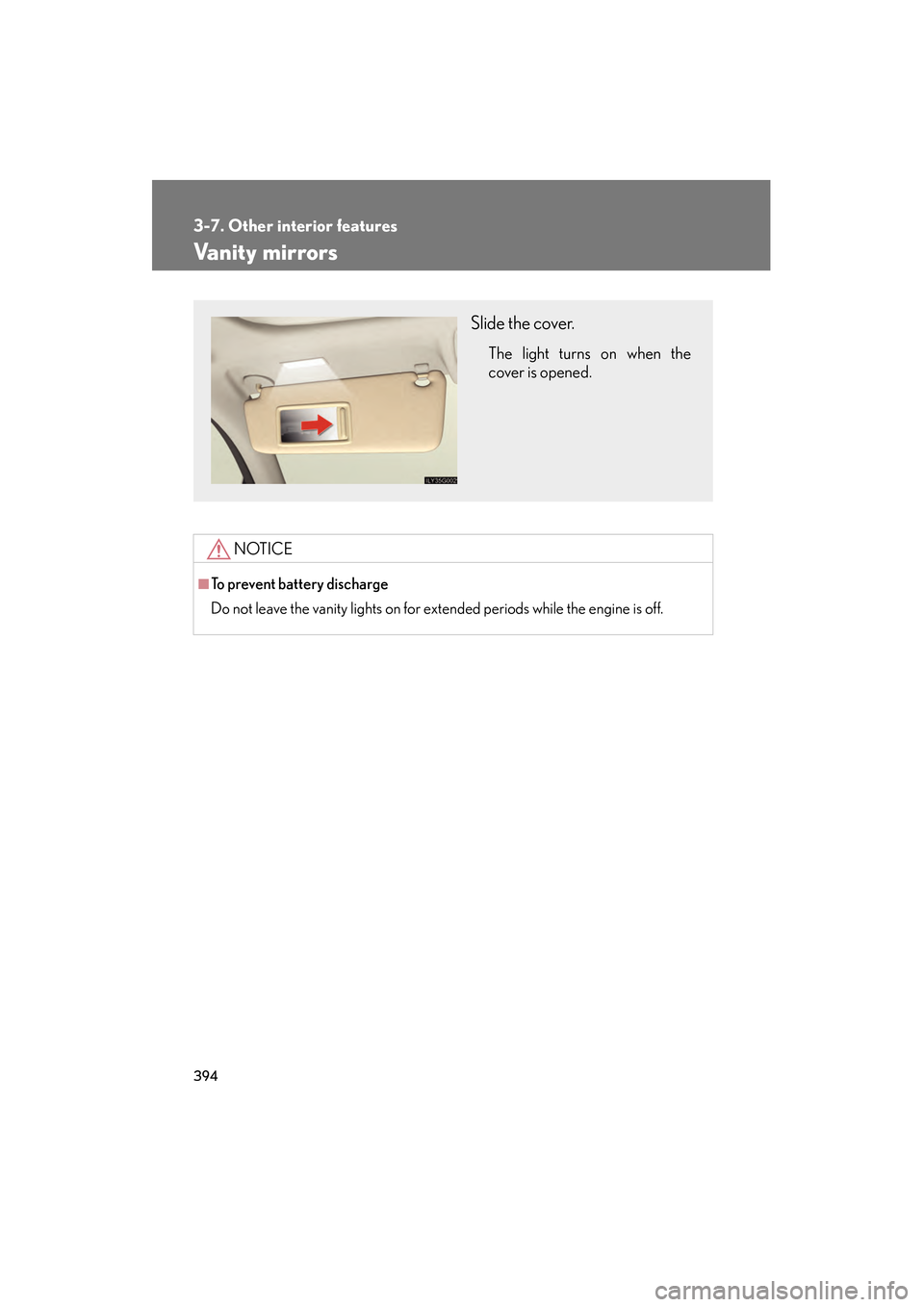
Slide the cover.
The light turns on when the
cover is opened.
GS_U_G.book Page 394 Wednesday, January 27, 2010 4:48 PM
Page 440 of 650
439
4-2. Maintenance
4
Maintenance and care
GS_G_U (OM30C80U)
January 27, 2010 4:47 pm
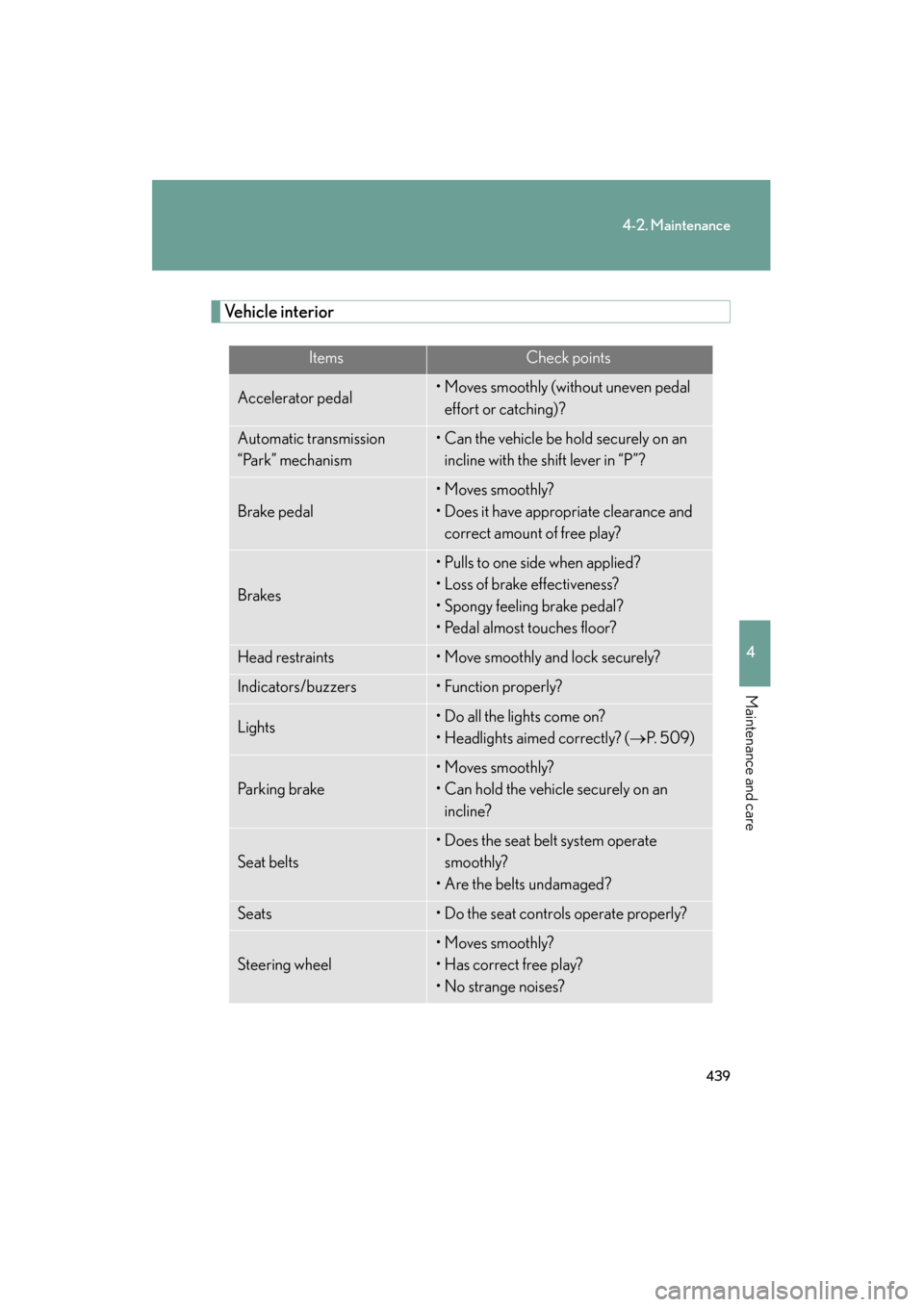
Vehicle interior
ItemsCheck points
Accelerator pedal• Moves smoothly (without uneven pedal effort or catching)?
Automatic transmission
“Park” mechanism• Can the vehicle be hold securely on an incline with the shift lever in “P”?
Brake pedal
• Moves smoothly?
• Does it have appropriate clearance and correct amount of free play?
Brakes
• Pulls to one side when applied?
• Loss of brake effectiveness?
• Spongy feeling brake pedal?
• Pedal almost touches floor?
Head restraints• Move smoothly and lock securely?
Indicators/buzzers• Function properly?
Lights• Do all the lights come on?
• Headlights aimed correctly? ( →P. 5 0 9 )
Pa r k i n g b r a ke
• Moves smoothly?
• Can hold the vehicle securely on an
incline?
Seat belts
• Does the seat belt system operate smoothly?
• Are the belts undamaged?
Seats• Do the seat controls operate properly?
Steering wheel
• Moves smoothly?
• Has correct free play?
• No strange noises?
GS_U_G.book Page 439 Wednesday, January 27, 2010 4:48 PM
Page 569 of 650
568
5-2. Steps to take in an emergency
GS_G_U (OM30C80U)
January 27, 2010 4:47 pm
If the engine will not start
If the engine will not start even though correct starting procedures are
being followed (→P. 135), consider each of the following points.
■The engine will not start even if you are carrying the correct elec-
tronic key
One of the following may be the cause of the problem.
●There may not be sufficient fuel in the vehicle’s tank.
Add fuel to the vehicle.
● The engine may be flooded.
Try to restart the engine once more following correct starting
procedures. ( →P. 135)
● There may be a malfunction in the immobilizer system. ( →P. 8 5 )
■ The starter motor turns over slowly, the interior lights and head-
lights are dim, or the horn does not sound or sounds at a low vol-
ume
One of the following may be the cause of the problem.
● The 12 volt battery may be discharged. ( →P. 5 74 )
● The 12 volt battery terminal connections may be loose or corroded.
■ The starter motor does not turn ov er, the interior lights and head-
lights do not turn on, or the horn does not sound
One of the following may be the cause of the problem.
● One or both of the 12 volt battery terminals may be disconnected.
● The 12 volt battery may be discharged. ( →P. 5 74 )
Contact your Lexus dealer if the problem cannot be repaired, or if
repair procedures are unknown.
GS_U_G.book Page 568 Wednesday, January 27, 2010 4:48 PM