remote control Lexus GS350 2011 Owner's Guide
[x] Cancel search | Manufacturer: LEXUS, Model Year: 2011, Model line: GS350, Model: Lexus GS350 2011Pages: 654, PDF Size: 11.03 MB
Page 412 of 654
411
3-7. Other interior features
3
Interior features
GS_G_U (OM30C11U)
October 28, 2011 5:15 pm
Garage door opener
The garage door opener (HomeLink® Universal Transceiver) is manufactured
under license from HomeLink®.
Programming the HomeLink® (for U.S.A. owners)
The HomeLink
® compatible transceiver in your vehicle has 3 buttons
which can be programmed to operate 3 different devices. Refer to the
programming method below appropriate for the device.
Indicator
Buttons
■ Programming the HomeLink
®
Point the remote control transmit-
ter for the device 1 to 3 in. (25 to
75 mm) from the HomeLink
®
control buttons.
Keep the HomeLink® indicator
light in view while programming.
The garage door opener can be pr ogrammed to operate garage doors,
gates, entry doors, door locks, home lighting systems, security systems, and
other devices.
STEP1
Page 413 of 654
412
3-7. Other interior features
GS_G_U (OM30C11U)
October 28, 2011 5:15 pm
Press and hold one of the
HomeLink® buttons and the trans-
mitter button. When the
HomeLink
® indicator light
changes from a slow to a rapid
flash after 20 seconds, release
both buttons.
Te s t t h e H o m e L i n k
® operation by
pressing the newly programmed
button.
If a HomeLink® button has been
programmed for a garage door,
check to see if the garage door
opens and closes. If the garage
door does not operate, see if your
remote control transmitter is of the
rolling code type. Press and hold
the programmed HomeLink
® but-
ton. The remote control transmitter
is of the rolling code type if the
HomeLink
® indicator light flashes
rapidly for 2 seconds and then
remains lit. If your transmitter is of
the rolling code type, proceed to
the heading “Programming a roll-
ing code system”.
Repeat the steps above to program another device for each of
the remaining HomeLink® buttons.
STEP2
STEP3
STEP4
Page 415 of 654
414
3-7. Other interior features
GS_G_U (OM30C11U)
October 28, 2011 5:15 pm
■Programming an entry gate (for U.S.A. owners)/Programming all
devices in the Canadian market
Place your transmitter 1 to 3 in. (25 to 75 mm) away from the sur-
face of the HomeLink
®.
Keep the indicator light on the HomeLink® in view while programming.
Press and hold the selected HomeLink® button.
Repeatedly press and release (cycle) the device’s remote control
button for two seconds each until step 4 is completed.
When the indicator light on the HomeLink
® compatible trans-
ceiver starts to flash rapidly, release the buttons.
Test the operation of the HomeLink
® by pressing the newly pro-
grammed button. Check to see if the gate/device operates cor-
rectly.
Repeat the steps above to program another device for each of
the remaining HomeLink
® buttons.
■ Programming other devices
To program other devices such as home security systems, home door
locks or lighting, contact your authorized Lexus dealer for assistance.
■ Reprogramming a button
The individual HomeLink
® buttons cannot be erased but can be
reprogrammed. To reprogram a button, follow the “Reprogramming a
HomeLink
® button” instructions.
STEP1
STEP2
STEP3
STEP4
STEP5
STEP6
Page 417 of 654
416
3-7. Other interior features
GS_G_U (OM30C11U)
October 28, 2011 5:15 pm
■Before programming
●Install a new battery in the remote control transmitter.
●The battery side of the remote control transmitter must be pointed away from
the HomeLink® button.
■Certification for the garage door opener
FCC ID: NZLWZLHL4
FCC ID: NZLOBIHL4For vehicles sold in the U.S.A.
NOTE:
This device complies with Part 15 of the FCC Rules.
Operation is subject to the following two conditions: (1) this device may not cause
harmful interference, and (2) this device must accept any interference received,
including interference that may cause undesired operation.
FCC WARNING:
Changes or modifications not expressly approved by the party responsible for
compliance could void the user’s authority to operate the equipment. For vehicles sold in Canada
NOTE:
Operation is subject to the following two conditions: (1) this device may not cause
interference, and (2) this device must accept any interference, including interfer-
ence that may cause undesired operation of the device.
■When support is necessary
Visit on the web at www.homelink.com
or call 1-800-355-3515
Page 418 of 654
417
3-7. Other interior features
3
Interior features
GS_G_U (OM30C11U)
October 28, 2011 5:15 pm
CAUTION
■When programming a garage door or other remote control devices
The garage door on other devices may oper ate, so ensure people and objects are
out of danger to prevent potential harm.
■Conforming to federal safety standards
Do not use the HomeLink
® Compatible Transceiver with any garage door opener
or device that lacks safety stop and reverse features as required by federal safety
standards.
This includes any garage door that cannot detect an obstruction object. A door or
device without these features increases the risk of death or serious injury.
Page 484 of 654
483
4-3. Do-it-yourself maintenance
4
Maintenance and care
GS_G_U (OM30C11U)
October 28, 2011 5:15 pm
■If the electronic key battery is discharged
The following symptoms may occur.
●The smart access system with push-button start and wireless remote control will
not function properly.
●The operational range is reduced.
■Use a CR1632 lithium battery
●Batteries can be purchased at your Lexus dealer, jewelers, or camera stores.
●Replace only with the same or equivalent type recommended by your Lexus
dealer.
●Dispose of used batteries according to the local laws.
■When the card key battery needs to be replaced
The battery for the card key is available only at Lexus dealers. Your Lexus dealer
can replace the battery for you.
CAUTION
■Removed battery and other parts
Keep away from children. These parts are small and if swallowed by a child, they can
cause choking. Failure to do so could result in death or serious injury.
NOTICE
■For normal operation after replacing the battery
Observe the following precautions to prevent accidents.
●Always work with dry hands.
Moisture may cause the battery to rust.
●Do not touch or move any other components inside the electronic key.
●Do not bend the battery terminals.
Page 572 of 654
5
When trouble arises
571
5-2. Steps to take in an emergency
GS_G_U (OM30C11U)
October 28, 2011 5:15 pm
If the electronic key does not operate properly
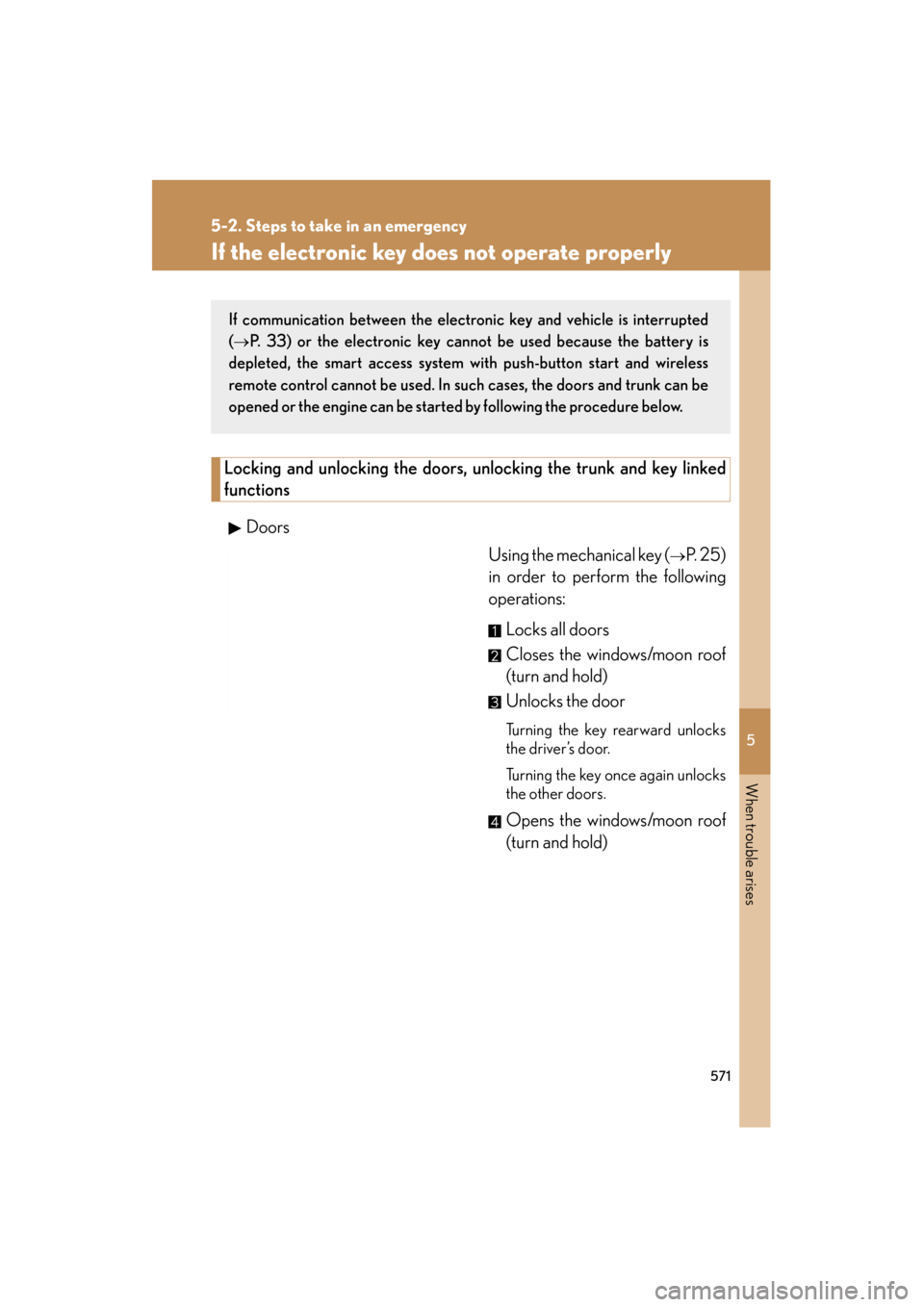
Locking and unlocking the doors, unlocking the trunk and key linked
functions
Doors Using the mechanical key (
→P. 2 5 )
in order to perform the following
operations:
Locks all doors
Closes the windows/moon roof
(turn and hold)
Unlocks the door
Turning the key rearward unlocks
the driver’s door.
Turning the key once again unlocks
the other doors.
Opens the windows/moon roof
(turn and hold)
If communication between the electronic key and vehicle is interrupted
(
→P. 33) or the electronic key cannot be used because the battery is
depleted, the smart access system with push-button start and wireless
remote control cannot be used. In such cases, the doors and trunk can be
opened or the engine can be started by following the procedure below.
Page 619 of 654
618
6-2. Customization
GS_G_U (OM30C11U)
October 28, 2011 5:15 pm
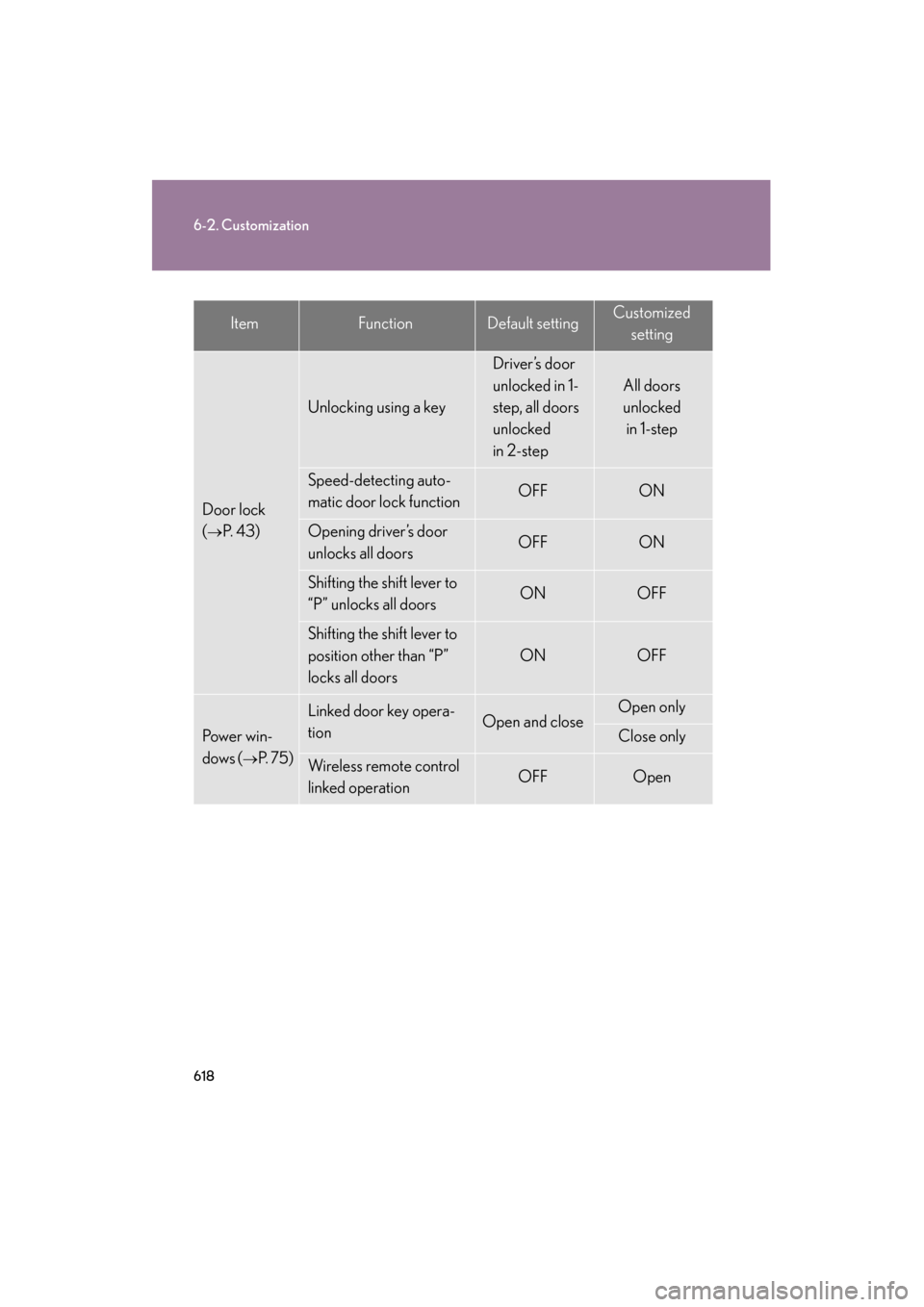
ItemFunctionDefault settingCustomizedsetting
Door lock
(
→P. 4 3 )
Unlocking using a key
Driver’s door
unlocked in 1-
step, all doors
unlocked
in 2-step
All doors
unlocked in 1-step
Speed-detecting auto-
matic door lock functionOFFON
Opening driver’s door
unlocks all doors OFFON
Shifting the shift lever to
“P” unlocks all doorsONOFF
Shifting the shift lever to
position other than “P”
locks all doors
ONOFF
Power win-
dows (
→P. 7 5 )
Linked door key opera-
tionOpen and closeOpen only
Close only
Wireless remote control
linked operationOFFOpen
Page 620 of 654
619
6-2. Customization
6
Vehicle specifications
GS_G_U (OM30C11U)
October 28, 2011 5:15 pm
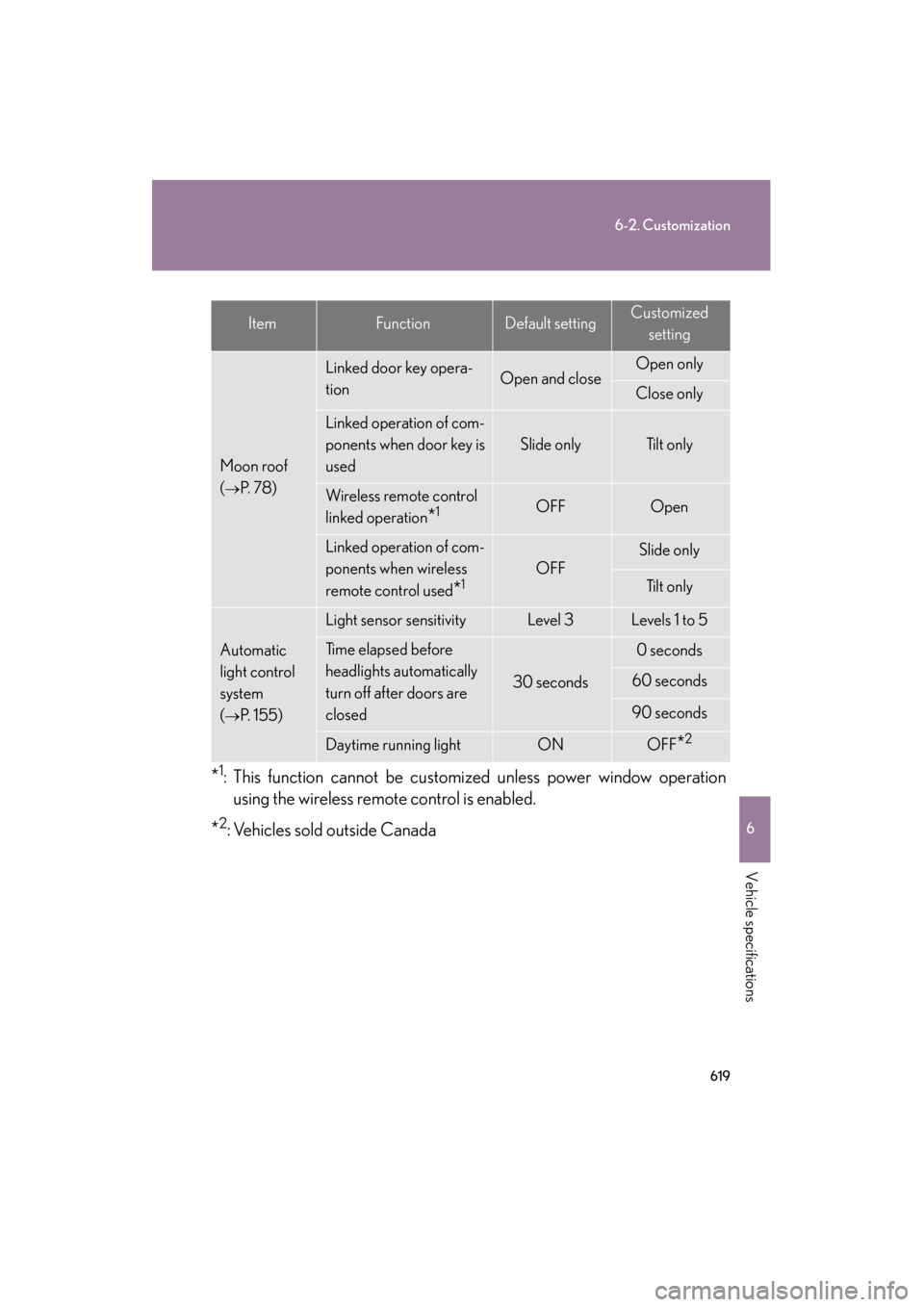
*1: This function cannot be customized unless power window operationusing the wireless remote control is enabled.
*2: Vehicles sold outside Canada
ItemFunctionDefault settingCustomized
setting
Moon roof
(
→P. 7 8 )
Linked door key opera-
tionOpen and closeOpen only
Close only
Linked operation of com-
ponents when door key is
used
Slide onlyTilt only
Wireless remote control
linked operation
*1OFFOpen
Linked operation of com-
ponents when wireless
remote control used
*1OFF
Slide only
Tilt only
Automatic
light control
system
(
→P. 1 5 5 )
Light sensor sensitivityLevel 3Levels 1 to 5
Time elapsed before
headlights automatically
turn off after doors are
closed
30 seconds
0 seconds
60 seconds
90 seconds
Daytime running lightONOFF*2
Page 643 of 654
642
Alphabetical index
GS_G_U (OM30C11U)
October 28, 2011 5:15 pm
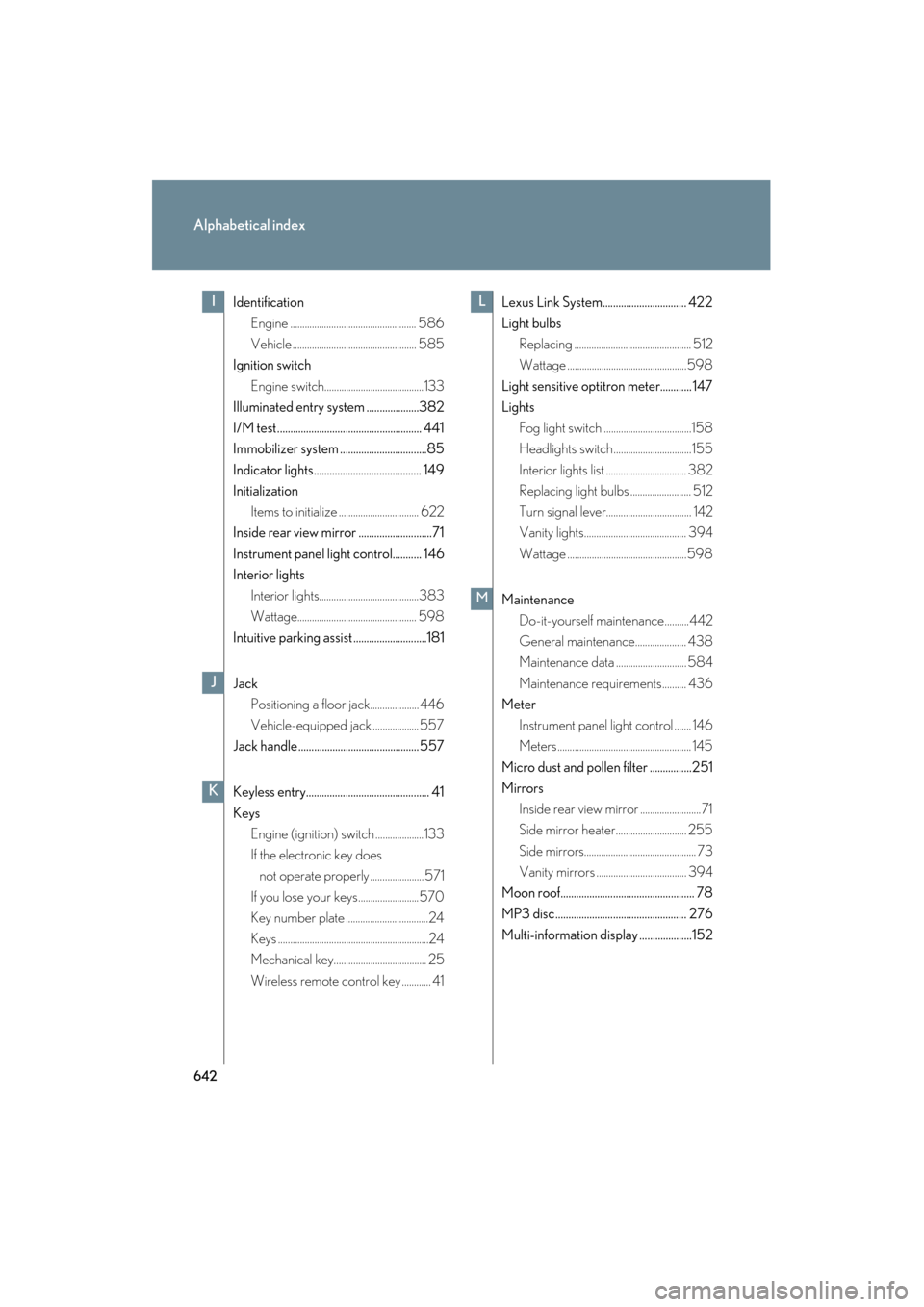
IdentificationEngine .................................................... 586
Vehicle ................................................... 585
Ignition switch
Engine switch.........................................133
Illuminated entry system ....................382
I/M test....................................................... 441
Immobilizer system .................................85
Indicator lights......................................... 149
Initialization
Items to initialize ................................. 622
Inside rear view mirror ............................71
Instrument panel light control........... 146
Interior lights
Interior lights.........................................383
Wattage................................................. 598
Intuitive parking assist ............................181
Jack Positioning a floor jack.................... 446
Vehicle-equipped jack ................... 557
Jack handle .............................................. 557
Keyless entry............................................... 41
Keys Engine (ignition) switch ....................133
If the electronic key does not operate properly ...................... 571
If you lose your keys.........................570
Key number plate ..................................24
Keys ..............................................................24
Mechanical key...................................... 25
Wireless remote control key ............ 41 Lexus Link System................................ 422
Light bulbs
Replacing ................................................ 512
Wattage .................................................598
Light sensitive optitron meter............ 147
Lights Fog light switch ....................................158
Headlights switch................................ 155
Interior lights list ................................. 382
Replacing light bulbs ......................... 512
Turn signal lever................................... 142
Vanity lights.......................................... 394
Wattage .................................................598
Maintenance Do-it-yourself ma intenance..........442
General maintenance..................... 438
Maintenance data ............................. 584
Maintenance requirements.......... 436
Meter
Instrument panel light control ....... 146
Meters....................................................... 145
Micro dust and pollen filter ................251
Mirrors Inside rear view mirror .........................71
Side mirror heater............................. 255
Side mirrors.............................................. 73
Vanity mirrors ..................................... 394
Moon roof................................................... 78
MP3 disc.................................................. 276
Multi-information display ....................152I
J
K
L
M