service Lexus GS350 2012 User Guide
[x] Cancel search | Manufacturer: LEXUS, Model Year: 2012, Model line: GS350, Model: Lexus GS350 2012Pages: 914, PDF Size: 49.39 MB
Page 461 of 914

4505-3. Using the audio system
GS350/250_EE (OM30C36E)
Redistribution and use in source and binary forms, with or without
modification, are permitted provided that the following conditions are met:
1. Redistributions of source code must retain the above copyright notice, this
list of conditions and the following disclaimer.
2. Redistributions in binary form must reproduce the above copyright notice,
this list of conditions and the following disclaimer in the documentation
and/or other materials provided with the distribution.
3. All advertising materials mentioning features or use of this software must
display the following acknowledgement: This product includes software
developed by the University of California, Berkeley and its contributors.
4. Neither the name of the University nor the names of its contributors may
be used to endorse or promote products derived from this software without
specific prior written permission.
THIS SOFTWARE IS PROVIDED BY THE REGENTS AND
CONTRIBUTORS “AS IS” AND ANY EXPRESS OR IMPLIED
WARRANTIES, INCLUDING, BUT NOT LIMITED TO, THE IMPLIED
WARRANTIES OF MERCHANTABILITY AND FITNESS FOR A
PARTICULAR PURPOSE ARE DISCLAIMED. IN NO EVENT SHALL
THE REGENTS OR CONTRIBUTORS BE LIABLE FOR ANY DIRECT,
INDIRECT, INCIDENTAL, SPECIAL, EXEMPLARY, OR
CONSEQUENTIAL DAMAGES (INCLUDING, BUT NOT LIMITED TO,
PROCUREMENT OF SUBSTITUTE GOODS OR SERVICES; LOSS OF
USE, DATA, OR PROFITS; OR BUSINESS INTERRUPTION)
HOWEVER CAUSED AND ON ANY THEORY OF LIABILITY,
WHETHER IN CONTRACT, STRICT LIABILITY, OR TORT
(INCLUDING NEGLIGENCE OR OTHERWISE) ARISING IN ANY WAY
OUT OF THE USE OF THIS SOFTWARE, EVEN IF ADVISED OF THE
POSSIBILITY OF SUCH DAMAGE.
Copyright © 2004 by Internet Systems Consortium, Inc. (““ISC””) Portions
Copyright © 1996-1999 by Internet Software Consortium. Permission to use,
copy, modify, and distribute this software for any purpose with or without fee
is hereby granted, provided that the above copyright notice and this
permission notice appear in all copies.
Page 463 of 914

4525-3. Using the audio system
GS350/250_EE (OM30C36E)
Redistribution and use in source and binary forms, with or without
modification, are permitted provided that the following conditions are met:
1. Redistributions of source code must retain the above copyright notice, this
list of conditions and the following disclaimer.
2. Redistributions in binary form must reproduce the above copyright notice,
this list of conditions and the following disclaimer in the documentation
and/or other materials provided with the distribution.
3. All advertising materials mentioning features or use of this software must
display the following acknowledgement: This product includes software
developed by WIDE Project and its contributors.
4. Neither the name of the project nor the names of its contributors may be
used to endorse or promote products derived from this software without
specific prior written permission.
THIS SOFTWARE IS PROVIDED BY THE PROJECT AND
CONTRIBUTORS “AS IS” AND ANY EXPRESS OR IMPLIED
WARRANTIES, INCLUDING, BUT NOT LIMITED TO, THE IMPLIED
WARRANTIES OF MERCHANTABILITY AND FITNESS FOR A
PARTICULAR PURPOSE ARE DISCLAIMED. IN NO EVENT SHALL
THE PROJECT OR CONTRIBUTORS BE LIABLE FOR ANY DIRECT,
INDIRECT, INCIDENTAL, SPECIAL, EXEMPLARY, OR
CONSEQUENTIAL DAMAGES (INCLUDING, BUT NOT LIMITED TO,
PROCUREMENT OF SUBSTITUTE GOODS OR SERVICES; LOSS OF
USE, DATA, OR PROFITS; OR BUSINESS INTERRUPTION)
HOWEVER CAUSED AND ON ANY THEORY OF LIABILITY,
WHETHER IN CONTRACT, STRICT LIABILITY, OR TORT
(INCLUDING NEGLIGENCE OR OTHERWISE) ARISING IN ANY WAY
OUT OF THE USE OF THIS SOFTWARE, EVEN IF ADVISED OF THE
POSSIBILITY OF SUCH DAMAGE.
Copyright © 1988 Stephen Deering.
Copyright © 1982, 1986 Regents of the University of California. All rights
reserved.
Page 464 of 914

4535-3. Using the audio system
5
Interior features
GS350/250_EE (OM30C36E)
Redistribution and use in source and binary forms, with or without
modification, are permitted provided that the following conditions are met:
1. Redistributions of source code must retain the above copyright notice, this
list of conditions and the following disclaimer.
2. Redistributions in binary form must reproduce the above copyright notice,
this list of conditions and the following disclaimer in the documentation
and/or other materials provided with the distribution.
3. [rescinded 22 July 1999]
4. Neither the name of the University nor the names of its contributors may
be used to endorse or promote products derived from this software without
specific prior written permission.
THIS SOFTWARE IS PROVIDED BY THE REGENTS AND
CONTRIBUTORS “AS IS” AND ANY EXPRESS OR IMPLIED
WARRANTIES, INCLUDING, BUT NOT LIMITED TO, THE IMPLIED
WARRANTIES OF MERCHANTABILITY AND FITNESS FOR A
PARTICULAR PURPOSE ARE DISCLAIMED. IN NO EVENT SHALL
THE REGENTS OR CONTRIBUTORS BE LIABLE FOR ANY DIRECT,
INDIRECT, INCIDENTAL, SPECIAL, EXEMPLARY, OR
CONSEQUENTIAL DAMAGES (INCLUDING, BUT NOT LIMITED TO,
PROCUREMENT OF SUBSTITUTE GOODS OR SERVICES; LOSS OF
USE, DATA, OR PROFITS; OR BUSINESS INTERRUPTION)
HOWEVER CAUSED AND ON ANY THEORY OF LIABILITY,
WHETHER IN CONTRACT, STRICT LIABILITY, OR TORT
(INCLUDING NEGLIGENCE OR OTHERWISE) ARISING IN ANY WAY
OUT OF THE USE OF THIS SOFTWARE, EVEN IF ADVISED OF THE
POSSIBILITY OF SUCH DAMAGE.
Copyright © 1982, 1986, 1988 Regents of the University of California. All
rights reserved.
Redistribution and use in source and binary forms are permitted provided
that the above copyright notice and this paragraph are duplicated in all such
forms and that any documentation and other materials related to such
distribution and use acknowledge that the software was developed by the
University of California, Berkeley. The name of the University may not be
used to endorse or promote products derived from this software without
specific prior written permission.
Page 467 of 914

4565-3. Using the audio system
GS350/250_EE (OM30C36E)
THIS SOFTWARE IS PROVIDED BY THE OpenSSL PROJECT “AS IS”
AND ANY EXPRESSED OR IMPLIED WARRANTIES, INCLUDING,
BUT NOT LIMITED TO, THE IMPLIED WARRANTIES OF
MERCHANTABILITY AND FITNESS FOR A PARTICULAR PURPOSE
ARE DISCLAIMED. IN NO EVENT SHALL THE OpenSSL PROJECT
OR ITS CONTRIBUTORS BE LIABLE FOR ANY DIRECT, INDIRECT,
INCIDENTAL, SPECIAL, EXEMPLARY, OR CONSEQUENTIAL
DAMAGES (INCLUDING, BUT NOT LIMITED TO, PROCUREMENT
OF SUBSTITUTE GOODS OR SERVICES; LOSS OF USE, DATA, OR
PROFITS; OR BUSINESS INTERRUPTION) HOWEVER CAUSED AND
ON ANY THEORY OF LIABILITY, WHETHER IN CONTRACT, STRICT
LIABILITY, OR TORT (INCLUDING NEGLIGENCE OR OTHERWISE)
ARISING IN ANY WAY OUT OF THE USE OF THIS SOFTWARE,
EVEN IF ADVISED OF THE POSSIBILITY OF SUCH DAMAGE.
This product includes cryptographic software written by Eric Young
([email protected]
). This product includes software written by Tim Hudson
([email protected]
).
Original SSLeay License
Copyright © 1995-1998 Eric Young ([email protected]
) All rights
reserved.
This package is an SSL implementation written by Eric Young
([email protected]
). The implementation was written so as to conform with
Netscapes SSL. This library is free for commercial and non-commercial use
as long as the following conditions are aheared to. The following conditions
apply to all code found in this distribution, be it the RC4, RSA, lhash, DES,
etc., code; not just the SSL code. The SSL documentation included with this
distribution is covered by the same copyright terms except that the holder is
Tim Hudson ([email protected]
). Copyright remains Eric Young’s, and as
such any Copyright notices in the code are not to be removed. If this package
is used in a product, Eric Young should be given attribution as the author of
the parts of the library used. This can be in the form of a textual message at
program startup or in documentation (online or textual) provided with the
package.
Page 468 of 914

457
5 5-3. Using the audio system
Interior features
GS350/250_EE (OM30C36E)
Redistribution and use in source and binary forms, with or without
modification, are permitted provided that the following conditions are met:
1. Redistributions of source code must retain the copyright notice, this list of
conditions and the following disclaimer.
2. Redistributions in binary form must reproduce the above copyright notice,
this list of conditions and the following disclaimer in the documentation
and/or other materials provided with the distribution.
3. All advertising materials mentioning features or use of this software must
display the following acknowledgement: “This product includes
cryptographic software written by Eric Young ([email protected]
)” The
word ‘cryptographic’ can be left out if the rouines from the library being
used are not cryptographic related :-).
4. If you include any Windows specific code (or a derivative thereof) from
the apps directory (application code) you must include an
acknowledgement: “This product includes software written by Tim
Hudson ([email protected]
)”
THIS SOFTWARE IS PROVIDED BY ERIC YOUNG “AS IS” AND ANY
EXPRESS OR IMPLIED WARRANTIES, INCLUDING, BUT NOT
LIMITED TO, THE IMPLIED WARRANTIES OF MERCHANTABILITY
AND FITNESS FOR A PARTICULAR PURPOSE ARE DISCLAIMED. IN
NO EVENT SHALL THE AUTHOR OR CONTRIBUTORS BE LIABLE
FOR ANY DIRECT, INDIRECT, INCIDENTAL, SPECIAL,
EXEMPLARY, OR CONSEQUENTIAL DAMAGES (INCLUDING, BUT
NOT LIMITED TO, PROCUREMENT OF SUBSTITUTE GOODS OR
SERVICES; LOSS OF USE, DATA, OR PROFITS; OR BUSINESS
INTERRUPTION) HOWEVER CAUSED AND ON ANY THEORY OF
LIABILITY, WHETHER IN CONTRACT, STRICT LIABILITY, OR TORT
(INCLUDING NEGLIGENCE OR OTHERWISE) ARISING IN ANY WAY
OUT OF THE USE OF THIS SOFTWARE, EVEN IF ADVISED OF THE
POSSIBILITY OF SUCH DAMAGE.
The licence and distribution terms for any publically available version or
derivative of this code cannot be changed. i.e. this code cannot simply be
copied and put under another distribution licence [including the GNU Public
Licence.
Page 471 of 914
4605-3. Using the audio system
GS350/250_EE (OM30C36E)
Seek tuning
Press and hold “<” or “>” on the “CH•TRACK” button.
Manual tuning
Turn the “TUNE/SCROLL” knob.
Preset stations
Select the desired preset stations (1 - 6).
Press “<” or “>” on the “CH•TRACK” button.
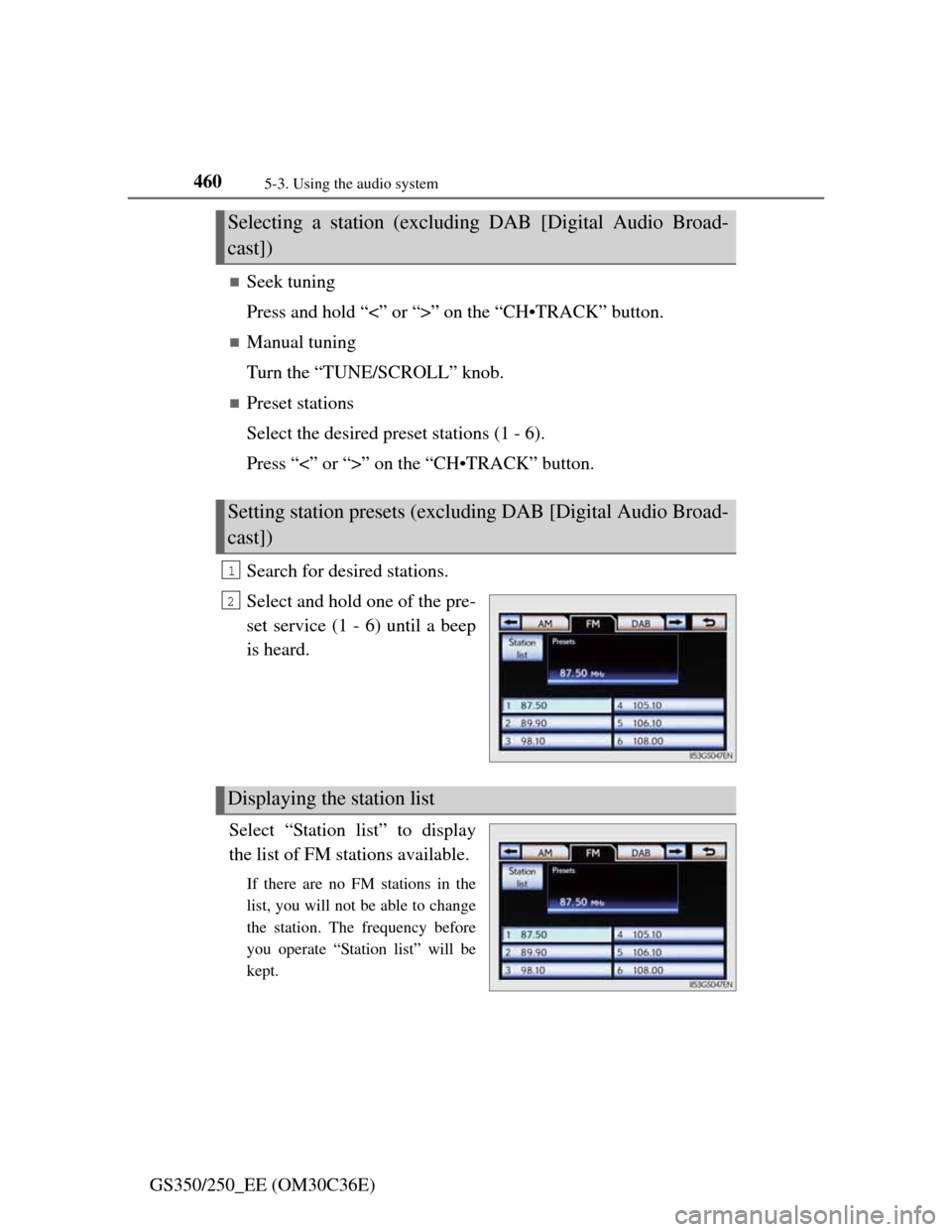
Search for desired stations.
Select and hold one of the pre-
set service (1 - 6) until a beep
is heard.
Select “Station list” to display
the list of FM stations available.
If there are no FM stations in the
list, you will not be able to change
the station. The frequency before
you operate “Station list” will be
kept.
Selecting a station (excluding DAB [Digital Audio Broad-
cast])
Setting station presets (excluding DAB [Digital Audio Broad-
cast])
1
2
Displaying the station list
Page 474 of 914
4635-3. Using the audio system
5
Interior features
GS350/250_EE (OM30C36E)
Listening to stations of the same network
FM alternative frequency:The station among those of the same
network with strong reception is
selected. FM alternative frequency on/
off (P. 461)
Regional code change: The station among those of the same net-
work with strong reception and broad-
casting the same program is selected.
Regional code change on/off (P. 461)
FM Traffic announcement
The system automatically switches to traffic information when a
broadcast with a traffic information signal is received.
“TP” (Traffic program) will appear on the screen. The station returns to
the previous one when the traffic information ends.
FM Traffic announcement on/off (P. 461)
Selecting a channel
Press “<” or “>” on “CH•TRACK” button or select or
on the screen.
Selecting a service
Manual tuning
Turn the “TUNE/SCROLL” knob.
Service list
Select one of the displayed services on the service list screen.
Preset stations
Select the desired preset stations (1 - 6).
RDS (Radio Data System)
DAB (Digital Audio Broadcast)
Page 475 of 914
4645-3. Using the audio system
GS350/250_EE (OM30C36E)
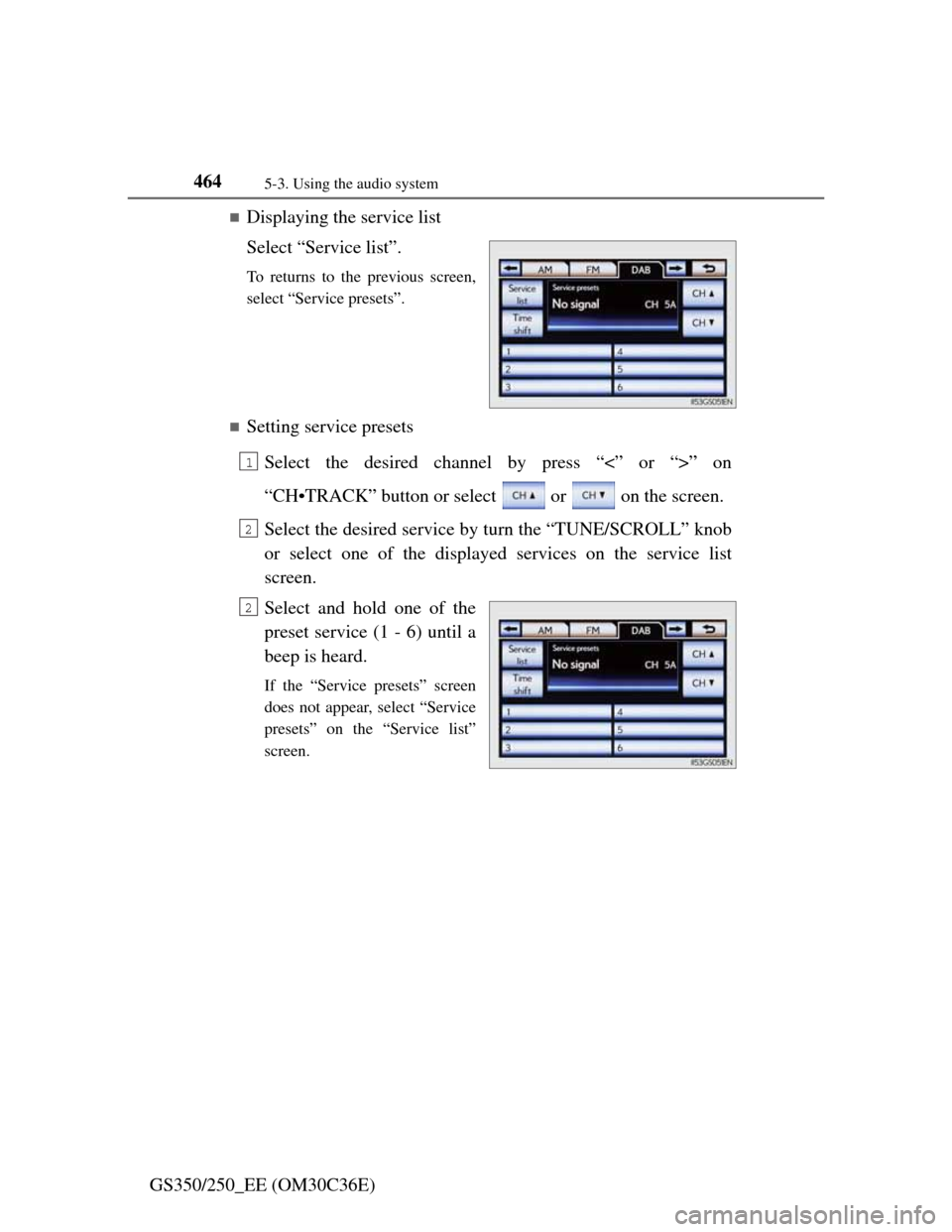
Displaying the service list
Select “Service list”.
To returns to the previous screen,
select “Service presets”.
Setting service presets
Select the desired channel by press “<” or “>” on
“CH•TRACK” button or select or on the screen.
Select the desired service by turn the “TUNE/SCROLL” knob
or select one of the displayed services on the service list
screen.
Select and hold one of the
preset service (1 - 6) until a
beep is heard.
If the “Service presets” screen
does not appear, select “Service
presets” on the “Service list”
screen.
1
2
2
Page 476 of 914
465
5 5-3. Using the audio system
Interior features
GS350/250_EE (OM30C36E)
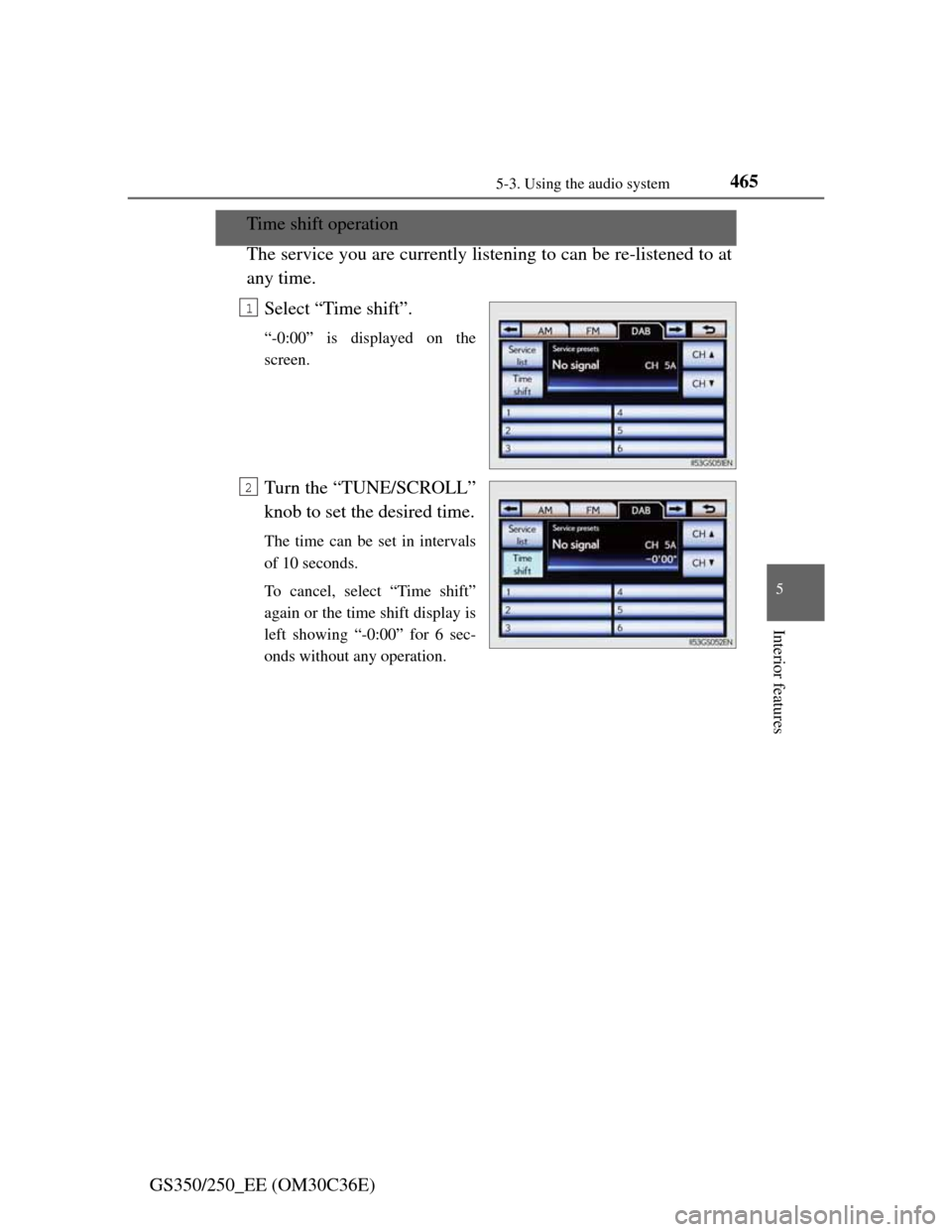
Time shift operation
The service you are currently listening to can be re-listened to at
any time.
Select “Time shift”.
“-0:00” is displayed on the
screen.
Turn the “TUNE/SCROLL”
knob to set the desired time.
The time can be set in intervals
of 10 seconds.
To cancel, select “Time shift”
again or the time shift display is
left showing “-0:00” for 6 sec-
onds without any operation.
1
2
Page 554 of 914
5435-3. Using the audio system
5
Interior features
GS350/250_EE (OM30C36E)
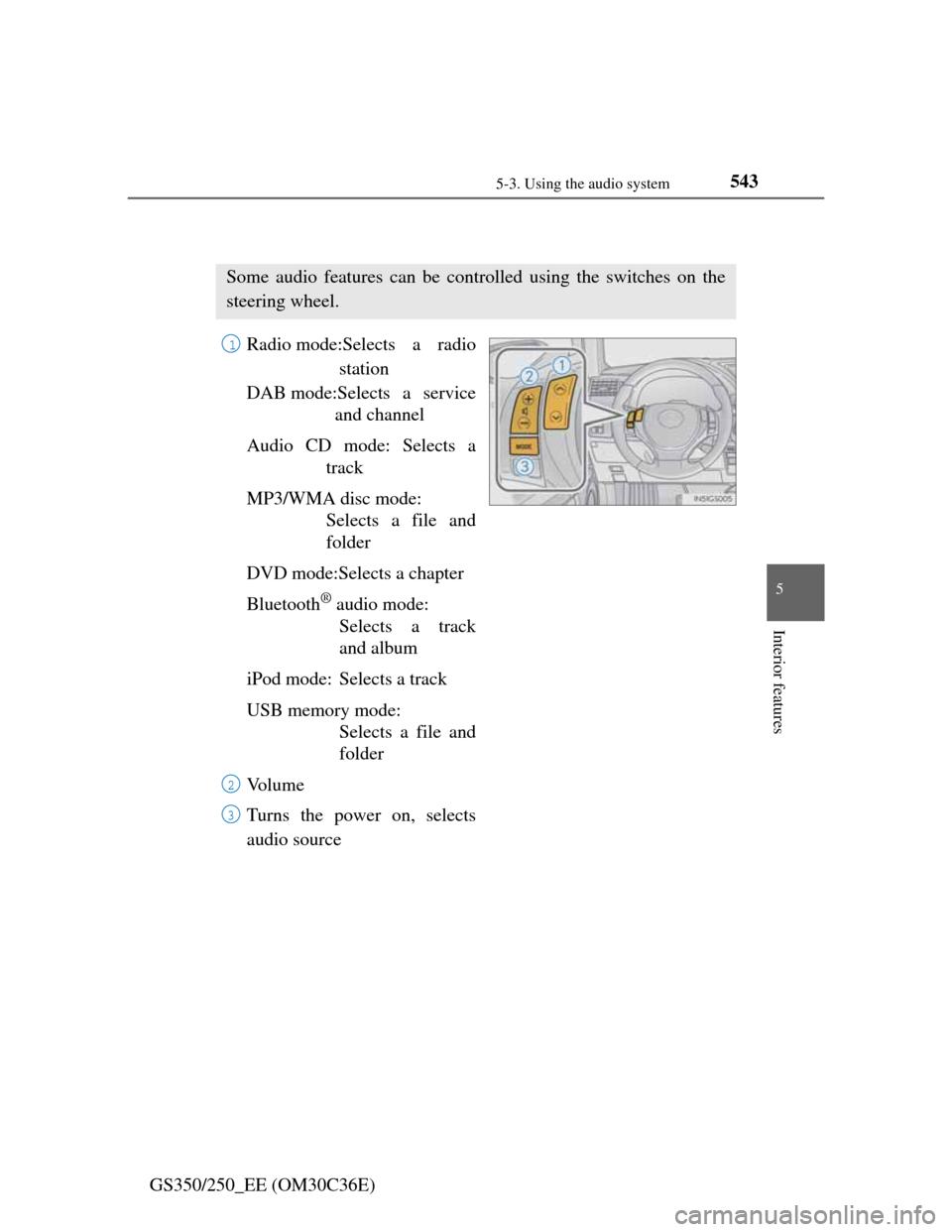
Using the steering wheel audio switches
Radio mode:Selects a radio
station
DAB mode:Selects a service
and channel
Audio CD mode: Selects a
track
MP3/WMA disc mode:
Selects a file and
folder
DVD mode:Selects a chapter
Bluetooth
® audio mode:
Selects a track
and album
iPod mode: Selects a track
USB memory mode:
Selects a file and
folder
Vo l u m e
Turns the power on, selects
audio source
Some audio features can be controlled using the switches on the
steering wheel.
1
2
3