engine Lexus GS350 2012 Owner's Guide
[x] Cancel search | Manufacturer: LEXUS, Model Year: 2012, Model line: GS350, Model: Lexus GS350 2012Pages: 914, PDF Size: 49.39 MB
Page 100 of 914
992. Instrument cluster
2
Instrument cluster
GS350/250_EE (OM30C36E)
Gauges and meters
The units used on the speedometer may differ depending on the target
region.
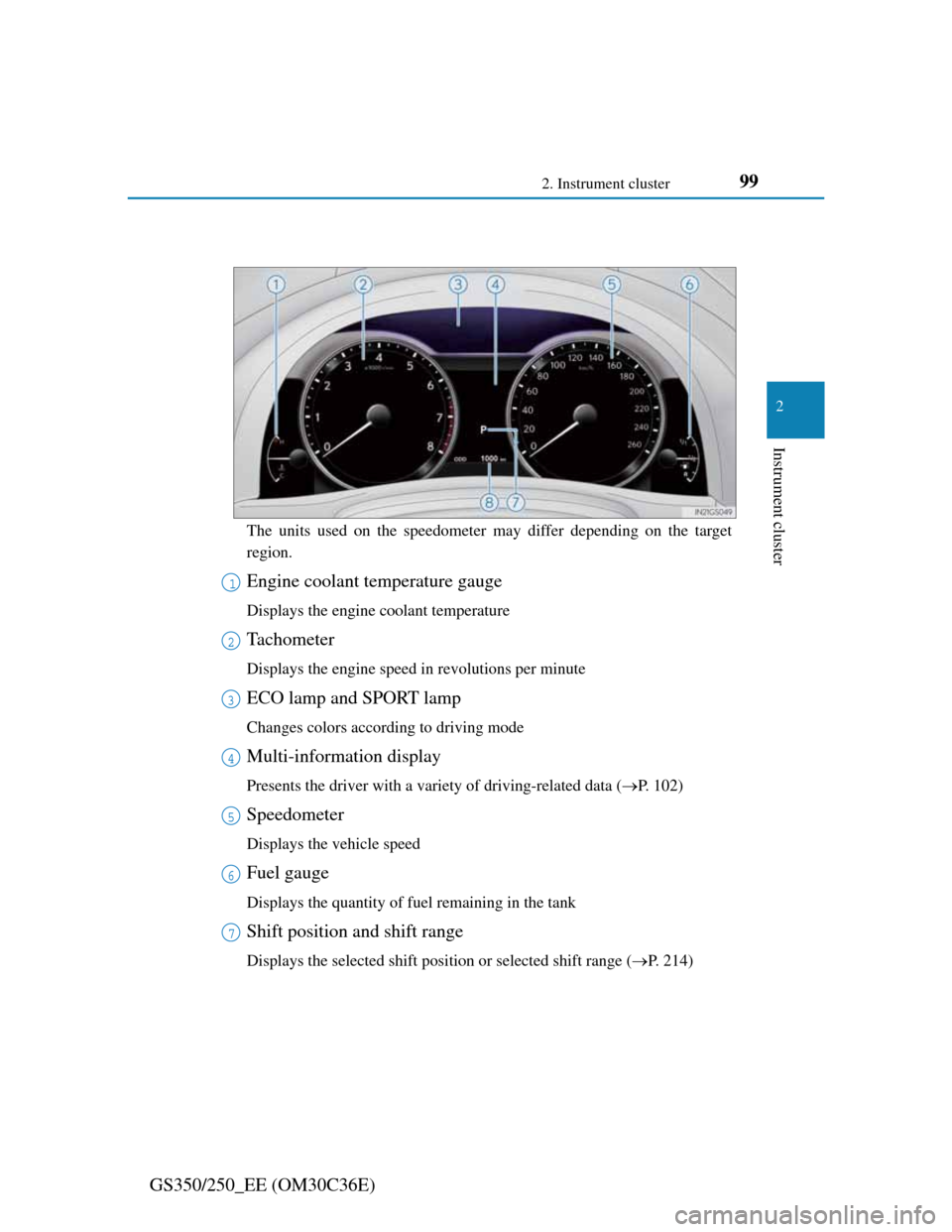
Engine coolant temperature gauge
Displays the engine coolant temperature
Tachometer
Displays the engine speed in revolutions per minute
ECO lamp and SPORT lamp
Changes colors according to driving mode
Multi-information display
Presents the driver with a variety of driving-related data (P. 102)
Speedometer
Displays the vehicle speed
Fuel gauge
Displays the quantity of fuel remaining in the tank
Shift position and shift range
Displays the selected shift position or selected shift range (P. 214)
1
2
3
4
5
6
7
Page 102 of 914
101
2 2. Instrument cluster
Instrument cluster
GS350/250_EE (OM30C36E)
The meters and display illuminate when
The engine switch is in IGNITION ON mode.
Instrument panel brightness adjustment
The instrument panel brightness levels when the tail lights are on and off can
be adjusted individually. However, when the surroundings are bright (day-
time, etc.), turning on the tail lights will not change the instrument panel
brightness.
Limitation of brightness adjustment
The brightness of the instrument panel lights is automatically adjusted based
on the light sensor detecting how bright the surroundings are. However, if the
instrument panel brightness has been manually set to either the brightest or
darkest setting, the automatic adjustment will not be performed.
ECO lamp and SPORT lamp
When sport mode is selected, SPORT lamp (red) will illuminate.
When all of the following conditions are satisfied and Eco-friendly driving,
ECO lamp (blue) will illuminate. (ECO lamp will become brighter the more
Eco-friendly driving you perform. Also, while the acceleration exceeds
Zone of Eco driving, ECO lamp turns off. (P. 109) However, when Eco
drive mode is selected, while the acceleration exceeds Zone of Eco driving,
ECO lamp does not turn off.):
• Driving with the shift lever in D
• Paddle shift switch is not operated.
• Either normal mode or Eco drive mode is selected.
• The vehicle speed is approximately 130 km/h (80 mph) or below.
Customization
Settings (e.g. on/off operation of ECO lamp) can be changed.
(Customizable features P. 857)
NOTICE
To prevent damage to the engine and its components
Do not let the indicator needle of the tachometer enter the red zone, which
indicates the maximum engine speed.
The engine may be overheating if the engine coolant temperature gauge is
in the red zone (H). In this case, immediately stop the vehicle in a safe
place, and check the engine after it has cooled completely. (P. 829)
Page 106 of 914
1052. Instrument cluster
2
Instrument cluster
GS350/250_EE (OM30C36E)
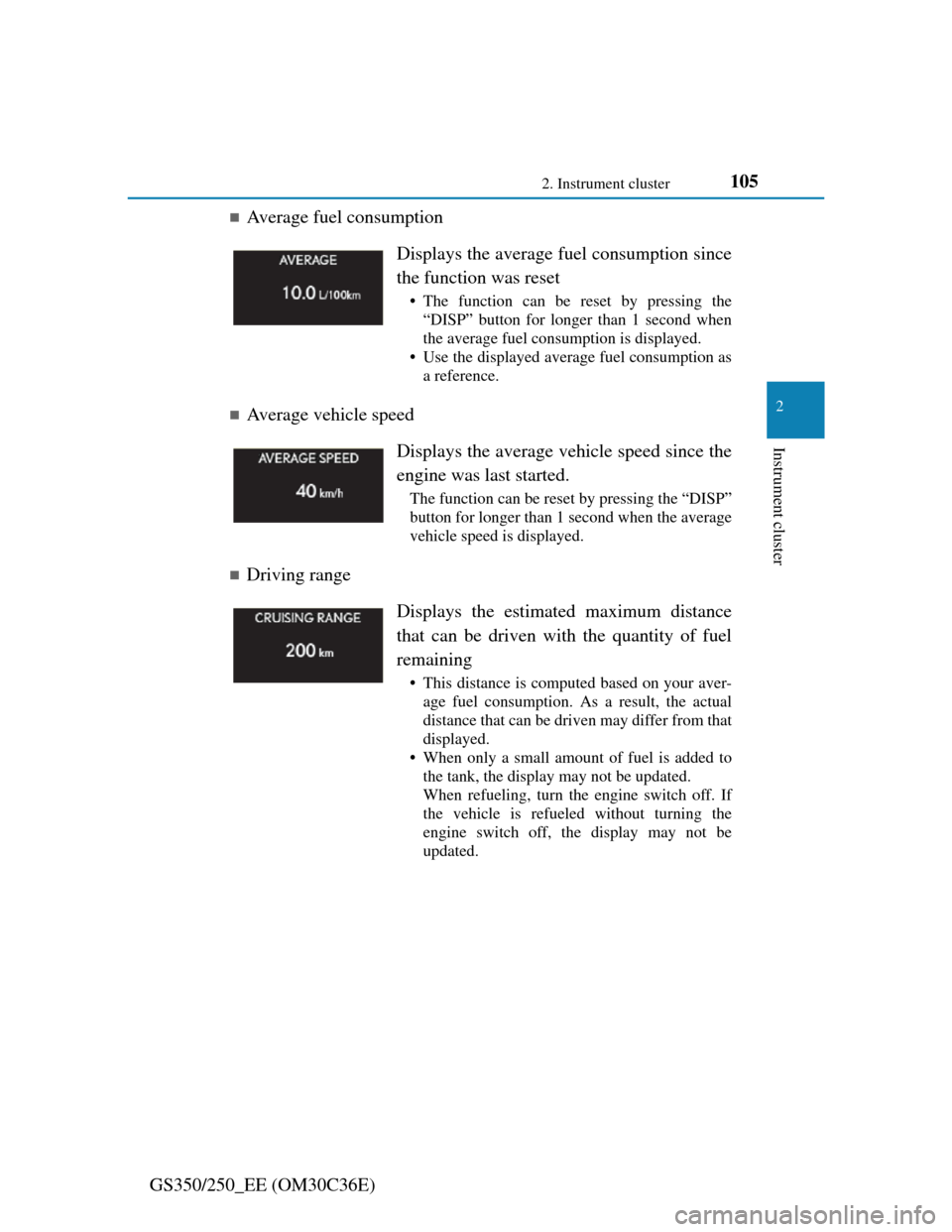
Average fuel consumption
Average vehicle speed
Driving range Displays the average fuel consumption since
the function was reset
• The function can be reset by pressing the
“DISP” button for longer than 1 second when
the average fuel consumption is displayed.
• Use the displayed average fuel consumption as
a reference.
Displays the average vehicle speed since the
engine was last started.
The function can be reset by pressing the “DISP”
button for longer than 1 second when the average
vehicle speed is displayed.
Displays the estimated maximum distance
that can be driven with the quantity of fuel
remaining
• This distance is computed based on your aver-
age fuel consumption. As a result, the actual
distance that can be driven may differ from that
displayed.
• When only a small amount of fuel is added to
the tank, the display may not be updated.
When refueling, turn the engine switch off. If
the vehicle is refueled without turning the
engine switch off, the display may not be
updated.
Page 110 of 914
109
2 2. Instrument cluster
Instrument cluster
GS350/250_EE (OM30C36E)
System check display
After turning the engine switch to IGNITION ON mode, “SYSTEM
CHECK” is displayed while system operation is checked.
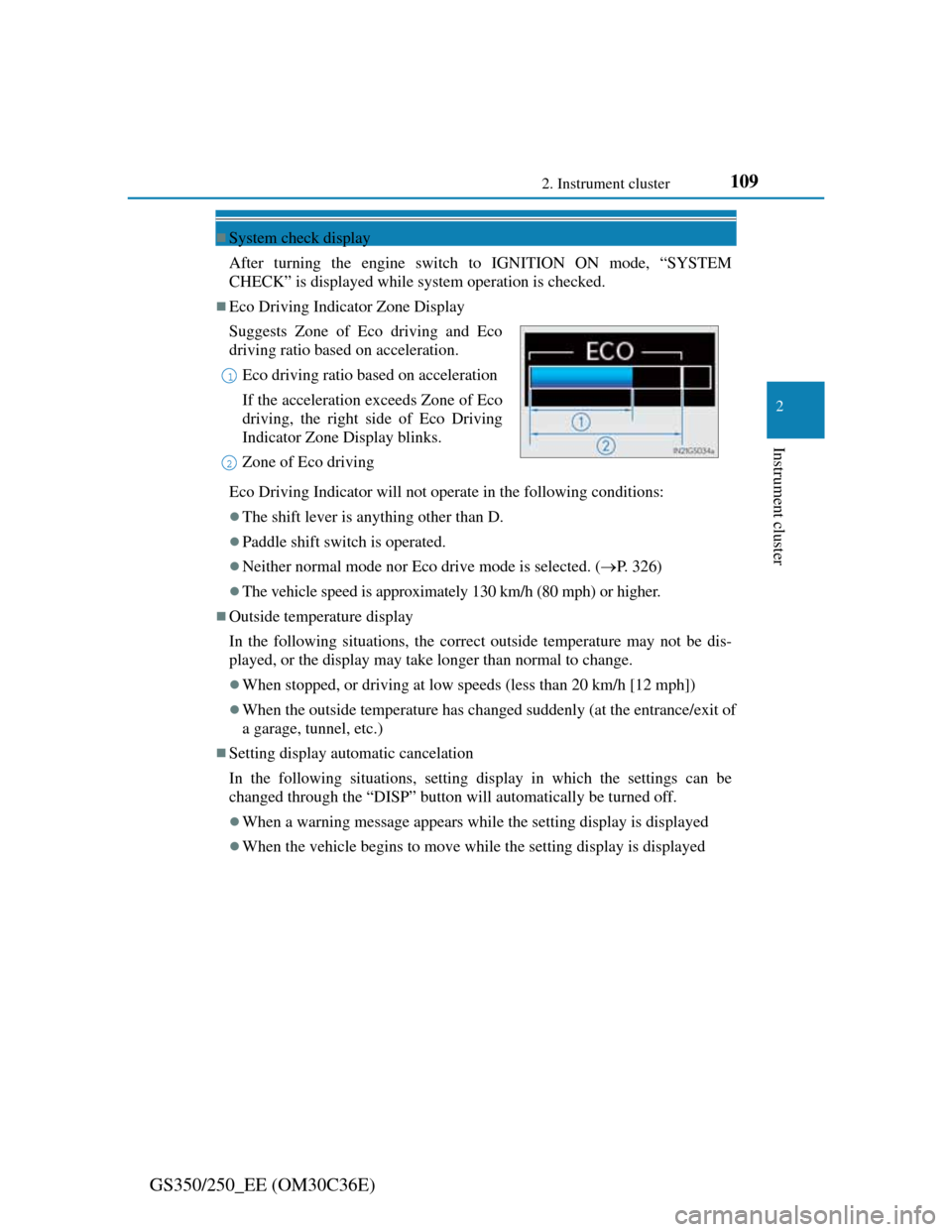
Eco Driving Indicator Zone Display
Eco Driving Indicator will not operate in the following conditions:
The shift lever is anything other than D.
Paddle shift switch is operated.
Neither normal mode nor Eco drive mode is selected. (P. 326)
The vehicle speed is approximately 130 km/h (80 mph) or higher.
Outside temperature display
In the following situations, the correct outside temperature may not be dis-
played, or the display may take longer than normal to change.
When stopped, or driving at low speeds (less than 20 km/h [12 mph])
When the outside temperature has changed suddenly (at the entrance/exit of
a garage, tunnel, etc.)
Setting display automatic cancelation
In the following situations, setting display in which the settings can be
changed through the “DISP” button will automatically be turned off.
When a warning message appears while the setting display is displayed
When the vehicle begins to move while the setting display is displayed Suggests Zone of Eco driving and Eco
driving ratio based on acceleration.
Eco driving ratio based on acceleration
If the acceleration exceeds Zone of Eco
driving, the right side of Eco Driving
Indicator Zone Display blinks.
Zone of Eco driving
1
2
Page 111 of 914

1102. Instrument cluster
GS350/250_EE (OM30C36E)
Tire inflation pressure (if equipped)
It may take a few minutes to display the tire inflation pressure after the
engine switch is turned to IGNITION ON mode. It may also take a few
minutes to display the tire inflation pressure after inflation pressure has
been adjusted.
“---” may be displayed if the tire position information cannot be determined
due to unfavorable radio wave conditions.
Tire inflation pressure changes with temperature. The displayed values may
also be different from the values measured using a tire pressure gauge.
Liquid crystal display
Small spots or light spots may appear on the display. This phenomenon is
characteristic of liquid crystal displays, and there is no problem continuing to
use the display.
Customization
Setting of available languages can be changed. (Customizable features P.
857)
CAUTION
The information display at low temperatures
Allow the interior of the vehicle to warm up before using the liquid crystal
information display. At extremely low temperatures, the information dis-
play monitor may respond slowly, and display changes may be delayed.
For example, there is a lag between the driver’s shifting and the new gear
number appearing on the display. This lag could cause the driver to down-
shift again, causing rapid and excessive engine braking and possibly an
accident resulting in death or injury.
Cautions during setting up the display
As the engine needs to be running during setting up the display, ensure that
the vehicle is parked in a place with adequate ventilation. In a closed area
such as a garage, exhaust gases including harmful carbon monoxide (CO)
may collect and enter the vehicle. This may lead to death or a serious health
hazard.
Page 112 of 914

1112. Instrument cluster
2
Instrument cluster
GS350/250_EE (OM30C36E)
NOTICE
During setting up the display
To prevent battery discharge, ensure that the engine is running while setting
up the display features.
Page 119 of 914
1182. Instrument cluster
GS350/250_EE (OM30C36E)
Head-up display
The head-up display may seem dark and hard to see when viewed through
sunglasses, especially polarized sunglasses.
Adjust the brightness of the head-up display or remove your sunglasses.
When the head-up display is turned off, it will remain off even if the engine
switch is turned to IGNITION ON mode after the engine switch has been
turned off.
When the battery is disconnected
The customize settings of the head-up display will be reset.
CAUTION
Before using the head-up display
Check that the position and brightness of the head-up display image does
not interfere with safe driving. Incorrect adjustment of the image’s position
or brightness may obstruct the driver’s view and lead to an accident, result-
ing in death or serious injury.
NOTICE
To prevent damage to components
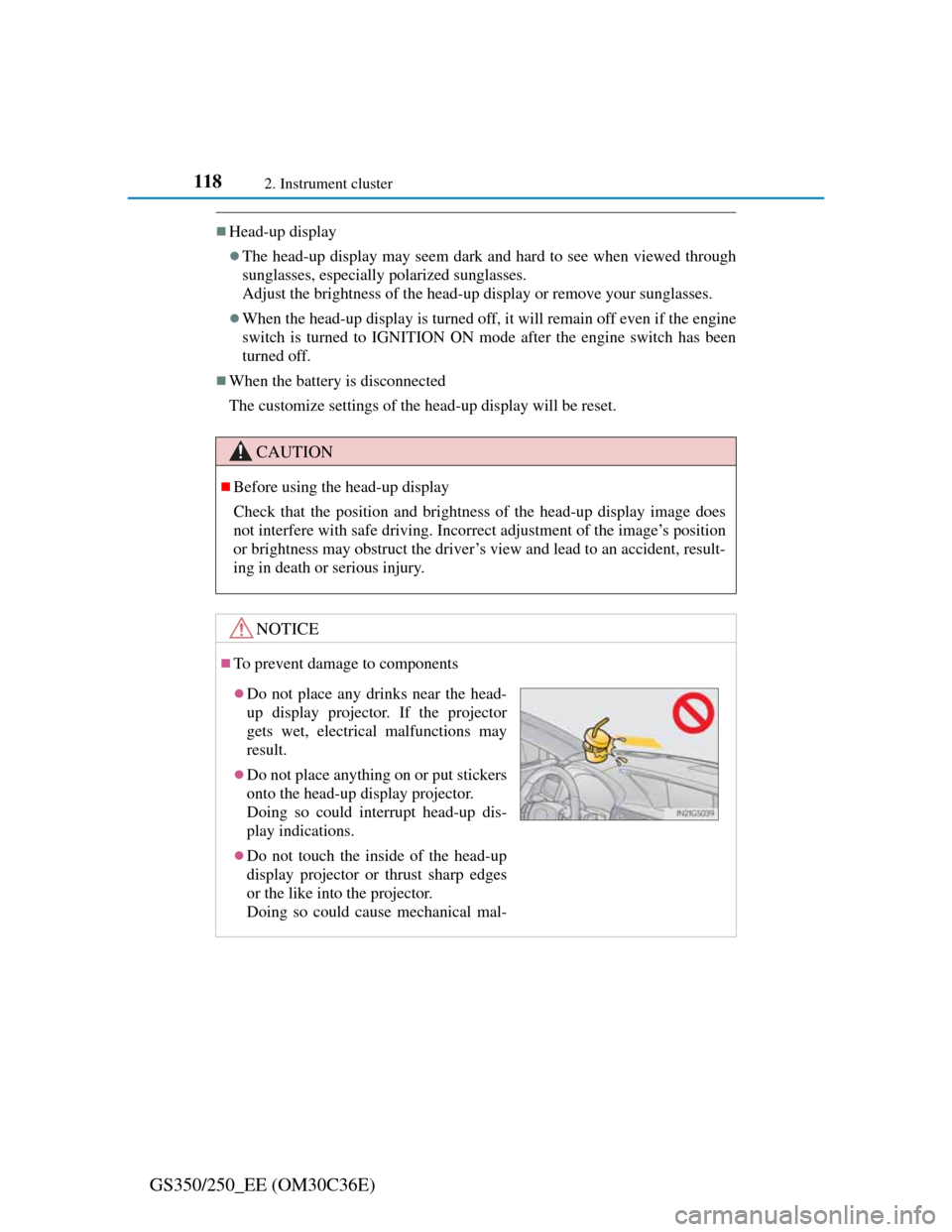
Do not place any drinks near the head-
up display projector. If the projector
gets wet, electrical malfunctions may
result.
Do not place anything on or put stickers
onto the head-up display projector.
Doing so could interrupt head-up dis-
play indications.
Do not touch the inside of the head-up
display projector or thrust sharp edges
or the like into the projector.
Doing so could cause mechanical mal-
Page 126 of 914
123
3 3-2. Opening, closing and locking the doors and trunk
Operation of each component
GS350/250_EE (OM30C36E)
Smart entry & start system
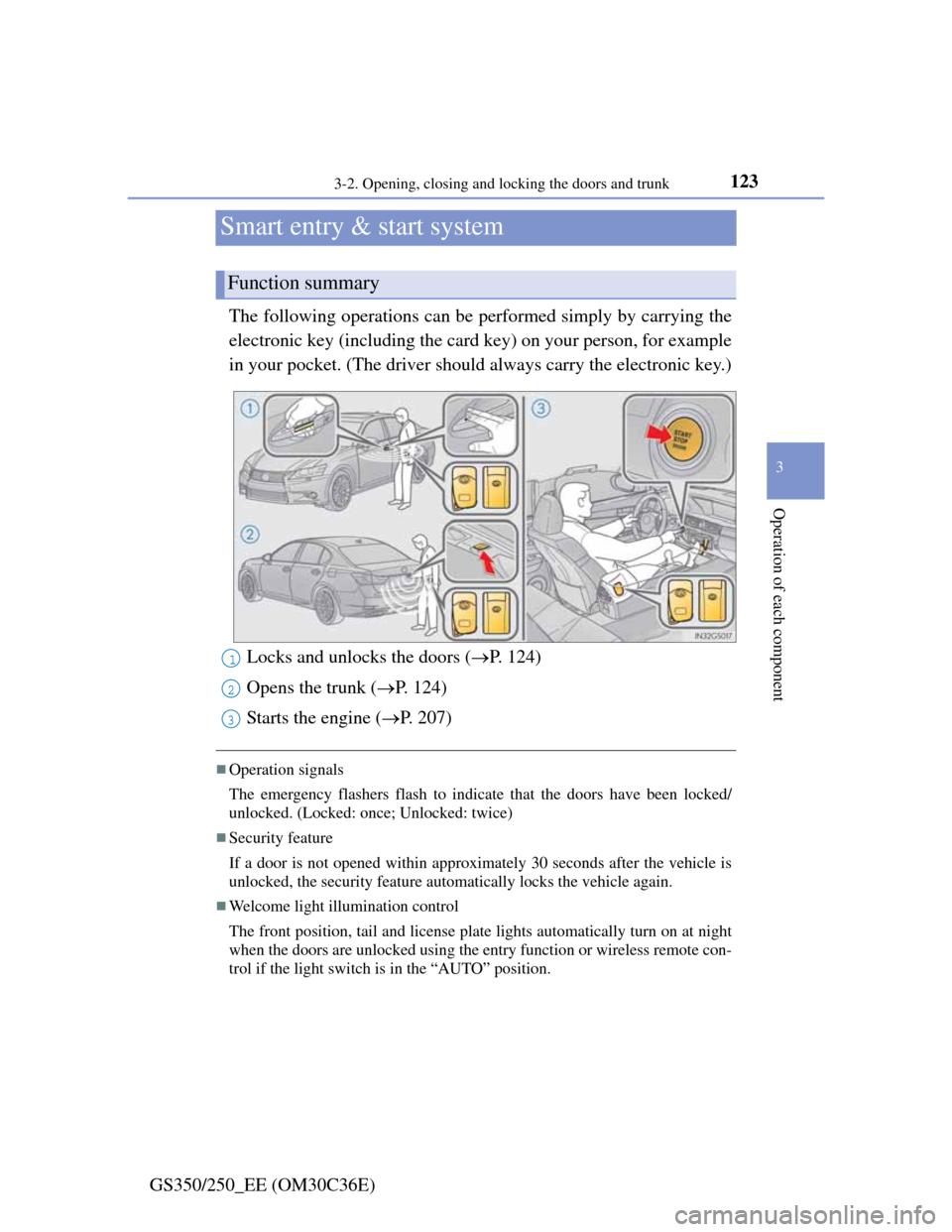
The following operations can be performed simply by carrying the
electronic key (including the card key) on your person, for example
in your pocket. (The driver should always carry the electronic key.)
Operation signals
The emergency flashers flash to indicate that the doors have been locked/
unlocked. (Locked: once; Unlocked: twice)
Security feature
If a door is not opened within approximately 30 seconds after the vehicle is
unlocked, the security feature automatically locks the vehicle again.
Welcome light illumination control
The front position, tail and license plate lights automatically turn on at night
when the doors are unlocked using the entry function or wireless remote con-
trol if the light switch is in the “AUTO” position.
Function summary
Locks and unlocks the doors (P. 124)
Opens the trunk (P. 124)
Starts the engine (P. 207)1
2
3
Page 129 of 914
1263-2. Opening, closing and locking the doors and trunk
GS350/250_EE (OM30C36E)
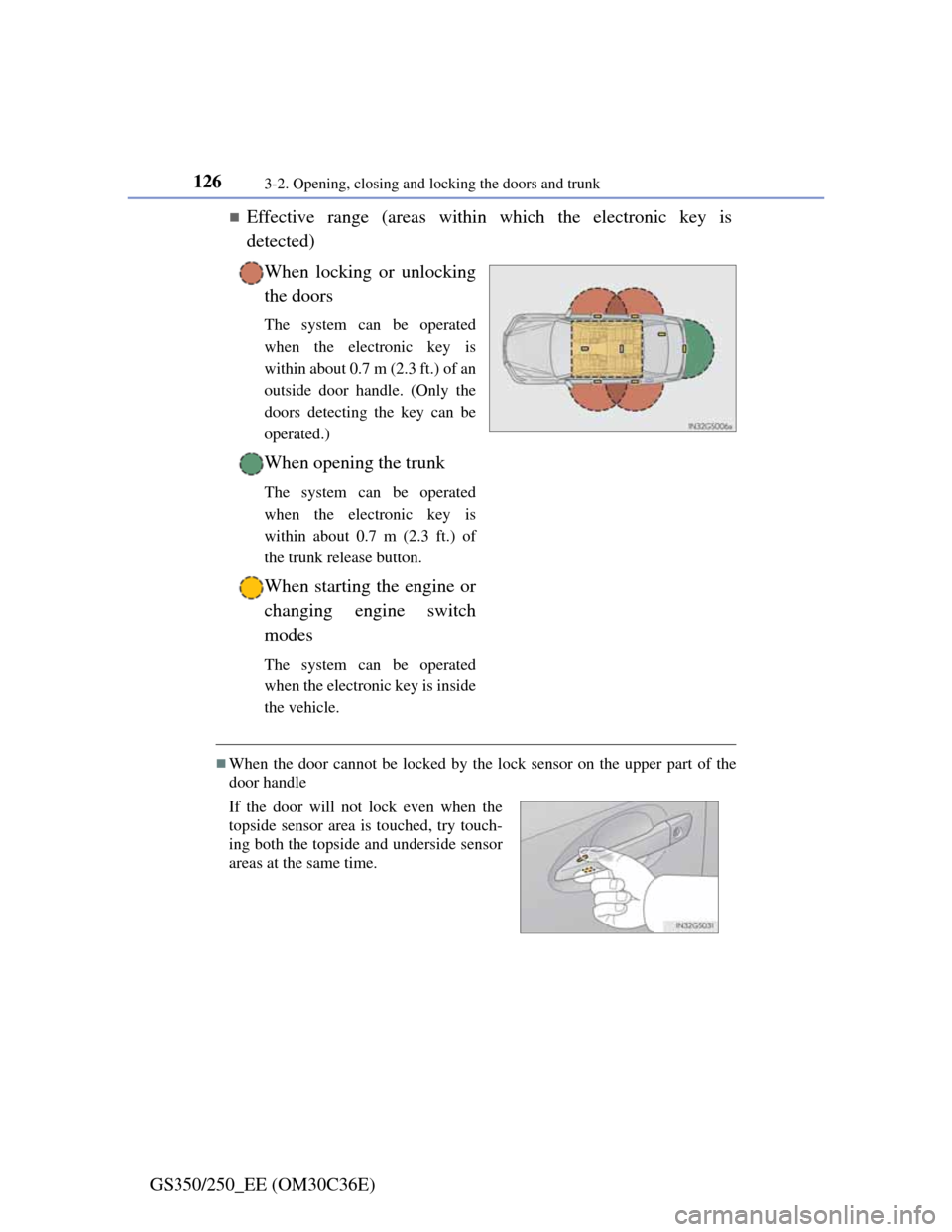
Effective range (areas within which the electronic key is
detected)
When locking or unlocking
the doors
The system can be operated
when the electronic key is
within about 0.7 m (2.3 ft.) of an
outside door handle. (Only the
doors detecting the key can be
operated.)
When opening the trunk
The system can be operated
when the electronic key is
within about 0.7 m (2.3 ft.) of
the trunk release button.
When starting the engine or
changing engine switch
modes
The system can be operated
when the electronic key is inside
the vehicle.
When the door cannot be locked by the lock sensor on the upper part of the
door handle
If the door will not lock even when the
topside sensor area is touched, try touch-
ing both the topside and underside sensor
areas at the same time.
Page 130 of 914
1273-2. Opening, closing and locking the doors and trunk
3
Operation of each component
GS350/250_EE (OM30C36E)
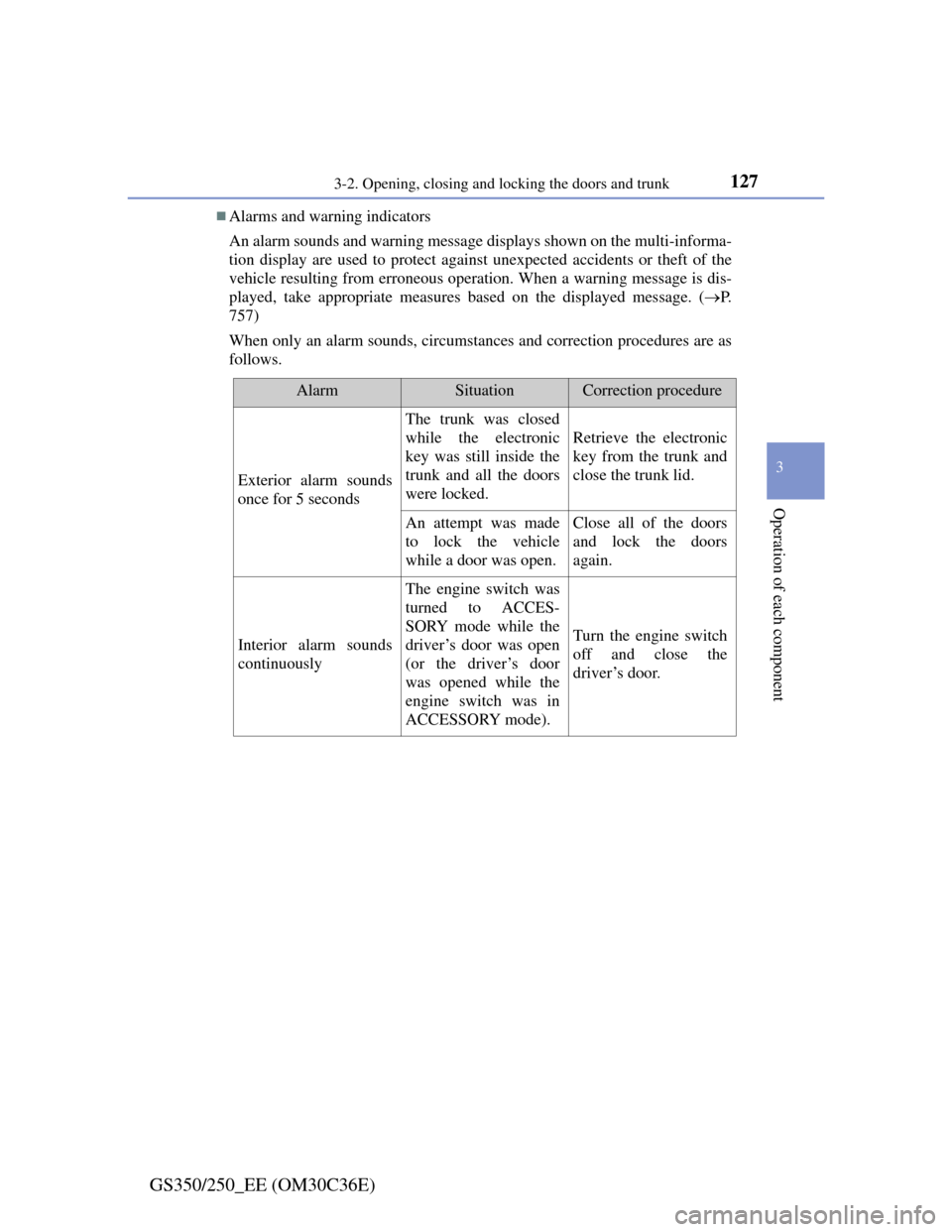
Alarms and warning indicators
An alarm sounds and warning message displays shown on the multi-informa-
tion display are used to protect against unexpected accidents or theft of the
vehicle resulting from erroneous operation. When a warning message is dis-
played, take appropriate measures based on the displayed message. (P.
757)
When only an alarm sounds, circumstances and correction procedures are as
follows.
AlarmSituationCorrection procedure
Exterior alarm sounds
once for 5 seconds
The trunk was closed
while the electronic
key was still inside the
trunk and all the doors
were locked.
Retrieve the electronic
key from the trunk and
close the trunk lid.
An attempt was made
to lock the vehicle
while a door was open.Close all of the doors
and lock the doors
again.
Interior alarm sounds
continuously
The engine switch was
turned to ACCES-
SORY mode while the
driver’s door was open
(or the driver’s door
was opened while the
engine switch was in
ACCESSORY mode).
Turn the engine switch
off and close the
driver’s door.