fuel Lexus GS350 2012 Owner's Guide
[x] Cancel search | Manufacturer: LEXUS, Model Year: 2012, Model line: GS350, Model: Lexus GS350 2012Pages: 914, PDF Size: 49.39 MB
Page 335 of 914
3284-5. Using the driving support
GS350/250_EE (OM30C36E)
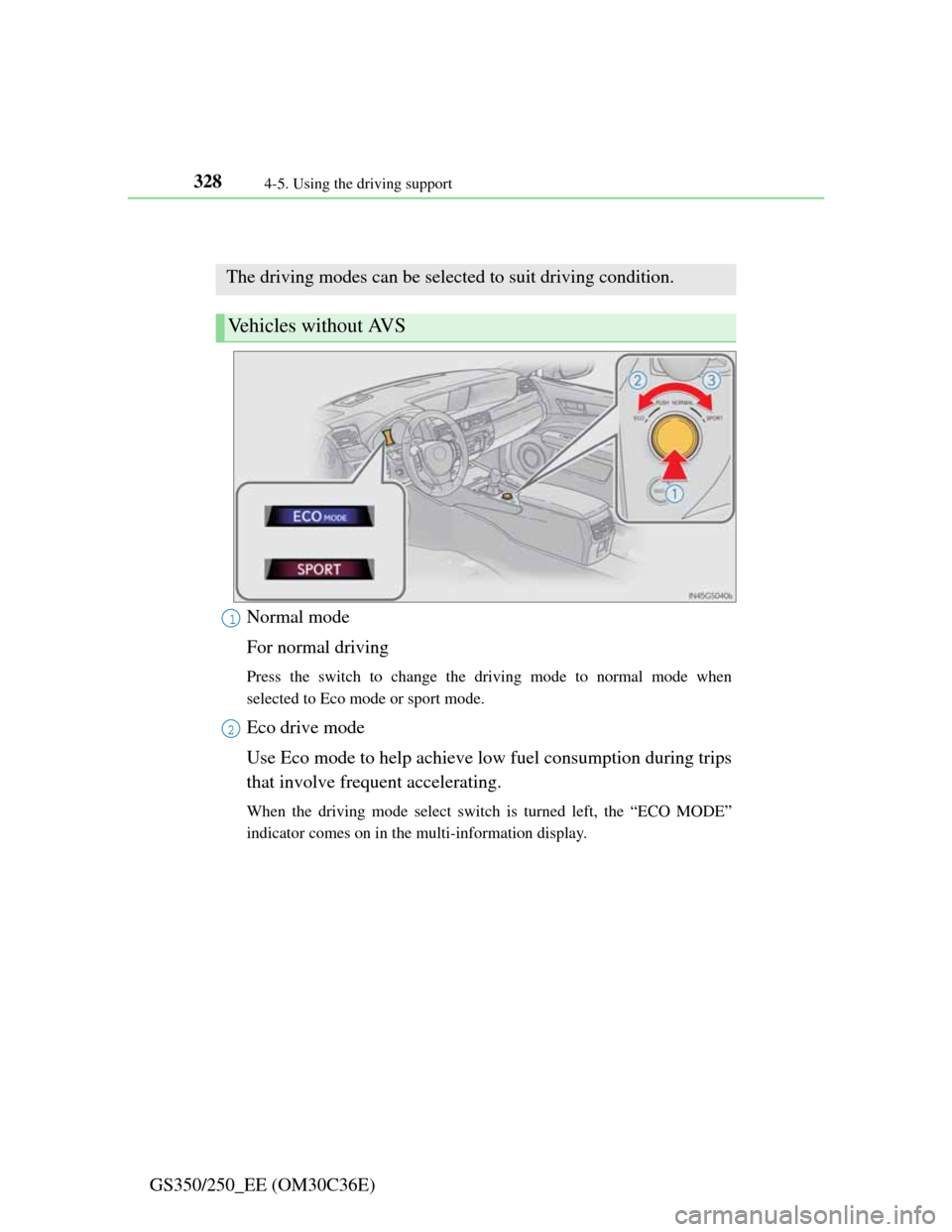
Driving mode select switch
Normal mode
For normal driving
Press the switch to change the driving mode to normal mode when
selected to Eco mode or sport mode.
Eco drive mode
Use Eco mode to help achieve low fuel consumption during trips
that involve frequent accelerating.
When the driving mode select switch is turned left, the “ECO MODE”
indicator comes on in the multi-information display.
The driving modes can be selected to suit driving condition.
Vehicles without AVS
1
2
Page 337 of 914
3304-5. Using the driving support
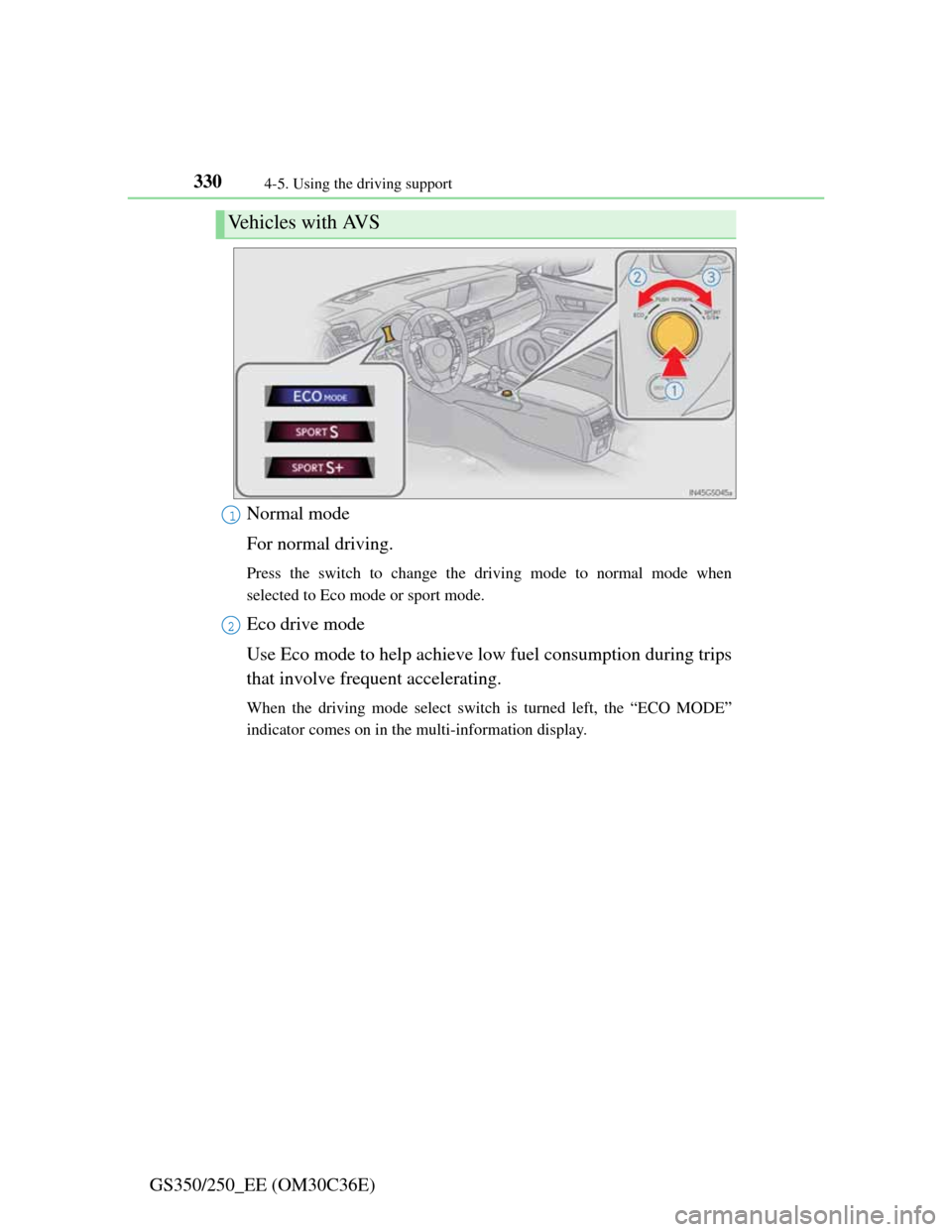
GS350/250_EE (OM30C36E)Normal mode
For normal driving.
Press the switch to change the driving mode to normal mode when
selected to Eco mode or sport mode.
Eco drive mode
Use Eco mode to help achieve low fuel consumption during trips
that involve frequent accelerating.
When the driving mode select switch is turned left, the “ECO MODE”
indicator comes on in the multi-information display.
Vehicles with AVS
1
2
Page 339 of 914

3324-5. Using the driving support
GS350/250_EE (OM30C36E)
Operation of the air conditioning system in Eco drive mode
Eco drive mode controls the heating/cooling operations and fan speed of the
air conditioning system to enhance fuel efficiency (P. 409). To improve air
conditioning performance, adjust the fan speed or turn off Eco drive mode.
Automatic operation of the seat heater during Eco drive mode
If the driving mode select switch is switched to Eco drive mode in cold tem-
peratures, the seat heater will be automatically operated to assist heating per-
formance.
Sport mode automatic deactivation
Sport mode is automatically deactivated if the engine switch is turned off
after driving in sport mode.
Page 388 of 914

3785-1. Remote Touch screen
GS350/250_EE (OM30C36E)Fuel consumption information from recent resets will be displayed.
Vehicles with a 12.3-inch display: The fuel consumption informa-
tion can be displayed and operated on the “Side Display”. For
details, refer to the “Navigation System Owner’s Manual”.
Press the “MENU” button on the Remote Touch, then select “Car”
on the “Menu” screen.
Fuel consumption
Page 389 of 914
3795-1. Remote Touch screen
5
Interior features
GS350/250_EE (OM30C36E)
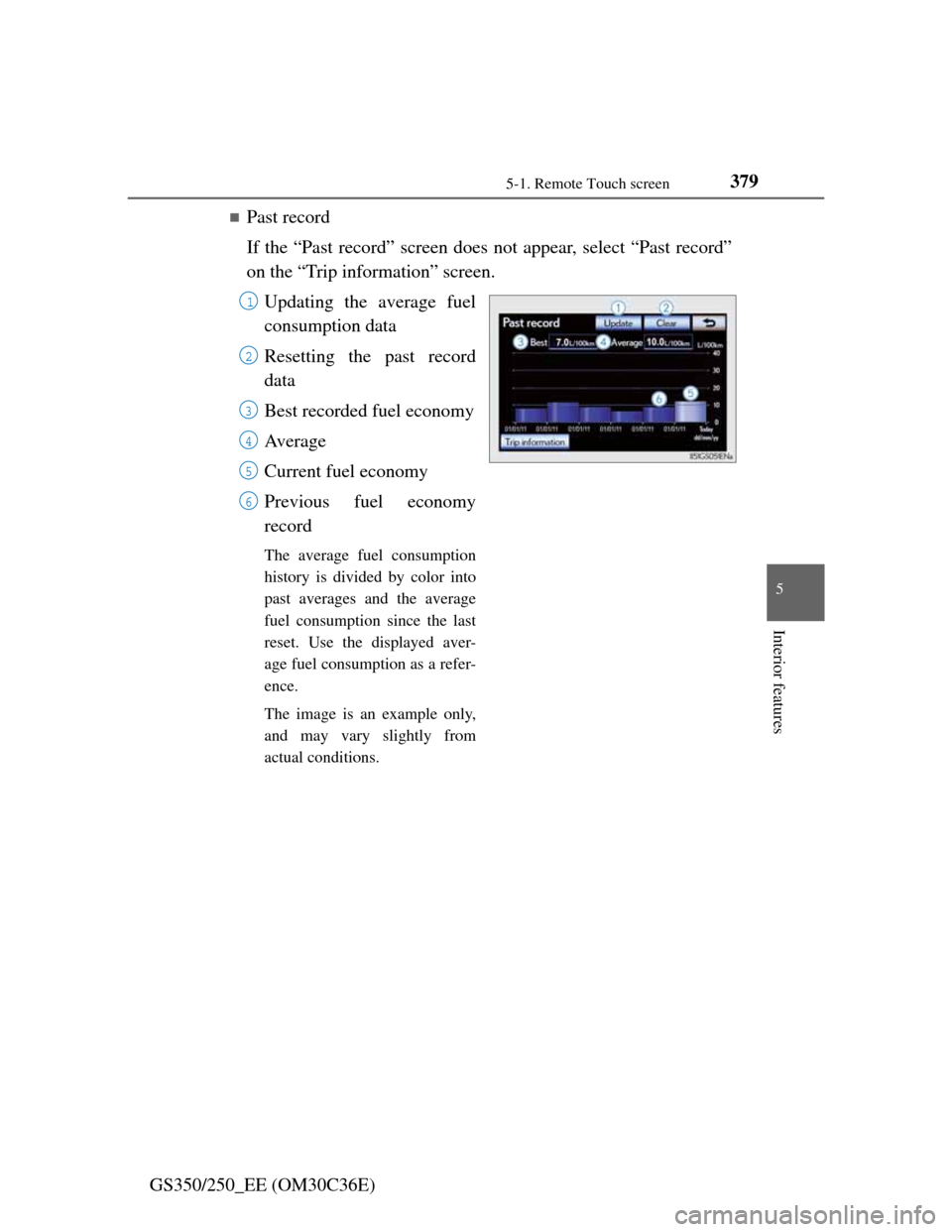
Past record
If the “Past record” screen does not appear, select “Past record”
on the “Trip information” screen.
Updating the average fuel
consumption data
Resetting the past record
data
Best recorded fuel economy
Av e r a g e
Current fuel economy
Previous fuel economy
record
The average fuel consumption
history is divided by color into
past averages and the average
fuel consumption since the last
reset. Use the displayed aver-
age fuel consumption as a refer-
ence.
The image is an example only,
and may vary slightly from
actual conditions.
1
2
3
4
5
6
Page 390 of 914
3805-1. Remote Touch screen
GS350/250_EE (OM30C36E)
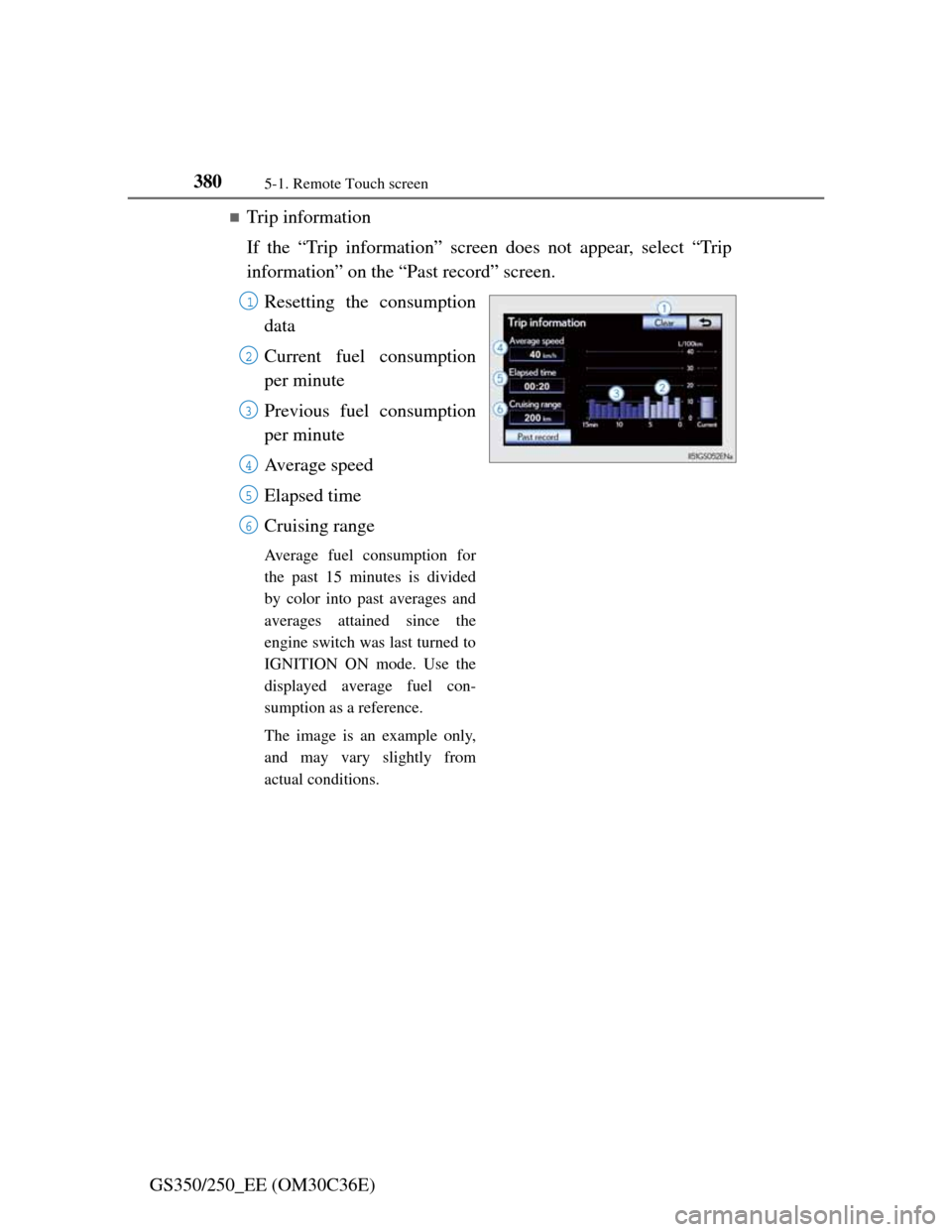
Trip information
If the “Trip information” screen does not appear, select “Trip
information” on the “Past record” screen.
Resetting the consumption
data
Current fuel consumption
per minute
Previous fuel consumption
per minute
Average speed
Elapsed time
Cruising range
Average fuel consumption for
the past 15 minutes is divided
by color into past averages and
averages attained since the
engine switch was last turned to
IGNITION ON mode. Use the
displayed average fuel con-
sumption as a reference.
The image is an example only,
and may vary slightly from
actual conditions.
1
2
3
4
5
6
Page 391 of 914

3815-1. Remote Touch screen
5
Interior features
GS350/250_EE (OM30C36E)
Updating the past record data
Update the average fuel consumption by selecting “Update” to measure the
current fuel consumption again.
Resetting the data
The data can be deleted by selecting “Clear”.
Cruising range
Displays the estimated maximum distance that can be driven with the quan-
tity of fuel remaining.
This distance is computed based on your average fuel consumption.
As a result, the actual distance that can be driven may differ from that dis-
played.
Page 397 of 914
3875-1. Remote Touch screen
5
Interior features
GS350/250_EE (OM30C36E)
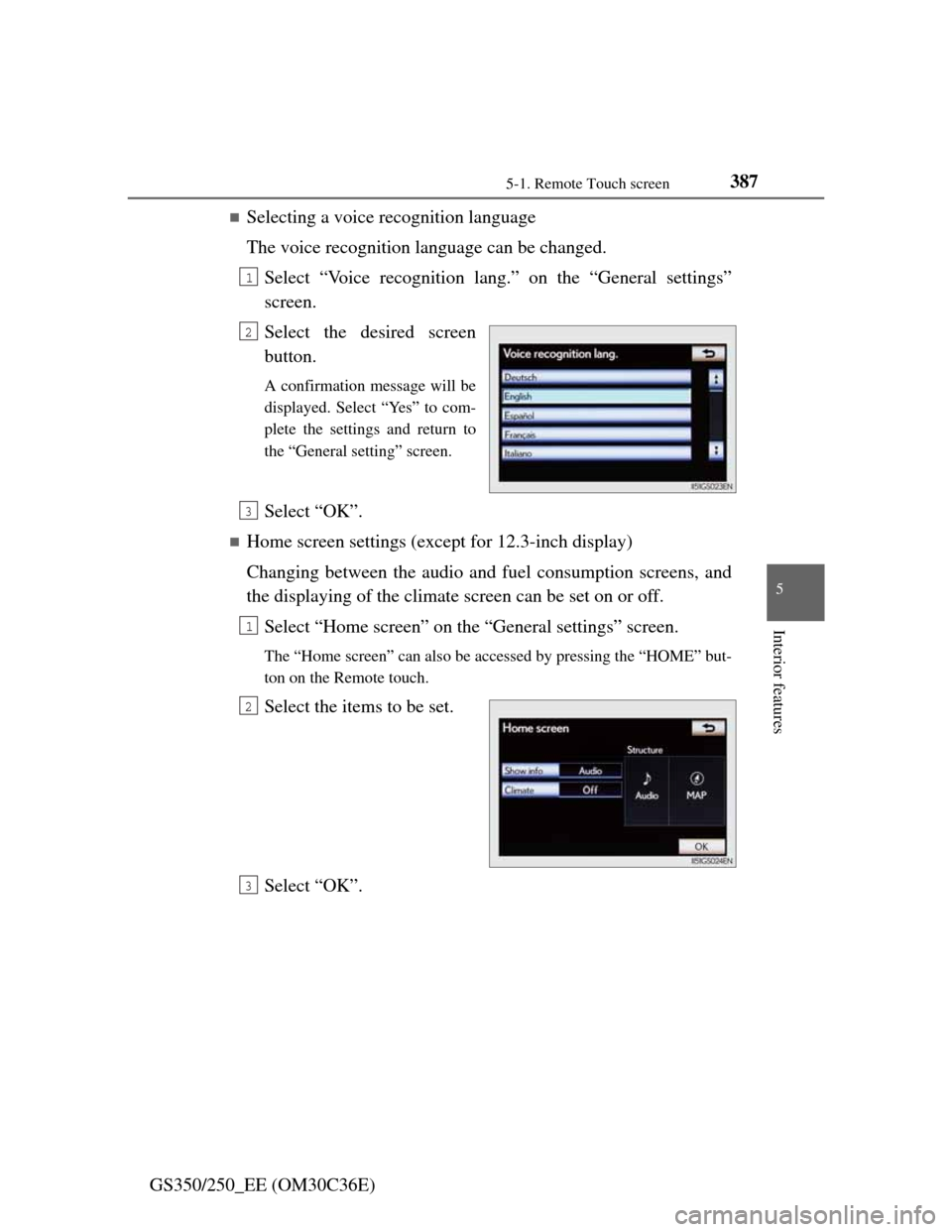
Selecting a voice recognition language
The voice recognition language can be changed.
Select “Voice recognition lang.” on the “General settings”
screen.
Select the desired screen
button.
A confirmation message will be
displayed. Select “Yes” to com-
plete the settings and return to
the “General setting” screen.
Select “OK”.
Home screen settings (except for 12.3-inch display)
Changing between the audio and fuel consumption screens, and
the displaying of the climate screen can be set on or off.
Select “Home screen” on the “General settings” screen.
The “Home screen” can also be accessed by pressing the “HOME” but-
ton on the Remote touch.
Select the items to be set.
Select “OK”.
1
2
3
1
2
3
Page 662 of 914
6446-1. Maintenance and care
GS350/250_EE (OM30C36E)
Cleaning and protecting the vehicle exterior
Working from top to bottom, liberally apply water to the vehicle
body, wheel wells and underside of the vehicle to remove any
dirt and dust.
Wash the vehicle body using a sponge or soft cloth, such as a
chamois.
For hard-to-remove marks, use car wash soap and rinse thor-
oughly with water.
Wipe away any water.
Wax the vehicle when the waterproof coating deteriorates.
If water does not bead on a clean surface, apply wax when the vehicle
body is cool.
Automatic car washes
Fold the mirrors before washing the vehicle. Start washing from the front of
the vehicle. Make sure to extend the mirrors before driving.
Brushes used in automatic car washes may scratch the vehicle surface and
harm your vehicle’s paint.
Rear spoiler (if equipped) may not be washable in some automatic car
washes. There may also be an increased risk of damage to vehicle.
High pressure car washes
Do not allow the nozzles of the car wash to come within close proximity of
the windows.
Before using the car wash, check that the fuel filler door on your vehicle is
closed properly.
Perform the following to protect the vehicle and maintain it in
prime condition:
Page 673 of 914
655 6-3. Do-it-yourself maintenance
6
Maintenance and care
GS350/250_EE (OM30C36E)
Light bulbs (P. 722)
• Bulb with same number and watt-
age rating as original
• Phillips-head screwdriver
• Flathead screwdriver
•Wrench
Radiator and condenser (P. 667)
Tire inflation pressure (P. 691)• Tire pressure gauge
• Compressed air source
Wa s h e r f l u i d (P. 671)
• Water or washer fluid containing
antifreeze (for winter use)
• Funnel (used only for adding
water or washer fluid)
CAUTION
The engine compartment contains many mechanisms and fluids that may
move suddenly, become hot, or become electrically energized. To avoid death
or serious injury, observe the following precautions.
When working on the engine compartment
Keep hands, clothing and tools away from the moving fan and engine
drive belt.
Be careful not to touch the engine, radiator, exhaust manifold, etc. right
after driving as they may be hot. Oil and other fluids may also be hot.
Do not leave anything that may burn easily, such as paper and rags, in the
engine compartment.
Do not smoke, cause sparks or expose an open flame to fuel or the battery.
Fuel and battery fumes are flammable.
Be extremely cautious when working on the battery. It contains poisonous
and corrosive sulfuric acid.
Take care because brake fluid can harm your hands or eyes and damage
painted surfaces. If fluid gets on your hands or in your eyes, flush the
affected area with clean water immediately.
If you still experience discomfort, consult a doctor.
ItemsParts and tools