mirror Lexus GS350 2012 Owner's Guide
[x] Cancel search | Manufacturer: LEXUS, Model Year: 2012, Model line: GS350, Model: Lexus GS350 2012Pages: 914, PDF Size: 49.39 MB
Page 208 of 914

2044-1. Before driving
GS350/250_EE (OM30C36E)
Tire information
Increase the tire inflation pressure to 20.0 kPa (0.2 kgf/cm2 or bar, 3 psi)
greater than the recommended value when towing. (P. 850)
Increase the air pressure of the trailer tires in accordance with the total
trailer weight and according to the values recommended by the manufac-
turer of your trailer.
Break-in schedule
Lexus recommends that vehicles fitted with new power train components
should not be used for towing trailers for the first 800 km (500 miles).
Safety checks before towing
Check that the maximum load limit for the towing hitch/bracket hitch ball is
not exceeded. Bear in mind that the coupling weight of the trailer will add
to the load exerted on the vehicle. Also make sure that you will not be tow-
ing a load that exceeds the maximum permissible axle capacity.
Ensure that the trailer load is secure.
Supplementary outside rear view mirrors should be added to the vehicle if
the traffic behind cannot be clearly seen with standard mirrors. Adjust the
extending arms of these mirrors on both sides of the vehicle so that they
always provide maximum visibility of the road behind.
Maintenance
Maintenance must be performed more frequently when using the vehicle
for towing due to the greater weight burden placed on the vehicle compared
to normal driving.
Retighten all bolts securing the hitching ball and bracket after towing for
approximately 1000 km (600 miles).
Page 244 of 914

2374-3. Operating the lights and wipers
4
Driving
GS350/250_EE (OM30C36E)
In the situations below, the system may not be able to correctly detect the
surrounding brightness levels, and may flash or expose nearby pedestrians
to the high beam. Therefore, you should consider turning the high beams on
or off manually rather than relying on the Automatic High Beam system.
• In bad weather (rain, snow, fog, sandstorms etc.)
• The windshield is obscured by fog, mist, ice, dirt etc.
• The windshield is cracked or damaged.
• The inside rear view mirror or camera sensor is deformed or dirty.
• Surrounding brightness levels are equal to those of headlights, tail lights
or fog lights.
• Vehicles ahead have headlights that are either switched off, dirty, are
changing color, or have are not aimed properly.
• When driving through an area of intermittently changing brightness and
darkness.
• When frequently and repeatedly driving ascending/descending roads, or
roads with rough, bumpy or uneven surfaces (such as stone-paved roads,
gravel tracks etc.).
• When frequently and repeatedly taking curves or driving on a winding
road.
• There is a highly reflective object ahead of the vehicle, such as a sign or
a mirror.
• The vehicle’s headlights are damaged or dirty.
• The vehicle is listing or titling, due to a flat tire, a trailer being towed etc.
• The driver believes that the high beam may be causing problems or dis-
tress to other drivers or pedestrians nearby.
CAUTION
Limitations of the Automatic High Beam
Do not rely on the Automatic High Beam. Always drive safely, taking care
to observe your surroundings and turning high beam on or off manually if
necessary.
Page 245 of 914
2384-3. Operating the lights and wipers
GS350/250_EE (OM30C36E)
NOTICE
Notes when using the Automatic High Beam system
Do not touch the camera sensor.
Do not subject the inside rear view mirror or the camera sensor to a strong
impact.
Do not disassemble the camera sensor.
Do not spill liquid onto the inside rear view mirror or the camera sensor.
Do not apply window tinting or stickers to the camera sensor or the area of
windshield near the camera sensor.
Do not place items on the dashboard. There is a possibility that the camera
sensor will mistake items reflected in the windshield for streetlights, the
headlights of other vehicles, etc.
Do not install a parking tag or any other accessories near or around the
inside rear view mirror and the camera sensor.
Do not overload the vehicle.
Do not modify the vehicle.
Do not replace windshield with non-genuine windshield.
Contact any authorized Lexus dealer or repairer, or another duly qualified
and equipped professional.
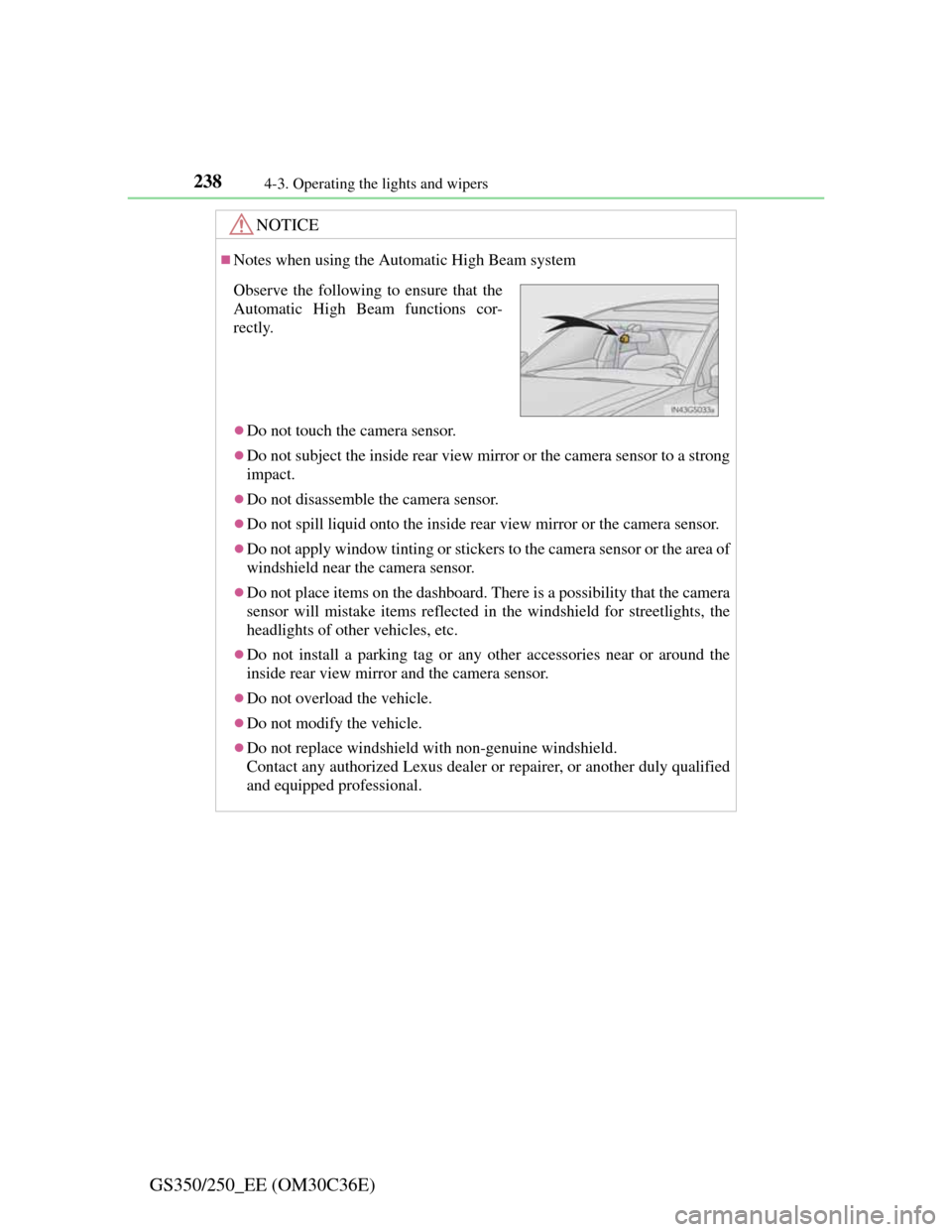
Observe the following to ensure that the
Automatic High Beam functions cor-
rectly.
Page 281 of 914
2744-5. Using the driving support
GS350/250_EE (OM30C36E)
LKA (Lane-Keeping Assist)
While driving on a freeway or motor highway that has lane markers
and no sharp curves, the system recognizes the lanes using a cam-
era located above the inside rear view mirror as a sensor to assist
the driver with staying in the lane. The LKA system has two func-
tions.
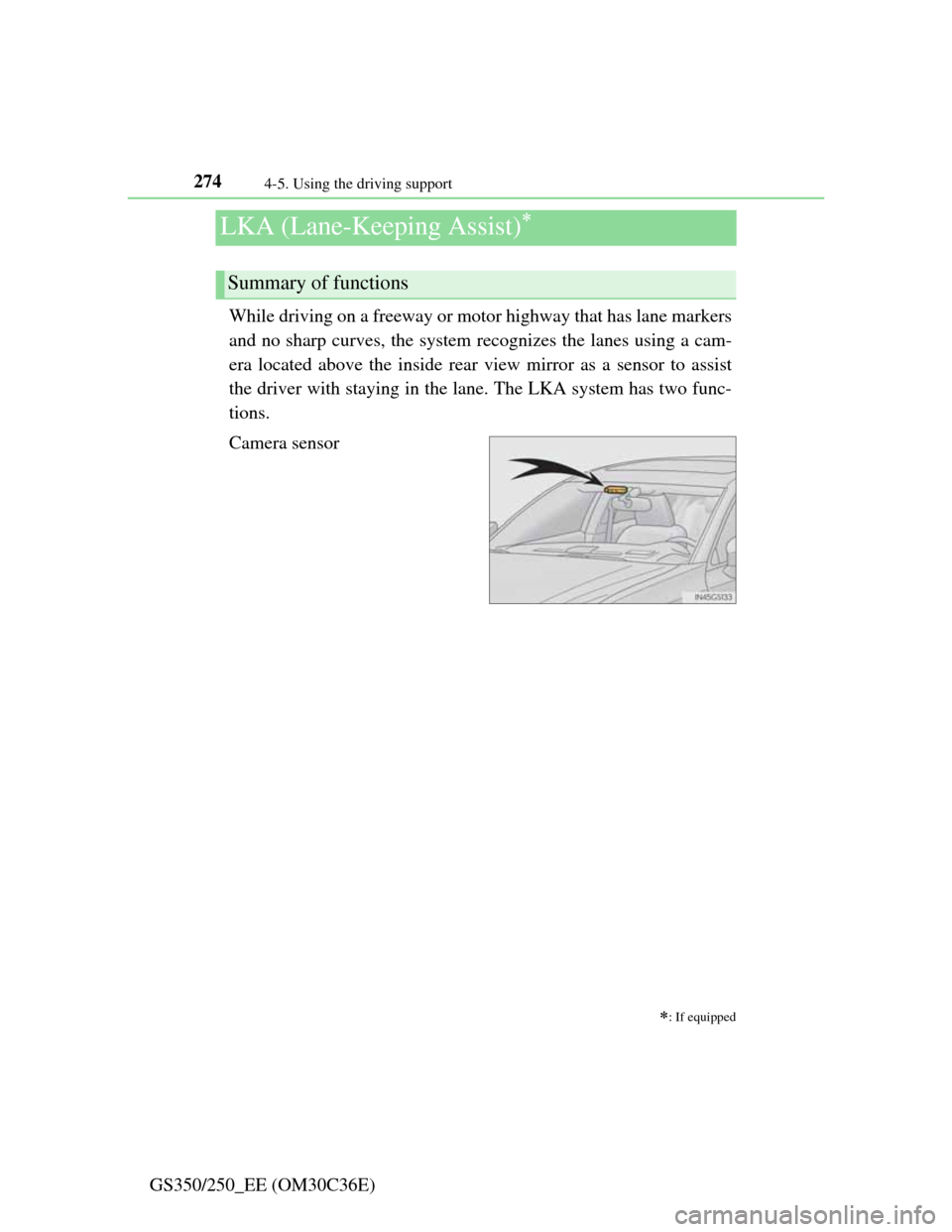
Camera sensor
: If equipped
Summary of functions
Page 290 of 914
2834-5. Using the driving support
4
Driving
GS350/250_EE (OM30C36E)
NOTICE
Camera sensor (P. 274)
Observe the following to ensure that the LKA system functions correctly.
Keep the windshield clean at all times.
Performance could be affected if the windshield is dirty, or if raindrops,
condensation or ice are adhering to the windshield.
When adjusting the rear view mirror, make sure that it does not block the
camera lens.
Do not attach window tinting to the windshield.
Do not install an antenna in front of the camera lens.
If the windshield is fogged up, use the windshield defogger to remove fog
from the windshield.
When it is cold, using the heater with air blowing to the feet may allow the
upper part of the windshield to fog up. This will have a negative effect on
the images.
Do not place anything on the dashboard.
The camera sensor may recognize the image reflected on the windshield
as lane markers by mistake.
Do not scratch the camera lens, or let it get dirty.
When cleaning the inside of the windshield, be careful not to get any glass
cleaner etc. on the lens. Also, do not touch the lens.
For lens repair, contact any authorized Lexus dealer or repairer, or another
duly qualified and equipped professional.
Do not change the installation position or direction of the camera sensor
or remove it. The direction of the camera sensor is precisely adjusted.
Do not subject the camera sensor to strong impact or force, and do not dis-
assemble the camera sensor.
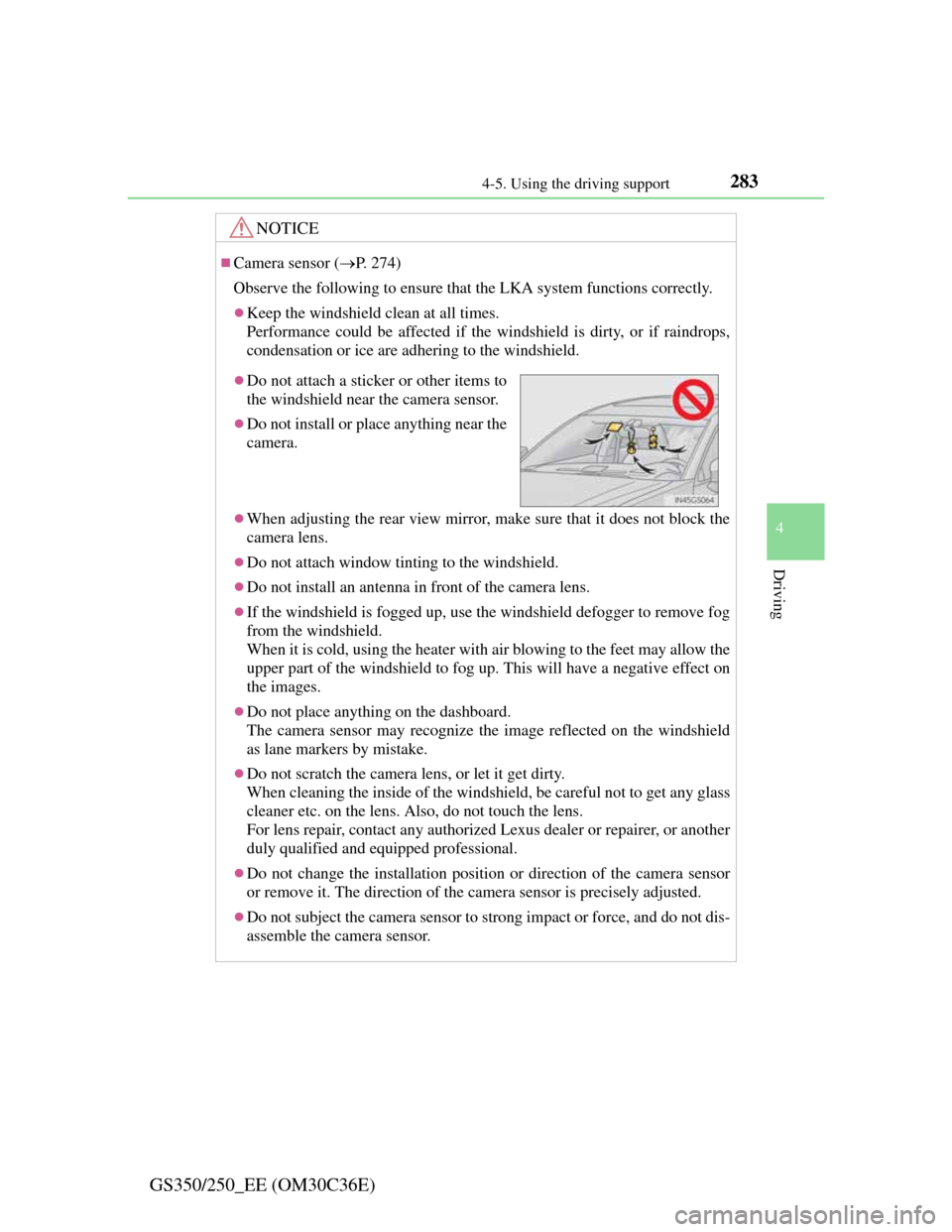
Do not attach a sticker or other items to
the windshield near the camera sensor.
Do not install or place anything near the
camera.
Page 314 of 914
3074-5. Using the driving support
4
Driving
GS350/250_EE (OM30C36E)Keeping the steering wheel in that position, check your sur-
roundings visually and using mirrors, and back up using the
distance guide lines etc. as a reference (Step in “Parking
operation”).
When the vehicle is approximately in the desired parking loca-
tion, parallel parking assist is complete (Step in “Parking
operation”).
Parking operation
The following example describes the procedure for pulling into a
parking space on the right. For pulling into a parking space on
the left, substitute left for right and vice versa in all steps.
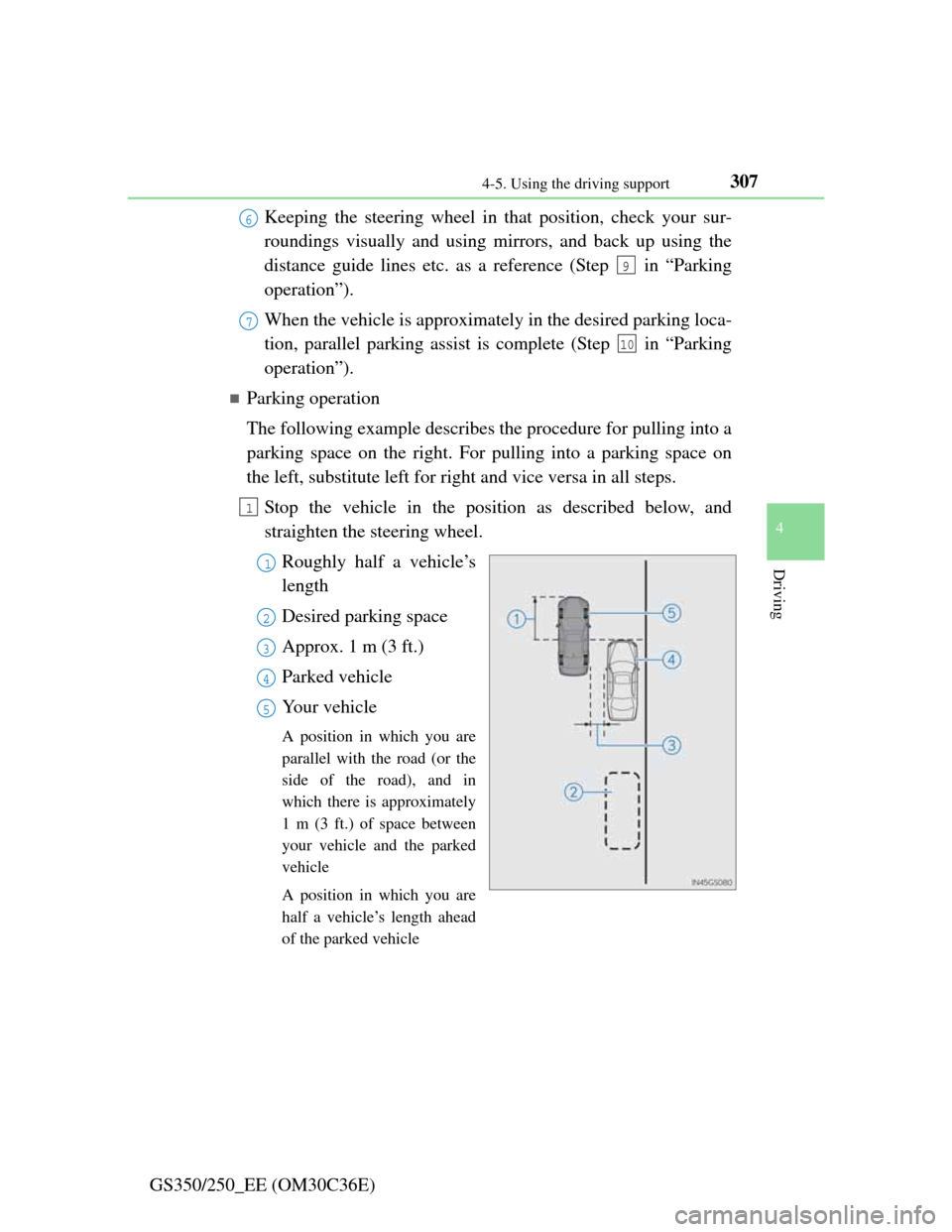
Stop the vehicle in the position as described below, and
straighten the steering wheel.
Roughly half a vehicle’s
length
Desired parking space
Approx. 1 m (3 ft.)
Parked vehicle
Your vehicle
A position in which you are
parallel with the road (or the
side of the road), and in
which there is approximately
1 m (3 ft.) of space between
your vehicle and the parked
vehicle
A position in which you are
half a vehicle’s length ahead
of the parked vehicle
6
9
7
10
1
1
2
3
4
5
Page 319 of 914

3124-5. Using the driving support
GS350/250_EE (OM30C36E)Leaving the vehicle stopped, turn the steering wheel all the
way to the left.
Be sure to turn the steering wheel only when the vehicle is stopped.
When the screen changes, keep the steering wheel in its cur-
rent position and back up.
When backing up, be careful not to hit any obstacles with the right front
corner of your vehicle. Back the vehicle up slowly.
When the vehicle is parallel with the road or the shoulder,
straighten the steering wheel.
Check your surroundings visually and with the mirrors, then
back up using the distance guide lines as a reference, and stop.
When the vehicle is approximately in the desired parking location, the
parallel parking assist is complete.
Parallel parking assist mode information
• There is a possibility that parallel parking guidance may not be
given when backing up at a very slow speed.
• If the trunk is opened, the parallel parking assist will be inter-
rupted by a message being displayed on the screen. Stop the
vehicle, shift the shift lever out of the R position, and restart
the operation from the step .
Canceling parallel parking assist
Select .
Vehicles with Lexus parking assist-sensor
If Lexus parking assist-sensor detects an object while you
attempt to park in a parking space on the left, the black and yel-
low vertical pole could be obscured by Lexus parking assist-sen-
sor display. In this event, turn Lexus parking assist-sensor switch
off (P. 285), and operate the vehicle while checking the safety
of the surrounding area direct visually and with mirror. After the
operation, turn the switch on.
8
9
10
1
Page 331 of 914
3244-5. Using the driving support
GS350/250_EE (OM30C36E)
CAUTION
When using the Lexus parking assist monitor system
When backing up, be sure to check visually behind and all around the vehi-
cle before proceeding.
Observe the following precautions to avoid an accident that could result in
death or serious injuries.
The parking assist monitor is a supplemental device intended to assist the
driver when backing up. Never depend on the parking assist monitor
entirely when backing up. Always make sure your intended path is clear.
Use caution, just as you would when backing up any vehicle.
Never back up while looking only at the screen.
The image shown on the screen may differ from the actual state, and you
could collide with another vehicle or obstacles if backing up looking only
at the screen, possibly causing an accident. When backing up, be sure to
check in front of and behind the vehicle, both directly and with mirrors.
Be sure to back up slowly, depressing the brake pedal to control vehicle
speed.
If you seem likely to hit nearby vehicles, obstacles, people or mount the
shoulder, depress the brake pedal to stop the vehicle, then disable the
assist system by select on the screen to cancel the system.
The instructions given are only guidelines.
When and how much to turn the steering wheel will vary according to
traffic conditions, road surface conditions, vehicle condition, etc. when
parking. It is necessary to be fully aware of this before using the parking
assist system.
When parking, be sure to check that the parking space will accommodate
your vehicle before maneuvering into it.
Do not use system in the following cases:
• On icy or slick road surfaces, or in snow
• When using tire chains or emergency tires
• When the trunk lid is not closed completely
• On roads that are not flat or straight, such as curves or slopes.
Page 332 of 914
3254-5. Using the driving support
4
Driving
GS350/250_EE (OM30C36E)
CAUTION
In low temperatures, the screen may darken or the image may become
faint. The image could distort when the vehicle is moving, or you may
become unable to see the image on the screen. Be sure to check direct
visually and with mirror all around the vehicle before proceeding.
If the tire sizes are changed, the position of the guide lines displayed on
the screen may change.
The camera uses a special lens. The distances between objects and pedes-
trians that appear in the image displayed on the screen will differ from the
actual distances. (P. 316)
When using the perpendicular parking assist screen
The position of the guide lines displayed on the screen may change in
accordance with the number of passengers, the amount of cargo etc. Be
sure to check behind and all around the vehicle direct visually and with
mirror before proceeding.
Estimated course line display mode: If the steering wheel is straight and
the vehicle width extension guide lines and the estimated course lines are
not in alignment, have the vehicle inspected by any authorized Lexus
dealer or repairer, or another duly qualified and equipped professional.
The vehicle width extension guide lines are wider than the actual width of
the vehicle. When backing up, be sure to check behind and all around the
vehicle direct visually and with mirror before proceeding.
When using the parallel parking assist screen
Do not use the system if the display is incorrect due to an uneven (curvy/
hilly) road or a non-straight road.
Make sure to operate the steering wheel only when the vehicle is stopped.
Be sure to check that there are no obstacles inside the blue outline.
If there are any obstacles inside the blue outline, do not use the parallel
parking assist.
When positioning the blue outline over the parking space, be sure to posi-
tion it so that the extended blue line may not cross the tire of the vehicle
parked in front of the empty space.
Page 361 of 914
3544-5. Using the driving support
GS350/250_EE (OM30C36E)
BSM (Blind Spot Monitor)
: If equipped
The Blind Spot Monitor is a system that assists the driver to con-
firm safety when changing lanes.
The system uses radar sensors to detect vehicles that are traveling
in an adjacent lane in the area that is not reflected in the outside
rear view mirror (the blind spot), and advises the driver of the vehi-
cles existence via the outside rear view mirror indicator.
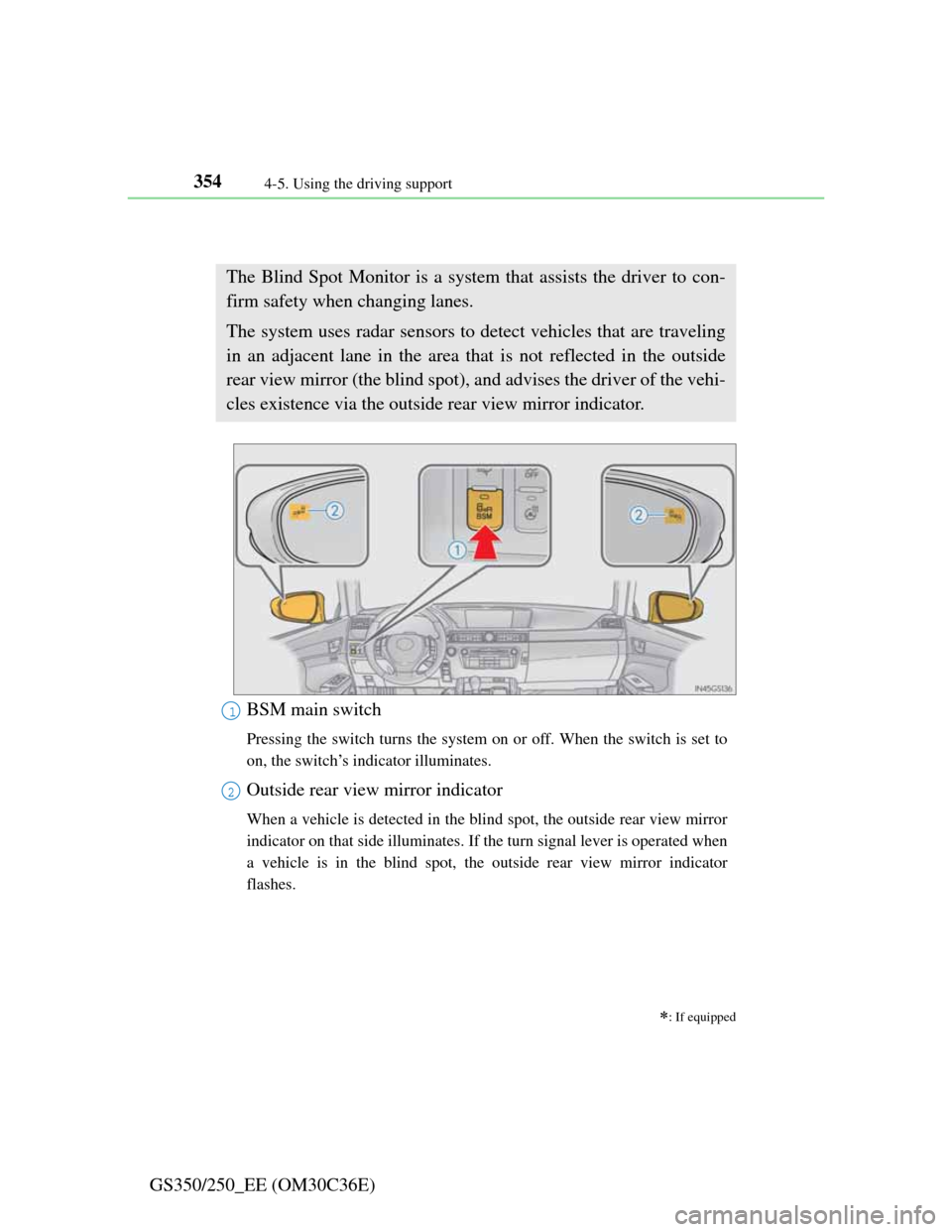
BSM main switch
Pressing the switch turns the system on or off. When the switch is set to
on, the switch’s indicator illuminates.
Outside rear view mirror indicator
When a vehicle is detected in the blind spot, the outside rear view mirror
indicator on that side illuminates. If the turn signal lever is operated when
a vehicle is in the blind spot, the outside rear view mirror indicator
flashes.
1
2