audio Lexus GS350 2012 Owner's Manual
[x] Cancel search | Manufacturer: LEXUS, Model Year: 2012, Model line: GS350, Model: Lexus GS350 2012Pages: 914, PDF Size: 49.39 MB
Page 4 of 914

TABLE OF CONTENTS4
GS350/250_EE (OM30C36E)
5-1. Remote Touch screen
Remote Touch ................... 368
Remote Touch screen ........ 370
Set up screen ..................... 382
Speech command system .. 401
5-2. Using the air conditioning sys-
tem and defogger
Front automatic air conditioning
system..............................409
Rear air conditioning sys-
tem...................................425
Rear window and outside rear
view mirror defoggers.......430
Windshield wiper de-icer .. 4315-3. Using the audio system
Audio system type ............. 432
Using the radio .................. 457
Using the CD/DVD
player................................465
Playing an audio CD and MP3/
WMA discs.......................467
Playing DVD video ........... 473
CD/DVD player and DVD
video disc information.......486
Listening to Bluetooth
audio.................................496
Listening to a USB mem-
ory......................................508
Listening to an iPod .......... 519
Optimal use of the audio/video
system................................530
Using the AUX port .......... 533
Using the rear seat audio con-
trols....................................534
Using the steering wheel audio
switches.............................539
5-4. Using the hands-free phone sys-
tem (for cellular phone)
Hands-free system (for cellular
phone)..............................542
Using a Bluetooth®
(phone).............................556
Setting the hands-free system
(for cellular
phone)..............................575
Setting the Bluetooth®...... 598
5Interior features
Page 17 of 914

17Pictorial index
GS350/250_EE (OM30C36E)
Multi-information display . . . . . . . . . . . . . . . . . . . . . . . . . . . . . P. 101
Display . . . . . . . . . . . . . . . . . . . . . . . . . . . . . . . . . . . . . . . . . . . P. 101
When the warning messages are displayed. . . . . . . . . . . . . . . . P. 757
Parking brake . . . . . . . . . . . . . . . . . . . . . . . . . . . . . . . . . . . . . . P. 224
Applying/releasing . . . . . . . . . . . . . . . . . . . . . . . . . . . . . . . . . . P. 224
Precautions against winter season. . . . . . . . . . . . . . . . . . . . . . . P. 360
Warning buzzer/message . . . . . . . . . . . . . . . . . . . . . . . . . . . . . P. 757
Turn signal lever . . . . . . . . . . . . . . . . . . . . . . . . . . . . . . . . . . . . P. 222
Headlight switch . . . . . . . . . . . . . . . . . . . . . . . . . . . . . . . . . . . . P. 228
Headlights/front position lights/tail lights/daytime running lightsP. 228
Front fog lights
*/rear fog light . . . . . . . . . . . . . . . . . . . . . . . . . P. 239
Windshield wiper and washer switch . . . . . . . . . . . . . . . . . . . . P. 241
Usage . . . . . . . . . . . . . . . . . . . . . . . . . . . . . . . . . . . . . . . . . . . . P. 241
Adding washer fluid . . . . . . . . . . . . . . . . . . . . . . . . . . . . . . . . . P. 671
Warning messages. . . . . . . . . . . . . . . . . . . . . . . . . . . . . . . . . . . P. 771
Emergency flasher switch . . . . . . . . . . . . . . . . . . . . . . . . . . . . . P. 738
Trunk opener . . . . . . . . . . . . . . . . . . . . . . . . . . . . . . . . . . . . . . . P. 150
Hood lock release lever. . . . . . . . . . . . . . . . . . . . . . . . . . . . . . . P. 657
Tilt and telescopic steering control switch . . . . . . . . . . . . . . . . P. 170
Adjustment . . . . . . . . . . . . . . . . . . . . . . . . . . . . . . . . . . . . . . . . P. 170
Driving position memory . . . . . . . . . . . . . . . . . . . . . . . . . . . . . P. 161
Air conditioning system . . . . . . . . . . . . . . . . . . . . . . . . . . . . . . P. 409
Usage . . . . . . . . . . . . . . . . . . . . . . . . . . . . . . . . . . . . . . . . . . . . P. 409
Rear window defogger . . . . . . . . . . . . . . . . . . . . . . . . . . . . . . . P. 430
Audio system . . . . . . . . . . . . . . . . . . . . . . . . . . . . . . . . . . . . . . P. 432
Audio system . . . . . . . . . . . . . . . . . . . . . . . . . . . . . . . . . . . . . . P. 432
Hands-free system. . . . . . . . . . . . . . . . . . . . . . . . . . . . . . . . . . . P. 542
Trunk opener main switch . . . . . . . . . . . . . . . . . . . . . . . . . . . . P. 151
*: If equipped
4
5
6
7
8
9
10
11
12
13
14
Page 20 of 914
20Pictorial index
GS350/250_EE (OM30C36E)
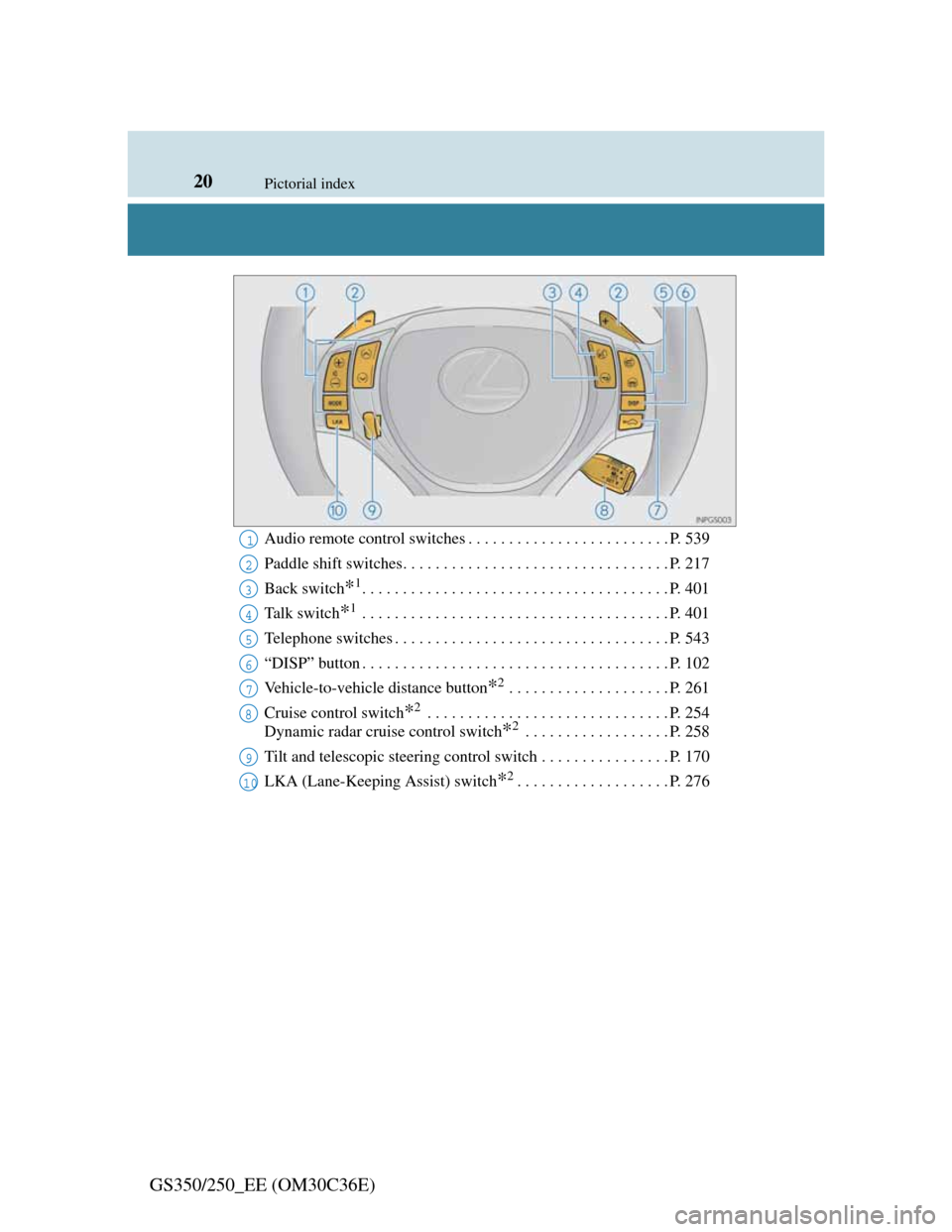
Audio remote control switches . . . . . . . . . . . . . . . . . . . . . . . . . P. 539
Paddle shift switches. . . . . . . . . . . . . . . . . . . . . . . . . . . . . . . . . P. 217
Back switch
*1. . . . . . . . . . . . . . . . . . . . . . . . . . . . . . . . . . . . . . P. 401
Ta l k s w i t c h
*1 . . . . . . . . . . . . . . . . . . . . . . . . . . . . . . . . . . . . . . P. 401
Telephone switches . . . . . . . . . . . . . . . . . . . . . . . . . . . . . . . . . . P. 543
“DISP” button . . . . . . . . . . . . . . . . . . . . . . . . . . . . . . . . . . . . . . P. 102
Vehicle-to-vehicle distance button
*2 . . . . . . . . . . . . . . . . . . . . P. 261
Cruise control switch
*2 . . . . . . . . . . . . . . . . . . . . . . . . . . . . . . P. 254
Dynamic radar cruise control switch
*2 . . . . . . . . . . . . . . . . . . P. 258
Tilt and telescopic steering control switch . . . . . . . . . . . . . . . . P. 170
LKA (Lane-Keeping Assist) switch
*2. . . . . . . . . . . . . . . . . . . P. 276
1
2
3
4
5
6
7
8
9
10
Page 25 of 914

25Pictorial index
GS350/250_EE (OM30C36E)
Multi-information display . . . . . . . . . . . . . . . . . . . . . . . . . . . . . P. 101
Display . . . . . . . . . . . . . . . . . . . . . . . . . . . . . . . . . . . . . . . . . . . P. 101
When the warning messages are displayed. . . . . . . . . . . . . . . . P. 757
Parking brake . . . . . . . . . . . . . . . . . . . . . . . . . . . . . . . . . . . . . . P. 224
Applying/releasing . . . . . . . . . . . . . . . . . . . . . . . . . . . . . . . . . . P. 224
Precautions against winter season. . . . . . . . . . . . . . . . . . . . . . . P. 360
Warning buzzer/message . . . . . . . . . . . . . . . . . . . . . . . . . . . . . P. 757
Turn signal lever . . . . . . . . . . . . . . . . . . . . . . . . . . . . . . . . . . . . P. 222
Headlight switch . . . . . . . . . . . . . . . . . . . . . . . . . . . . . . . . . . . . P. 228
Headlights/front position lights/tail lights/daytime running lightsP. 228
Front fog lights
*/rear fog light . . . . . . . . . . . . . . . . . . . . . . . . . P. 239
Windshield wiper and washer switch . . . . . . . . . . . . . . . . . . . . P. 241
Usage . . . . . . . . . . . . . . . . . . . . . . . . . . . . . . . . . . . . . . . . . . . . P. 241
Adding washer fluid . . . . . . . . . . . . . . . . . . . . . . . . . . . . . . . . . P. 671
Warning messages. . . . . . . . . . . . . . . . . . . . . . . . . . . . . . . . . . . P. 771
Emergency flasher switch . . . . . . . . . . . . . . . . . . . . . . . . . . . . . P. 738
Trunk opener . . . . . . . . . . . . . . . . . . . . . . . . . . . . . . . . . . . . . . . P. 150
Hood lock release lever. . . . . . . . . . . . . . . . . . . . . . . . . . . . . . . P. 657
Tilt and telescopic steering control switch . . . . . . . . . . . . . . . . P. 170
Adjustment . . . . . . . . . . . . . . . . . . . . . . . . . . . . . . . . . . . . . . . . P. 170
Driving position memory . . . . . . . . . . . . . . . . . . . . . . . . . . . . . P. 161
Air conditioning system . . . . . . . . . . . . . . . . . . . . . . . . . . . . . . P. 409
Usage . . . . . . . . . . . . . . . . . . . . . . . . . . . . . . . . . . . . . . . . . . . . P. 409
Rear window defogger . . . . . . . . . . . . . . . . . . . . . . . . . . . . . . . P. 430
Audio system . . . . . . . . . . . . . . . . . . . . . . . . . . . . . . . . . . . . . . P. 432
Audio system . . . . . . . . . . . . . . . . . . . . . . . . . . . . . . . . . . . . . . P. 432
Hands-free system. . . . . . . . . . . . . . . . . . . . . . . . . . . . . . . . . . . P. 542
Trunk opener main switch . . . . . . . . . . . . . . . . . . . . . . . . . . . . P. 151
*: If equipped
4
5
6
7
8
9
10
11
12
13
14
Page 28 of 914
28Pictorial index
GS350/250_EE (OM30C36E)
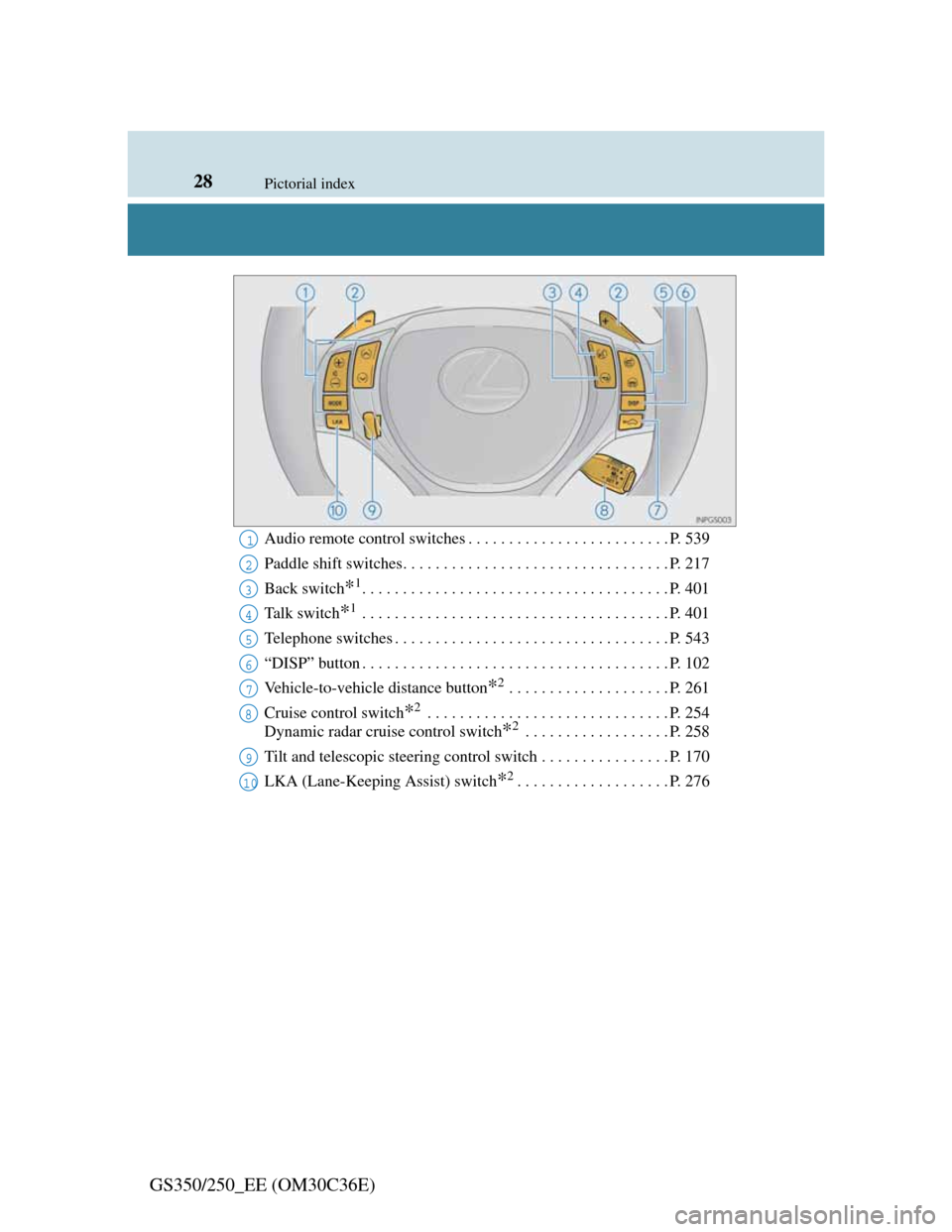
Audio remote control switches . . . . . . . . . . . . . . . . . . . . . . . . . P. 539
Paddle shift switches. . . . . . . . . . . . . . . . . . . . . . . . . . . . . . . . . P. 217
Back switch
*1. . . . . . . . . . . . . . . . . . . . . . . . . . . . . . . . . . . . . . P. 401
Ta l k s w i t c h
*1 . . . . . . . . . . . . . . . . . . . . . . . . . . . . . . . . . . . . . . P. 401
Telephone switches . . . . . . . . . . . . . . . . . . . . . . . . . . . . . . . . . . P. 543
“DISP” button . . . . . . . . . . . . . . . . . . . . . . . . . . . . . . . . . . . . . . P. 102
Vehicle-to-vehicle distance button
*2 . . . . . . . . . . . . . . . . . . . . P. 261
Cruise control switch
*2 . . . . . . . . . . . . . . . . . . . . . . . . . . . . . . P. 254
Dynamic radar cruise control switch
*2 . . . . . . . . . . . . . . . . . . P. 258
Tilt and telescopic steering control switch . . . . . . . . . . . . . . . . P. 170
LKA (Lane-Keeping Assist) switch
*2. . . . . . . . . . . . . . . . . . . P. 276
1
2
3
4
5
6
7
8
9
10
Page 114 of 914

1132. Instrument cluster
2
Instrument cluster
GS350/250_EE (OM30C36E)
Vehicle speed
Tachometer
Shift position and shift range
Displays the selected shift position or selected shift range (P. 214)
Eco Driving Indicator (P. 109)
Audio display
Displays audio information for approximately 3 seconds when the audio
system is operated
Route guidance display (vehicles with navigation system)
(P. 116)
When approaching an intersection while the navigation system is giving
route guidance, an arrow will automatically be displayed to indicate the
direction of travel.
Lane departure warning display (LKA [Lane-Keeping Assist])
(if equipped) (P. 767)
Approach warning display (dynamic radar cruise control) (if
equipped)
(P. 767)
Pre-crash braking warning message (pre-crash safety system)
(if equipped) (P. 767)
Head-up display contents
Page 117 of 914

1162. Instrument cluster
GS350/250_EE (OM30C36E)When the vehicle approaches an
intersection, the direction the
vehicle should go is guided by
the arrow.
When the vehicle approaches an
intersection, the route guidance
will start and the distance
* to the
intersection will also be dis-
played.
*: The distance decreases in incre-
ments of 50 m (164 ft.) and the dis-
tance indication will disappear
when the vehicle passes through
the intersection.
The following display can be shown or hidden.
Audio display
Route guidance display (vehi-
cles with navigation system)
Route guidance display (vehicles with navigation system)
Display customization
1
2
Page 124 of 914

1213-1. Key information
3
Operation of each component
GS350/250_EE (OM30C36E)
When riding in an aircraft
When bringing an electronic key onto an aircraft, make sure you do not press
any buttons on the electronic key while inside the aircraft cabin. If you are
carrying an electronic key in your bag etc., ensure that the buttons are not
likely to be pressed accidentally. Pressing a button may cause the electronic
key to emit radio waves that could interfere with the operation of the aircraft.
NOTICE
To prevent key damage
Do not drop the keys, subject them to strong shocks or bend them.
Do not expose the keys to high temperatures for long periods of time.
Do not get the keys wet or wash them in an ultrasonic washer etc.
Do not attach metallic or magnetic materials to the keys or place the keys
close to such materials.
Do not disassemble the keys.
Do not attach a sticker or anything else to the surface of the electronic key.
Do not place the keys near objects that produce magnetic fields, such as
TVs, audio systems and glass top ranges, or medical electrical equipment,
such as low-frequency therapy equipment.
Carrying the electronic key on your person
Carry the electronic key 10 cm (3.9 in.) or more away from electric appli-
ances that are turned on. Radio waves emitted from electric appliances
within 10 cm (3.9 in.) of the electronic key may interfere with the key,
causing the key to not function properly.
In case of a smart entry & start system malfunction or other key-related
problems
Take your vehicle with all the electronic keys provided with your vehicle,
including the card key, to any authorized Lexus dealer or repairer, or
another duly qualified and equipped professional.
Page 133 of 914

1303-2. Opening, closing and locking the doors and trunk
GS350/250_EE (OM30C36E)
Conditions affecting operation
The smart entry & start system uses weak radio waves. In the following situ-
ations, the communication between the electronic key and the vehicle may be
affected, preventing the smart entry & start system, wireless remote control
and engine immobilizer system from operating properly. (Ways of coping:
P. 821)
When the electronic key battery is depleted
Near a TV tower, electric power plant, gas station, radio station, large dis-
play, airport or other facility that generates strong radio waves or electrical
noise
When carrying a portable radio, cellular phone, cordless phone or other
wireless communication device
When the electronic key is in contact with, or is covered by the following
metallic objects
• Cards to which aluminum foil is attached
• Cigarette boxes that have aluminum foil inside
• Metallic wallets or bags
• Coins
• Hand warmers made of metal
• Media such as CDs and DVDs
When other wireless keys (that emit radio waves) are being used nearby
When carrying the electronic key together with the following devices that
emit radio waves
• Another vehicle’s electronic key or a wireless key that emits radio waves
• Personal computers or personal digital assistants (PDAs)
• Digital audio players
• Portable game systems
If window tint with a metallic content or metallic objects are attached to the
rear window
Page 214 of 914
2084-2. Driving procedures
GS350/250_EE (OM30C36E)Stop the vehicle.
Shift the shift lever to P.
Set the parking brake. (P. 225)
Press the engine switch.
Release the brake pedal and check that “POWER ON” on the
multi-information display is off.
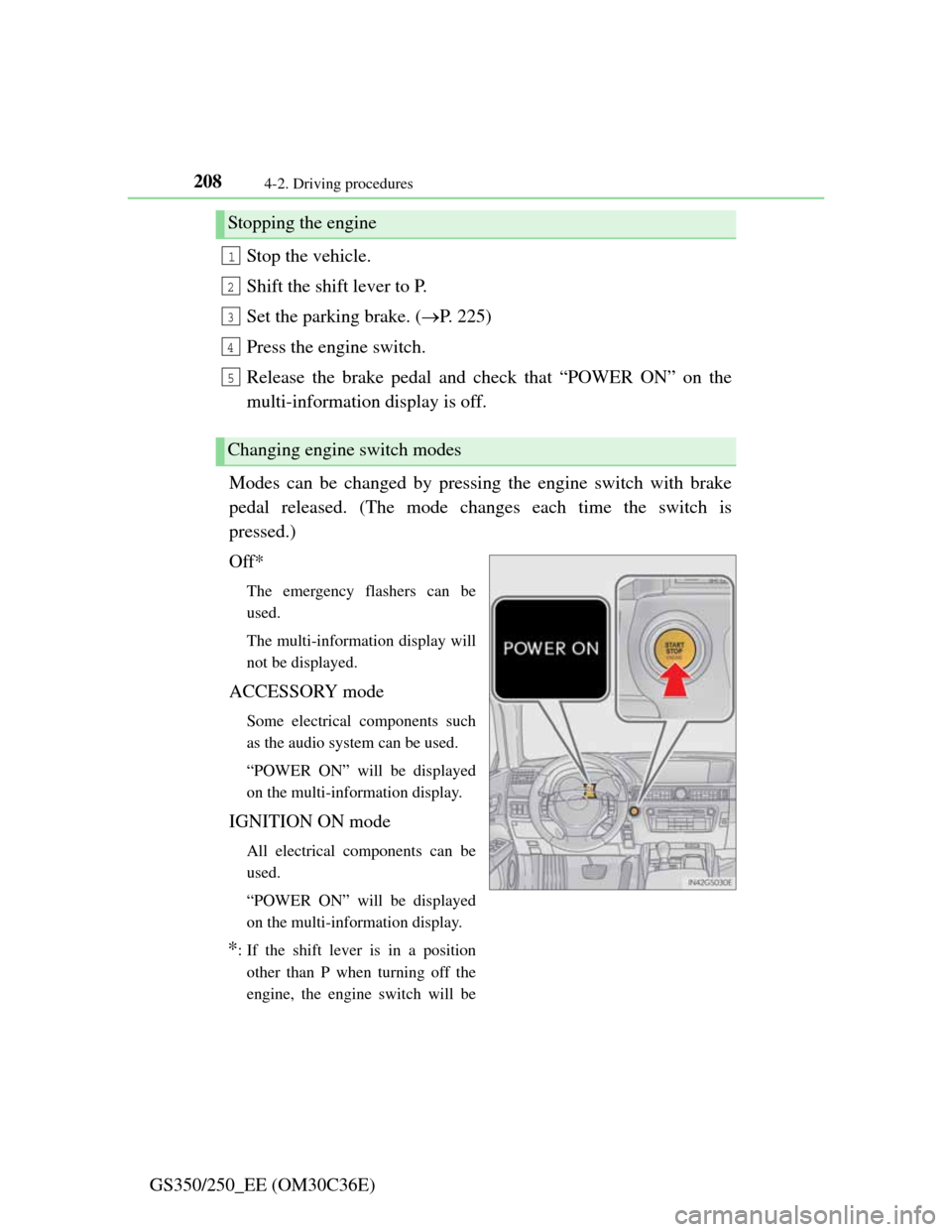
Modes can be changed by pressing the engine switch with brake
pedal released. (The mode changes each time the switch is
pressed.)
Off*
The emergency flashers can be
used.
The multi-information display will
not be displayed.
ACCESSORY mode
Some electrical components such
as the audio system can be used.
“POWER ON” will be displayed
on the multi-information display.
IGNITION ON mode
All electrical components can be
used.
“POWER ON” will be displayed
on the multi-information display.
*: If the shift lever is in a position
other than P when turning off the
engine, the engine switch will be
Stopping the engine
Changing engine switch modes
1
2
3
4
5