radio Lexus GS350 2013 Adjusting the steering wheel and mirrors / LEXUS 2013 GS350 (OM30C34U) User Guide
[x] Cancel search | Manufacturer: LEXUS, Model Year: 2013, Model line: GS350, Model: Lexus GS350 2013Pages: 828, PDF Size: 10.43 MB
Page 112 of 828

112
GS350_U (OM30C34U)
3-2. Opening, closing and locking the doors and trunk
■Electronic key battery depletion
●The standard battery life is 1 to 2 years.
●If the battery becomes low, an alarm will sound in the cabin when the engine stops.
( P. 7 1 9 )
●As the electronic key always receives radio waves, the battery will become
depleted even if the electronic key is not used. The following symptoms indicate
that the electronic key battery may be depleted. Replace the battery when neces-
sary. ( P. 6 4 6 )
• The smart access system with push-button start or the wireless remote control does not operate.
• The detection area becomes smaller.
• The LED indicator on the key surface does not turn on.
●To avoid serious deterioration, do not leave the electronic key within 3 ft. (1 m) of
the following electrical appliances that produce a magnetic field:
•TVs
•Personal computers
• Cellular phones, cordless phones and battery chargers
• Recharging cellular phones or cordless phones
•Table lamps
•Glass top ranges
■When the electronic key battery is fully depleted
P. 6 4 6
■Customization
Settings (e. g. smart access system with push-button start) can be changed.
(Customizable features: P. 777)
■If the smart access system with push-but ton start has been deactivated in a cus-
tomized setting
●Locking and unlocking the doors and opening the trunk:
Use the wireless remote control or mechanical key. ( P. 1 1 4 , 74 0 )
●Starting the engine and changing engine switch modes: P. 74 1
●Stopping the engine: P. 1 7 2
Page 113 of 828

GS350_U (OM30C34U)
1133-2. Opening, closing and locking the doors and trunk
3
Operation of each component
■Certification for the smart access system with push-button start
For vehicles sold in the U.S.A.
FCC ID: HYQ23AAB FCC ID: HYQ14FBA
FCC ID: HYQ14CBA
FCC ID: NI4TMLF10-2
NOTE:
This device complies with part 15 of the FCC Rules. Operation is subject to the fol-
lowing two conditions: (1) This device may not cause harmful interference, and (2)
this device must accept any interference received, including interference that may
cause undesired operation.
FCC WARNING:
Changes or modifications not expressly ap proved by the party responsible for com-
pliance could void the user’s authority to operate the equipment.
For vehicles sold in Canada
NOTE:
Operation is subject to the following two conditions: (1) this device may not cause
interference, and (2) this device must acc ept any interference, including interfer-
ence that may cause undesired operation of the device.
CAUTION
■Caution regarding interference with electronic devices
●People with implanted pacemakers or cardiac defibrillators should keep away
from the smart access system wi th push-button start antennas. (P. 1 0 3 )
The radio waves may affect the operation of such devices. If necessary, the entry
function can be disabled. Ask your Lexus dealer for details, such as the frequency
of radio waves and timing of emitting th e radio waves. Then, consult your doctor
to see if you should disable the entry function.
●Users of any electrical medical device other than implanted pacemakers and
implanted cardiac defibrillators should consult the manufacturer of the device for
information about its operation under the influence of radio waves.
Radio waves could have unexpected effects on the operation of such medical
devices.
Ask your Lexus dealer for details on disabling the entry function.
Page 123 of 828

GS350_U (OM30C34U)
1233-2. Opening, closing and locking the doors and trunk
3
Operation of each component
■Trunk easy closer (vehicles with power trunk opener and closer)
In the event that the trunk lid is left slightly open, the trunk easy closer will automati-
cally close it to the fully closed position.
■Function to prevent the trunk being locked with the electronic key inside
●When all doors are being locked, closing the trunk lid with the electronic key left
inside the trunk will sound an alarm.
In this case, the trunk lid can be opened pressing the trunk release button on the
trunk lid.
●Even when the spare electronic key is put in the trunk with all the doors locked, the
key confinement prevention function can be activated so the trunk can be opened.
In order to prevent theft, take all electron ic keys with you when leaving the vehicle.
●Even when the electronic key is put in the trunk with all the doors are locked, the
key may not be detected depending on the places and the surrounding radio wave
conditions. In this case, the key confinem ent prevention function cannot be acti-
vated, causing the doors to lock when th e trunk is closed. Make sure to check
where the key is before closing the trunk.
●The key confinement prevention function cannot be activated if any one of the
doors is unlocked. In this case, open the trunk using the trunk opener.
■Overload protection function (vehicle s with power trunk opener and closer)
The trunk lid will not operate when excessiv e load is present on the top of the trunk
lid.
■Fall-down protection function (vehicle s with power trunk opener and closer)
While the trunk lid is opening automatically, applying excessive force to it will stop
the opening operation to prevent the trunk lid from rapidly falling down.
■Jam protection function (vehicles with power trunk opener and closer)
While the trunk lid is closing automatically, the trunk lid will stop closing and open if
something gets caught.
Page 223 of 828

GS350_U (OM30C34U)
2234-5. Using the driving support systems
4
Driving
■Certification
For vehicles sold in the U.S.A.
FCC ID: HYQDNMWR004
This device complies with Part 15 of the FCC Rules. Operation is subject to the fol-
lowing two conditions: (1) this device may not cause harmful interference, and (2)
this device must accept any interference received, including interference that may
cause undesired operation.
FCC WARNING
Changes or modifications not expressly ap proved by the party responsible for com-
pliance could void the user’s authority to operate the equipment.
Radio frequency radiation exposure Information:
This equipment complies with FCC radiation exposure limits set forth for an uncon-
trolled environment.
This equipment should be in stalled and operated with minimum distance of 20 cm
between the radiator and your body.
This transmitter must not be co-located or operating in conjunction with any other
antenna or transmitter.
For vehicles sold in Canada
Operation is subject to the following two conditions: (1) this device may not cause
interference, and (2) this device must acc ept any interference, including interfer-
ence that may cause undesired operation of the device.
Page 283 of 828

GS350_U (OM30C34U)
2834-5. Using the driving support systems
4
Driving
■Automatic cancelation of the pre-collision system
When a malfunction occurs due to sensor contamination, etc. that results in the sen-
sors being unable to detect obstacles, the pre-collision system will be automatically
disabled. In this case, the system will not activate even if there is a collision possibility.
■When there is a malfunction in the system
“PCS” warning light will flash and warning messages will be displayed.
( P. 6 8 8 , 6 9 9 )
■Certification
For vehicles sold in the U.S.A.
FCC ID: HYQDNMWR004
This device complies with Part 15 of the FCC Rules. Operation is subject to the fol-
lowing two conditions: (1) this device may not cause harmful interference, and (2)
this device must accept any interference received, including interference that may
cause undesired operation.
FCC WARNING
Changes or modifications not expressly ap proved by the party responsible for com-
pliance could void the user’s authority to operate the equipment.
Radio frequency radiation exposure Information:
This equipment complies with FCC radiation exposure limits set forth for an uncon-
trolled environment.
This equipment should be in stalled and operated with minimum distance of 20 cm
between the radiator and your body.
This transmitter must not be co-located or operating in conjunction with any other
antenna or transmitter.
For vehicles sold in Canada
Operation is subject to the following two conditions: (1) this device may not cause
interference, and (2) this device must acc ept any interference, including interfer-
ence that may cause undesired operation of the device.
Page 291 of 828

GS350_U (OM30C34U)
2914-5. Using the driving support systems
4
Driving
■When there is a malfunction in the system
If a system malfunction is detected due to any of the following reasons, warning mes-
sages will be displayed: ( P. 7 0 3 )
●There is a malfunction with the sensors
●The sensors have become dirty
●The outside temperature is extremely high or low
●The sensor voltage has become abnormal
■Certification for the BSM
For vehicles sold in the U.S.A.
FCC ID: OAYBSDTX
This device complies with part 15 of the FCC Rules. Operation is subject to the fol-
lowing three conditions:
(1) This device may not cause harmful interference.
(2) This device must accept any interference received, including interference that may cause undesired operation.
(3) This device may only work when the vehi cle is in operation pursuant to § 15.252
(a) (4).
FCC WARNING
Changes or modifications not expressly ap proved by the party responsible for com-
pliance could void the user’s authority to operate the equipment.
For vehicles sold in Canada
IC: 4135A-BSDTX
This device complies with the radio standards specification RSS-220 of Industry
Canada. Operation is subject to the following two conditions:
(1) This device may not cause harmful interference.
(2) This device must accept any interference received, including interference that may cause undesired operation.
NOTE
During printing time of this user manual the approvals listed below are granted. Fur-
ther countries may become available or actual certification identifiers may be sub-
ject to change or update.
WA R N I N G
Changes or modifications not expressly ap proved by the party responsible for com-
pliance could void the user’s authority to operate the equipment.
Page 305 of 828

305
GS350_U (OM30C34U)
Interior features5
5-3. Using the audio system Audio system type ..................... 367
Using the radio ........................... 390
Using the CD/DVD player ..... 412
Playing an audio CD and MP3/WMA discs........... 414
Playing DVD video ....................420
CD/DVD player and DVD video disc information ...........432
Listening to Bluetooth
® audio....................444
Listening to a USB memory.........................454
Listening to an iPod ...................464
Optimal use of the audio/video system ..........474
Using the AUX port...................476
Using the rear seat audio controls ........................... 477
Using the steering wheel audio switches ..........................482
5-4. Using the hands-free phone system (for cellular phone)
Hands-free system (for cellular phone) ................ 485
Using a Bluetooth
® phone .... 493
Setting the hands-free system (for cellular phone) .................. 512
Setting the Bluetooth
®............535 5-5. Using the interior lights
Interior lights list .........................548• Interior light ............................ 549
• Personal lights ....................... 549
5-6. Using the storage features List of storage features ............. 551• Glove box ............................... 553
• Console box........................... 554
• Cup holders ........................... 555
• Auxiliary boxes ..................... 557
Trunk features ..............................558
5-7. Other interior features Sun visors and vanity mirrors .....................561
Clock............................................... 562
Ashtrays ......................................... 563
Power outlets ............................... 564
Heated steering wheel ............ 566
Seat heaters/ seat ventilators .........................568
Armrest ............................................571
Rear sunshade/ rear door sunshades .............. 572
Trunk storage extension .......... 575
Coat hooks .................................... 576
Assist grip.......................................577
Utility hook.................................... 578
Garage door opener................ 579
Safety Connect ...........................586
Page 309 of 828
GS350_U (OM30C34U)
3095-1. Remote Touch screen
5
Interior features
If the engine switch is turned to
ACCESSORY or IGNITION ON
mode, the initial screen will be dis-
played for a few seconds as the sys-
tem starts up.
Images shown on the initial screen can
be changed to suit individual prefer-
ences. (P. 3 2 2 )
SwitchPa g e
“Destination”Navigation System Owner’s Manual
“Info/Apps” or “Info”P. 314/Navigation System Owner’s
Manual
“Setup”P. 3 1 7
“Radio”P. 3 6 7 , 3 9 0
“Media”P. 3 6 7 , 4 1 4
“Climate”P. 3 4 5
“Phone”P. 4 8 5
“Display”P. 3 1 0
Initial screen
Page 333 of 828

GS350_U (OM30C34U)
3335-1. Remote Touch screen
5
Interior features
Select “Audio” on the “Setup” screen.HD Radio™ sy stem settings
Detailed information: P. 3 9 4
iPod settings
Detailed information: P. 4 6 7
Audio settings
1
2
Page 341 of 828
GS350_U (OM30C34U)
3415-1. Remote Touch screen
5
Interior features
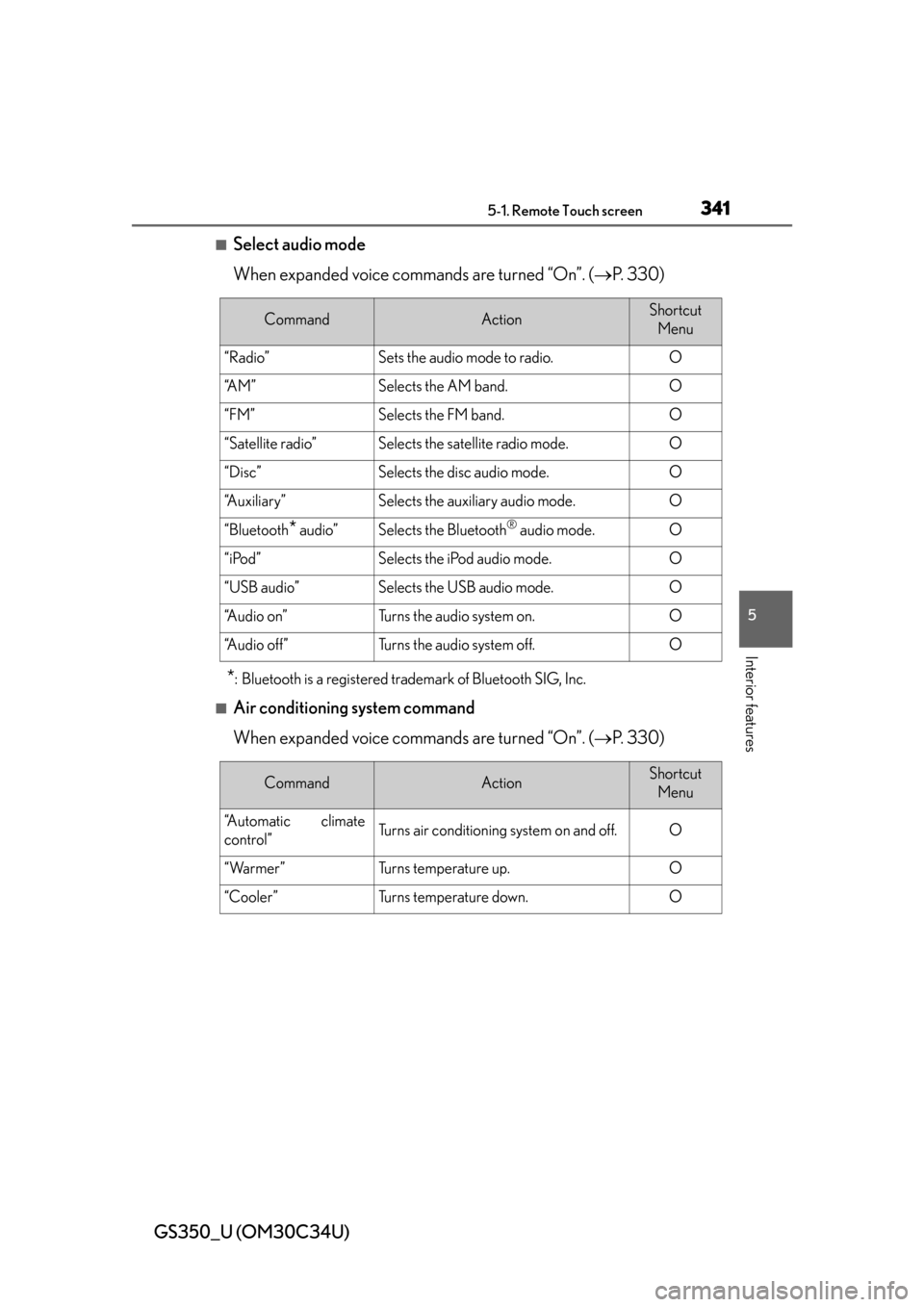
■Select audio mode
When expanded voice commands are turned “On”. (P. 330)
*: Bluetooth is a registered trademark of Bluetooth SIG, Inc.
■Air conditioning system command
When expanded voice commands are turned “On”. ( P. 330)
CommandActionShortcut
Menu
“Radio”Sets the audio mode to radio.O
“A M ”Selects the AM band.O
“FM”Selects the FM band.O
“Satellite radio”Selects the satellite radio mode.O
“Disc”Selects the disc audio mode.O
“Auxiliary”Selects the auxiliary audio mode.O
“Bluetooth* audio”Selects the Bluetooth® audio mode.O
“iPod”Selects the iPod audio mode.O
“USB audio”Selects the USB audio mode.O
“A u d i o o n ”Turns the audio system on.O
“Audio off”Turns the audio system off.O
CommandActionShortcut Menu
“Automatic climate
control”Turns air conditioning system on and off.O
“Warmer”Turns temperature up.O
“Cooler ”Tu r n s t e m p e r a t u r e d o w n .O