door lock Lexus GS350 2013 Adjusting the steering wheel and mirrors / LEXUS 2013 GS350 (OM30C34U) Workshop Manual
[x] Cancel search | Manufacturer: LEXUS, Model Year: 2013, Model line: GS350, Model: Lexus GS350 2013Pages: 828, PDF Size: 10.43 MB
Page 208 of 828
208
GS350_U (OM30C34U)
4-4. Refueling
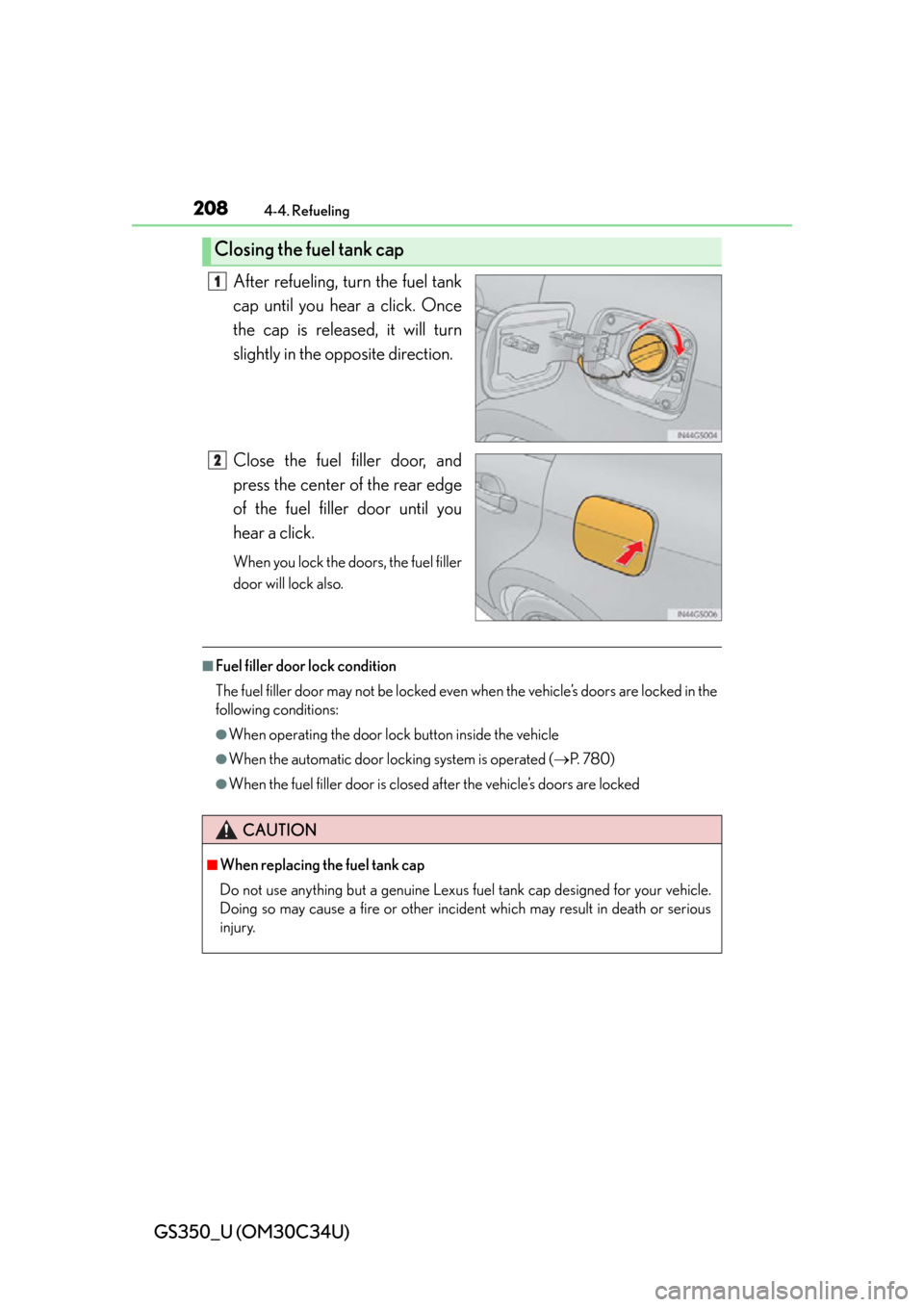
After refueling, turn the fuel tank
cap until you hear a click. Once
the cap is released, it will turn
slightly in the opposite direction.
Close the fuel filler door, and
press the center of the rear edge
of the fuel filler door until you
hear a click.
When you lock the doors, the fuel filler
door will lock also.
■Fuel filler door lock condition
The fuel filler door may not be locked even when the vehicle’s doors are locked in the
following conditions:
●When operating the door lock button inside the vehicle
●When the automatic door locking system is operated (P. 7 8 0 )
●When the fuel filler door is closed after the vehicle’s doors are locked
Closing the fuel tank cap
1
2
CAUTION
■When replacing the fuel tank cap
Do not use anything but a genuine Lexus fu el tank cap designed for your vehicle.
Doing so may cause a fire or other incide nt which may result in death or serious
injury.
Page 305 of 828

305
GS350_U (OM30C34U)
Interior features5
5-3. Using the audio system Audio system type ..................... 367
Using the radio ........................... 390
Using the CD/DVD player ..... 412
Playing an audio CD and MP3/WMA discs........... 414
Playing DVD video ....................420
CD/DVD player and DVD video disc information ...........432
Listening to Bluetooth
® audio....................444
Listening to a USB memory.........................454
Listening to an iPod ...................464
Optimal use of the audio/video system ..........474
Using the AUX port...................476
Using the rear seat audio controls ........................... 477
Using the steering wheel audio switches ..........................482
5-4. Using the hands-free phone system (for cellular phone)
Hands-free system (for cellular phone) ................ 485
Using a Bluetooth
® phone .... 493
Setting the hands-free system (for cellular phone) .................. 512
Setting the Bluetooth
®............535 5-5. Using the interior lights
Interior lights list .........................548• Interior light ............................ 549
• Personal lights ....................... 549
5-6. Using the storage features List of storage features ............. 551• Glove box ............................... 553
• Console box........................... 554
• Cup holders ........................... 555
• Auxiliary boxes ..................... 557
Trunk features ..............................558
5-7. Other interior features Sun visors and vanity mirrors .....................561
Clock............................................... 562
Ashtrays ......................................... 563
Power outlets ............................... 564
Heated steering wheel ............ 566
Seat heaters/ seat ventilators .........................568
Armrest ............................................571
Rear sunshade/ rear door sunshades .............. 572
Trunk storage extension .......... 575
Coat hooks .................................... 576
Assist grip.......................................577
Utility hook.................................... 578
Garage door opener................ 579
Safety Connect ...........................586
Page 550 of 828
550
GS350_U (OM30C34U)
5-5. Using the interior lights
■Illuminated entry system
The lights automatically turn on/off according to engine switch mode, the presence
of the electronic key, whether the doors are locked/unlocked, and whether the doors
are opened/closed.
■To prevent battery discharge
If the interior lights remain on when the engine switch is turned off, the lights will go
off automatically after 20 minutes.
■Customization
Setting (e.g. the time elapsed before lights turn off) can be changed.
(Customizable features: P. 777)
NOTICE
■To prevent battery discharge
Do not leave the lights on longer than necessary when the engine is not running.
Page 553 of 828
GS350_U (OM30C34U)
5535-6. Using the storage features
5
Interior features
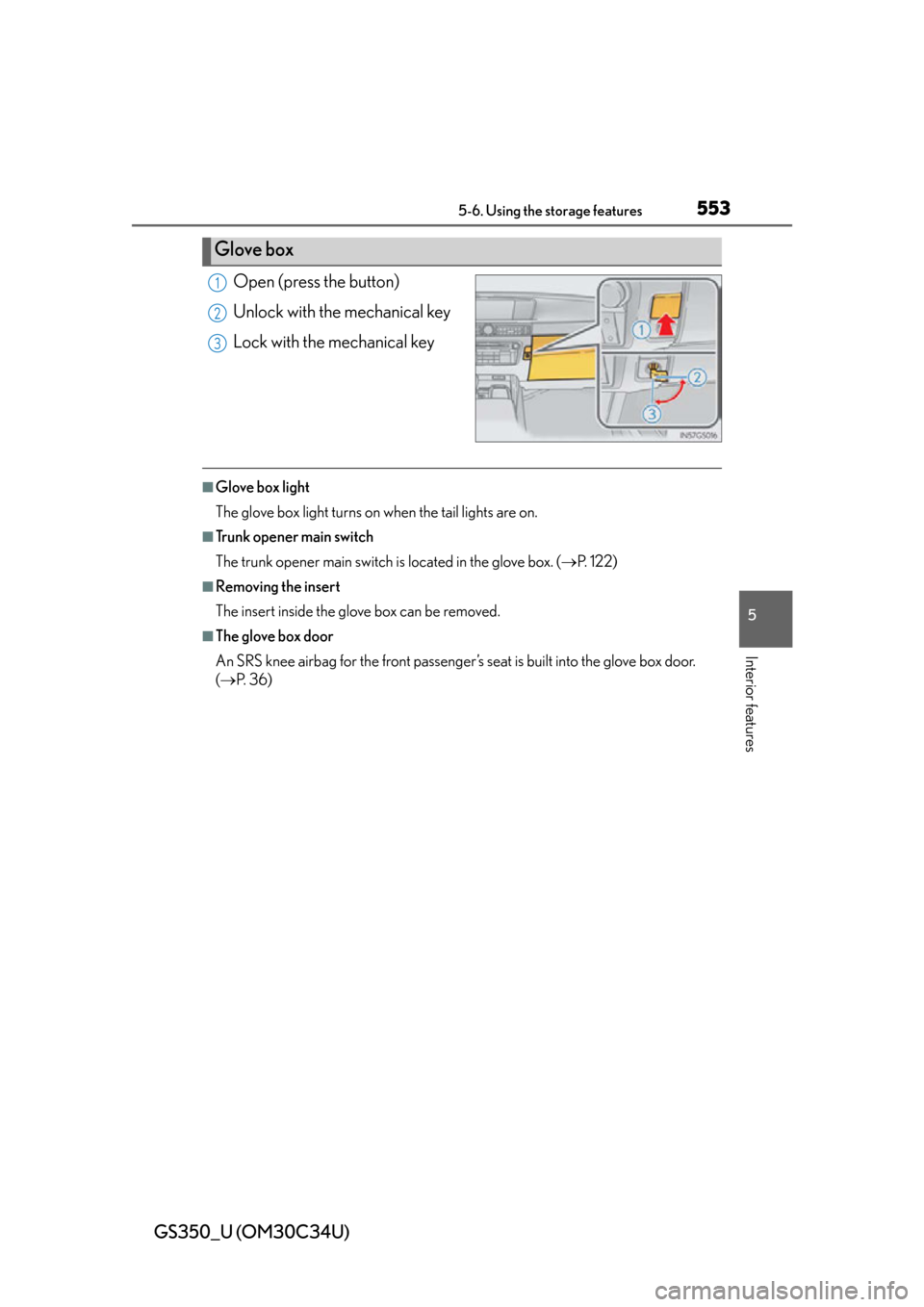
Open (press the button)
Unlock with the mechanical key
Lock with the mechanical key
■Glove box light
The glove box light turns on when the tail lights are on.
■Trunk opener main switch
The trunk opener main switch is located in the glove box. ( P. 1 2 2 )
■Removing the insert
The insert inside the glove box can be removed.
■The glove box door
An SRS knee airbag for the front passenger’ s seat is built into the glove box door.
( P. 3 6 )
Glove box
1
2
3
Page 572 of 828
572
GS350_U (OM30C34U)
5-7. Other interior features
Rear sunshade/rear door sunshades
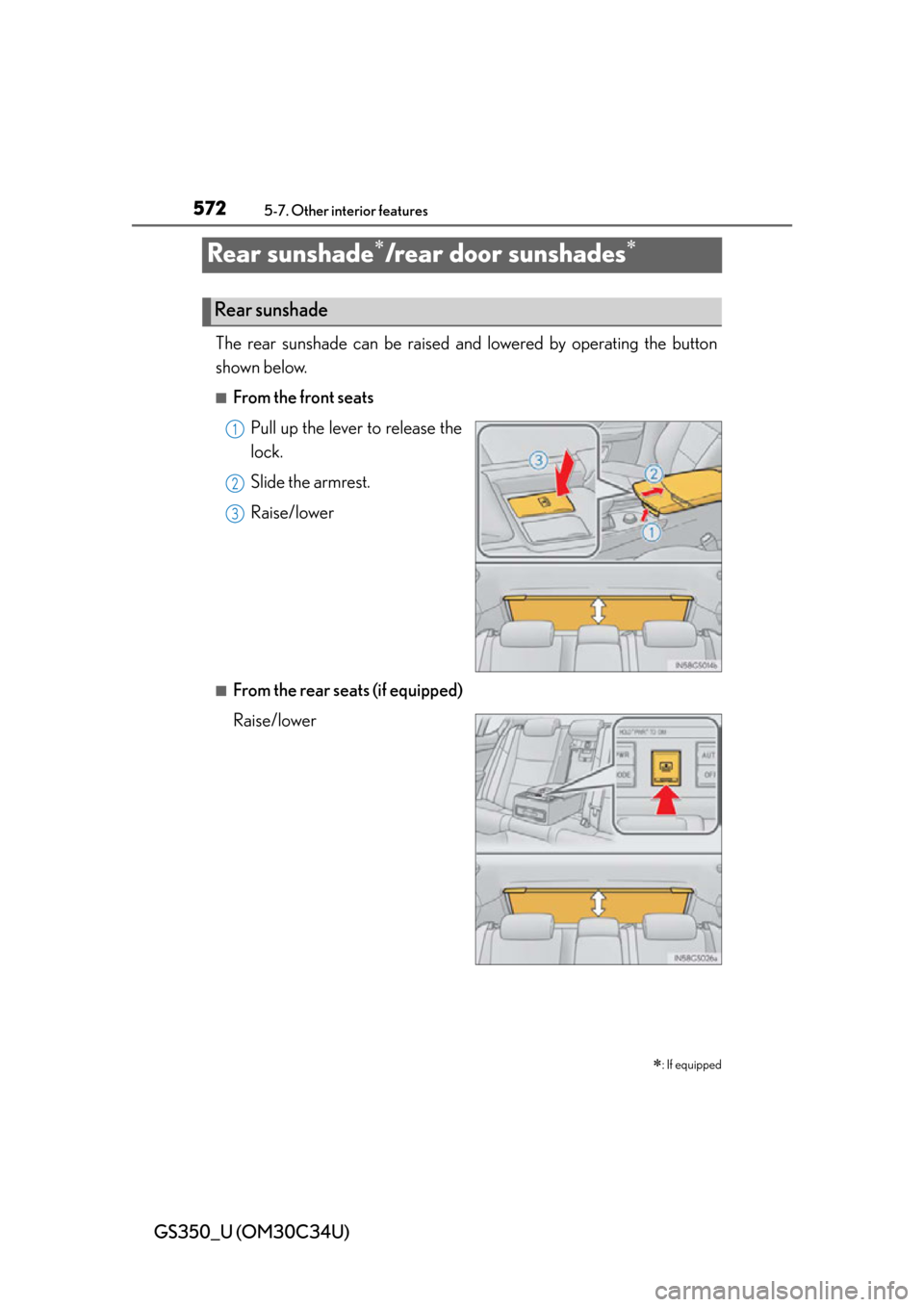
The rear sunshade can be raised and lowered by operating the button
shown below.
■From the front seats
Pull up the lever to release the
lock.
Slide the armrest.
Raise/lower
■From the rear seats (if equipped)
Raise/lower
: If equipped
Rear sunshade
1
2
13
Page 574 of 828
574
GS350_U (OM30C34U)
5-7. Other interior features
■Button lock function (vehicles with rear control panel)
To prevent inadvertent operation, some buttons on the rear armrest can be locked.
( P. 3 6 4 )
■Rear control panel illumination off function (vehicles with rear control panel)
Control panel illumination on the rear armrest can be turned off. ( P. 3 6 4 )
■Customization
Time elapsed before the reverse operation feature activates can be changed.
(Customizable features: P. 777)
CAUTION
■When the rear sunshade is being operated
Do not place fingers or other objects in the fastener section or in the opening.
They may get caught, causing injury.
NOTICE
■To prevent battery discharge
Do not operate the rear sunshade when the engine is off.
■To ensure normal operation of the rear sunshade and rear door sunshades
Observe the following precautions.
●Do not place excessive load on the moto r or other components of the rear sun-
shade.
●Do not place objects where they may hinder opening and closing operations.
●Do not attach items to the rear sunshade and rear door sunshades.
●Keep the opening clean and clear of obstructions.
●Do not operate the rear sunshade cont inuously for long periods of time.
Page 575 of 828
575
GS350_U (OM30C34U)5-7. Other interior features
5
Interior features
Trunk storage extension
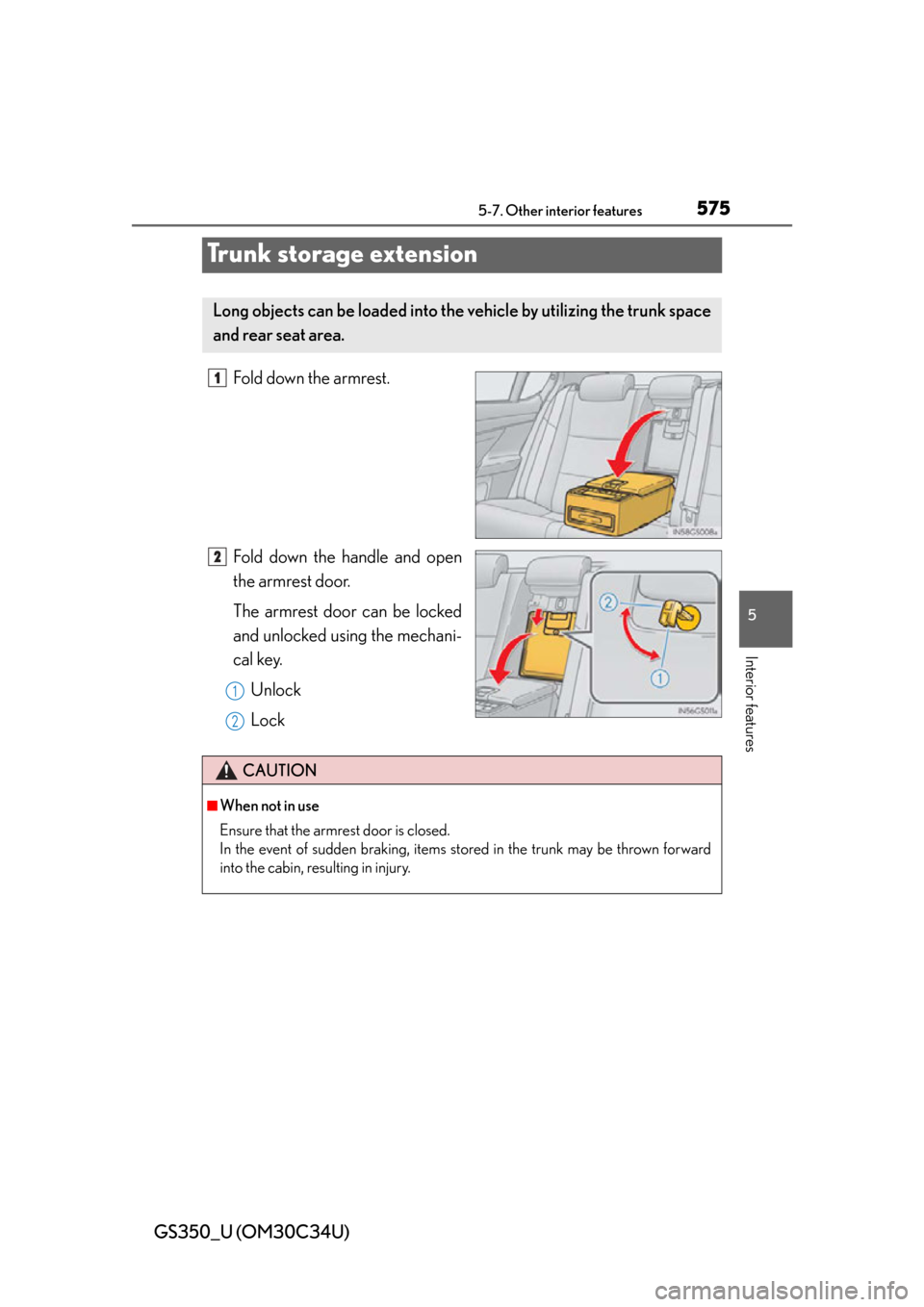
Fold down the armrest.
Fold down the handle and open
the armrest door.
The armrest door can be locked
and unlocked using the mechani-
cal key. Unlock
Lock
Long objects can be loaded into th e vehicle by utilizing the trunk space
and rear seat area.
1
2
1
2
CAUTION
■When not in use
Ensure that the armrest door is closed.
In the event of sudden braking, items stored in the trunk may be thrown forward
into the cabin, resulting in injury.
Page 579 of 828
579
GS350_U (OM30C34U)5-7. Other interior features
5
Interior features
Garage door opener
The garage door opener (HomeLink® Universal Transceiver) is manufac-
tured under license from HomeLink
®.
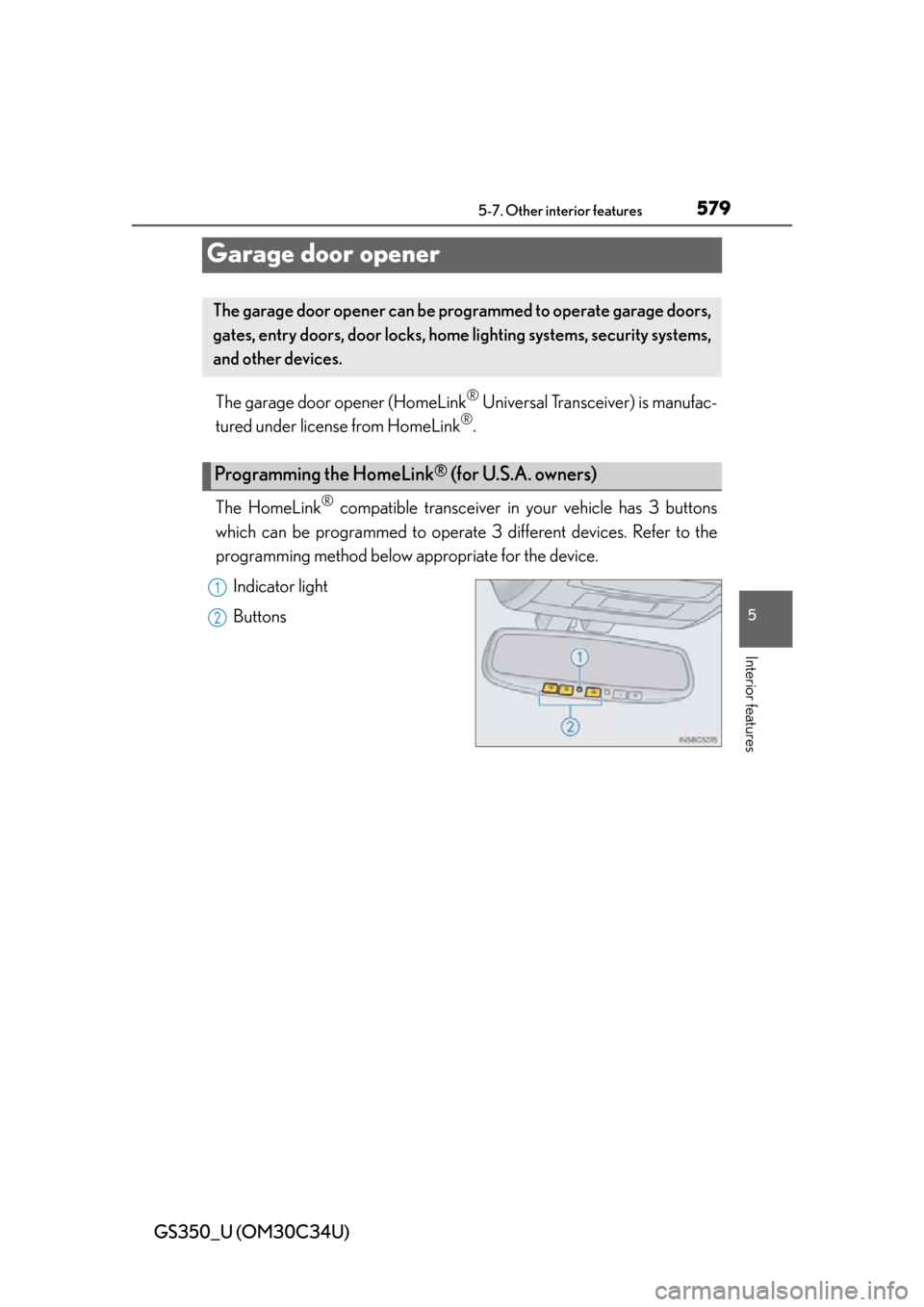
The HomeLink
® compatible transceiver in your vehicle has 3 buttons
which can be programmed to operate 3 different devices. Refer to the
programming method below appropriate for the device.
Indicator light
Buttons
The garage door opener can be programmed to operate garage doors,
gates, entry doors, door locks, home lighting systems, security systems,
and other devices.
Programming the HomeLink® (for U.S.A. owners)
1
2
Page 582 of 828
582
GS350_U (OM30C34U)
5-7. Other interior features
Press and hold the vehicle’s programmed HomeLink® button for 2
seconds and release it. Repeat this step once again. The garage door
may open.
If the garage door opens, the progra mming process is complete. If the door
does not open, press and release the button a third time. This third press and
release will complete the programming process by opening the garage door.
The ceiling mounted garage door open er motor should now recognize the
HomeLink
® signal and operate the garage door.
Repeat the steps above to program another rolling code system for
any of the remaining HomeLink
® buttons.
■Programming an entry gate (for U.S.A. owners)/Programming a
devices in the Canadian market
Place the remote control transmitter 1 to 3 in. (25 to 75 mm) away
from the HomeLink
® buttons.
Keep the HomeLink® indicator light in view while programming.
Press and hold the selected HomeLink® button.
Repeatedly press and release (cyc le) the remote control transmitter
for 2 seconds each until step is completed.
When the HomeLink
® indicator light starts to flash rapidly, release
the buttons.
Test the HomeLink
® operation by pressing the newly programmed
button. Check to see if the gate/device operates correctly.
Repeat the steps above to progra m another device for any of the
remaining HomeLink
® buttons.
■Programming other devices
To program other devices such as home security systems, home door
locks and lighting, contact your Lexus dealer for assistance.
■Reprogramming a button
The individual HomeLink
® buttons cannot be erased but can be repro-
grammed. To reprogram a button, follow the “Reprogramming a
HomeLink
® button” instructions.
3
4
1
2
3
4
4
5
6
Page 594 of 828
594
GS350_U (OM30C34U)
6-1. Maintenance and care
Cleaning and protecting the vehicle exterior
●Working from top to bottom, liberally apply water to the vehicle body,
wheel wells and underside of the vehicle to remove any dirt and dust.
●Wash the vehicle body using a sponge or soft cloth, such as a chamois.
●For hard-to-remove marks, use car wash soap and rinse thoroughly
with water.
●Wipe away any water.
●Wax the vehicle when the waterproof coating deteriorates.
If water does not bead on a clean surface, apply wax when the vehicle body is
cool.
■Automatic car washes
●Fold the mirrors before washing the vehicle. Start washing from the front of the
vehicle. Make sure to extend the mirrors before driving.
●Brushes used in automatic car washes may scratch the vehicle surface and harm
your vehicle’s paint.
●Rear spoiler (if equipped) may not be wa shable in some automatic car washes.
There may also be an increased risk of damage to vehicle.
■High pressure car washes
●Do not allow the nozzles of the car wash to come within close proximity of the win-
dows.
●Before using the car wash, check that the fuel filler door on your vehicle is closed
properly.
■When using a car wash
If the door handle becomes wet while the electronic key is within the effective range,
the door may lock and unlock repeatedly. In that case, follow the following correc-
tion procedures to wash the vehicle:
●Place the key in a position 6 ft. (2 m) or more separate from the vehicle while the
vehicle is being washed. (Take care to ensure that the key is not stolen.)
●Set the electronic key to battery-saving mode to disable the smart access system
with push-button start. ( P. 1 0 7 )
Perform the following to protect th e vehicle and maintain it in prime
condition: