air condition Lexus GS350 2013 User Guide
[x] Cancel search | Manufacturer: LEXUS, Model Year: 2013, Model line: GS350, Model: Lexus GS350 2013Pages: 830, PDF Size: 9.71 MB
Page 250 of 830
GS350_U (OM30C34U)
2494-5. Using the driving support systems
4
Driving
●The shape of the obstacle may prevent the sensor from detecting it. Pay particular
attention to the following obstacles:
• Wires, fences, ropes, etc.
• Cotton, snow and other materials that absorb sound waves
• Sharply-angled objects
•Low obstacles
• Tall obstacles with upper sections projecting outwards in the direction of yourvehicle
●The following situations may occur during use.
• Depending on the shape of the obstacle and other factors, the detection dis-tance may shorten, or detection may be impossible.
• Obstacles may not be detected if they are too close to the sensor.
• There will be a short delay between obstacle detection and display. Even at slow speeds, there is a possibility that the obstacle will come within the sensor’s
detection areas before the display is shown and the warning beep sounds.
• Thin posts or objects lower than the sensor may not be detected for collision when approached, even if they have been detected once.
• It might be difficult to hear beeps due to the volume of audio system or air flow noise of air conditioning system.
■If a message is displayed on the multi-information display
→ P. 700, 707
■Certification
XFor vehicles sold in the U.S.A.
This device complies with Part 15 of the FCC Rules. Operation is subject to the fol-
lowing two conditions; (1) This device may not cause harmful interference, and (2)
this device must accept any interference received, including interference that may
cause undesired operation.
XFor vehicles sold in Canada
This ISM device complies with Canadian ICES-001.
Cet appareil ISM est conforme a la norme NMB-001 du Canada.
Page 268 of 830
GS350_U (OM30C34U)
2674-5. Using the driving support systems
4
Driving
■Operation of the air conditioning system in Eco drive mode
Eco drive mode controls the heating/cooling operations and fan speed of the air
conditioning system to enhance fuel efficiency. To improve air conditioning perfor-
mance, adjust the fan speed or turn off Eco drive mode. ( →P. 3 4 5 )
■Automatic operation of the seat heater during Eco drive mode
If the driving mode select switch is switched to Eco drive mode in cold temperatures,
the seat heater will be automatically operated to assist heating performance.
■Sport mode automatic deactivation
Sport mode is automatically deactivated if the engine switch is turned off after driv-
ing in sport mode.
Page 300 of 830
GS350_U (OM30C34U)
2994-6. Driving tips
4
Driving
Perform the following according to the driving conditions:
●Do not try to forcibly open a window or move a wiper that is frozen.
Pour warm water over the frozen area to melt the ice. Wipe away the
water immediately to prevent it from freezing.
●To ensure proper operation of the climate control system fan, remove
any snow that has accumulated on the air inlet vents in front of the wind-
shield.
●Check for and remove any excess ice or snow that may have accumu-
lated on the exterior lights, vehicle’s roof, chassis, around the tires or on
the brakes.
●Remove any snow or mud from the bottom of your shoes before getting
in the vehicle.
Accelerate the vehicle slowly, keep a safe distance between you and the
vehicle ahead, and drive at a reduced speed suitable to road conditions.
Park the vehicle and move the shift lever to P without setting the parking
brake. The parking brake may freeze up, preventing it from being
released. If necessary, block the wheels to prevent inadvertent sliding or
creeping.
Before driving the vehicle
When driving the vehicle
When parking the vehicle
Page 305 of 830
304
GS350_U (OM30C34U)
5-1. Remote Touch screen Remote Touch .............................306
Remote Touch screen ............. 308
Set up screen .................................317
Voice command system .......... 334
5-2. Using the air conditioning system and defogger
Front automatic air conditioning system......... 345
Rear air conditioning system ..........................................360
Rear window and outside rear view mirror defoggers .......... 365
Windshield wiper de-icer ....... 366
Page 309 of 830
308
GS350_U (OM30C34U)
5-1. Remote Touch screen
Remote Touch screen
By using the Remote Touch, you can control the audio system and air
conditioning system, and adjust the screen display etc.
Vehicles with a navigation system: Different information can be dis-
played on the left and right of the screen. The 8-inch display area on the
left of the screen is called the “Mai n Display”, and the area to the right is
called the “Side Display”. For detail s, refer to the “Navigation System
Owner’s Manual”.
“Menu” screen
XVehicles without navigation
systemXVehicles with a navigation
system
Page 331 of 830
330
GS350_U (OM30C34U)
5-1. Remote Touch screen
Voice guidance can be set.
Select “Voice” on the “Setup” screen.Select voice guidance volume
Voice guidance on/off during
route guidance
*
Voice guidance on/off during
audio system is in use
Voice recognition prompt on/off
This setting can also be changed on
the “Shortcut Menu” screen.
(→ P. 3 4 2 )
Restore default settings
Voice commands on/off when
using the audio/video and air
conditioning system
Voice guidance on/off when
using the traffic information*
Voice guidance on/off when
using the XM NavWeather™*
Make sure to save after changing
settings.
*: Vehicles with a navigation system.
Vo i c e s e t t i n g s
1
2
3
4
5
6
7
8
Page 335 of 830
334
GS350_U (OM30C34U)
5-1. Remote Touch screen
Voice command system
◆Talk switch
Press .
To cancel, press and hold the talk
switch.
◆ Back switch
Press .
To return to the previous screen.
◆Microphone
The voice command system enables the navigation, audio/video,
hands-free and air conditioning sys tems to be operated using voice
commands.
For details of the navigation system , refer to the “Navigation System
Owner’s Manual”.
Page 339 of 830
338
GS350_U (OM30C34U)
5-1. Remote Touch screen
Selecting “On” next to “Expanded Voice Commands” on the “Voice Set-
tings” screen enables voice command operation of the audio/video and
air conditioning system. ( →P. 3 3 0 )
For more information on operations that can be controlled using
expanded voice commands, refer to “Command list”. ( →P. 3 3 9 )
■Voice command example (t urn the audio system)
Press .
Say “Audio on”.
Expanded voice commands
1
2
Page 342 of 830
GS350_U (OM30C34U)
3415-1. Remote Touch screen
5
Interior features
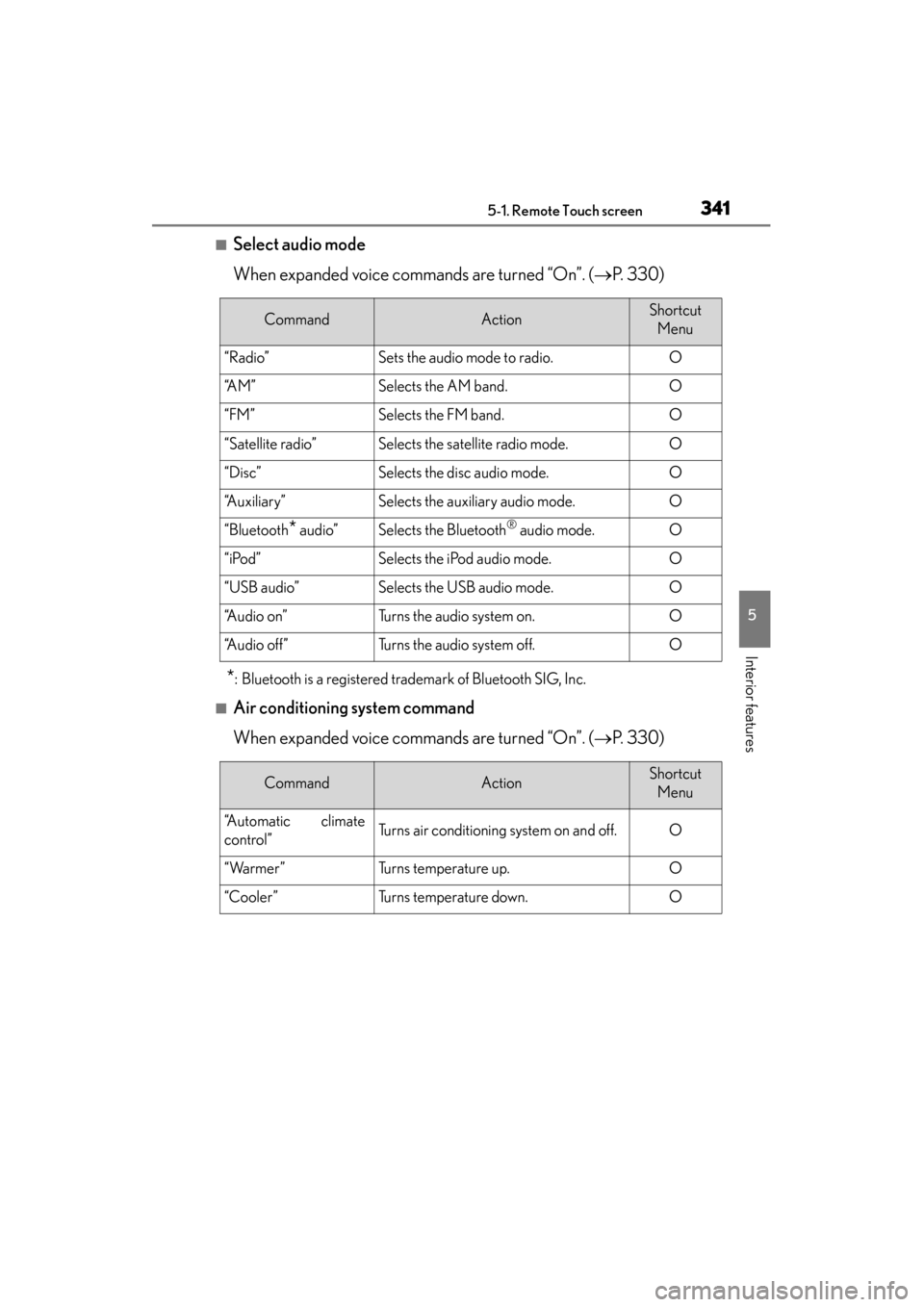
■Select audio mode
When expanded voice commands are turned “On”. (→P. 3 3 0 )
*: Bluetooth is a registered trademark of Bluetooth SIG, Inc.
■Air conditioning system command
When expanded voice commands are turned “On”. ( →P. 3 3 0 )
CommandActionShortcut
Menu
“Radio”Sets the audio mode to radio.O
“A M ”Selects the AM band.O
“FM”Selects the FM band.O
“Satellite radio”Selects the satellite radio mode.O
“Disc”Selects the disc audio mode.O
“Auxiliary”Selects the auxiliary audio mode.O
“Bluetooth* audio”Selects the Bluetooth® audio mode.O
“iPod”Selects the iPod audio mode.O
“USB audio”Selects the USB audio mode.O
“A u d i o o n ”Turns the audio system on.O
“Audio off”Turns the audio system off.O
CommandActionShortcut Menu
“Automatic climate
control”Turns air conditioning system on and off.O
“Warmer”Turns temperature up.O
“Cooler”Turns temperature down.O
Page 344 of 830
GS350_U (OM30C34U)
3435-1. Remote Touch screen
5
Interior features
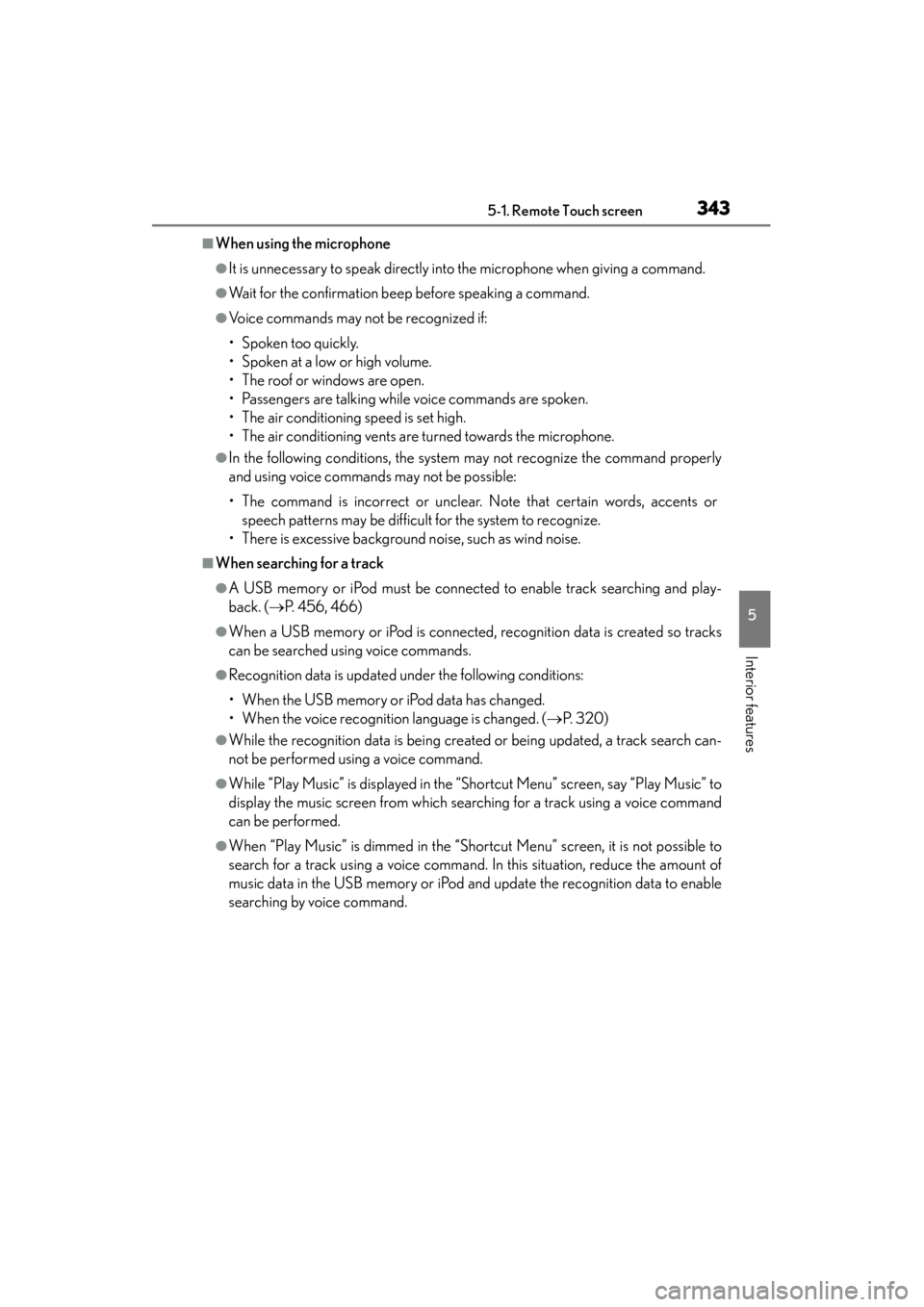
■When using the microphone
●It is unnecessary to speak directly into the microphone when giving a command.
●Wait for the confirmation beep before speaking a command.
●Voice commands may not be recognized if:
• Spoken too quickly.
• Spoken at a low or high volume.
• The roof or windows are open.
• Passengers are talking while voice commands are spoken.
• The air conditioning speed is set high.
• The air conditioning vents are turned towards the microphone.
●In the following conditions, the system may not recognize the command properly
and using voice commands may not be possible:
• The command is incorrect or unclear. Note that certain words, accents orspeech patterns may be difficult for the system to recognize.
• There is excessive background noise, such as wind noise.
■When searching for a track
●A USB memory or iPod must be connected to enable track searching and play-
back. ( →P. 456, 466)
●When a USB memory or iPod is connected, recognition data is created so tracks
can be searched using voice commands.
●Recognition data is updated under the following conditions:
• When the USB memory or iPod data has changed.
• When the voice recognition language is changed. ( →P. 3 2 0 )
●While the recognition data is being created or being updated, a track search can-
not be performed using a voice command.
●While “Play Music” is displayed in the “Shortcut Menu” screen, say “Play Music” to
display the music screen from which searching for a track using a voice command
can be performed.
●When “Play Music” is dimmed in the “Shortcut Menu” screen, it is not possible to
search for a track using a voice command. In this situation, reduce the amount of
music data in the USB memory or iPod and update the recognition data to enable
searching by voice command.