maintenance Lexus GS350 2013 Repair Manual
[x] Cancel search | Manufacturer: LEXUS, Model Year: 2013, Model line: GS350, Model: Lexus GS350 2013Pages: 830, PDF Size: 9.71 MB
Page 646 of 830
GS350_U (OM30C34U)
6456-3. Do-it-yourself maintenance
6
Maintenance and care
Remove the air conditioning filter
from the filter case and replace it
with a new one.
The “↑UP” marks shown on the filter
and the filter case should be pointing
up.
■Checking interval
Inspect and replace the air conditioning filter according to the maintenance sched-
ule. In dusty areas or areas with heavy traffic flow, early replacement may be
required. (For scheduled maintenance information, please refer to the “Owner’s
Manual Supplement” or “Scheduled Maintenance”.)
■If air flow from the vents decreases dramatically
The filter may be clogged. Check the filter and replace if necessary.
5
NOTICE
■When using the air conditioning system
Make sure that a filter is always installed.
Using the air conditioning system without a filter may cause damage to the system.
Page 647 of 830
646
GS350_U (OM30C34U)
6-3. Do-it-yourself maintenance
Electronic key battery
●Flathead screwdriver
●Small flathead screwdriver
●Lithium battery CR2032
Take out the mechanical key.
Remove the cover.
To prevent damage to the key, cover
the tip of the screwdriver with a rag.
Remove the depleted battery.
Insert a new battery with the “+” termi-
nal facing up.
Replace the battery with a new one if it is depleted.
You will need the following items:
Replacing the battery
1
2
3
Page 648 of 830
GS350_U (OM30C34U)
6476-3. Do-it-yourself maintenance
6
Maintenance and care
■Use a CR2032 lithium battery
●Batteries can be purchased at your Lexus dealer, local electrical appliance shops
or camera stores.
●Replace only with the same or equivalent type recommended by the manufacturer.
●Dispose of used batteries according to local laws.
■If the electronic key battery is depleted
The following symptoms may occur:
●The smart access system with push-button start and wireless remote control will
not function properly.
●The operational range will be reduced.
CAUTION
■Removed battery and other parts
Keep away from children. These parts are small and if swallowed by a child, they
can cause choking. Failure to do so could result in death or serious injury.
NOTICE
■For normal operation after replacing the battery
Observe the following precautions to prevent accidents:
●Always work with dry hands.
Moisture may cause the battery to rust.
●Do not touch or move any other component inside the remote control.
●Do not bend either of the battery terminals.
Page 649 of 830
648
GS350_U (OM30C34U)
6-3. Do-it-yourself maintenance
Checking and replacing fuses
Turn the engine switch off.
After a system failure, see “Fuse layout and amperage ratings” for
details about which fuse to check. (→P. 6 5 1 )
Open the Fuse box cover.
XEngine compartment (type A fuse box)
Push the tab in and lift the lid off.
XEngine compartment (type B fuse box)
Push the tab in and lift the lid off.
If any of the electrical components do not operate, a fuse may have
blown. If this happens, check and replace the fuses as necessary.
1
2
3
Page 650 of 830
GS350_U (OM30C34U)
6496-3. Do-it-yourself maintenance
6
Maintenance and care
XDriver’s side instrument panel
Remove the lid.
XPassenger’s side instrument panel
Remove the lid.
XTr u n k
Push the tab in and lift the lid off.
Remove the lid.
Page 651 of 830
650
GS350_U (OM30C34U)
6-3. Do-it-yourself maintenance
Remove the fuse with the pullout
tool.
Only type A fuse can be removed
using the pullout tool.
Check if the fuse is blown.Normal fuse
Blown fuse
Type A and B:
Replace the blown fuse with a new fuse of an appropriate amperage rating. The
amperage rating can be found on the fuse box lid.
Type C and D:
Contact your Lexus dealer.
4
5
1
2
XTy p e AXType B
XTy p e CXType D
Page 652 of 830
GS350_U (OM30C34U)
6516-3. Do-it-yourself maintenance
6
Maintenance and care
■Engine compartment (type A fuse box)
Fuse layout and amperage ratings
FuseAmpereCircuit
1LH J/B-B40Left-hand junction block
2VGRS40VGRS
3RH J/B-B40Right-hand junction block
4P/ I - B N O. 280F/PMP, EFI MAIN, A/F HTR, EDU, IG2
MAIN
5ALT150RH J/B ALT, P/I ALT, LH J/B ALT, LUG J/B
ALT
6P/ I A LT100RR DEF, TAIL, FR FOG, DEICER, PANEL,
RR S/SHADE
7RH J/B ALT80Right-hand junction block
8MPX-B10
Smart access system with push-button start,
electric tilt and telescopic steering column,
power seats, head-up display, front right-
hand door ECU, gauges and meters, steer-
ing sensor, yaw rate and G sensor, overhead
module, front left-hand door ECU, power
trunk opener and closer, RR CTRL SW,
clock, body ECU, CAN gateway ECU
Page 653 of 830
652
GS350_U (OM30C34U)
6-3. Do-it-yourself maintenance
9DOME7. 5
Personal lights, ornament lights, trunk light,
footwell lights, door courtesy lights, vanity
lights, rear door inside handle illuminations,
power trunk opener and closer
10EPS80EPS
11ARS80Dynamic rear steering
12HTR50Air conditioning system
13ABS NO.140VDIM
14LUG J/B ALT50Luggage compartment junction block
15PTC NO.150PTC heater
16PTC NO.250PTC heater
17ABS NO.250VDIM
18ST30Starting system
19H-LP LO30Headlights, H-LP RLY
20D/C CUT30DOME, MPX-B
21DCM7. 5DCM
22ECU-B7. 5Smart access system with push-button start
23ALT-S7. 5Charging system
24ETCS10Multiport fuel injection system/sequential
multiport fuel injection system
25HORN10Horn
26R/B-B20EPS-B, ODS, TV
27P/ I - B N O.150Headlights, daytime running lights
28EPB30Pa r k i n g b r a ke
29LUG J/B-B40Luggage compartment junction block
30FA N N O.180Electric cooling fans
31LH J/B ALT60Left-hand junction block
32H-LP CLN30Headlight cleaner
FuseAmpereCircuit
Page 654 of 830
GS350_U (OM30C34U)
6536-3. Do-it-yourself maintenance
6
Maintenance and care
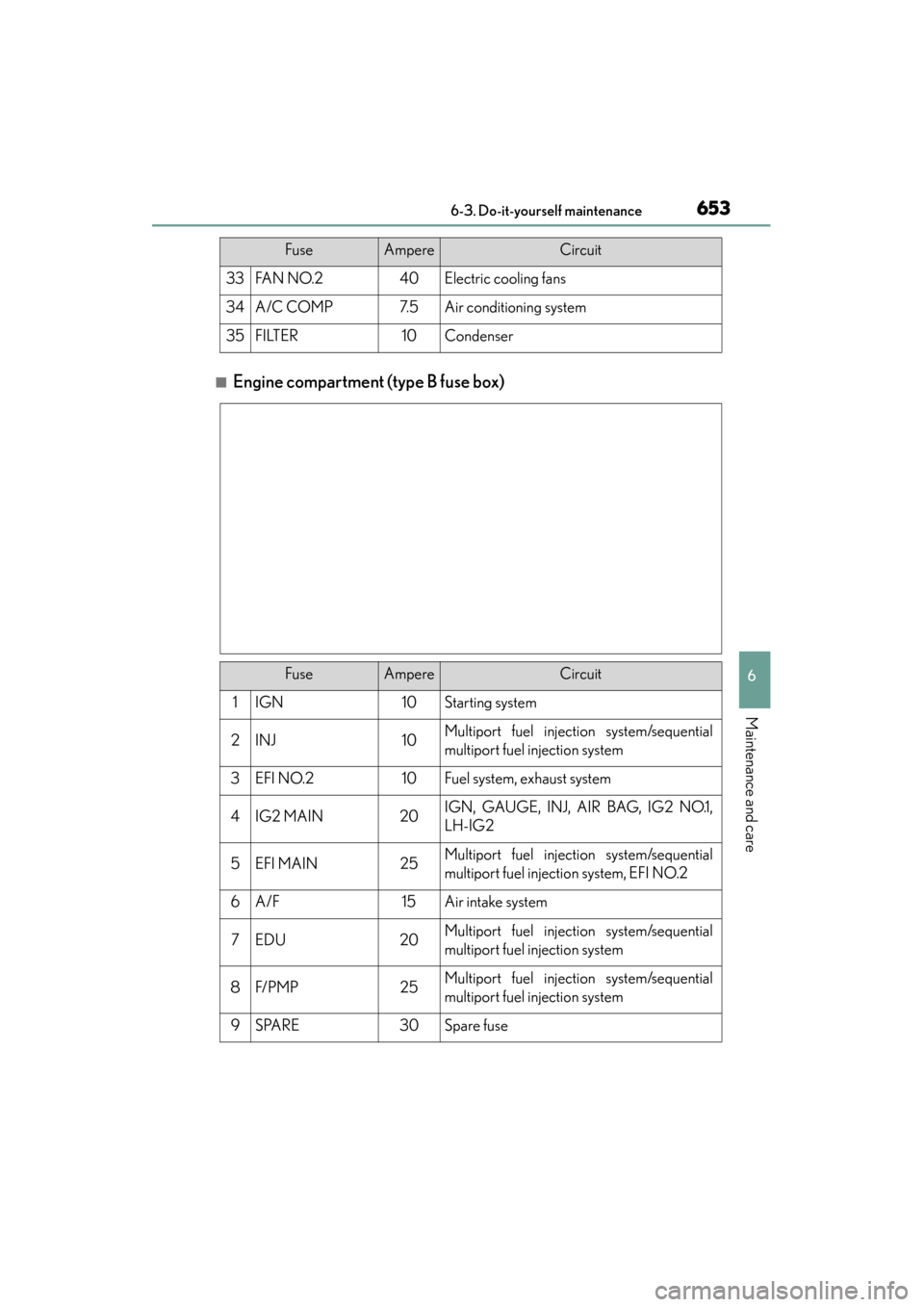
■Engine compartment (type B fuse box)
33FA N N O. 240Electric cooling fans
34A/C COMP7. 5Air conditioning system
35FILTER10Condenser
FuseAmpereCircuit
FuseAmpereCircuit
1IGN10Starting system
2INJ10Multiport fuel injection system/sequential
multiport fuel injection system
3EFI NO.210Fuel system, exhaust system
4IG2 MAIN20IGN, GAUGE, INJ, AIR BAG, IG2 NO.1,
LH-IG2
5EFI MAIN25Multiport fuel injection system/sequential
multiport fuel injection system, EFI NO.2
6A/F15Air intake system
7EDU20Multiport fuel injection system/sequential
multiport fuel injection system
8F/ P M P25Multiport fuel injection system/sequential
multiport fuel injection system
9SPARE30Spare fuse
Page 655 of 830
654
GS350_U (OM30C34U)
6-3. Do-it-yourself maintenance
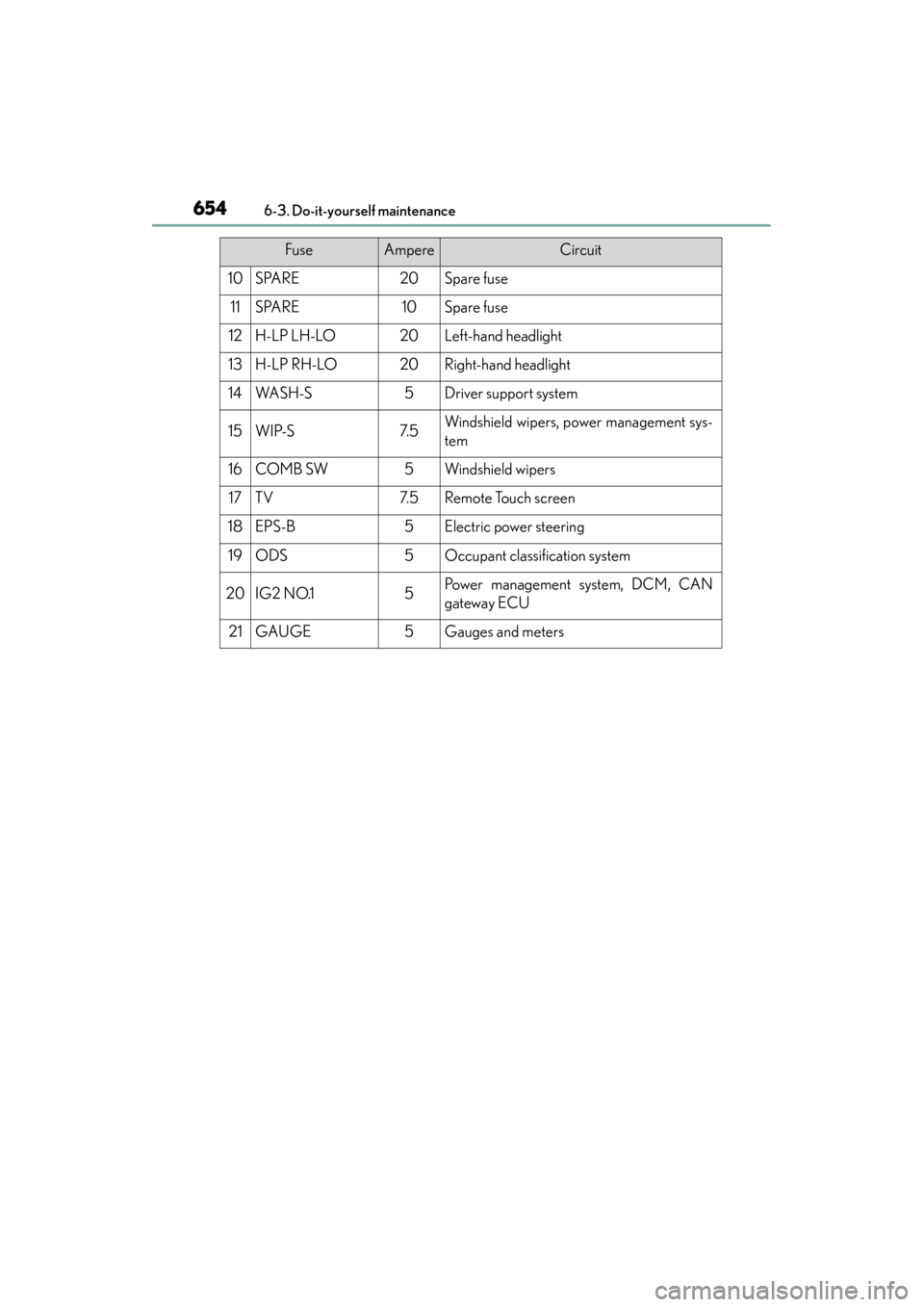
10SPARE20Spare fuse
11SPARE10Spare fuse
12H-LP LH-LO20Left-hand headlight
13H-LP RH-LO20Right-hand headlight
14WA S H - S5Driver support system
15WIP-S7. 5Windshield wipers, power management sys-
tem
16COMB SW5Windshield wipers
17TV7. 5Remote Touch screen
18EPS-B5Electric power steering
19ODS5Occupant classification system
20IG2 NO.15Po w e r m a n a g e m e n t s y s t e m , D C M , C A N
gateway ECU
21GAUGE5Gauges and meters
FuseAmpereCircuit