engine Lexus GS350 2014 Owner's Manual
[x] Cancel search | Manufacturer: LEXUS, Model Year: 2014, Model line: GS350, Model: Lexus GS350 2014Pages: 846, PDF Size: 35.04 MB
Page 456 of 846
GS350_OM_OM30D41U_(U)
4555-3. Using the audio system
5
Interior features
To use the Bluetooth® audio system, you need to enter your portable
player into the system. Once registered, you can enjoy your music on the
vehicle’s audio system. ( →P. 5 5 6 )
For the operation procedure for the portable player, consult your player’s
accompanying instruction manual.
■When “Bluetooth* Power” is turned on
When the portable player is on standby for the connection, it will be
automatically connected whenever the engine switch is in either
ACCESSORY or IGNITION ON mode.
■When “Bluetooth* Power” is turned off
Manually connect the portable player in accordance with the following
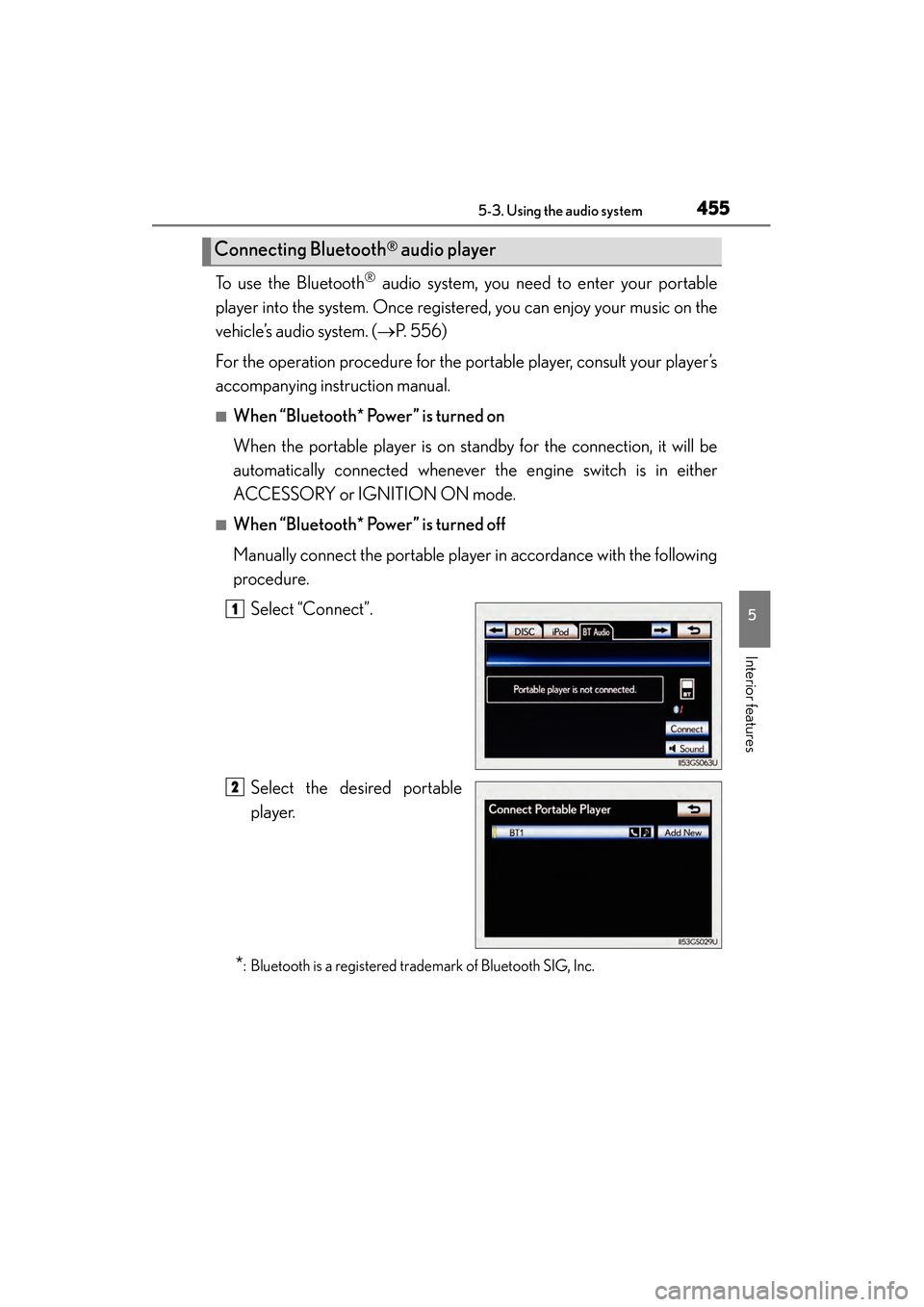
procedure. Select “Connect”.
Select the desired portable
player.
*: Bluetooth is a registered trademark of Bluetooth SIG, Inc.
Connecting Bluetooth® audio player
1
2
GS350_OM_OM30D41U_(U).book Page 455 Monday, July 29, 2013 2:22 PM
Page 462 of 846
GS350_OM_OM30D41U_(U)
4615-3. Using the audio system
5
Interior features
■Compatible models
Portable players must correspond to the following specifications:
●Bluetooth® specification
Ver. 1.1 or higher
(Recommended: Ver. 2.1+EDR or higher)
●Profile
• A2DP (Advanced Audio Distribution Profile) Ver. 1.0 or higher
• AVRCP (Audio/Video Remote Control Profile) Ver. 1.0 or higher (Recommended: Ver. 1.4 or higher)
However, please note that some functions may be limited depending on the type of
portable player. Also, the different screen is displayed depending on which portable
player is connecting.
Please go to the website at http://www.lexus.com/MobileLink
to find approved por-
table players for this system.
■Certification
→ P. 5 0 0
■Reconnecting the portable player
If the portable player is disconnected with a poor reception when the engine switch
is in ACCESSORY or IGNITION ON mode, the system automatically reconnects
the portable player.
If you have switched off the portable player yourself, follow the instructions below to
reconnect:
●Select the portable player again
●Enter the portable player
■When transferring ownership of your vehicle
Be sure to remove the registered portable player from the system. ( →P. 551)
GS350_OM_OM30D41U_(U).book Page 461 Monday, July 29, 2013 2:22 PM
Page 507 of 846
506
GS350_OM_OM30D41U_(U)
5-4. Using the hands-free phone system (for cellular phone)
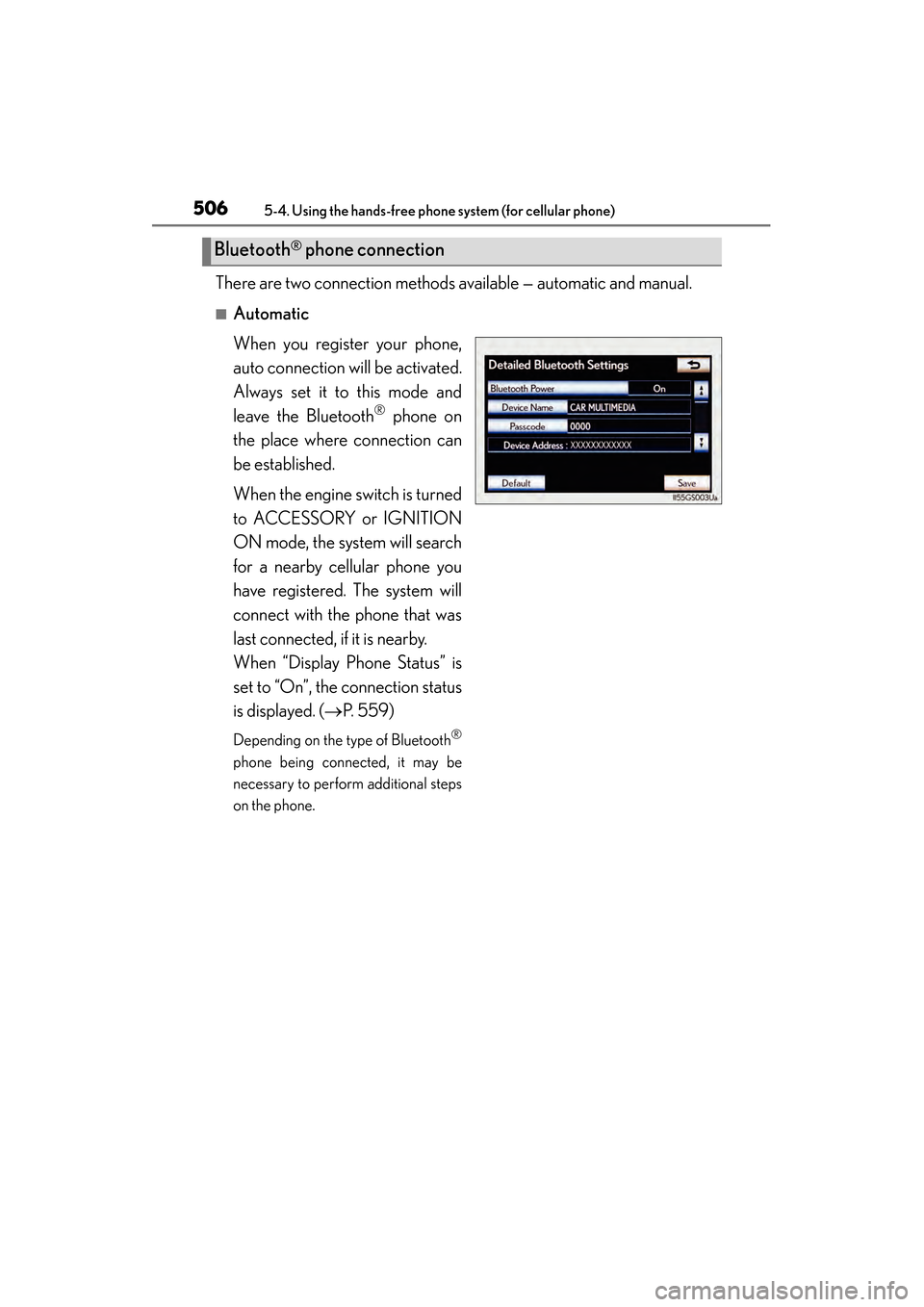
There are two connection methods available — automatic and manual.
■Automatic
When you register your phone,
auto connection will be activated.
Always set it to this mode and
leave the Bluetooth
® phone on
the place where connection can
be established.
When the engine switch is turned
to ACCESSORY or IGNITION
ON mode, the system will search
for a nearby cellular phone you
have registered. The system will
connect with the phone that was
last connected, if it is nearby.
When “Display Phone Status” is
set to “On”, the connection status
is displayed. (→ P. 559)
Depending on the type of Bluetooth®
phone being connected, it may be
necessary to perform additional steps
on the phone.
Bluetooth® phone connection
GS350_OM_OM30D41U_(U).book Page 506 Monday, July 29, 2013 2:22 PM
Page 509 of 846
508
GS350_OM_OM30D41U_(U)
5-4. Using the hands-free phone system (for cellular phone)
■Reconnecting to the Bluetooth® phone
If the system cannot connect due to poor signal strength with the engine switch in
ACCESSORY or IGNITION ON mode, the system will automatically attempt to
reconnect.
If the phone is turned off, the system will not attempt to reconnect. In this case, it must
be connected manually, or the phone must be re-selected or re-entered.
■Connecting the phone while Bluetooth® audio is playing
●Bluetooth® audio will stop temporarily.
●It may take time to connect.
■Connecting the phone while another Bluetooth® device is connected
When another Bluetooth
® device is currently connected, a confirmation message
will be displayed. To disconnect the Bluetooth® device, select “Yes”.
■Connecting the phone while 5 Bluetooth® devices have already been registered
When 5 Bluetooth
® devices have already been registered, a registered device
needs to be deleted. Select “Yes” to delete one or more.
Select the device to be deleted, then select “Remove”, and “Yes”.
■If the Bluetooth® phone has a Bluetooth® audio function
When the Bluetooth
® phone to be registered has a Bluetooth® audio function, this
audio function will be registered automatically at the same time and confirmation
message may be displayed. If this screen is displayed, select “Yes” to connect the
audio function or select “No” to cancel the connection.
GS350_OM_OM30D41U_(U).book Page 508 Monday, July 29, 2013 2:22 PM
Page 559 of 846
558
GS350_OM_OM30D41U_(U)
5-4. Using the hands-free phone system (for cellular phone)
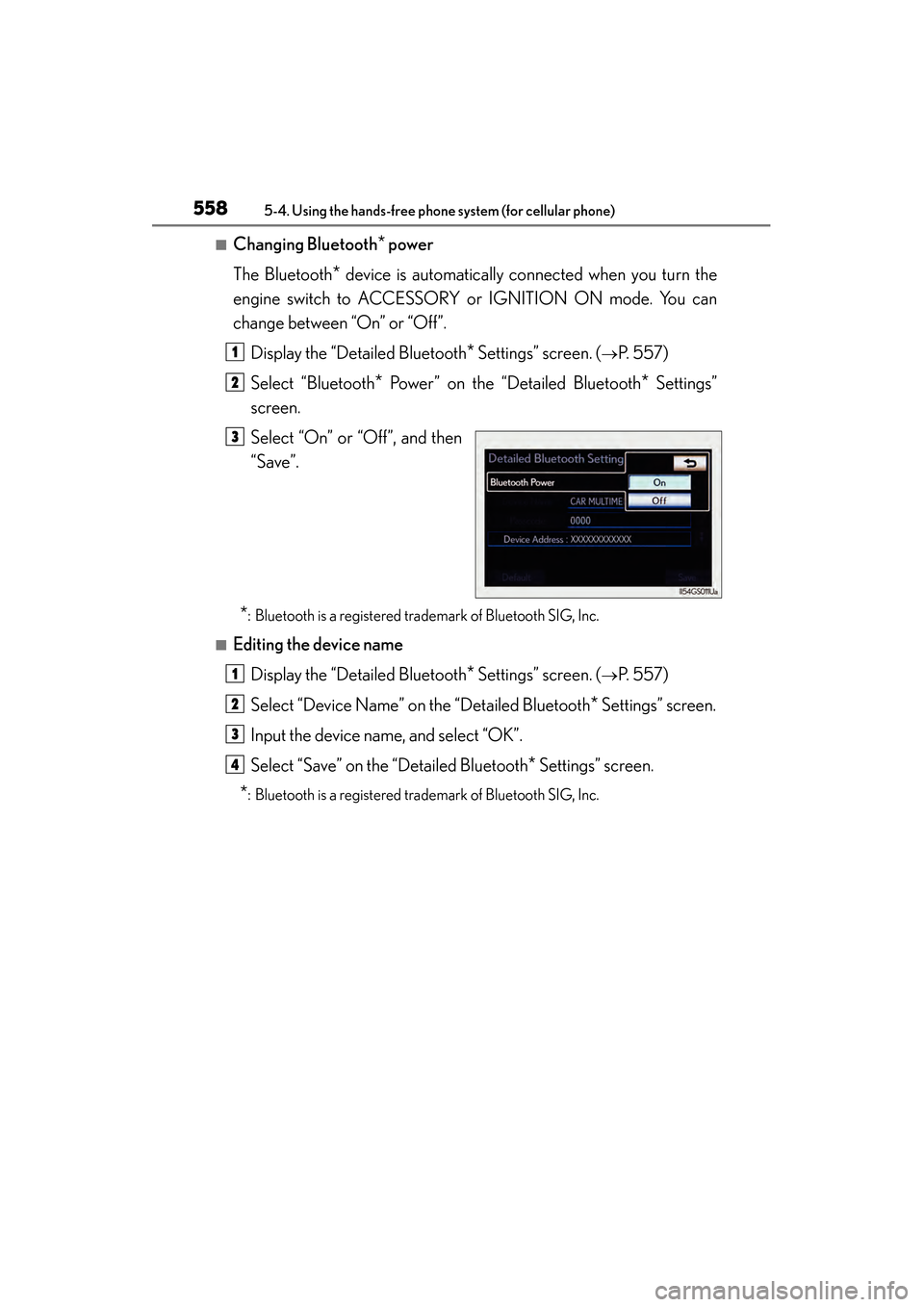
■Changing Bluetooth* power
The Bluetooth
* device is automatically connected when you turn the
engine switch to ACCESSORY or IGNITION ON mode. You can
change between “On” or “Off”.
Display the “Detailed Bluetooth
* Settings” screen. (→P. 5 5 7 )
Select “Bluetooth
* Power” on the “Detailed Bluetooth* Settings”
screen.
Select “On” or “Off”, and then
“Save”.
*: Bluetooth is a registered trademark of Bluetooth SIG, Inc.
■Editing the device name
Display the “Detailed Bluetooth
* Settings” screen. (→P. 5 5 7 )
Select “Device Name” on the “Detailed Bluetooth
* Settings” screen.
Input the device name, and select “OK”.
Select “Save” on the “Detailed Bluetooth
* Settings” screen.
*: Bluetooth is a registered trademark of Bluetooth SIG, Inc.
1
2
3
1
2
3
4
GS350_OM_OM30D41U_(U).book Page 558 Monday, July 29, 2013 2:22 PM
Page 560 of 846
GS350_OM_OM30D41U_(U)
5595-4. Using the hands-free phone system (for cellular phone)
5
Interior features
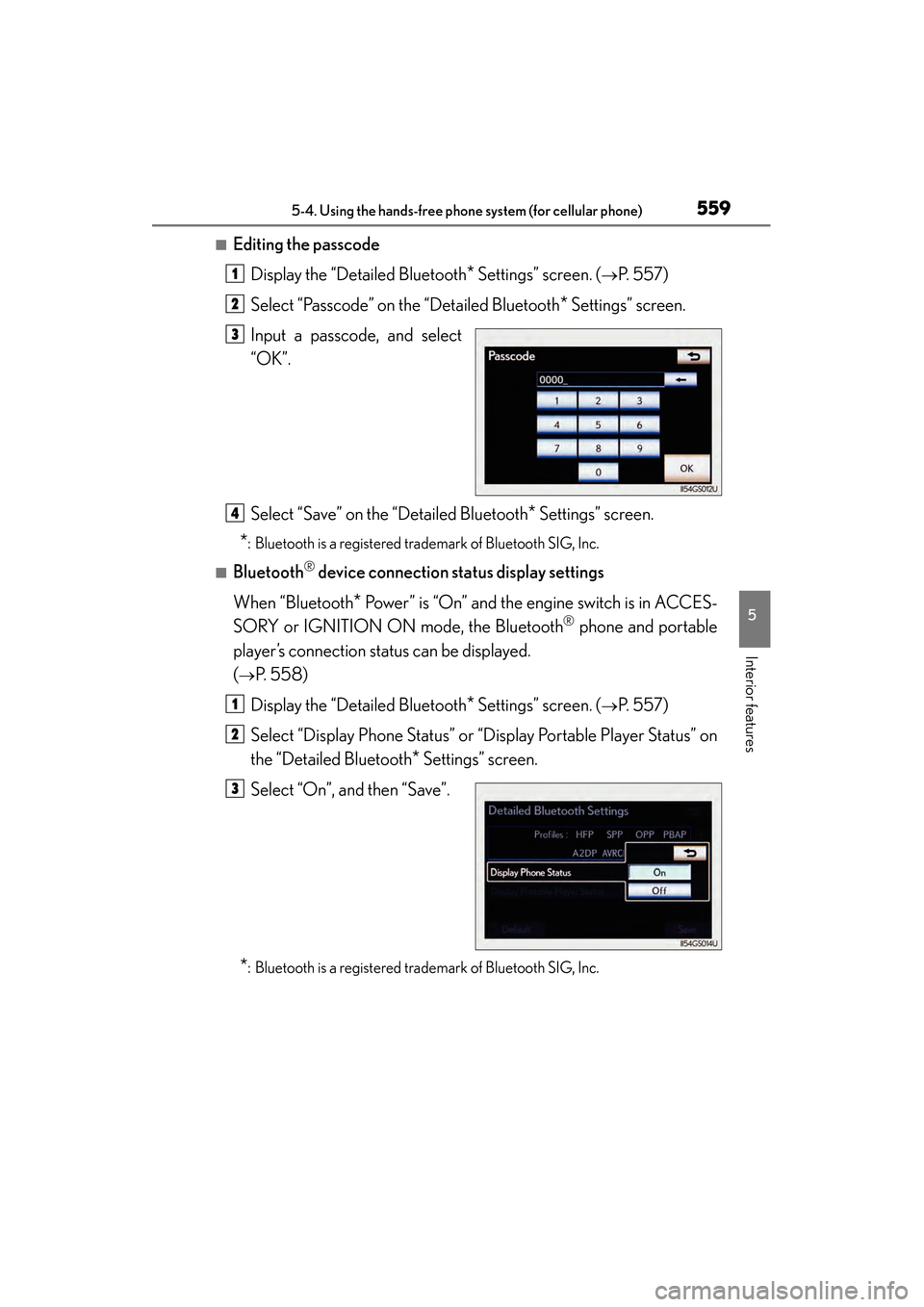
■Editing the passcodeDisplay the “Detailed Bluetooth
* Settings” screen. (→P. 5 5 7 )
Select “Passcode” on the “Detailed Bluetooth
* Settings” screen.
Input a passcode, and select
“OK”.
Select “Save” on the “Detailed Bluetooth
* Settings” screen.
*: Bluetooth is a registered trademark of Bluetooth SIG, Inc.
■Bluetooth® device connection status display settings
When “Bluetooth
* Power” is “On” and the engine switch is in ACCES-
SORY or IGNITION ON mode, the Bluetooth
® phone and portable
player’s connection status can be displayed.
(
→P. 5 5 8 )
Display the “Detailed Bluetooth
* Settings” screen. (→P. 5 5 7 )
Select “Display Phone Status” or “Display Portable Player Status” on
the “Detailed Bluetooth
* Settings” screen.
Select “On”, and then “Save”.
*: Bluetooth is a registered trademark of Bluetooth SIG, Inc.
1
2
3
4
1
2
3
GS350_OM_OM30D41U_(U).book Page 559 Monday, July 29, 2013 2:22 PM
Page 564 of 846
GS350_OM_OM30D41U_(U)
5635-5. Using the interior lights
5
Interior features
■Illuminated entry system
The lights automatically turn on/off according to engine switch mode, the presence
of the electronic key, whether the doors are locked/unlocked, and whether the doors
are opened/closed.
■To prevent battery discharge
If the interior lights remain on when the engine switch is turned off, the lights will go
off automatically after 20 minutes.
■Customization
Setting (e.g. the time elapsed before lights turn off) can be changed.
(Customizable features: →P. 7 9 3 )
NOTICE
■To prevent battery discharge
Do not leave the lights on longer than necessary when the engine is not running.
GS350_OM_OM30D41U_(U).book Page 563 Monday, July 29, 2013 2:22 PM
Page 575 of 846
574
GS350_OM_OM30D41U_(U)
5-7. Other interior features
Sun visors and vanity mirrors
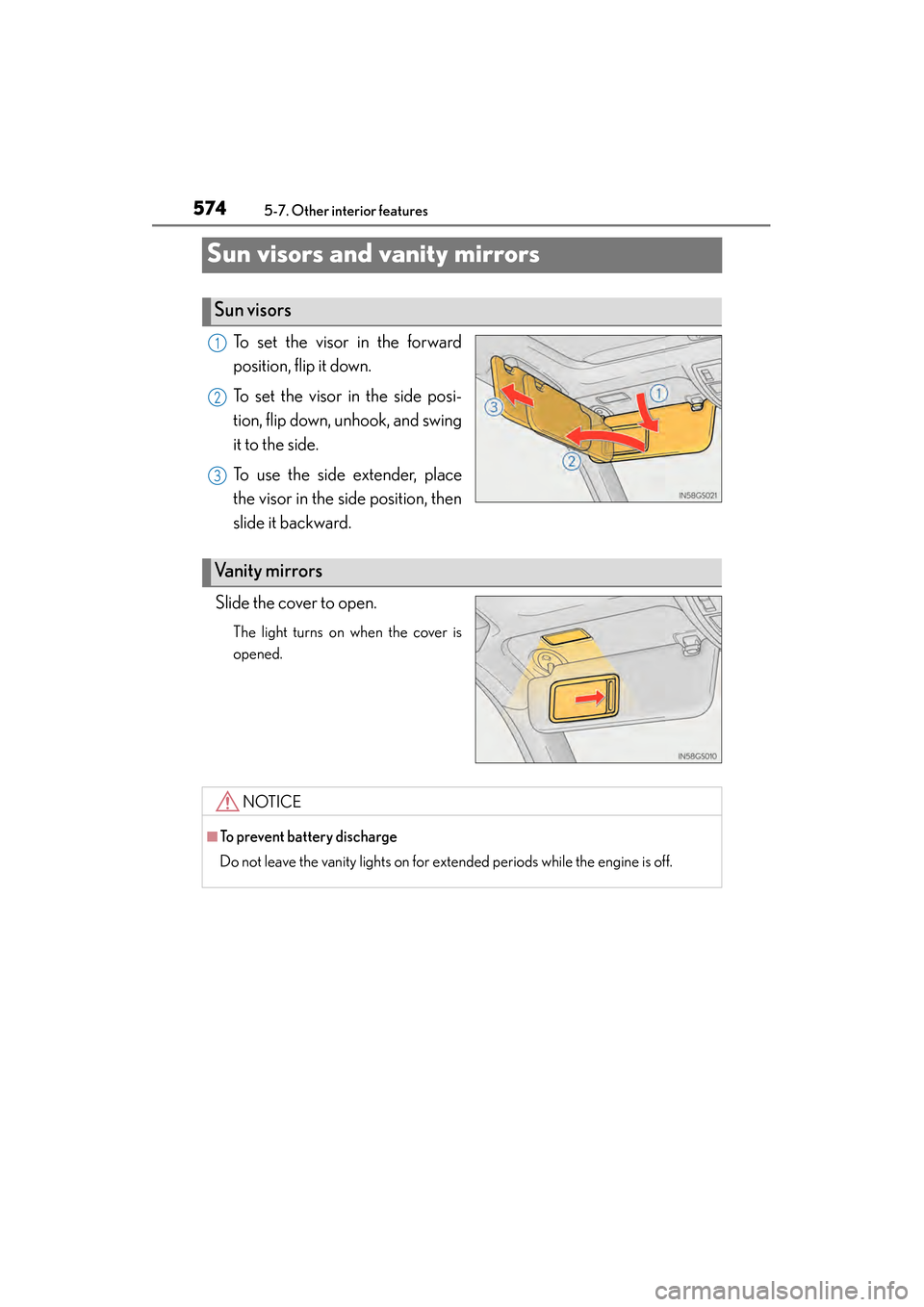
To set the visor in the forward
position, flip it down.
To set the visor in the side posi-
tion, flip down, unhook, and swing
it to the side.
To use the side extender, place
the visor in the side position, then
slide it backward.
Slide the cover to open.
The light turns on when the cover is
opened.
Sun visors
1
2
3
Va n i t y m i r r o r s
NOTICE
■To prevent battery discharge
Do not leave the vanity lights on for extended periods while the engine is off.
GS350_OM_OM30D41U_(U).book Page 574 Monday, July 29, 2013 2:22 PM
Page 578 of 846
577
GS350_OM_OM30D41U_(U)5-7. Other interior features
5
Interior features
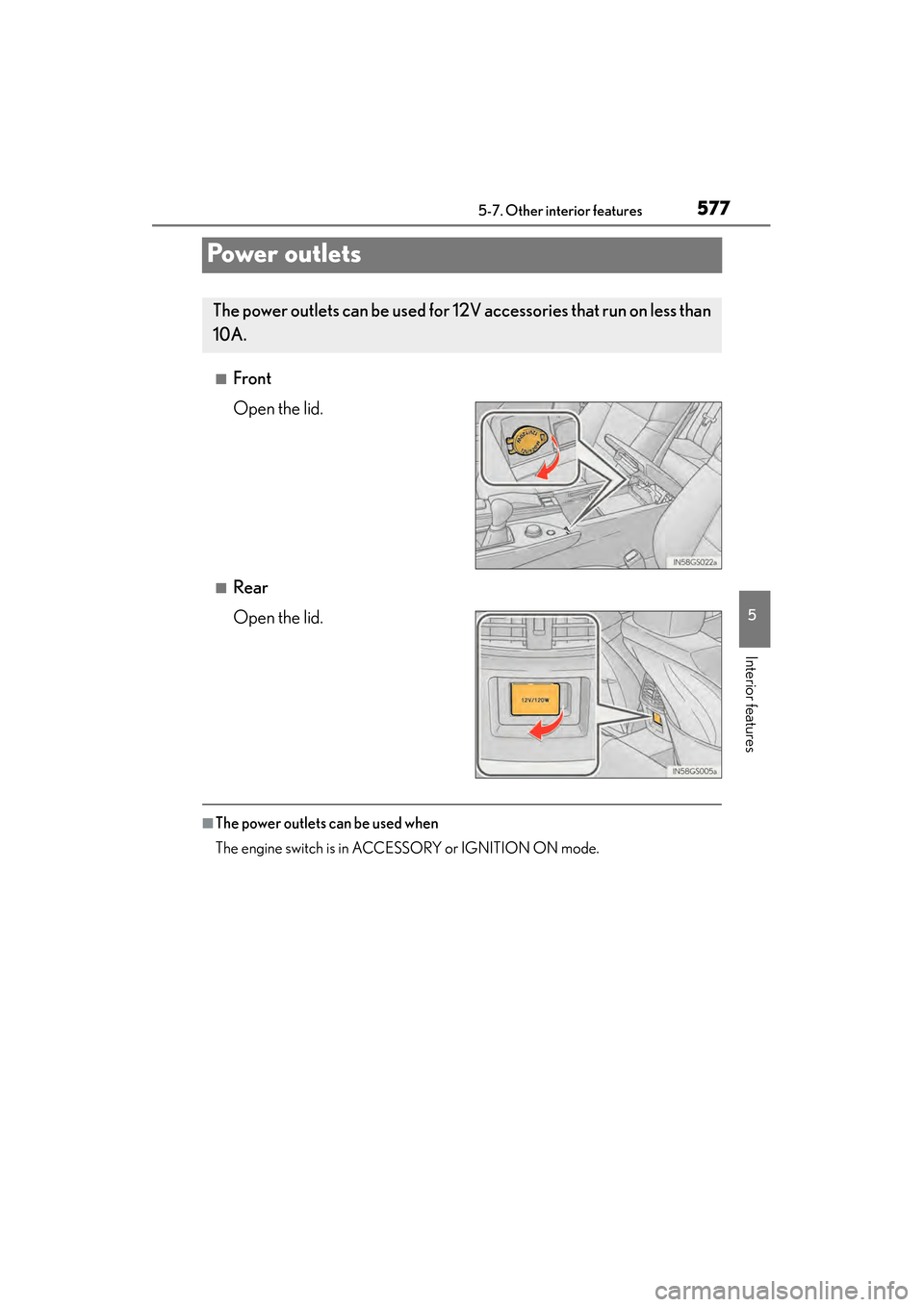
Powe r o u t l e t s
■Front
Open the lid.
■Rear
Open the lid.
■The power outlets can be used when
The engine switch is in ACCESSORY or IGNITION ON mode.
The power outlets can be used for 12V accessories that run on less than
10A.
GS350_OM_OM30D41U_(U).book Page 577 Monday, July 29, 2013 2:22 PM
Page 579 of 846
578
GS350_OM_OM30D41U_(U)
5-7. Other interior features
NOTICE
■To avoid damaging the power outlets
Close the power outlet lids when the power outlets are not in use.
Foreign objects or liquids that enter the power outlets may cause a short circuit.
■To prevent blown fuse
Do not use an accessory that uses more than 12V 10A.
■To prevent battery discharge
Do not use the power outlets longer than necessary when the engine is off.
GS350_OM_OM30D41U_(U).book Page 578 Monday, July 29, 2013 2:22 PM