audio Lexus GS350 2014 Owner's Manual
[x] Cancel search | Manufacturer: LEXUS, Model Year: 2014, Model line: GS350, Model: Lexus GS350 2014Pages: 846, PDF Size: 35.04 MB
Page 495 of 846
494
GS350_OM_OM30D41U_(U)
5-3. Using the audio system
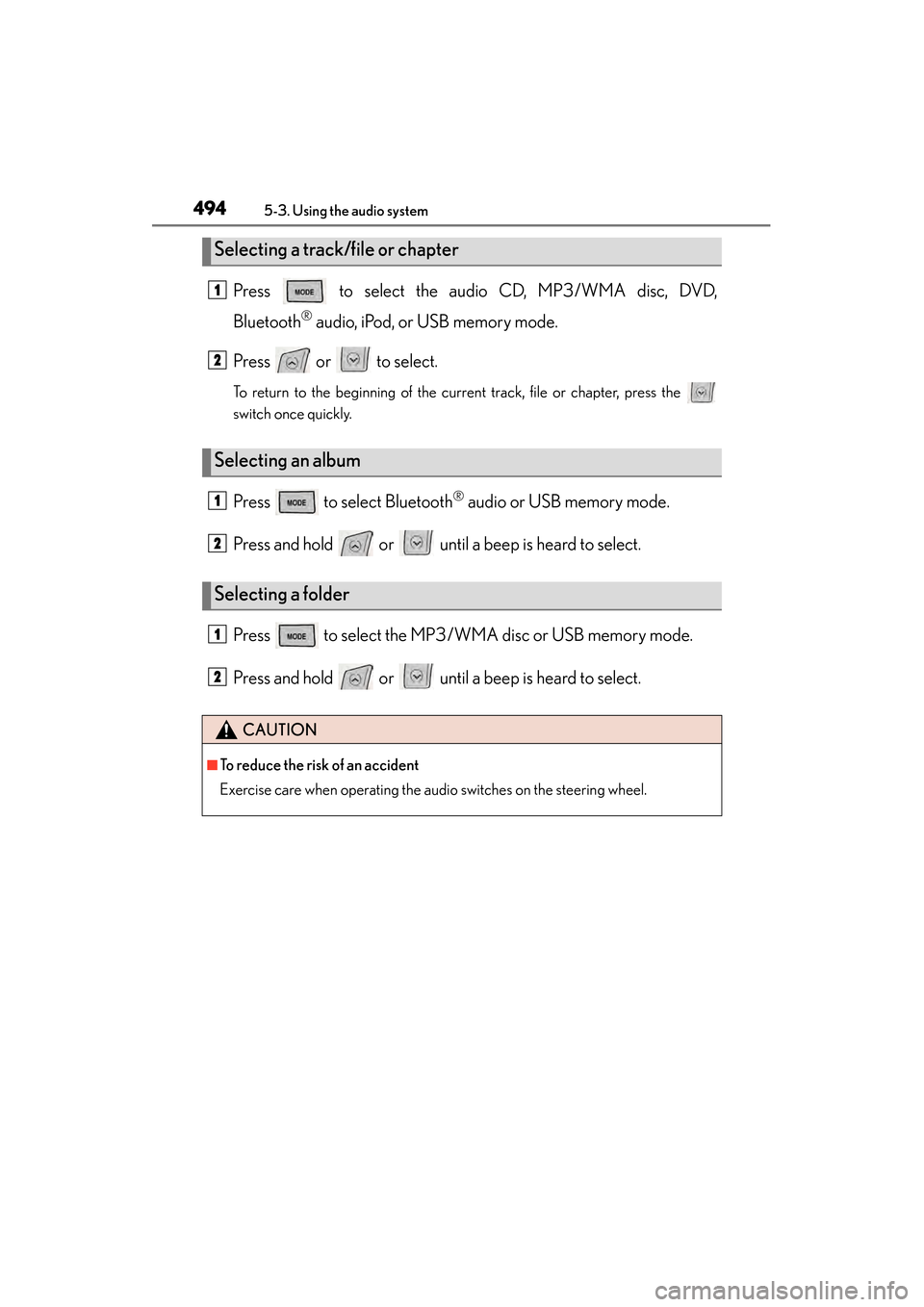
Press to select the audio CD, MP3/WMA disc, DVD,
Bluetooth
® audio, iPod, or USB memory mode.
Press or to select.
To return to the beginning of the current track, file or chapter, press the
switch once quickly.
Press to select Bluetooth® audio or USB memory mode.
Press and hold or until a beep is heard to select.
Press to select the MP3/W MA disc or USB memory mode.
Press and hold or until a beep is heard to select.
Selecting a track/file or chapter
Selecting an album
Selecting a folder
CAUTION
■To reduce the risk of an accident
Exercise care when operating the audio switches on the steering wheel.
1
2
1
2
1
2
GS350_OM_OM30D41U_(U).book Page 494 Monday, July 29, 2013 2:22 PM
Page 499 of 846

498
GS350_OM_OM30D41U_(U)
5-4. Using the hands-free phone system (for cellular phone)
■When using the hands-free system
●The audio system is muted when making a call.
●If both parties speak at the same time, it may be difficult to hear.
●If the incoming call volume is overly loud, an echo may be heard.
●Try to face toward the microphone as much as possible when speaking.
●In the following circumstances, it may be difficult to hear the other party:
• When driving on unpaved roads
• When driving at high speeds
• If a window is open
• If the air conditioning is blowing directly on the microphone
• If the air conditioning is set to high
• There is an effect from the network of the cellular phone
■Conditions under which the system will not operate
●If using a cellular phone that does not support Bluetooth®
●If the cellular phone is turned off
●If you are outside service range
●If the cellular phone is not connected
●If the cellular phone’s battery is low
■Bluetooth® antenna
The antenna is built into the instrument panel. If the cellular phone is behind the seat
or in the console box, or touching or covered by metal objects, connection status
may deteriorate.
■Battery charge/Signal status
●This display may not correspond exactly with the cellular phone itself.
●When the cellular phone is not connected, “No connect” is displayed.
●When the cellular phone is out of the service area or in a place inaccessible by
radio waves, “No Service” is displayed.
■When using Bluetooth® audio and hands-free system at the same time
The following problems may occur.
●The Bluetooth® connection may be cut.
●Noise may be heard on the Bluetooth® audio playback.
GS350_OM_OM30D41U_(U).book Page 498 Monday, July 29, 2013 2:22 PM
Page 503 of 846
502
GS350_OM_OM30D41U_(U)
5-4. Using the hands-free phone system (for cellular phone)
CAUTION
XFor vehicles sold in Canada
Tout changement ou toute modification de la construction non approuvé expres-
sément par l’abonné responsable de la conformité risque d’annuler l’autorité de
l’utilisateur d’exploiter l’équipement.
Cet émetteur ne doit pas être co-implanté ou actionné en même temps qu’aucune
autre antenne ou émetteur.
Under Industry Canada regulations, this radio transmitter may only operate using
an antenna of a type and maximum (or lesser) gain approved for the transmitter by
Industry Canada. To reduce potential radio interference to other users, the
antenna type and its gain should be so chosen that the equivalent isotropically radi-
ated power (e.i.r.p.) is not more than that necessary for successful communication.
Conformément à la réglementation d’Industrie Canada, le présent émetteur radio
peut fonctionner avec une antenne d’un type et d’un gain maximal (ou inférieur)
approuvé pour l’émetteur par Industrie Canada. Dans le but de réduire les risques
de brouillage radioélectrique à l’intention des autres utilisateurs, il faut choisir le
type d’antenne et son gain de sorte que la puissance isotrope rayonnée équiva-
lente (p.i.r.e.) ne dépasse pas l’intensité nécessaire à l’établissement d’une commu-
nication satisfaisante.
■Caution while driving
Do not use the cellular phone or connect the Bluetooth
® system.
■Caution regarding interference with electronic devices
●Your audio unit is fitted with Bluetooth® antennas. People with implantable car-
diac pacemakers, cardiac resynchronization therapy-pacemakers or implantable
cardioverter defibrillators should maintain a reasonable distance between them-
selves and the Bluetooth
® antennas. The radio waves may affect the operation of
such devices.
●Before using Bluetooth® devices, users of any electrical medical device other
than implantable cardiac pacemakers, cardiac resynchronization therapy-pace-
makers or implantable cardioverter defibrillators should consult the manufac-
turer of the device for information about its operation under the influence of radio
waves. Radio waves could have unexpected effects on the operation of such
medical devices.
NOTICE
■When leaving the vehicle
Do not leave your cellular phone in the vehicle. The inside of the vehicle may
become hot, causing damage to the phone.
GS350_OM_OM30D41U_(U).book Page 502 Monday, July 29, 2013 2:22 PM
Page 509 of 846
508
GS350_OM_OM30D41U_(U)
5-4. Using the hands-free phone system (for cellular phone)
■Reconnecting to the Bluetooth® phone
If the system cannot connect due to poor signal strength with the engine switch in
ACCESSORY or IGNITION ON mode, the system will automatically attempt to
reconnect.
If the phone is turned off, the system will not attempt to reconnect. In this case, it must
be connected manually, or the phone must be re-selected or re-entered.
■Connecting the phone while Bluetooth® audio is playing
●Bluetooth® audio will stop temporarily.
●It may take time to connect.
■Connecting the phone while another Bluetooth® device is connected
When another Bluetooth
® device is currently connected, a confirmation message
will be displayed. To disconnect the Bluetooth® device, select “Yes”.
■Connecting the phone while 5 Bluetooth® devices have already been registered
When 5 Bluetooth
® devices have already been registered, a registered device
needs to be deleted. Select “Yes” to delete one or more.
Select the device to be deleted, then select “Remove”, and “Yes”.
■If the Bluetooth® phone has a Bluetooth® audio function
When the Bluetooth
® phone to be registered has a Bluetooth® audio function, this
audio function will be registered automatically at the same time and confirmation
message may be displayed. If this screen is displayed, select “Yes” to connect the
audio function or select “No” to cancel the connection.
GS350_OM_OM30D41U_(U).book Page 508 Monday, July 29, 2013 2:22 PM
Page 554 of 846
GS350_OM_OM30D41U_(U)
5535-4. Using the hands-free phone system (for cellular phone)
5
Interior features
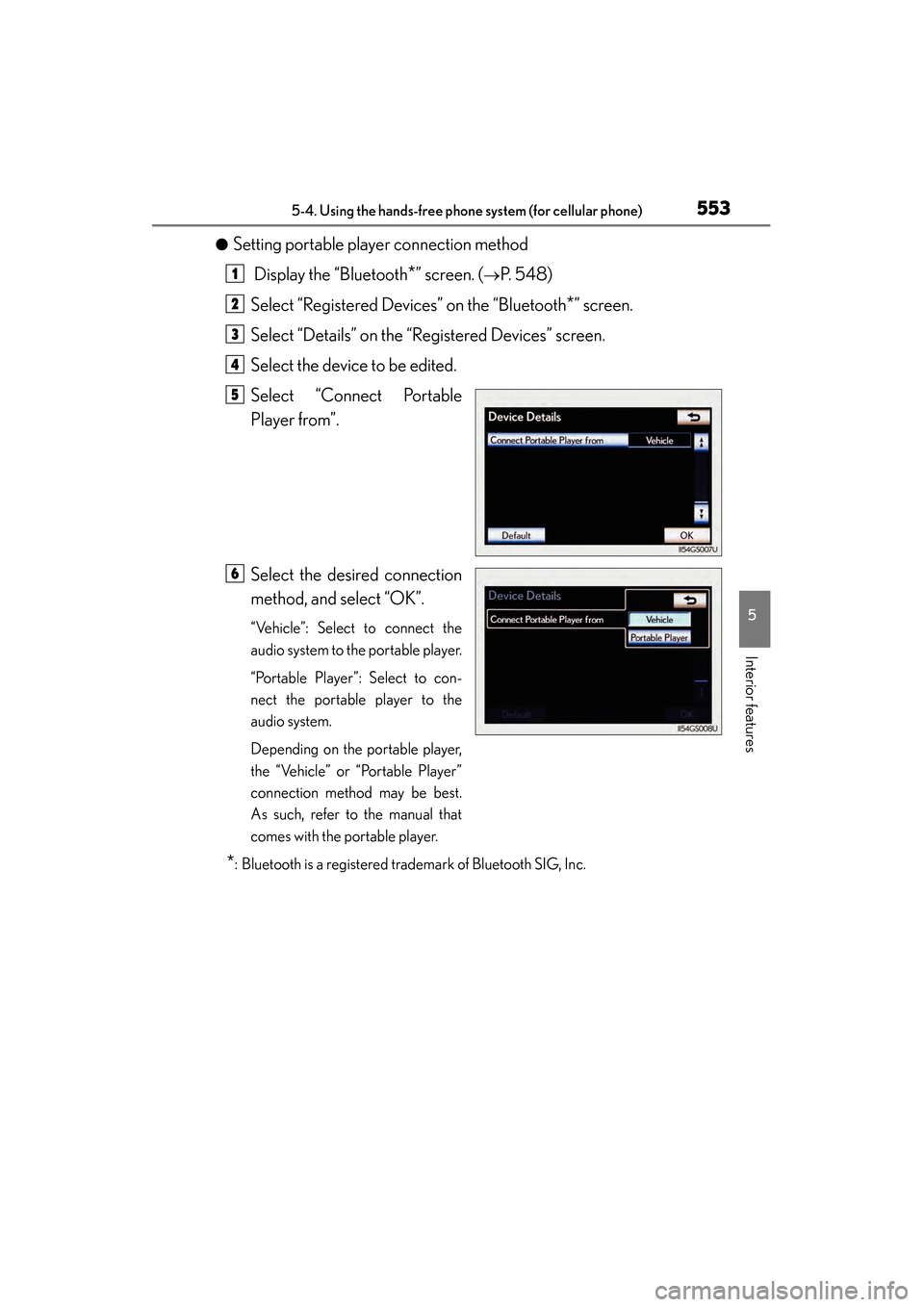
●Setting portable player connection method Display the “Bluetooth
*” screen. (→P. 548)
Select “Registered Devices” on the “Bluetooth
*” screen.
Select “Details” on the “Registered Devices” screen.
Select the device to be edited.
Select “Connect Portable
Player from”.
Select the desired connection
method, and select “OK”.
“Vehicle”: Select to connect the
audio system to the portable player.
“Portable Player”: Select to con-
nect the portable player to the
audio system.
Depending on the portable player,
the “Vehicle” or “Portable Player”
connection method may be best.
As such, refer to the manual that
comes with the portable player.
*: Bluetooth is a registered trademark of Bluetooth SIG, Inc.
1
2
3
4
5
6
GS350_OM_OM30D41U_(U).book Page 553 Monday, July 29, 2013 2:22 PM
Page 556 of 846
GS350_OM_OM30D41U_(U)
5555-4. Using the hands-free phone system (for cellular phone)
5
Interior features
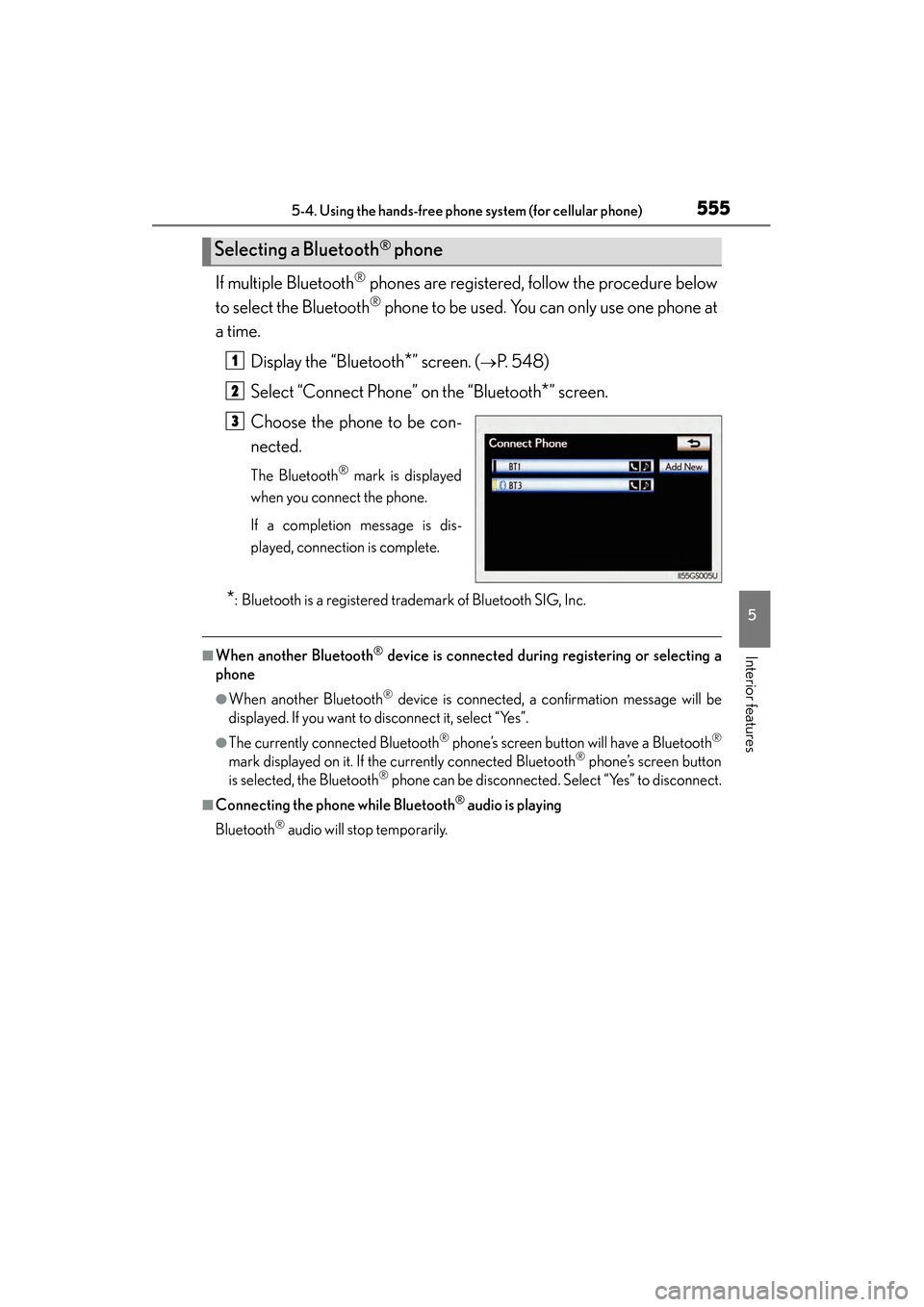
If multiple Bluetooth® phones are registered, follow the procedure below
to select the Bluetooth
® phone to be used. You can only use one phone at
a time.
Display the “Bluetooth
*” screen. (→P. 548)
Select “Connect Phone” on the “Bluetooth
*” screen.
Choose the phone to be con-
nected.
The Bluetooth® mark is displayed
when you connect the phone.
If a completion message is dis-
played, connection is complete.
*: Bluetooth is a registered trademark of Bluetooth SIG, Inc.
■When another Bluetooth® device is connected during registering or selecting a
phone
●When another Bluetooth® device is connected, a confirmation message will be
displayed. If you want to disconnect it, select “Yes”.
●The currently connected Bluetooth® phone’s screen button will have a Bluetooth®
mark displayed on it. If the currently connected Bluetooth® phone’s screen button
is selected, the Bluetooth® phone can be disconnected. Select “Yes” to disconnect.
■Connecting the phone while Bluetooth® audio is playing
Bluetooth
® audio will stop temporarily.
Selecting a Bluetooth® phone
1
2
3
GS350_OM_OM30D41U_(U).book Page 555 Monday, July 29, 2013 2:22 PM
Page 615 of 846
614
GS350_OM_OM30D41U_(U)
6-1. Maintenance and care
NOTICE
■Cleaning detergents
●Do not use the following types of detergent, as they may discolor the vehicle inte-
rior or cause streaks or damage to painted surfaces:
• Non-seat portions: Organic substances such as benzene or gasoline, alkalineor acidic solutions, dye, and bleach
• Seats: Alkaline or acidic solutions, such as thinner, benzene, and alcohol
●Do not use polish wax or polish cleaner. The instrument panel’s or other interior
part’s painted surface may be damaged.
■Preventing damage to leather surfaces
Observe the following precautions to avoid damage to and deterioration of
leather surfaces:
●Remove any dust or dirt from leather surfaces immediately.
●Do not expose the vehicle to direct sunlight for extended periods of time. Park
the vehicle in the shade, especially during summer.
●Do not place items made of vinyl, plastic, or containing wax on the upholstery, as
they may stick to the leather surface if the vehicle interior heats up significantly.
■Water on the floor
Do not wash the vehicle floor with water.
Vehicle systems such as the audio system may be damaged if water comes into
contact with electrical components such as the audio system above or under the
floor of the vehicle. Water may also cause the body to rust.
■When cleaning the inside of the windshield (vehicles with LKA [Lane-Keeping
Assist])
Be careful not to touch the camera sensor ( →P. 2 3 0 ) .
If the camera is accidentally scratched or hit, LKA may not operate properly or
may cause a malfunction.
■Cleaning the inside of the rear window
●Do not use glass cleaner to clean the rear window, as this may cause damage to
the rear window defogger heater wires or antenna. Use a cloth dampened with
lukewarm water to gently wipe the window clean. Wipe the window in strokes
running parallel to the heater wires or antenna.
●Be careful not to scratch or damage the heater wires or antenna.
GS350_OM_OM30D41U_(U).book Page 614 Monday, July 29, 2013 2:22 PM
Page 671 of 846
670
GS350_OM_OM30D41U_(U)
6-3. Do-it-yourself maintenance
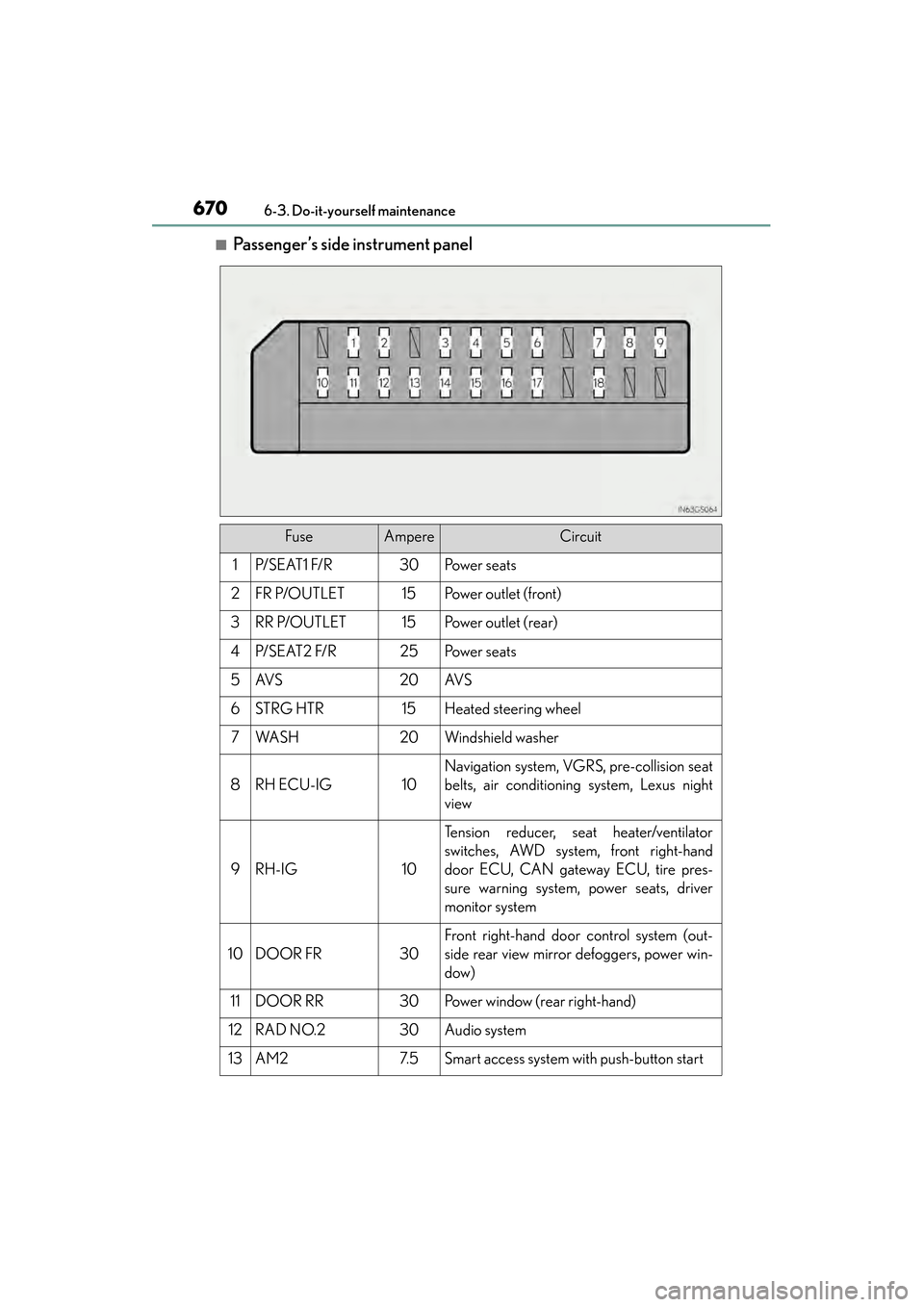
■Passenger’s side instrument panel
FuseAmpereCircuit
1P/ S E AT 1 F/ R30Po w e r s e a t s
2FR P/OUTLET15Po w e r o u t l e t ( f r o n t )
3RR P/OUTLET15Po w e r o u t l e t ( r e a r )
4P/ S E AT 2 F/ R25Po w e r s e a t s
5AV S20AV S
6STRG HTR15Heated steering wheel
7WA S H20Windshield washer
8RH ECU-IG10
Navigation system, VGRS, pre-collision seat
belts, air conditioning system, Lexus night
view
9RH-IG10
Tension reducer, seat heater/ventilator
switches, AWD system, front right-hand
door ECU, CAN gateway ECU, tire pres-
sure warning system, power seats, driver
monitor system
10DOOR FR30
Front right-hand door control system (out-
side rear view mirror defoggers, power win-
dow)
11DOOR RR30Power window (rear right-hand)
12RAD NO.230Audio system
13AM27. 5Smart access system with push-button start
GS350_OM_OM30D41U_(U).book Page 670 Monday, July 29, 2013 2:22 PM
Page 672 of 846
GS350_OM_OM30D41U_(U)
6716-3. Do-it-yourself maintenance
6
Maintenance and care
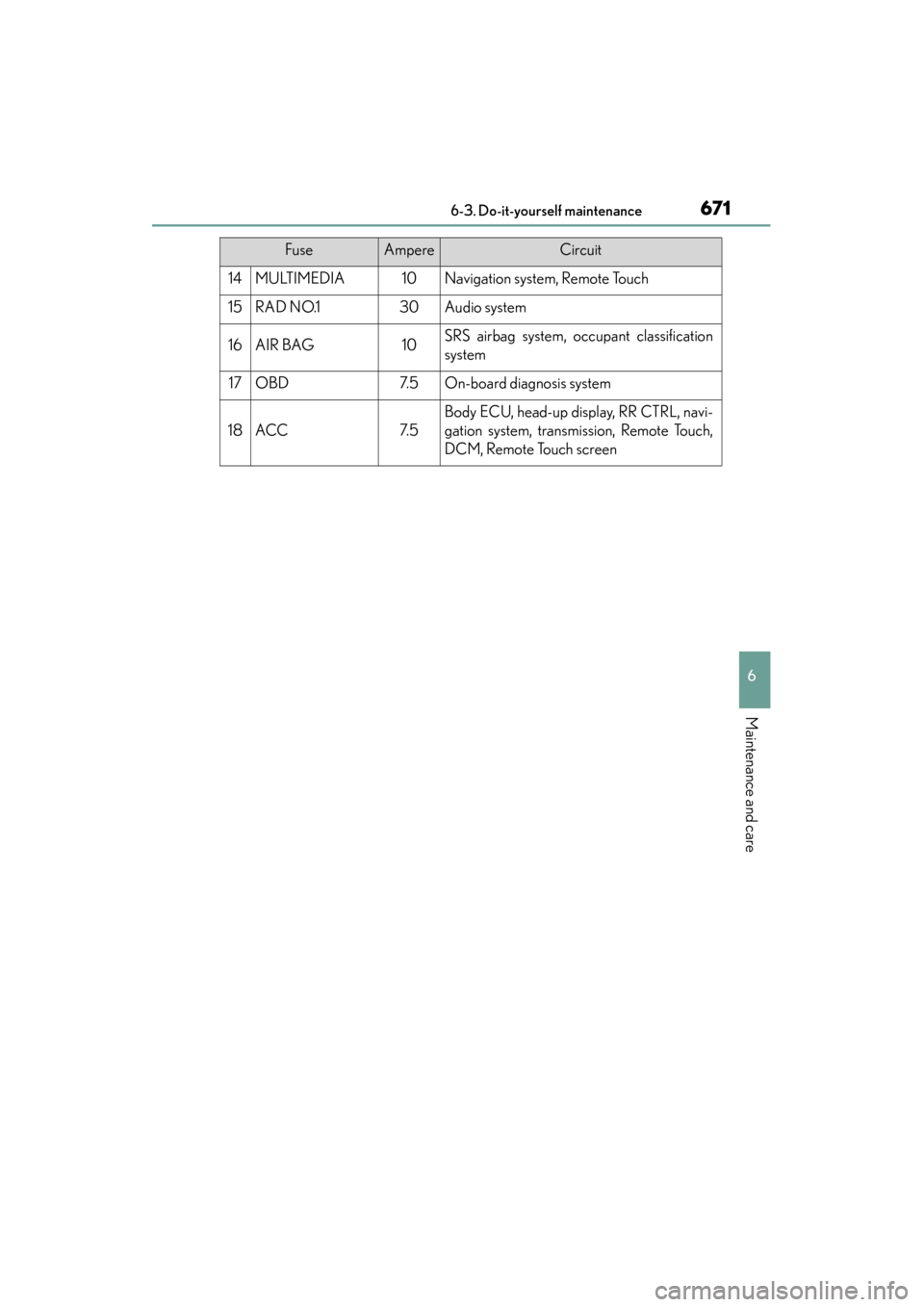
14MULTIMEDIA10Navigation system, Remote Touch
15RAD NO.130Audio system
16AIR BAG10SRS airbag system, occupant classification
system
17OBD7. 5On-board diagnosis system
18ACC7. 5
Body ECU, head-up display, RR CTRL, navi-
gation system, transmission, Remote Touch,
DCM, Remote Touch screen
FuseAmpereCircuit
GS350_OM_OM30D41U_(U).book Page 671 Monday, July 29, 2013 2:22 PM
Page 709 of 846
7087-2. Steps to take in an emergency
GS350_OM_OM30D41U_(U)
■The tire pressure warning light may come on due to natural causes
The tire pressure warning light may come on due to natural causes such as natural
air leaks and tire inflation pressure changes caused by temperature. In this case,
adjusting the tire inflation pressure will turn off the warning light (after a few minutes).
■When a tire is replaced with a spare tire
The compact spare tire is not equipped with a tire pressure warning valve and trans-
mitter. If a tire goes flat, the tire pressure warning light will not turn off even though
the flat tire has been replaced with the spare tire.
■Conditions that the tire pressure warning system may not function properly
→P. 6 4 8
■If the tire pressure warning light freque ntly comes on after blinking for 1 minute
If the tire pressure warning light frequently comes on after blinking for 1 minute when
the engine switch is turned to IGNITION ON mode, have it checked by your Lexus
dealer.
■Warning buzzer
In some cases, the buzzer may not be heard because of noisy place or an audio
sound.
■Customization
The vehicle speed linked seat belt reminder buzzer can be disabled.
(Customizable features: → P. 7 9 3 )
GS350_OM_OM30D41U_(U).book Page 708 Monday, July 29, 2013 2:22 PM