audio Lexus GS350 2014 User Guide
[x] Cancel search | Manufacturer: LEXUS, Model Year: 2014, Model line: GS350, Model: Lexus GS350 2014Pages: 846, PDF Size: 35.04 MB
Page 312 of 846
311
GS350_OM_OM30D41U_(U)
Interior features5
5-3. Using the audio system Audio system type ......................376
Using the radio ............................399
Using the CD/DVD player ..... 421
Playing an audio CD and MP3 /WMA discs .......... 423
Playing DVD video .................... 429
CD/DVD player and DVD video disc information ............ 441
Listening to Bluetooth
® audio.................... 452
Listening to a USB memory.........................463
Listening to an iPod ................... 473
Optimal use of the audio/video system ........ 483
Using the AUX port................. 485
Using the rear seat audio controls ........................... 487
Using the steering wheel audio switches .......................... 492
5-4. Using the hands-free phone system (for cellular phone)
Hands-free system (for cellular phone) .................495
Using a Bluetooth
® phone ... 503
Setting the hands-free system (for cellular phone) ................. 524
Setting the Bluetooth
®........... 548 5-5. Using the interior lights
Interior lights list ...........................561• Interior light ............................ 562
• Personal lights ....................... 562
5-6. Using the storage features List of storage features ............ 564• Glove box ............................... 566
• Console box........................... 567
• Cup holders ...........................568
• Auxiliary boxes ..................... 570
Trunk features ................................571
5-7. Other interior features Sun visors and vanity mirrors .................... 574
Clock............................................... 575
Ashtrays .......................................... 576
Power outlets ................................577
Heated steering wheel ............ 579
Seat heaters/ seat ventilators .......................... 581
Armrest ......................................... 585
Rear sunshade/ rear door sunshades ..............586
Trunk storage extension ..........589
Coat hooks ...................................590
Assist grips..................................... 591
Utility hook.................................... 592
Garage door opener................ 593
Safety Connect .......................... 600
GS350_OM_OM30D41U_(U).book Page 311 Monday, July 29, 2013 2:22 PM
Page 315 of 846
314
GS350_OM_OM30D41U_(U)
5-1. Remote Touch screen
Remote Touch screen
By using the Remote Touch, you can control the audio system and air
conditioning system, and adjust the screen display etc.
Vehicles with a navigation system: Different information can be dis-
played on the left and right of the screen. The 8-inch display area on the
left of the screen is called the “Mai n Display”, and the area to the right is
called the “Side Display”. For detail s, refer to the “Navigation System
Owner’s Manual”.
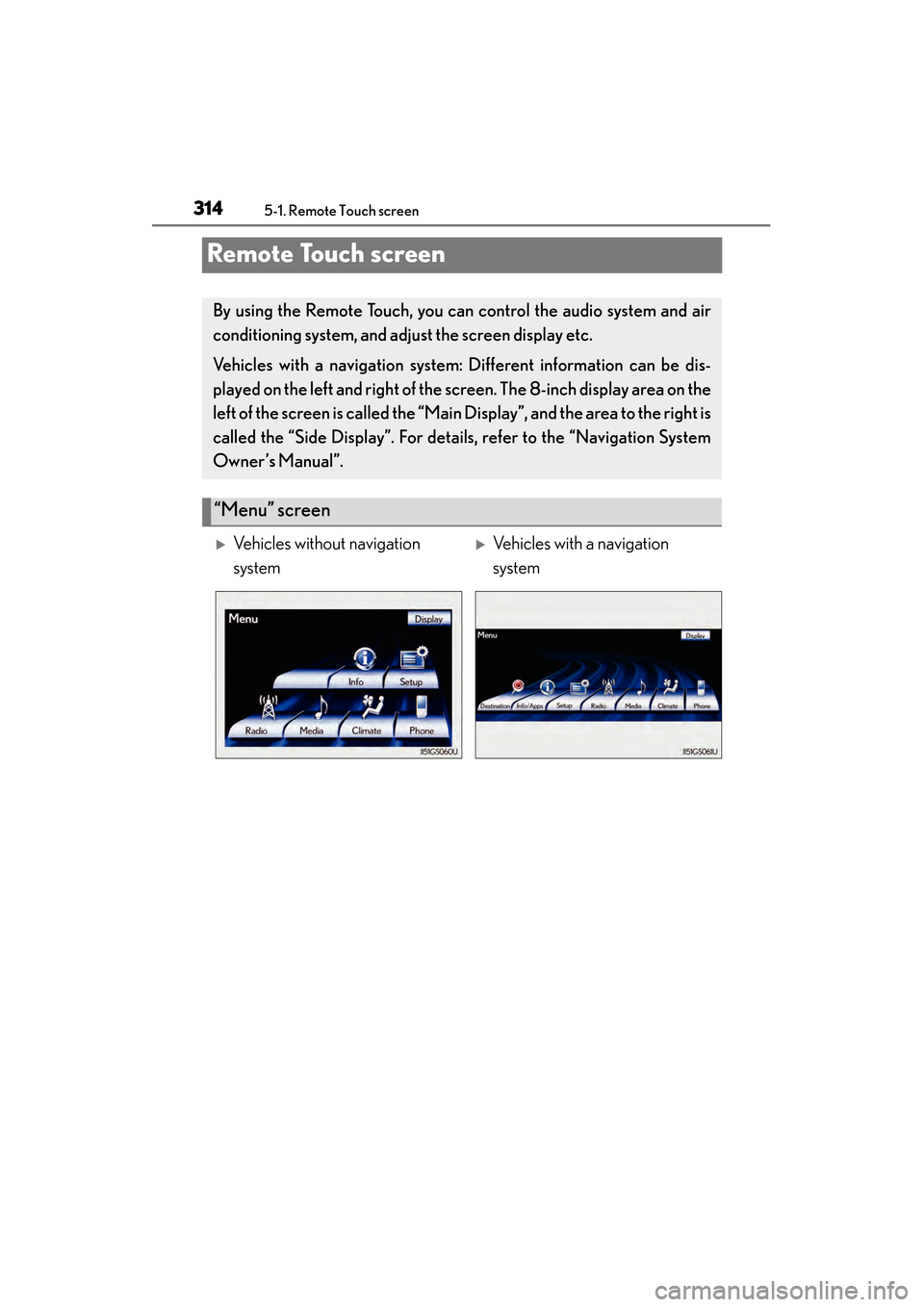
“Menu” screen
XVehicles without navigation
systemXVehicles with a navigation
system
GS350_OM_OM30D41U_(U).book Page 314 Monday, July 29, 2013 2:22 PM
Page 317 of 846
316
GS350_OM_OM30D41U_(U)
5-1. Remote Touch screen
The contrast and brightness of the screen display and the image the cam-
era displays can be adjusted. (For information regarding audio/video
screen adjustment: →P. 435)
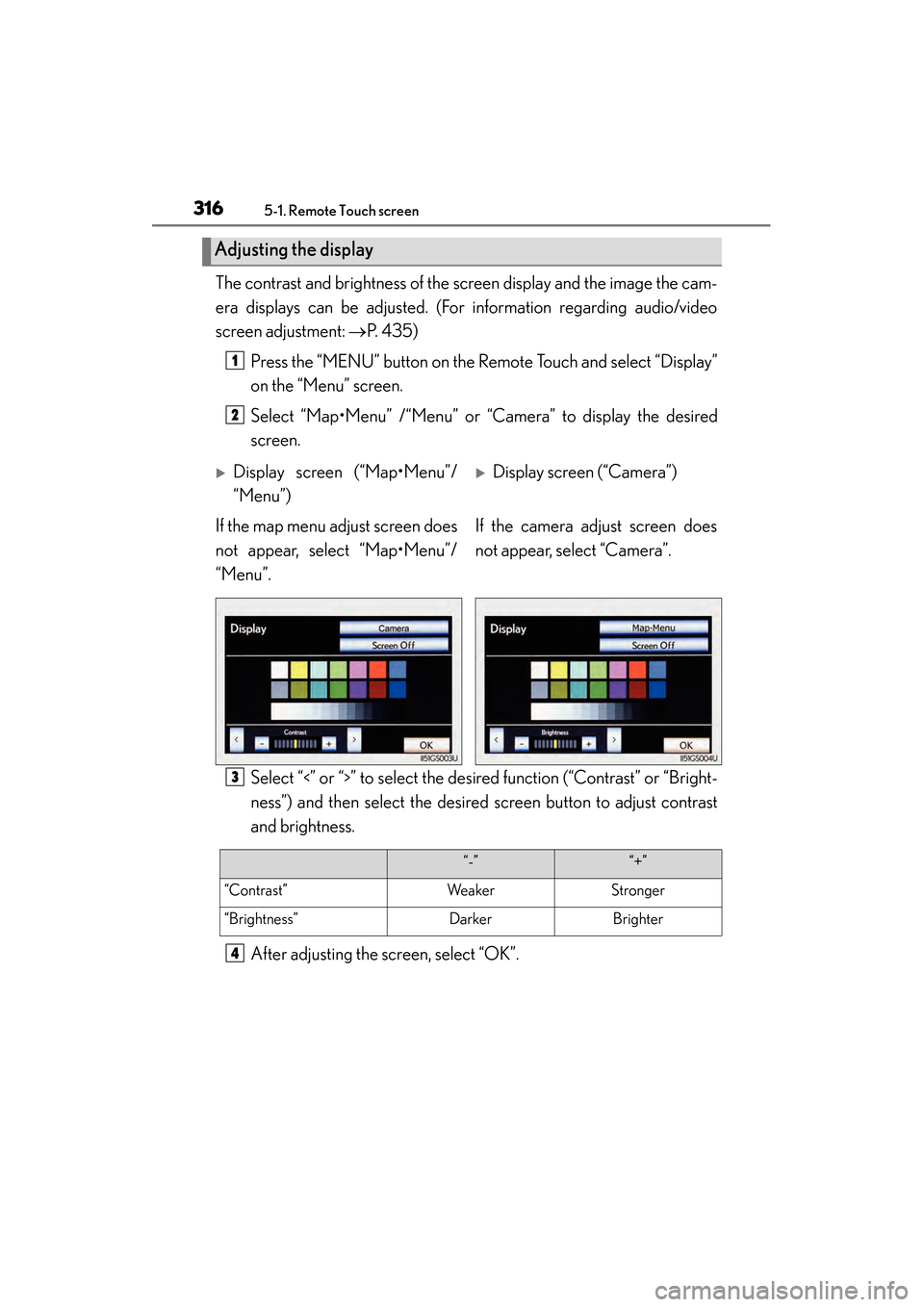
Press the “MENU” button on the Remote Touch and select “Display”
on the “Menu” screen.
Select “Map•Menu” /“Menu” or “Camera” to display the desired
screen.
Select “<” or “>” to select the desired function (“Contrast” or “Bright-
ness”) and then select the desired screen button to adjust contrast
and brightness.
After adjusting the screen, select “OK”.
Adjusting the display
1
2
XDisplay screen (“Map•Menu”/
“Menu”)XDisplay screen (“Camera”)
If the map menu adjust screen does
not appear, select “Map•Menu”/
“Menu”. If the camera adjust screen does
not appear, select “Camera”.
3
“-”“+”
“Contrast”WeakerStronger
“Brightness”DarkerBrighter
4
GS350_OM_OM30D41U_(U).book Page 316 Monday, July 29, 2013 2:22 PM
Page 318 of 846
GS350_OM_OM30D41U_(U)
3175-1. Remote Touch screen
5
Interior features
■When using the Remote Touch screen
●If the screen is cold, the display may be dark, or the system may seem to be operat-
ing slightly slower than normal.
●When the screen is viewed through polarized sunglasses, a rainbow pattern may
appear on the screen due to optical characteristics of the screen. If this is disturb-
ing, please operate the screen without polarized sunglasses.
●Dimmed screen buttons cannot be operated.
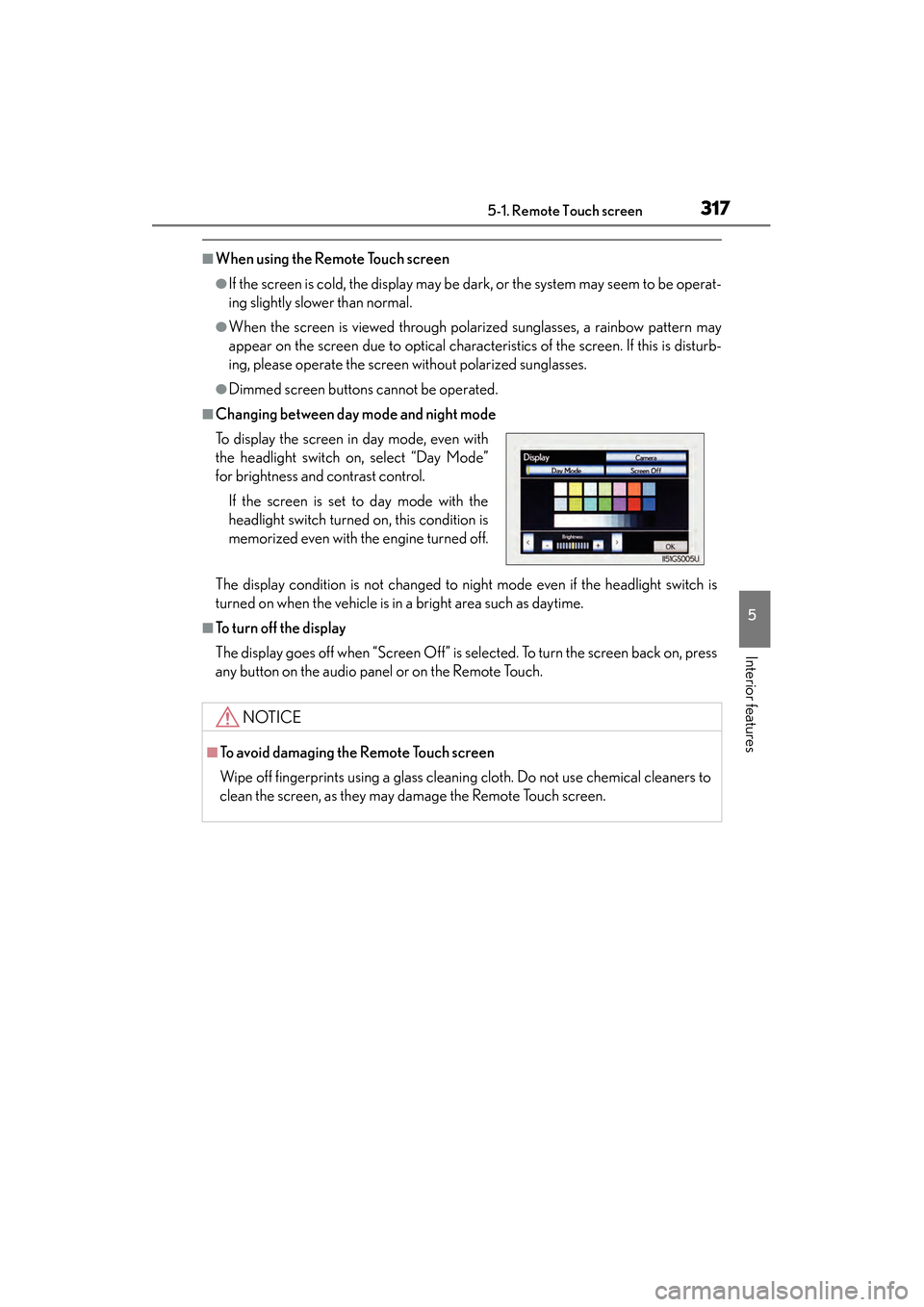
■Changing between day mode and night mode
The display condition is not changed to night mode even if the headlight switch is
turned on when the vehicle is in a bright area such as daytime.
■To t u r n o f f t h e d i s p l a y
The display goes off when “Screen Off” is selected. To turn the screen back on, press
any button on the audio panel or on the Remote Touch. To display the screen in day mode, even with
the headlight switch on, select “Day Mode”
for brightness and contrast control.
If the screen is set to day mode with the
headlight switch turned on, this condition is
memorized even with the engine turned off.
NOTICE
■To avoid damaging the Remote Touch screen
Wipe off fingerprints using a glass cleaning cloth. Do not use chemical cleaners to
clean the screen, as they may damage the Remote Touch screen.
GS350_OM_OM30D41U_(U).book Page 317 Monday, July 29, 2013 2:22 PM
Page 335 of 846
334
GS350_OM_OM30D41U_(U)
5-1. Remote Touch screen
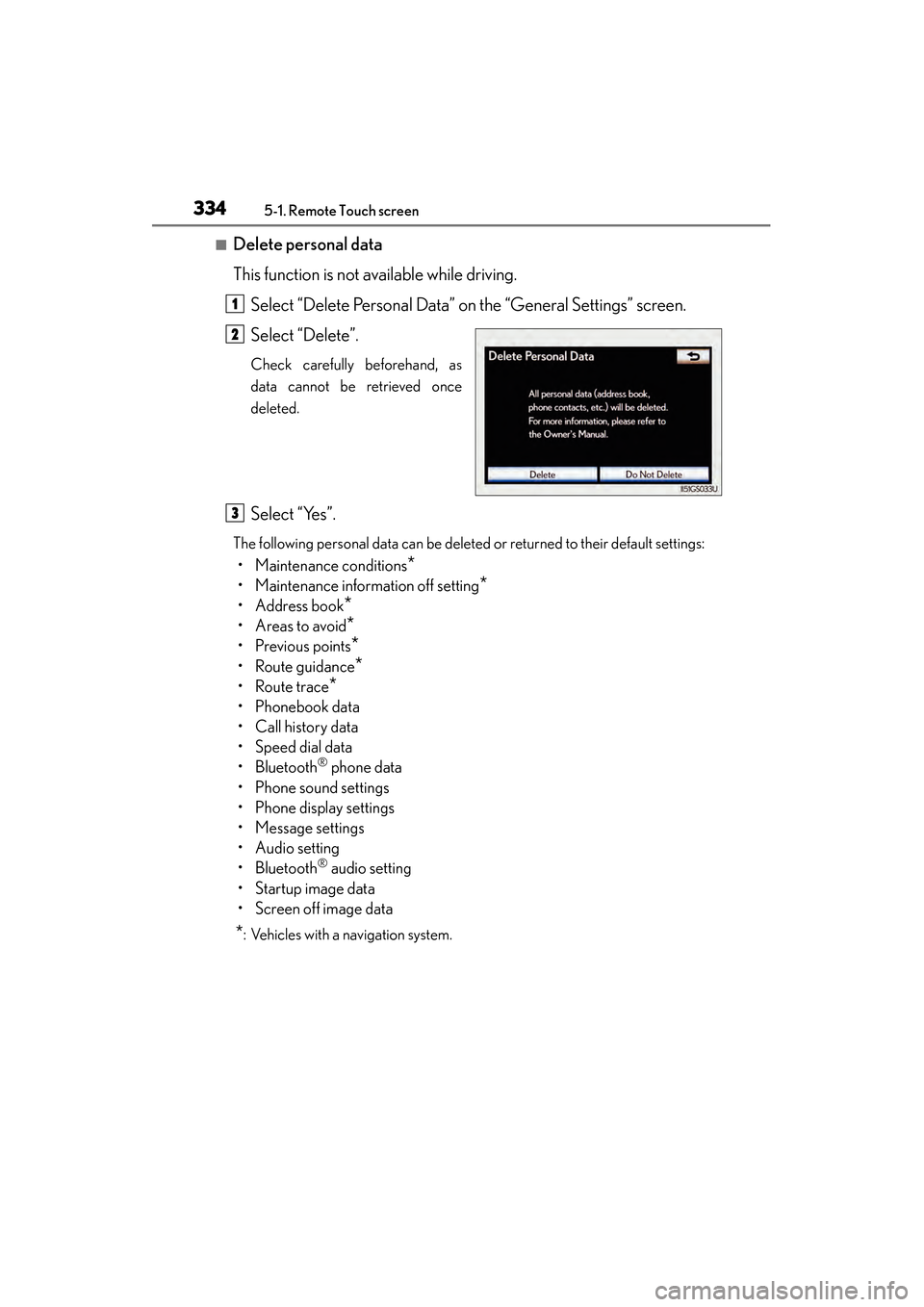
■Delete personal data
This function is not available while driving.Select “Delete Personal Data” on the “General Settings” screen.
Select “Delete”.
Check carefully beforehand, as
data cannot be retrieved once
deleted.
Select “Yes”.
The following personal data can be deleted or returned to their default settings:
• Maintenance conditions*
• Maintenance information off setting*
• Address book*
•Areas to avoid*
•Previous points*
• Route guidance*
•Route trace*
• Phonebook data
•Call history data
• Speed dial data
•Bluetooth
® phone data
• Phone sound settings
• Phone display settings
• Message settings
• Audio setting
•Bluetooth
® audio setting
•Startup image data
• Screen off image data
*: Vehicles with a navigation system.
1
2
3
GS350_OM_OM30D41U_(U).book Page 334 Monday, July 29, 2013 2:22 PM
Page 337 of 846
336
GS350_OM_OM30D41U_(U)
5-1. Remote Touch screen
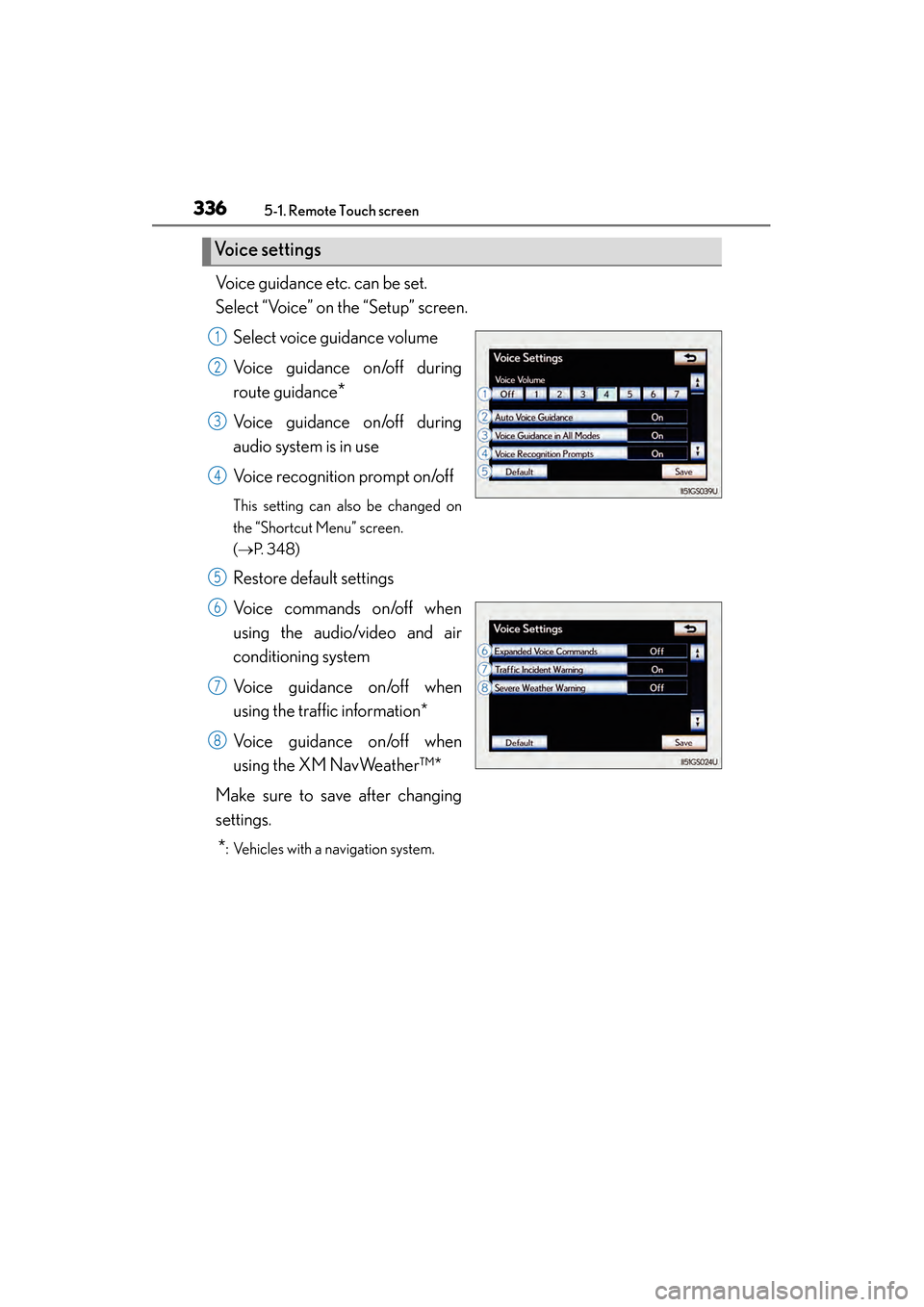
Voice guidance etc. can be set.
Select “Voice” on the “Setup” screen.Select voice guidance volume
Voice guidance on/off during
route guidance
*
Voice guidance on/off during
audio system is in use
Voice recognition prompt on/off
This setting can also be changed on
the “Shortcut Menu” screen.
(→ P. 3 4 8 )
Restore default settings
Voice commands on/off when
using the audio/video and air
conditioning system
Voice guidance on/off when
using the traffic information*
Voice guidance on/off when
using the XM NavWeather™*
Make sure to save after changing
settings.
*: Vehicles with a navigation system.
Vo i c e s e t t i n g s
1
2
3
4
5
6
7
8
GS350_OM_OM30D41U_(U).book Page 336 Monday, July 29, 2013 2:22 PM
Page 340 of 846
GS350_OM_OM30D41U_(U)
3395-1. Remote Touch screen
5
Interior features
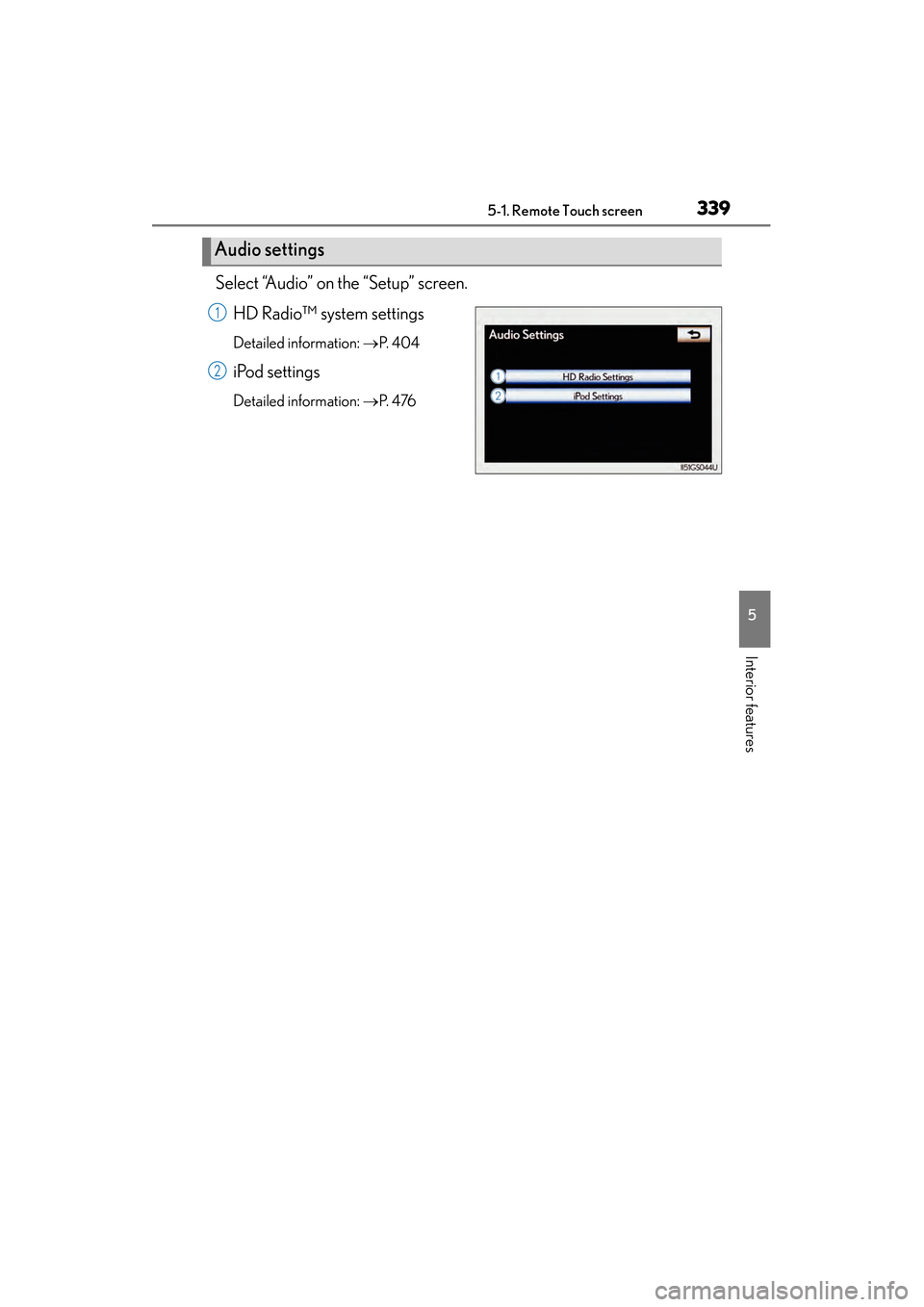
Select “Audio” on the “Setup” screen.HD Radio™ system settings
Detailed information: →P. 4 0 4
iPod settings
Detailed information: →P. 4 76
Audio settings
1
2
GS350_OM_OM30D41U_(U).book Page 339 Monday, July 29, 2013 2:22 PM
Page 341 of 846
340
GS350_OM_OM30D41U_(U)
5-1. Remote Touch screen
Voice command system
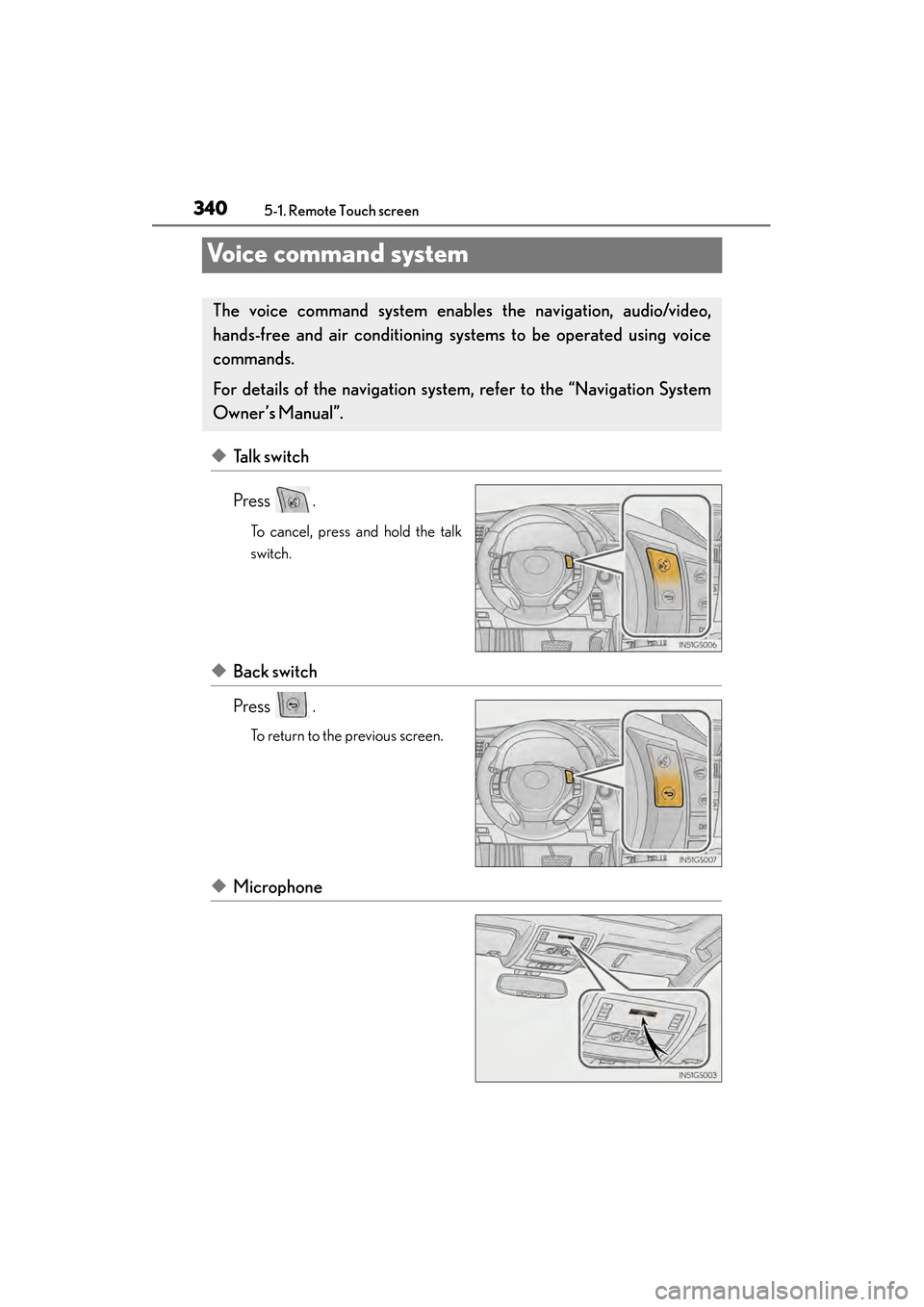
◆Talk switch
Press .
To cancel, press and hold the talk
switch.
◆Back switch
Press .
To return to the previous screen.
◆Microphone
The voice command system enables the navigation, audio/video,
hands-free and air conditioning sys tems to be operated using voice
commands.
For details of the navigation system , refer to the “Navigation System
Owner’s Manual”.
GS350_OM_OM30D41U_(U).book Page 340 Monday, July 29, 2013 2:22 PM
Page 345 of 846
344
GS350_OM_OM30D41U_(U)
5-1. Remote Touch screen
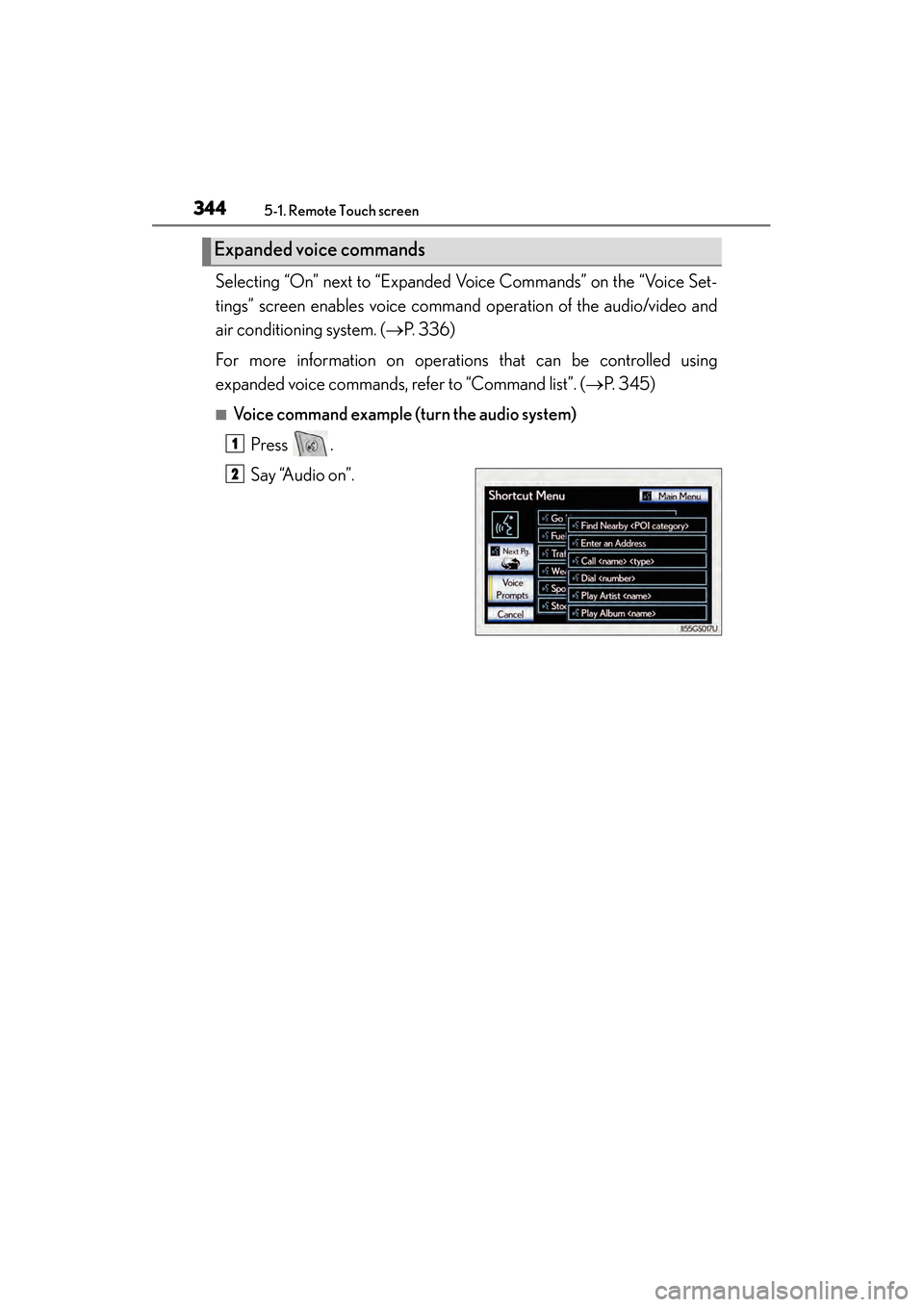
Selecting “On” next to “Expanded Voice Commands” on the “Voice Set-
tings” screen enables voice command operation of the audio/video and
air conditioning system. ( →P. 3 3 6 )
For more information on operations that can be controlled using
expanded voice commands, refer to “Command list”. ( →P. 345)
■Voice command example (t urn the audio system)
Press .
Say “Audio on”.
Expanded voice commands
1
2
GS350_OM_OM30D41U_(U).book Page 344 Monday, July 29, 2013 2:22 PM
Page 348 of 846
GS350_OM_OM30D41U_(U)
3475-1. Remote Touch screen
5
Interior features
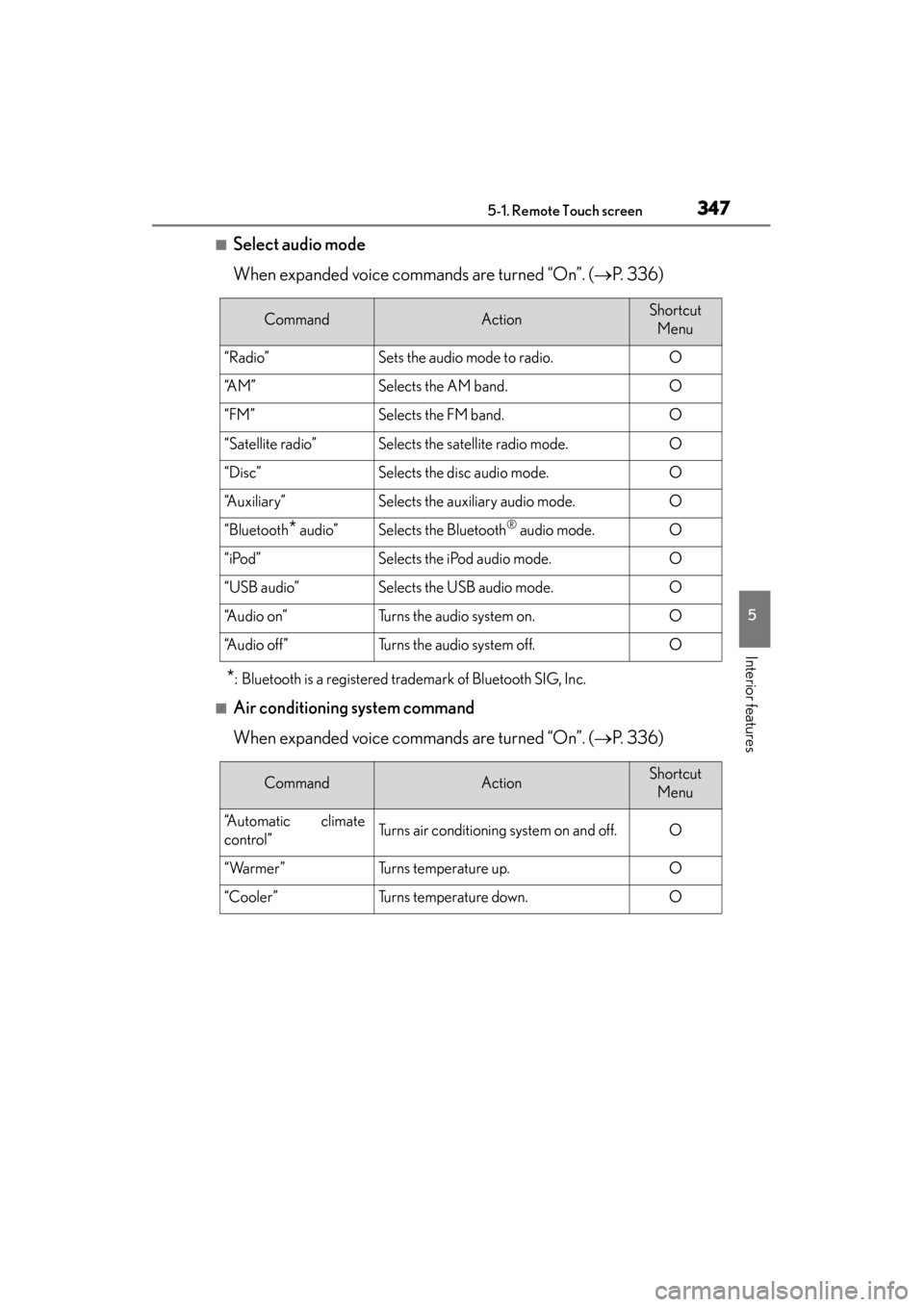
■Select audio mode
When expanded voice commands are turned “On”. (→P. 3 3 6 )
*: Bluetooth is a registered trademark of Bluetooth SIG, Inc.
■Air conditioning system command
When expanded voice commands are turned “On”. ( →P. 3 3 6 )
CommandActionShortcut
Menu
“Radio”Sets the audio mode to radio.O
“A M ”Selects the AM band.O
“FM”Selects the FM band.O
“Satellite radio”Selects the satellite radio mode.O
“Disc”Selects the disc audio mode.O
“Auxiliary”Selects the auxiliary audio mode.O
“Bluetooth* audio”Selects the Bluetooth® audio mode.O
“iPod”Selects the iPod audio mode.O
“USB audio”Selects the USB audio mode.O
“A u d i o o n ”Turns the audio system on.O
“Audio off”Turns the audio system off.O
CommandActionShortcut Menu
“Automatic climate
control”Turns air conditioning system on and off.O
“Warmer”Turns temperature up.O
“Cooler”Turns temperature down.O
GS350_OM_OM30D41U_(U).book Page 347 Monday, July 29, 2013 2:22 PM