instrument panel Lexus GS350 2014 User Guide
[x] Cancel search | Manufacturer: LEXUS, Model Year: 2014, Model line: GS350, Model: Lexus GS350 2014Pages: 846, PDF Size: 35.04 MB
Page 170 of 846

GS350_OM_OM30D41U_(U)
1694-1. Before driving
4
Driving
CAUTION
■Things that must not be carried in the trunk
The following things may cause a fire if loaded in the trunk:
●Receptacles containing gasoline
●Aerosol cans
■Storage precautions
Observe the following precautions.
Failure to do so may prevent the pedals from being depressed properly, may block
the driver’s vision, or may result in items hitting the driver or passengers, possibly
causing an accident.
●Stow cargo and luggage in the trunk whenever possible.
●Do not place cargo or luggage in or on the following locations.
• At the feet of the driver
• On the front passenger or rear seats (when stacking items)
• On the package tray
• On the instrument panel
• On the dashboard
• In front of the Remote Touch screen
●Secure all items in the occupant compartment.
■Capacity and distribution
●Do not exceed the maximum axle weight rating or the total vehicle weight rating.
●Even if the total load of occupant’s weight and the cargo load is less than the total
load capacity, do not apply the load unevenly. Improper loading may cause dete-
rioration of steering or braking control which may cause death or serious injury.
GS350_OM_OM30D41U_(U).book Page 169 Monday, July 29, 2013 2:22 PM
Page 377 of 846
376
GS350_OM_OM30D41U_(U)
5-3. Using the audio system
Audio system type
CD and DVD player with AM/FM radio
Vehicles with a navigation system: The audio fun ctions can be displayed
and operated on the “Side Display”. For details, refer to the “Navigation
System Owner’s Manual”.
XUsing the instrument panel
Press the “RADIO” or “MEDIA” button to display the audio control
screen.
XUsing the Remote Touch
Press the “MENU” button on the Remote Touch, select “Radio” or
“Media” and select each tab to display the audio control screen.
GS350_OM_OM30D41U_(U).book Page 376 Monday, July 29, 2013 2:22 PM
Page 461 of 846
460
GS350_OM_OM30D41U_(U)
5-3. Using the audio system
■When using the Bluetooth® audio system
●In the following conditions, the system may not function.
• The portable player is turned off
• The portable player is not connected
• The portable player battery is low
●There may be a delay if phone connection is carried out during Bluetooth® audio
play.
●Depending on the type of portable player that is connected to the system, opera-
tion may differ slightly and certain functions may not be available.
■Bluetooth® antenna
The antenna is built into the instrument panel. If the portable player is behind the seat
or in the glove box or console box, or is touching or covered by metal objects, con-
nection status may deteriorate.
■Battery charge/signal status
This display may not correspond exactly with the portable player, and this system
does not have a charging function.
■About Bluetooth®
Bluetooth is a registered trademark of
Bluetooth SIG, Inc.
GS350_OM_OM30D41U_(U).book Page 460 Monday, July 29, 2013 2:22 PM
Page 470 of 846
GS350_OM_OM30D41U_(U)
4695-3. Using the audio system
5
Interior features
■If you select
The display returns to the previous screen.
■USB memory functions
●When the USB memory is connected and the audio source is changed to USB
memory mode, the USB memory will start playing the first file in the first folder. If
the same device is removed and reinserted (and the contents have not been
changed), the USB memory will resume playing from the same point it was last
used.
●Depending on the USB memory that is connected to the system, certain functions
may not be available. Disconnecting the device and reconnecting it once again
may resolve some malfunctions.
■When using a USB memory
You may be unable to use the instrument panel power outlet if the USB memory is
connected to the USB port at the same time.
■Error messages for USB memory
“USB Error”: This indicates a problem in the USB memory or its connection.
“No music files found.”: This indicates that no MP3/WMA files are included in theUSB memory.
■USB memory
●Compatible devices
USB memory that can be used for MP3 and WMA playback.
●Compatible device formats
The following device formats can be used:
• USB communication formats: USB2.0 HS (480 Mbps) and FS (12 Mbps)
• File formats: FAT16/32 (Windows)
• Correspondence class: Mass storage class
MP3 and WMA files written in any format other than those listed above may not play
correctly, and their file names and folder names may not be displayed correctly.
Items related to standards and limitations are as follows:
• Maximum directory hierarchy: 8 levels
• Maximum number of folders in a device: 3000 (including the root)
• Maximum number of files in a device: 9999
• Maximum number of files per folder: 255
GS350_OM_OM30D41U_(U).book Page 469 Monday, July 29, 2013 2:22 PM
Page 481 of 846
480
GS350_OM_OM30D41U_(U)
5-3. Using the audio system
■iPod cover art
●Depending on the iPod and the songs in the iPod, iPod cover art may be displayed.
This function can be changed to “On” or “Off”. (→P. 4 76 )
●It may take time to display iPod cover art, and the iPod may not be operated while
the cover art display is in process.
●Only iPod cover art that is saved in JPEG format can be displayed.
■iPod functions
●When the iPod connected to the system includes iPod video, the system can only
output the sound by selecting “Video” on the “iPod” screen.
●Depending on the iPod, the video sound may not be able to be heard.
●When an iPod is connected and the audio source is changed to iPod mode, the
iPod will resume play from the same point in which it was last used.
●Depending on the iPod that is connected to the system, certain functions may not
be available. If a function is unavailable due to a malfunction (as opposed to a sys-
tem specification), disconnecting the device and reconnecting it once again may
resolve the problem.
■When using an iPod
You maybe unable to use the instrument panel power outlet if the iPod is connected
to the USB port at the same time.
■Battery charge
When an iPod is connected using a genuine iPod cable, the iPod starts charging its
battery.
■Error messages for iPod
“iPod Error”: This indicates a problem in the iPod or its connection.
“No music files found.”: This indicates that there is no music data in the iPod.
“Please check the iPod firmware version.”:
This indicates that the software version is not compatible.
Perform the iPod firmware updates and try again.
“iPod authorization failed.”: This indicates th at it failed to authorize the iPod. Please
check your iPod.
GS350_OM_OM30D41U_(U).book Page 480 Monday, July 29, 2013 2:22 PM
Page 499 of 846

498
GS350_OM_OM30D41U_(U)
5-4. Using the hands-free phone system (for cellular phone)
■When using the hands-free system
●The audio system is muted when making a call.
●If both parties speak at the same time, it may be difficult to hear.
●If the incoming call volume is overly loud, an echo may be heard.
●Try to face toward the microphone as much as possible when speaking.
●In the following circumstances, it may be difficult to hear the other party:
• When driving on unpaved roads
• When driving at high speeds
• If a window is open
• If the air conditioning is blowing directly on the microphone
• If the air conditioning is set to high
• There is an effect from the network of the cellular phone
■Conditions under which the system will not operate
●If using a cellular phone that does not support Bluetooth®
●If the cellular phone is turned off
●If you are outside service range
●If the cellular phone is not connected
●If the cellular phone’s battery is low
■Bluetooth® antenna
The antenna is built into the instrument panel. If the cellular phone is behind the seat
or in the console box, or touching or covered by metal objects, connection status
may deteriorate.
■Battery charge/Signal status
●This display may not correspond exactly with the cellular phone itself.
●When the cellular phone is not connected, “No connect” is displayed.
●When the cellular phone is out of the service area or in a place inaccessible by
radio waves, “No Service” is displayed.
■When using Bluetooth® audio and hands-free system at the same time
The following problems may occur.
●The Bluetooth® connection may be cut.
●Noise may be heard on the Bluetooth® audio playback.
GS350_OM_OM30D41U_(U).book Page 498 Monday, July 29, 2013 2:22 PM
Page 562 of 846
561
GS350_OM_OM30D41U_(U)5-5. Using the interior lights
5
Interior features
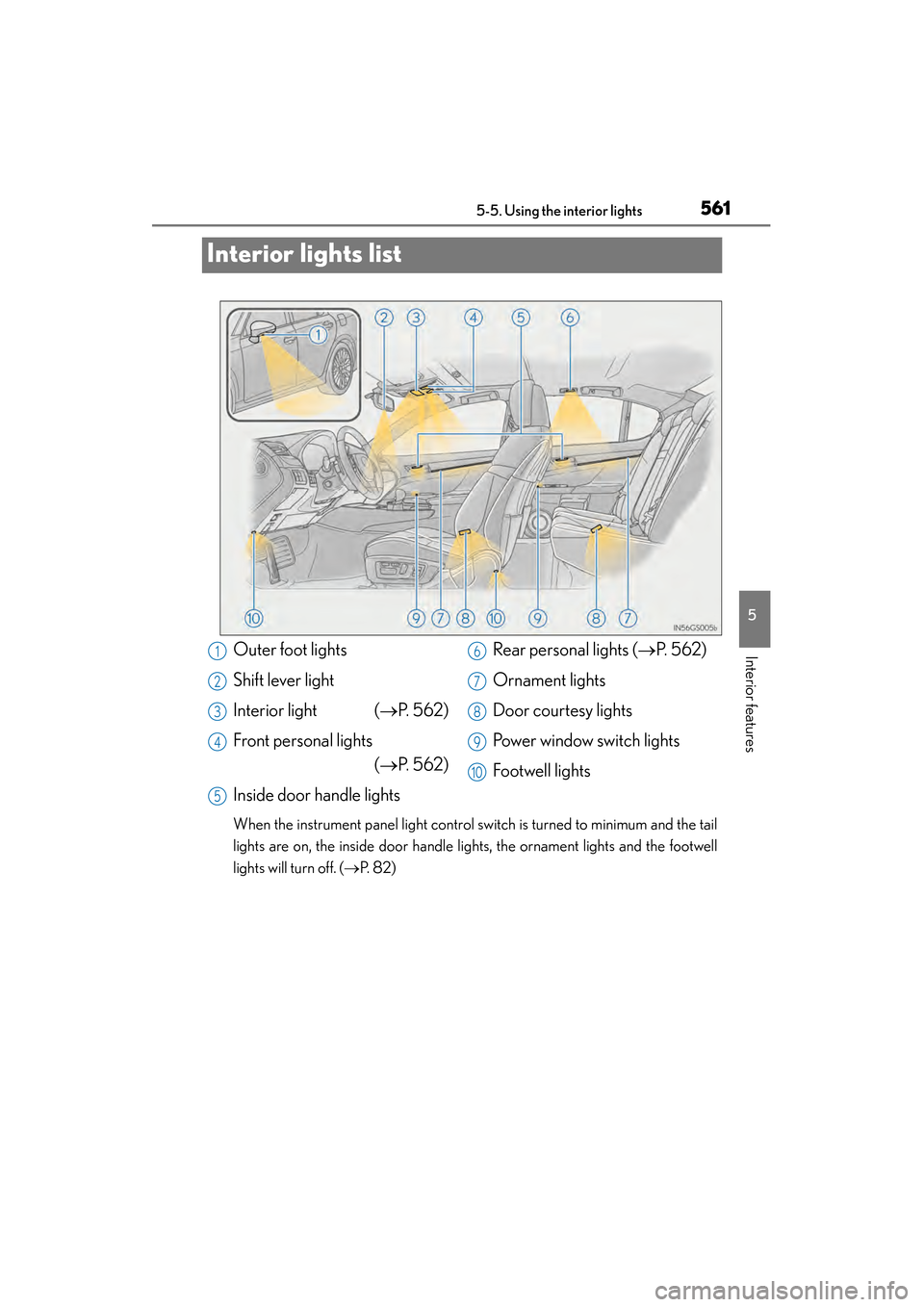
Interior lights list
When the instrument panel light control switch is turned to minimum and the tail
lights are on, the inside door handle lights, the ornament lights and the footwell
lights will turn off. ( →P. 8 2 )
Outer foot lights
Shift lever light
Interior light ( →P. 562)
Front personal lights (→P. 562)
Inside door handle lights Rear personal lights (
→P. 562)
Ornament lights
Door courtesy lights
Power window switch lights
Footwell lights1
2
3
4
5
6
7
8
9
10
GS350_OM_OM30D41U_(U).book Page 561 Monday, July 29, 2013 2:22 PM
Page 614 of 846
GS350_OM_OM30D41U_(U)
6136-1. Maintenance and care
6
Maintenance and care
■Caring for leather areas
Lexus recommends cleaning the interior of the vehicle at least twice a year to main-
tain the quality of the vehicle’s interior.
■Shampooing the carpets
There are several commercial foaming-type cleaners available. Use a sponge or
brush to apply the foam. Rub in overlapping circles. Do not use water. Wipe dirty sur-
faces and let them dry. Excellent results are obtained by keeping the carpet as dry as
possible.
■Seat belts
Clean with mild soap and lukewarm water using a cloth or sponge. Also check the
belts periodically for excessive wear, fraying or cuts.
■When cleaning the carpeted portions of the glove box, console box, etc.
If a strong adhesive tape is used, there is a possibility that the surface of the carpet
could be damaged.
CAUTION
■Wa t e r i n t h e v e h i c l e
●Do not splash or spill liquid in the vehicle.
Doing so may cause electrical components etc. to malfunction or catch fire.
●Do not get any of the SRS components or wiring in the vehicle interior wet.
(→ P. 3 8 )
An electrical malfunction may cause the airbags to deploy or not function prop-
erly, resulting in death or serious injury.
■Cleaning the interior (especially instrument panel)
Do not use polish wax or polish cleaner. The instrument panel may reflect off the
windshield, obstructing the driver’s view and leading to an accident, resulting in
death or serious injury.
GS350_OM_OM30D41U_(U).book Page 613 Monday, July 29, 2013 2:22 PM
Page 615 of 846
614
GS350_OM_OM30D41U_(U)
6-1. Maintenance and care
NOTICE
■Cleaning detergents
●Do not use the following types of detergent, as they may discolor the vehicle inte-
rior or cause streaks or damage to painted surfaces:
• Non-seat portions: Organic substances such as benzene or gasoline, alkalineor acidic solutions, dye, and bleach
• Seats: Alkaline or acidic solutions, such as thinner, benzene, and alcohol
●Do not use polish wax or polish cleaner. The instrument panel’s or other interior
part’s painted surface may be damaged.
■Preventing damage to leather surfaces
Observe the following precautions to avoid damage to and deterioration of
leather surfaces:
●Remove any dust or dirt from leather surfaces immediately.
●Do not expose the vehicle to direct sunlight for extended periods of time. Park
the vehicle in the shade, especially during summer.
●Do not place items made of vinyl, plastic, or containing wax on the upholstery, as
they may stick to the leather surface if the vehicle interior heats up significantly.
■Water on the floor
Do not wash the vehicle floor with water.
Vehicle systems such as the audio system may be damaged if water comes into
contact with electrical components such as the audio system above or under the
floor of the vehicle. Water may also cause the body to rust.
■When cleaning the inside of the windshield (vehicles with LKA [Lane-Keeping
Assist])
Be careful not to touch the camera sensor ( →P. 2 3 0 ) .
If the camera is accidentally scratched or hit, LKA may not operate properly or
may cause a malfunction.
■Cleaning the inside of the rear window
●Do not use glass cleaner to clean the rear window, as this may cause damage to
the rear window defogger heater wires or antenna. Use a cloth dampened with
lukewarm water to gently wipe the window clean. Wipe the window in strokes
running parallel to the heater wires or antenna.
●Be careful not to scratch or damage the heater wires or antenna.
GS350_OM_OM30D41U_(U).book Page 614 Monday, July 29, 2013 2:22 PM
Page 663 of 846
662
GS350_OM_OM30D41U_(U)
6-3. Do-it-yourself maintenance
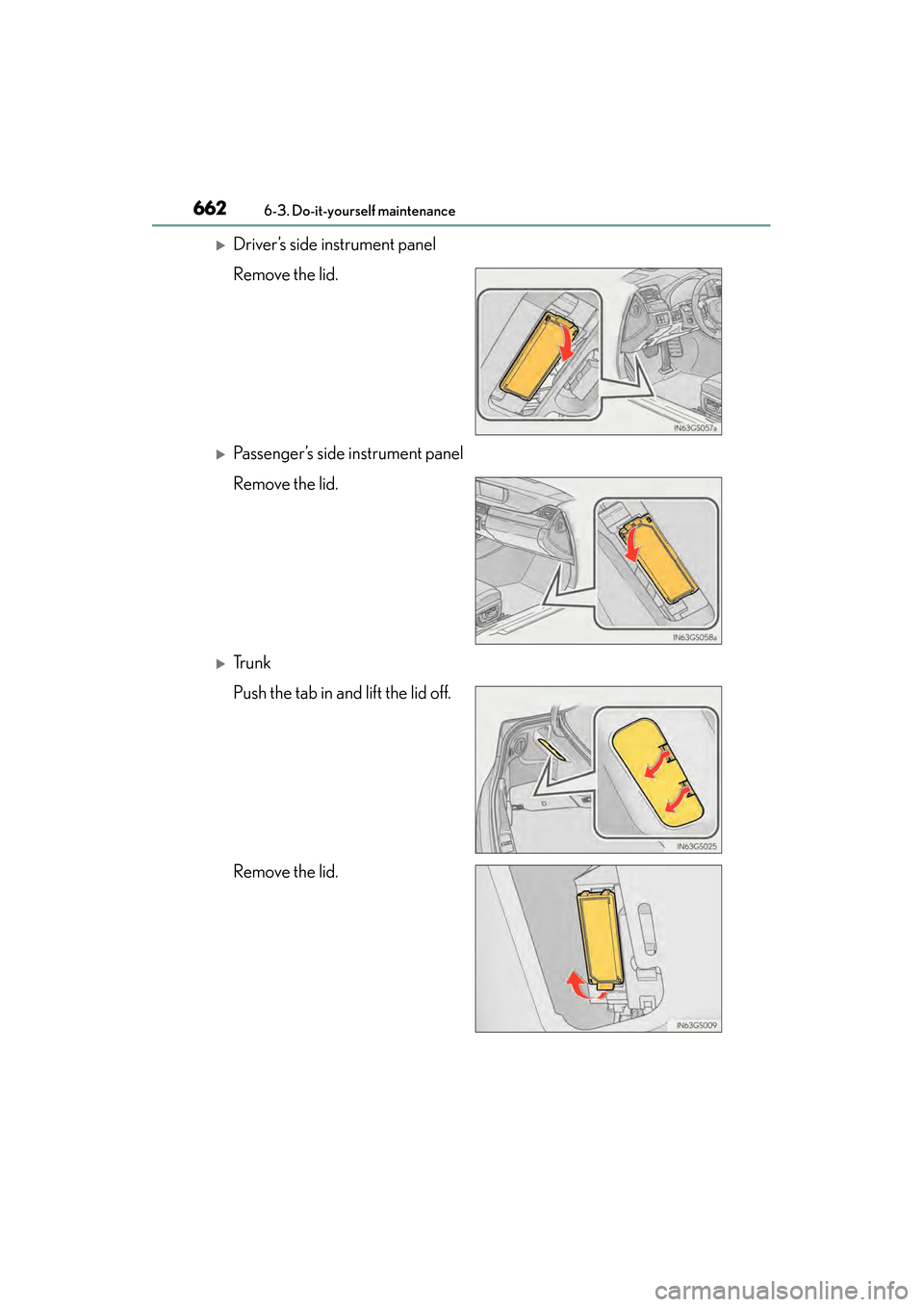
XDriver’s side instrument panel
Remove the lid.
XPassenger’s side instrument panel
Remove the lid.
XTr u n k
Push the tab in and lift the lid off.
Remove the lid.
GS350_OM_OM30D41U_(U).book Page 662 Monday, July 29, 2013 2:22 PM