navigation system Lexus GS350 2014 Owner's Guide
[x] Cancel search | Manufacturer: LEXUS, Model Year: 2014, Model line: GS350, Model: Lexus GS350 2014Pages: 846, PDF Size: 35.04 MB
Page 496 of 846
495
GS350_OM_OM30D41U_(U)5-4. Using the hands-free phone system (for cellular phone)
5
Interior features
Hands-free system (for cellular phone)
The hands-free system is a function th at allows you to use your cellular
phone without touching it.
This system supports Bluetooth
® cellular phones. Bluetooth® is a wire-
less data system that allows a cellular phone to wirelessly connect to
the hands-free system and outgoing/incoming calls.
The illustrations of the hands-fr ee system screens shown here may
slightly vary depending on the type of the system.
Vehicles with a navigation system: The hands-free system function can
be displayed and operated on the “S ide Display”. For details, refer to
the “Navigation System Owner’s Manual”.
GS350_OM_OM30D41U_(U).book Page 495 Monday, July 29, 2013 2:22 PM
Page 501 of 846
500
GS350_OM_OM30D41U_(U)
5-4. Using the hands-free phone system (for cellular phone)
■Compatible models
This system supports the following service.
●Bluetooth® Specification Ver. 1.1 or higher (Recommended: Ver. 2.1+EDR or
higher)
●Profiles
• HFP (Hands Free Profile) Ver. 1.0 or higher (Recommended: Ver. 1.5 or higher)
• OPP (Object Push Profile) Ver. 1.1 or higher
• PBAP (Phone Book Access Profile) Ver. 1.0 or higher
• MAP (Message Access Profile) Ver. 1.0 or higher
• SPP (Serial Port Profile) Ver. 1.1 or higher
*
*
: This profile is necessary when using Apps. For details, refer to the “Navigation
System Owner’s Manual”
If your cellular phone does not support HFP, you cannot enter the Bluetooth
®
phone, and take OPP, PBAP, MAP or SPP service individually.
If the connected Bluetooth
® phone version is older than recommended or incom-
patible, this function may not be used.
Please go to http://www.lexus.com/MobileLink
to find approved Bluetooth®
phones for this system.
■Certification
FCC ID: AJDK041
IC: 775E-K041
This device complies with Part 15 of FCC Rules and Industry Canada licence-
exempt RSS standard(s). Operation is subject to the following two conditions: (1) this
device may not cause interference, and (2) this device must accept any interference,
including interference that may cause undesired operation of this device.
Le présent appareil est conforme aux la partie 15 des règles de la FCC et CNR
d’Industrie Canada applicables aux appareils radio exempts de licence.
L’exploitation est autorisée aux deux conditions suivantes: (1) l’appareil ne doit pas
produire de brouillage, et (2) l’utilisateur de l’appareil doit accepter tout brouillage
radioélectrique subi, même si le brouillage est susceptible d’en compromettre le
fonctionnement.
For vehicles sold in Canada:
This device complies with RSS-310 of Industry Canada. Operation is subject to the
condition that this device does not cause harmful interference.
Cet appareil est conforme au CNR-310 d’Industrie Canada. Son exploitation est
autorisée sous réserve que l’appareil ne cause pas de brouillage préjudiciable.
GS350_OM_OM30D41U_(U).book Page 500 Monday, July 29, 2013 2:22 PM
Page 516 of 846
GS350_OM_OM30D41U_(U)
5155-4. Using the hands-free phone system (for cellular phone)
5
Interior features
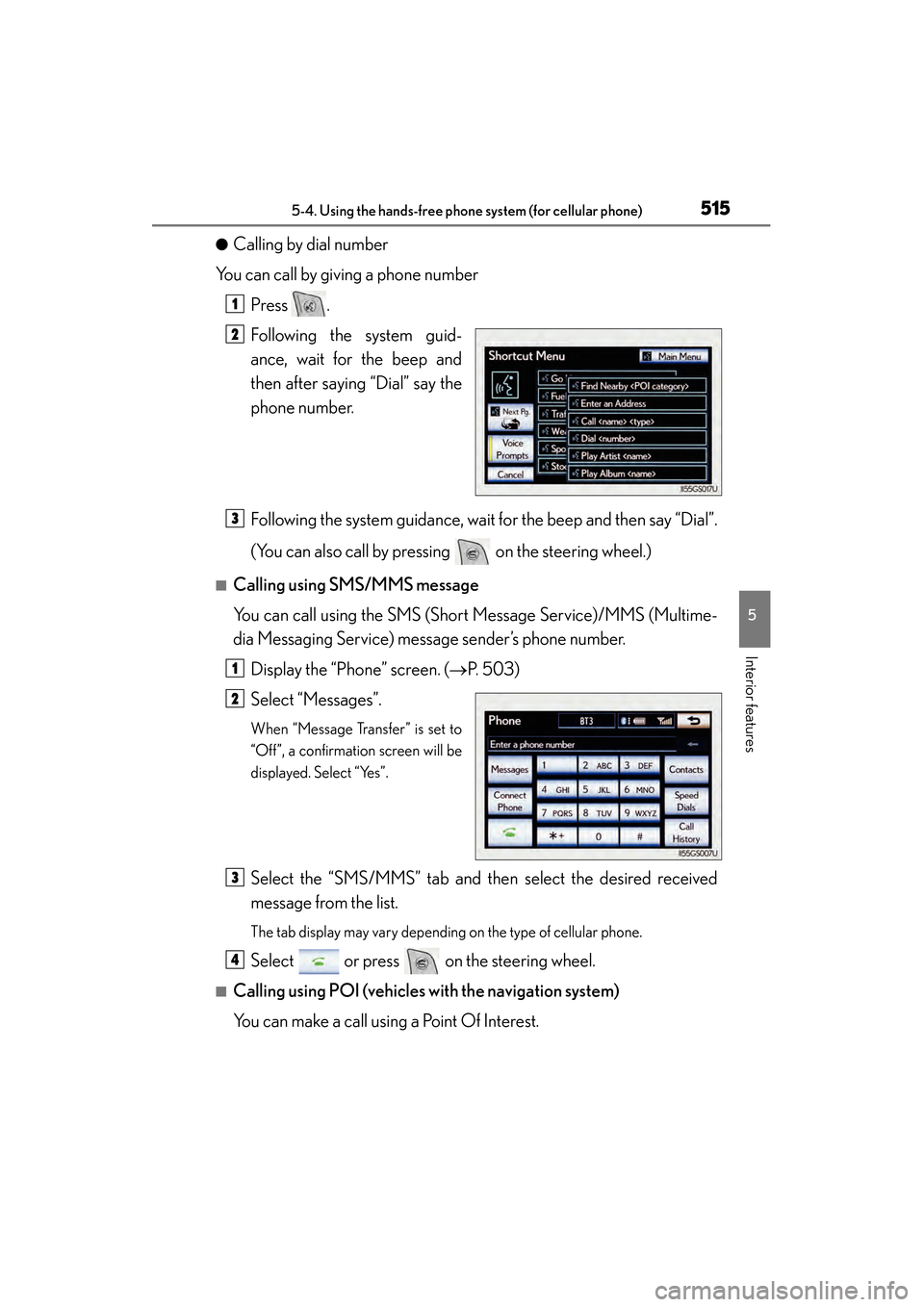
●Calling by dial number
You can call by giving a phone number
Press .
Following the system guid-
ance, wait for the beep and
then after saying “Dial” say the
phone number.
Following the system guidance, wait for the beep and then say “Dial”.
(You can also call by pressing on the steering wheel.)
■Calling using SMS/MMS message
You can call using the SMS (Short Message Service)/MMS (Multime-
dia Messaging Service) message sender’s phone number.Display the “Phone” screen. ( →P. 503)
Select “Messages”.
When “Message Transfer” is set to
“Off”, a confirmation screen will be
displayed. Select “Yes”.
Select the “SMS/MMS” tab and then select the desired received
message from the list.
The tab display may vary depending on the type of cellular phone.
Select or press on the steering wheel.
■Calling using POI (vehicles with the navigation system)
You can make a call using a Point Of Interest.
1
2
3
1
2
3
4
GS350_OM_OM30D41U_(U).book Page 515 Monday, July 29, 2013 2:22 PM
Page 546 of 846
GS350_OM_OM30D41U_(U)
5455-4. Using the hands-free phone system (for cellular phone)
5
Interior features
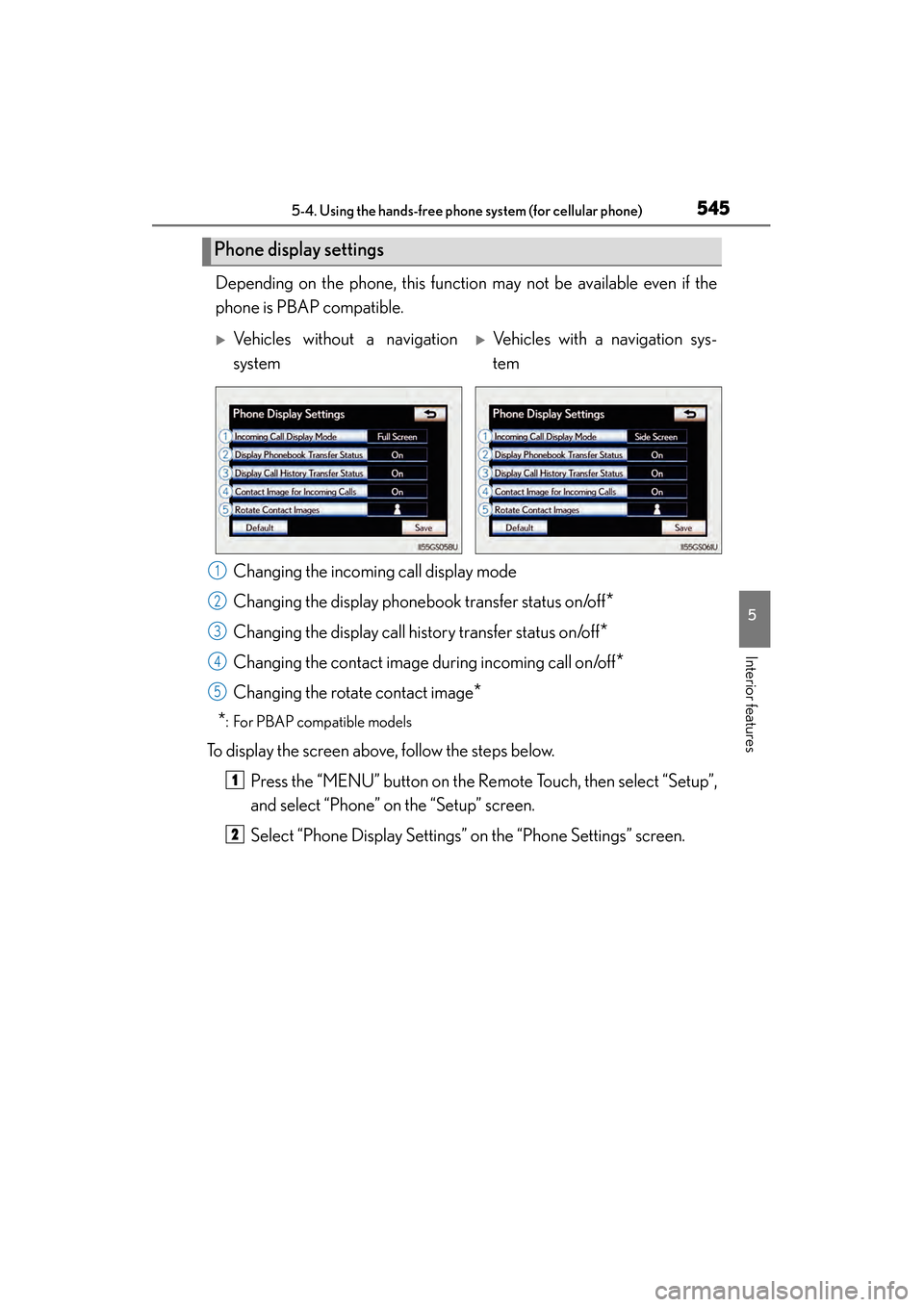
Depending on the phone, this function may not be available even if the
phone is PBAP compatible. Changing the incoming call display mode
Changing the display phonebook transfer status on/off
*
Changing the display call history transfer status on/off*
Changing the contact image during incoming call on/off*
Changing the rotate contact image*
*
: For PBAP compatible models
To display the screen above, follow the steps below.
Press the “MENU” button on the Remote Touch, then select “Setup”,
and select “Phone” on the “Setup” screen.
Select “Phone Display Settings” on the “Phone Settings” screen.
Phone display settings
XVehicles without a navigation
systemXVehicles with a navigation sys-
tem
1
2
3
4
15
1
2
GS350_OM_OM30D41U_(U).book Page 545 Monday, July 29, 2013 2:22 PM
Page 547 of 846
546
GS350_OM_OM30D41U_(U)
5-4. Using the hands-free phone system (for cellular phone)
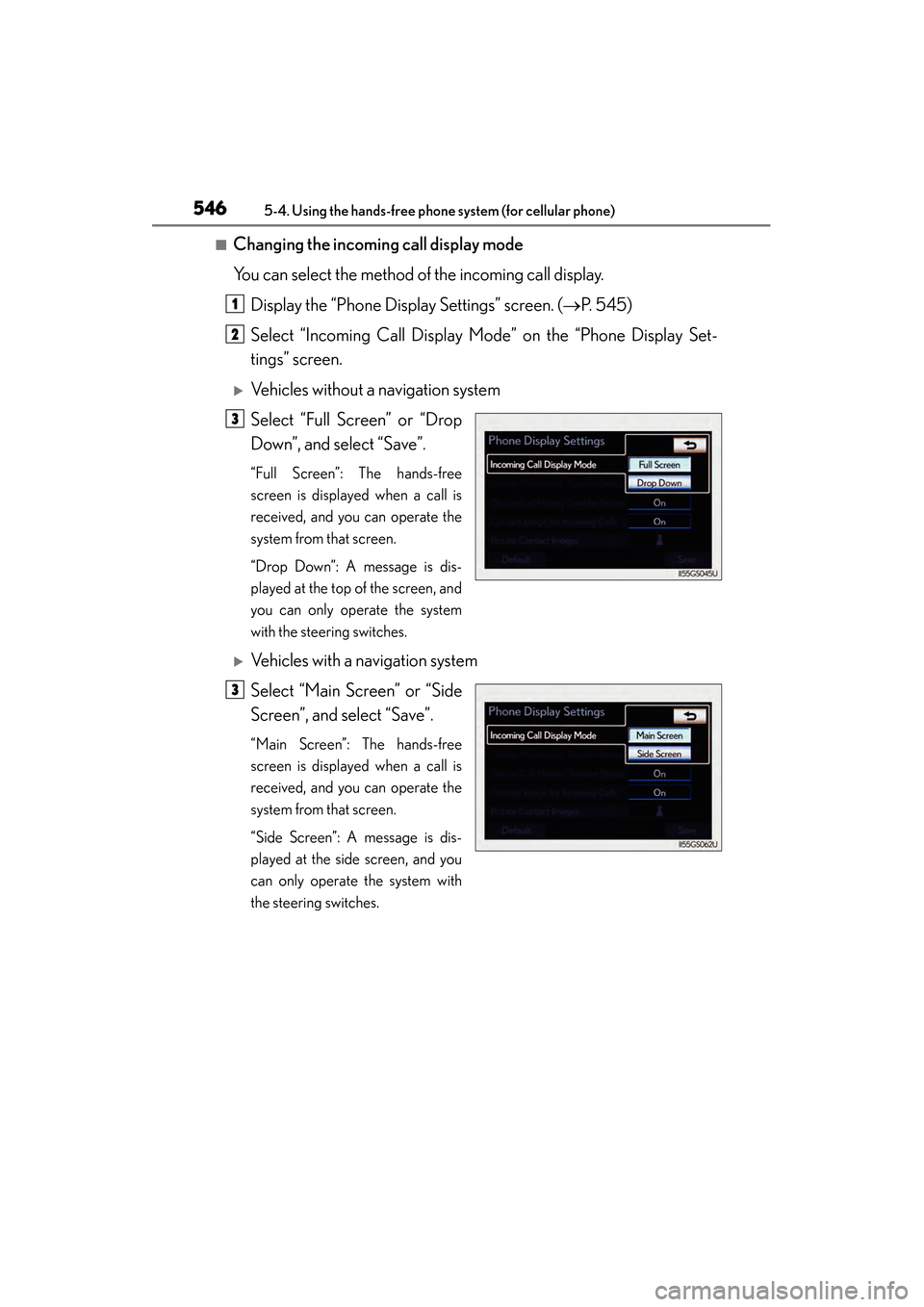
■Changing the incoming call display mode
You can select the method of the incoming call display.
Display the “Phone Display Settings” screen. ( →P. 545)
Select “Incoming Call Display Mode” on the “Phone Display Set-
tings” screen.
XVehicles without a navigation system
Select “Full Screen” or “Drop
Down”, and select “Save”.
“Full Screen”: The hands-free
screen is displayed when a call is
received, and you can operate the
system from that screen.
“Drop Down”: A message is dis-
played at the top of the screen, and
you can only operate the system
with the steering switches.
XVehicles with a navigation system
Select “Main Screen” or “Side
Screen”, and select “Save”.
“Main Screen”: The hands-free
screen is displayed when a call is
received, and you can operate the
system from that screen.
“Side Screen”: A message is dis-
played at the side screen, and you
can only operate the system with
the steering switches.
1
2
3
3
GS350_OM_OM30D41U_(U).book Page 546 Monday, July 29, 2013 2:22 PM
Page 671 of 846
670
GS350_OM_OM30D41U_(U)
6-3. Do-it-yourself maintenance
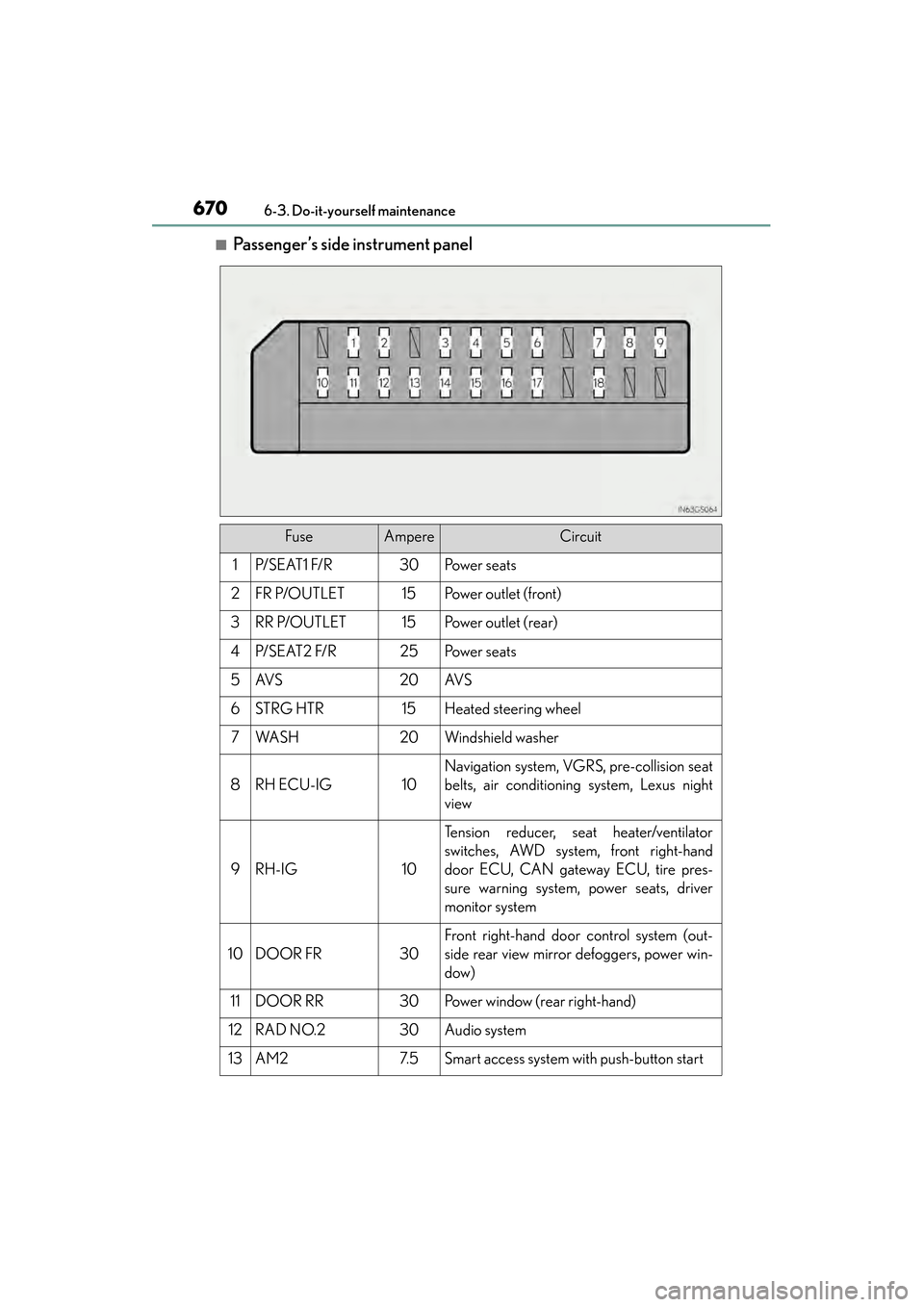
■Passenger’s side instrument panel
FuseAmpereCircuit
1P/ S E AT 1 F/ R30Po w e r s e a t s
2FR P/OUTLET15Po w e r o u t l e t ( f r o n t )
3RR P/OUTLET15Po w e r o u t l e t ( r e a r )
4P/ S E AT 2 F/ R25Po w e r s e a t s
5AV S20AV S
6STRG HTR15Heated steering wheel
7WA S H20Windshield washer
8RH ECU-IG10
Navigation system, VGRS, pre-collision seat
belts, air conditioning system, Lexus night
view
9RH-IG10
Tension reducer, seat heater/ventilator
switches, AWD system, front right-hand
door ECU, CAN gateway ECU, tire pres-
sure warning system, power seats, driver
monitor system
10DOOR FR30
Front right-hand door control system (out-
side rear view mirror defoggers, power win-
dow)
11DOOR RR30Power window (rear right-hand)
12RAD NO.230Audio system
13AM27. 5Smart access system with push-button start
GS350_OM_OM30D41U_(U).book Page 670 Monday, July 29, 2013 2:22 PM
Page 672 of 846
GS350_OM_OM30D41U_(U)
6716-3. Do-it-yourself maintenance
6
Maintenance and care
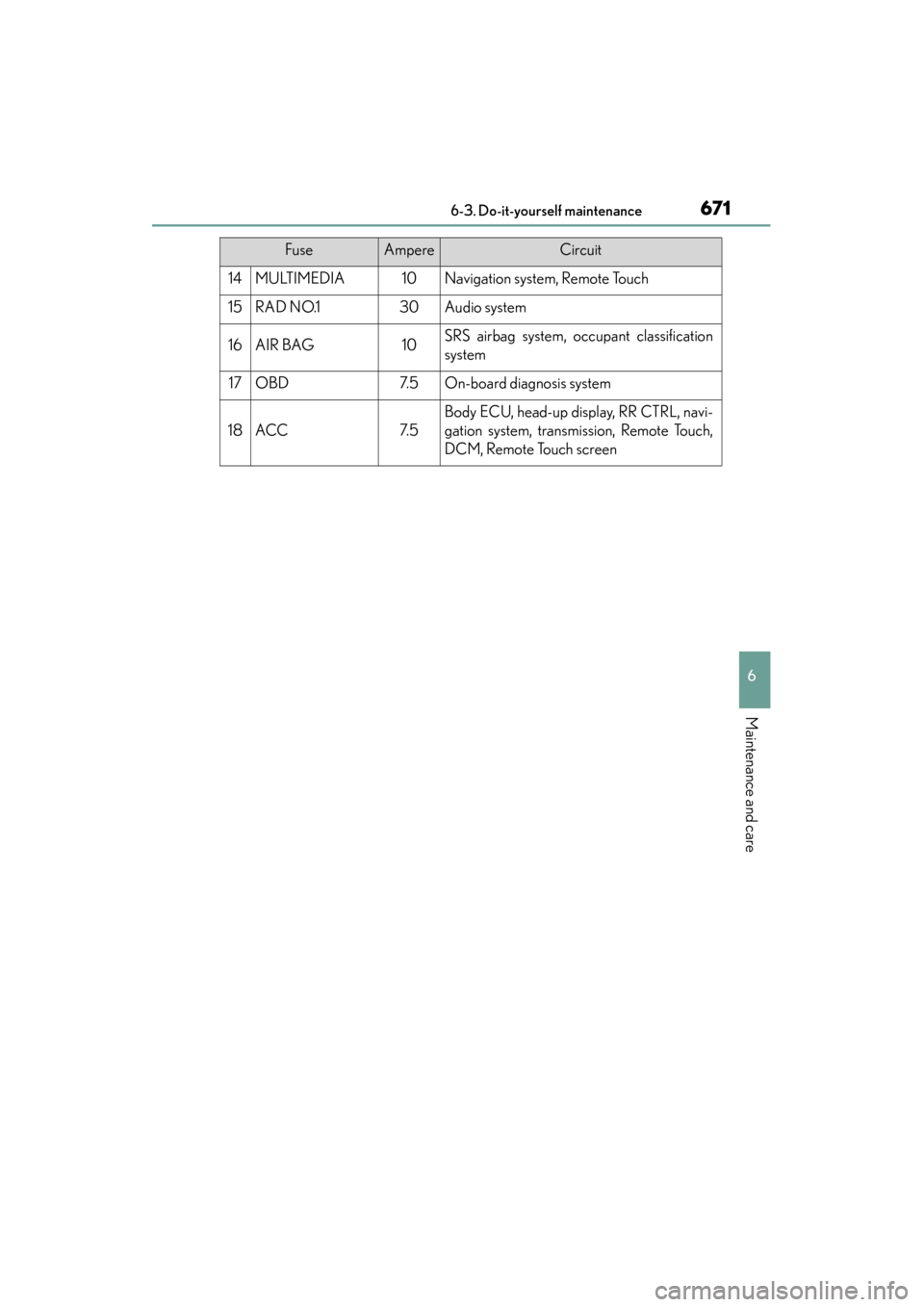
14MULTIMEDIA10Navigation system, Remote Touch
15RAD NO.130Audio system
16AIR BAG10SRS airbag system, occupant classification
system
17OBD7. 5On-board diagnosis system
18ACC7. 5
Body ECU, head-up display, RR CTRL, navi-
gation system, transmission, Remote Touch,
DCM, Remote Touch screen
FuseAmpereCircuit
GS350_OM_OM30D41U_(U).book Page 671 Monday, July 29, 2013 2:22 PM
Page 748 of 846
7477-2. Steps to take in an emergency
GS350_OM_OM30D41U_(U)
7
When trouble arises
CAUTION
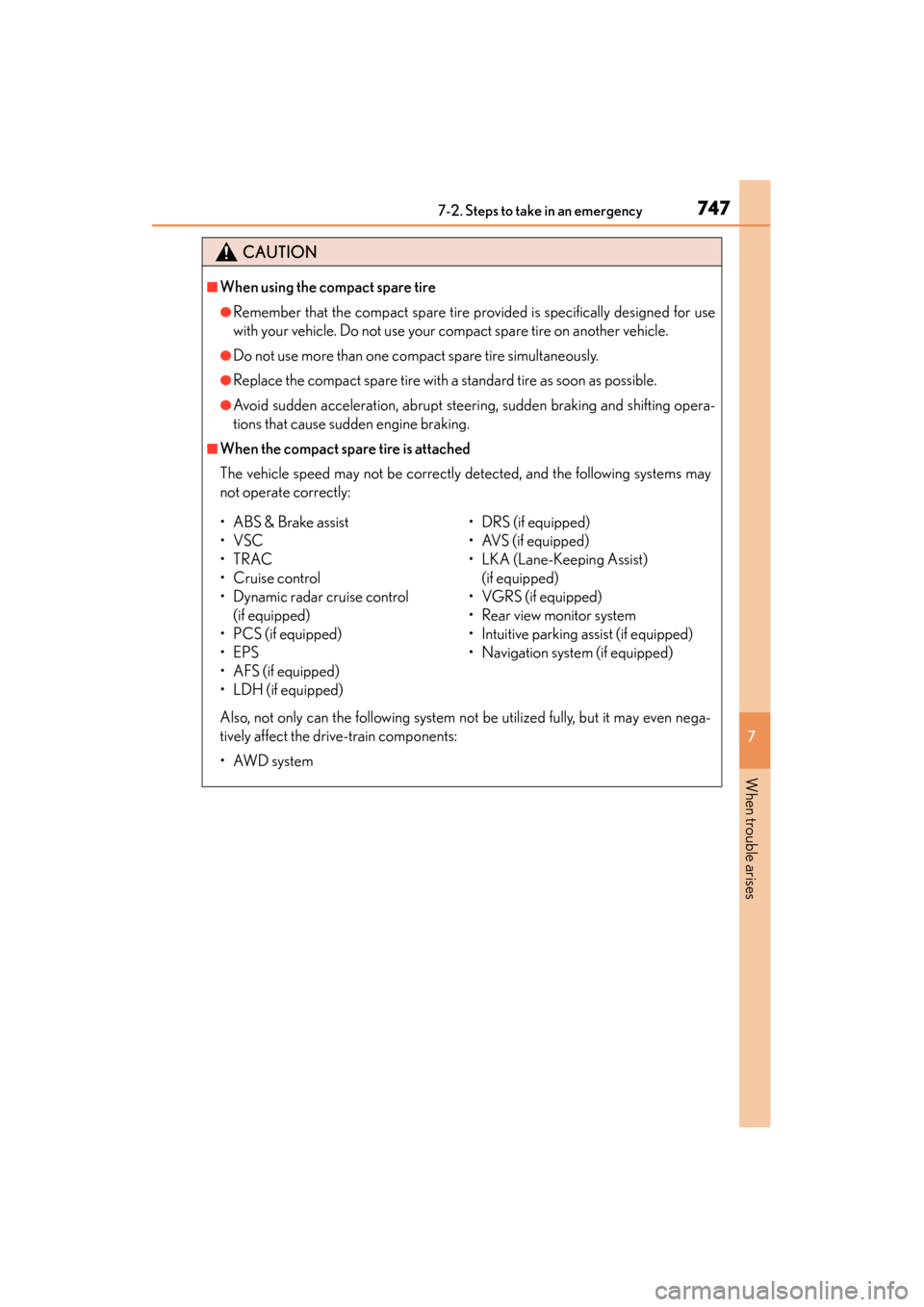
■When using the compact spare tire
●Remember that the compact spare tire provided is specifically designed for use
with your vehicle. Do not use your compact spare tire on another vehicle.
●Do not use more than one compact spare tire simultaneously.
●Replace the compact spare tire with a standard tire as soon as possible.
●Avoid sudden acceleration, abrupt steering, sudden braking and shifting opera-
tions that cause sudden engine braking.
■When the compact spare tire is attached
The vehicle speed may not be correctly detected, and the following systems may
not operate correctly:
Also, not only can the following system not be utilized fully, but it may even nega-
tively affect the drive-train components:
•AWD system
• ABS & Brake assist
•VSC
•TRAC
•Cruise control
• Dynamic radar cruise control (if equipped)
• PCS (if equipped)
•EPS
• AFS (if equipped)
• LDH (if equipped) • DRS (if equipped)
• AVS (if equipped)
• LKA (Lane-Keeping Assist)
(if equipped)
• VGRS (if equipped)
• Rear view monitor system
• Intuitive parking assist (if equipped)
• Navigation system (if equipped)
GS350_OM_OM30D41U_(U).book Page 747 Monday, July 29, 2013 2:22 PM
Page 794 of 846
793
GS350_OM_OM30D41U_(U)8-2. Customization
8
Vehicle specifications
Customizable features
■Changing by using the Remote Touch
XVehicles without a navigation system
“Vehicle Settings” screen displayed on the Remote Touch screen.
(→ P. 323)
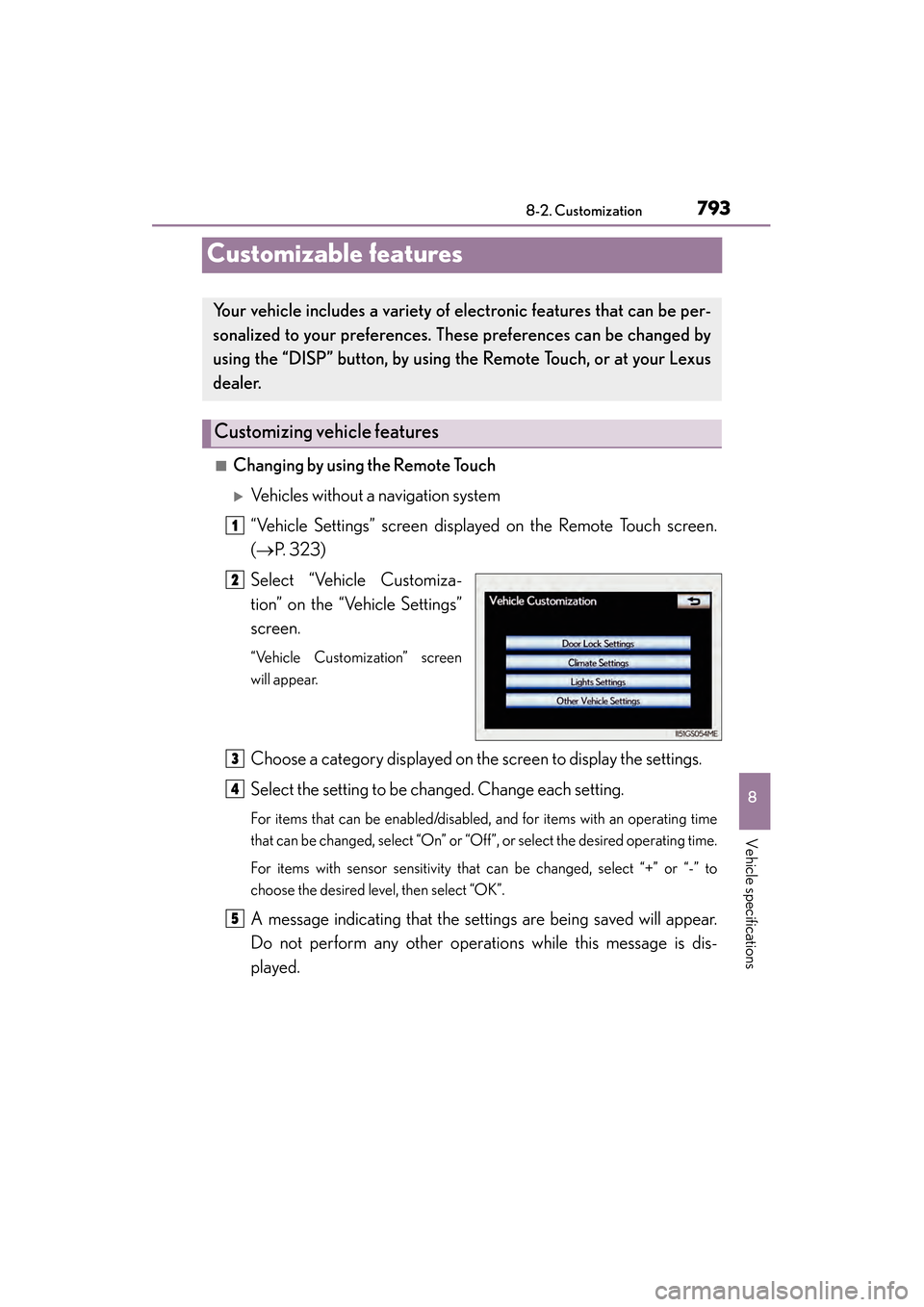
Select “Vehicle Customiza-
tion” on the “Vehicle Settings”
screen.
“Vehicle Customization” screen
will appear.
Choose a category displayed on the screen to display the settings.
Select the setting to be changed. Change each setting.
For items that can be enabled/disabled, and for items with an operating time
that can be changed, select “On” or “Off”, or select the desired operating time.
For items with sensor sensitivity that can be changed, select “+” or “-” to
choose the desired level, then select “OK”.
A message indicating that the settings are being saved will appear.
Do not perform any other operations while this message is dis-
played.
Your vehicle includes a variety of electronic features that can be per-
sonalized to your preferences. These preferences can be changed by
using the “DISP” button, by using th e Remote Touch, or at your Lexus
dealer.
Customizing vehicle features
1
2
3
4
5
GS350_OM_OM30D41U_(U).book Page 793 Monday, July 29, 2013 2:22 PM
Page 795 of 846

794
GS350_OM_OM30D41U_(U)
8-2. Customization
XVehicles with a navigation system
→ Refer to “Navigation System Owner’s Manual”.
■Changing by using the “DISP” button
→P. 8 8
GS350_OM_OM30D41U_(U).book Page 794 Monday, July 29, 2013 2:22 PM