bluetooth Lexus GS350 2014 Service Manual
[x] Cancel search | Manufacturer: LEXUS, Model Year: 2014, Model line: GS350, Model: Lexus GS350 2014Pages: 846, PDF Size: 35.04 MB
Page 524 of 846
GS350_OM_OM30D41U_(U)
5235-4. Using the hands-free phone system (for cellular phone)
5
Interior features
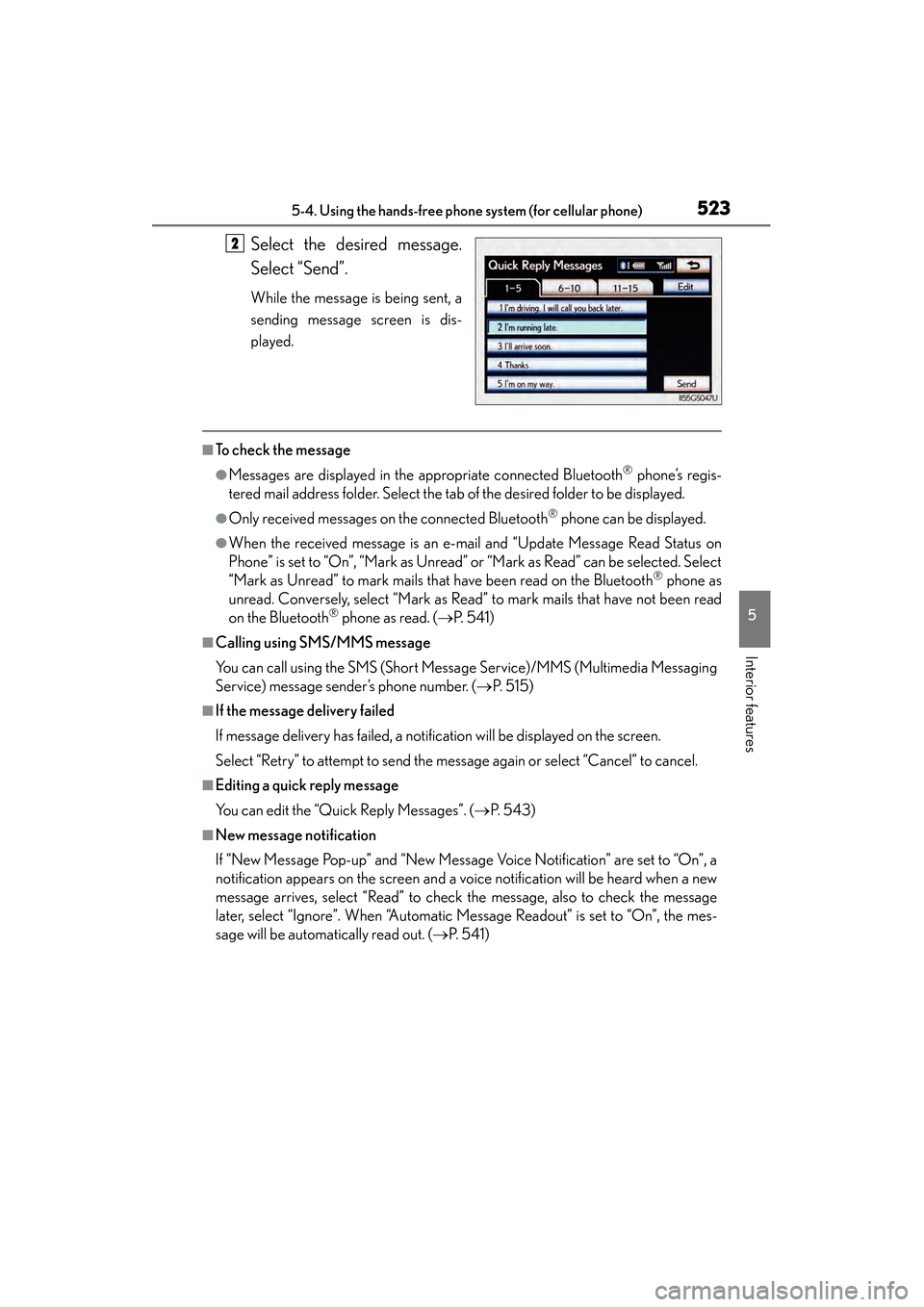
Select the desired message.
Select “Send”.
While the message is being sent, a
sending message screen is dis-
played.
■To check the message
●Messages are displayed in the appropriate connected Bluetooth® phone’s regis-
tered mail address folder. Select the tab of the desired folder to be displayed.
●Only received messages on the connected Bluetooth® phone can be displayed.
●When the received message is an e-mail and “Update Message Read Status on
Phone” is set to “On”, “Mark as Unread” or “Mark as Read” can be selected. Select
“Mark as Unread” to mark mails that have been read on the Bluetooth
® phone as
unread. Conversely, select “Mark as Read” to mark mails that have not been read
on the Bluetooth
® phone as read. ( →P. 5 4 1 )
■Calling using SMS/MMS message
You can call using the SMS (Short Message Service)/MMS (Multimedia Messaging
Service) message sender’s phone number. ( →P. 5 1 5 )
■If the message delivery failed
If message delivery has failed, a notification will be displayed on the screen.
Select “Retry” to attempt to send the message again or select “Cancel” to cancel.
■Editing a quick reply message
You can edit the “Quick Reply Messages”. ( →P. 5 4 3 )
■New message notification
If “New Message Pop-up” and “New Message Voice Notification” are set to “On”, a
notification appears on the screen and a voice notification will be heard when a new
message arrives, select “Read” to check the message, also to check the message
later, select “Ignore”. When “Automatic Message Readout” is set to “On”, the mes-
sage will be automatically read out. ( →P. 5 4 1 )
2
GS350_OM_OM30D41U_(U).book Page 523 Monday, July 29, 2013 2:22 PM
Page 527 of 846
526
GS350_OM_OM30D41U_(U)
5-4. Using the hands-free phone system (for cellular phone)
When you complete setting, select “Save”.
■Adaptive volume control
When traveling at 50 mph (80 km/h) or more, the system automatically raises the
volume.
■Tr a n s m i t v o l u m e
The sound quality of the voice heard from the other party’s speaker may be nega-
tively impacted.
■To return to the default phone sound settings
Select “Default”, and then “Yes”.
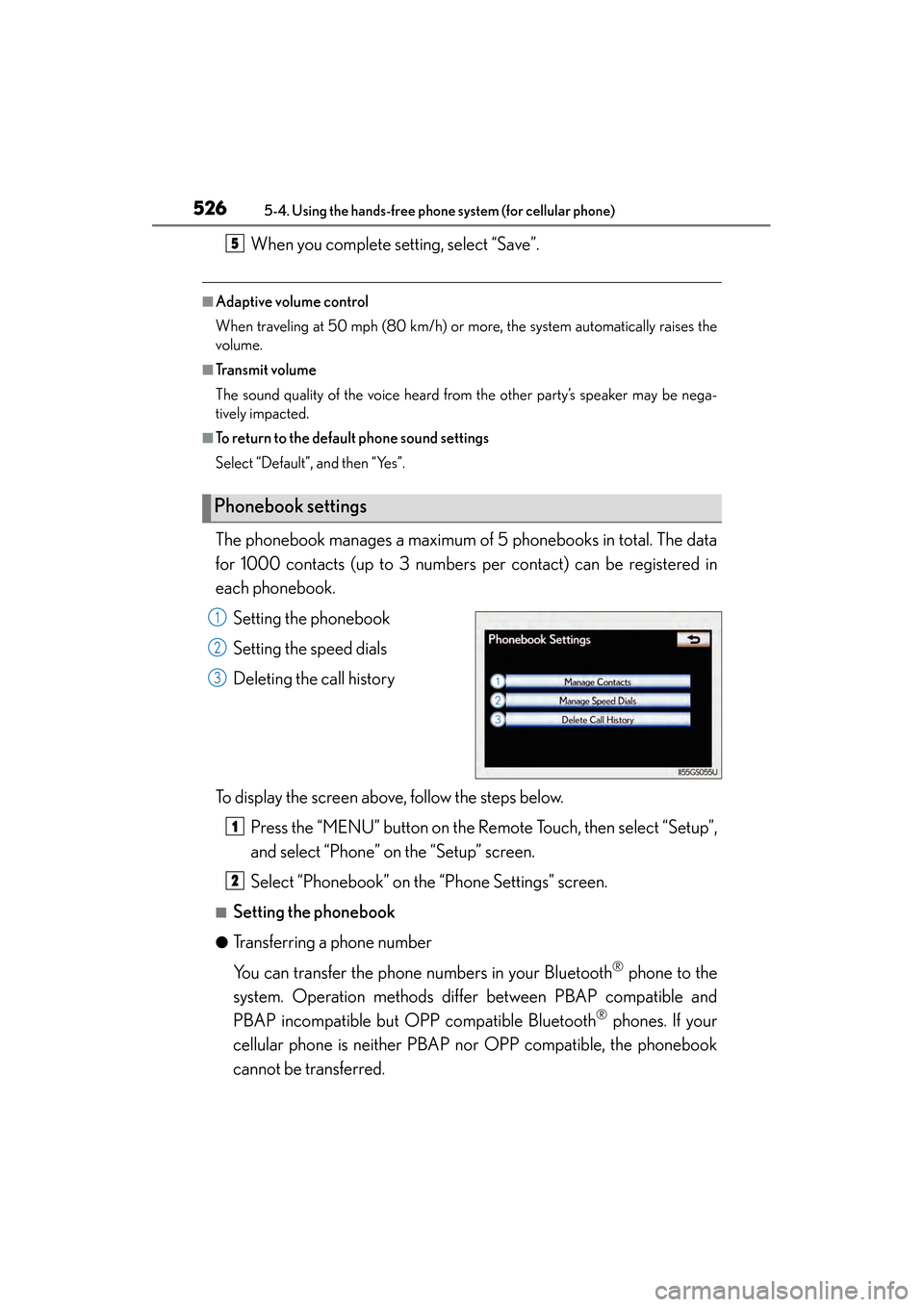
The phonebook manages a maximum of 5 phonebooks in total. The data
for 1000 contacts (up to 3 numbers per contact) can be registered in
each phonebook.Setting the phonebook
Setting the speed dials
Deleting the call history
To display the screen above, follow the steps below. Press the “MENU” button on the Remote Touch, then select “Setup”,
and select “Phone” on the “Setup” screen.
Select “Phonebook” on the “Phone Settings” screen.
■Setting the phonebook
●Transferring a phone number
You can transfer the phone numbers in your Bluetooth
® phone to the
system. Operation methods differ between PBAP compatible and
PBAP incompatible but OPP compatible Bluetooth
® phones. If your
cellular phone is neither PBAP nor OPP compatible, the phonebook
cannot be transferred.
Phonebook settings
5
1
2
3
1
2
GS350_OM_OM30D41U_(U).book Page 526 Monday, July 29, 2013 2:22 PM
Page 528 of 846
GS350_OM_OM30D41U_(U)
5275-4. Using the hands-free phone system (for cellular phone)
5
Interior features
XFor PBAP compatible Bluetooth® phones
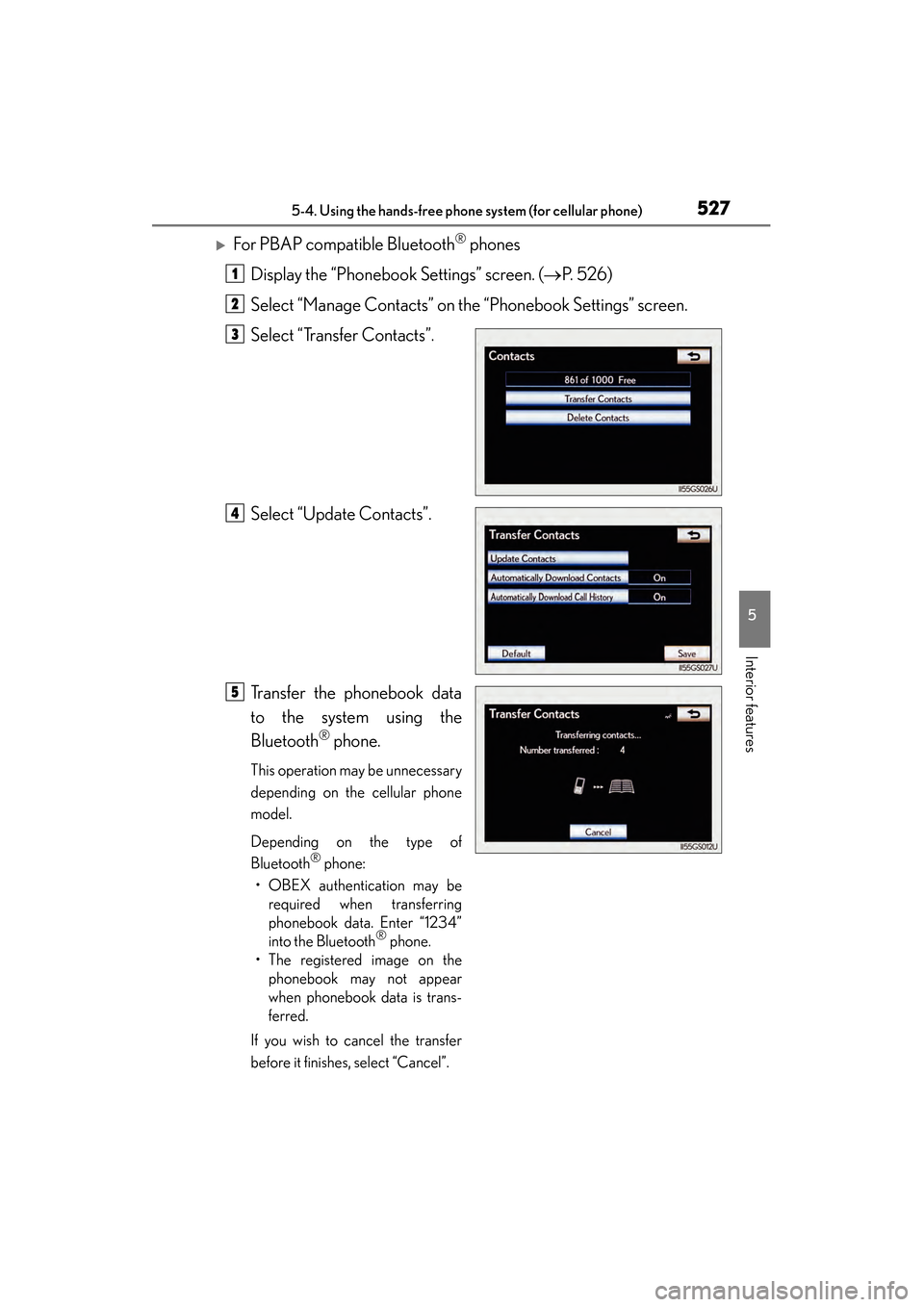
Display the “Phonebook Settings” screen. ( →P. 5 2 6 )
Select “Manage Contacts” on the “Phonebook Settings” screen.
Select “Transfer Contacts”.
Select “Update Contacts”.
Transfer the phonebook data
to the system using the
Bluetooth
® phone.
This operation may be unnecessary
depending on the cellular phone
model.
Depending on the type of
Bluetooth
® phone:
• OBEX authentication may be required when transferring
phonebook data. Enter “1234”
into the Bluetooth
® phone.
• The registered image on the phonebook may not appear
when phonebook data is trans-
ferred.
If you wish to cancel the transfer
before it finishes, select “Cancel”.
1
2
3
4
5
GS350_OM_OM30D41U_(U).book Page 527 Monday, July 29, 2013 2:22 PM
Page 529 of 846
528
GS350_OM_OM30D41U_(U)
5-4. Using the hands-free phone system (for cellular phone)
XPBAP compatible models automatic data transfer settingDisplay the “Phonebook Settings” screen. ( →P. 5 2 6 )
Select “Manage Contacts” on the “Phonebook Settings” screen.
Select “Transfer Contacts” on the “Contacts” screen.
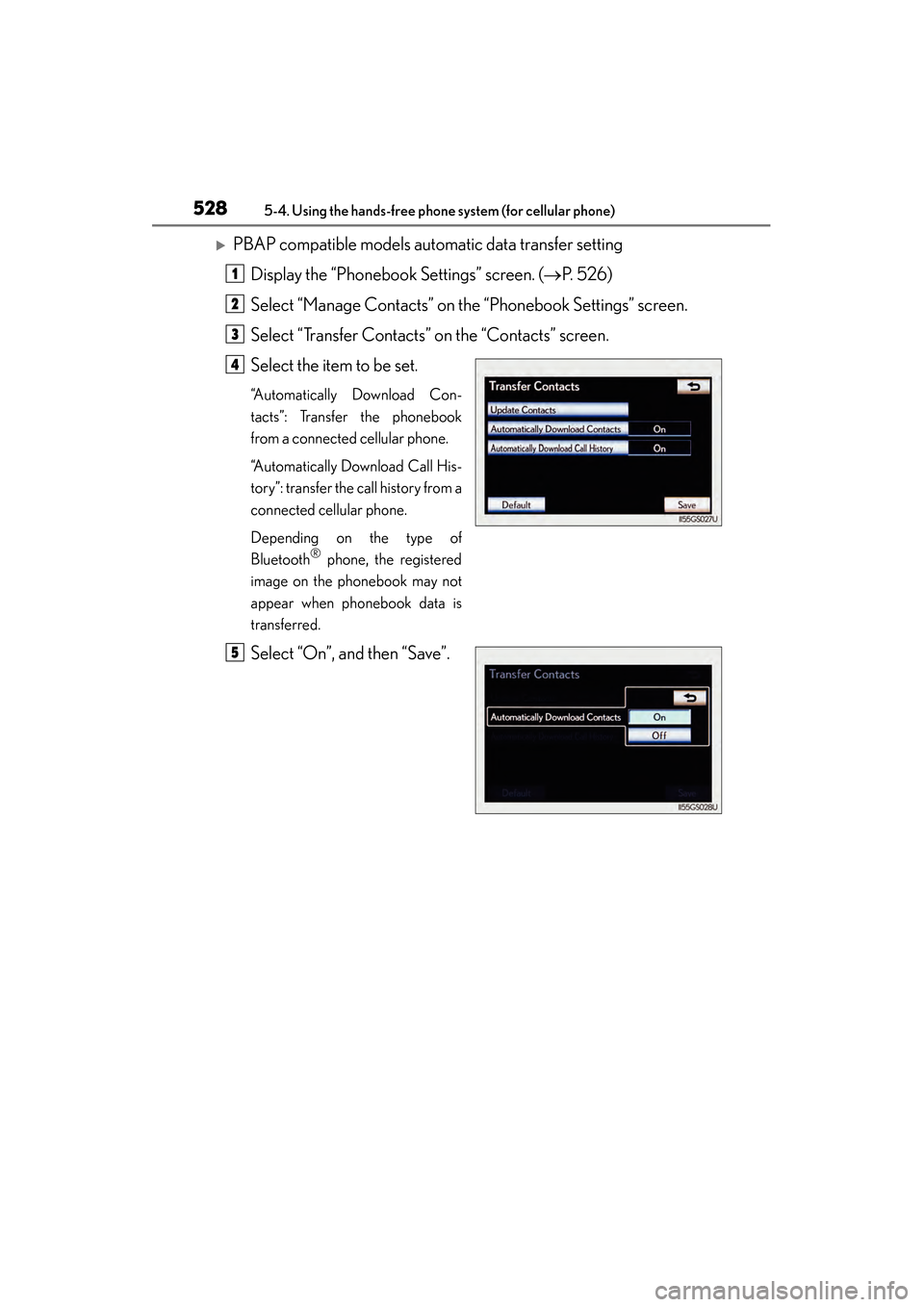
Select the item to be set.
“Automatically Download Con-
tacts”: Transfer the phonebook
from a connected cellular phone.
“Automatically Download Call His-
tory”: transfer the call history from a
connected cellular phone.
Depending on the type of
Bluetooth
® phone, the registered
image on the phonebook may not
appear when phonebook data is
transferred.
Select “On”, and then “Save”.
1
2
3
4
5
GS350_OM_OM30D41U_(U).book Page 528 Monday, July 29, 2013 2:22 PM
Page 530 of 846
GS350_OM_OM30D41U_(U)
5295-4. Using the hands-free phone system (for cellular phone)
5
Interior features
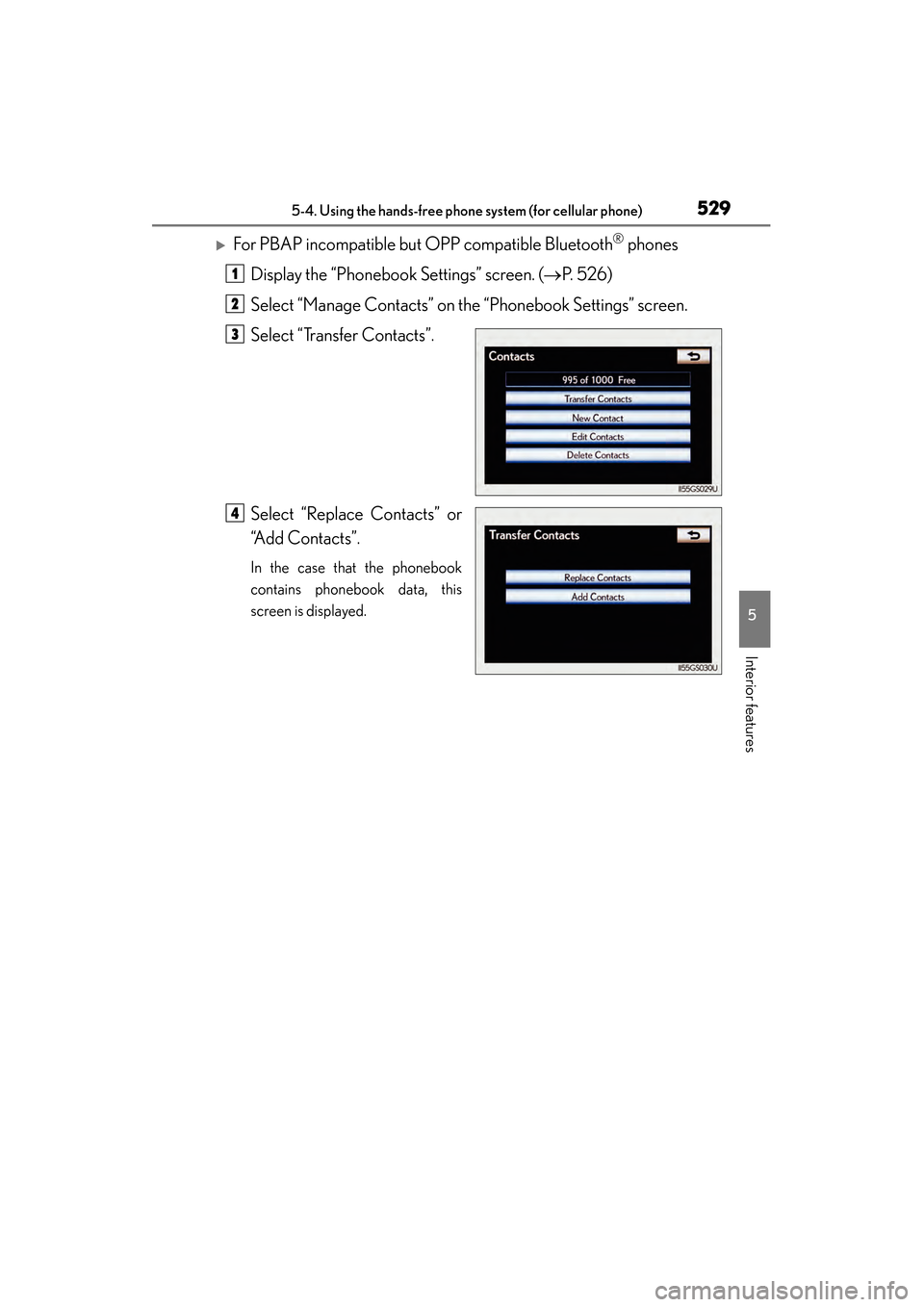
XFor PBAP incompatible but OPP compatible Bluetooth® phones
Display the “Phonebook Settings” screen. ( →P. 5 2 6 )
Select “Manage Contacts” on the “Phonebook Settings” screen.
Select “Transfer Contacts”.
Select “Replace Contacts” or
“Add Contacts”.
In the case that the phonebook
contains phonebook data, this
screen is displayed.
1
2
3
4
GS350_OM_OM30D41U_(U).book Page 529 Monday, July 29, 2013 2:22 PM
Page 531 of 846
530
GS350_OM_OM30D41U_(U)
5-4. Using the hands-free phone system (for cellular phone)
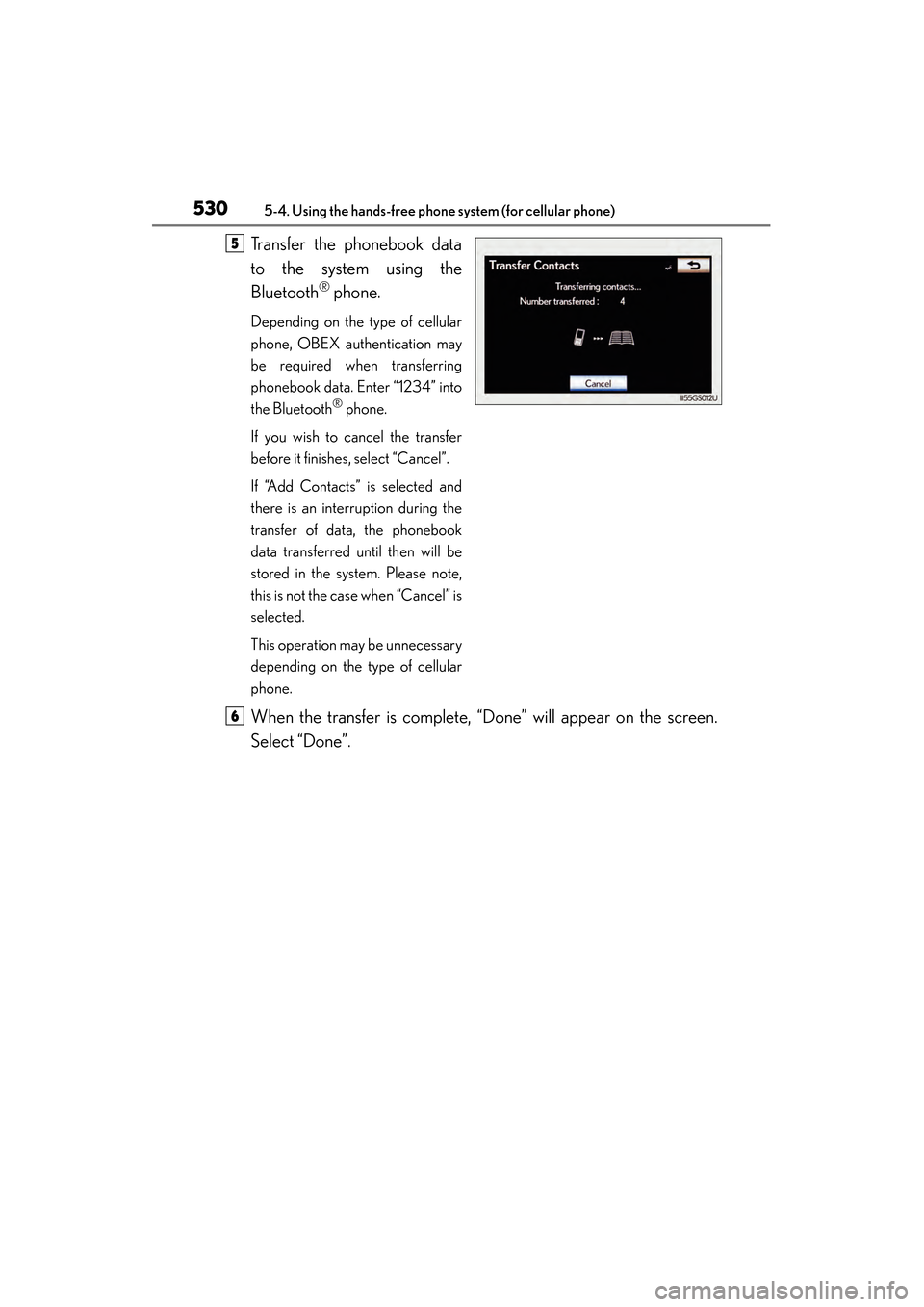
Transfer the phonebook data
to the system using the
Bluetooth
® phone.
Depending on the type of cellular
phone, OBEX authentication may
be required when transferring
phonebook data. Enter “1234” into
the Bluetooth
® phone.
If you wish to cancel the transfer
before it finishes, select “Cancel”.
If “Add Contacts” is selected and
there is an interruption during the
transfer of data, the phonebook
data transferred until then will be
stored in the system. Please note,
this is not the case when “Cancel” is
selected.
This operation may be unnecessary
depending on the type of cellular
phone.
When the transfer is complete, “Done” will appear on the screen.
Select “Done”.
5
6
GS350_OM_OM30D41U_(U).book Page 530 Monday, July 29, 2013 2:22 PM
Page 532 of 846
GS350_OM_OM30D41U_(U)
5315-4. Using the hands-free phone system (for cellular phone)
5
Interior features
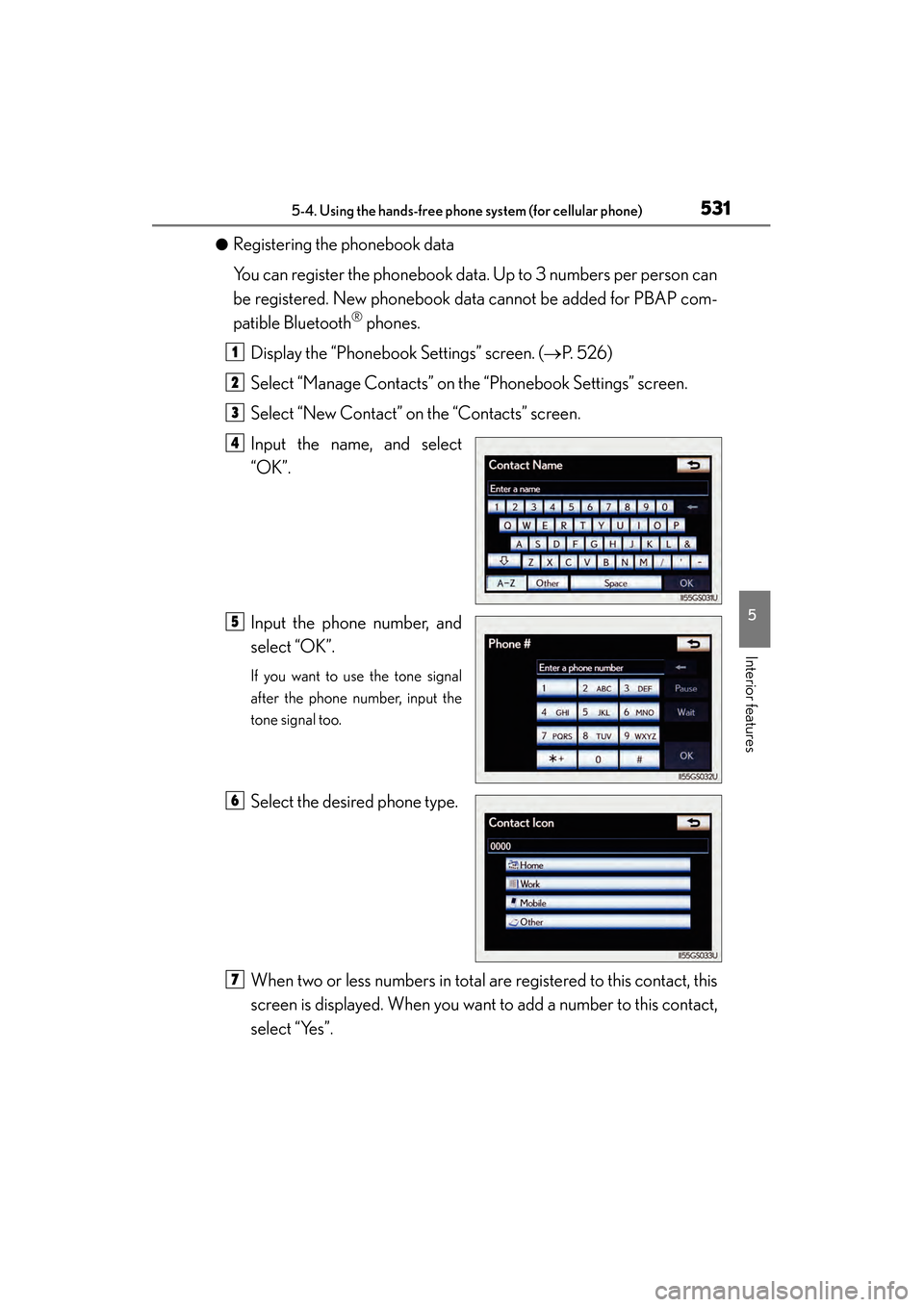
●Registering the phonebook data
You can register the phonebook data. Up to 3 numbers per person can
be registered. New phonebook data cannot be added for PBAP com-
patible Bluetooth
® phones.
Display the “Phonebook Settings” screen. ( →P. 5 2 6 )
Select “Manage Contacts” on the “Phonebook Settings” screen.
Select “New Contact” on the “Contacts” screen.
Input the name, and select
“OK”.
Input the phone number, and
select “OK”.
If you want to use the tone signal
after the phone number, input the
tone signal too.
Select the desired phone type.
When two or less numbers in total are registered to this contact, this
screen is displayed. When you want to add a number to this contact,
select “Yes”.
1
2
3
4
5
6
7
GS350_OM_OM30D41U_(U).book Page 531 Monday, July 29, 2013 2:22 PM
Page 533 of 846
532
GS350_OM_OM30D41U_(U)
5-4. Using the hands-free phone system (for cellular phone)
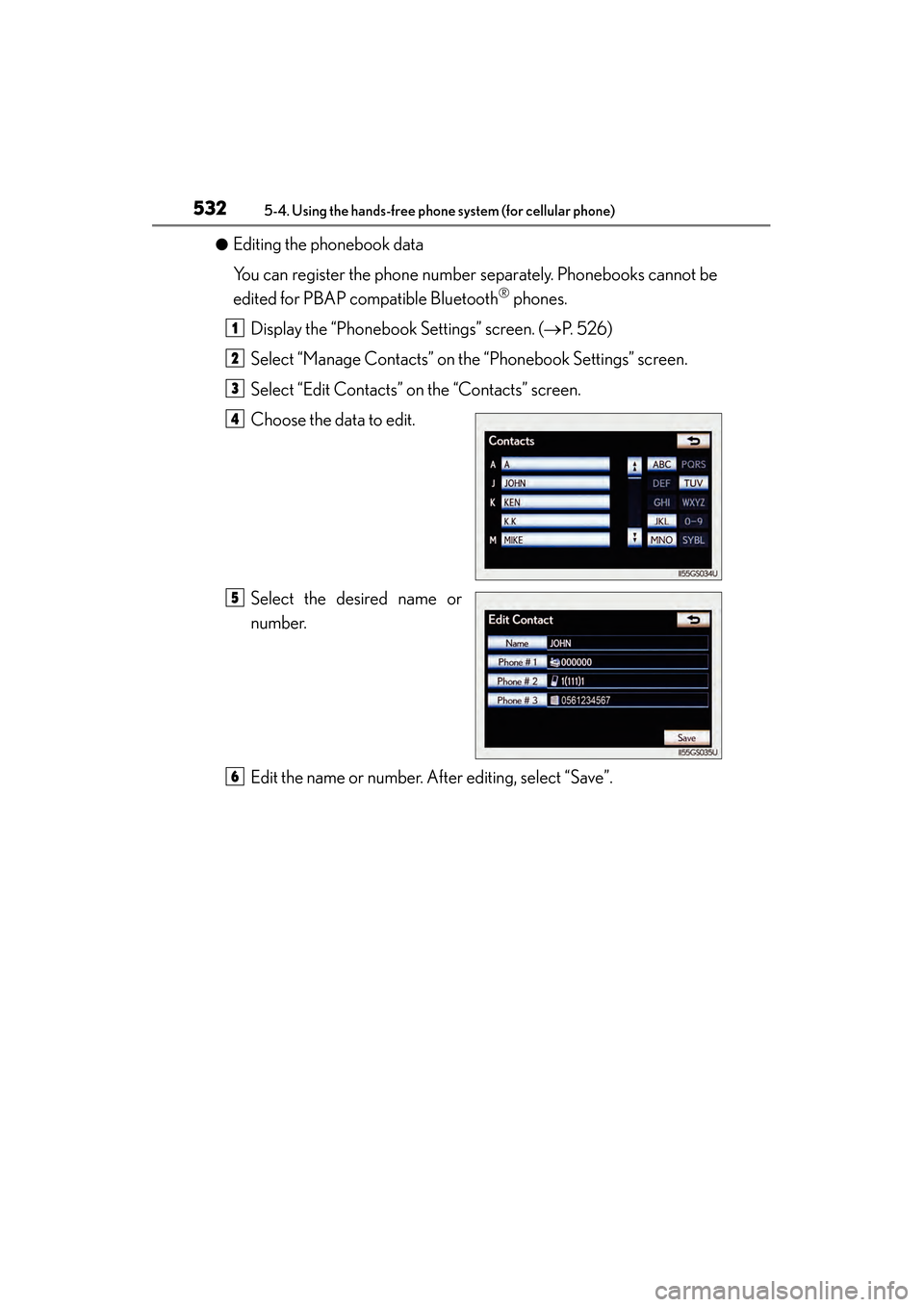
●Editing the phonebook data
You can register the phone number separately. Phonebooks cannot be
edited for PBAP compatible Bluetooth
® phones.
Display the “Phonebook Settings” screen. ( →P. 5 2 6 )
Select “Manage Contacts” on the “Phonebook Settings” screen.
Select “Edit Contacts” on the “Contacts” screen.
Choose the data to edit.
Select the desired name or
number.
Edit the name or number. After editing, select “Save”.
1
2
3
4
5
6
GS350_OM_OM30D41U_(U).book Page 532 Monday, July 29, 2013 2:22 PM
Page 535 of 846
534
GS350_OM_OM30D41U_(U)
5-4. Using the hands-free phone system (for cellular phone)
■Phonebook data
Phonebook data is managed for every registered phone. When another phone is
connecting, you cannot read the registered data.
When selling or disposing of the vehicle, delete all your data on the system.
For PBAP compatible phones, delete the phonebook data after setting “Automati-
cally Download Contacts” to “Off”. (→P. 5 2 8 )
■Setting the phonebook in a different way (To display the “Contacts” screen)
Display the “Phone” screen. ( →P. 5 0 3 )
Select “Contacts” on the “Phone” screen.
Select “Options” on the “Contacts” screen.
Select “Manage Contacts” on the “Contacts” screen.
■When another Bluetooth® device is connected during transferring a phonebook
●For PBAP compatible Bluetooth® phones
If another Bluetooth® device is connected when transferring phonebook data,
depending on the phone, the connected Bluetooth® device may need to be dis-
connected.
●For PBAP incompatible but OPP compatible Bluetooth® phones
When another Bluetooth® device is connected, a confirmation message will be
displayed. If you want to disconnect it, select “Yes”.
1
2
3
4
GS350_OM_OM30D41U_(U).book Page 534 Monday, July 29, 2013 2:22 PM
Page 536 of 846
GS350_OM_OM30D41U_(U)
5355-4. Using the hands-free phone system (for cellular phone)
5
Interior features
■Transferring the phone number data in a different way
Display the “Phone” screen. ( →P. 5 0 3 )
Select “Contacts” on the “Phone” screen.
Select “Transfer” on the “Contacts” screen.
The “Transfer Contacts” screen is displayed. The following operations are per-
formed in the same manner as when they are performed from the “Setup” screen.
■Editing the phonebook da ta in a different way
●From “Contact” screen
Display the “Phone” screen. ( →P. 5 0 3 )
Select “Contacts” on the “Phone” screen.
Choose the desired data from the list.
Select “Options” on the “Contact” screen.
Select “Edit” on the “Contact” screen.
Follow the steps “Editing the phonebook data” from step . ( →P. 5 3 2 )
●From “Call History” screen
Display the “Phone” screen. ( →P. 5 0 3 )
Select “Call History” on the “Phone” screen.
Choose the desired data from the list.
Select “Add to Contacts” or “Update Contact” on the “Call History” screen.
If you select “Add to Contacts”, follow the steps “Editing the phonebook data” from
step . ( →P. 5 3 2 )
If you select “Update Contact”, follow the steps “Editing the phonebook data”
from step . ( →P. 5 3 2 )
■Deleting the phonebook data in a different way (PBAP incompatible but OPP
compatible models)
Display the “Phone” screen. ( →P. 5 0 3 )
Select “Contacts” on the “Phone” screen.
Choose the desired data from the list.
Select “Options” on the “Contact” screen.
Select “Delete” on the “Contact” screen.
A confirmation message will be displayed. If everything is correct, select “Yes”.
■When a Bluetooth® phone is deleted.
The phonebook data will be deleted at the same time.
1
2
3
4
1
2
3
4
5
65
1
2
3
4
5
5
4
1
2
3
4
5
6
GS350_OM_OM30D41U_(U).book Page 535 Monday, July 29, 2013 2:22 PM