brake Lexus GS350 2014 Manual PDF
[x] Cancel search | Manufacturer: LEXUS, Model Year: 2014, Model line: GS350, Model: Lexus GS350 2014Pages: 846, PDF Size: 35.04 MB
Page 718 of 846
7177-2. Steps to take in an emergency
GS350_OM_OM30D41U_(U)
7
When trouble arises
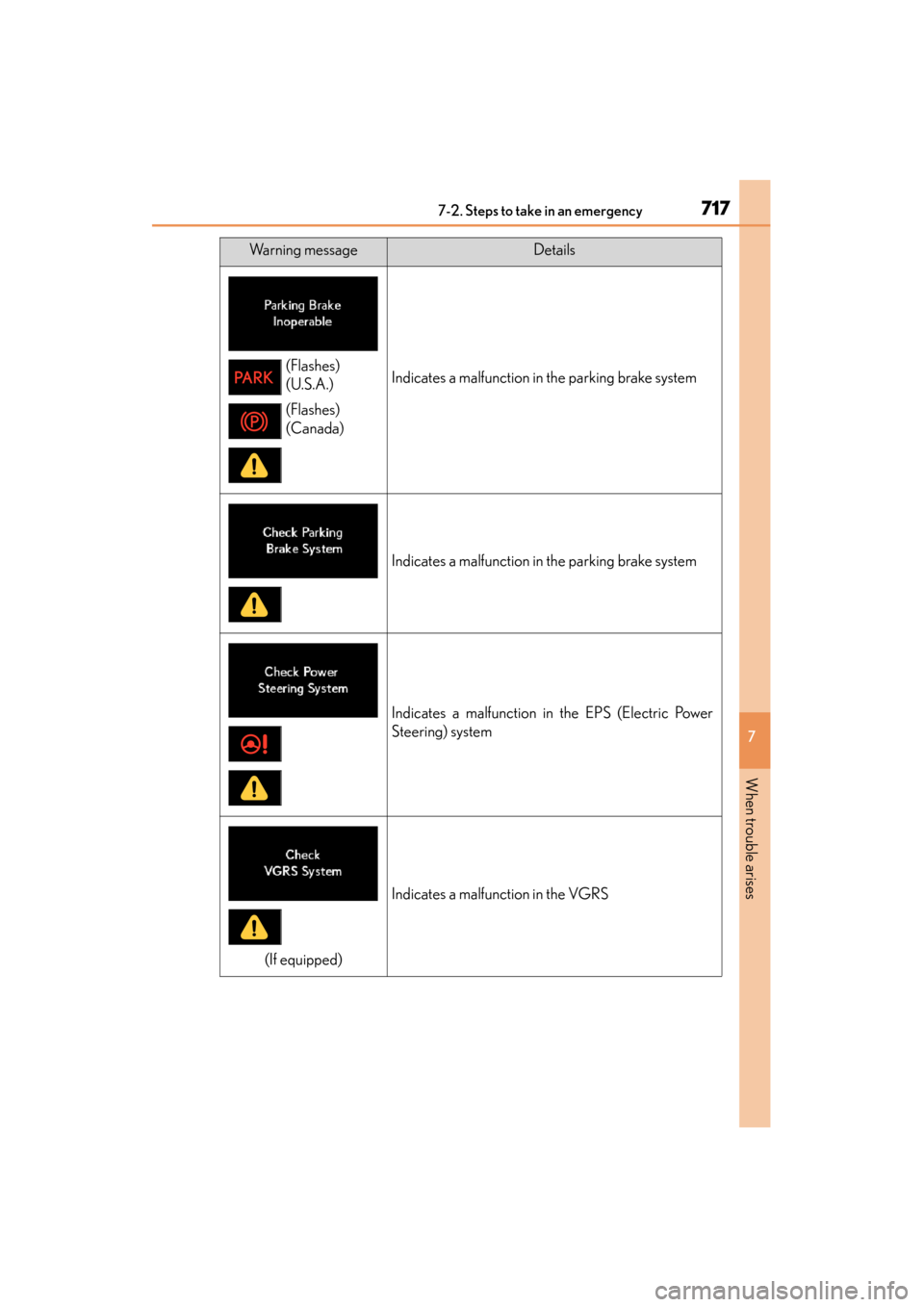
Indicates a malfunction in the parking brake system
Indicates a malfunction in the parking brake system
Indicates a malfunction in the EPS (Electric Power
Steering) system
(If equipped)
Indicates a malfunction in the VGRS
Warning messageDetails
(Flashes)
(U.S.A.)
(Flashes)
(Canada)
GS350_OM_OM30D41U_(U).book Page 717 Monday, July 29, 2013 2:22 PM
Page 722 of 846
7217-2. Steps to take in an emergency
GS350_OM_OM30D41U_(U)
7
When trouble arises
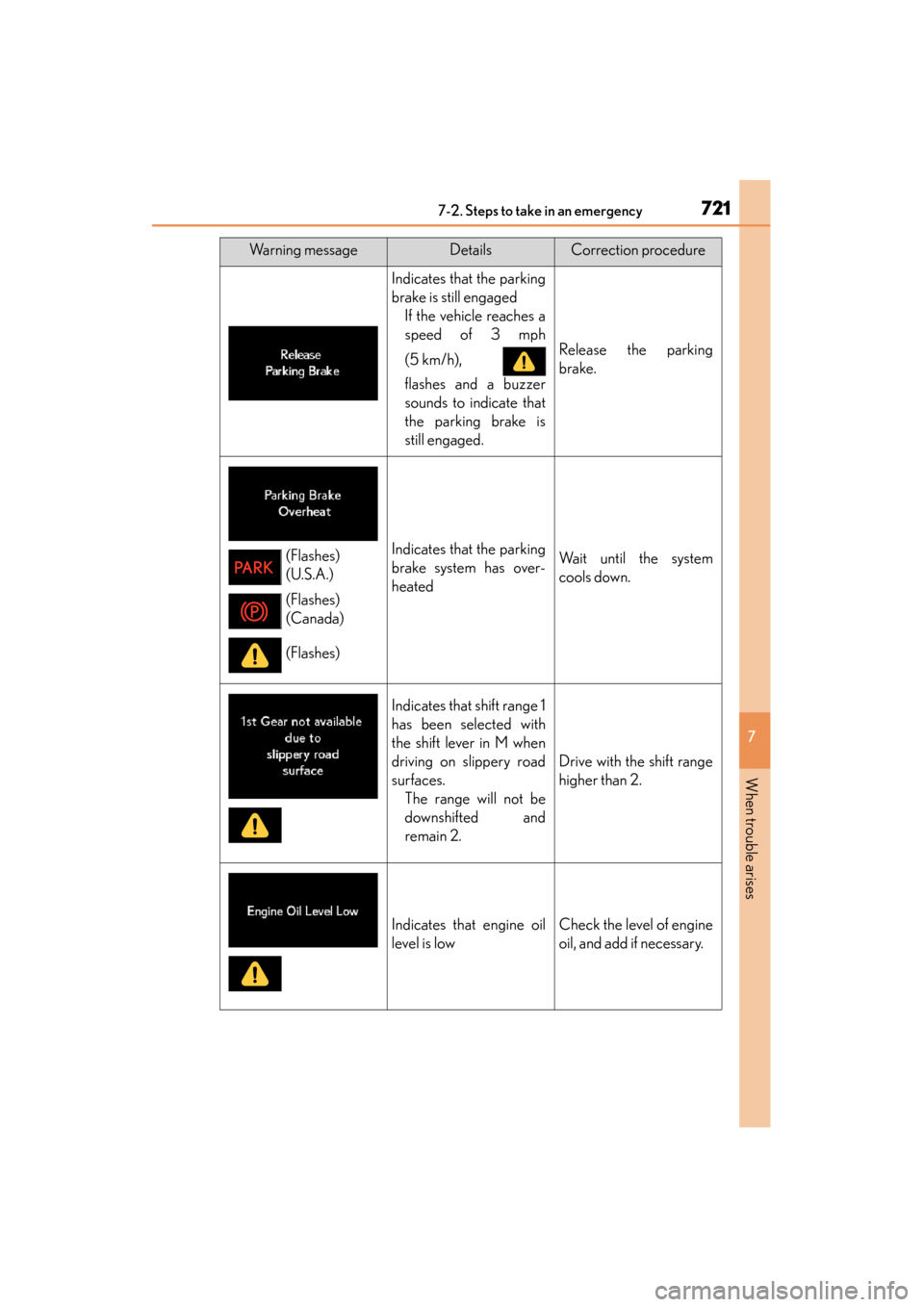
Indicates that the parking
brake is still engagedIf the vehicle reaches a
speed of 3 mph
(5 km/h),
flashes and a buzzer
sounds to indicate that
the parking brake is
still engaged.
Release the parking
brake.
Indicates that the parking
brake system has over-
heatedWait until the system
cools down.
Indicates that shift range 1
has been selected with
the shift lever in M when
driving on slippery road
surfaces.The range will not be
downshifted and
remain 2.
Drive with the shift range
higher than 2.
Indicates that engine oil
level is lowCheck the level of engine
oil, and add if necessary.
Warning messageDetailsCorrection procedure
(Flashes)
(U.S.A.)
(Flashes)
(Canada)
(Flashes)
GS350_OM_OM30D41U_(U).book Page 721 Monday, July 29, 2013 2:22 PM
Page 723 of 846
7227-2. Steps to take in an emergency
GS350_OM_OM30D41U_(U)
(If equipped)
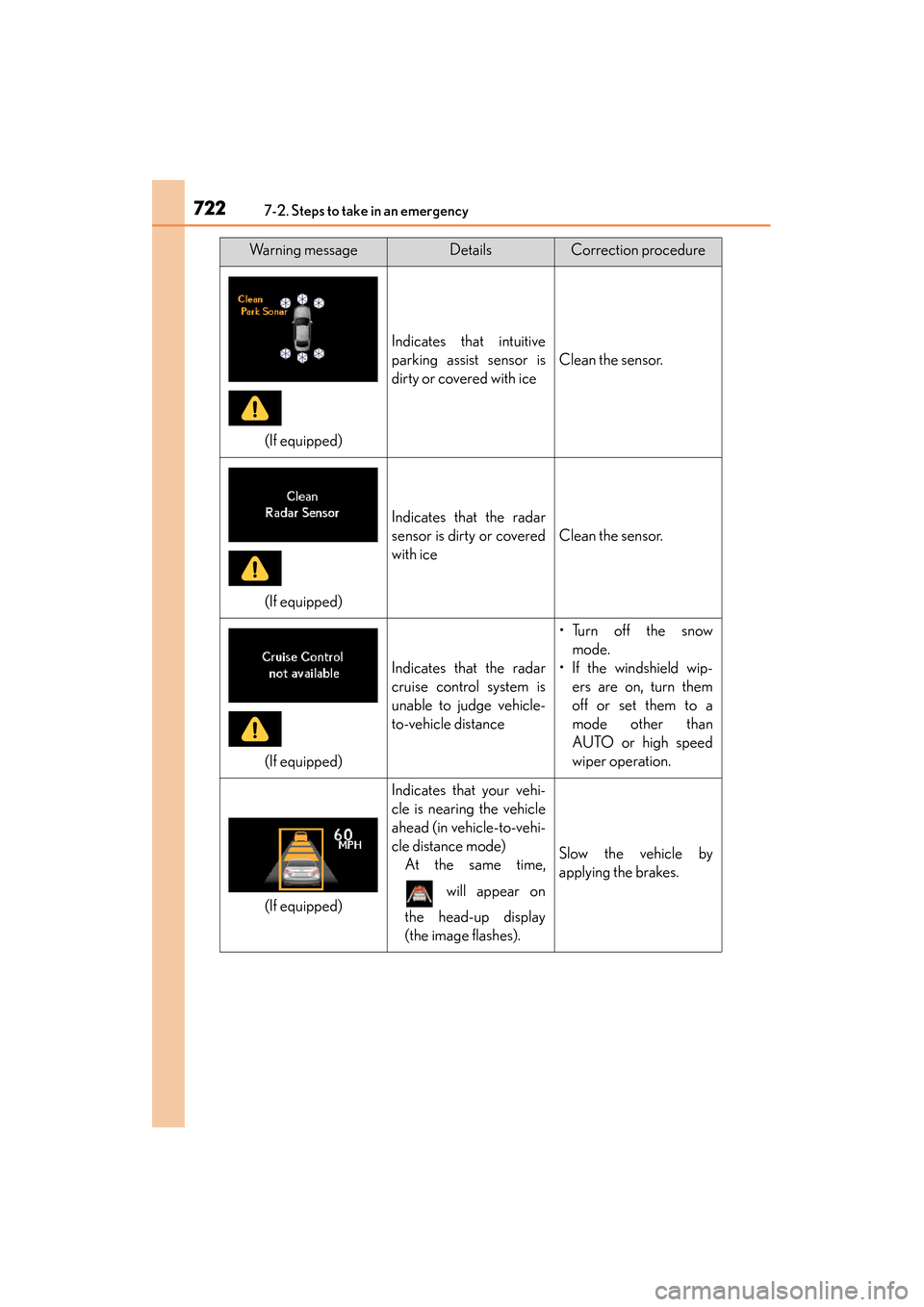
Indicates that intuitive
parking assist sensor is
dirty or covered with ice
Clean the sensor.
(If equipped)
Indicates that the radar
sensor is dirty or covered
with ice
Clean the sensor.
(If equipped)
Indicates that the radar
cruise control system is
unable to judge vehicle-
to-vehicle distance
•Turn off the snowmode.
• If the windshield wip- ers are on, turn them
off or set them to a
mode other than
AUTO or high speed
wiper operation.
(If equipped)
Indicates that your vehi-
cle is nearing the vehicle
ahead (in vehicle-to-vehi-
cle distance mode)At the same time,
will appear on
the head-up display
(the image flashes).
Slow the vehicle by
applying the brakes.
Warning messageDetailsCorrection procedure
GS350_OM_OM30D41U_(U).book Page 722 Monday, July 29, 2013 2:22 PM
Page 724 of 846
7237-2. Steps to take in an emergency
GS350_OM_OM30D41U_(U)
7
When trouble arises
(If equipped)
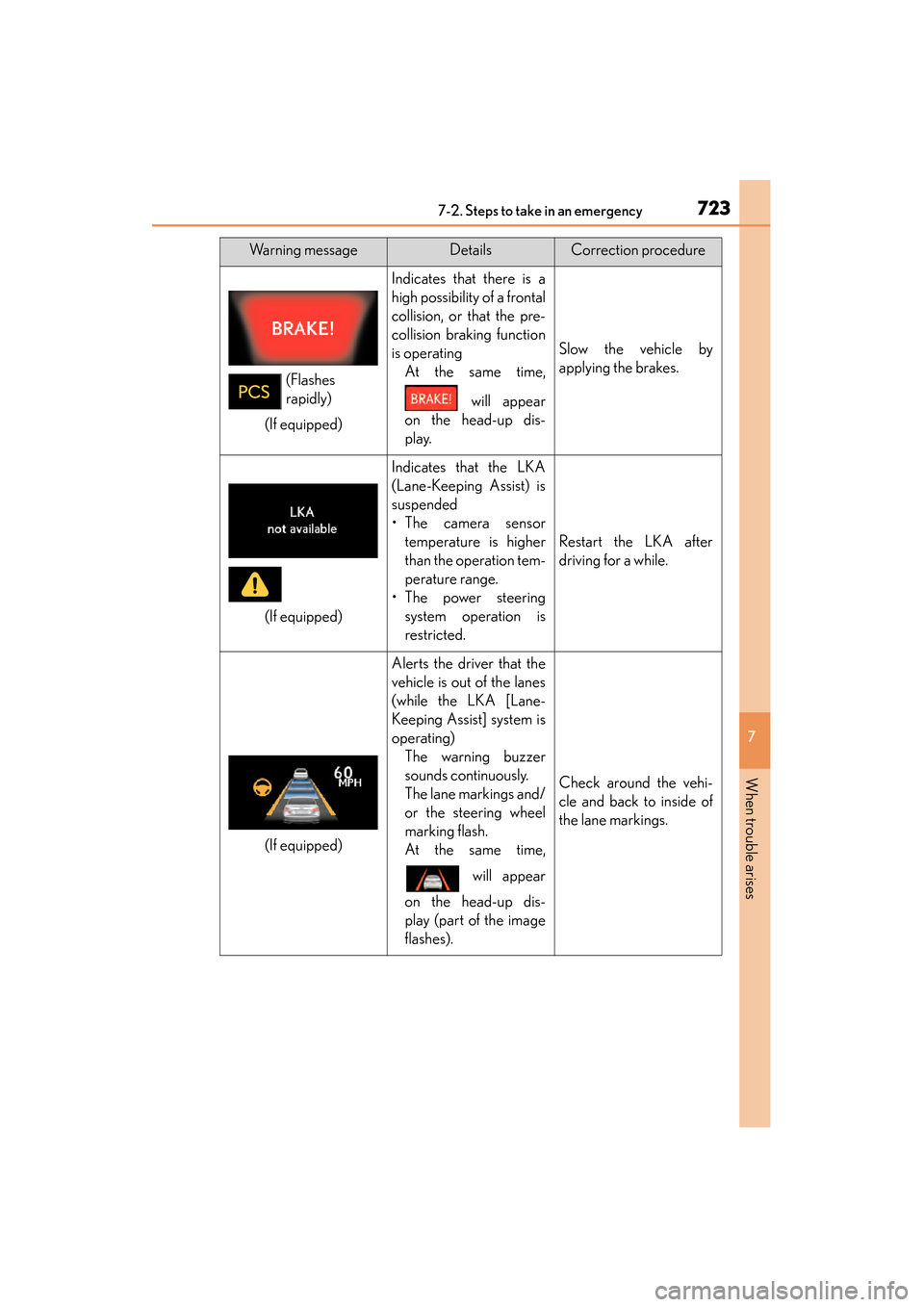
Indicates that there is a
high possibility of a frontal
collision, or that the pre-
collision braking function
is operatingAt the same time,
will appear
on the head-up dis-
play.
Slow the vehicle by
applying the brakes.
(If equipped)
Indicates that the LKA
(Lane-Keeping Assist) is
suspended
•The camera sensor temperature is higher
than the operation tem-
perature range.
•The power steering system operation is
restricted.
Restart the LKA after
driving for a while.
(If equipped)
Alerts the driver that the
vehicle is out of the lanes
(while the LKA [Lane-
Keeping Assist] system is
operating)The warning buzzer
sounds continuously.
The lane markings and/
or the steering wheel
marking flash.
At the same time,
will appear
on the head-up dis-
play (part of the image
flashes).
Check around the vehi-
cle and back to inside of
the lane markings.
Warning messageDetailsCorrection procedure
(Flashes
rapidly)
GS350_OM_OM30D41U_(U).book Page 723 Monday, July 29, 2013 2:22 PM
Page 733 of 846
7327-2. Steps to take in an emergency
GS350_OM_OM30D41U_(U)
InteriorbuzzerExterior
buzzerWarning messageDetailsCorrection procedure
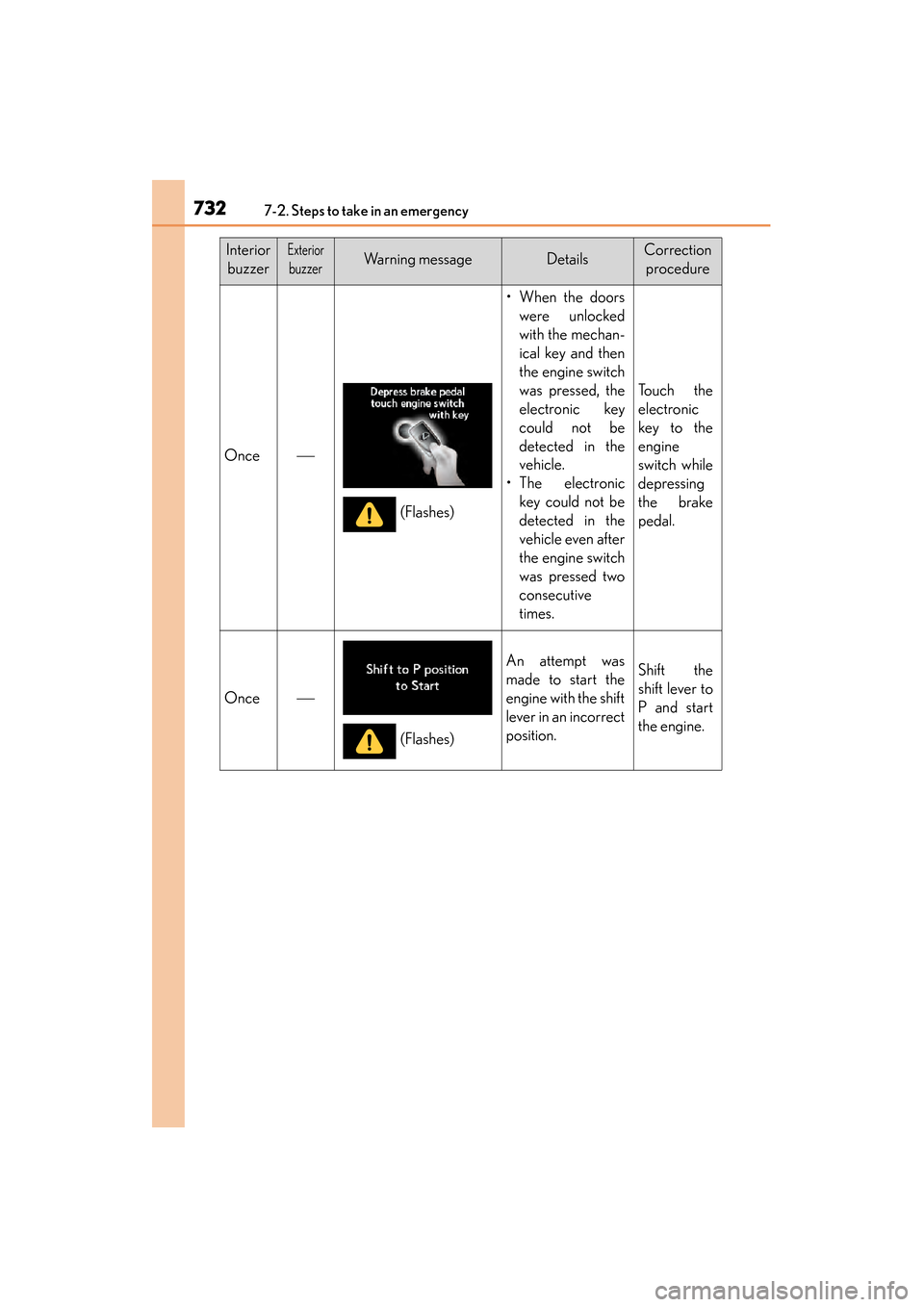
Once
• When the doors were unlocked
with the mechan-
ical key and then
the engine switch
was pressed, the
electronic key
could not be
detected in the
vehicle.
•The electronic key could not be
detected in the
vehicle even after
the engine switch
was pressed two
consecutive
times.
To u c h t h e
electronic
key to the
engine
switch while
depressing
the brake
pedal.
Once
An attempt was
made to start the
engine with the shift
lever in an incorrect
position.Shift the
shift lever to
P and start
the engine.
(Flashes)
(Flashes)
GS350_OM_OM30D41U_(U).book Page 732 Monday, July 29, 2013 2:22 PM
Page 735 of 846
7347-2. Steps to take in an emergency
GS350_OM_OM30D41U_(U)
InteriorbuzzerExterior
buzzerWarning messageDetailsCorrection procedure
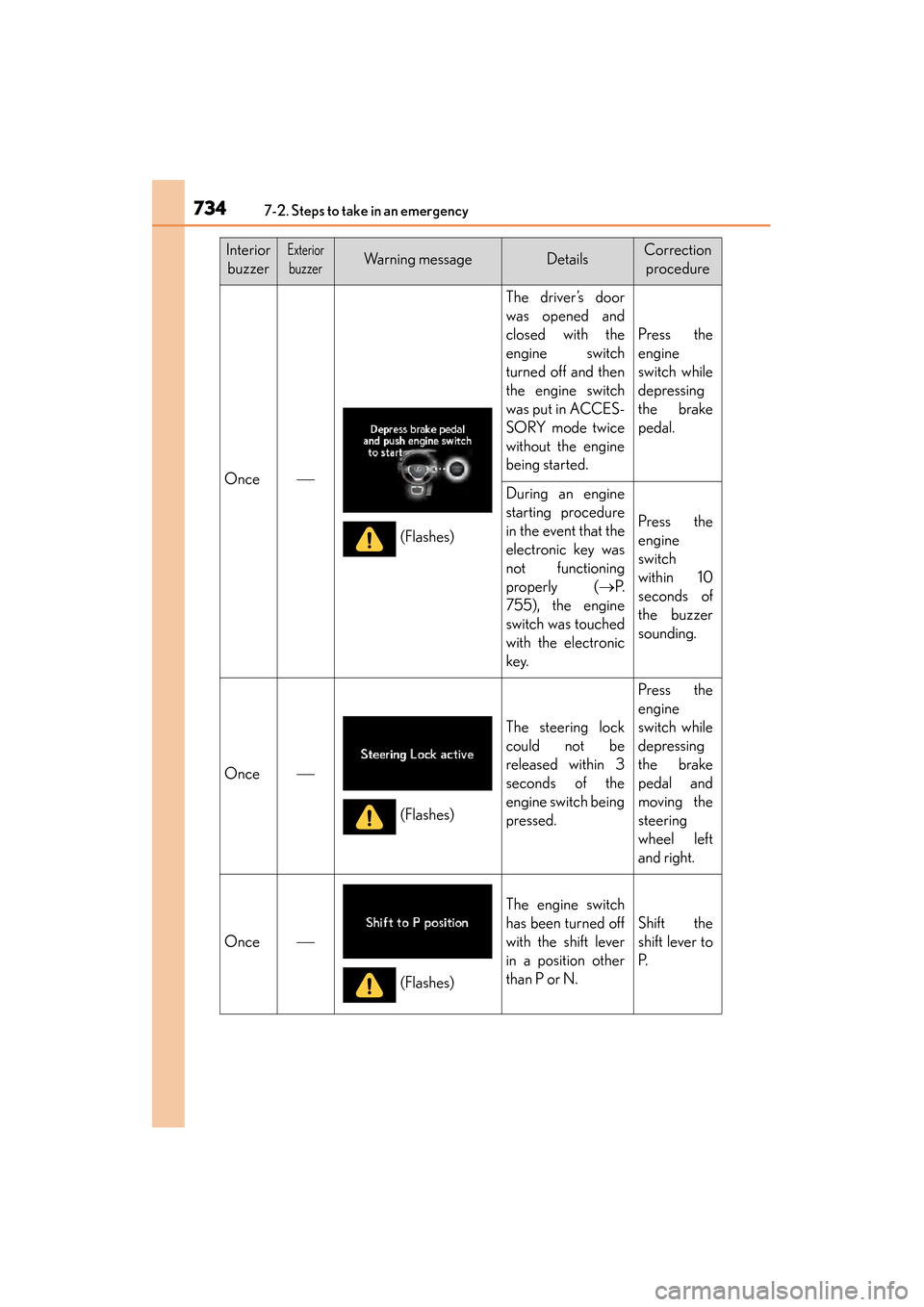
Once
The driver’s door
was opened and
closed with the
engine switch
turned off and then
the engine switch
was put in ACCES-
SORY mode twice
without the engine
being started.
Press the
engine
switch while
depressing
the brake
pedal.
During an engine
starting procedure
in the event that the
electronic key was
not functioning
properly ( →P.
755), the engine
switch was touched
with the electronic
key.
Press the
engine
switch
within 10
seconds of
the buzzer
sounding.
Once
The steering lock
could not be
released within 3
seconds of the
engine switch being
pressed.
Press the
engine
switch while
depressing
the brake
pedal and
moving the
steering
wheel left
and right.
Once
The engine switch
has been turned off
with the shift lever
in a position other
than P or N.
Shift the
shift lever to
P.
(Flashes)
(Flashes)
(Flashes)
GS350_OM_OM30D41U_(U).book Page 734 Monday, July 29, 2013 2:22 PM
Page 737 of 846
736
GS350_OM_OM30D41U_(U)
7-2. Steps to take in an emergency
If you have a flat tire
●Stop the vehicle on a hard, flat surface.
●Set the parking brake.
●Shift the shift lever to P.
●Stop the engine.
●Turn on the emergency flashers. (→P. 692)
Remove the flat tire and replace it with the spare tire provided.
For details about tires: →P. 642
CAUTION
■If you have a flat tire
Do not continue driving with a flat tire.
Driving even a short distance with a flat tire can damage the tire and the wheel
beyond repair, which could result in an accident.
Before jacking up the vehicle
GS350_OM_OM30D41U_(U).book Page 736 Monday, July 29, 2013 2:22 PM
Page 738 of 846
7377-2. Steps to take in an emergency
GS350_OM_OM30D41U_(U)
7
When trouble arises
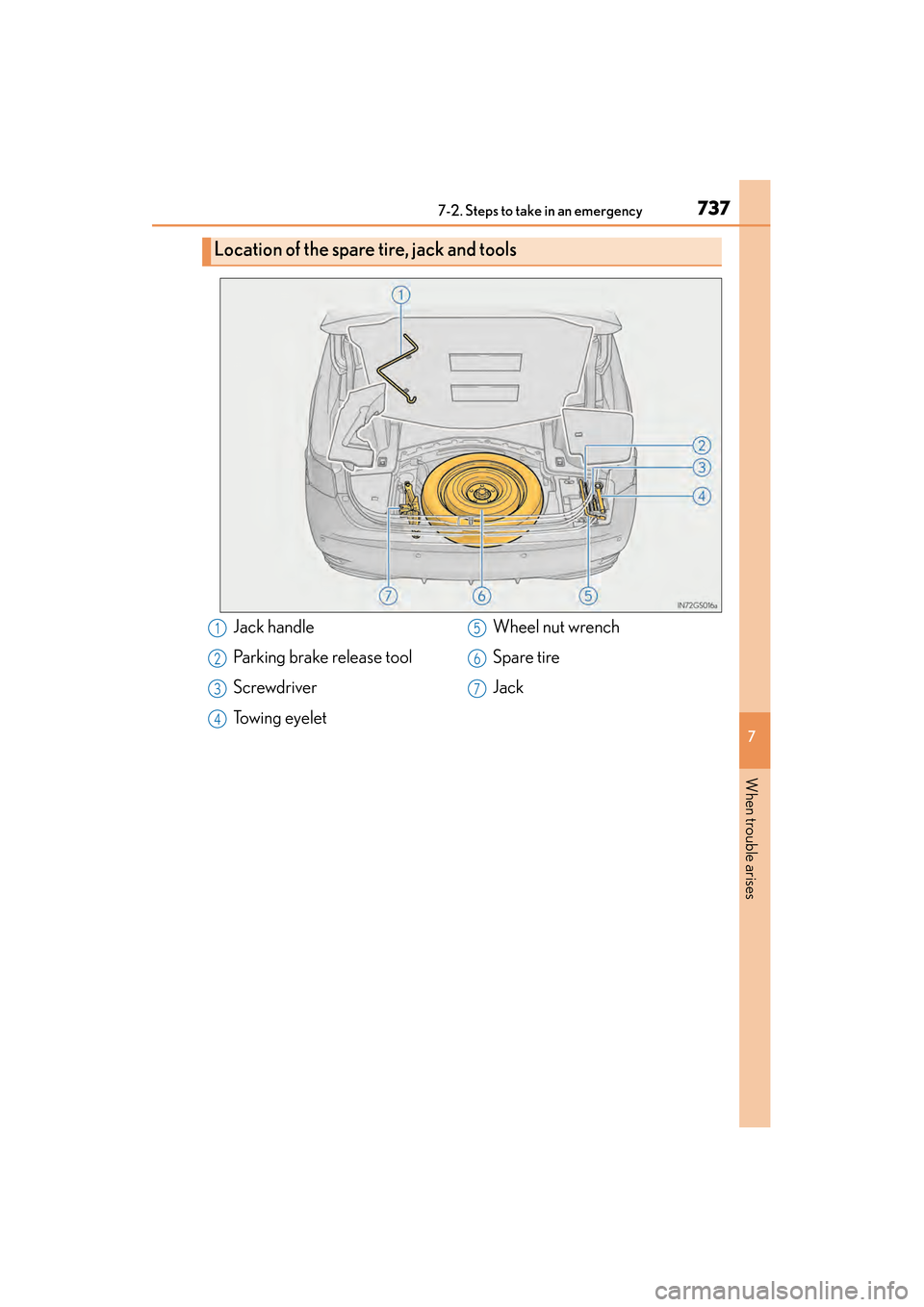
Location of the spare tire, jack and tools
Jack handle
Parking brake release tool
Screwdriver
Towing eyeletWheel nut wrench
Spare tire
Jack1
2
3
4
5
6
7
GS350_OM_OM30D41U_(U).book Page 737 Monday, July 29, 2013 2:22 PM
Page 744 of 846
7437-2. Steps to take in an emergency
GS350_OM_OM30D41U_(U)
7
When trouble arises
CAUTION
■Replacing a flat tire
●Do not touch the disc wheels or the area around the brakes immediately after the
vehicle has been driven.
After the vehicle has been driven the disc wheels and the area around the brakes
will be extremely hot. Touching these areas with hands, feet or other body parts
while changing a tire, etc. may result in burns.
●Failure to follow these precautions could cause the wheel nuts to loosen and the
tire to fall off, resulting in death or serious injury.
• Never use oil or grease on the wheel bolts or wheel nuts.Oil and grease may cause the wheel nuts to be excessively tightened, leading
to bolt or disc wheel damage. In addition, the oil or grease can cause the
wheel nuts to loosen and the wheel may fall off, causing a serious accident.
Remove any oil or grease from the wheel bolts or wheel nuts.
• Have the wheel nuts tightened with a torque wrench to 76 ft•lbf (103 N•m, 10.5 kgf•m) as soon as possible after changing wheels.
• When installing a tire, only use wheel nuts that have been specifically designed for that wheel.
• If there are any cracks or deformations in the bolt screws, nut threads or bolt holes of the wheel, have the vehicle inspected by your Lexus dealer.
GS350_OM_OM30D41U_(U).book Page 743 Monday, July 29, 2013 2:22 PM
Page 748 of 846
7477-2. Steps to take in an emergency
GS350_OM_OM30D41U_(U)
7
When trouble arises
CAUTION
■When using the compact spare tire
●Remember that the compact spare tire provided is specifically designed for use
with your vehicle. Do not use your compact spare tire on another vehicle.
●Do not use more than one compact spare tire simultaneously.
●Replace the compact spare tire with a standard tire as soon as possible.
●Avoid sudden acceleration, abrupt steering, sudden braking and shifting opera-
tions that cause sudden engine braking.
■When the compact spare tire is attached
The vehicle speed may not be correctly detected, and the following systems may
not operate correctly:
Also, not only can the following system not be utilized fully, but it may even nega-
tively affect the drive-train components:
•AWD system
• ABS & Brake assist
•VSC
•TRAC
•Cruise control
• Dynamic radar cruise control (if equipped)
• PCS (if equipped)
•EPS
• AFS (if equipped)
• LDH (if equipped) • DRS (if equipped)
• AVS (if equipped)
• LKA (Lane-Keeping Assist)
(if equipped)
• VGRS (if equipped)
• Rear view monitor system
• Intuitive parking assist (if equipped)
• Navigation system (if equipped)
GS350_OM_OM30D41U_(U).book Page 747 Monday, July 29, 2013 2:22 PM