Air Lexus GS350 2014 Manual Online
[x] Cancel search | Manufacturer: LEXUS, Model Year: 2014, Model line: GS350, Model: Lexus GS350 2014Pages: 846, PDF Size: 35.04 MB
Page 376 of 846
375
GS350_OM_OM30D41U_(U)5-2. Using the air conditioning system and defogger
5
Interior features
Windshield wiper de-icer∗
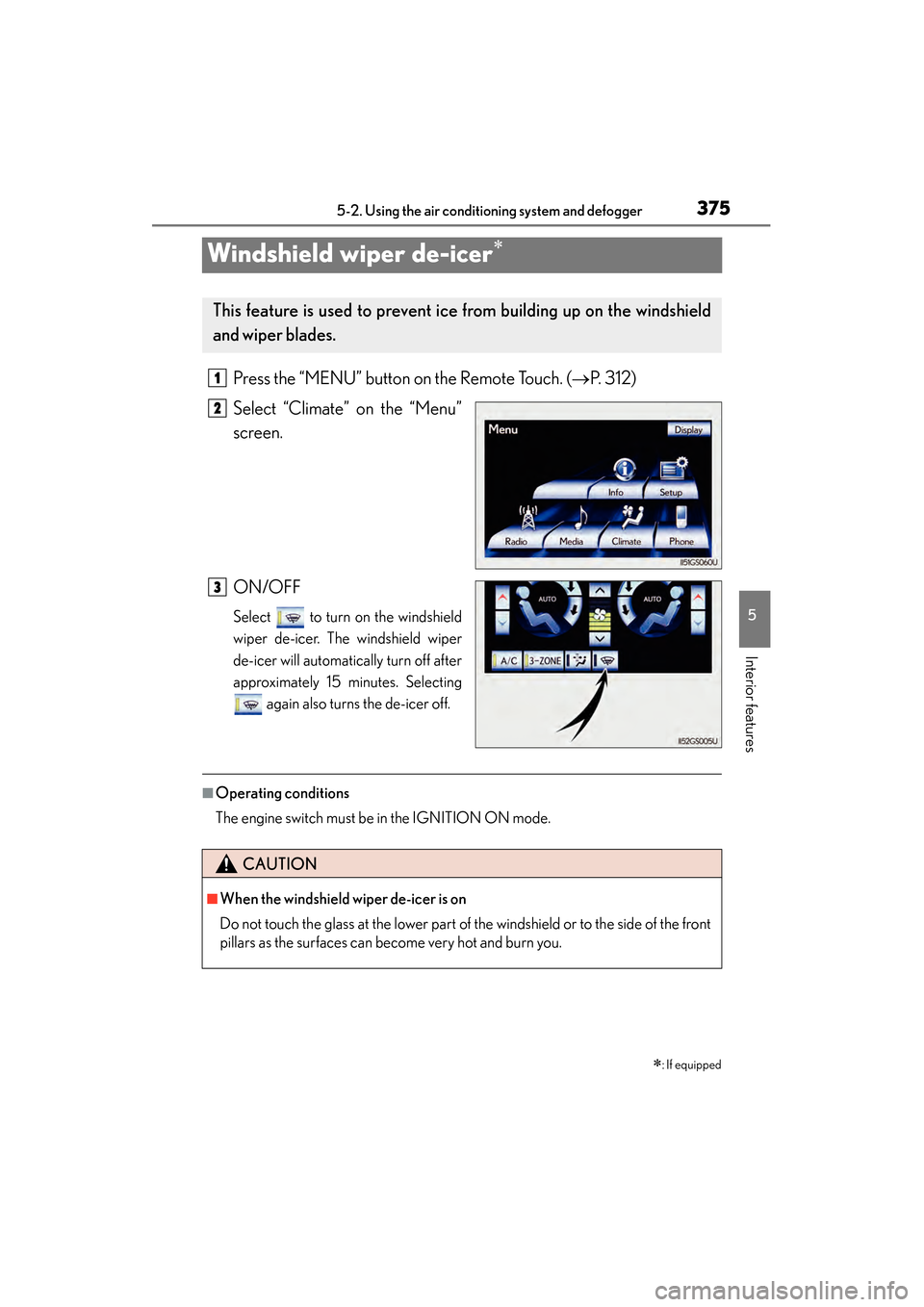
Press the “MENU” button on the Remote Touch. ( →P. 312)
Select “Climate” on the “Menu”
screen.
ON/OFF
Select to turn on the windshield
wiper de-icer. The windshield wiper
de-icer will automatically turn off after
approximately 15 minutes. Selecting again also turns the de-icer off.
■Operating conditions
The engine switch must be in the IGNITION ON mode.
∗: If equipped
This feature is used to prevent ice from building up on the windshield
and wiper blades.
1
2
3
CAUTION
■When the windshield wiper de-icer is on
Do not touch the glass at the lower part of the windshield or to the side of the front
pillars as the surfaces can become very hot and burn you.
GS350_OM_OM30D41U_(U).book Page 375 Monday, July 29, 2013 2:22 PM
Page 419 of 846
418
GS350_OM_OM30D41U_(U)
5-3. Using the audio system
■If the satellite radio does not operate normally
If a problem occurs with the XM
® tuner, a message will appear on the screen. Refer
to the table below to identify the problem, and take the suggested corrective action.
Contact the XM
® Listener Care Center at 1-877-515-3987 (U.S.A.) or
1-877- 438-9677 (Canada).
Ck Antenna
The XM® antenna is not connected. Check whether the
XM® antenna cable is attached securely.
There is a short-circuit in the antenna or the surrounding
antenna cable. See a Lexus certified dealer.
Ch Unauth
You have not subscribed to XM® Satellite Radio. The
radio is being updated with the latest encryption code.
Contact XM
® Satellite Radio for subscription informa-
tion. When a contract is canceled, you can choose “CH
000” and all free-to-air channels.
The premium channel you selected is not authorized.
Wait for about 2 seconds until the radio returns to the
previous channel or “CH 001”. If it does not change
automatically, select another channel. To listen to the
premium channel, contact XM
® Satellite Radio.
No Signal
The XM® signal is too weak at the current location. Wait
until your vehicle reaches a location with a stronger sig-
nal.
LoadingThe unit is acquiring audio or program information. Wait
until the unit has received the information.
Ch Off AirThe channel you selected is not broadcasting any pro-
gramming. Select another channel.
-----
There is no song/program title or artist name/feature
associated with the channel at that time. No action is
required.
Ch Unavail
The channel you selected is no longer available. Wait for
about 2 seconds until the radio returns to the previous
channel or “CH 001”. If it does not change automatically,
select another channel.
GS350_OM_OM30D41U_(U).book Page 418 Monday, July 29, 2013 2:22 PM
Page 499 of 846

498
GS350_OM_OM30D41U_(U)
5-4. Using the hands-free phone system (for cellular phone)
■When using the hands-free system
●The audio system is muted when making a call.
●If both parties speak at the same time, it may be difficult to hear.
●If the incoming call volume is overly loud, an echo may be heard.
●Try to face toward the microphone as much as possible when speaking.
●In the following circumstances, it may be difficult to hear the other party:
• When driving on unpaved roads
• When driving at high speeds
• If a window is open
• If the air conditioning is blowing directly on the microphone
• If the air conditioning is set to high
• There is an effect from the network of the cellular phone
■Conditions under which the system will not operate
●If using a cellular phone that does not support Bluetooth®
●If the cellular phone is turned off
●If you are outside service range
●If the cellular phone is not connected
●If the cellular phone’s battery is low
■Bluetooth® antenna
The antenna is built into the instrument panel. If the cellular phone is behind the seat
or in the console box, or touching or covered by metal objects, connection status
may deteriorate.
■Battery charge/Signal status
●This display may not correspond exactly with the cellular phone itself.
●When the cellular phone is not connected, “No connect” is displayed.
●When the cellular phone is out of the service area or in a place inaccessible by
radio waves, “No Service” is displayed.
■When using Bluetooth® audio and hands-free system at the same time
The following problems may occur.
●The Bluetooth® connection may be cut.
●Noise may be heard on the Bluetooth® audio playback.
GS350_OM_OM30D41U_(U).book Page 498 Monday, July 29, 2013 2:22 PM
Page 503 of 846
502
GS350_OM_OM30D41U_(U)
5-4. Using the hands-free phone system (for cellular phone)
CAUTION
XFor vehicles sold in Canada
Tout changement ou toute modification de la construction non approuvé expres-
sément par l’abonné responsable de la conformité risque d’annuler l’autorité de
l’utilisateur d’exploiter l’équipement.
Cet émetteur ne doit pas être co-implanté ou actionné en même temps qu’aucune
autre antenne ou émetteur.
Under Industry Canada regulations, this radio transmitter may only operate using
an antenna of a type and maximum (or lesser) gain approved for the transmitter by
Industry Canada. To reduce potential radio interference to other users, the
antenna type and its gain should be so chosen that the equivalent isotropically radi-
ated power (e.i.r.p.) is not more than that necessary for successful communication.
Conformément à la réglementation d’Industrie Canada, le présent émetteur radio
peut fonctionner avec une antenne d’un type et d’un gain maximal (ou inférieur)
approuvé pour l’émetteur par Industrie Canada. Dans le but de réduire les risques
de brouillage radioélectrique à l’intention des autres utilisateurs, il faut choisir le
type d’antenne et son gain de sorte que la puissance isotrope rayonnée équiva-
lente (p.i.r.e.) ne dépasse pas l’intensité nécessaire à l’établissement d’une commu-
nication satisfaisante.
■Caution while driving
Do not use the cellular phone or connect the Bluetooth
® system.
■Caution regarding interference with electronic devices
●Your audio unit is fitted with Bluetooth® antennas. People with implantable car-
diac pacemakers, cardiac resynchronization therapy-pacemakers or implantable
cardioverter defibrillators should maintain a reasonable distance between them-
selves and the Bluetooth
® antennas. The radio waves may affect the operation of
such devices.
●Before using Bluetooth® devices, users of any electrical medical device other
than implantable cardiac pacemakers, cardiac resynchronization therapy-pace-
makers or implantable cardioverter defibrillators should consult the manufac-
turer of the device for information about its operation under the influence of radio
waves. Radio waves could have unexpected effects on the operation of such
medical devices.
NOTICE
■When leaving the vehicle
Do not leave your cellular phone in the vehicle. The inside of the vehicle may
become hot, causing damage to the phone.
GS350_OM_OM30D41U_(U).book Page 502 Monday, July 29, 2013 2:22 PM
Page 506 of 846
GS350_OM_OM30D41U_(U)
5055-4. Using the hands-free phone system (for cellular phone)
5
Interior features
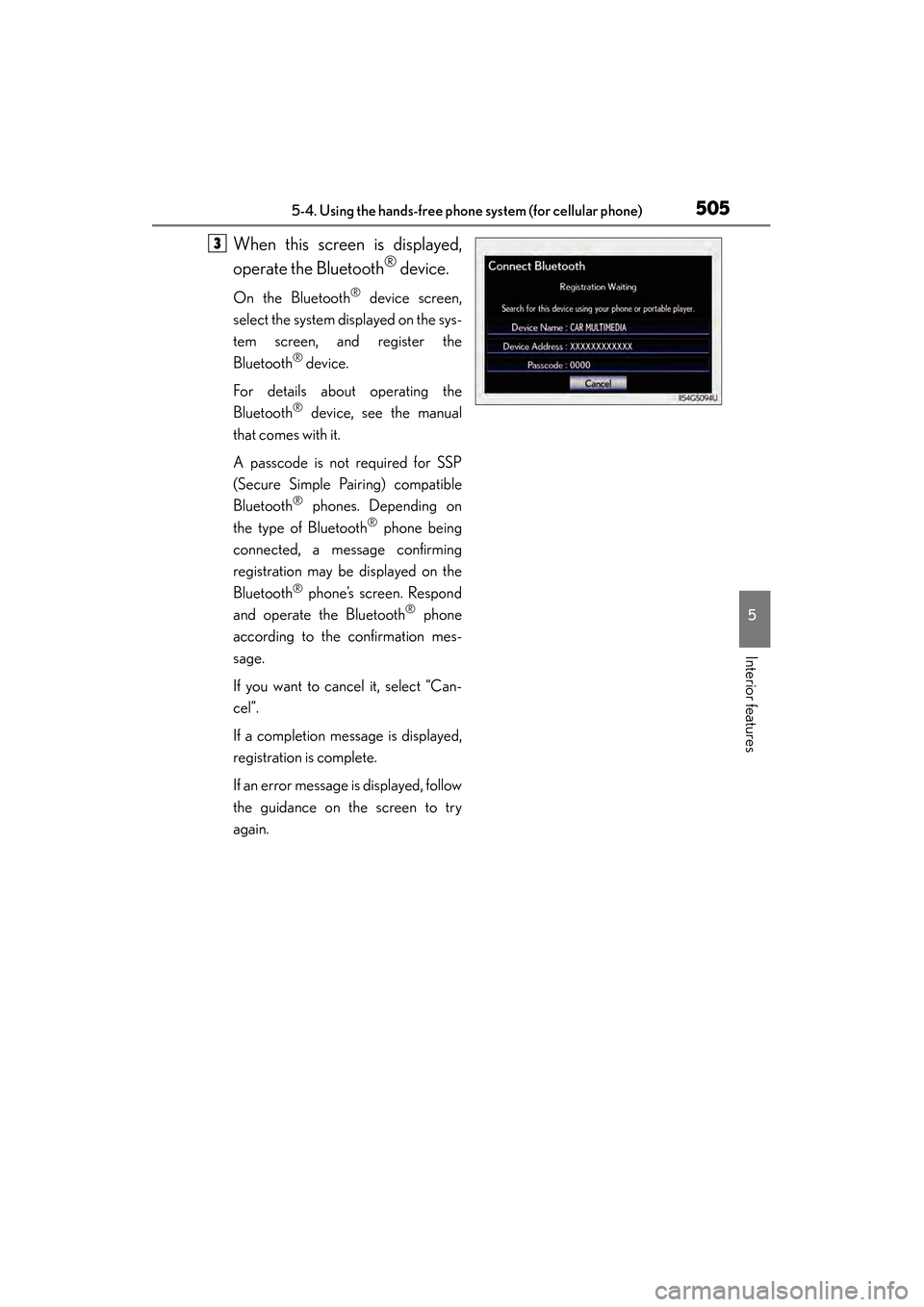
When this screen is displayed,
operate the Bluetooth
® device.
On the Bluetooth® device screen,
select the system displayed on the sys-
tem screen, and register the
Bluetooth
® device.
For details about operating the
Bluetooth
® device, see the manual
that comes with it.
A passcode is not required for SSP
(Secure Simple Pairing) compatible
Bluetooth
® phones. Depending on
the type of Bluetooth® phone being
connected, a message confirming
registration may be displayed on the
Bluetooth
® phone’s screen. Respond
and operate the Bluetooth® phone
according to the confirmation mes-
sage.
If you want to cancel it, select “Can-
cel”.
If a completion message is displayed,
registration is complete.
If an error message is displayed, follow
the guidance on the screen to try
again.
3
GS350_OM_OM30D41U_(U).book Page 505 Monday, July 29, 2013 2:22 PM
Page 551 of 846
550
GS350_OM_OM30D41U_(U)
5-4. Using the hands-free phone system (for cellular phone)
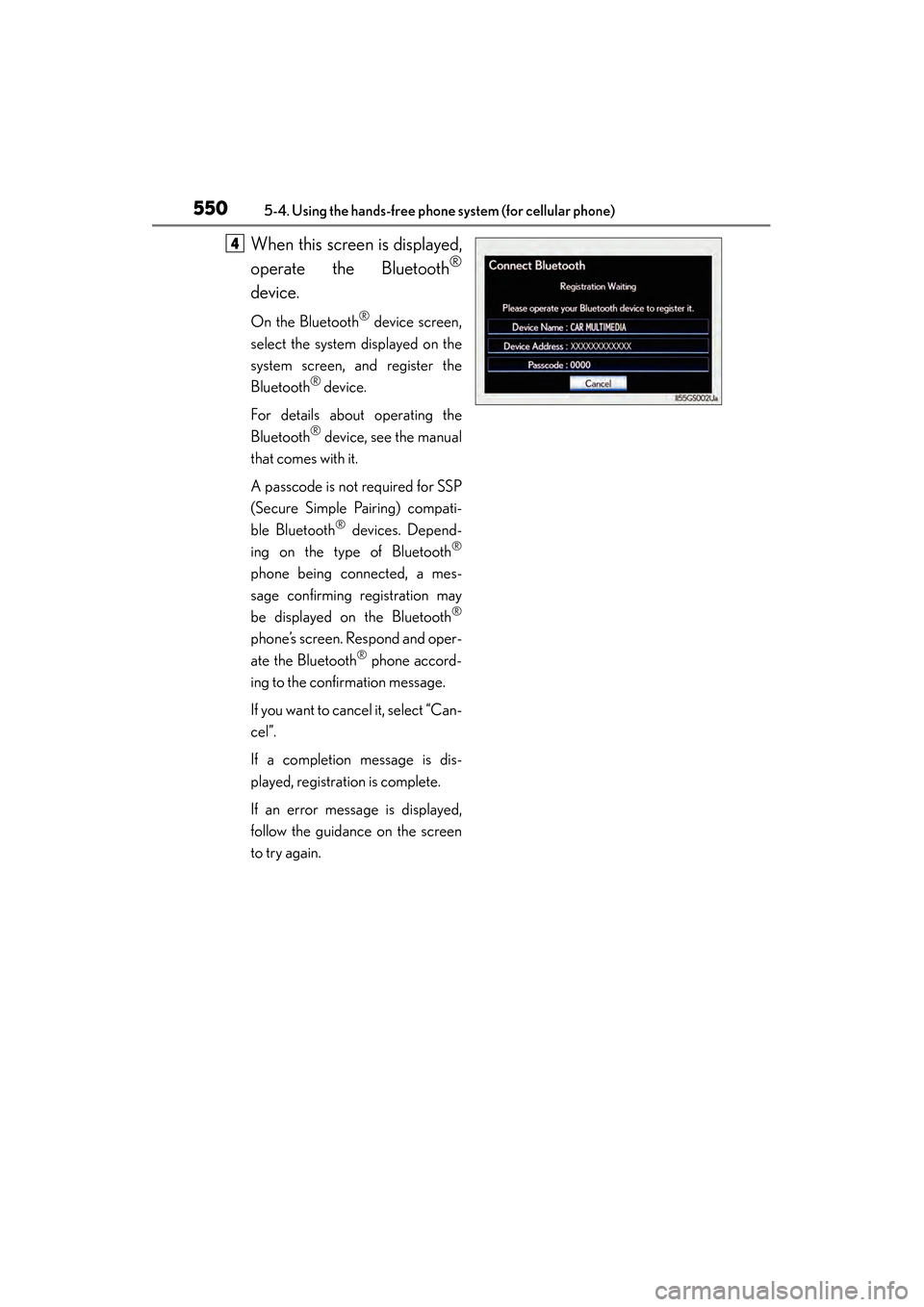
When this screen is displayed,
operate the Bluetooth
®
device.
On the Bluetooth® device screen,
select the system displayed on the
system screen, and register the
Bluetooth
® device.
For details about operating the
Bluetooth
® device, see the manual
that comes with it.
A passcode is not required for SSP
(Secure Simple Pairing) compati-
ble Bluetooth
® devices. Depend-
ing on the type of Bluetooth®
phone being connected, a mes-
sage confirming registration may
be displayed on the Bluetooth
®
phone’s screen. Respond and oper-
ate the Bluetooth
® phone accord-
ing to the confirmation message.
If you want to cancel it, select “Can-
cel”.
If a completion message is dis-
played, registration is complete.
If an error message is displayed,
follow the guidance on the screen
to try again.
4
GS350_OM_OM30D41U_(U).book Page 550 Monday, July 29, 2013 2:22 PM
Page 567 of 846
566
GS350_OM_OM30D41U_(U)
5-6. Using the storage features
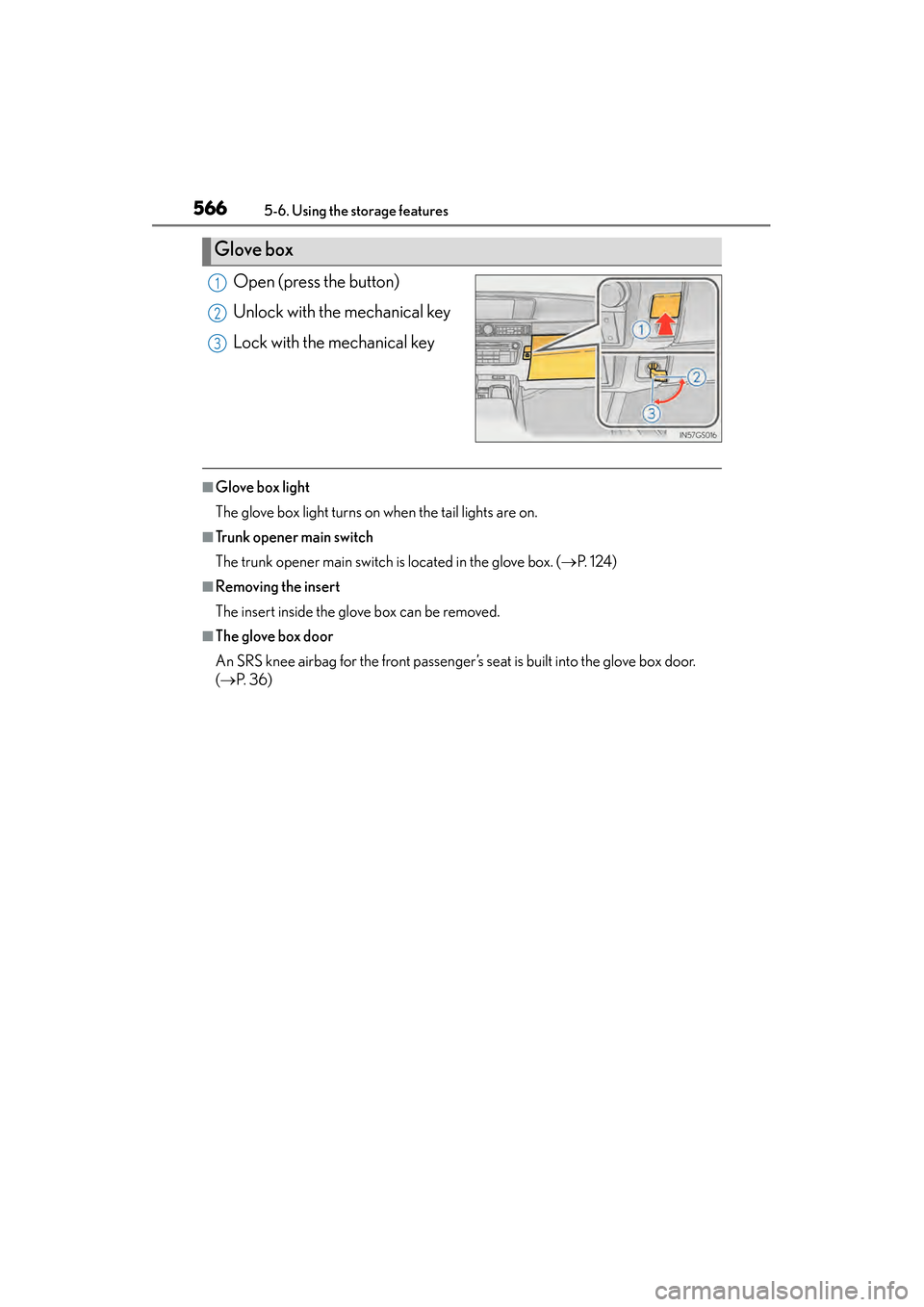
Open (press the button)
Unlock with the mechanical key
Lock with the mechanical key
■Glove box light
The glove box light turns on when the tail lights are on.
■Trunk opener main switch
The trunk opener main switch is located in the glove box. (→P. 1 2 4 )
■Removing the insert
The insert inside the glove box can be removed.
■The glove box door
An SRS knee airbag for the front passenger’s seat is built into the glove box door.
(→ P. 3 6 )
Glove box
1
2
3
GS350_OM_OM30D41U_(U).book Page 566 Monday, July 29, 2013 2:22 PM
Page 582 of 846
581
GS350_OM_OM30D41U_(U)5-7. Other interior features
5
Interior features
Seat heaters∗/s e a t v e n t i l a t o r s∗
∗: If equipped
The seat can be warmed and air from the seat can improve ventilation.
Front seat heaters and ventilators (if equipped)/rear seat heaters
(if equipped)
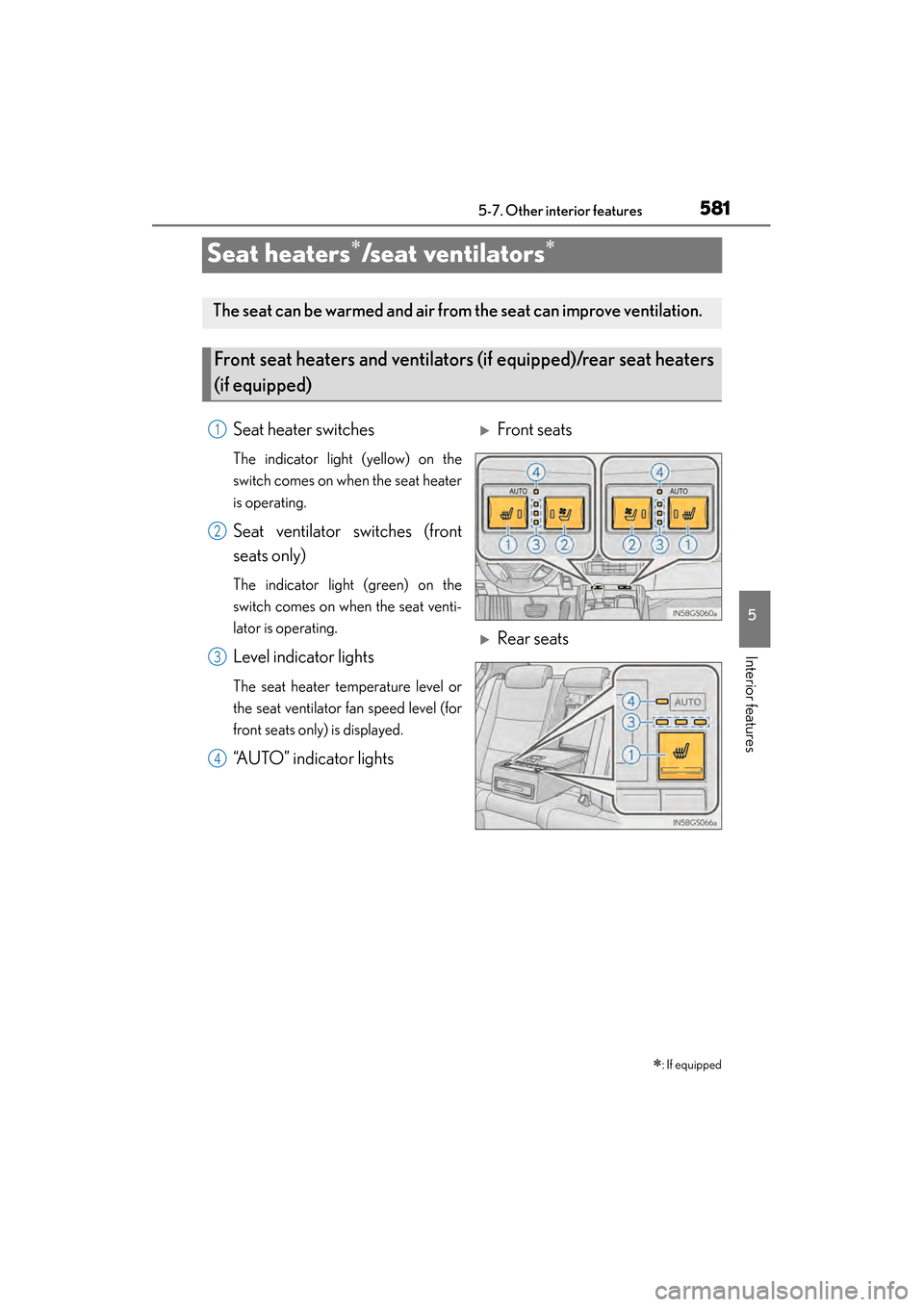
Seat heater switches
The indicator light (yellow) on the
switch comes on when the seat heater
is operating.
Seat ventilator switches (front
seats only)
The indicator light (green) on the
switch comes on when the seat venti-
lator is operating.
Level indicator lights
The seat heater temperature level or
the seat ventilator fan speed level (for
front seats only) is displayed.
“AUTO” indicator lights
XFront seats
XRear seats
1
2
3
4
GS350_OM_OM30D41U_(U).book Page 581 Monday, July 29, 2013 2:22 PM
Page 583 of 846
582
GS350_OM_OM30D41U_(U)
5-7. Other interior features
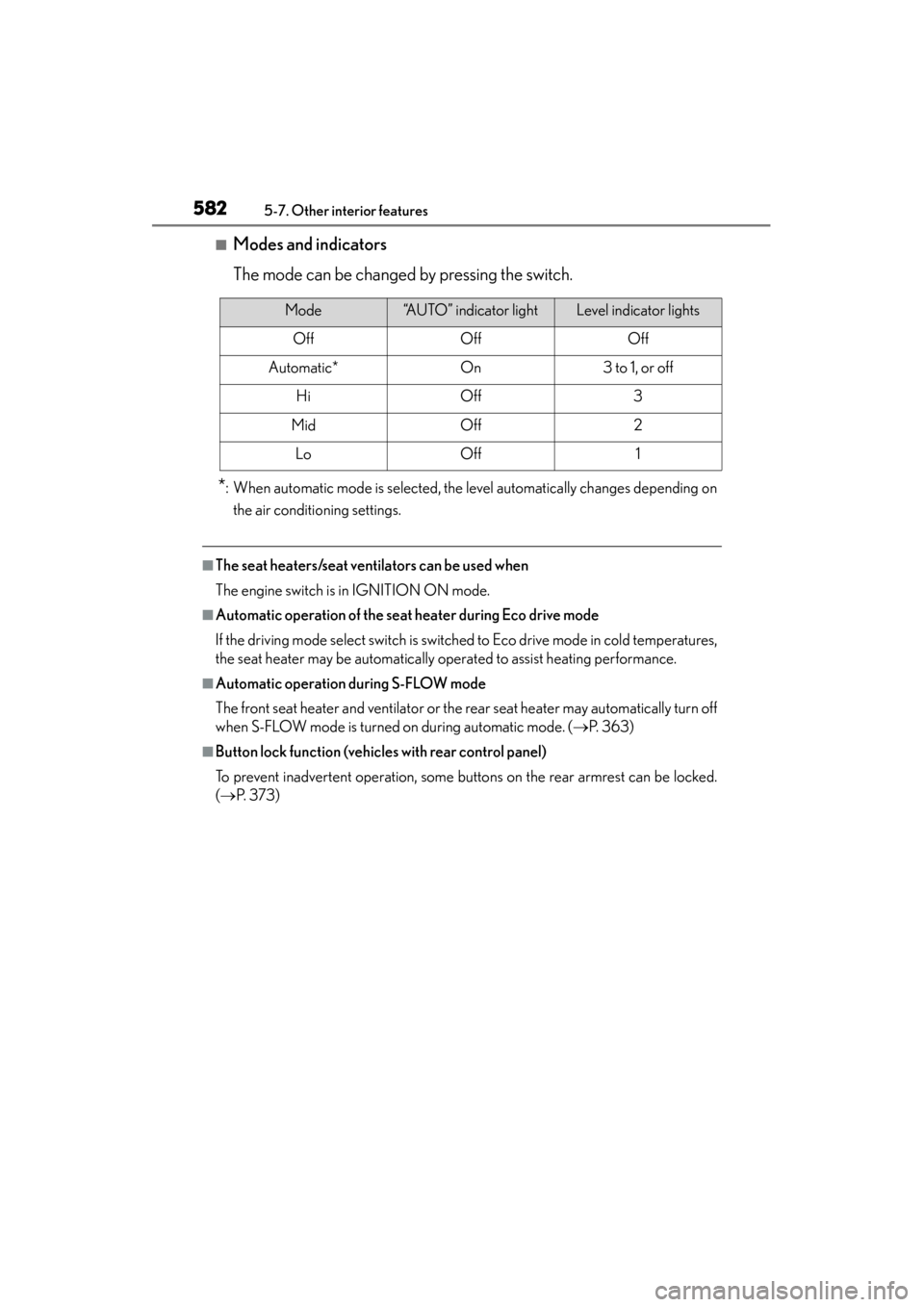
■Modes and indicators
The mode can be changed by pressing the switch.
*: When automatic mode is selected, the level automatically changes depending onthe air conditioning settings.
■The seat heaters/seat ventilators can be used when
The engine switch is in IGNITION ON mode.
■Automatic operation of the seat heater during Eco drive mode
If the driving mode select switch is switched to Eco drive mode in cold temperatures,
the seat heater may be automatically operated to assist heating performance.
■Automatic operation during S-FLOW mode
The front seat heater and ventilator or the rear seat heater may automatically turn off
when S-FLOW mode is turned on during automatic mode. ( →P. 363)
■Button lock function (vehicles with rear control panel)
To prevent inadvertent operation, some buttons on the rear armrest can be locked.
(→ P. 3 7 3 )
Mode“AUTO” indicator lightLevel indicator lights
OffOffOff
Automatic*On3 to 1, or off
HiOff3
MidOff2
LoOff1
GS350_OM_OM30D41U_(U).book Page 582 Monday, July 29, 2013 2:22 PM
Page 591 of 846
590
GS350_OM_OM30D41U_(U)
5-7. Other interior features
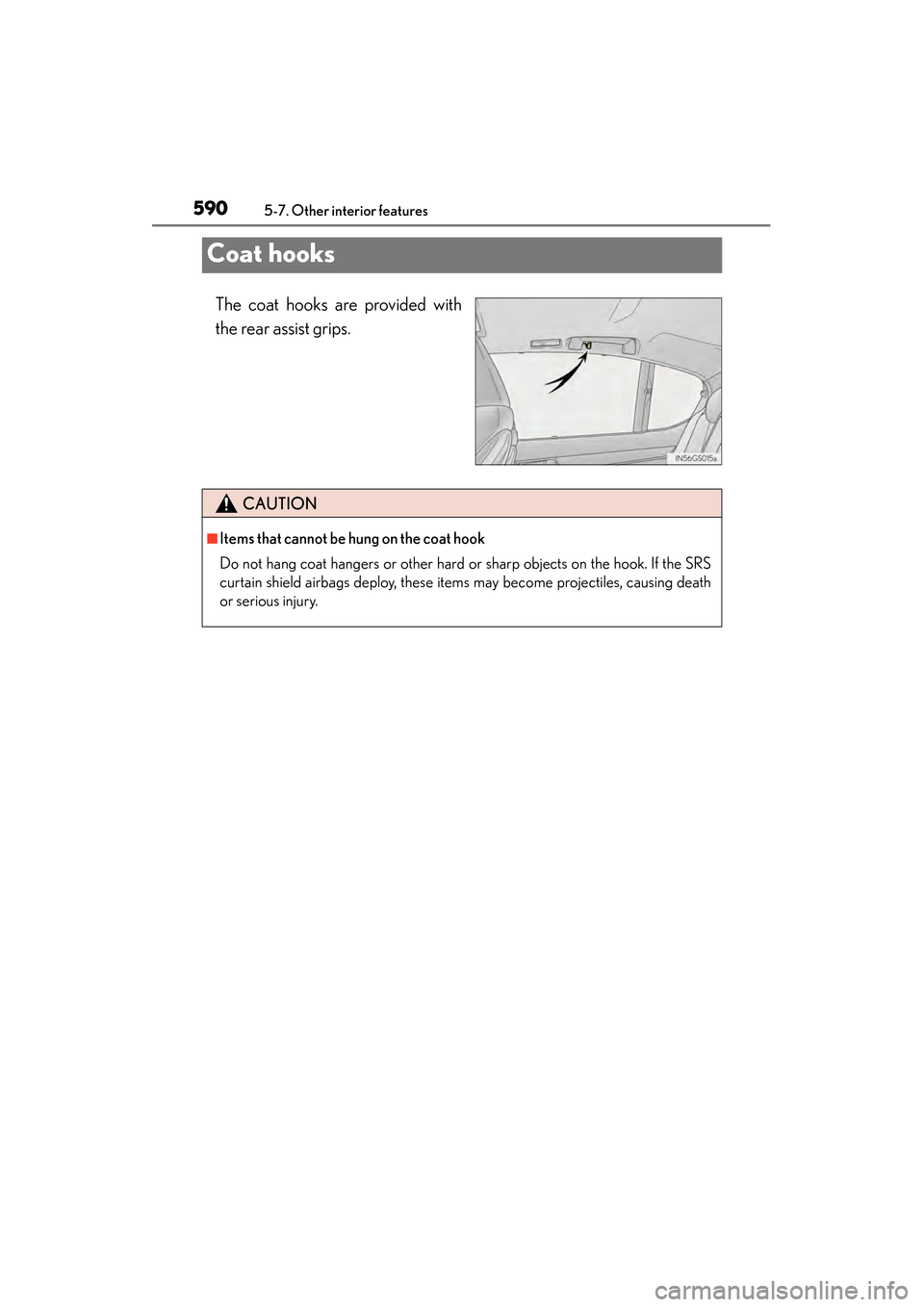
Coat hooks
The coat hooks are provided with
the rear assist grips.
CAUTION
■Items that cannot be hung on the coat hook
Do not hang coat hangers or other hard or sharp objects on the hook. If the SRS
curtain shield airbags deploy, these items may become projectiles, causing death
or serious injury.
GS350_OM_OM30D41U_(U).book Page 590 Monday, July 29, 2013 2:22 PM