door Lexus GS350 2014 Using the air conditioning system and defogger / LEXUS 2014 GS350 QUICK GUIDE OWNERS MANUAL (OM30D73U)
[x] Cancel search | Manufacturer: LEXUS, Model Year: 2014, Model line: GS350, Model: Lexus GS350 2014Pages: 102, PDF Size: 9.51 MB
Page 1 of 102

1
GS350_QG_OM30D73U_(U)
The Quick Guide is not intended as a substitute for your Owner’s
Manual. We strongly encourage you to review the Owner’s
Manual and supplementary manuals so you will have a better
understanding of your vehicle’s capabilities and limitations.
Audio System
Audio control screen.................................................................................................................... 66
Side Display (vehicles with a navigation system).............................................................. 66
Remote control (steering wheel switches).......................................................................... 66
Basic operation ............................................................................................................................... 67
Radio ................................................................................................................................................... 67
DVD player/CD player ...............................................................................................................68
Operating an iPod ......................................................................................................................... 69
Rear seat audio controls ............................................................................................................. 69
Automatic Transmission ....................................................................................................................20
BSM (Blind Spot Monitor) ................................................................................................................ 41
Cruise Control ......................................................................................................................................35
Door Locks ............................................................................................................................................. 87
Driving Mode Select Switch ............................................................................................................ 44
Driving Position Memory ................................................................................................................... 15
Dynamic Radar Cruise Control..................................................................................................... 37
Eco Driving Indicator .........................................................................................................................28
Engine (Ignition) Switch.......................................................................................................................17
Floor mat installation.............................................................................................................................. 9
Front Air Conditioning System
Side Display (vehicles with a navigation system)................................................................71
Using the automatic mode......................................................................................................... 72
Adjusting the temperature......................................................................................................... 72
Using the S-FLOW mode ..........................................................................................................72
Front Seats ............................................................................................................................................... 14
Fuel Tank Cap ......................................................................................................................................... 91
Garage Door Opener ...................................................................................................................... 80
Hands-free System For Cellular Phone
Bluetooth
® phone pairing .........................................................................................................59
Phonebook transfer ......................................................................................................................60
Registering a speed dial ................................................................................................................61
Calling by name.............................................................................................................................. 62
Calling by speed dial ....................................................................................................................63
Calling using SMS/MMS message ....................................................................................... 64
Receiving a call ...............................................................................................................................65
Steering switches ...........................................................................................................................65
Page 3 of 102

3
GS350_QG_OM30D73U_(U)
OverviewInstrument Panel
Windshield wiper and washer switch P.31
Multi-information display P.25
Headlight switch
Turn signal lever
Fog light switch
*
P.29
P.23
Inside lock buttons P.87
Trunk opener P.92
Hood lock release lever*
Driving position memory
switches
P.15
See P.6
See P.5
Window lock switch P.89
Outside rear view
mirror switches
*
Power window switches
P.89
Door lock switches P.87
PCS OFF switch*
Tire pressure warning reset switch P.48
AFS OFF switch P.30
Page 8 of 102

8
GS350_QG_OM30D73U_(U)
OverviewRoof
: If equipped
*: Refer to “Owner’s Manual”.
Moon roof switches
P.90
Personal lights*
“SOS” button P.82
Garage door opener switches P.80
Interior light*Vanity lights*
Page 11 of 102

11
GS350_QG_OM30D73U_(U)
■Wireless remote control
Locks all the doors
Unlocks all the doors
Pressing the button unlocks the driver’s
door. Pressing the button again within
5 seconds unlocks the other doors.
Opens the windows and moon roof
(press and hold)
*
Opens the trunk (press and hold)
If the vehicle is equipped with a power
trunk opener and closer, the trunk lid
automatically opens fully.
Sounds the alarm (press and hold)
*: This setting must be customized at your
Lexus dealer.
Smart Access System with Push-button Start
■Entering the vehicle
Grip the driver’s door handle to unlock the
door. Grip the passenger’s door handle to
unlock all the doors.
Make sure to touch the sensor on the
back of the handle.
The doors cannot be unlocked for 3 sec-
onds after the doors are locked.
1
2
3
4
5
The following operations can be performed simply by carrying the electronic key on your
person, for example in your pocket. (The driver should always carry the electronic key.)
For details on starting the engine, see page 17.
Page 12 of 102

12
GS350_QG_OM30D73U_(U)
■Exiting the vehicle
Touch the lock sensor (the indentation on
the upper part of the door handle) to lock
all the doors.
■Opening the trunk
Press the button.
If the vehicle is equipped with power
trunk opener and closer, the trunk lid
automatically opens fully.
For details on what to do when the electronic key does not operate properly, see page 97.
Page 13 of 102

13
GS350_QG_OM30D73U_(U)
Theft Deterrent System
■Engine immobilizer system
The indicator light flashes after the engine
switch has been turned off to indicate that
the system is operating.
The indicator light stops flashing after the
engine switch has been turned to ACCES-
SORY or IGNITION ON mode to indicate
that the system has been canceled.
■Alarm
The alarm uses light and sound to give an alert when an intrusion is detected.
To s e t t h e a l a r m :
Close the doors, trunk and hood, and lock all the doors. The system will be set automatically
after 30 seconds.
The indicator light changes from being on to flashing when the system is set.
To deactivate or stop the alarm:
●Unlock the doors or open the trunk.
●Turn the engine switch to ACCESSORY or IGNITION ON mode, or start the engine.
(The alarm will be deactivated or stopped after a few seconds.)
Page 16 of 102

16
GS350_QG_OM30D73U_(U)
■Memory recall function (driver’s side only)
Each electronic key can be registered to recall your preferred driving position.
■Registering procedure
Check that the shift lever is in P.
Turn the engine switch to IGNITION ON mode.
Recall the driving position that you want to record.
While pressing the recalled button, press
and hold the door lock switch (either lock
or unlock) until the buzzer sounds.
If the button could not be registered, the
buzzer sounds continuously for approxi-
mately 3 seconds.1
2
3
4
Page 80 of 102

80
GS350_QG_OM30D73U_(U)
Portable Audio Device Ports
Open the console box, open the cover and
connect the portable audio device.
Garage Door Opener (if equipped)
The garage door opener (HomeLink® Universal Transceiver) is manufactured under
license from HomeLink
®.
■Programming the HomeLink® (for U.S.A. owners)
The HomeLink® compatible transceiver in your vehicle has 3 buttons which can be pro-
grammed to operate 3 different devices. Refer to the programming method below
appropriate for the device.
Indicator light
Buttons
These ports can be used to connect a portable audio device and listen to it through the
vehicle’s speakers.
The garage door opener can be programmed to operate garage doors, gates, entry
doors, door locks, home lighting systems, security systems, and other devices.
1
2
Page 81 of 102
81
GS350_QG_OM30D73U_(U)
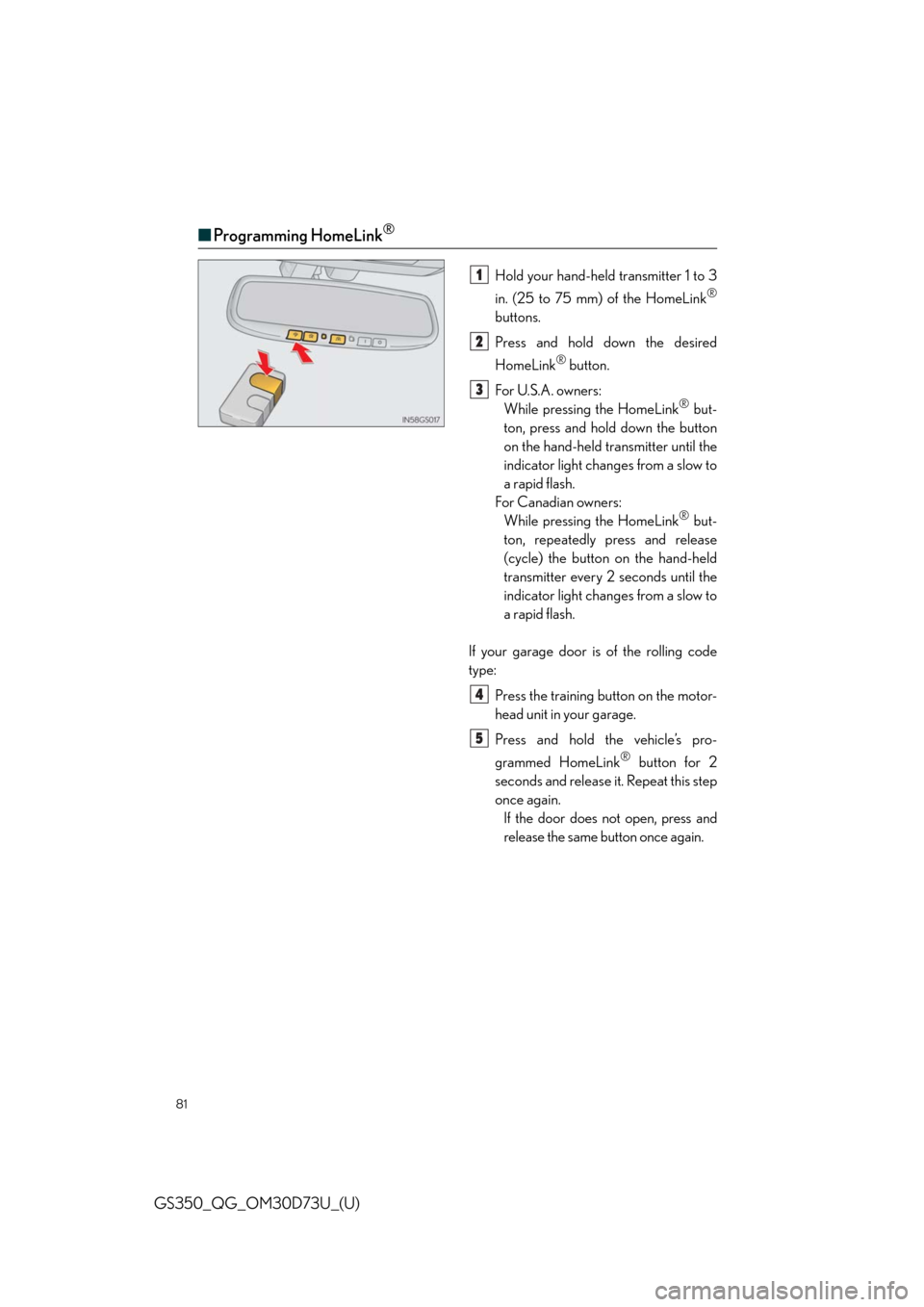
■Programming HomeLink®
Hold your hand-held transmitter 1 to 3
in. (25 to 75 mm) of the HomeLink
®
buttons.
Press and hold down the desired
HomeLink
® button.
For U.S.A. owners:
While pressing the HomeLink
® but-
ton, press and hold down the button
on the hand-held transmitter until the
indicator light changes from a slow to
a rapid flash.
For Canadian owners:
While pressing the HomeLink
® but-
ton, repeatedly press and release
(cycle) the button on the hand-held
transmitter every 2 seconds until the
indicator light changes from a slow to
a rapid flash.
If your garage door is of the rolling code
type:
Press the training button on the motor-
head unit in your garage.
Press and hold the vehicle’s pro-
grammed HomeLink
® button for 2
seconds and release it. Repeat this step
once again.
If the door does not open, press and
release the same button once again.
1
2
3
4
5
Page 82 of 102

82
GS350_QG_OM30D73U_(U)
■Programming other devices
For U.S.A. owners:
To program an entry gate, see the Owner’s Manual.
To program other devices, contact your Lexus dealer.
For Canadian owners:
To program all other devices, follow the same procedure as for garage door programming.
■Operating HomeLink®
Press the appropriate HomeLink® button.
The indicator light should come on.
Safety Connect (if equipped)
■System components
“SOS” button
LED light indicators
Microphone
Safety Connect is a subscription-based telematics service that uses Global Positioning
System (GPS) data and embedded cellular technology to provide safety and security
features to subscribers. Safety Connect is supported by Lexus’ designated response
center, which operates 24 hours per day, 7 days per week.
Safety Connect service is available by subscription on select, telematics hardware-
equipped vehicles.
1
2
3