nut Lexus GS350 2015 User Guide
[x] Cancel search | Manufacturer: LEXUS, Model Year: 2015, Model line: GS350, Model: Lexus GS350 2015Pages: 615, PDF Size: 12.93 MB
Page 240 of 615

238
GS350_OM_OM30F69U_(U)
4-5. Using the driving support systems
■Temporary cancelation of the LKA system functions
If any of the following occurs, the LKA system functions will be temporarily canceled.
The functions will resume after the necessary operating conditions have returned.
●The steering wheel is turned as far as necessary to cause the vehicle to change
lanes.
●When the system detects no-handed driving. (The lane keeping assist function will
be temporarily canceled, but the lane departure warning function will continue.)
●The turn signal lever is operated.
●The vehicle speed deviates from the operating range of the LKA system functions.
(The buzzer will beep twice when the lane keeping assist function is being can-
celed.)
●When the lane lines cannot be recognized while driving. (The buzzer will beep
twice when the lane keeping assist function is being canceled.)
●The wiper switch is set on high speed mode or is set on AUTO mode with wipers
operating at high speed. (The lane keeping assist function will be temporarily can-
celed, but the lane departure warning function will continue.)
●If the vehicle crosses a line for approximately half a minute or more. (The lane keep-
ing assist function will be temporarily canceled, but the lane departure warning
function will continue.)
●When the lane departure warning function is activated.
The lane departure warning function will not operate again for a several seconds
after it has been activated, even if the vehicle leaves the lane again.
■The lane departure warning
It may be difficult to feel the sensory warning depending on the road conditions.
■No-handed driving warning
If the steering wheel is not operated for approximately 15 seconds on a straight road
or approximately 5 seconds on a curve, the buzzer will beep twice, indicators on the
multi-information display will flash, and the lane keeping assist function will be tem-
porarily canceled. If you drive the vehicle with your hands lightly touching the steer-
ing wheel, this may also be detected as no-handed driving.
■After the vehicle has been parked in the sun
The LKA system functions may not be available and a warning message (→P. 4 8 9 )
will be displayed for a while after driving has started. In such cases, turn the LKA sys-
tem off and turn it on again after normal temperature returns. When the temperature
in the cabin decreases and the temperature around the camera sensor ( →P. 2 3 3 )
becomes suitable for its operation, the functions will begin to operate.
GS350_OM_OM30F69U_(U).book Page 238 Monday, January 19, 2015 2:53 PM
Page 255 of 615
GS350_OM_OM30F69U_(U)
2534-5. Using the driving support systems
4
Driving
■Reactivation of the TRAC system linked to vehicle speed
When only the TRAC system is turned off, the TRAC system will turn on when vehi-
cle speed increases. However, when both TRAC/VSC systems are turned off, the
systems will not turn on even when vehicle speed increases.
■Reduced effectiveness of the EPS system
The effectiveness of the EPS system is reduced to prevent the system from overheat-
ing when there is frequent steering input over an extended period of time. The steer-
ing wheel may feel heavy as a result.
* Should this occur, refrain from excessive
steering input or stop the vehicle and turn the engine off. The EPS system should
return to normal within 10 minutes.
*: If the LKA (Lane-Keeping Assist) system cannot operate in this case, a warning
message will be shown on the multi-information display.
GS350_OM_OM30F69U_(U).book Page 253 Monday, January 19, 2015 2:53 PM
Page 259 of 615
GS350_OM_OM30F69U_(U)
2574-5. Using the driving support systems
4
Driving
■Hill-start assist control buzzer
●When hill-start assist control is activated, the buzzer will sound once.
●In the following situations, hill-start assist control will be canceled and the buzzer
will sound twice.
• No attempt is made to drive the vehicle within approximately 2 seconds ofreleasing the brake pedal.
• The shift lever is moved to P.
• The parking brake is applied.
• The brake pedal is depressed again.
• The brake pedal has been depressed for more than approximately 3 minutes.
■If the slip indicator comes on
It may indicate a malfunction in the system. Contact your Lexus dealer.
CAUTION
■Hill-start assist control
●Do not overly rely on hill-start assist control. Hill-start assist control may not oper-
ate effectively on steep inclines and roads covered with ice.
●Unlike the parking brake, hill-start assist control is not intended to hold the vehi-
cle stationary for an extended period of time. Do not attempt to use hill-start
assist control to hold the vehicle on an incline, as doing so may lead to an acci-
dent.
GS350_OM_OM30F69U_(U).book Page 257 Monday, January 19, 2015 2:53 PM
Page 315 of 615
GS350_OM_OM30F69U_(U)
3135-2. Using the air conditioning system and defogger
5
Interior features
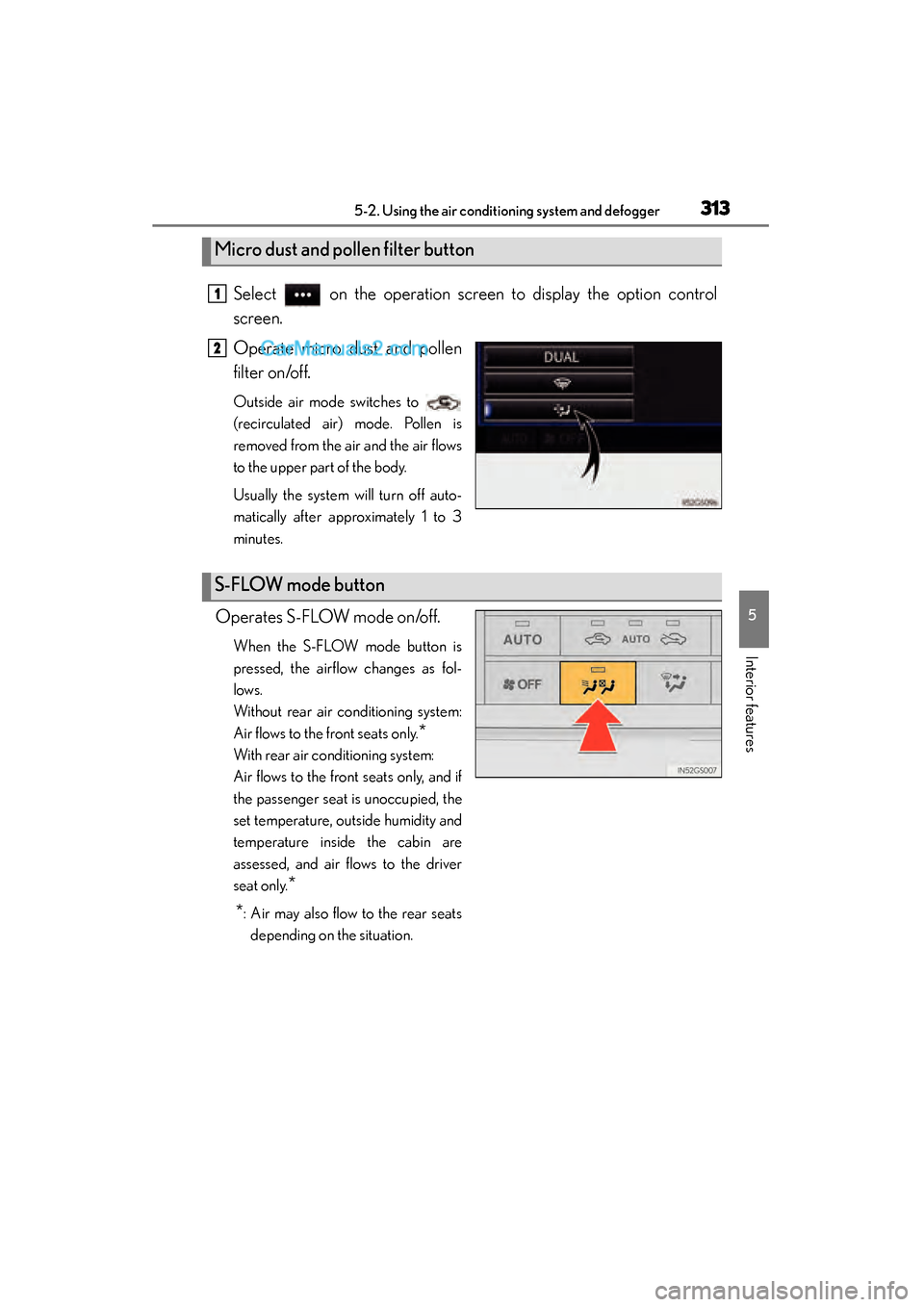
Select on the operation screen to display the option control
screen.
Operate micro dust and pollen
filter on/off.
Outside air mode switches to
(recirculated air) mode. Pollen is
removed from the air and the air flows
to the upper part of the body.
Usually the system will turn off auto-
matically after approximately 1 to 3
minutes.
Operates S-FLOW mode on/off.
When the S-FLOW mode button is
pressed, the airflow changes as fol-
lows.
Without rear air conditioning system:
Air flows to the front seats only.
*
With rear air conditioning system:
Air flows to the front seats only, and if
the passenger seat is unoccupied, the
set temperature, outside humidity and
temperature inside the cabin are
assessed, and air flows to the driver
seat only.
*
*
: Air may also flow to the rear seats depending on the situation.
Micro dust and pollen filter button
1
2
S-FLOW mode button
GS350_OM_OM30F69U_(U).book Page 313 Monday, January 19, 2015 2:53 PM
Page 319 of 615
GS350_OM_OM30F69U_(U)
3175-2. Using the air conditioning system and defogger
5
Interior features
■Micro dust and pollen filter
●In order to prevent the windshield from fogging up when the outside air is cold, the
following may occur:
• Outside air mode does not switch to (recirculated air) mode.
• The dehumidification function operates.
• The operation cancels after approximately 1 minute.
●In rainy weather, the windows may fog up. Press .
●In extremely humid weather, the windows may fog up.
●The pollens are filtered out even if the micro dust and pollen filter is turned off.
■Operation of the air conditioning system in Eco drive mode
In the Eco drive mode, the air conditioning system is controlled as follows to priori-
tize fuel efficiency:
●Engine speed and compressor operation controlled to restrict heating/cooling
capacity
●Fan speed restricted when automatic mode is selected
To improve air conditioning performance, perform the following operations:
●Adjust the fan speed
●Turn off Eco drive mode
■When the S-FLOW mode operates
If air flows to the driver’s seat only, the temperature setting for the front passenger’s
seat is not displayed.
■When the outside temperature falls to nearly 32 °F (0 °C)
The dehumidification function may not operate even when “A/C” on the option con-
trol screen is selected.
GS350_OM_OM30F69U_(U).book Page 317 Monday, January 19, 2015 2:53 PM
Page 326 of 615
324
GS350_OM_OM30F69U_(U)
5-2. Using the air conditioning system and defogger
Rear window and outside rear view mirror
defoggers
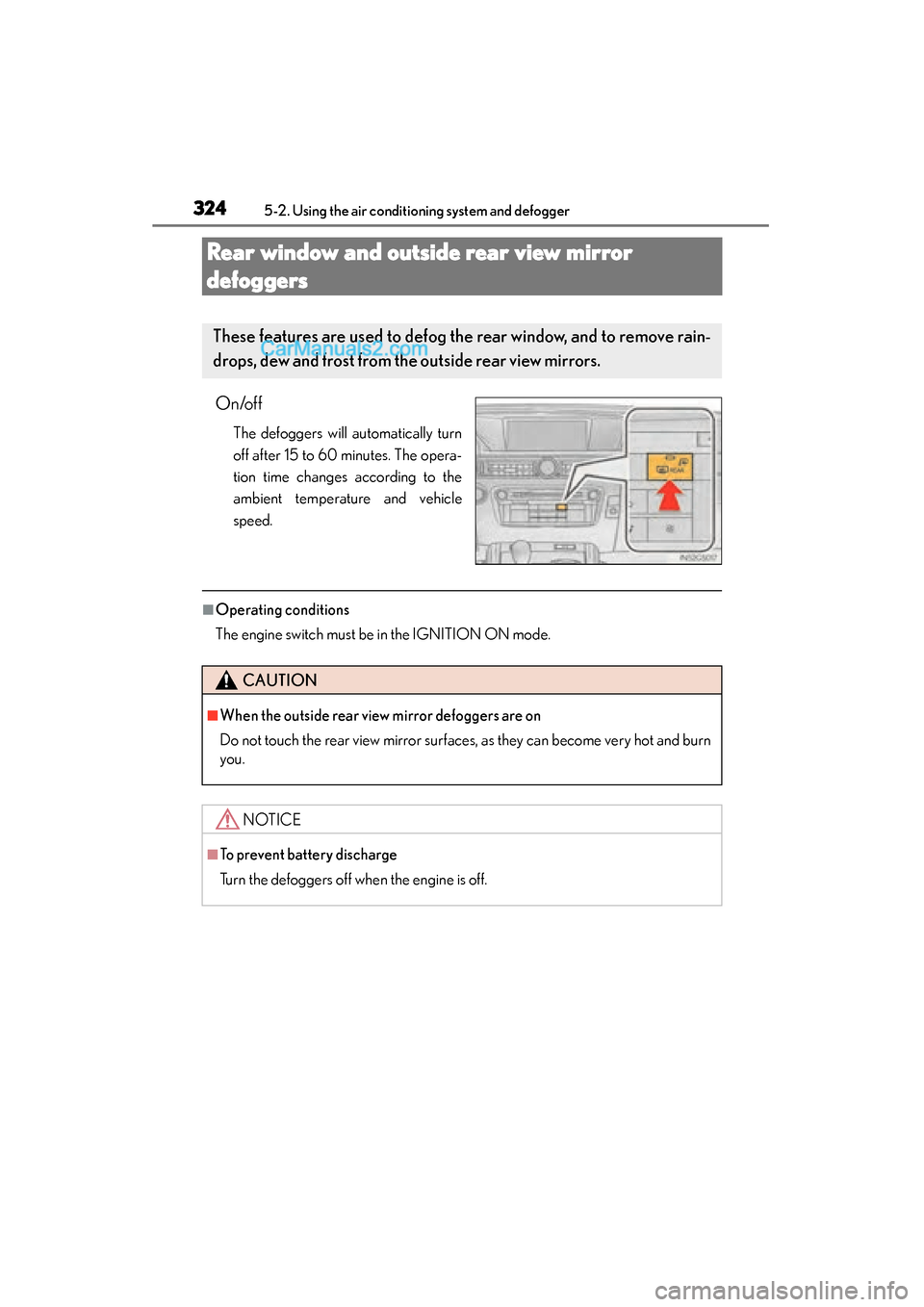
On/off
The defoggers will automatically turn
off after 15 to 60 minutes. The opera-
tion time changes according to the
ambient temperature and vehicle
speed.
■Operating conditions
The engine switch must be in the IGNITION ON mode.
These features are used to defog the rear window, and to remove rain-
drops, dew and frost from the outside rear view mirrors.
CAUTION
■When the outside rear view mirror defoggers are on
Do not touch the rear view mirror surfaces, as they can become very hot and burn
you.
NOTICE
■To prevent battery discharge
Turn the defoggers off when the engine is off.
GS350_OM_OM30F69U_(U).book Page 324 Monday, January 19, 2015 2:53 PM
Page 327 of 615
325
GS350_OM_OM30F69U_(U)5-2. Using the air conditioning system and defogger
5
Interior features
Windshield wiper de-icer∗
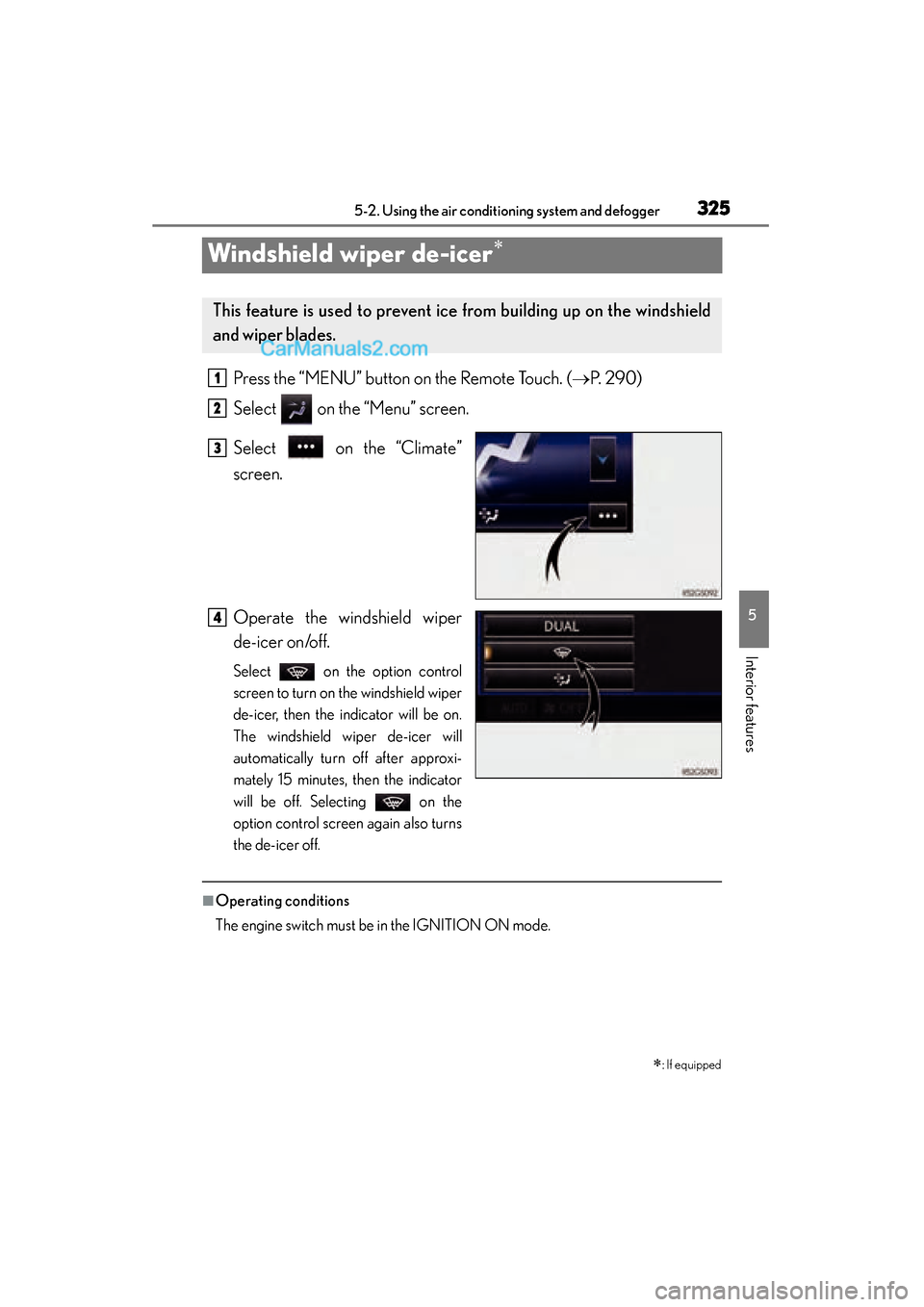
Press the “MENU” button on the Remote Touch. ( →P. 2 9 0 )
Select on the “Menu” screen.
Select on the “Climate”
screen.
Operate the windshield wiper
de-icer on/off.
Select on the option control
screen to turn on the windshield wiper
de-icer, then the indicator will be on.
The windshield wiper de-icer will
automatically turn off after approxi-
mately 15 minutes, then the indicator
will be off. Selecting on the
option control screen again also turns
the de-icer off.
■Operating conditions
The engine switch must be in the IGNITION ON mode.
∗: If equipped
This feature is used to prevent ice from building up on the windshield
and wiper blades.
1
2
3
4
GS350_OM_OM30F69U_(U).book Page 325 Monday, January 19, 2015 2:53 PM
Page 331 of 615
GS350_OM_OM30F69U_(U)
3295-3. Using the interior lights
5
Interior features
■Illuminated entry system
The lights automatically turn on/off according to engine switch mode, the presence
of the electronic key, whether the doors are locked/unlocked, and whether the doors
are opened/closed.
■To prevent battery discharge
If the interior lights remain on when the engine switch is turned off, the lights will go
off automatically after 20 minutes.
■Customization
Setting (e.g. the time elapsed before lights turn off) can be changed.
(Customizable features: →P. 559)
NOTICE
■To prevent battery discharge
Do not leave the lights on longer than necessary when the engine is not running.
GS350_OM_OM30F69U_(U).book Page 329 Monday, January 19, 2015 2:53 PM
Page 347 of 615
345
GS350_OM_OM30F69U_(U)5-5. Other interior features
5
Interior features
Heated steering wheel∗
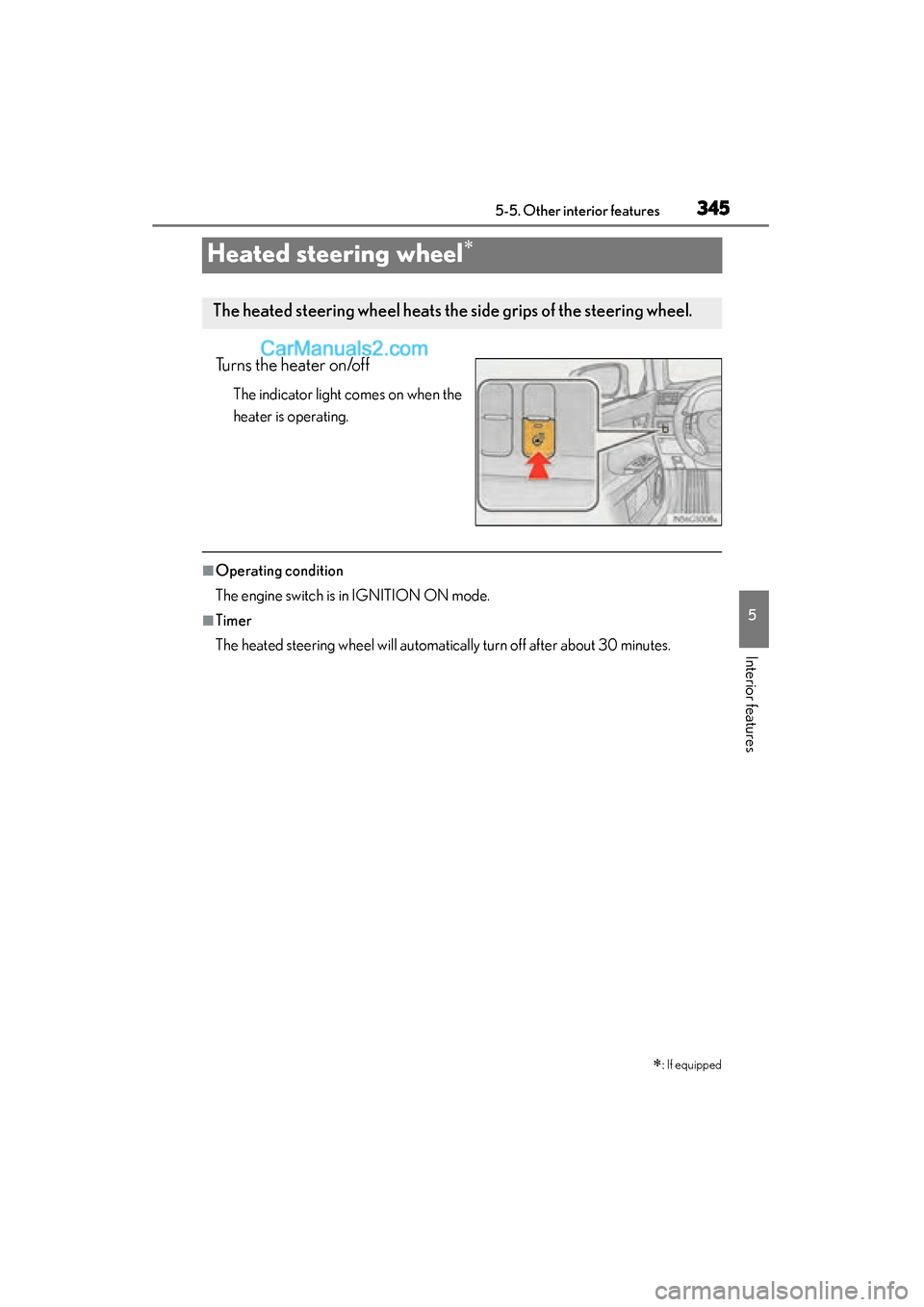
Turns the heater on/off
The indicator light comes on when the
heater is operating.
■Operating condition
The engine switch is in IGNITION ON mode.
■Timer
The heated steering wheel will automatically turn off after about 30 minutes.
∗: If equipped
The heated steering wheel heats the side grips of the steering wheel.
GS350_OM_OM30F69U_(U).book Page 345 Monday, January 19, 2015 2:53 PM
Page 355 of 615
GS350_OM_OM30F69U_(U)
3535-5. Other interior features
5
Interior features
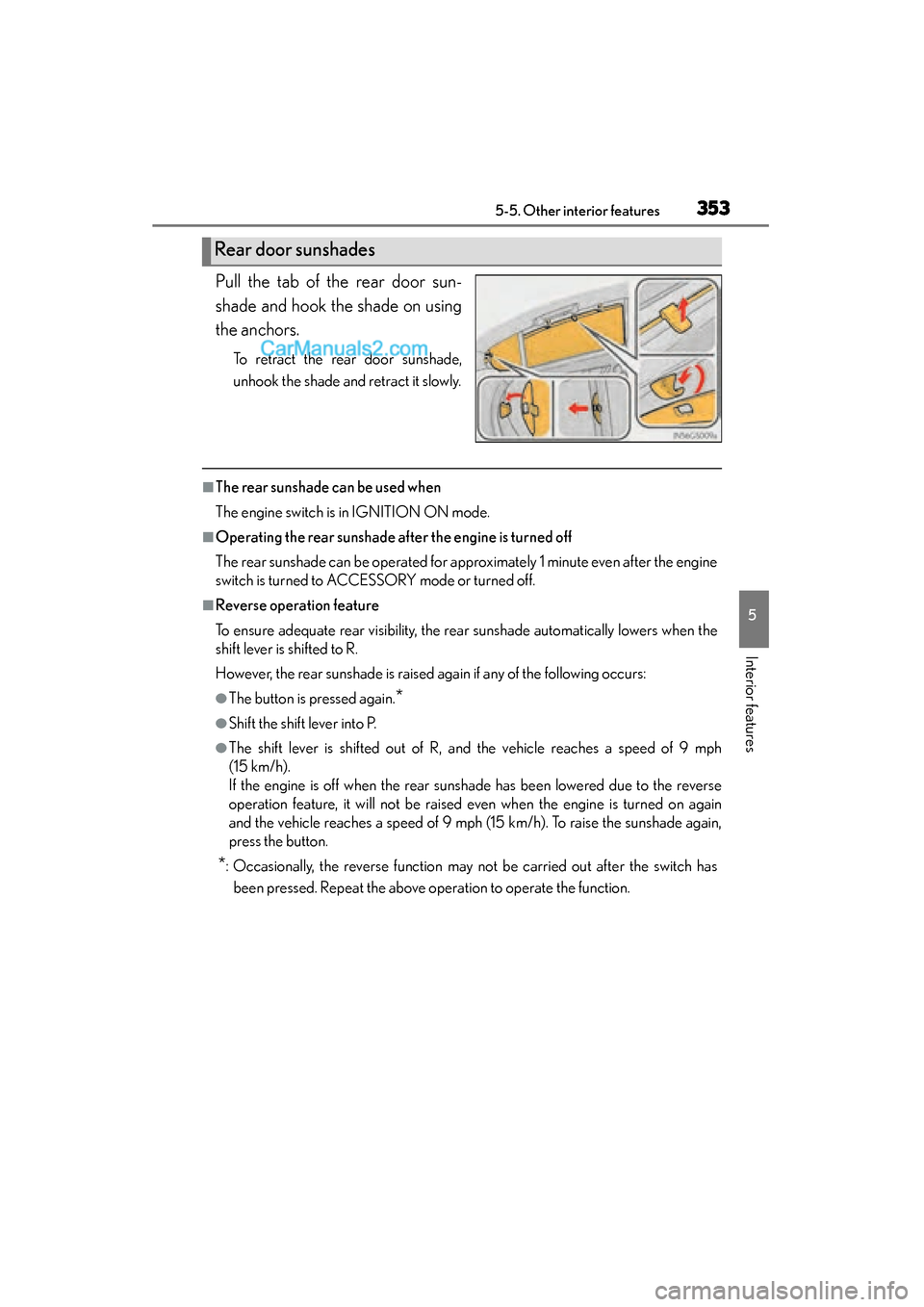
Pull the tab of the rear door sun-
shade and hook the shade on using
the anchors.
To retract the rear door sunshade,
unhook the shade and retract it slowly.
■The rear sunshade can be used when
The engine switch is in IGNITION ON mode.
■Operating the rear sunshade after the engine is turned off
The rear sunshade can be operated for approximately 1 minute even after the engine
switch is turned to ACCESSORY mode or turned off.
■Reverse operation feature
To ensure adequate rear visibility, the rear sunshade automatically lowers when the
shift lever is shifted to R.
However, the rear sunshade is raised again if any of the following occurs:
●The button is pressed again.*
●Shift the shift lever into P.
●The shift lever is shifted out of R, and the vehicle reaches a speed of 9 mph
(15 km/h).
If the engine is off when the rear sunshade has been lowered due to the reverse
operation feature, it will not be raised even when the engine is turned on again
and the vehicle reaches a speed of 9 mph (15 km/h). To raise the sunshade again,
press the button.
*: Occasionally, the reverse function may not be carried out after the switch hasbeen pressed. Repeat the above operation to operate the function.
Rear door sunshades
GS350_OM_OM30F69U_(U).book Page 353 Monday, January 19, 2015 2:53 PM