Lock light Lexus GS350 2015 Owner's Guide
[x] Cancel search | Manufacturer: LEXUS, Model Year: 2015, Model line: GS350, Model: Lexus GS350 2015Pages: 615, PDF Size: 12.93 MB
Page 201 of 615

GS350_OM_OM30F69U_(U)
1994-3. Operating the lights and wipers
4
Driving
■Daytime running light system
●To make your vehicle more visible to other drivers during daytime driving, the day-
time running lights turn on automatically whenever the engine is started and the
parking brake is released with the headlight switch in the or “AUTO” position.
(Illuminate brighter than the parking lights.)
Daytime running lights are not designed for use at night.
For the U.S.A.: Daytime running lights can be turned off by operating the switch.
●Compared to turning on the headlights, the daytime running light system offers
greater durability and consumes less electricity, so it can help improve fuel econ-
omy.
■Headlight control sensor
■Automatic light off system
When the light switch is in or : The headlights and tail lights turn off 30 sec-
onds after the engine switch is turned to ACCESSORY mode or turned off and a
door is opened and all of the doors and trunk are closed. (The lights turn off immedi-
ately if on the key is pressed twice after all the doors are closed.)
To turn the lights on again, turn the engine switch to IGNITION ON mode, or turn
the light switch off once and then back to or .
If any of the doors or trunk lid is kept open, the lights automatically turn off after 20
minutes.
■Light reminder buzzer
A buzzer sounds when the engine switch is turned off or turned to ACCESSORY
mode and the driver’s door is opened while the lights are turned on.
■Automatic headlight leveling system
The level of the headlights is automatically adjusted according to the number of pas-
sengers and the loading condition of the vehi cle to ensure that the headlights do not
interfere with other road users. The sensor may not function properly if an
object is placed on the sensor, or anything
that blocks the sensor is affixed to the wind-
shield.
Doing so interferes with the sensor detecting
the level of ambient light and may cause the
automatic headlight system to malfunction.
GS350_OM_OM30F69U_(U).book Page 199 Monday, January 19, 2015 2:53 PM
Page 209 of 615

GS350_OM_OM30F69U_(U)
2074-3. Operating the lights and wipers
4
Driving
■Raindrop sensor (vehicles with rain-sensing windshield wipers)
●If AUTO mode is selected while the engine switch is in IGNITION ON mode, the
wipers will operate once to show that AUTO mode is activated.
●If the temperature of the raindrop sensor is 185°F (85°C) or higher, or -22°F
(-30°C) or lower, automatic operation may not occur. In this case, operate the
wipers in any mode other than AUTO mode.
■When the windshield wipers are in temporary operation
AUTO mode cannot be activated even if is pressed.
■If no windshield washer fluid sprays
Check that the washer nozzles are not blocked if there is washer fluid in the wind-
shield washer fluid reservoir.
●The raindrop sensor judges the amount of
raindrops.
An optical sensor is adopted. It may not
operate properly when sunlight from the
rising or setting of the sun intermittently
strikes the windshield, or if bugs etc. are
present on the windshield.
CAUTION
■Caution regarding the use of windshield wipers in AUTO mode
The windshield wipers may operate unexpectedly if the sensor is touched or the
windshield is subject to vibration in AUTO mode. Take care that your fingers or
anything else do not become caught in the windshield wipers.
■Caution regarding the use of washer fluid
When it is cold, do not use the washer fluid until the windshield becomes warm.
The fluid may freeze on the windshield and cause low visibility. This may lead to an
accident, resulting in death or serious injury.
GS350_OM_OM30F69U_(U).book Page 207 Monday, January 19, 2015 2:53 PM
Page 210 of 615
208
GS350_OM_OM30F69U_(U)
4-3. Operating the lights and wipers
NOTICE
■When the windshield is dry
Do not use the wipers, as they may damage the windshield.
■When there is no washer fluid spray from the nozzle
Damage to the washer fluid pump may be caused if the lever is pulled toward you
and held continually.
■When a nozzle becomes blocked
In this case, contact your Lexus dealer.
Do not try to clear it with a pin or other object. The nozzle will be damaged.
■When standing the windshield wipers up
Raise the wipers in line with the windshield. (→P. 2 8 6 )
Failure to do so may result in damage to the wipers and/or the hood.
GS350_OM_OM30F69U_(U).book Page 208 Monday, January 19, 2015 2:53 PM
Page 213 of 615
GS350_OM_OM30F69U_(U)
2114-4. Refueling
4
Driving
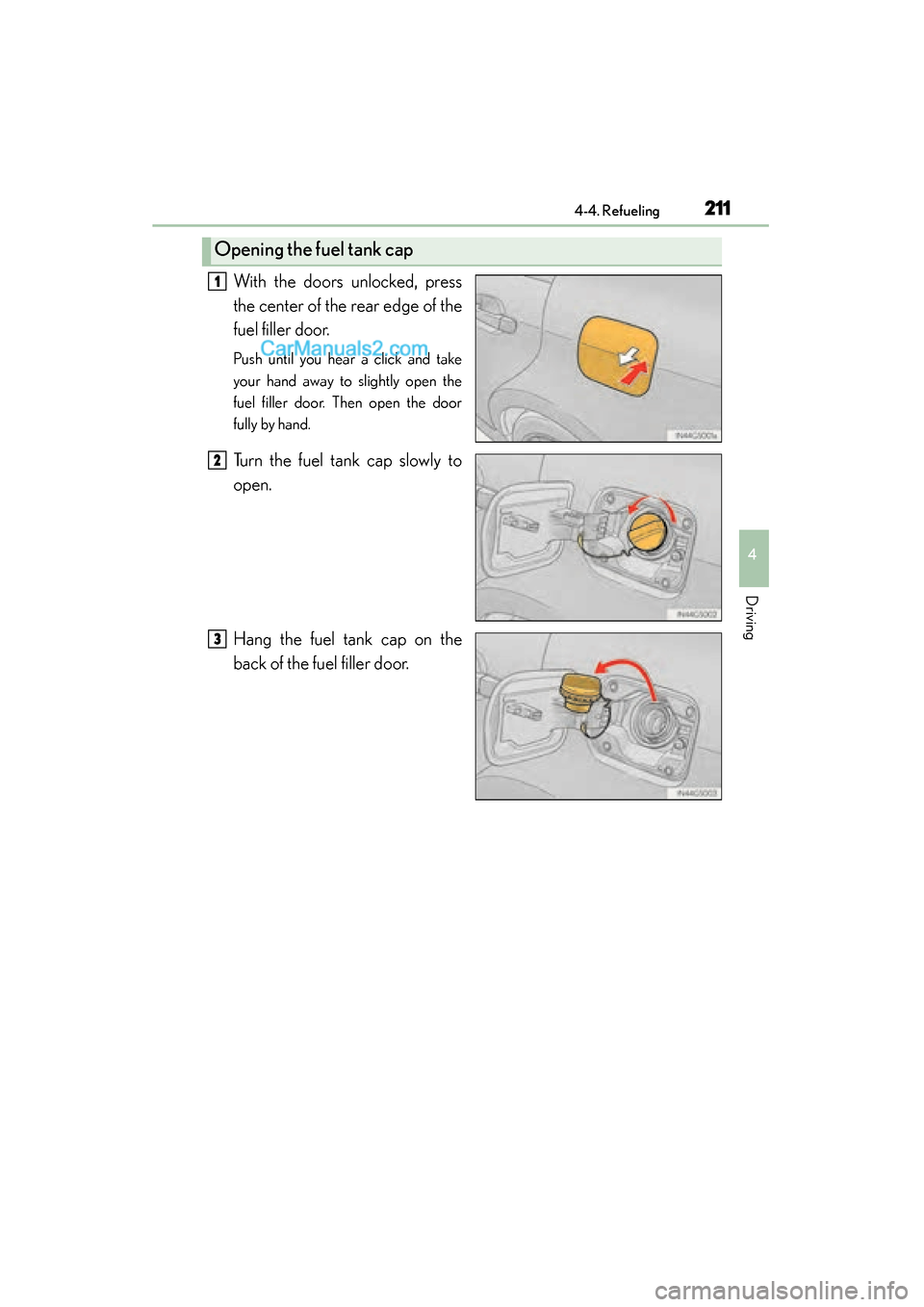
With the doors unlocked, press
the center of the rear edge of the
fuel filler door.
Push until you hear a click and take
your hand away to slightly open the
fuel filler door. Then open the door
fully by hand.
Turn the fuel tank cap slowly to
open.
Hang the fuel tank cap on the
back of the fuel filler door.
Opening the fuel tank cap
1
2
3
GS350_OM_OM30F69U_(U).book Page 211 Monday, January 19, 2015 2:53 PM
Page 215 of 615
GS350_OM_OM30F69U_(U)
2134-4. Refueling
4
Driving
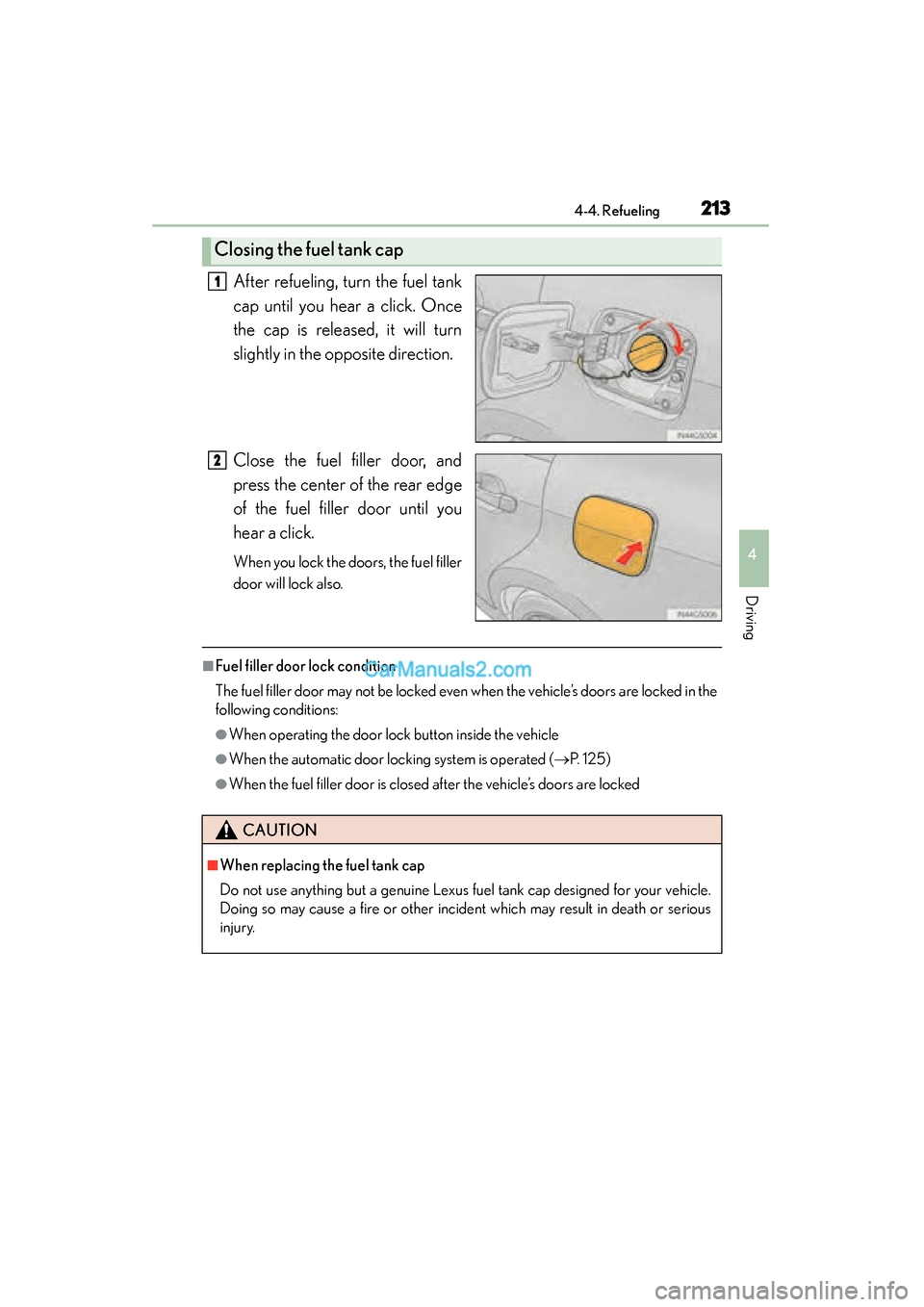
After refueling, turn the fuel tank
cap until you hear a click. Once
the cap is released, it will turn
slightly in the opposite direction.
Close the fuel filler door, and
press the center of the rear edge
of the fuel filler door until you
hear a click.
When you lock the doors, the fuel filler
door will lock also.
■Fuel filler door lock condition
The fuel filler door may not be locked even when the vehicle’s doors are locked in the
following conditions:
●When operating the door lock button inside the vehicle
●When the automatic door locking system is operated (→P. 1 2 5 )
●When the fuel filler door is closed after the vehicle’s doors are locked
Closing the fuel tank cap
1
2
CAUTION
■When replacing the fuel tank cap
Do not use anything but a genuine Lexus fuel tank cap designed for your vehicle.
Doing so may cause a fire or other incident which may result in death or serious
injury.
GS350_OM_OM30F69U_(U).book Page 213 Monday, January 19, 2015 2:53 PM
Page 266 of 615

264
GS350_OM_OM30F69U_(U)
4-5. Using the driving support systems
CAUTION
■Limitations of the pre-collision system
Do not overly rely on the pre-collision system. Always drive safely, taking care to
observe your surroundings and checking for any obstacles or other road hazards.
Failure to do so may cause an accident resulting in death or serious injury.
■Handling the radar sensor
Observe the following to ensure the pre-collision system can function effectively.
Otherwise, the system may not function correctly and could result in an accident.
●Keep the sensor and grille cover clean at all times.
Clean the sensor and grille cover with a soft cloth so you do not mark or damage
them.
●Do not subject the sensor or surrounding area to a strong impact.
If the sensor moves even slightly off position, the system may become inaccurate
or malfunction. If the sensor or surrounding area is subject to a strong impact,
always have the area inspected and adjusted by your Lexus dealer.
●Do not disassemble the sensor.
●Do not attach accessories or stickers to the sensor, grille cover or surrounding
area.
●Do not modify or paint the sensor and grille cover.
●If the radar sensor needs to be replaced, contact your Lexus dealer.
■Determining the direction the driver is fa cing and whether the driver’s eyes are
open or closed
The direction the driver is facing and whether the driver’s eyes are open or closed
may not be determined correctly if the following conditions exist:
●There is an object between the driver monitor sensor and the driver’s face, such
as when the sensor is blocked.
●A part of the driver’s face is covered.
●The sensor or the driver’s face is exposed to intense light such as sunlight.
●The driving posture is improper.
GS350_OM_OM30F69U_(U).book Page 264 Monday, January 19, 2015 2:53 PM
Page 286 of 615
284
GS350_OM_OM30F69U_(U)
4-6. Driving tips
Perform the following according to the driving conditions:
●Do not try to forcibly open a window or move a wiper that is frozen.
Pour warm water over the frozen area to melt the ice. Wipe away the
water immediately to prevent it from freezing.
●To ensure proper operation of the climate control system fan, remove
any snow that has accumulated on the air inlet vents in front of the wind-
shield.
●Check for and remove any excess ice or snow that may have accumu-
lated on the exterior lights, vehicle’s roof, chassis, around the tires or on
the brakes.
●Remove any snow or mud from the bottom of your shoes before getting
in the vehicle.
Accelerate the vehicle slowly, keep a safe distance between you and the
vehicle ahead, and drive at a reduced speed suitable to road conditions.
Park the vehicle and move the shift lever to P without setting the parking
brake. The parking brake may freeze up, preventing it from being
released. If necessary, block the wheels to prevent inadvertent sliding or
creeping.
Before driving the vehicle
When driving the vehicle
When parking the vehicle
GS350_OM_OM30F69U_(U).book Page 284 Monday, January 19, 2015 2:53 PM
Page 291 of 615
289
GS350_OM_OM30F69U_(U)
Interior features5
5-1. Remote Touch screen Remote Touch/12.3-inch display ......................................... 290
5-2. Using the air conditioning system and defogger
Front automatic air conditioning system .........299
Rear air conditioning system ........................................... 319
Rear window and outside rear view mirror defoggers........... 324
Windshield wiper de-icer .......325
5-3. Using the interior lights Interior lights list.......................... 327• Interior light ............................328
• Personal lights........................328 5-4. Using the storage features
List of storage features ............330• Glove box ............................... 332
• Console box........................... 333
• Cup holders ........................... 334
• Auxiliary boxes ..................... 336
Trunk features .............................. 337
5-5. Other interior features Sun visors and vanity mirrors ...................340
Clock................................................ 341
Ashtrays ......................................... 342
Power outlets ...............................343
Heated steering wheel ............ 345
Seat heaters/ seat ventilators ......................... 347
Armrest ........................................... 351
Rear sunshade/ rear door sunshades .............. 352
Trunk storage extension .......... 355
Coat hooks ................................... 356
Assist grips.................................... 357
Utility hook....................................358
Garage door opener................ 359
LEXUS Enform Safety Connect ...................................... 366
GS350_OM_OM30F69U_(U).book Page 289 Monday, January 19, 2015 2:53 PM
Page 317 of 615
GS350_OM_OM30F69U_(U)
3155-2. Using the air conditioning system and defogger
5
Interior features
■Registering air conditioning settings to electronic keys
●Unlocking the vehicle using an electronic key and turning the engine switch to
IGNITION ON mode will recall that key’s registered air conditioning settings.
●When the engine switch is turned off, the current air conditioning settings will auto-
matically be registered to the electronic key that was used to unlock the vehicle.
The system may not operate correctly if more than one electronic key is in the vicinity
or if the smart access system with push-button start is used to unlock a passenger
door.
Settings for the electronic key and the corresponding door can be changed. Contact
your Lexus dealer.
■Using automatic mode
●Fan speed is adjusted automatically according to the temperature setting and the
ambient conditions.
Therefore, the fan may stop for a while until warm or cool air is ready to flow imme-
diately after is pressed.
●Cool air may blow around the upper body even when the heater is on due to sun-
light.
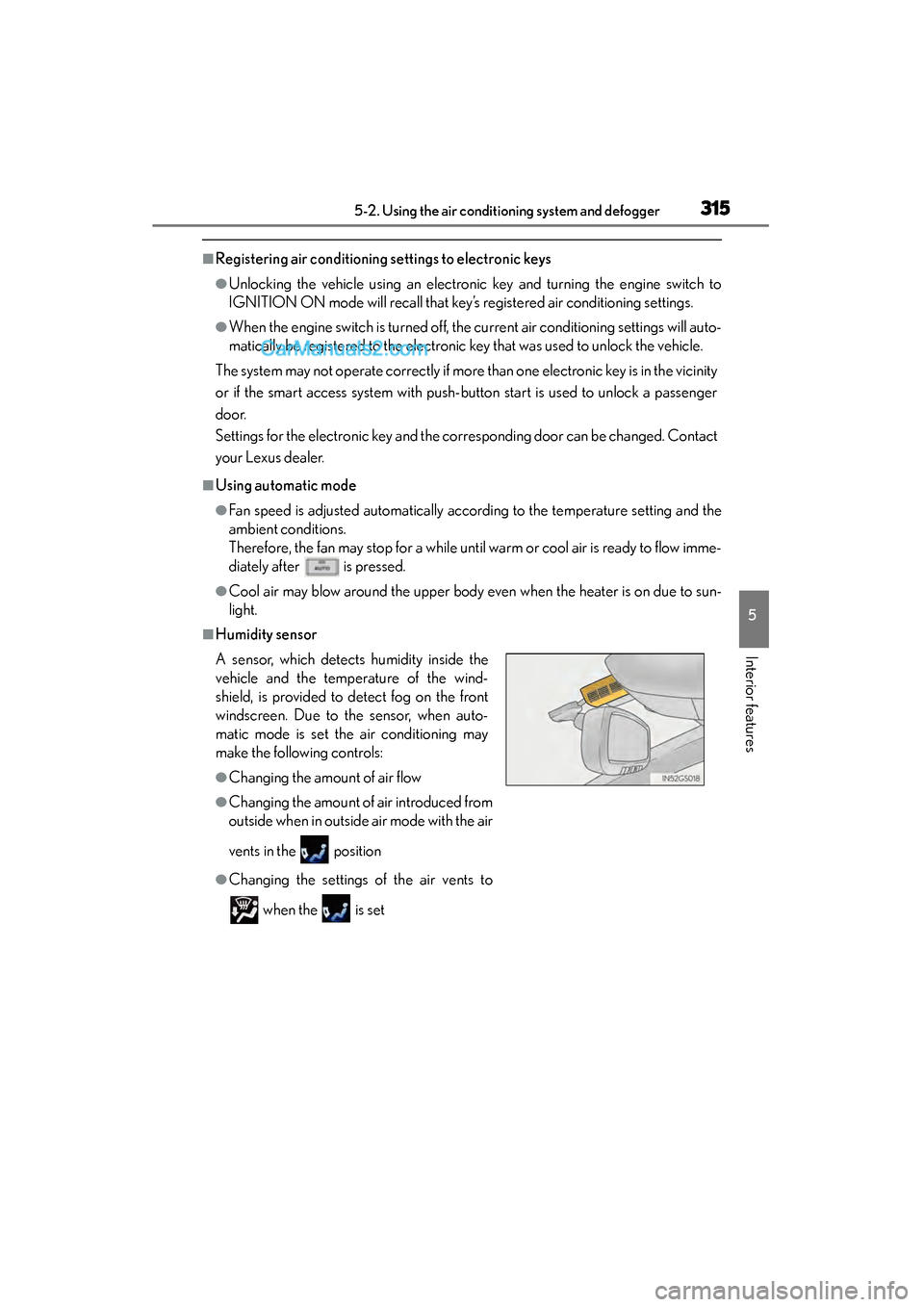
■Humidity sensor
A sensor, which detects humidity inside the
vehicle and the temperature of the wind-
shield, is provided to detect fog on the front
windscreen. Due to the sensor, when auto-
matic mode is set the air conditioning may
make the following controls:
●Changing the amount of air flow
●Changing the amount of air introduced from
outside when in outside air mode with the air
vents in the position
●Changing the settings of the air vents to
when the is set
GS350_OM_OM30F69U_(U).book Page 315 Monday, January 19, 2015 2:53 PM
Page 331 of 615
GS350_OM_OM30F69U_(U)
3295-3. Using the interior lights
5
Interior features
■Illuminated entry system
The lights automatically turn on/off according to engine switch mode, the presence
of the electronic key, whether the doors are locked/unlocked, and whether the doors
are opened/closed.
■To prevent battery discharge
If the interior lights remain on when the engine switch is turned off, the lights will go
off automatically after 20 minutes.
■Customization
Setting (e.g. the time elapsed before lights turn off) can be changed.
(Customizable features: →P. 559)
NOTICE
■To prevent battery discharge
Do not leave the lights on longer than necessary when the engine is not running.
GS350_OM_OM30F69U_(U).book Page 329 Monday, January 19, 2015 2:53 PM