wiper Lexus GS350 2015 Owner's Guide
[x] Cancel search | Manufacturer: LEXUS, Model Year: 2015, Model line: GS350, Model: Lexus GS350 2015Pages: 615, PDF Size: 12.93 MB
Page 240 of 615

238
GS350_OM_OM30F69U_(U)
4-5. Using the driving support systems
■Temporary cancelation of the LKA system functions
If any of the following occurs, the LKA system functions will be temporarily canceled.
The functions will resume after the necessary operating conditions have returned.
●The steering wheel is turned as far as necessary to cause the vehicle to change
lanes.
●When the system detects no-handed driving. (The lane keeping assist function will
be temporarily canceled, but the lane departure warning function will continue.)
●The turn signal lever is operated.
●The vehicle speed deviates from the operating range of the LKA system functions.
(The buzzer will beep twice when the lane keeping assist function is being can-
celed.)
●When the lane lines cannot be recognized while driving. (The buzzer will beep
twice when the lane keeping assist function is being canceled.)
●The wiper switch is set on high speed mode or is set on AUTO mode with wipers
operating at high speed. (The lane keeping assist function will be temporarily can-
celed, but the lane departure warning function will continue.)
●If the vehicle crosses a line for approximately half a minute or more. (The lane keep-
ing assist function will be temporarily canceled, but the lane departure warning
function will continue.)
●When the lane departure warning function is activated.
The lane departure warning function will not operate again for a several seconds
after it has been activated, even if the vehicle leaves the lane again.
■The lane departure warning
It may be difficult to feel the sensory warning depending on the road conditions.
■No-handed driving warning
If the steering wheel is not operated for approximately 15 seconds on a straight road
or approximately 5 seconds on a curve, the buzzer will beep twice, indicators on the
multi-information display will flash, and the lane keeping assist function will be tem-
porarily canceled. If you drive the vehicle with your hands lightly touching the steer-
ing wheel, this may also be detected as no-handed driving.
■After the vehicle has been parked in the sun
The LKA system functions may not be available and a warning message (→P. 4 8 9 )
will be displayed for a while after driving has started. In such cases, turn the LKA sys-
tem off and turn it on again after normal temperature returns. When the temperature
in the cabin decreases and the temperature around the camera sensor ( →P. 2 3 3 )
becomes suitable for its operation, the functions will begin to operate.
GS350_OM_OM30F69U_(U).book Page 238 Monday, January 19, 2015 2:53 PM
Page 286 of 615
284
GS350_OM_OM30F69U_(U)
4-6. Driving tips
Perform the following according to the driving conditions:
●Do not try to forcibly open a window or move a wiper that is frozen.
Pour warm water over the frozen area to melt the ice. Wipe away the
water immediately to prevent it from freezing.
●To ensure proper operation of the climate control system fan, remove
any snow that has accumulated on the air inlet vents in front of the wind-
shield.
●Check for and remove any excess ice or snow that may have accumu-
lated on the exterior lights, vehicle’s roof, chassis, around the tires or on
the brakes.
●Remove any snow or mud from the bottom of your shoes before getting
in the vehicle.
Accelerate the vehicle slowly, keep a safe distance between you and the
vehicle ahead, and drive at a reduced speed suitable to road conditions.
Park the vehicle and move the shift lever to P without setting the parking
brake. The parking brake may freeze up, preventing it from being
released. If necessary, block the wheels to prevent inadvertent sliding or
creeping.
Before driving the vehicle
When driving the vehicle
When parking the vehicle
GS350_OM_OM30F69U_(U).book Page 284 Monday, January 19, 2015 2:53 PM
Page 288 of 615
286
GS350_OM_OM30F69U_(U)
4-6. Driving tips
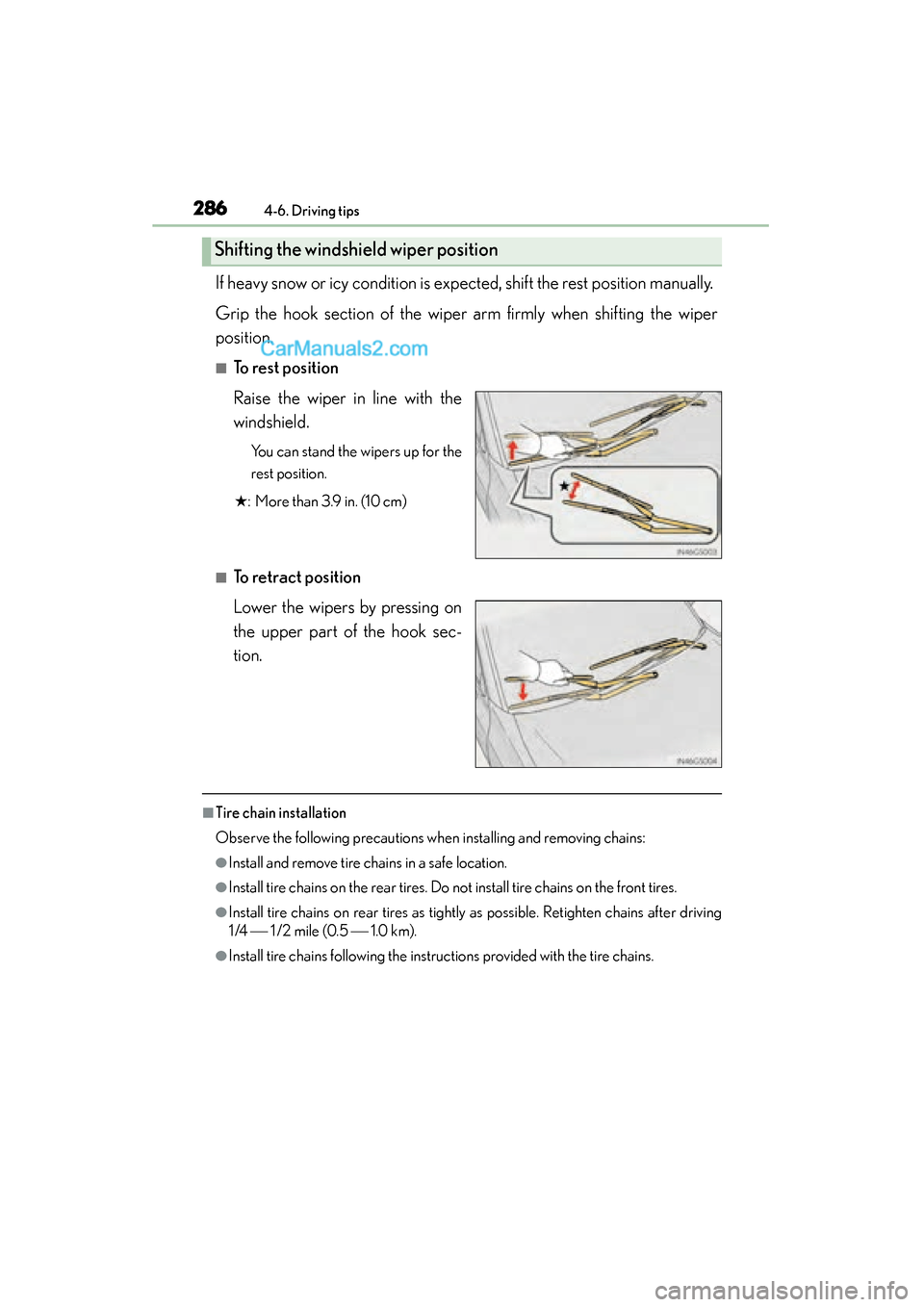
If heavy snow or icy condition is expected, shift the rest position manually.
Grip the hook section of the wiper arm firmly when shifting the wiper
position.
■To rest position
Raise the wiper in line with the
windshield.
You can stand the wipers up for the
rest position.
★ : More than 3.9 in. (10 cm)
■To retract position
Lower the wipers by pressing on
the upper part of the hook sec-
tion.
■Tire chain installation
Observe the following precautions when installing and removing chains:
●Install and remove tire chains in a safe location.
●Install tire chains on the rear tires. Do not install tire chains on the front tires.
●Install tire chains on rear tires as tightly as possible. Retighten chains after driving
1/4 1/2 mile (0.5 1.0 km).
●Install tire chains following the instructions provided with the tire chains.
Shifting the windshield wiper position
GS350_OM_OM30F69U_(U).book Page 286 Monday, January 19, 2015 2:53 PM
Page 290 of 615
288
GS350_OM_OM30F69U_(U)
4-6. Driving tips
NOTICE
■Repairing or replacing snow tires
Request repairs or replacement of snow tires from Lexus dealers or legitimate tire
retailers.
This is because the removal and attachment of snow tires affects the operation of
the tire pressure warning valves and transmitters.
■Fitting tire chains (vehicles with front and rear tires of the same size except for
the vehicles with LDH and 19 inch tires)
The tire pressure warning valves and transmitters may not function correctly when
tire chains are fitted.
■When standing the windshield wipers up
Raise the wipers in line with the windshield. (→P. 2 8 6 )
Failure to do so may result in damage to the wipers and/or the hood.
GS350_OM_OM30F69U_(U).book Page 288 Monday, January 19, 2015 2:53 PM
Page 291 of 615
289
GS350_OM_OM30F69U_(U)
Interior features5
5-1. Remote Touch screen Remote Touch/12.3-inch display ......................................... 290
5-2. Using the air conditioning system and defogger
Front automatic air conditioning system .........299
Rear air conditioning system ........................................... 319
Rear window and outside rear view mirror defoggers........... 324
Windshield wiper de-icer .......325
5-3. Using the interior lights Interior lights list.......................... 327• Interior light ............................328
• Personal lights........................328 5-4. Using the storage features
List of storage features ............330• Glove box ............................... 332
• Console box........................... 333
• Cup holders ........................... 334
• Auxiliary boxes ..................... 336
Trunk features .............................. 337
5-5. Other interior features Sun visors and vanity mirrors ...................340
Clock................................................ 341
Ashtrays ......................................... 342
Power outlets ...............................343
Heated steering wheel ............ 345
Seat heaters/ seat ventilators ......................... 347
Armrest ........................................... 351
Rear sunshade/ rear door sunshades .............. 352
Trunk storage extension .......... 355
Coat hooks ................................... 356
Assist grips.................................... 357
Utility hook....................................358
Garage door opener................ 359
LEXUS Enform Safety Connect ...................................... 366
GS350_OM_OM30F69U_(U).book Page 289 Monday, January 19, 2015 2:53 PM
Page 305 of 615
GS350_OM_OM30F69U_(U)
3035-2. Using the air conditioning system and defogger
5
Interior features
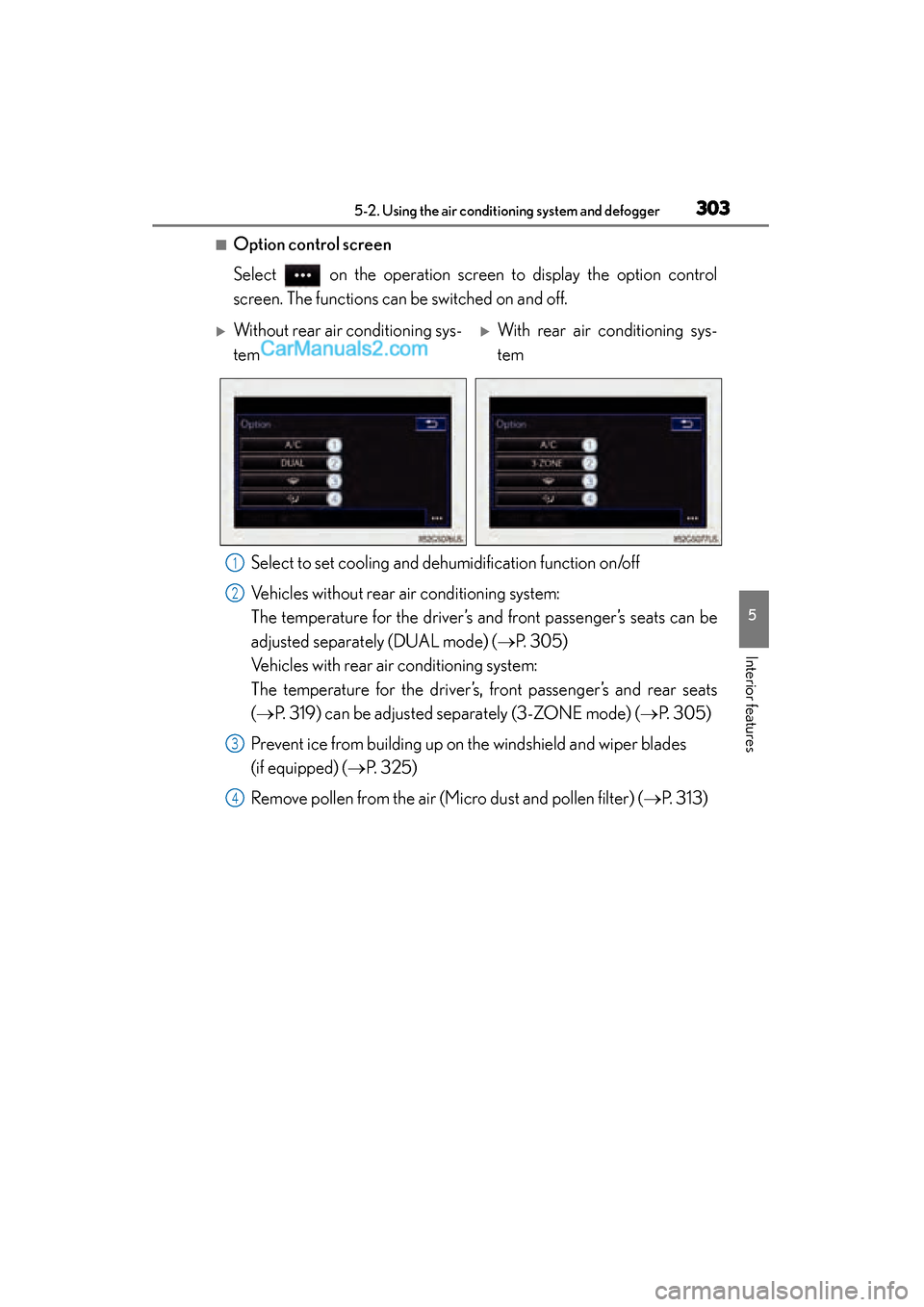
■Option control screen
Select on the operation screen to display the option control
screen. The functions can be switched on and off.Select to set cooling and de humidification function on/off
Vehicles without rear air conditioning system:
The temperature for the driver’s and front passenger’s seats can be
adjusted separately (DUAL mode) ( →P. 305)
Vehicles with rear air conditioning system:
The temperature for the driver’s, front passenger’s and rear seats
(→ P. 319) can be adjusted separately (3-ZONE mode) ( →P. 305)
Prevent ice from building up on the windshield and wiper blades
(if equipped) ( →P. 325)
Remove pollen from the air (Micro dust and pollen filter) ( →P. 313)
XWithout rear air conditioning sys-
temXWith rear air conditioning sys-
tem
1
2
3
4
GS350_OM_OM30F69U_(U).book Page 303 Monday, January 19, 2015 2:53 PM
Page 327 of 615
325
GS350_OM_OM30F69U_(U)5-2. Using the air conditioning system and defogger
5
Interior features
Windshield wiper de-icer∗
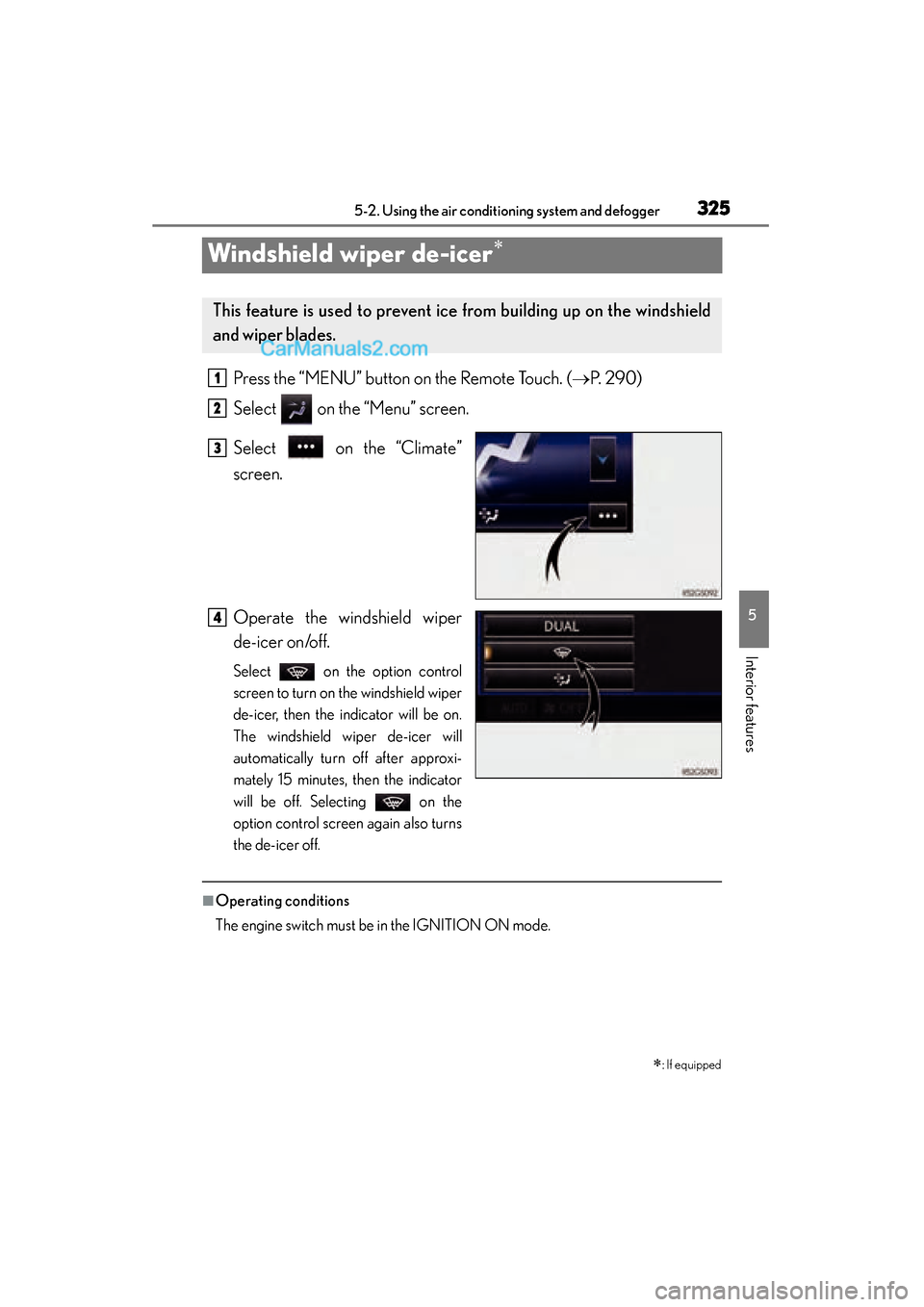
Press the “MENU” button on the Remote Touch. ( →P. 2 9 0 )
Select on the “Menu” screen.
Select on the “Climate”
screen.
Operate the windshield wiper
de-icer on/off.
Select on the option control
screen to turn on the windshield wiper
de-icer, then the indicator will be on.
The windshield wiper de-icer will
automatically turn off after approxi-
mately 15 minutes, then the indicator
will be off. Selecting on the
option control screen again also turns
the de-icer off.
■Operating conditions
The engine switch must be in the IGNITION ON mode.
∗: If equipped
This feature is used to prevent ice from building up on the windshield
and wiper blades.
1
2
3
4
GS350_OM_OM30F69U_(U).book Page 325 Monday, January 19, 2015 2:53 PM
Page 328 of 615

326
GS350_OM_OM30F69U_(U)
5-2. Using the air conditioning system and defogger
CAUTION
■When the windshield wiper de-icer is on
Do not touch the glass at the lower part of the windshield or to the side of the front
pillars as the surfaces can become very hot and burn you.
GS350_OM_OM30F69U_(U).book Page 326 Monday, January 19, 2015 2:53 PM
Page 378 of 615

376
GS350_OM_OM30F69U_(U)
6-1. Maintenance and care
CAUTION
■When washing the vehicle
Do not apply water to the inside of the engine compartment. Doing so may cause
the electrical components etc. to catch fire.
■When cleaning the windshield (vehicles with rain-sensing windshield wipers)
●When the upper part of the windshield where the raindrop sensor is located is
touched by hand
●When a wet rag or similar is held close to the raindrop sensor
●If something bumps against the windshield
●If you directly touch the raindrop sensor body or if something bumps into the
raindrop sensor
■Precautions regarding the exhaust pipes and rear bumper diffusers
Exhaust gases cause the exhaust pipes and rear bumper diffusers to become quite
hot.
When washing the vehicle, be careful not to touch the pipes and diffusers until they
have cooled sufficiently, as touching hot exhaust pipes and rear bumper diffusers
can cause burns.
■Precaution regarding the rear bumper with Blind Spot Monitor (if equipped)
If the paint of the rear bumper is chipped or scratched, the system may malfunc-
tion. If this occurs, consult your Lexus dealer.
Turn off AUTO mode of the wiper to prevent
the wiper from operating. ( →P. 206)
If AUTO mode is selected, the wipers may
operate unexpectedly in the following situa-
tions, and may result in hands being caught
or other serious injuries and cause damage
to the wiper blades.
GS350_OM_OM30F69U_(U).book Page 376 Monday, January 19, 2015 2:53 PM
Page 379 of 615
GS350_OM_OM30F69U_(U)
3776-1. Maintenance and care
6
Maintenance and care
NOTICE
■To prevent paint deterioration and corrosion on the body and components (alu-
minum wheels etc.)
●Wash the vehicle immediately in the following cases:
• After driving near the sea coast
• After driving on salted roads
• If coal tar or tree sap is present on the paint surface
• If dead insects, insect droppings or bird droppings are present on the paintsurface
• After driving in an area contaminated with soot, oily smoke, mine dust, iron powder or chemical substances
• If the vehicle becomes heavily soiled with dust or mud
• If liquids such as benzene and gasoline are spilled on the paint surface
●If the paint is chipped or scratched, have it repaired immediately.
●To prevent the wheels from corroding, remove any dirt and store in a place with
low humidity when storing the wheels.
■Cleaning the exterior lights
●Wash carefully. Do not use organic substances or scrub with a hard brush.
This may damage the surfaces of the lights.
●Do not apply wax to the surfaces of the lights.
Wax may cause damage to the lenses.
■When using an automatic car wash (vehicles with rain-sensing windshield wipers)
Turn off AUTO mode of the wiper to prevent the wiper from operating. ( →P. 206)
If AUTO mode is selected, the wipers may operate and the wiper blades may be
damaged.
■When using a high-pressure car wash
●When washing the vehicle, do not let water from the high-pressure washer
directly hit the camera or the area around the camera. Due to the shock from
high-pressure water, it is possible that the device may not operate normally.
●Do not bring the nozzle tip close to boots (rubber or resin manufactured cover),
connectors or the following parts. The parts may be damaged if they come into
contact with high-pressure water.
• Drivetrain system related parts
•Steering parts
• Suspension parts
•Brake parts
GS350_OM_OM30F69U_(U).book Page 377 Monday, January 19, 2015 2:53 PM