PCS Lexus GS350 2015 Owner's Manual
[x] Cancel search | Manufacturer: LEXUS, Model Year: 2015, Model line: GS350, Model: Lexus GS350 2015Pages: 615, PDF Size: 12.93 MB
Page 5 of 615
3
1
8 7
6
5
4
3
2
GS350_OM_OM30F69U_(U)
9
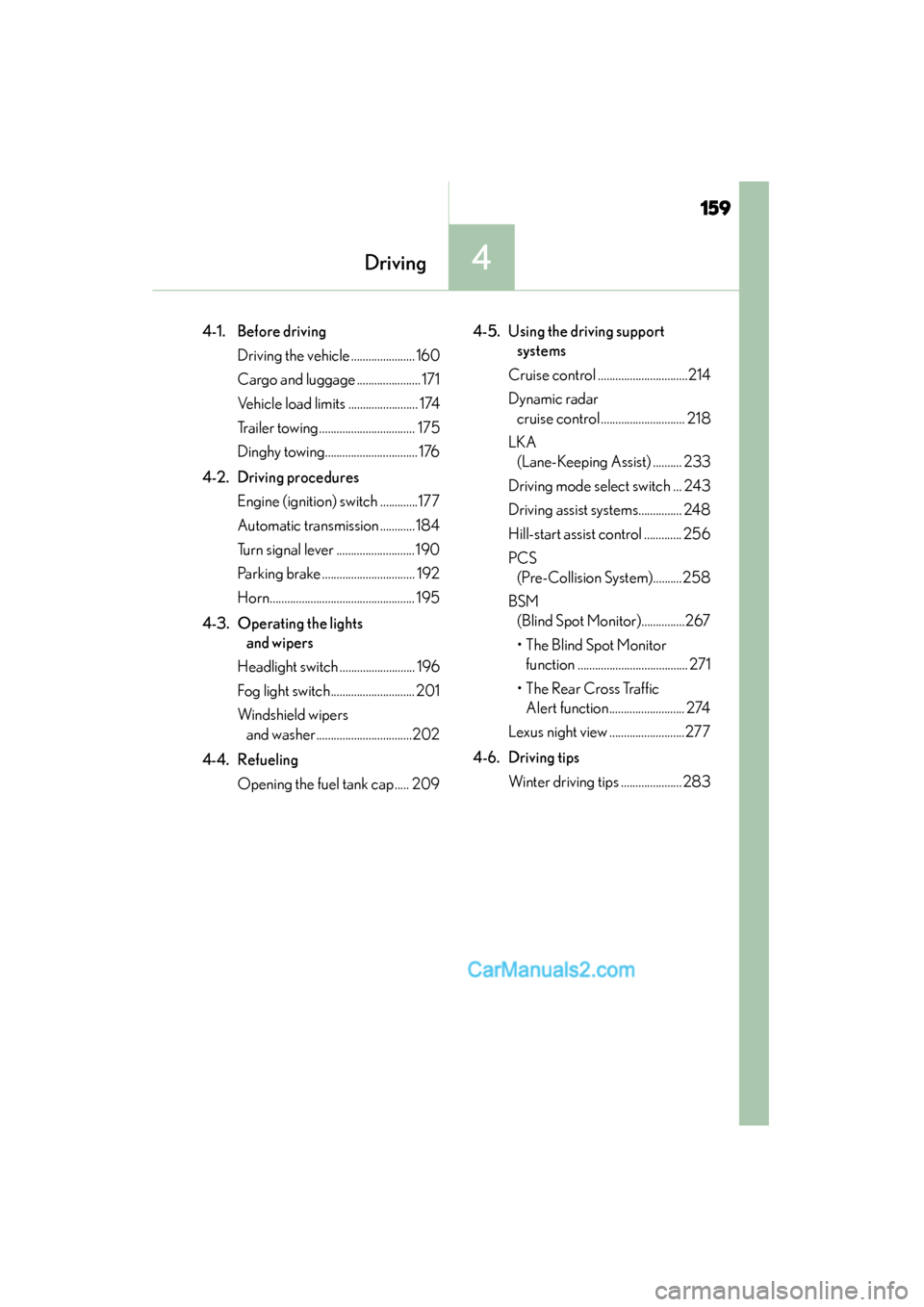
4-1. Before drivingDriving the vehicle ..................... 160
Cargo and luggage...................... 171
Vehicle load limits .........................174
Trailer towing ................................. 175
Dinghy towing ............................... 176
4-2. Driving procedures Engine (ignition) switch ............. 177
Automatic transmission ........... 184
Turn signal lever ........................... 190
Parking brake ................................192
Horn ..................................................195
4-3. Operating the lights and wipers
Headlight switch ..........................196
Fog light switch ............................ 201
Windshield wipers and washer ................................ 202
4-4. Refueling Opening the fuel tank cap ..... 209 4-5. Using the driving support
systems
Cruise control ............................... 214
Dynamic radar cruise control............................. 218
LKA (Lane-Keeping Assist) .......... 233
Driving mode select switch ... 243
Driving assist systems .............. 248
Hill-start assist control ............. 256
PCS (Pre-Collision System) ......... 258
BSM (Blind Spot Monitor) .............. 267
•The Blind Spot Monitor function ...................................... 271
• The Rear Cross Traffic Alert function ......................... 274
Lexus night view .......................... 277
4-6. Driving tips Winter driving tips ..................... 283
4Driving
GS350_OM_OM30F69U_(U).book Page 3 Monday, January 19, 2015 2:53 PM
Page 21 of 615
19Pictorial index
GS350_OM_OM30F69U_(U)
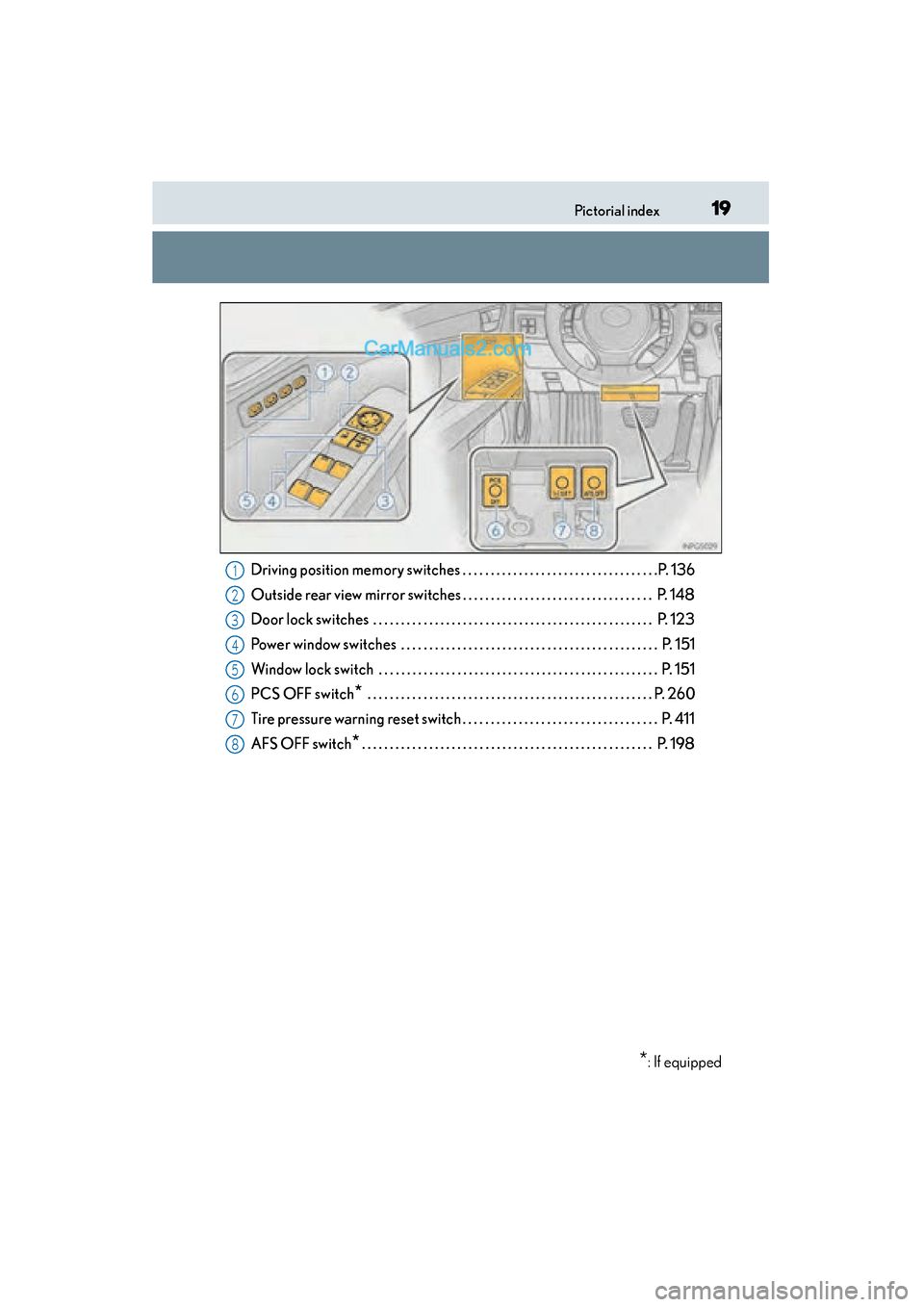
Driving position memory switches . . . . . . . . . . . . . . . . . . . . . . . . . . . . . . . . . . .P. 136
Outside rear view mirror switches . . . . . . . . . . . . . . . . . . . . . . . . . . . . . . . . . . P. 148
Door lock switches . . . . . . . . . . . . . . . . . . . . . . . . . . . . . . . . . . . . . . . . . . . . . . . . . . P. 123
Power window switches . . . . . . . . . . . . . . . . . . . . . . . . . . . . . . . . . . . . . . . . . . . . . . P. 151
Window lock switch . . . . . . . . . . . . . . . . . . . . . . . . . . . . . . . . . . . . . . . . . . . . . . . . . . P. 151
PCS OFF switch
* . . . . . . . . . . . . . . . . . . . . . . . . . . . . . . . . . . . . . . . . . . . . . . . . . . . P. 260
Tire pressure warning reset switch . . . . . . . . . . . . . . . . . . . . . . . . . . . . . . . . . . . P. 411
AFS OFF switch
*. . . . . . . . . . . . . . . . . . . . . . . . . . . . . . . . . . . . . . . . . . . . . . . . . . . . P. 198
*: If equipped
1
2
3
4
5
6
7
8
GS350_OM_OM30F69U_(U).book Page 19 Monday, January 19, 2015 2:53 PM
Page 80 of 615
78
GS350_OM_OM30F69U_(U)
2. Instrument cluster
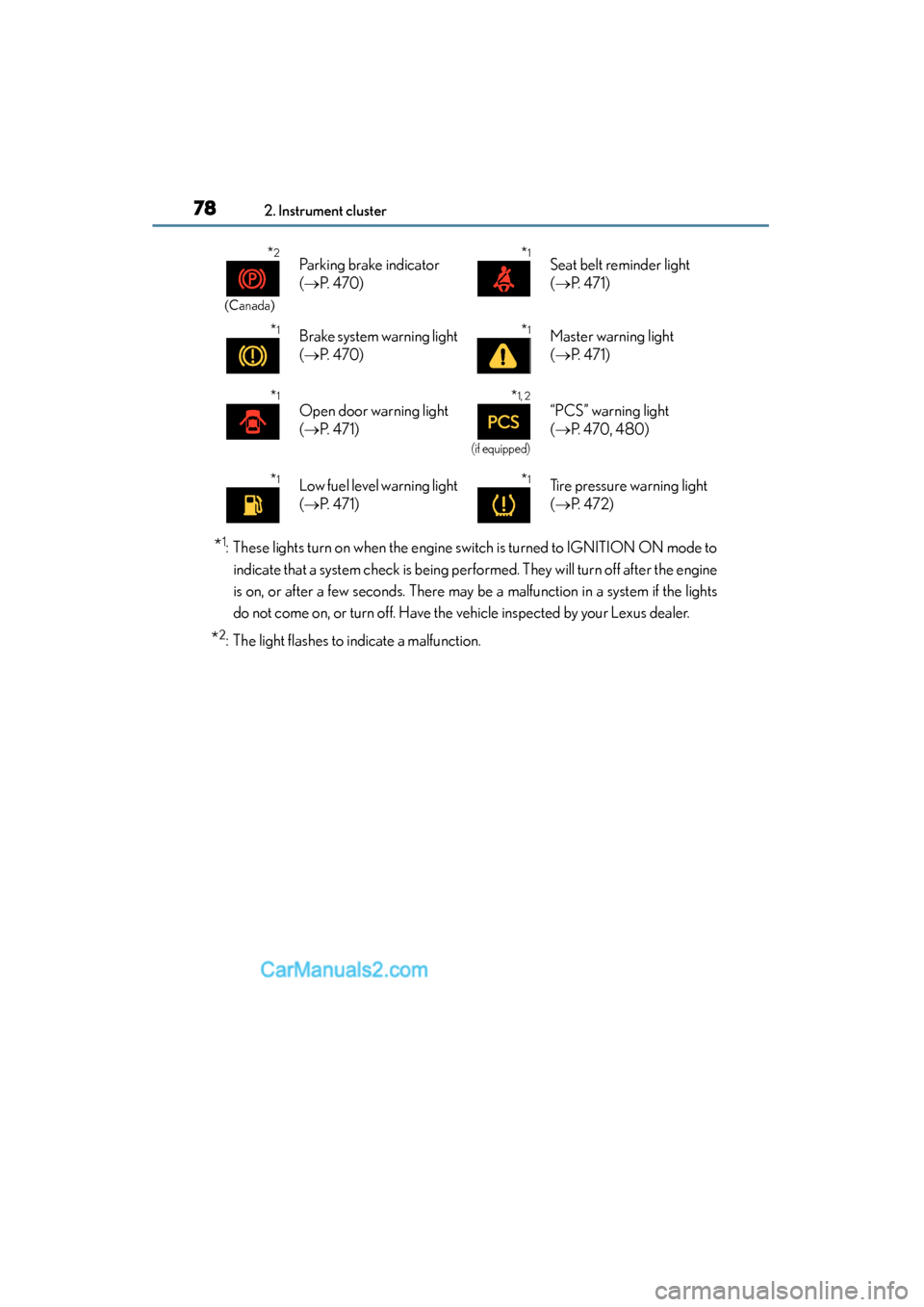
*1: These lights turn on when the engine switch is turned to IGNITION ON mode toindicate that a system check is being performed. They will turn off after the engine
is on, or after a few seconds. There may be a malfunction in a system if the lights
do not come on, or turn off. Have the vehicle inspected by your Lexus dealer.
*2: The light flashes to indicate a malfunction.
*2
(Canada)
Parking brake indicator
(→ P. 4 7 0 )*1Seat belt reminder light
(→ P. 4 7 1 )
*1Brake system warning light
(→ P. 4 7 0 )*1Master warning light
(→ P. 4 7 1 )
*1
Open door warning light
(→ P. 4 7 1 )*1, 2
(if equipped)
“PCS” warning light
(→ P. 470, 480)
*1Low fuel level warning light
(→ P. 4 7 1 )*1Tire pressure warning light
(→ P. 4 7 2 )
GS350_OM_OM30F69U_(U).book Page 78 Monday, January 19, 2015 2:53 PM
Page 81 of 615
GS350_OM_OM30F69U_(U)
792. Instrument cluster
2
Instrument cluster
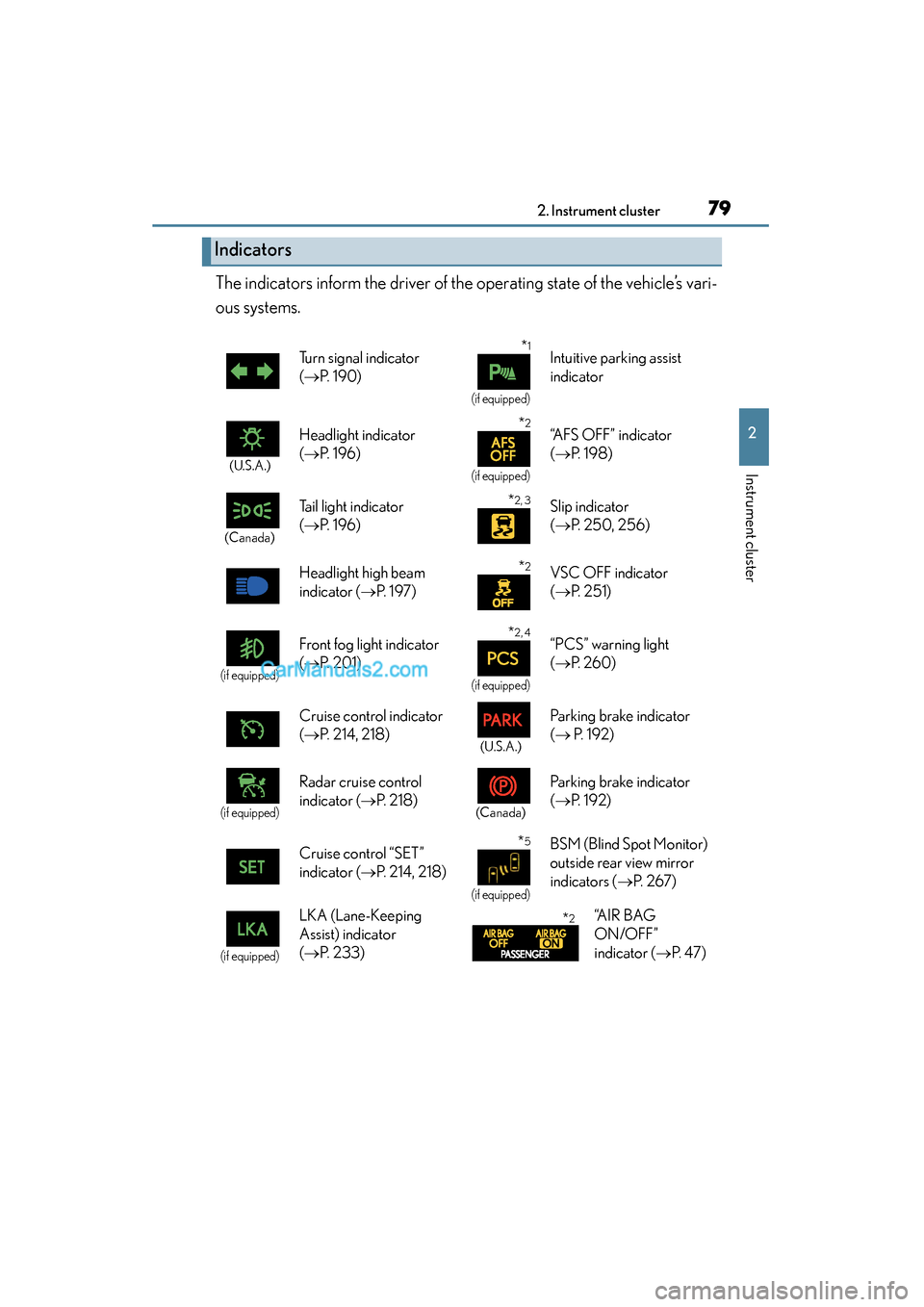
The indicators inform the driver of the operating state of the vehicle’s vari-
ous systems.
Indicators
Turn signal indicator
(→ P. 1 9 0 )*1
(if equipped)
Intuitive parking assist
indicator
(U.S.A.)
Headlight indicator
(→ P. 1 9 6 )*2
(if equipped)
“AFS OFF” indicator
(→ P. 1 9 8 )
(Canada)
Tail light indicator
(→ P. 1 9 6 ) *2, 3Slip indicator
(→ P. 250, 256)
Headlight high beam
indicator ( →P. 1 9 7 )
*2VSC OFF indicator
(→ P. 2 5 1 )
(if equipped)
Front fog light indicator
(→ P. 2 0 1 )*2, 4
(if equipped)
“PCS” warning light
(→ P. 260)
Cruise control indicator
( → P. 214, 218)
(U.S.A.)
Parking brake indicator
(→ P. 1 9 2 )
(if equipped)
Radar cruise control
indicator ( →P. 2 1 8 )
(Canada)
Parking brake indicator
(→ P. 192)
Cruise control “SET”
indicator ( →P. 214, 218)
*5
(if equipped)
BSM (Blind Spot Monitor)
outside rear view mirror
indicators ( →P. 2 6 7 )
(if equipped)
LKA (Lane-Keeping
Assist) indicator
(→ P. 2 3 3 )*2“A I R B A G
ON/OFF”
indicator ( →P. 4 7 )
GS350_OM_OM30F69U_(U).book Page 79 Monday, January 19, 2015 2:53 PM
Page 161 of 615
159
GS350_OM_OM30F69U_(U)
Driving4
4-1. Before driving Driving the vehicle ...................... 160
Cargo and luggage ...................... 171
Vehicle load limits ........................ 174
Trailer towing ................................. 175
Dinghy towing................................ 176
4-2. Driving procedures Engine (ignition) switch .............177
Automatic transmission ............ 184
Turn signal lever ...........................190
Parking brake ................................ 192
Horn.................................................. 195
4-3. Operating the lights and wipers
Headlight switch .......................... 196
Fog light switch............................. 201
Windshield wipers and washer.................................202
4-4. Refueling Opening the fuel tank cap ..... 209 4-5. Using the driving support
systems
Cruise control ...............................214
Dynamic radar cruise control ............................. 218
LKA (Lane-Keeping Assist) .......... 233
Driving mode select switch ... 243
Driving assist systems............... 248
Hill-start assist control ............. 256
PCS (Pre-Collision System)..........258
BSM (Blind Spot Monitor)...............267
• The Blind Spot Monitor function ...................................... 271
• The Rear Cross Traffic Alert function.......................... 274
Lexus night view ..........................277
4-6. Driving tips Winter driving tips ..................... 283
GS350_OM_OM30F69U_(U).book Page 159 Monday, January 19, 2015 2:53 PM
Page 251 of 615
GS350_OM_OM30F69U_(U)
2494-5. Using the driving support systems
4
Driving
◆DRS (Dynamic Rear Steering) (if equipped)
Contributes to the turning characteristics and responsiveness of the
vehicle by slightly adjusting the rear wheel angle of the vehicle in accor-
dance with steering wheel movement
◆EPS (Electric Power Steering)
Employs an electric motor to reduce the amount of effort needed to
turn the steering wheel
◆AVS (Adaptive Variable Suspension system) (if equipped)
By independently controlling the damping force of the shock absorbers
for each of the 4 wheels according to the road and driving conditions,
this system helps riding comfort with superior steering stability, and
helps good vehicle posture
When SPORT S+ mode is selected by the driving mode select switch,
the damping force is suitable for sporty driving ( →P. 245)
◆LDH (Lexus Dynamic Handling system) (if equipped)
Provides independent control of the VGRS, DRS and EPS. Contributes
to turning characteristics at low speeds, responsiveness at medium
speeds and safety at high speeds by controlling the steering angle of
the front and rear wheels in accordance with the steering wheel opera-
tion and vehicle speed
◆VDIM (Vehicle Dynamics Integrated Management)
Provides integrated control of the ABS, brake assist, TRAC, VSC, hill-
start assist control, EPS, VGRS (if equipped) and DRS (if equipped)
systems
Helps to maintain vehicle stability when swerving on slippery road sur-
faces by controlling the brakes, engine output, steering assist, and
steering ratio and rear wheel angle
◆PCS (Pre-Collision System) (if equipped)
→ P. 2 5 8
GS350_OM_OM30F69U_(U).book Page 249 Monday, January 19, 2015 2:53 PM
Page 260 of 615

258
GS350_OM_OM30F69U_(U)
4-5. Using the driving support systems
PCS (Pre-Collision System)∗
◆Pre-collision seat belts (front seat only)
If the pre-collision sensor detects that a collision is unavoidable, the
pre-collision system will retract the seat belt before the collision occurs.
The same will happen if the driver makes an emergency braking or
loses control of the vehicle. (→P. 32)
◆Pre-collision brake assist
When there is a high possibility of a frontal collision, the system applies
greater braking force in relation to how strongly the brake pedal is
depressed.
◆Pre-collision braking
When there is a high possibility of a frontal collision, the system warns
the driver using a warning light, warning display and buzzer. If the sys-
tem determines that a collision is unavoidable, the brakes are automati-
cally applied to reduce the collision speed.
∗
: If equipped
When the radar sensor detects possibility of a frontal collision, the pre-
collision system such as the brakes and seat belts are automatically
engaged to lessen impact as well as vehicle damage.
The pre-collision system can be turned on and off as necessary by oper-
ating the switch. ( →P. 2 6 0 )
GS350_OM_OM30F69U_(U).book Page 258 Monday, January 19, 2015 2:53 PM
Page 261 of 615
GS350_OM_OM30F69U_(U)
2594-5. Using the driving support systems
4
Driving
◆Suspension control (if equipped)
When the system determines that there is a high possibility of a frontal
collision, the operation of AVS ( →P. 249) optimally controls the damp-
ing force of the shock absorber.
◆Steering control (if equipped)
XVehicles with VGRS
There is a high possibility of collision and if the steering wheel is oper-
ated, the steering gear ratio is changed by VGRS to help improve the
response to steering input.
XVehicles with LDH
There is a high possibility of collision and if the steering wheel is oper-
ated, the steering angles of the front and rear wheels and the heaviness
of the steering wheel are controlled by LDH, thus heightening respon-
siveness in response to the steering operation.
◆Driver monitor sy stem (if equipped)
When the system determines that there is a possibility of a collision, and
either the driver is not facing forward or the driver’s eyes are closed,
PCS warnings are given in advance to warn the driver. If the system
determines that the conditions to operate pre-collision alert braking
have been met even when the possibility of a collision increases further,
pre-collision alert braking will operate.
GS350_OM_OM30F69U_(U).book Page 259 Monday, January 19, 2015 2:53 PM
Page 262 of 615

260
GS350_OM_OM30F69U_(U)
4-5. Using the driving support systems
Enabled
Disabled
The “PCS” warning light comes on
when pre-collision system is disabled.
The radar sensor detects vehicles or
other obstacles on or near the road
ahead and determines whether a
collision is imminent based on the
position, speed, and heading of the
obstacles.
The driver monitor sensor detects
the direction the driver is facing and
whether the driver’s eyes are open
or closed.
The system determines whether the
driver is facing forward and whether
or not the driver’s eyes are closed.
Disabling pre-collision system
1
2
Radar sensor
Driver monitor sensor (if equipped)
GS350_OM_OM30F69U_(U).book Page 260 Monday, January 19, 2015 2:53 PM
Page 263 of 615
GS350_OM_OM30F69U_(U)
2614-5. Using the driving support systems
4
Driving
■The pre-collision system is operational when
The PCS OFF switch is not pressed and the following conditions are met:
●Pre-collision warning:
• Vehicle speed is greater than about 10 mph (15 km/h).
• The speed at which your vehicle is approaching the obstacle or the vehicle run-ning ahead of you is greater than about 10 mph (15 km/h).
●Pre-collision seat belts (operating conditions A):
• Vehicle speed is greater than about 19 mph (30 km/h).
• The system detects sudden braking or skidding.
• The front occupants are wearing a seat belt.
●Pre-collision seat belts (operating conditions B):
• Vehicle speed is greater than about 4 mph (5 km/h).
• The speed at which your vehicle is approaching the obstacle or the vehicle run-ning ahead of you is greater than about 19 mph (30 km/h).
• The front occupants are wearing a seat belt.
●Pre-collision brake assist:
• Vehicle speed is greater than about 19 mph (30 km/h).
• The speed at which your vehicle is approaching the obstacle or the vehicle run- ning ahead of you is greater than about 19 mph (30 km/h).
• The brake pedal is depressed.
●Pre-collision braking:
• Vehicle speed is greater than about 10 mph (15 km/h).
• The speed at which your vehicle is approaching the obstacle or the vehicle run- ning ahead of you is greater than about 10 mph (15 km/h).
●Suspension control:
• Vehicle speed is greater than about 4 mph (5 km/h).
• The speed at which your vehicle is approaching the obstacle or the vehicle run-ning ahead of you is greater than about 19 mph (30 km/h).
●Steering control:
• Vehicle speed is greater than about 19 mph (30 km/h).
• The speed at which your vehicle is approaching the obstacle or the vehicle run-ning ahead of you is greater than about 19 mph (30 km/h).
●Pre-collision alert braking:
• The system determines that the driver is not facing forward, or that the driver’seyes are closed.
• Vehicle speed is greater than about 25 mph (40 km/h).
• The speed at which your vehicle is approaching the vehicle running ahead of you is greater than about 25 mph (40 km/h).
• The steering is not being turned.
GS350_OM_OM30F69U_(U).book Page 261 Monday, January 19, 2015 2:53 PM