light Lexus GS350 2015 Quick Guide
[x] Cancel search | Manufacturer: LEXUS, Model Year: 2015, Model line: GS350, Model: Lexus GS350 2015Pages: 96, PDF Size: 2.89 MB
Page 45 of 96

44
GS350_QG_OM30F71U_(U)
Tire Pressure Warning System
■The tire inflation pressure display function (if equipped)
The tire pressure detected by the tire pres-
sure warning system can be displayed on
the multi-information display.
■Initializing the tire pressure warning system
Press and hold the tire pressure warning
reset switch until the tire pressure warning
light blinks slowly 3 times.
Your vehicle is equipped with a tire pressure warning system that uses tire pressure warn-
ing valves and transmitters to detect low ti re inflation pressure before serious problems
arise.
GS350_QG_OM30F71U_(U).book Page 44 Monday, January 19, 2015 4:43 PM
Page 75 of 96
74
GS350_QG_OM30F71U_(U)
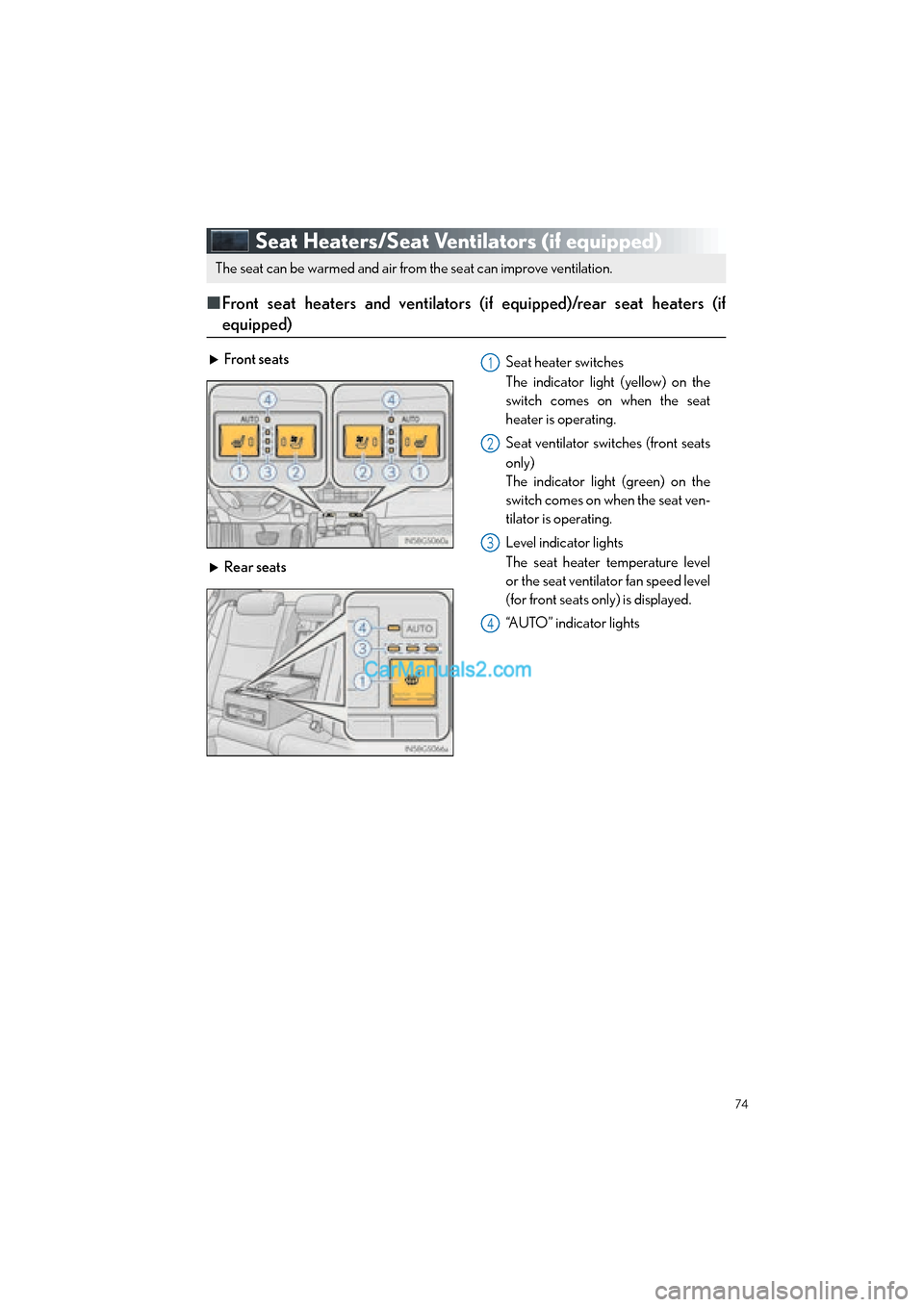
Seat Heaters/Seat Ventilators (if equipped)
■Front seat heaters and ventilators (if equipped)/rear seat heaters (if
equipped)
The seat can be warmed and air from the seat can improve ventilation.
Front seats Seat heater switches
The indicator light (yellow) on the
switch comes on when the seat
heater is operating.
Seat ventilator switches (front seats
only)
The indicator light (green) on the
switch comes on when the seat ven-
tilator is operating.
Level indicator lights
The seat heater temperature level
or the seat ventilator fan speed level
(for front seats only) is displayed.
“AUTO” indicator lights
Rear seats
1
2
3
4
GS350_QG_OM30F71U_(U).book Page 74 Monday, January 19, 2015 4:43 PM
Page 76 of 96

75
GS350_QG_OM30F71U_(U)
●Modes and indicators
The mode can be changed by pressing the switch.
*: When automatic mode is selected, the level automatically changes depending on the air
conditioning settings.
Mode“AUTO” indicator lightLevel indicator lights
OffOffOff
Automatic*On3 to 1, or off
HiOff3
MidOff2
LoOff1
If the driving mode select switch is switched to Eco drive mode in cold temperatures, the
seat heater may be automatically operated to assist heating performance. ( →P. 4 0 )
GS350_QG_OM30F71U_(U).book Page 75 Monday, January 19, 2015 4:43 PM
Page 82 of 96

81
GS350_QG_OM30F71U_(U)
Portable Audio Device Ports
Open the console box, open the cover and
connect the portable audio device.
Garage Door Opener (if equipped)
The garage door opener (HomeLink® Universal Transceiver) is manufactured under
license from HomeLink
®.
■ Programming the HomeLink® (for U.S.A. owners)
The HomeLink® compatible transceiver in your vehicle has 3 buttons which can be pro-
grammed to operate 3 different devices. Refer to the programming method below appro-
priate for the device.
Indicator light
Buttons
These ports can be used to connect a portable audio device and listen to it through the
vehicle’s speakers.
The garage door opener can be programmed to operate garage doors, gates, entry
doors, door locks, home lighting systems, security systems, and other devices.
1
2
GS350_QG_OM30F71U_(U).book Page 81 Monday, January 19, 2015 4:43 PM
Page 83 of 96

82
GS350_QG_OM30F71U_(U)
■Programming HomeLink®
Hold your hand-held transmitter 1 to 3
in. (25 to 75 mm) of the HomeLink
®
buttons.
Press and hold down the desired
HomeLink
® button.
For U.S.A. owners: While pressing the HomeLink
® but-
ton, press and hold down the button
on the hand-held transmitter until the
indicator light changes from a slow to
a rapid flash.
For Canadian owners: While pressing the HomeLink
® but-
ton, repeatedly press and release
(cycle) the button on the hand-held
transmitter every 2 seconds until the
indicator light changes from a slow to
a rapid flash.
If your garage door is of the rolling code
type: Press the training button on the motor-
head unit in your garage.
Press and hold the vehicle’s pro-
grammed HomeLink
® button for 2
seconds and release it. Repeat this step
once again. If the door does not open, press and
release the same button once again.
1
2
3
4
5
GS350_QG_OM30F71U_(U).book Page 82 Monday, January 19, 2015 4:43 PM
Page 84 of 96
83
GS350_QG_OM30F71U_(U)
■Programming other devices
For U.S.A. owners:
To program an entry gate, see the OWNER’S MANUAL.
To program other devices, contact your Lexus dealer.
For Canadian owners: To program all other devices, follow the same procedure as for garage door programming.
■Operating HomeLink®
Press the appropriate HomeLink® button.
The indicator light should come on.
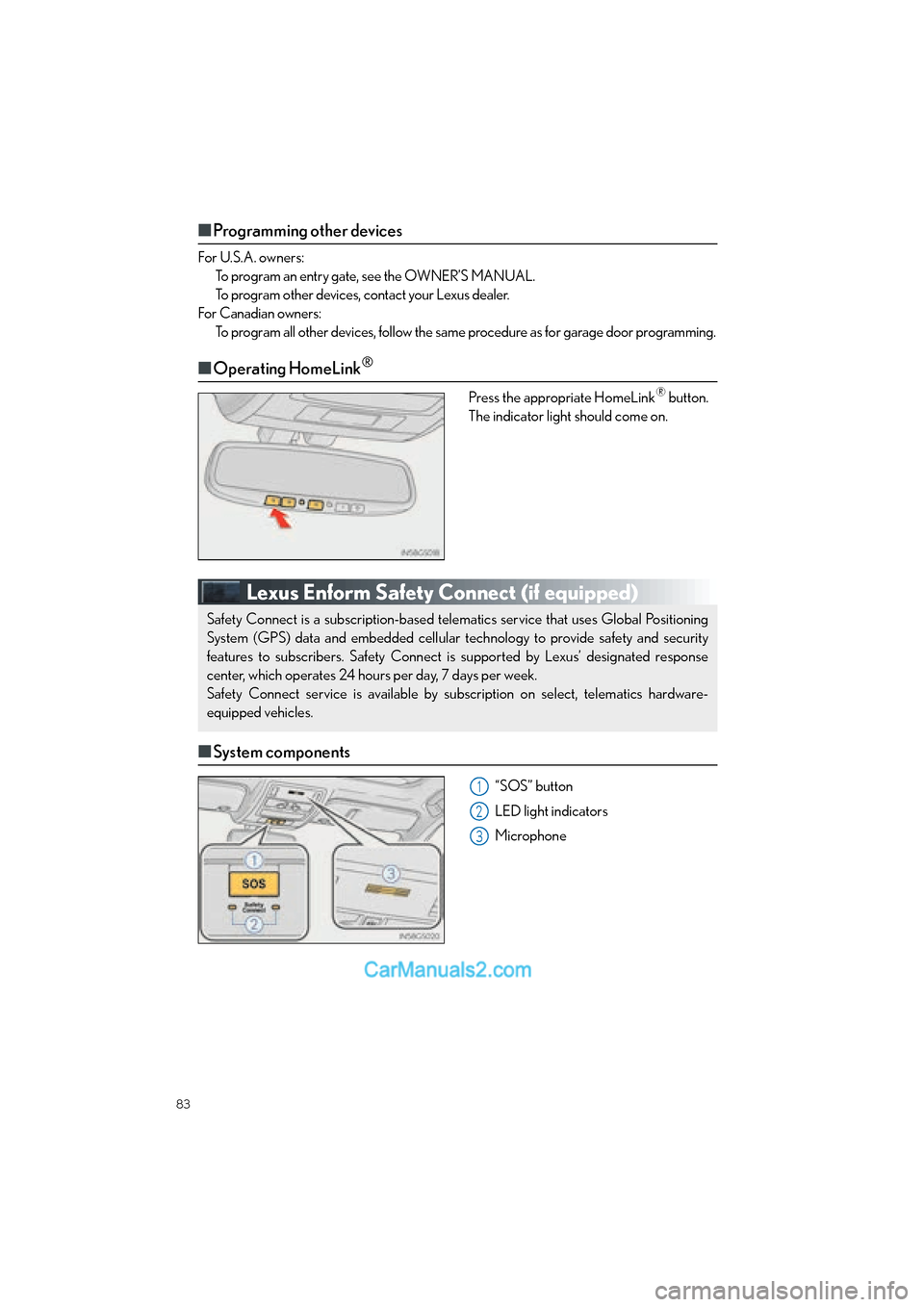
Lexus Enform Safety Connect (if equipped)
■ System components
“SOS” button
LED light indicators
Microphone
Safety Connect is a subscription-based telematics service that uses Global Positioning
System (GPS) data and embedded cellular technology to provide safety and security
features to subscribers. Safety Connect is supported by Lexus’ designated response
center, which operates 24 hours per day, 7 days per week.
Safety Connect service is available by subscription on select, telematics hardware-
equipped vehicles.
1
2
3
GS350_QG_OM30F71U_(U).book Page 83 Monday, January 19, 2015 4:43 PM
Page 89 of 96

88
GS350_QG_OM30F71U_(U)
Fuel Tank Cap
■Before refueling the vehicle
● Close all the doors and windows, and turn the engine switch off.
● Confirm the type of fuel.
■Opening the fuel tank cap
With the doors unlocked, press the
center of the rear ed ge of the fuel filler
door.
Push until you hear a click and take
your hand away to slightly open the fuel
filler door. Then open the door fully by
hand.
Turn the fuel tank cap slowly to open.
Hang the fuel tank cap on the back of
the fuel filler door.1
2
3
GS350_QG_OM30F71U_(U).book Page 88 Monday, January 19, 2015 4:43 PM
Page 90 of 96

What to do if...
89
GS350_QG_OM30F71U_(U)
List of Warning/Indicator Lights
Stop the vehicle immediately. Continuing to drive the vehicle may be dangerous.
(U.S.A.)
Brake system warning light
(Canada)
Stop the vehicle immediately.
Charging system warning light
Have the vehicle inspected immediately.
(U.S.A.)
Malfunction
indicator lamp
Slip indicator
(Canada)
(Flashes)
“AFS OFF” indicator
(if equipped)
SRS warning light(Flashes)(U.S.A.)
Parking brake
indicator
(U.S.A.)
ABS warning light(Flashes)
(Canada)
(Canada)Brake system warning light
Electric power steering
system warning light(Blinking
and then continu-
ously on)
Tire pressure warning light
(Flashes)
“PCS” warning light
(if equipped)
For further information, refer to the OWNER’S MANUAL.
GS350_QG_OM30F71U_(U).book Page 89 Monday, January 19, 2015 4:43 PM
Page 91 of 96

90
What to do if...
GS350_QG_OM30F71U_(U)
*1: It also comes on due to natural causes such as natural air leaks and tire inflation pressurechanges caused by temperature. Adjust the ti re inflation pressure to the specified level.
The light will turn off after a few minutes. In case the light does not turn off even if the tire
inflation pressure is adjusted, have the system checked by your Lexus dealer.
*2: Refer to “NAVIGATION AND MULTIMEDIA SYSTEM OWNER’S MANUAL”.
Follow the correction procedures.
Open door warning lightMaster warning light
Low fuel level warning light
(Illuminates without
blinking)
Tire pressure warning light*1
Seat belt reminder light
See the OWNER’S MANUAL
Turn signal indicatorIntuitive parking assist
indicator (if equipped)
*2
Headlight indicator (U.S.A.)“AFS OFF” indicator
(if equipped)
Tail light indicator (Canada)
(Flashes)
Slip indicator
Headlight high beam indicatorVSC OFF indicator
Front fog light indicator
(if equipped)
(Flashes
faster)
“PCS” warning light
(if equipped)
Cruise control indicatorParking brake indicator
(U.S.A.)
Radar cruise control
indicator (if equipped)Parking brake indicator
(Canada)
Cruise control “SET” indicator
BSM (Blind Spot Monitor)
outside rear view mirror
indicators (if equipped)
LKA (Lane-Keeping assist)
indicator (if equipped) “A I R B A G O N /
OFF” indicator
For further information, refer to the OWNER’S MANUAL.
GS350_QG_OM30F71U_(U).book Page 90 Monday, January 19, 2015 4:43 PM