steering Lexus GS350 2015 Quick Guide
[x] Cancel search | Manufacturer: LEXUS, Model Year: 2015, Model line: GS350, Model: Lexus GS350 2015Pages: 96, PDF Size: 2.89 MB
Page 58 of 96
57
GS350_QG_OM30F71U_(U)
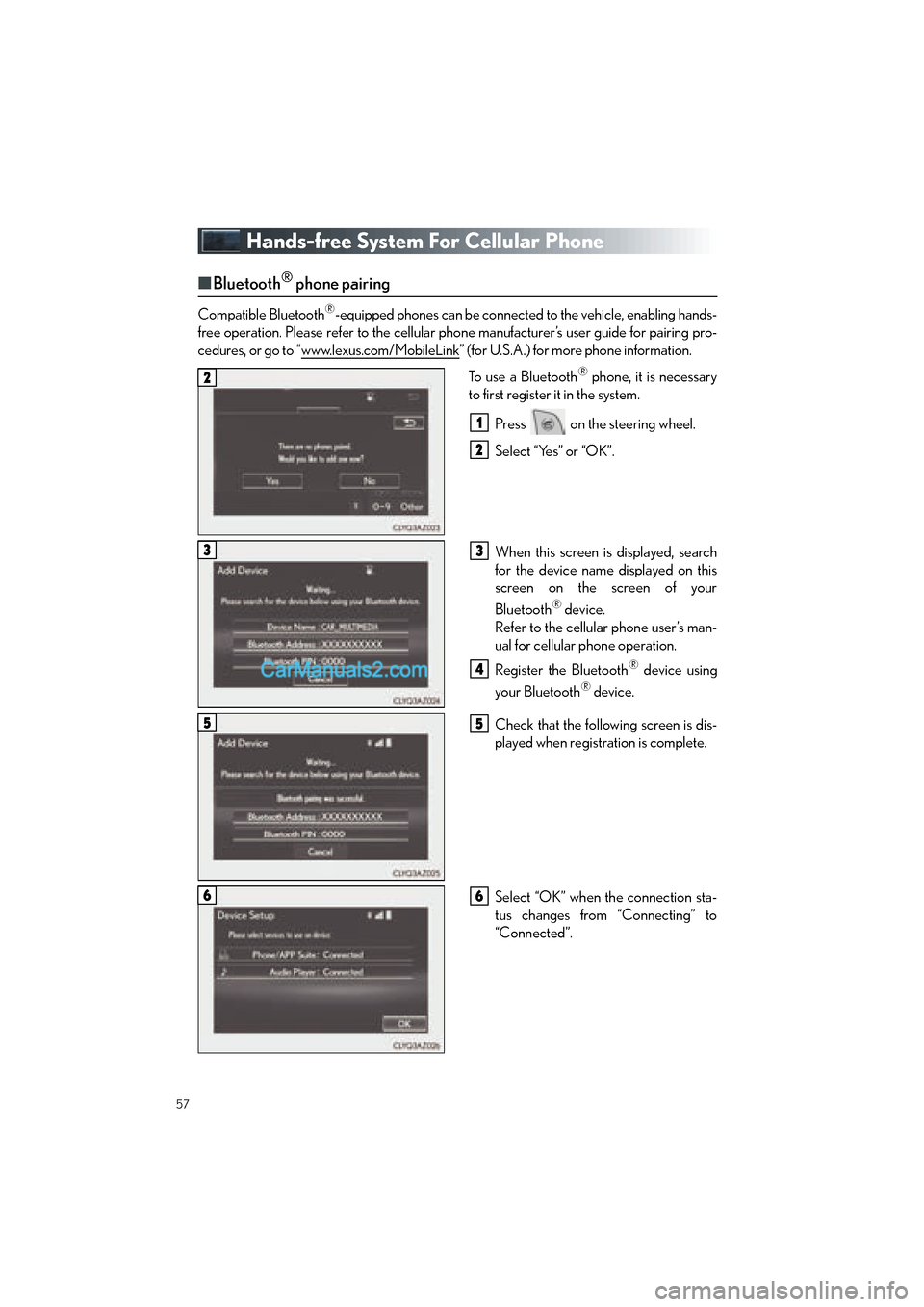
Hands-free System For Cellular Phone
■Bluetooth® phone pairing
Compatible Bluetooth®-equipped phones can be connected to the vehicle, enabling hands-
free operation. Please refer to the cellular phone manufacturer’s user guide for pairing pro-
cedures, or go to “www.lexus.com/MobileLink
” (for U.S.A.) for more phone information.
To use a Bluetooth
® phone, it is necessary
to first register it in the system.
Press on the steering wheel.
Select “Yes” or “OK”.
When this screen is displayed, search
for the device name displayed on this
screen on the screen of your
Bluetooth
® device.
Refer to the cellular phone user’s man-
ual for cellular phone operation.
Register the Bluetooth
® device using
your Bluetooth
® device.
Check that the following screen is dis-
played when registration is complete.
Select “OK” when the connection sta-
tus changes from “Connecting” to
“Connected”.
2
1
2
33
4
55
66
GS350_QG_OM30F71U_(U).book Page 57 Monday, January 19, 2015 4:43 PM
Page 61 of 96

60
GS350_QG_OM30F71U_(U)
■Calling by name (vehicles with navigation system)
You can call by giving a name registered in the contacts. For details, refer to the
“NAVIGATION AND MULTIMEDIA SYSTEM OWNER’S MANUAL”.
Press .
Say “Call
■Calling by favorites list
Press on the steering wheel.
Select the “Favorites” tab and select
the desired contact.
Select the desired number.
Check that the “Call” screen is dis-
played.
11
2
: Pressing this switch turns the voice command system on. Say a command after the
beep.
21
2
33
4
GS350_QG_OM30F71U_(U).book Page 60 Monday, January 19, 2015 4:43 PM
Page 62 of 96

61
GS350_QG_OM30F71U_(U)
■Calling using e-mail/SMS/MMS message
Press on the steering wheel.
Select .
Select the desired message.
Select .
Check that the “Call” screen is dis-
played.
■Receiving a call
When a call is received, this screen is
displayed with a sound.
Press on the steering wheel to
talk on the phone.
To refuse the call, press on the steer-
ing wheel.
■ Steering switches
Sending/Receiving/“Phone” screen
display
End call/Refuse call
Start the voice command system
Increases/decreases volume
21
2
3
4
5
The tab display may vary depending on the type of cellular phone.
11
2
1
2
3
4
GS350_QG_OM30F71U_(U).book Page 61 Monday, January 19, 2015 4:43 PM
Page 63 of 96

62
GS350_QG_OM30F71U_(U)
Audio System
■Audio control screen
Follow the procedure below to display the audio control screen.
Press the “MENU” button on the
Remote Touch.
Please refer to page 45 for the
Remote Touch operation.
The “Menu” screen will be displayed.
Using the Remote Touch, select
“Radio” or “Media” and select each tab.
■Side Display (vehicles with a navigation system)
Operations such as selecting a preset sta-
tion or track are carried out on the screen.
Changing the audio sources
Station selector/selecting a track/file/
chapter
■Remote control (steering wheel switches)
Some audio features can be controlled using the switches on the steering wheel.
Radio mode: Selects a radio station
SAT mode: Selects a channel
Audio CD mode: Selects a track
MP3/WMA/AAC disc mode: Selects
a file
DVD mode: Selects a chapter
USB mode: Selects a file/track
iPod mode: Selects a track/file
BT audio mode: Selects a track
Increases/decreases volume
Press: Change audio modes
Press and hold: Mute/unmute or
pause/resume the current operation
1
2
1
2
1
2
3
GS350_QG_OM30F71U_(U).book Page 62 Monday, January 19, 2015 4:43 PM
Page 77 of 96

76
GS350_QG_OM30F71U_(U)
Voice Command System
■Basic operation
Press the talk switch.
To cancel the voice command system,
press and hold the talk switch.
After a beep sounds, say the desired
command.
On the list screen, you can select the
desired command.
Continue on to pages 77-80 for a detailed list of Voice Commands for the following cate-
gories: Basic. . . . . . . . . . . . . . . . . . . . . . . . . . . . . . . . . . . . . . . . . . . . . . . . . . . . . P.77
Apps . . . . . . . . . . . . . . . . . . . . . . . . . . . . . . . . . . . . . . . . . . . . . . . . . . . . . P.77
Navi . . . . . . . . . . . . . . . . . . . . . . . . . . . . . . . . . . . . . . . . . . . . . . . . . . . . . P.77
Phone. . . . . . . . . . . . . . . . . . . . . . . . . . . . . . . . . . . . . . . . . . . . . . . . . . . . P.78
Radio . . . . . . . . . . . . . . . . . . . . . . . . . . . . . . . . . . . . . . . . . . . . . . . . . . . . P.78
Audio . . . . . . . . . . . . . . . . . . . . . . . . . . . . . . . . . . . . . . . . . . . . . . . . . . . . P.79
Info . . . . . . . . . . . . . . . . . . . . . . . . . . . . . . . . . . . . . . . . . . . . . . . . . . . . . . P.79
Other . . . . . . . . . . . . . . . . . . . . . . . . . . . . . . . . . . . . . . . . . . . . . . . . . . . P.80
1
2
■Important voice commands information and tips
• Voice commands can be used while driving.
• You must wait until after the beep to say a command.
• In vehicles with a navigation system, a large (TALK icon) will appear on the navi-
gation screen to prompt you to say a command.
• If you know what command to use, you can press at any time to interrupt the
voice guidance.
• If a desired outcome is not shown, or if no selections are available, press on the
steering wheel to return to the previous screen.
NOTE: When inputting voice commands you must wait until after the beep to speak.
GS350_QG_OM30F71U_(U).book Page 76 Monday, January 19, 2015 4:43 PM
Page 90 of 96

What to do if...
89
GS350_QG_OM30F71U_(U)
List of Warning/Indicator Lights
Stop the vehicle immediately. Continuing to drive the vehicle may be dangerous.
(U.S.A.)
Brake system warning light
(Canada)
Stop the vehicle immediately.
Charging system warning light
Have the vehicle inspected immediately.
(U.S.A.)
Malfunction
indicator lamp
Slip indicator
(Canada)
(Flashes)
“AFS OFF” indicator
(if equipped)
SRS warning light(Flashes)(U.S.A.)
Parking brake
indicator
(U.S.A.)
ABS warning light(Flashes)
(Canada)
(Canada)Brake system warning light
Electric power steering
system warning light(Blinking
and then continu-
ously on)
Tire pressure warning light
(Flashes)
“PCS” warning light
(if equipped)
For further information, refer to the OWNER’S MANUAL.
GS350_QG_OM30F71U_(U).book Page 89 Monday, January 19, 2015 4:43 PM