brake light Lexus GS350 2016 User Guide
[x] Cancel search | Manufacturer: LEXUS, Model Year: 2016, Model line: GS350, Model: Lexus GS350 2016Pages: 624, PDF Size: 15.29 MB
Page 210 of 624
210
GS350_200t_GS F_OM_OM30E86U_(U)4-2. Driving procedures
Parking brake
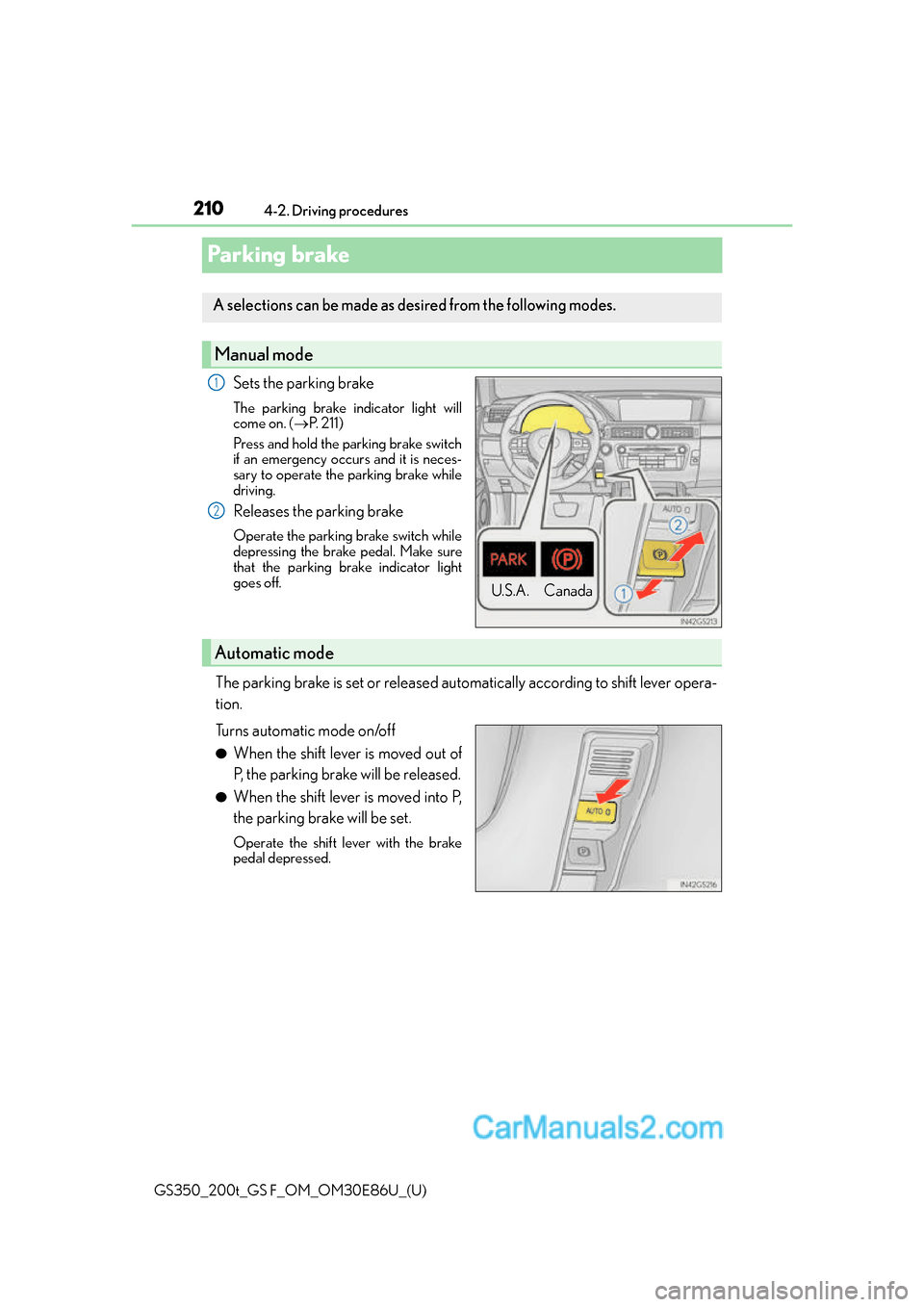
Sets the parking brake
The parking brake indicator light will
come on. (
P. 2 1 1 )
Press and hold the parking brake switch
if an emergency occurs and it is neces-
sary to operate the parking brake while
driving.
Releases the parking brake
Operate the parking brake switch while
depressing the brake pedal. Make sure
that the parking brake indicator light
goes off.
The parking brake is set or released automatically according to shift lever opera-
tion.
Turns automatic mode on/off
●When the shift lever is moved out of
P, the parking brake will be released.
●When the shift lever is moved into P,
the parking brake will be set.
Operate the shift lever with the brake
pedal depressed.
A selections can be made as de sired from the following modes.
Manual mode
U.S.A. Canada
1
2
Automatic mode
Page 211 of 624
GS350_200t_GS F_OM_OM30E86U_(U)
2114-2. Driving procedures
4
Driving
■Parking brake operation
●When the engine switch is not in IGNITION ON mode, the parking brake cannot be
released using the parking brake switch.
●When the engine switch is not in IGNI TION ON mode, automatic mode (automatic
brake setting and releas ing) is not available.
●If the parking brake is operated repeatedly over a short period of time, the system may
restrict operation to prevent overheating. If this happens, refrain from operating the
parking brake. Normal operation will return after about 1 minute.
●In situations such as when parking on a steep slope*, the maximum amount of braking
force can be used by pressing the parking brake switch with the parking brake already
set.
*: Use wheel chocks when parking on a steep slope.
■Parking brake operation sound
When the parking brake operates, a motor sound (whirring sound) may be heard. This
does not indicate a malfunction.
■Parking brake indicator light
●Depending on the engine switch mode, the parking brake indicator light will come on
and stay on as described below:
IGNITION ON mode: Comes on until the parking brake is released.
Not in IGNITION ON mode: Stays on for approximately 15 seconds.
●When the engine switch is turned off with the parking brake set, the parking brake indi-
cator light will stay on for about 15 seco nds. This does not indicate a malfunction.
■When there is a malfunction in the system
Warning lights and/or warning message will turn on or flash. ( P. 4 5 4 , 4 6 0 )
Depending on the condition, the par king brake indicator light may flash.
■Parking brake engaged warning buzzer
P. 4 6 3
■Usage in winter time
P. 3 1 7
NOTICE
■When parking the vehicle
Before you leave the vehicle, set the parking brake, shift the shift lever to P and make
sure that the vehicle does not move.
■When the system malfunctions
Stop the vehicle in a safe place and check the warning messages.
■When the parking brake cannot be released due to a malfunction
Use the parking brake release tool to manually release the parking brake. (P. 5 1 8 )
Driving the vehicle with the parking brake set will lead to brake components overheat-
ing, which may affect braking perf ormance and increase brake wear.
Page 212 of 624
212
GS350_200t_GS F_OM_OM30E86U_(U)4-2. Driving procedures
Brake Hold (GS350/GS200t)
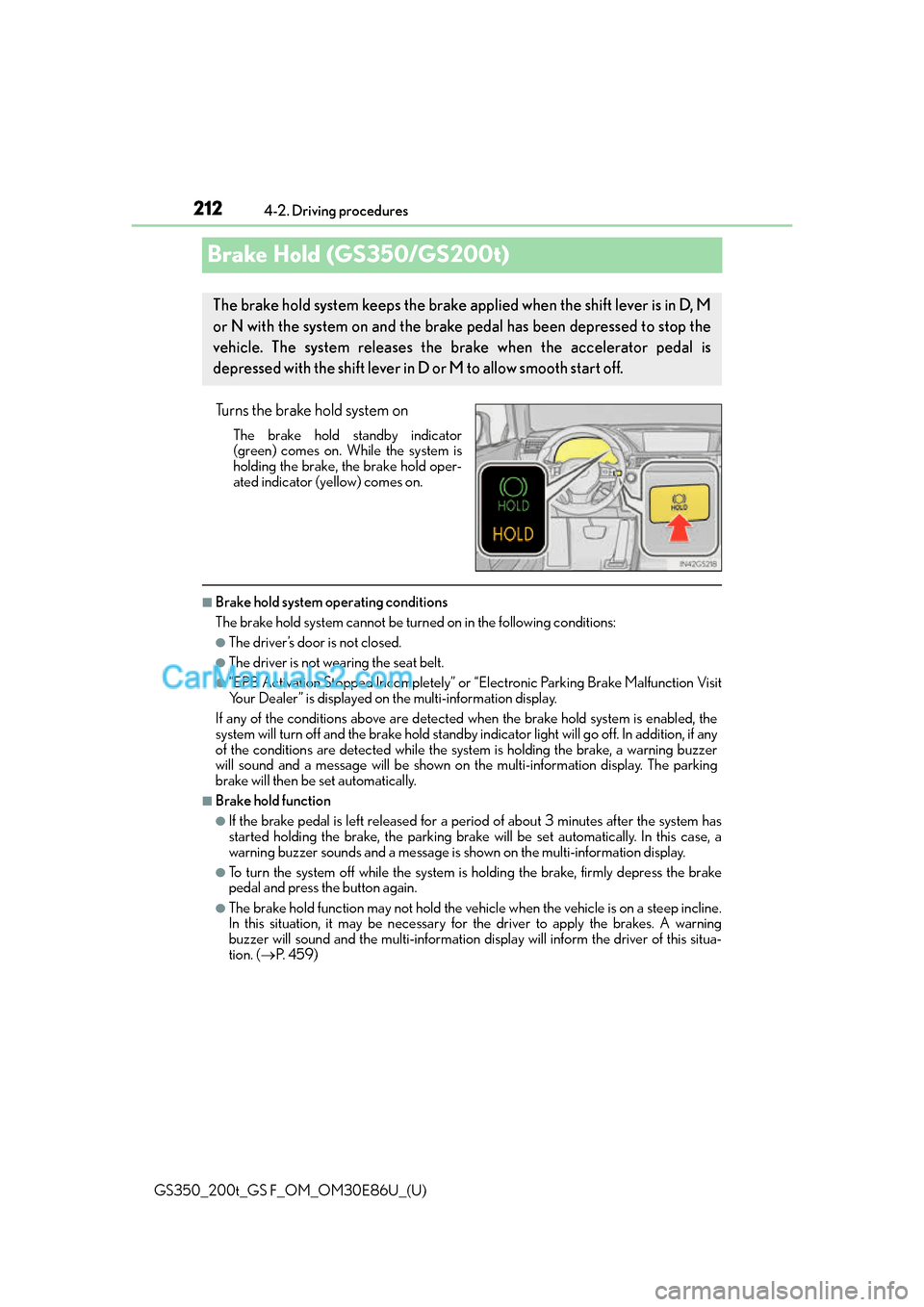
Turns the brake hold system on
The brake hold standby indicator
(green) comes on. Wh
ile the system is
holding the brake, the brake hold oper-
ated indicator (yellow) comes on.
■Brake hold system operating conditions
The brake hold system cannot be turn ed on in the following conditions:
●The driver’s door is not closed.
●The driver is not wearing the seat belt.
●“EPB Activation Stopped Incompletely” or “Electronic Parking Brake Malfunction Visit
Your Dealer” is displayed on the multi-information display.
If any of the conditions above are detected when the brake hold system is enabled, the
system will turn off and the brake hold standby indicator light will go of f. In addition, if any
of the conditions are detected while the sy stem is holding the brake, a warning buzzer
will sound and a message will be shown on th e multi-information display. The parking
brake will then be set automatically.
■Brake hold function
●If the brake pedal is left released for a period of about 3 minutes after the system has
started holding the brake, the parking brake w ill be set automatically. In this case, a
warning buzzer sounds and a message is shown on the multi-information display.
●To turn the system off while the system is holding the brake, firmly depress the brake
pedal and press the button again.
●The brake hold function may not hold the vehicle when the vehicle is on a steep incline.
In this situation, it may be necessary for the driver to apply the brakes. A warning
buzzer will sound and the multi-information di splay will inform the driver of this situa-
tion. ( P. 4 5 9 )
The brake hold system keeps the brake applied when the shift lever is in D, M
or N with the system on and the brake pedal has been depressed to stop the
vehicle. The system releases the brake when the accelerator pedal is
depressed with the shift lever in D or M to allow smooth start off.
Page 213 of 624
GS350_200t_GS F_OM_OM30E86U_(U)
2134-2. Driving procedures
4
Driving
■When the parking brake is set automatically while the system is holding the brakes
The parking brake will not be released auto matically. Perform one of the following proce-
dures to release the parking brake and conf irm that the parking brake indicator light
turns off. ( P. 2 1 0 )
●With the brake pedal depressed, operate the parking brake switch.
●Fasten your seat belt, check that the shift leve r is in either D or R and slowly depress the
accelerator pedal.
■Warning message and buzzers
Warning messages and buzzers are used to indicate a system malfunction or to inform
the driver of the need for caution. ( P. 4 5 9 )
WA R N I N G
■When the vehicle is on a steep incline
When using the brake hold system on a stee p incline exercise caution. The brake hold
function may not hold the vehicle in such a situation.
■When stopped on a slippery road
The system cannot stop the vehicle when the gripping ability of the tires has been
exceeded. Do not use the system when stopped on a slippery road.
NOTICE
■When parking the vehicle
The brake hold system is not designed for use when parking the vehicle for a long
period of time. Turning the engine switch of f while the system is holding the brake may
release the brake, which would cause the vehicle to move. When operating the engine
switch, depress the brake pedal, set the parking brake and shift the shift lever to P.
Page 216 of 624
216
GS350_200t_GS F_OM_OM30E86U_(U)4-3. Operating the lights and wipers
AFS (Adaptive Front-lighting System) secure
s excellent visibility at intersections
and on curves by automatically adjusting the direction of the light axis of the
headlights according to vehicle speed and the degree of the tire’s angle as con-
trolled by steering input.
AFS operates at speeds of 6 mph (10 km/h) or higher.
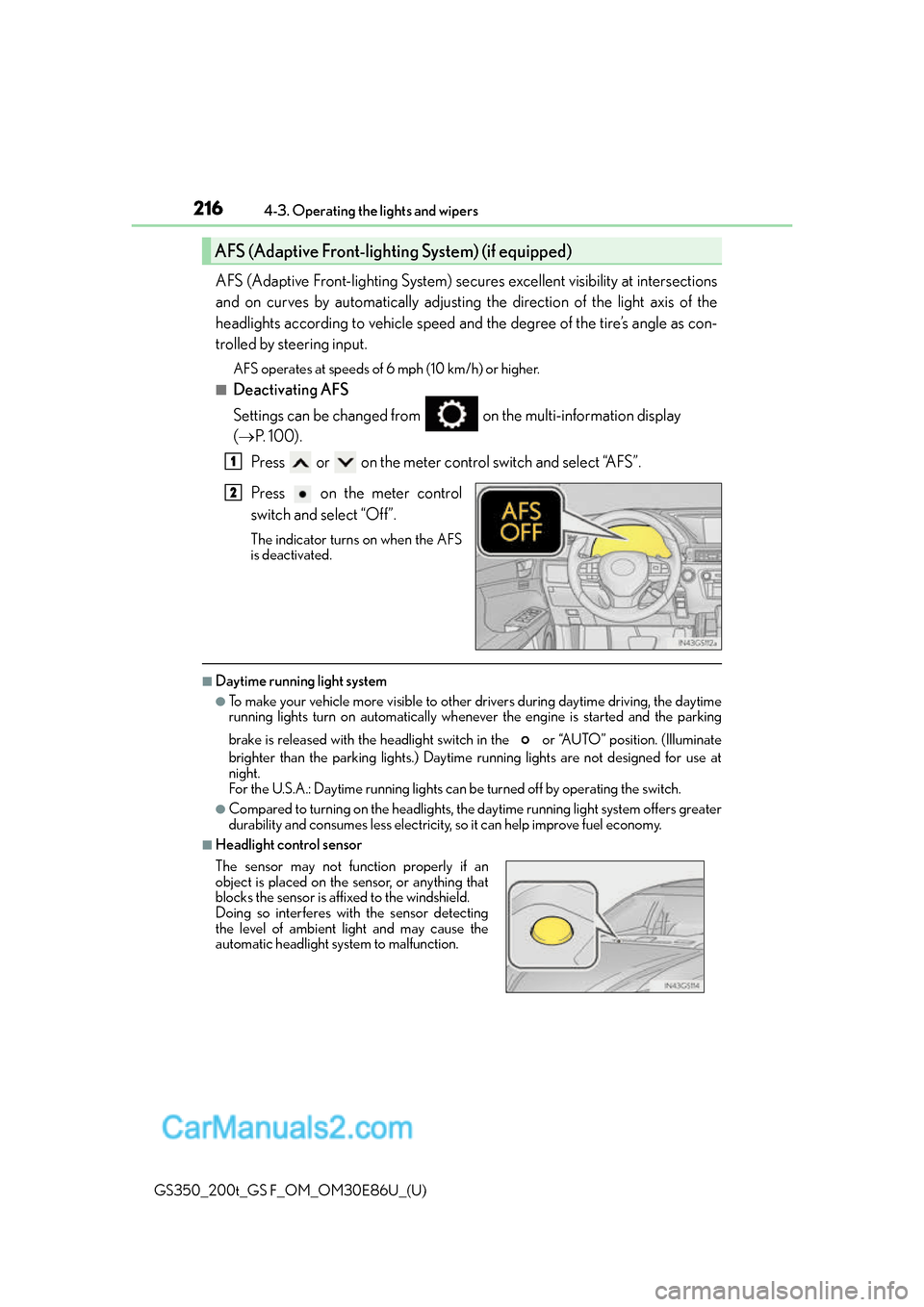
■Deactivating AFS
Settings can be changed from on the multi-information display
( P. 100).
Press or on the meter control switch and select “AFS”.
Press on the meter control
switch and select “Off”.
The indicator turns on when the AFS
is deactivated.
■Daytime running light system
●To make your vehicle more visible to other drivers during daytime driving, the daytime
running lights turn on automatically whenever the engine is started and the parking
brake is released with the headlight switch in the or “AUTO” position. (Illuminate
brighter than the parking lights.) Daytim e running lights are not designed for use at
night.
For the U.S.A.: Daytime running lights can be turned off by operating the switch.
●Compared to turning on the headlights, the daytime running light system offers greater
durability and consumes less electricity, so it can help improve fuel economy.
■Headlight control sensor
AFS (Adaptive Front-lighting System) (if equipped)
1
2
The sensor may not function properly if an
object is placed on the sensor, or anything that
blocks the sensor is affixed to the windshield.
Doing so interferes with the sensor detecting
the level of ambient light and may cause the
automatic headlight system to malfunction.
Page 241 of 624
GS350_200t_GS F_OM_OM30E86U_(U)
2414-5. Using the driving support systems
4
Driving
■Operational conditions
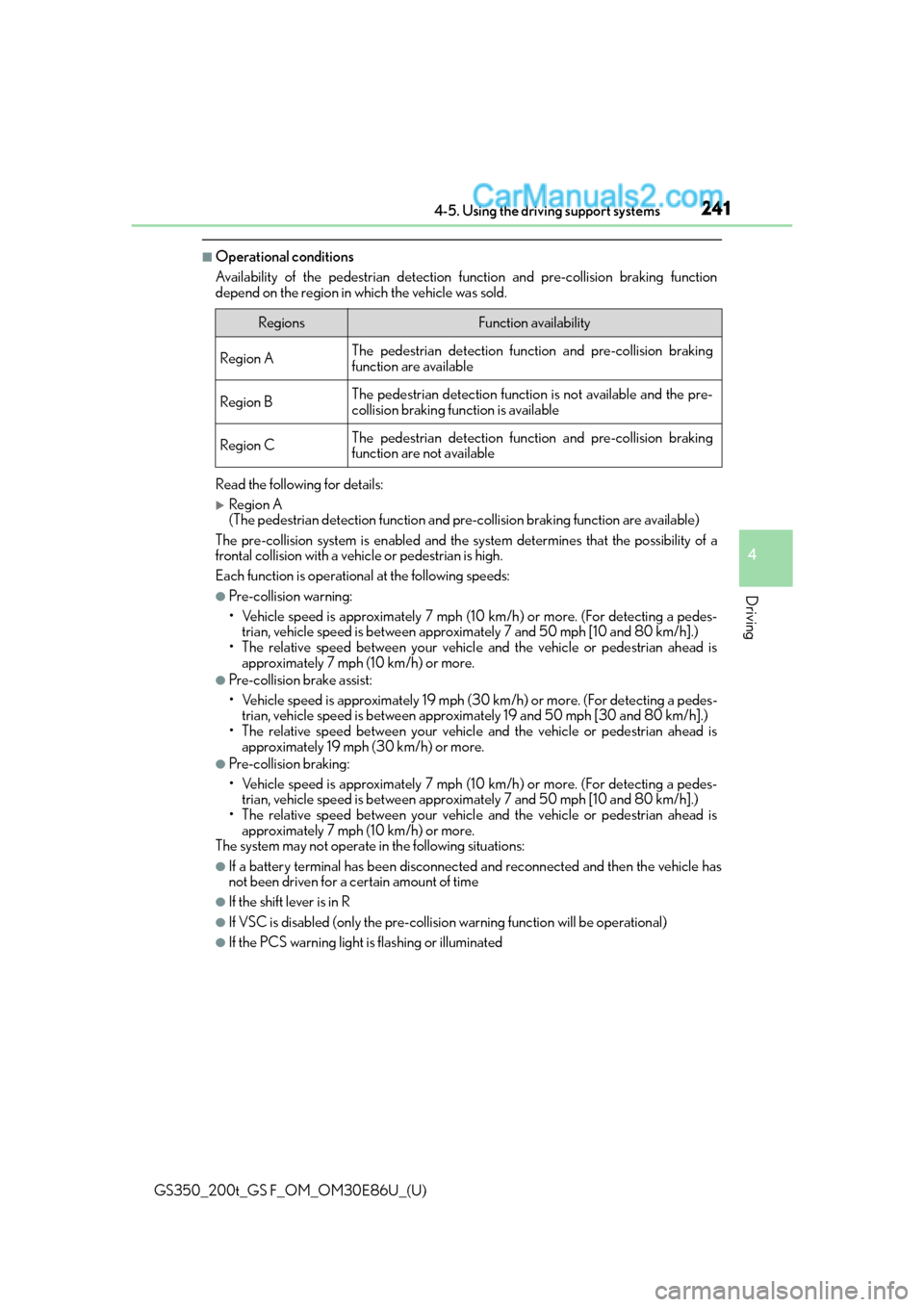
Availability of the pedestrian detection function and pre-collision braking function
depend on the region in which the vehicle was sold.
Read the following for details:
Region A
(The pedestrian detection fu nction and pre-collision braking function are available)
The pre-collision system is enabled and the sy stem determines that the possibility of a
frontal collision with a vehicle or pedestrian is high.
Each function is operationa l at the following speeds:
●Pre-collision warning:
• Vehicle speed is approximately 7 mph (1 0 km/h) or more. (For detecting a pedes-
trian, vehicle speed is between approxim ately 7 and 50 mph [10 and 80 km/h].)
• The relative speed between your vehicl e and the vehicle or pedestrian ahead is
approximately 7 mph (10 km/h) or more.
●Pre-collision brake assist:
• Vehicle speed is approximately 19 mph (3 0 km/h) or more. (For detecting a pedes-
trian, vehicle speed is between approxim ately 19 and 50 mph [30 and 80 km/h].)
• The relative speed between your vehicl e and the vehicle or pedestrian ahead is
approximately 19 mph (30 km/h) or more.
●Pre-collision braking:
• Vehicle speed is approximately 7 mph (1 0 km/h) or more. (For detecting a pedes-
trian, vehicle speed is between approxim ately 7 and 50 mph [10 and 80 km/h].)
• The relative speed between your vehicl e and the vehicle or pedestrian ahead is
approximately 7 mph (10 km/h) or more.
The system may not operate in the following situations:
●If a battery terminal has be en disconnected and reconnected and then the vehicle has
not been driven for a certain amount of time
●If the shift lever is in R
●If VSC is disabled (only the pre-collision warning function will be operational)
●If the PCS warning light is flashing or illuminated
RegionsFunction availability
Region AThe pedestrian detection function and pre-collision braking
function are available
Region BThe pedestrian detection function is not available and the pre-
collision braking function is available
Region CThe pedestrian detection function and pre-collision braking
function are not available
Page 242 of 624
242
GS350_200t_GS F_OM_OM30E86U_(U)4-5. Using the driving support systems
Region B
(The pedestrian detection fu
nction is not available and the pre-collision braking func-
tion is available)
The pre-collision system is enabled and the sy stem determines that the possibility of a
frontal collision with a vehicle is high.
Each function is operationa l at the following speeds:
●Pre-collision warning:
• Vehicle speed is approximately 10 mph (15 km/h) or more.
• The relative speed between your vehicl e and the vehicle or pedestrian ahead is
approximately 7 mph (10 km/h) or more.
●Pre-collision brake assist:
• Vehicle speed is approximately 19 mph (30 km/h) or more.
• The relative speed between your vehicl e and the vehicle or pedestrian ahead is
approximately 19 mph (30 km/h) or more.
●Pre-collision braking:
• Vehicle speed is approximately 10 mph (15 km/h) or more.
• The relative speed between your vehicl e and the vehicle or pedestrian ahead is
approximately 7 mph (10 km/h) or more.
The system may not operate in the following situations:
●If a battery terminal has be en disconnected and reconnected and then the vehicle has
not been driven for a certain amount of time
●If the shift lever is in R
●If VSC is disabled (only the pre-collision warning function will be operational)
●If the PCS warning light is flashing or illuminated
Region C
(The pedestrian detection function and pr e-collision braking function are not avail-
able)
The pre-collision system is enabled and the sy stem determines that the possibility of a
frontal collision with a vehicle is high.
Each function is operationa l at the following speeds:
●Pre-collision warning:
• Vehicle speed is approximately 10 mph (15 km/h) or more.
• The relative speed between your vehicl e and the vehicle or pedestrian ahead is
approximately 7 mph (10 km/h) or more.
●Pre-collision brake assist:
• Vehicle speed is approximately 19 mph (30 km/h) or more.
• The relative speed between your vehicl e and the vehicle or pedestrian ahead is
approximately 19 mph (30 km/h) or more.
The system may not operate in the following situations:
●If a battery terminal has be en disconnected and reconnected and then the vehicle has
not been driven for a certain amount of time
●If the shift lever is in R
●If VSC is disabled (only the pre-collision warning function will be operational)
●If the PCS warning light is flashing or illuminated
Page 248 of 624
248
GS350_200t_GS F_OM_OM30E86U_(U)4-5. Using the driving support systems
■If the PCS warning light flashes and a warnin
g message is displayed on the multi-infor-
mation display
The pre-collision system may be temporarily unavailable or there may be a malfunction
in the system.
●In the following situations, the warning light will turn off, the message will disappear and
the system will become operational when normal operating conditions return:
• When the radar sensor or camera sensor or the area around either sensor is hot, such as in the sun
• When the radar sensor or camera sensor or the area around either sensor is cold,
such as in an extremely cold environment
• When the radar sensor or front grille embl em is dirty or covered with snow, etc.
• If the camera sensor is obst ructed, such as when the hood is open or a sticker is
attached to the windshield near the camera sensor
●If the PCS warning light continues to flash or the warning message does not disappear,
the system may be malfunctioning. Have the vehicle inspected by your Lexus dealer
immediately.
■If VSC is disabled
●If VSC is disabled ( P. 311), the pre-collision brake assist and pre-collision braking
functions are also disabled.
●The PCS warning light will turn on and “VSC Turned Off Pre-Collision Brake System
Unavailable” will be displayed on the multi-information display.
Page 269 of 624
GS350_200t_GS F_OM_OM30E86U_(U)
2694-5. Using the driving support systems
4
Driving
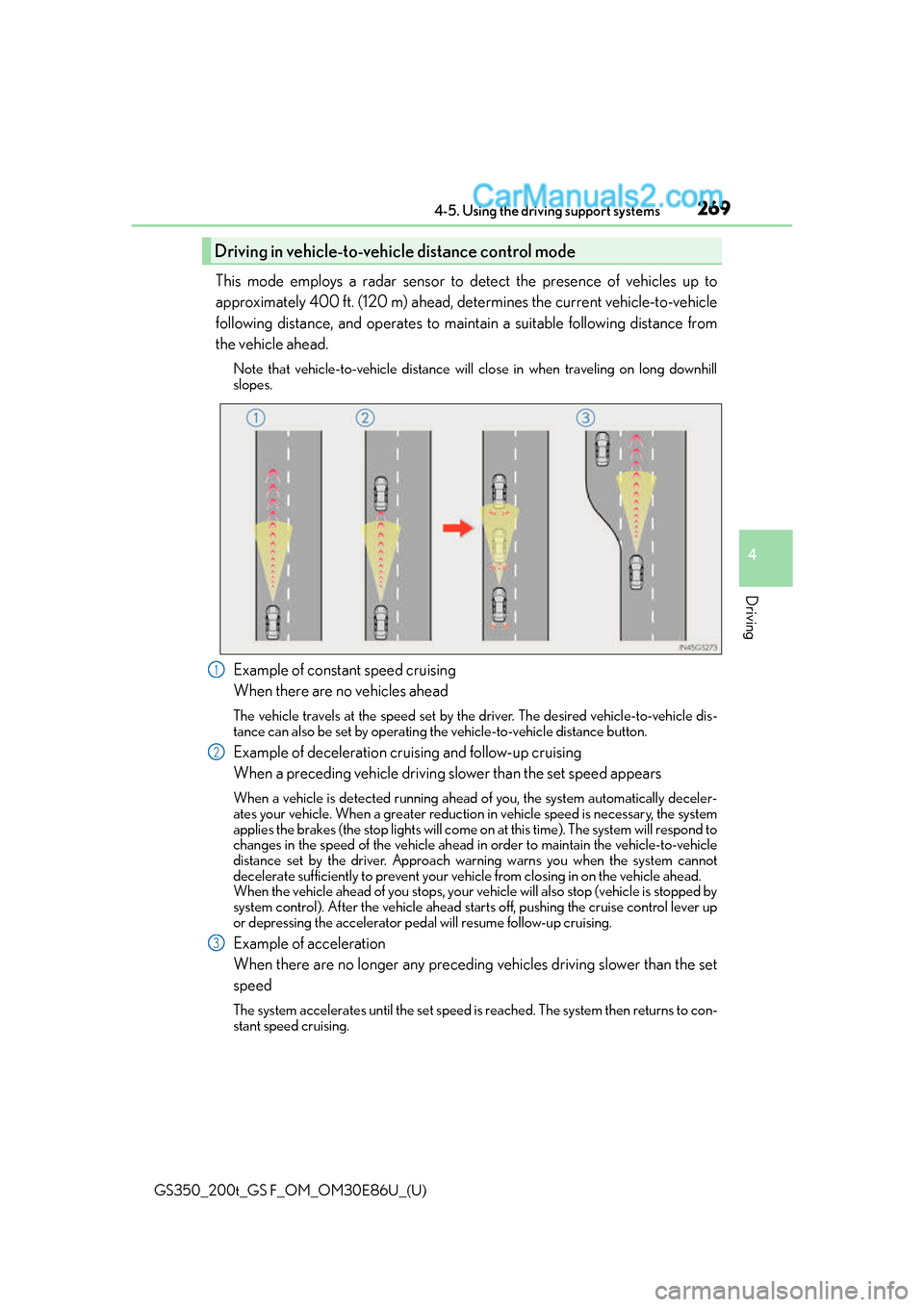
This mode employs a radar sensor to detect the presence of vehicles up to
approximately 400 ft. (120 m) ahead, determines the current vehicle-to-vehicle
following distance, and operates to maintain a suitable following distance from
the vehicle ahead.
Note that vehicle-to-vehicle distance will close in when traveling on long downhill
slopes.
Example of constant speed cruising
When there are no vehicles ahead
The vehicle travels at the speed set by the driver. The desired vehicle-to-vehicle dis-
tance can also be set by operating th e vehicle-to-vehicle distance button.
Example of deceleration cruising and follow-up cruising
When a preceding vehicle driving slower than the set speed appears
When a vehicle is detected running ahead of you, the system automatically deceler-
ates your vehicle. When a greater reduction in vehicle speed is necessary, the system
applies the brakes (the stop lights will come on at this time). The system will respond to
changes in the speed of the vehicle ahead in order to maintain the vehicle-to-vehicle
distance set by the driver. Approach wa rning warns you when the system cannot
decelerate sufficiently to prevent your ve hicle from closing in on the vehicle ahead.
When the vehicle ahead of you stops, your ve hicle will also stop (vehicle is stopped by
system control). After the vehicle ahead starts off, pushing the cruise control lever up
or depressing the accelerator peda l will resume follow-up cruising.
Example of acceleration
When there are no longer any preceding vehicles driving slower than the set
speed
The system accelerates until the set speed is reached. The system then returns to con-
stant speed cruising.
Driving in vehicle-to-vehicle distance control mode
1
2
3
Page 281 of 624
GS350_200t_GS F_OM_OM30E86U_(U)
2814-5. Using the driving support systems
4
Driving
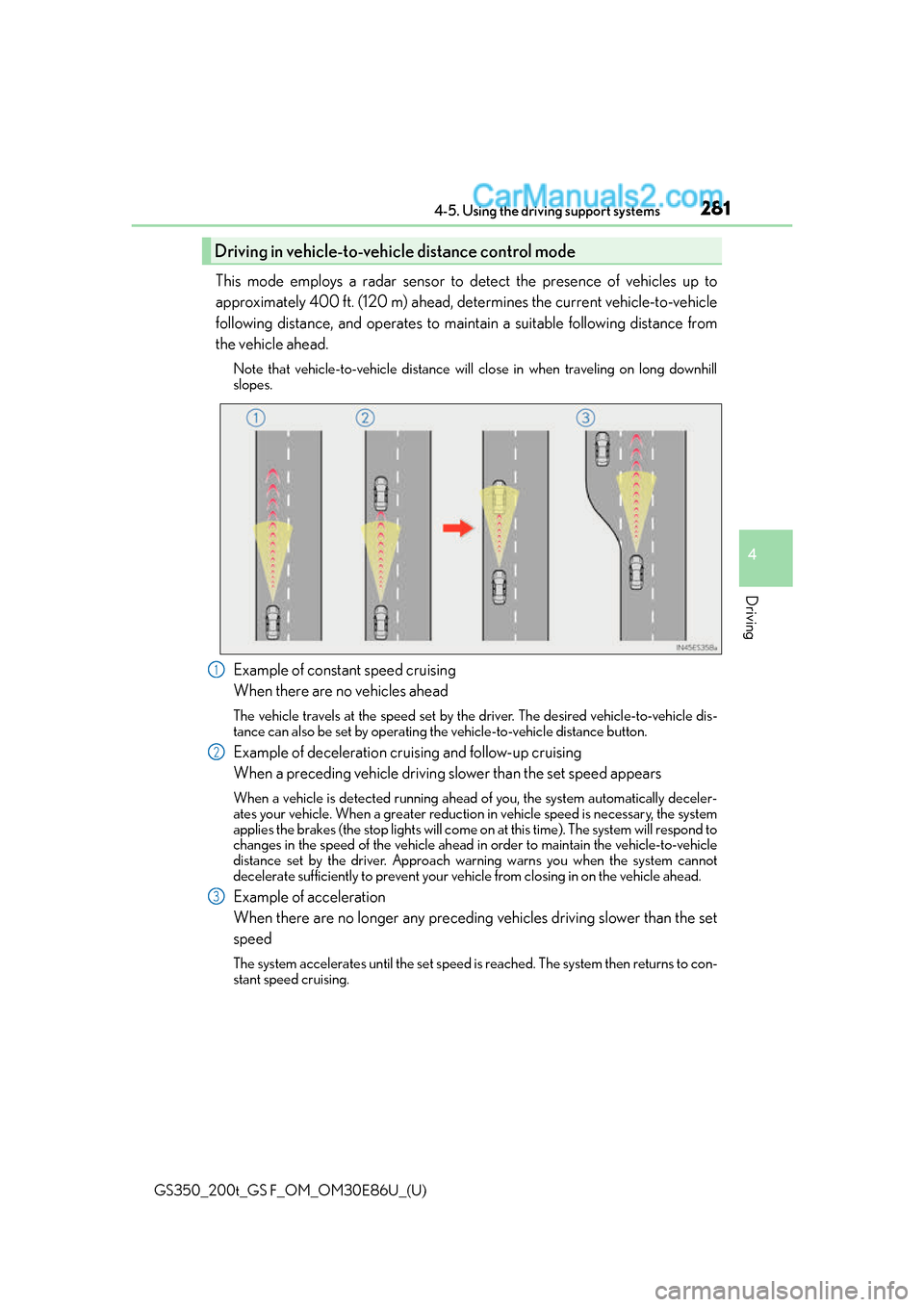
This mode employs a radar sensor to detect the presence of vehicles up to
approximately 400 ft. (120 m) ahead, determines the current vehicle-to-vehicle
following distance, and operates to maintain a suitable following distance from
the vehicle ahead.
Note that vehicle-to-vehicle distance will close in when traveling on long downhill
slopes.
Example of constant speed cruising
When there are no vehicles ahead
The vehicle travels at the speed set by the driver. The desired vehicle-to-vehicle dis-
tance can also be set by operating th e vehicle-to-vehicle distance button.
Example of deceleration cruising and follow-up cruising
When a preceding vehicle driving slower than the set speed appears
When a vehicle is detected running ahead of you, the system automatically deceler-
ates your vehicle. When a greater reduction in vehicle speed is necessary, the system
applies the brakes (the stop lights will come on at this time). The system will respond to
changes in the speed of the vehicle ahead in order to maintain the vehicle-to-vehicle
distance set by the driver. Approach wa rning warns you when the system cannot
decelerate sufficiently to prevent your ve hicle from closing in on the vehicle ahead.
Example of acceleration
When there are no longer any preceding vehicles driving slower than the set
speed
The system accelerates until the set speed is reached. The system then returns to con-
stant speed cruising.
Driving in vehicle-to-vehicle distance control mode
1
2
3