buttons Lexus GS350 2016 User Guide
[x] Cancel search | Manufacturer: LEXUS, Model Year: 2016, Model line: GS350, Model: Lexus GS350 2016Pages: 624, PDF Size: 15.29 MB
Page 341 of 624
GS350_200t_GS F_OM_OM30E86U_(U)
3415-2. Using the air conditioning system and defogger
5
Interior features
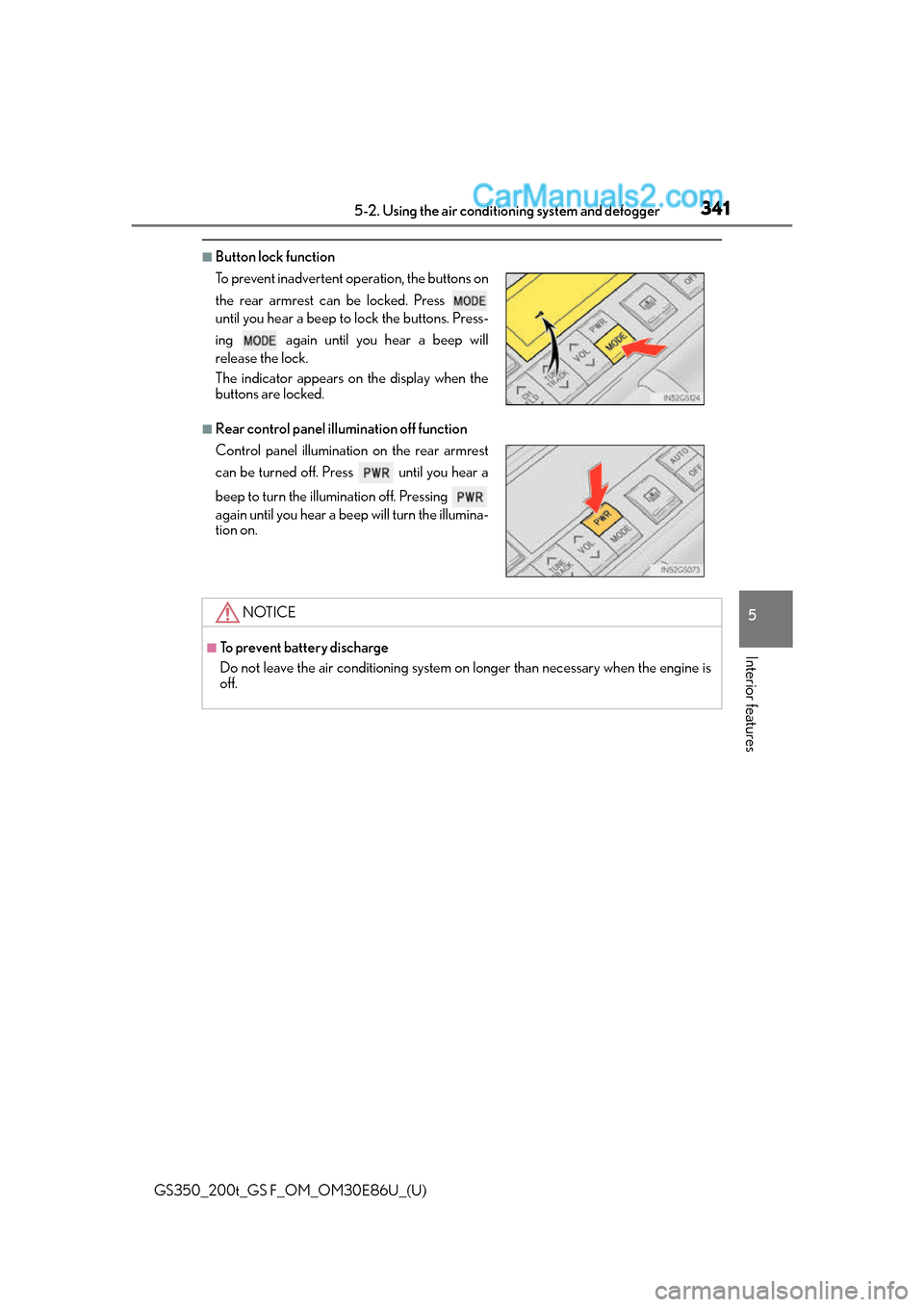
■Button lock function
■Rear control panel illumination off function To prevent inadvertent operation, the buttons on
the rear armrest can be locked. Press
until you hear a beep to lock the buttons. Press-
ing again until you hear a beep will
release the lock.
The indicator appears on the display when the
buttons are locked.
Control panel illumination on the rear armrest
can be turned off. Press until you hear a
beep to turn the illumination off. Pressing
again until you hear a beep will turn the illumina-
tion on.
NOTICE
■To prevent battery discharge
Do not leave the air conditioning system on longer than necessary when the engine is
off.
Page 346 of 624
346
GS350_200t_GS F_OM_OM30E86U_(U)5-2. Using the air conditio
ning system and defogger
■Automatic operation of the seat heater during Eco drive mode
If the driving mode select swit ch is switched to Eco drive mo de in cold temperatures, the
seat heater may be automatically oper ated to assist heating performance.
■Automatic operation during S-FLOW mode
The front seat heater and ventilator or the rear seat heater may automatically turn off
when S-FLOW mode is turned on during automatic mode. ( P. 3 2 9 )
■Button lock function (vehicle s with rear control panel)
To prevent inadvertent operation, some buttons on the rear armrest can be locked.
( P. 3 4 1 )
■When the switch is disabled (vehicles with rear control panel)
When the rear control panel switch cannot be operated even though the button lock
function is released, check whether the sw itch is disabled due to selecting on
Remote Touch screen. ( P. 335)
■Rear control panel illumination off functi on (vehicles with rear control panel)
Control panel illumination on the re ar armrest can be turned off. (P. 3 4 1 )
■Customization
The automatic mode settings for the front seat heaters and ventilators or the rear seat
heaters can be changed. (Customizable features: P. 5 6 8 )
Page 362 of 624
362
GS350_200t_GS F_OM_OM30E86U_(U)5-5. Using the other interior features
●The rear sunshade can be used when the engine switch is in IGNITION ON mode.
●The rear sunshade can be operated for approximately 1 minute even after the engine
switch is turned to ACCESSORY mode or turned off.
●Reverse operation feature: To ensure adequate
rear visibility, the rear sunshade auto-
matically lowers when the sh ift lever is shifted to R.
However, the rear sunshade is raised again if any of the following occurs:
• The button is pressed again.
*
• Shift the shift lever into P.
• The shift lever is shifted out of R, and the vehicle reaches a speed of 9 mph (15 km/h). If the engine is off when the rear sunshade has been lowered due to the reverse opera-
tion feature, it will not be raised even when the engine is turned on again and the vehi-
cle reaches a speed of 9 mph (15 km/h). To raise the sunshade again, press the button.
*: Occasionally, the reverse function may not be carried out after the switch has been
pressed. Repeat the above operation to operate the function.
●Vehicles with rear control panel: To preven t inadvertent operation, some buttons on the
rear armrest can be locked. ( P. 3 4 1 )
●Vehicles with rear control panel: Control panel illumination on the rear armrest can be
turned off. ( P. 3 4 1 )
●Time elapsed before the reverse operation feature activates can be changed.
(Customizable features: P. 5 6 8 )
WA R N I N G
When the rear sunshade is being operated, do not place fingers or other objects in the
fastener section or in the opening.
They may get caught, causing injury.
NOTICE
●To prevent battery discharge, do not operate the rear sunshade when the engine is
off.
●Observe the following precautions to ensure normal operation of the rear sunshade
and rear door sunshades.
• Do not place excessive load on the motor or other components of the rear sun- shade.
• Do not place objects where they may hi nder opening and closing operations.
• Do not attach items to the rear sunshade and rear door sunshades.
• Keep the opening clean and clear of obstructions.
• Do not operate the rear sunshade cont inuously for long periods of time.
Page 365 of 624
365
GS350_200t_GS F_OM_OM30E86U_(U)5-5. Using the other interior features
5
Interior features
Garage door opener
The HomeLink® wireless control system in your vehicle has 3 buttons which can
be programmed to operate 3 different devices. Refer to the programming meth-
ods on the following pages to determine the method which is appropriate for the
device.
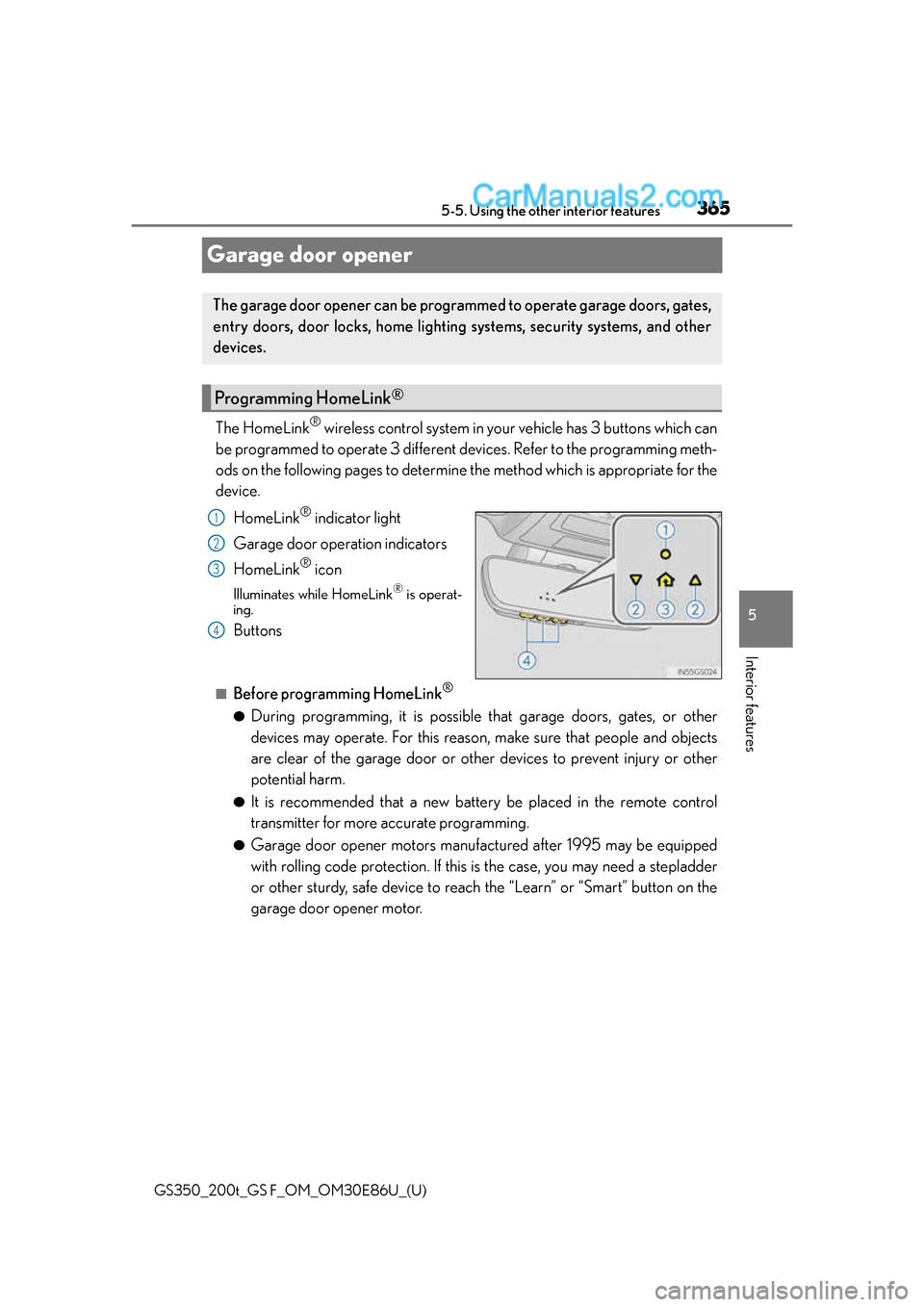
HomeLink
® indicator light
Garage door operation indicators
HomeLink
® icon
Illuminates while HomeLink® is operat-
ing.
Buttons
■Before programming HomeLink®
●During programming, it is possible that garage doors, gates, or other
devices may operate. For this reason, make sure that people and objects
are clear of the garage door or other devices to prevent injury or other
potential harm.
●It is recommended that a new battery be placed in the remote control
transmitter for more accurate programming.
●Garage door opener motors manufactured after 1995 may be equipped
with rolling code protection. If this is the case, you may need a stepladder
or other sturdy, safe device to reach the “Learn” or “Smart” button on the
garage door opener motor.
The garage door opener can be programmed to operate garage doors, gates,
entry doors, door locks, home lighting systems, security systems, and other
devices.
Programming HomeLink®
1
2
3
4
Page 366 of 624
366
GS350_200t_GS F_OM_OM30E86U_(U)5-5. Using the other interior features
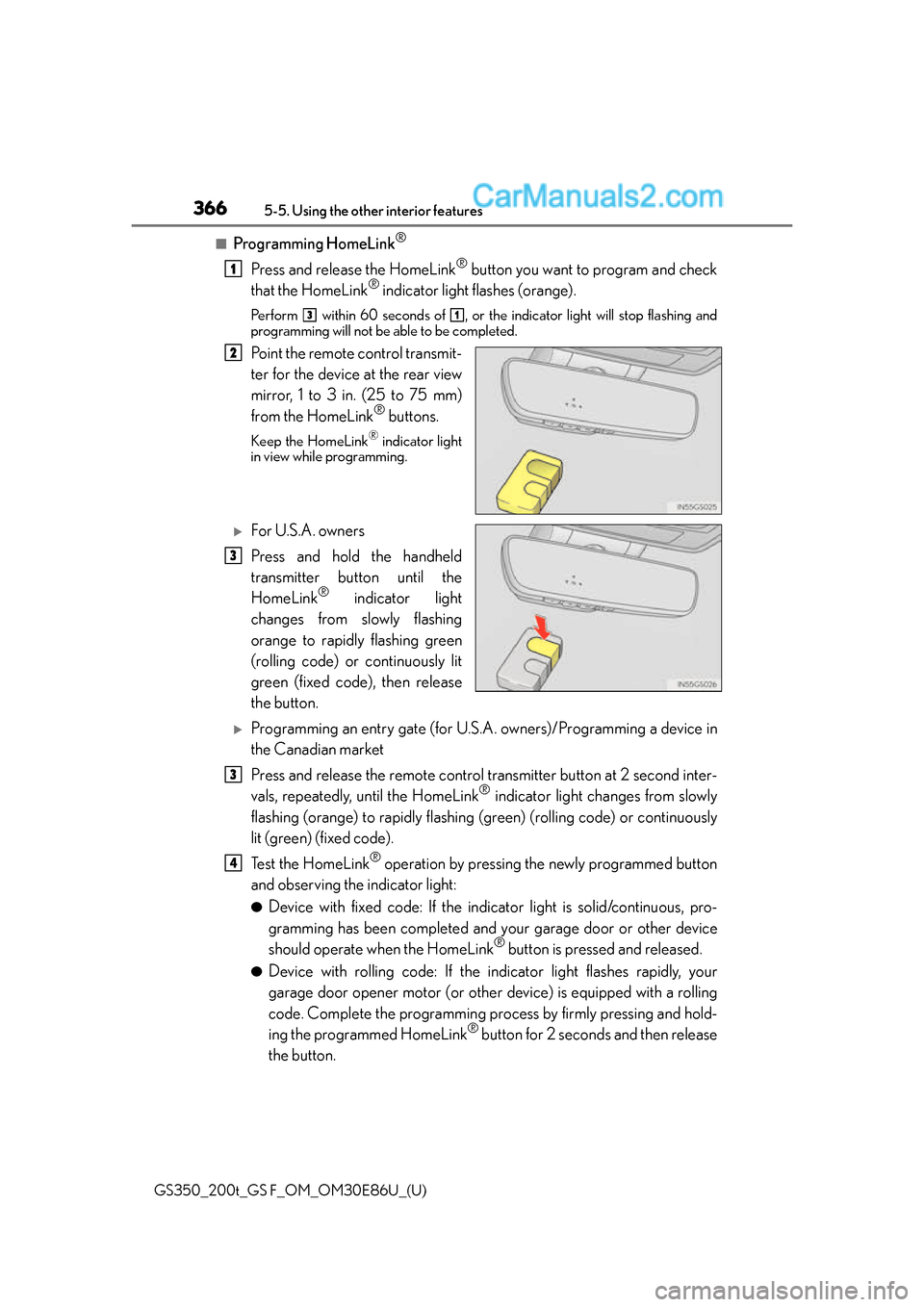
■Programming HomeLink®
Press and release the HomeLink® button you want to program and check
that the HomeLink® indicator light flashes (orange).
Perform within 60 seconds of , or the indicator light will stop flashing and
programming will not be able to be completed.
Point the remote control transmit-
ter for the device at the rear view
mirror, 1 to 3 in. (25 to 75 mm)
from the HomeLink
® buttons.
Keep the HomeLink® indicator light
in view while programming.
For U.S.A. owners
Press and hold the handheld
transmitter button until the
HomeLink
® indicator light
changes from slowly flashing
orange to rapidly flashing green
(rolling code) or continuously lit
green (fixed code), then release
the button.
Programming an entry gate (for U.S. A. owners)/Programming a device in
the Canadian market
Press and release the remote control transmitter button at 2 second inter-
vals, repeatedly, until the HomeLink
® indicator light changes from slowly
flashing (orange) to rapidly flashing (green) (rolling code) or continuously
lit (green) (fixed code).
Te s t t h e H o m e L i n k
® operation by pressing the newly programmed button
and observing the indicator light:
●Device with fixed code: If the indi cator light is solid/continuous, pro-
gramming has been completed and your garage door or other device
should operate when the HomeLink
® button is pressed and released.
●Device with rolling code: If the indicator light flashes rapidly, your
garage door opener motor (or other device) is equipped with a rolling
code. Complete the programming process by firmly pressing and hold-
ing the programmed HomeLink
® button for 2 seconds and then release
the button.
1
31
2
3
3
4
Page 367 of 624
GS350_200t_GS F_OM_OM30E86U_(U)
3675-5. Using the other interior features
5
Interior features
●If the garage door or other device does not operate, proceed to “Pro-
gramming a rolling code system”.
Repeat the steps above to program another device for any of the remaining
HomeLink
® buttons.
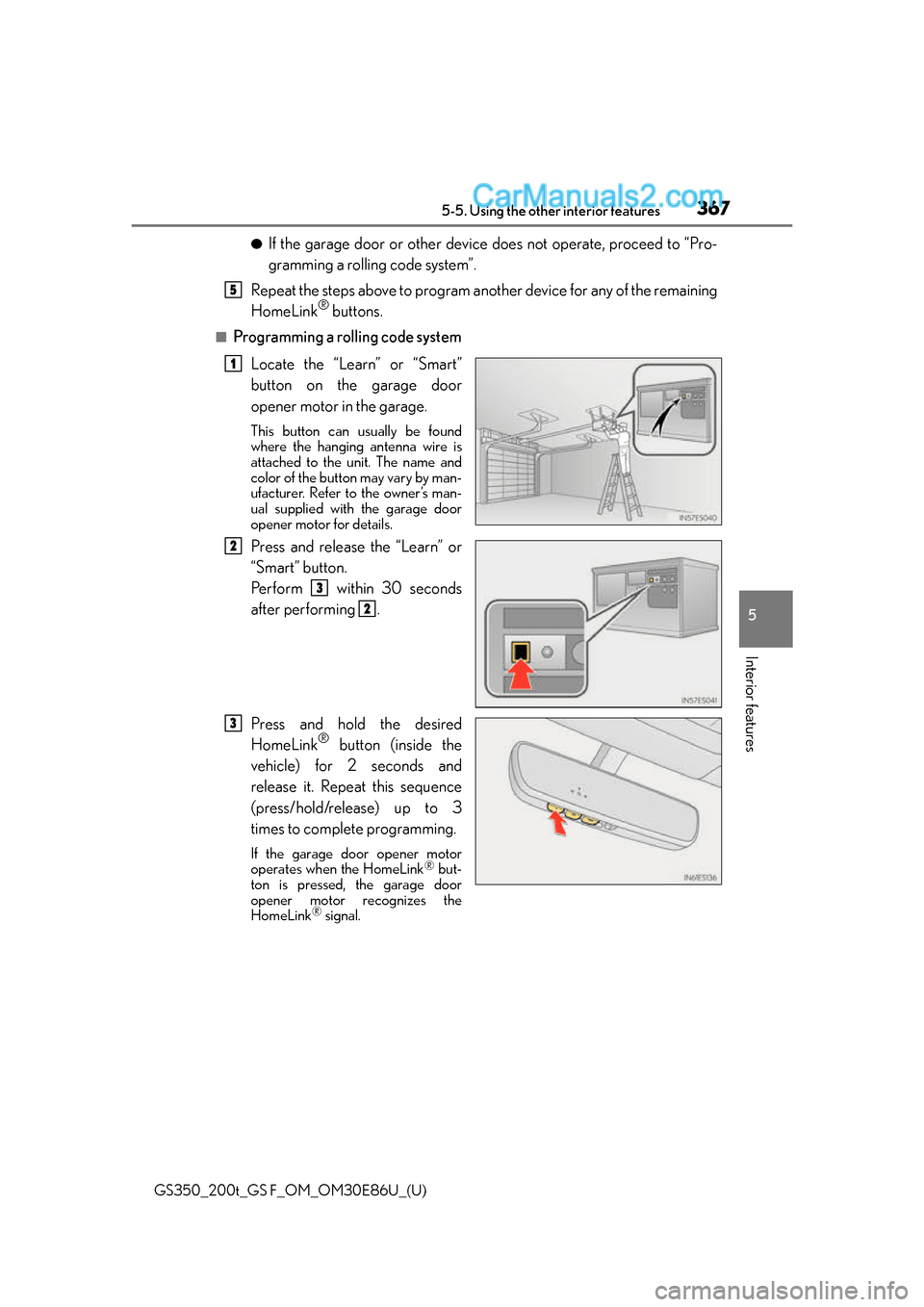
■Programming a rolling code system
Locate the “Learn” or “Smart”
button on the garage door
opener motor in the garage.
This button can usually be found
where the hanging antenna wire is
attached to the unit. The name and
color of the button may vary by man-
ufacturer. Refer to the owner’s man-
ual supplied with the garage door
opener motor for details.
Press and release the “Learn” or
“Smart” button.
Pe r f o r m w i t h i n 3 0 s e c o n d s
after performing .
Press and hold the desired
HomeLink
® button (inside the
vehicle) for 2 seconds and
release it. Repeat this sequence
(press/hold/release) up to 3
times to complete programming.
If the garage door opener motor
operates when the HomeLink® but-
ton is pressed, the garage door
opener motor recognizes the
HomeLink
® signal.
5
1
2
3
2
3
Page 368 of 624
368
GS350_200t_GS F_OM_OM30E86U_(U)5-5. Using the other interior features
■Enabling 2-way communication with a garage door (only available for com-
patible devices)
When enabled, 2-way communication allows you to check the status of the
opening and closing of a garage door
through indicators in your vehicle.
2-way communication is only available if the garage door opener motor used
is a compatible device. (To check device compatibility, refer to
www.HomeLink.com.) Within 5 seconds after programming the garage door opener has been
completed, if the garage door opener motor is trained to HomeLink
®,
both garage door operation indicators will flash rapidly (green) and the
light on the garage door opener moto r will blink twice, indicating that 2-
way communication is enabled.
If the indicators do not flash, perform and within the first 10 presses of
the HomeLink
® button after programming has been completed.
Press a programmed HomeLink
® button to operate a garage door.
Within 1 minute of pressing the HomeLink
® button, after the garage door
operation has stopped, press the “Learn” or “Smart” button on the garage
door opener motor. Within 5 second s of the establishment of 2-way com-
munication with the garage door opener, both garage door operation indi-
cators in the vehicle will flash rapidly (green) and the light on the garage
door opener motor will blink twice, indicating that 2-way communication is
enabled.
■Reprogramming a single HomeLink® button
When the following procedure is performed, buttons which already have
devices registered to them can be overwritten: With one hand, press and hold the desired HomeLink
® button.
When the HomeLink
® indicator starts flashing (orange), continue to hold
the HomeLink® button and perform “Programming HomeLink®” (it
takes 20 seconds for the HomeLink® indicator to start flashing).
Press the appropriate HomeLink
® button. The HomeLink® indicator light
should turn on.
Operating HomeLink®
1
23
2
3
1
2
1
Page 369 of 624
GS350_200t_GS F_OM_OM30E86U_(U)
3695-5. Using the other interior features
5
Interior features
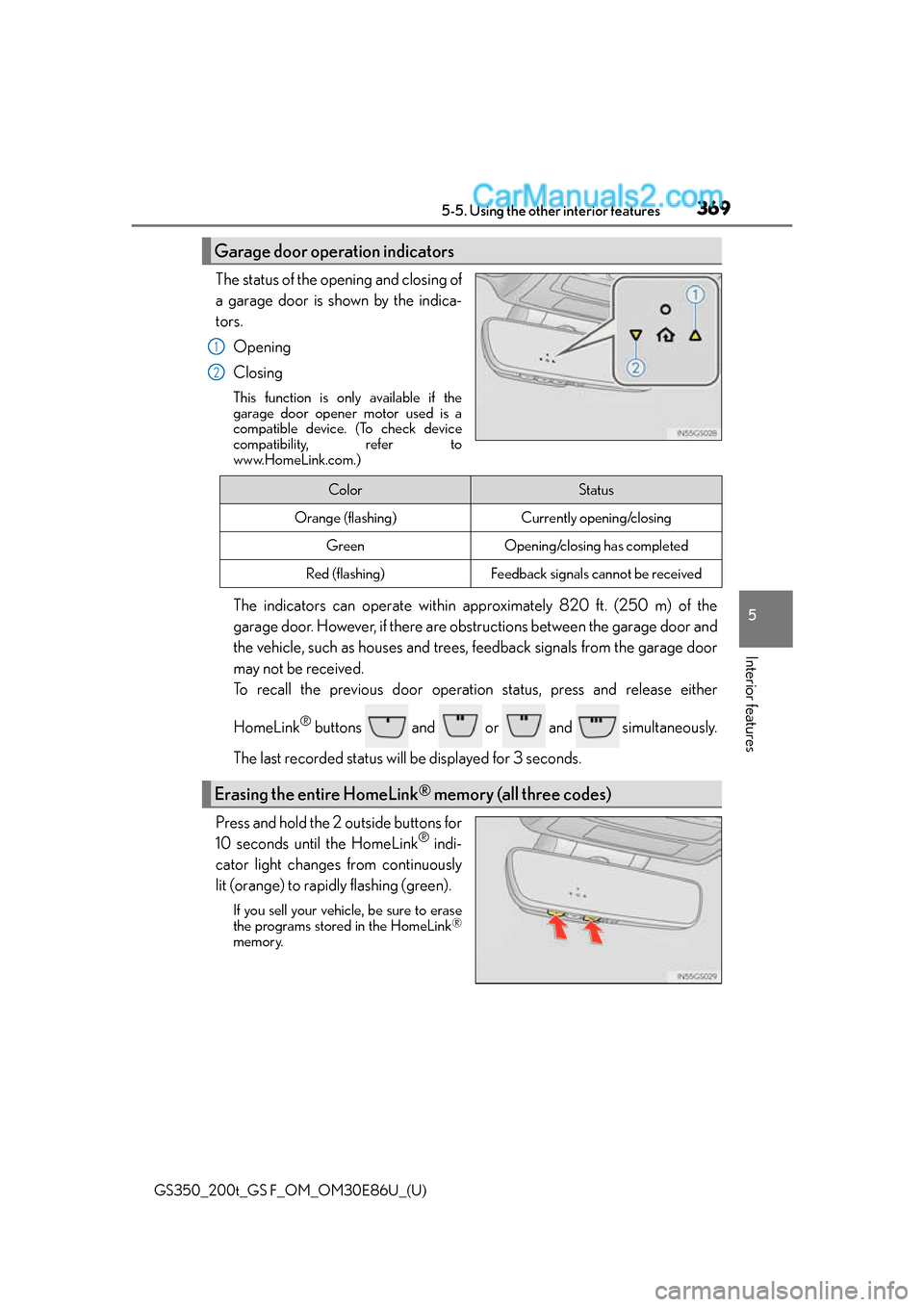
The status of the opening and closing of
a garage door is shown by the indica-
tors.Opening
Closing
This function is only available if the
garage door opener motor used is a
compatible device. (To check device
compatibility, refer to
www.HomeLink.com.)
The indicators can operate within approximately 820 ft. (250 m) of the
garage door. However, if there are obstructions between the garage door and
the vehicle, such as houses and trees, feedback signals from the garage door
may not be received.
To recall the previous door operat ion status, press and release either
HomeLink
® buttons and or and simultaneously.
The last recorded status w ill be displayed for 3 seconds.
Press and hold the 2 outside buttons for
10 seconds until the HomeLink
® indi-
cator light changes from continuously
lit (orange) to rapidly flashing (green).
If you sell your vehicle, be sure to erase
the programs stored in the HomeLink®
memory.
Garage door operation indicators
1
2
ColorStatus
Orange (flashing)Currently opening/closing
GreenOpening/closing has completed
Red (flashing)Feedback signals cannot be received
Erasing the entire HomeLink® memory (all three codes)
Page 371 of 624
GS350_200t_GS F_OM_OM30E86U_(U)
3715-5. Using the other interior features
5
Interior features
WA R N I N G
■When programming a garage door or other remote control device
The garage door or other device may operate, so ensure people and objects are out of
danger to prevent potential harm.
■Conforming to federal safety standards
Do not use the HomeLink® compatible transceiver with any garage door opener or
device that lacks safety stop and reverse fe atures as required by federal safety stan-
dards.
This includes any garage door that canno t detect an interfering object. A door or
device without these features increases the risk of death or serious injury.
■When operating or programming HomeLink®
Never allow a child to operate or play with the HomeLink® buttons.