steering Lexus GS350 2016 User Guide
[x] Cancel search | Manufacturer: LEXUS, Model Year: 2016, Model line: GS350, Model: Lexus GS350 2016Pages: 624, PDF Size: 15.29 MB
Page 51 of 624
511-1. For safe use
GS350_200t_GS F_OM_OM30E86U_(U)
1
For safety and security
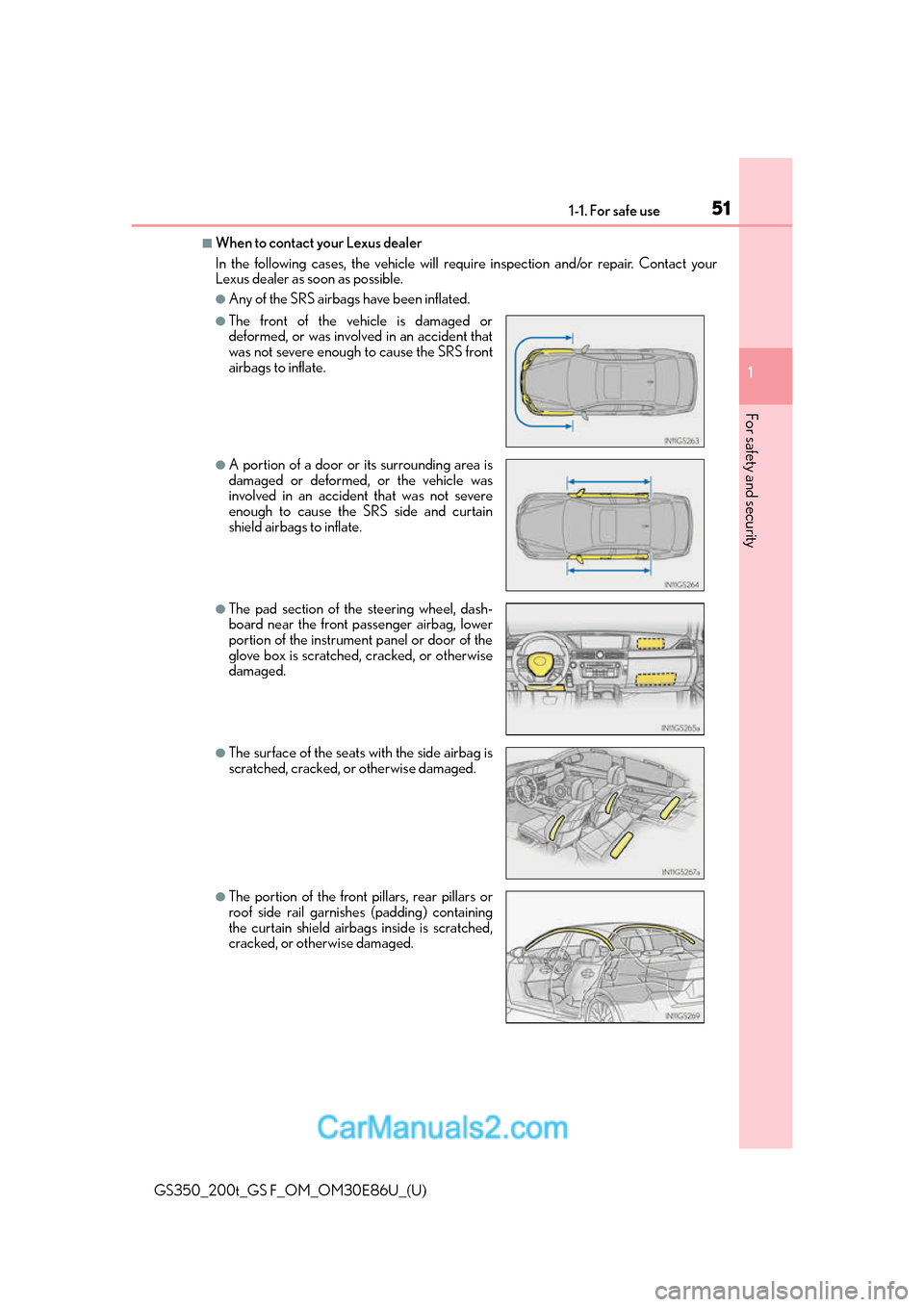
■When to contact your Lexus dealer
In the following cases, the vehicle will re quire inspection and/or repair. Contact your
Lexus dealer as soon as possible.
●Any of the SRS airbags have been inflated.
●The front of the vehicle is damaged or
deformed, or was involv ed in an accident that
was not severe enough to cause the SRS front
airbags to inflate.
●A portion of a door or its surrounding area is
damaged or deformed, or the vehicle was
involved in an accident that was not severe
enough to cause the SRS side and curtain
shield airbags to inflate.
●The pad section of the steering wheel, dash-
board near the front passenger airbag, lower
portion of the instrument panel or door of the
glove box is scratched, cracked, or otherwise
damaged.
●The surface of the seats with the side airbag is
scratched, cracked, or otherwise damaged.
●The portion of the front pillars, rear pillars or
roof side rail garnishes (padding) containing
the curtain shield airbag s inside is scratched,
cracked, or otherwise damaged.
Page 80 of 624
80
GS350_200t_GS F_OM_OM30E86U_(U)2. Instrument cluster
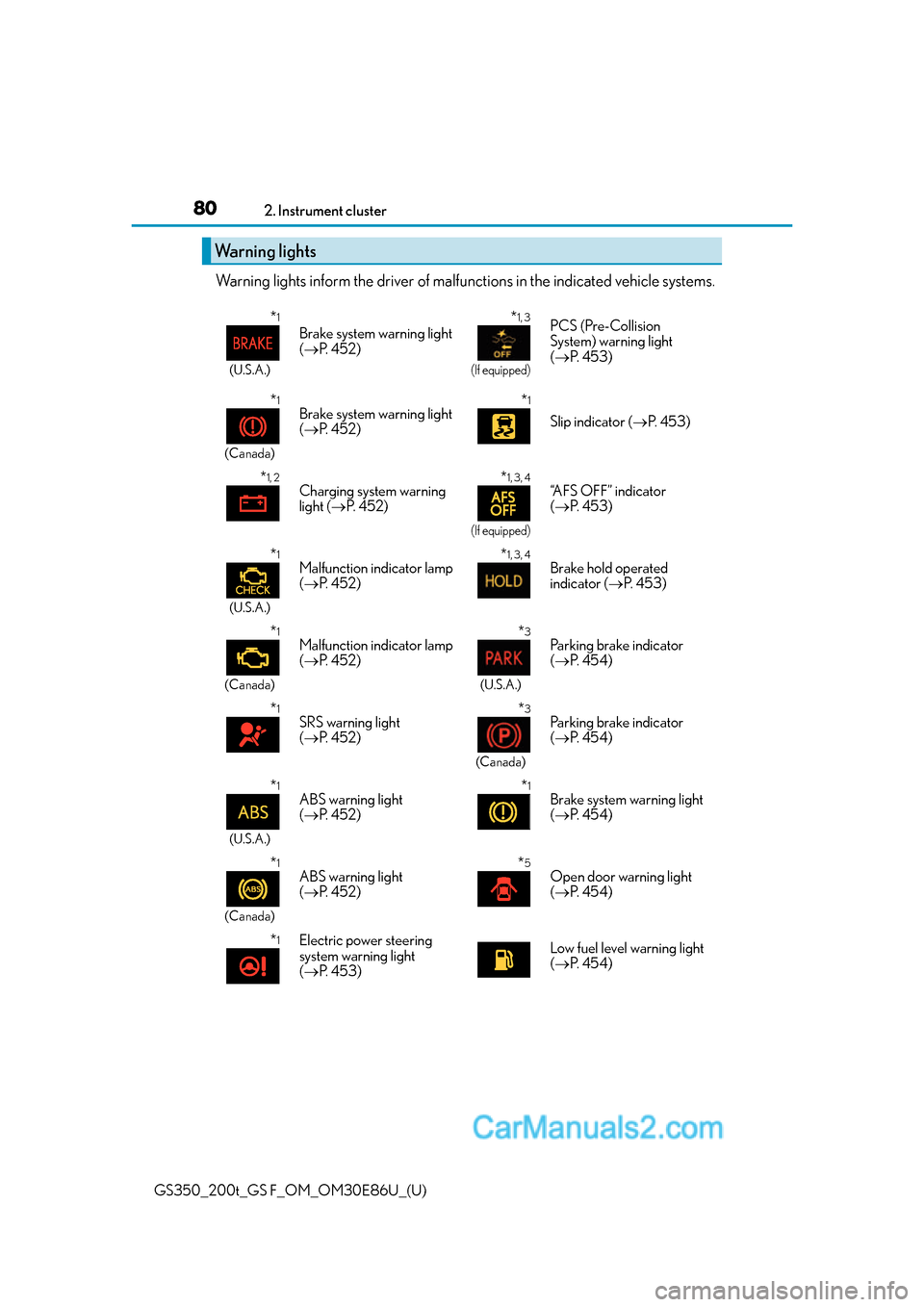
Warning lights inform the driver of malfun
ctions in the indicated vehicle systems.
Warning lights
*1
(U.S.A.)
Brake system warning light
( P. 4 5 2 )
*1, 3
(If equipped)
PCS (Pre-Collision
System) warning light
( P. 4 5 3 )
*1
(Canada)
Brake system warning light
( P. 4 5 2 )*1
Slip indicator ( P. 4 5 3 )
*1, 2Charging system warning
light ( P. 4 5 2 )*1, 3, 4
(If equipped)
“AFS OFF” indicator
( P. 4 5 3 )
*1
(U.S.A.)
Malfunction indicator lamp
( P. 4 5 2 )*1, 3, 4Brake hold operated
indicator ( P. 4 5 3 )
*1
(Canada)
Malfunction indicator lamp
( P. 4 5 2 )*3
(U.S.A.)
Parking brake indicator
( P. 4 5 4 )
*1SRS warning light
( P. 4 5 2 )*3
(Canada)
Parking brake indicator
( P. 4 5 4 )
*1
(U.S.A.)
ABS warning light
( P. 4 5 2 )*1Brake system warning light
( P. 4 5 4 )
*1
(Canada)
ABS warning light
( P. 4 5 2 )*5Open door warning light
( P. 4 5 4 )
*1Electric power steering
system warning light
( P. 4 5 3 )Low fuel level warning light
( P. 4 5 4 )
Page 103 of 624
GS350_200t_GS F_OM_OM30E86U_(U)
1032. Instrument cluster
2
Instrument cluster
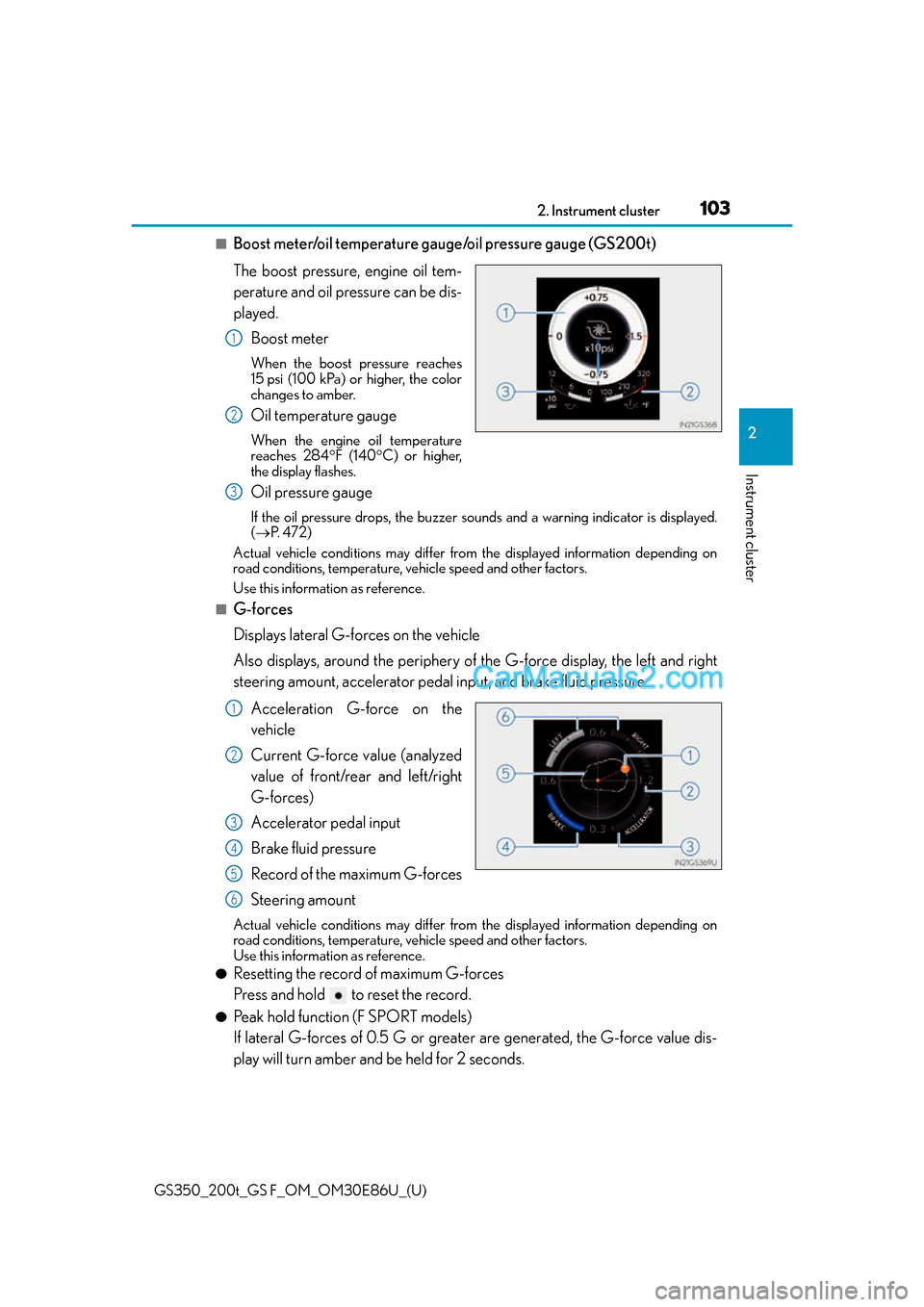
■Boost meter/oil temperature gauge/oil pressure gauge (GS200t)
The boost pressure, engine oil tem-
perature and oil pressure can be dis-
played.Boost meter
When the boost pressure reaches
15 psi (100 kPa) or higher, the color
changes to amber.
Oil temperature gauge
When the engine oil temperature
reaches 284 F (140 C) or higher,
the display flashes.
Oil pressure gauge
If the oil pressure drops, the buzzer so unds and a warning indicator is displayed.
( P. 4 7 2 )
Actual vehicle conditions may differ fr om the displayed information depending on
road conditions, temperature, vehicle speed and other factors.
Use this information as reference.
■G-forces
Displays lateral G-forces on the vehicle
Also displays, around the periphery of the G-force display, the left and right
steering amount, accelerator pedal input, and brake fluid pressure
Acceleration G-force on the
vehicle
Current G-force value (analyzed
value of front/rear and left/right
G-forces)
Accelerator pedal input
Brake fluid pressure
Record of the maximum G-forces
Steering amount
Actual vehicle conditions may differ fr om the displayed information depending on
road conditions, temperature, vehicle speed and other factors.
Use this information as reference.
●Resetting the record of maximum G-forces
Press and hold to reset the record.
●Peak hold function (F SPORT models)
If lateral G-forces of 0.5 G or greater are generated, the G-force value dis-
play will turn amber and be held for 2 seconds.
1
2
3
1
2
3
4
5
6
Page 106 of 624
106
GS350_200t_GS F_OM_OM30E86U_(U)2. Instrument cluster
■G-force display
●The G-force values may not be zero even when the vehicle is parked, such as when it is
parked on an incline.
●Depending on the vehicle usage conditions,
the brake fluid pressure display may not
reach its maximum reading even though the brake pedal is fully depressed.
●If a battery terminal is disconnected and reconnected, the steering amount display may
be disabled temporarily. After driving the vehi cle for a while, the display will be enabled.
■System check display
After turning the engine switch to IGNITION ON mode, opening image is displayed
while system operation is checked. When the system check is complete, the normal
screen will return.
■Suspension of the settings display
In the following situations, th e settings display using the meter control switches will be
suspended.
●When a warning message appears on the multi-information display
●When the vehicle begins to move
■Tire inflation pressure
●It may take a few minutes to display the tire inflation pressure after the engine switch is
turned to IGNITION ON mode. It may also take a few minutes to display the tire infla-
tion pressure after inflation pressure has been adjusted.
●“---” may be displayed if the tire information cannot be determined due to unfavorable
radio wave conditions.
●Tire inflation pressure changes with temperat ure. The displayed values may also be dif-
ferent from the values measured using a tire pressure gauge.
■When disconnecting and reconnecting battery terminals
The drive information will be reset.
■Liquid crystal display
P. 9 0
WA R N I N G
■Caution for use while driving
●When operating the multi-information display while driving, pay extra attention to the
safety of the area around the vehicle.
●Do not look continuously at the multi-info rmation display while driving as you may fail
to see pedestrians, objects on the road, etc. ahead of the vehicle.
■Cautions during setting up the display
As the engine needs to be operating during setting up the display, ensure that the vehi-
cle is parked in a place with adequate vent ilation. In a closed area such as a garage,
exhaust gases including harmful carbon mo noxide (CO) may collect and enter the
vehicle. This may lead to death or a serious health hazard.
Page 108 of 624
108
GS350_200t_GS F_OM_OM30E86U_(U)2. Instrument cluster
Multi-information display (GS F)
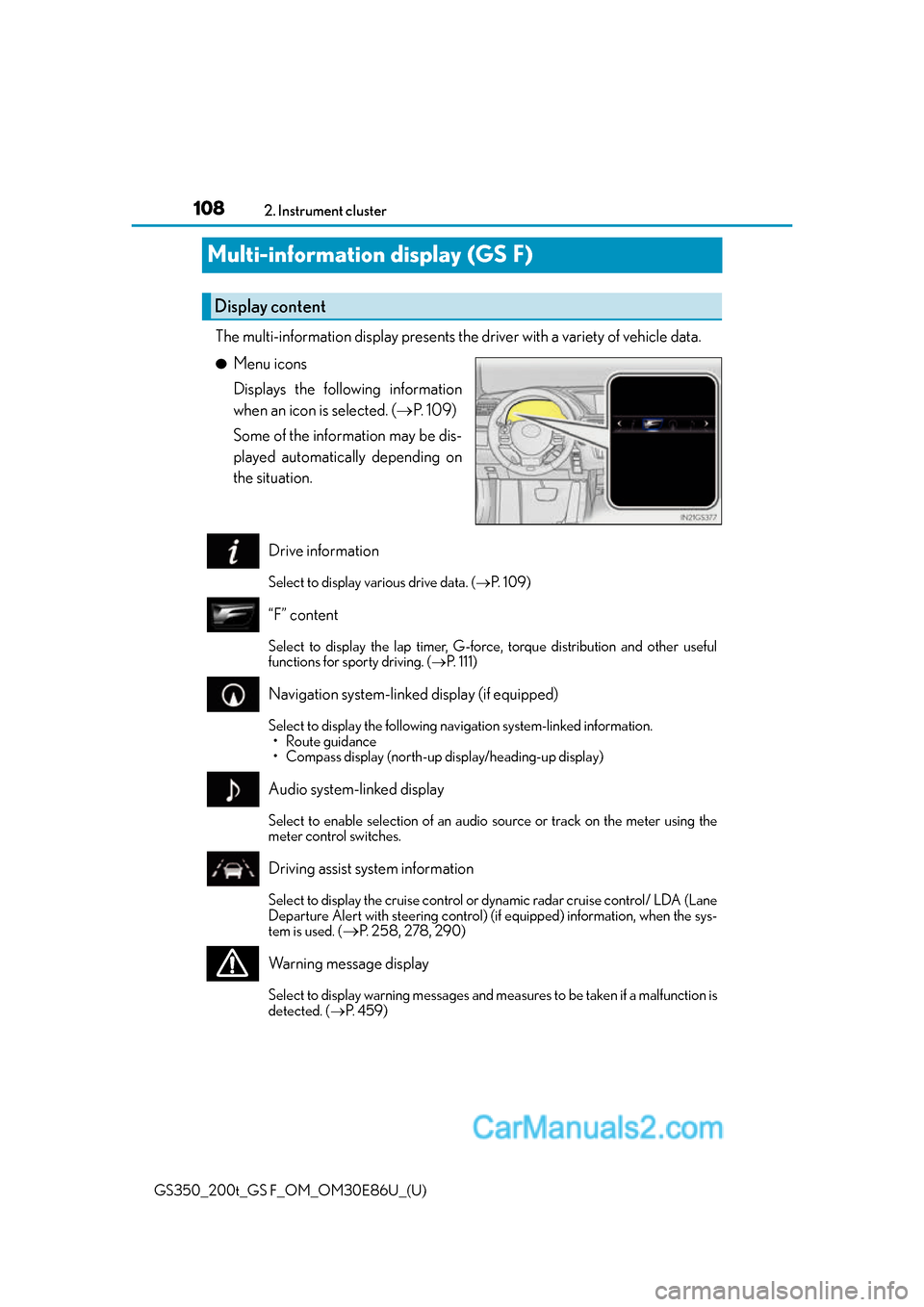
The multi-information display presents the driver with a variety of vehicle data.
●Menu icons
Displays the following information
when an icon is selected. (
P. 1 0 9 )
Some of the information may be dis-
played automatically depending on
the situation.
Drive information
Select to display various drive data. ( P. 1 0 9 )
“F” content
Select to display the lap timer, G-force, torque distribution and other useful
functions for sporty driving. (P. 111)
Navigation system-linked display (if equipped)
Select to display the following na vigation system-linked information.
• Route guidance
• Compass display (north-up display/heading-up display)
Audio system-linked display
Select to enable selection of an audio source or track on the meter using the
meter control switches.
Driving assist system information
Select to display the cruise control or dynamic radar cruise control/ LDA (Lane
Departure Alert with steering control) (if equipped) information, when the sys-
tem is used. (
P. 258, 278, 290)
Warning message display
Select to display warning messages and me asures to be taken if a malfunction is
detected. ( P. 4 5 9 )
Display content
Page 110 of 624
110
GS350_200t_GS F_OM_OM30E86U_(U)2. Instrument cluster
■Average speed (after reset*2/a f t e r s t a r t )*1
Displays the average vehicle speed since the function was reset and the
engine was started, respectively
■Elapsed time (after reset*2/after start)*1
Displays the elapsed time since the function was reset and the engine was
started, respectively
■Distance (range/after start)*1
Displays the estimated maximum distance that can be driven with the quantity
of fuel remaining and the distance driv
en after the engine was started respec-
tively.
• This distance is computed based on your average fuel consumption. As a result,
the actual distance that can be driven may differ from that displayed.
• When only a small amount of fuel is added to the tank, the display may not be
updated.
When refueling, turn the engine switch off. If the vehicle is refueled without turning
the engine switch off, the display may not be updated.
■Tire inflation pressure
Displays inflation pressure of each tire.
The inflation pressure of the sp are tire will not be displayed.
■Gear positions
Displays the current gear position when the shift lever is in D or M.
■LDA (Lane Departure Alert with steering control) vehicle sway warning (if
equipped)
P. 2 5 8
■Display off
A blank screen is displayed
*1: Displayed when the item is set in “Drive In fo 1”, “Drive Info 2” or “Drive Info 3”.
( P. 5 7 1 )
*2: The function can be reset by pressing th e of the meter control switches for longer
than 1 second when the item to reset is displayed.
If there is more than one item that can be reset, the item selection screen will appear.
Page 114 of 624
114
GS350_200t_GS F_OM_OM30E86U_(U)2. Instrument cluster
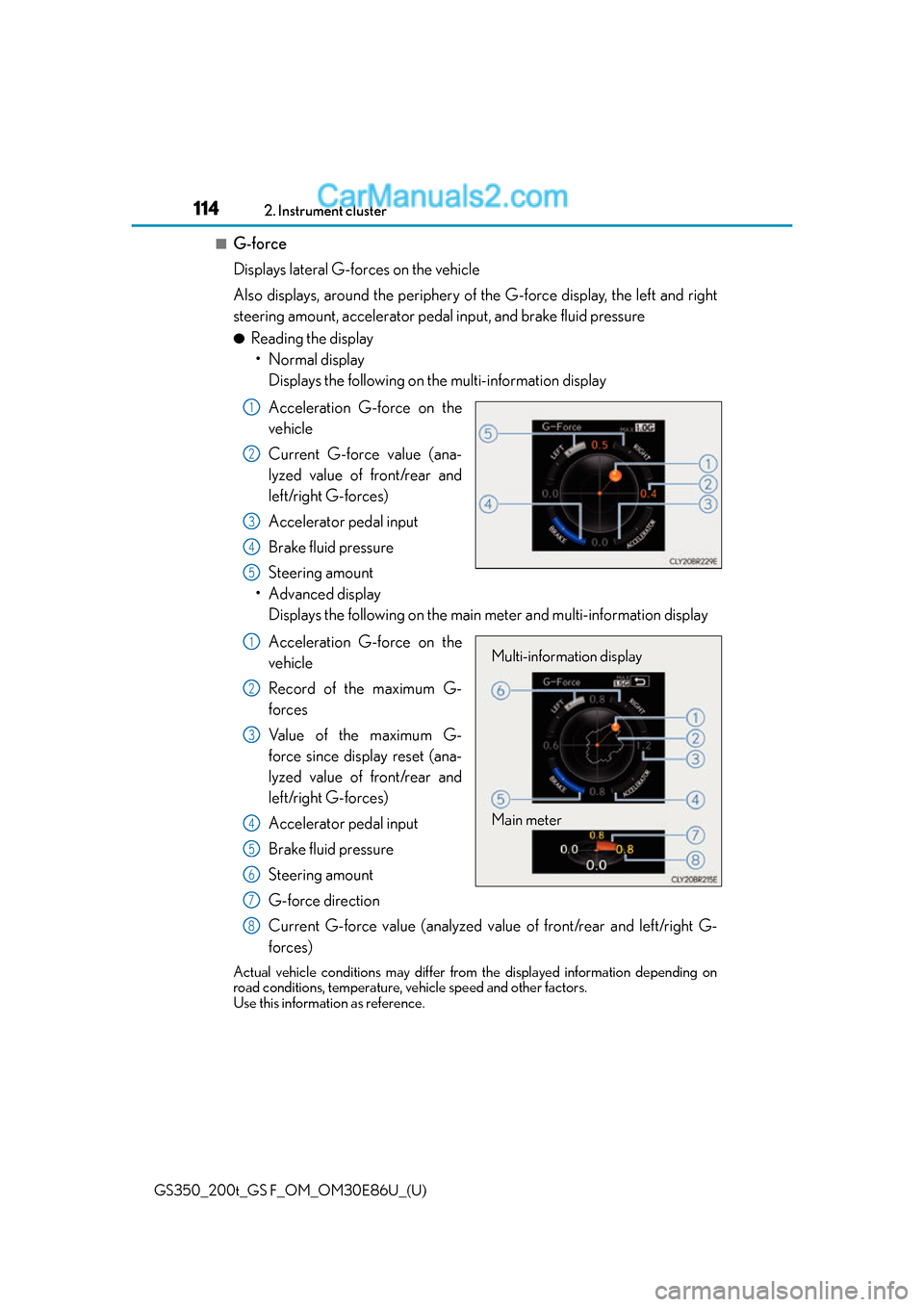
■G-force
Displays lateral G-forces on the vehicle
Also displays, around the periphery of the G-force display, the left and right
steering amount, accelerator pedal input, and brake fluid pressure
●Reading the display
• Normal display Displays the following on the multi-information display
Acceleration G-force on the
vehicle
Current G-force value (ana-
lyzed value of front/rear and
left/right G-forces)
Accelerator pedal input
Brake fluid pressure
Steering amount
• Advanced display Displays the following on the main meter and multi-information display
Acceleration G-force on the
vehicle
Record of the maximum G-
forces
Value of the maximum G-
force since display reset (ana-
lyzed value of front/rear and
left/right G-forces)
Accelerator pedal input
Brake fluid pressure
Steering amount
G-force direction
Current G-force value (analyzed value of front/rear and left/right G-
forces)
Actual vehicle conditions may differ fr om the displayed information depending on
road conditions, temperature, vehicle speed and other factors.
Use this information as reference.
1
2
3
4
5
Multi-information display
Main meter1
2
3
4
5
6
7
8
Page 116 of 624
116
GS350_200t_GS F_OM_OM30E86U_(U)2. Instrument cluster
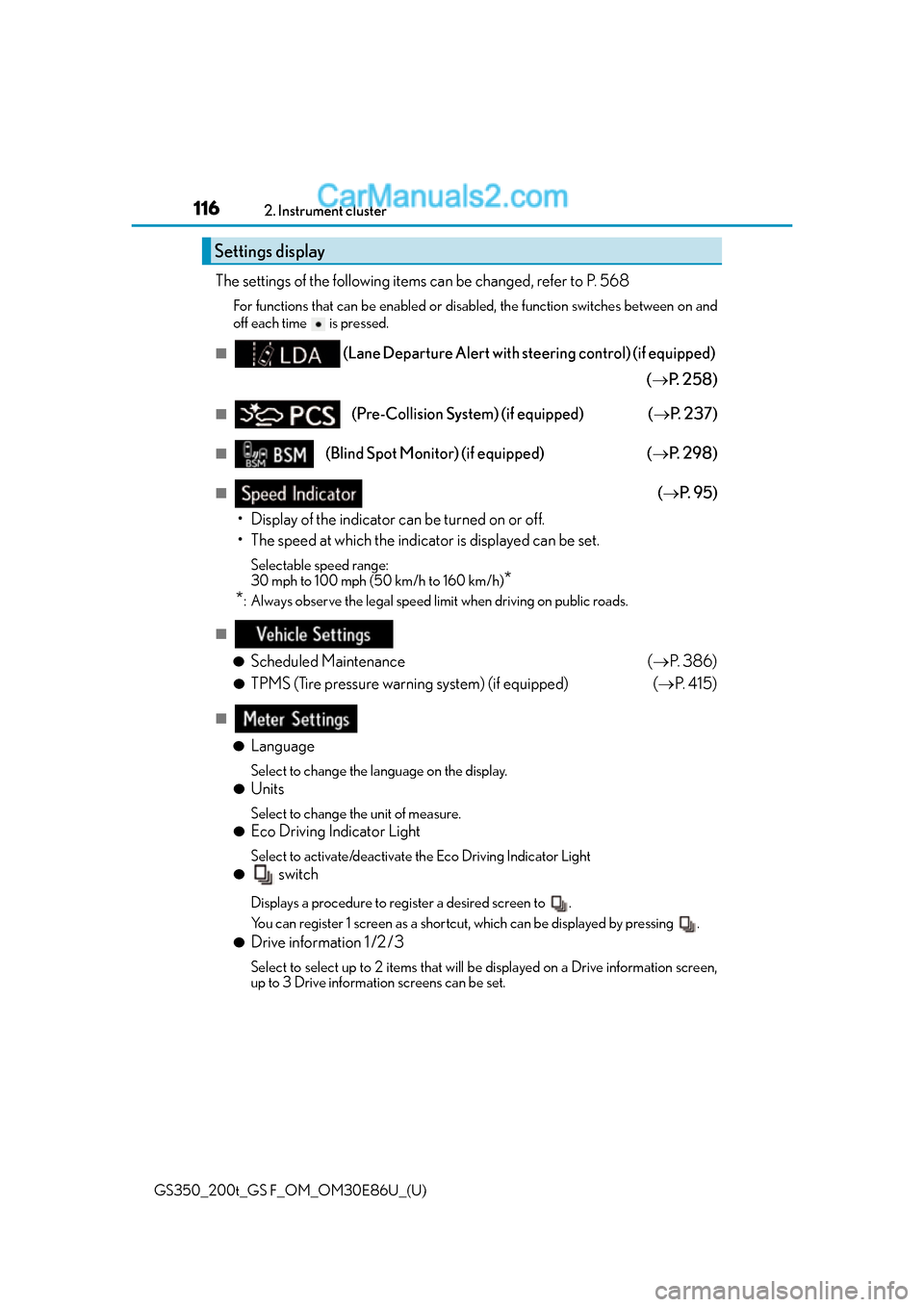
The settings of the following items can be changed, refer to P. 568
For functions that can be enabled or disabled, the function switches between on and
off each time is pressed.
■(Lane Departure Alert with steering control) (if equipped)
( P. 2 5 8 )
■(Pre-Collision System) (if equipped) ( P. 2 3 7 )
■(Blind Spot Monitor) (if equipped) ( P. 2 9 8 )
■( P. 9 5 )
• Display of the indicator can be turned on or off.
• The speed at which the indicator is displayed can be set.
Selectable speed range:
30 mph to 100 mph (50 km/h to 160 km/h)
*
*
: Always observe the legal speed limit when driving on public roads.
■
●
Scheduled Maintenance (P. 3 8 6 )
●TPMS (Tire pressure warning system) (if equipped) ( P. 4 1 5 )
■
●
Language
Select to change the la nguage on the display.
●Units
Select to change the unit of measure.
●Eco Driving Indicator Light
Select to activate/deactivate the Eco Driving Indicator Light
● switch
Displays a procedure to register a desired screen to .
You can register 1 screen as a shortcut , which can be displayed by pressing .
●Drive information 1 /2 /3
Select to select up to 2 items that will be displayed on a Drive information screen,
up to 3 Drive information screens can be set.
Settings display
Page 118 of 624
118
GS350_200t_GS F_OM_OM30E86U_(U)2. Instrument cluster
■Start-up display
When the engine is started, the name of the
vehicle is displayed on the multi-information
display.
While the start-up display is being displaye d, the meter display cannot be changed even
if the drive mode is changed. When the start-up display is finished, the meter display for
the currently selected mode will be displayed.
■Torque distribution display
Torque distribution may not be displayed correctly in some cases, such as when the vehi-
cle passes over road expansion joints.
■G-force display
●The G-force values may not be zero even when the vehicle is parked, such as when it is
parked on an incline.
●The steering amount, accelerator pedal input, and brake fluid pressure displays are dis-
abled until the engine has warmed up (the variable red zone of the tachometer has
retracted to 7300 rpm).
After the engine has warmed up, these displays will be enabled.
●Depending on the vehicle usage conditions, the brake fluid pressure display may not
reach its maximum reading even though the brake pedal is fully depressed.
●If a battery terminal is disconnected and reconnected, the steering amount display may
be disabled temporarily. After driving the vehi cle for a while, the display will be enabled.
■Suspension of the settings display
In the following situations, operation of the settings display will be temporarily sus-
pended.
●When a warning message appears on the multi-information display
●When the vehicle begins to move
■Tire inflation pressure
●It may take a few minutes to display the tire inflation pressure after the engine switch is
turned to IGNITION ON mode. It may also take a few minutes to display the tire infla-
tion pressure after inflation pressure has been adjusted.
●“---” may be displayed if the tire position information cannot be determined due to
unfavorable radio wave conditions.
●Tire inflation pressure changes with temperat ure. The displayed values may also be dif-
ferent from the values measured using a tire pressure gauge.
■When disconnecting and reconnecting battery terminals
The following information data will be reset:
●Lap timer: Measured lap times, history
●G-force: Record of the maximum G-forces
■Using the lap timer
If the engine is stopped while a lap is being timed, the lap timer will stop and the lap time
up to that point will be recorded.
■Liquid crystal display
P. 9 8
Page 121 of 624
GS350_200t_GS F_OM_OM30E86U_(U)
1212. Instrument cluster
2
Instrument cluster
●Vehicle speed
●Tachometer
●Shift position and shift range
Displays the selected shift position or selected shift range ( P. 202)
●Eco Driving Indicator (GS350/GS200t) ( P. 8 5 )
●Head-up rev indicator (GS F) ( P. 1 2 4 )
●Audio display*
Displays audio information for approximately 3 seconds when the audio system is
operated
●Route guidance display (vehicles with navigation system) ( P. 1 2 4 )
When approaching an intersec tion while the navigation system is giving route guid-
ance, an arrow will automatically be displayed to indicate the direction of travel.
●Lexus Enform (if equipped)
Displays “LEXUS Enform” for approximat ely 3 seconds when LEXUS App Suite is
operated
●Lane departure warning display (LDA [Lane Departure Alert with
steering control], LKA [Lane-Keeping Assist]) (if equipped) ( P. 4 6 0 )
●Approach warning display (dynamic radar cruise control, dynamic radar
cruise control with full-speed range) (if equipped) ( P. 4 6 0 )
●Pre-collision warning message (PCS [Pre-Collision System])
(if equipped) ( P. 4 6 0 )
●Speed limit display (vehicles with navigation system) ( P. 1 2 5 )
*: The default setting is off
Head-up display contents