theft Lexus GS350 2016 User Guide
[x] Cancel search | Manufacturer: LEXUS, Model Year: 2016, Model line: GS350, Model: Lexus GS350 2016Pages: 624, PDF Size: 15.29 MB
Page 154 of 624
154
GS350_200t_GS F_OM_OM30E86U_(U)3-2. Opening, closing and
locking the doors and trunk
■When the vehicle is not driven for extended periods
●To prevent theft of the vehicle, do not leave the electronic key within 6 ft. (2 m) of the
vehicle.
●The smart access system with push-button start can be deactivated in advance.
( P. 5 6 8 )
■To operate the system properly
●Make sure to carry the electronic key when operating the system. Do not get the elec-
tronic key too close to the vehicle when op erating the system from the outside of the
vehicle.
Depending on the position and holding condit ion of the electronic key, the key may not
be detected correctly and the system may no t operate properly. (The alarm may go off
accidentally, or the door lock prev ention function may not operate.)
●Do not leave the electronic key inside the trunk.
The key confinement prevention function ma y not operate, depending on the location
of the key (close to a spare tire, the inside edge of the trunk), conditions (inside a metal
bag, close to metallic objects) and the radio waves in the surrounding area. (P. 1 4 5 )
■If the smart access system with push-button start does not operate properly
●Locking and unlocking the doors and open ing the trunk: Use the mechanical key.
( P. 5 2 0 )
●Starting the engine: P. 5 2 1
■Customization
Settings (e. g. smart access system with push-button start) can be changed.
(Customizable features: P. 5 6 8 )
■If the smart access system with push-butto n start has been deactivated in a customized
setting
●Locking and unlocking the d oors and opening the trunk:
Use the wireless remote control or mechanical key. ( P. 137, 144, 520)
●Starting the engine and changing engine switch modes: P. 5 2 1
●Stopping the engine: P. 1 9 8
Page 373 of 624
GS350_200t_GS F_OM_OM30E86U_(U)
3735-5. Using the other interior features
5
Interior features
Subscribers have the following Safety Connect services available:
●Automatic Collision Notification*
Helps drivers receive necessary response from emergency service providers.
(P. 3 74 )
*: U.S. Patent No. 7,508,298 B2
●Stolen Vehicle Location
Helps drivers in the event of vehicle theft. ( P. 3 74 )
●Emergency Assistance Button (“SOS”)
Connects drivers to resp onse-center support. (P. 3 74 )
●Enhanced Roadside Assistance
Provides drivers various on-road assistance. ( P. 3 7 5 )
After you have signed the Telematics Subscription Service Agreement and are
enrolled, you can begin receiving services.
A variety of subscription terms is available for purchase. Contact your Lexus
dealer, call 1-800-25-LEXUS (1-800-255-3987) or push the “SOS” button in
your vehicle for further subscription details.
■Safety Connect Services Information
●Phone calls using the vehicles Bluetooth® technology will not be possible during Safety
Connect.
●Contact with the Safety Conne ct response center is dependent upon the telematics
device being in operative condition, cellul ar connection availability, and GPS satellite
signal reception, which can limit the ability to reach the response center or receive
emergency service support. Enrollment an d Telematics Subscription Service Agree-
ment required. A variety of subscription terms is available; charges vary by subscription
term selected.
●Automatic Collision Notification, Emergency Assistance and Stolen Vehicle Location
will function in the United States, including Hawaii and Alaska, and in Canada, and
Enhanced Roadside Assistance will function in the United States (except Hawaii) and in
Canada. No Safety Connect services will function outside of the United States in coun-
tries other than Canada.
●Safety Connect services are not subject to section 255 of the Telecommunications Act
and the device is not TTY compatible.
■Languages
The Safety Connect resp onse center will offer support in multiple languages. The Safety
Connect system will offer voice prompts in English and Spanish. Please indicate your lan-
guage of choice when enrolling.
■When contacting the response center
You may be unable to contact the resp onse center if the network is busy.
Services
Subscription
Page 600 of 624
600What to do if... (Troubleshooting)
GS350_200t_GS F_OM_OM30E86U_(U)
What to do if... (Troubleshooting)
●If you lose your mechanical keys, ne w genuine mechanical keys can be made
by your Lexus dealer. ( P. 1 3 4 )
●If you lose your electronic keys, the risk of vehicle theft increases significantly.
Contact your Lexus dealer immediately. ( P. 1 3 5 )
●Is the electronic key battery weak or depleted? ( P. 4 2 9 )
●Is the engine switch in IGNITION ON mode?
When locking the doors, turn the engine switch off. ( P. 1 9 8 )
●Is the electronic key left inside the vehicle?
When locking the doors, make sure that you have the electronic key on your
person.
●The function may not operate properly du e to the condition of the radio wave.
( P. 1 5 2 )
●Is the child-protector lock set?
The rear door cannot be opened from inside the vehicle when the lock is set.
Open the rear door from outside and then unlock the child-protector lock.
( P. 1 4 0 )
●The function to prevent the electronic ke y from being left inside the trunk will
operate and you can open the trunk as usual. Take the key out from the trunk.
( P. 1 4 5 )
If you have a problem, check the following before contacting your Lexus
dealer.
The doors cannot be locked, unlocked, opened or closed
You lose your keys
The doors cannot be locked or unlocked
The rear door cannot be opened
The trunk lid is closed with the electronic key left inside
Page 601 of 624
601What to do if... (Troubleshooting)
GS350_200t_GS F_OM_OM30E86U_(U)
●Did you press the engine switch while firmly depressing the brake pedal?
(P. 1 9 7 )
●Is the shift lever in P? ( P. 199)
●Is the electronic key anywhere detectable inside the vehicle? ( P. 1 5 0 )
●Is the steering wheel unlocked? ( P. 199)
●Is the electronic key battery weak or depleted?
In this case, the engine can be started in a temporary way. (P. 5 2 1 )
●Is the battery discharged? ( P. 5 2 3 )
●Is the engine switch in IGNITION ON mode?
If you cannot release the shift lever by depressing the brake pedal with the
engine switch in IGNITION ON mode ( P. 5 1 7 )
●It is locked automatically to prevent theft of the vehicle. ( P. 199)
●Is the window lock switch pressed?
The power window except for the one at the driver’s seat cannot be operated
if the window lock switch is pressed. ( P. 1 7 5 )
●The auto power off function will be oper ated if the vehicle is left in ACCES-
SORY or IGNITION ON mode (the engine is not running) for a period of
time. ( P. 199)
If you think something is wrong
The engine does not start
The shift lever cannot be shifted from P even if you depress the brake
pedal
The steering wheel cannot be turned after the engine is stopped
The windows do not open or close by operating the power window
switches
The engine switch is turned off automatically
Page 619 of 624
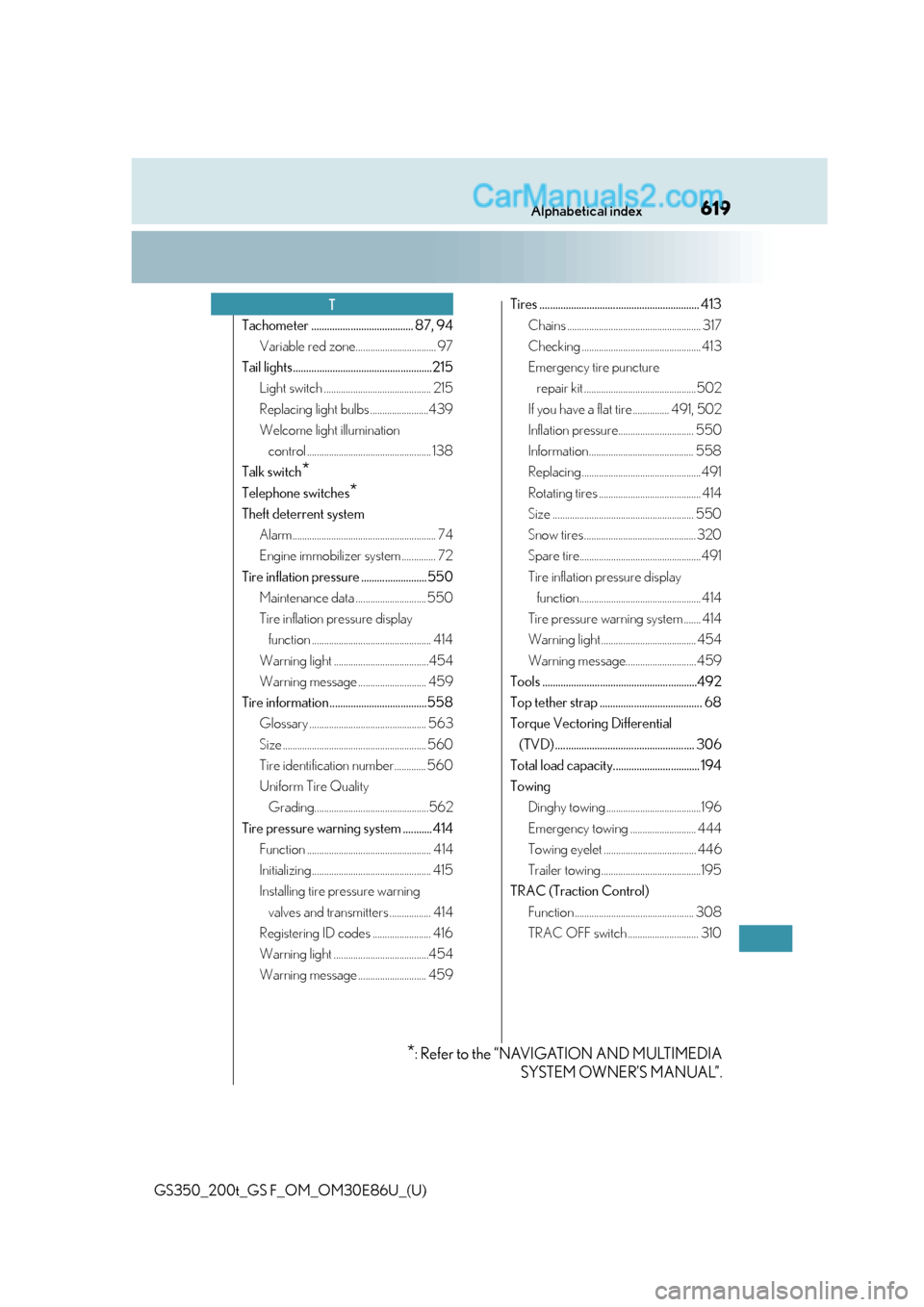
619Alphabetical index
GS350_200t_GS F_OM_OM30E86U_(U)
Tachometer ....................................... 87, 94Variable red zone................................. 97
Tail lights.....................................................215 Light switch ............................................ 215
Replacing light bulbs ........................439
Welcome light illumination control ................................................... 138
Talk switch
*
Telephone switches*
Theft deterrent system Alarm........................................................... 74
Engine immobilizer system .............. 72
Tire inflation pressure .........................550 Maintenance data ............................. 550
Tire inflation pressure display function ................................................. 414
Warning light .......................................454
Warning message ............................ 459
Tire information .....................................558 Glossary ................................................ 563
Size ........................................................... 560
Tire identification number............. 560
Uniform Tire Quality Grading...............................................562
Tire pressure warning system ...........414 Function ................................................... 414
Initializing ................................................. 415
Installing tire pressure warning valves and transmitters ................. 414
Registering ID codes ........................ 416
Warning light .......................................454
Warning message ............................ 459 Tires ............................................................. 413
Chains ....................................................... 317
Checking ................................................. 413
Emergency tire puncture repair kit ..............................................502
If you have a flat tire ............... 491, 502
Inflation pressure............................... 550
Information........................................... 558
Replacing .................................................491
Rotating tires .......................................... 414
Size .......................................................... 550
Snow tires .............................................. 320
Spare tire..................................................491
Tire inflation pressure display function.................................................. 414
Tire pressure warning system ....... 414
Warning light ....................................... 454
Warning message............................. 459
Tools ...........................................................492
Top tether strap ....................................... 68
Torque Vectoring Differential (TVD) ..................................................... 306
Total load capacity................................. 194
Towing Dinghy towing .......................................196
Emergency towing ........................... 444
Towing eyelet ...................................... 446
Trailer towing.........................................195
TRAC (Traction Control) Function ................................................. 308
TRAC OFF switch ............................. 310
T
*: Refer to the “NAVIGATION AND MULTIMEDIA SYSTEM OWNER’S MANUAL”.