lock Lexus GS350 2016 Manual PDF
[x] Cancel search | Manufacturer: LEXUS, Model Year: 2016, Model line: GS350, Model: Lexus GS350 2016Pages: 624, PDF Size: 15.29 MB
Page 317 of 624
GS350_200t_GS F_OM_OM30E86U_(U)
3174-6. Driving tips
4
Driving
Perform the following according to the driving conditions:
●Do not try to forcibly open a window or move a wiper that is frozen. Pour
warm water over the frozen area to melt the ice. Wipe away the water imme-
diately to prevent it from freezing.
●To ensure proper operation of the climate control system fan, remove any
snow that has accumulated on the air inlet vents in front of the windshield.
●Check for and remove any excess ice or snow that may have accumulated on
the exterior lights, vehicle’s roof, chassis, around the tires or on the brakes.
●Remove any snow or mud from the bottom of your shoes before getting in the
vehicle.
Accelerate the vehicle slowly, keep a safe distance between you and the vehicle
ahead, and drive at a reduced speed suitable to road conditions.
Park the vehicle and move the shift lever to P without setting the parking brake.
The parking brake may freeze up, preventing it from being released. If necessary,
block the wheels to prevent in advertent sliding or creeping.
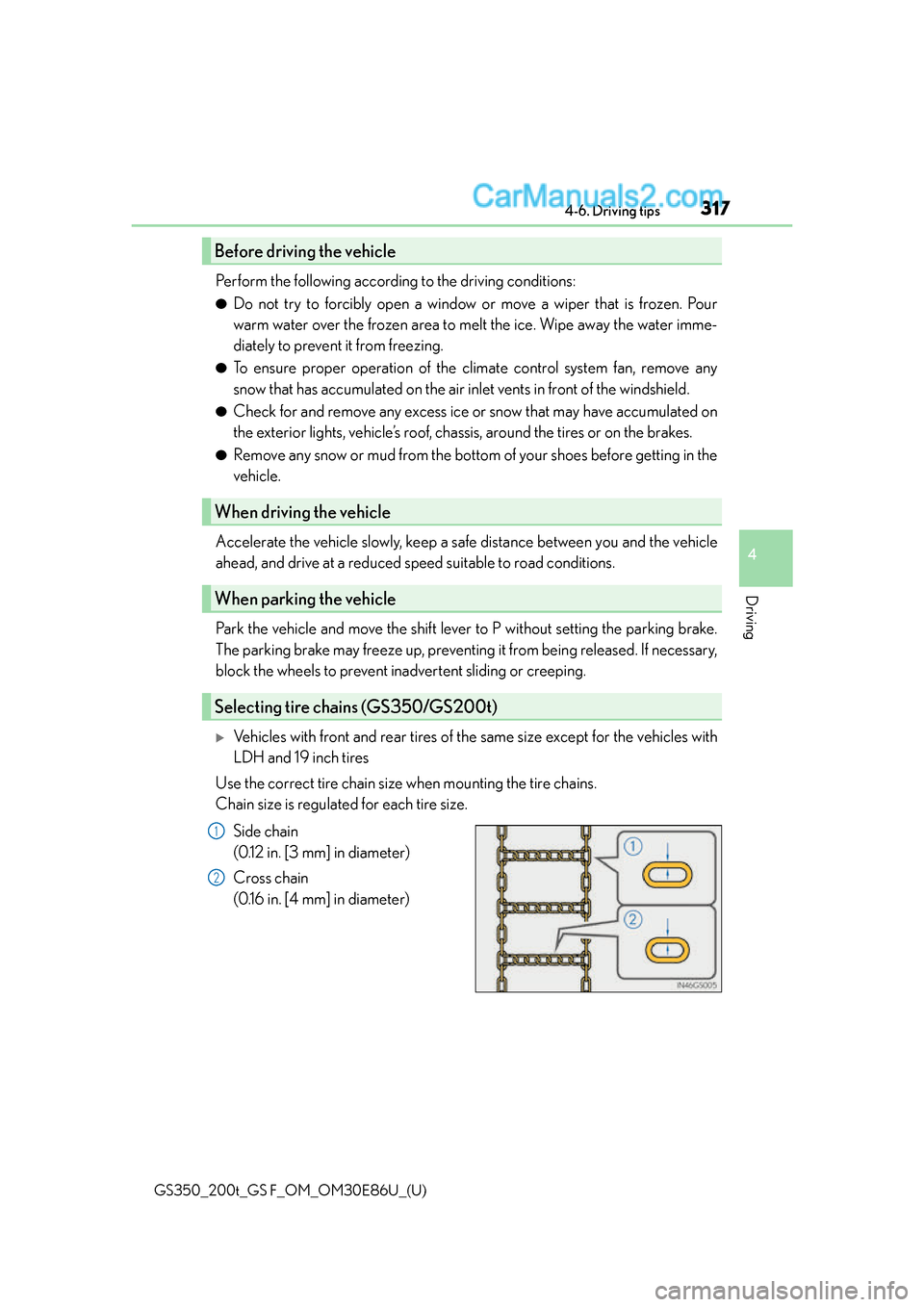
Vehicles with front and rear tires of the same size except for the vehicles with
LDH and 19 inch tires
Use the correct tire chain size when mounting the tire chains.
Chain size is regulated for each tire size.
Side chain
(0.12 in. [3 mm] in diameter)
Cross chain
(0.16 in. [4 mm] in diameter)
Before driving the vehicle
When driving the vehicle
When parking the vehicle
Selecting tire chains (GS350/GS200t)
1
2
Page 321 of 624
321
GS350_200t_GS F_OM_OM30E86U_(U)
5Interior features
5-1. Remote Touch screenRemote Touch/12.3-inch display ..........................................322
5-2. Using the air conditioning system and defogger
Front automatic air conditio ning system .........328
Rear air conditioning system ..........................................339
Heated steering wheel/ seat heaters/seat
ventilators ...................................342 5-3. Using the interior lights
Interior lights list ......................... 347• Interior lights ..........................348
• Personal lights .......................348
5-4. Using the storage features List of storage features ............350• Glove box ................................ 351
• Console box............................ 351
• Cup holders ........................... 352
• Auxiliary boxes ..................... 353
Trunk features .............................. 354
5-5. Using the other interior features
Other interior features ............358 • Sun visors ................................358
• Vanity mirrors ........................358
• Clock ........................................ 359
• Ashtrays ................................... 359
• Power outlets .........................360
• Armrest ....................................360
•Rear sunshade/ rear door sunshades .............361
•Trunk storage
extension ................................. 363
• Coat hooks ............................. 364
• Assist grips.............................. 364
• Garage door opener ......... 365
• LEXUS Enform Safety Connect ....................................372
Page 335 of 624

GS350_200t_GS F_OM_OM30E86U_(U)
3355-2. Using the air conditioning system and defogger
5
Interior features
Select on the control screen to display the rear air conditioning control
screen.
■Using the automatic mode
Select “REAR AUTO” on the screen.
The air conditioning system will operate, and air outlets and speed will be set auto-
matically.
When the rear seat heaters are set to automatic mode, the system is operated
automatically according to the set temperature, outside temperature, etc.
Adjust the temperature setting.
To stop the operation, select “REAR OFF”.
■Adjusting the temperature setting
Select to increase the temperature and to decrease the tempera-
ture.
The air conditioning system switches be tween individual and simultaneous modes
each time “3-ZONE” on the control screen is selected.
■Disabling the switches on the rear armrest.
Select .
Rear seat heater switches ( P. 343) are also locked.
■Location of air outlets
The air outlets and air volume changes
according to the selected air flow mode.
Changing the rear seat settings (with rear air conditioning system)
Air outlets
1
2
Page 336 of 624
336
GS350_200t_GS F_OM_OM30E86U_(U)5-2. Using the air conditio
ning system and defogger
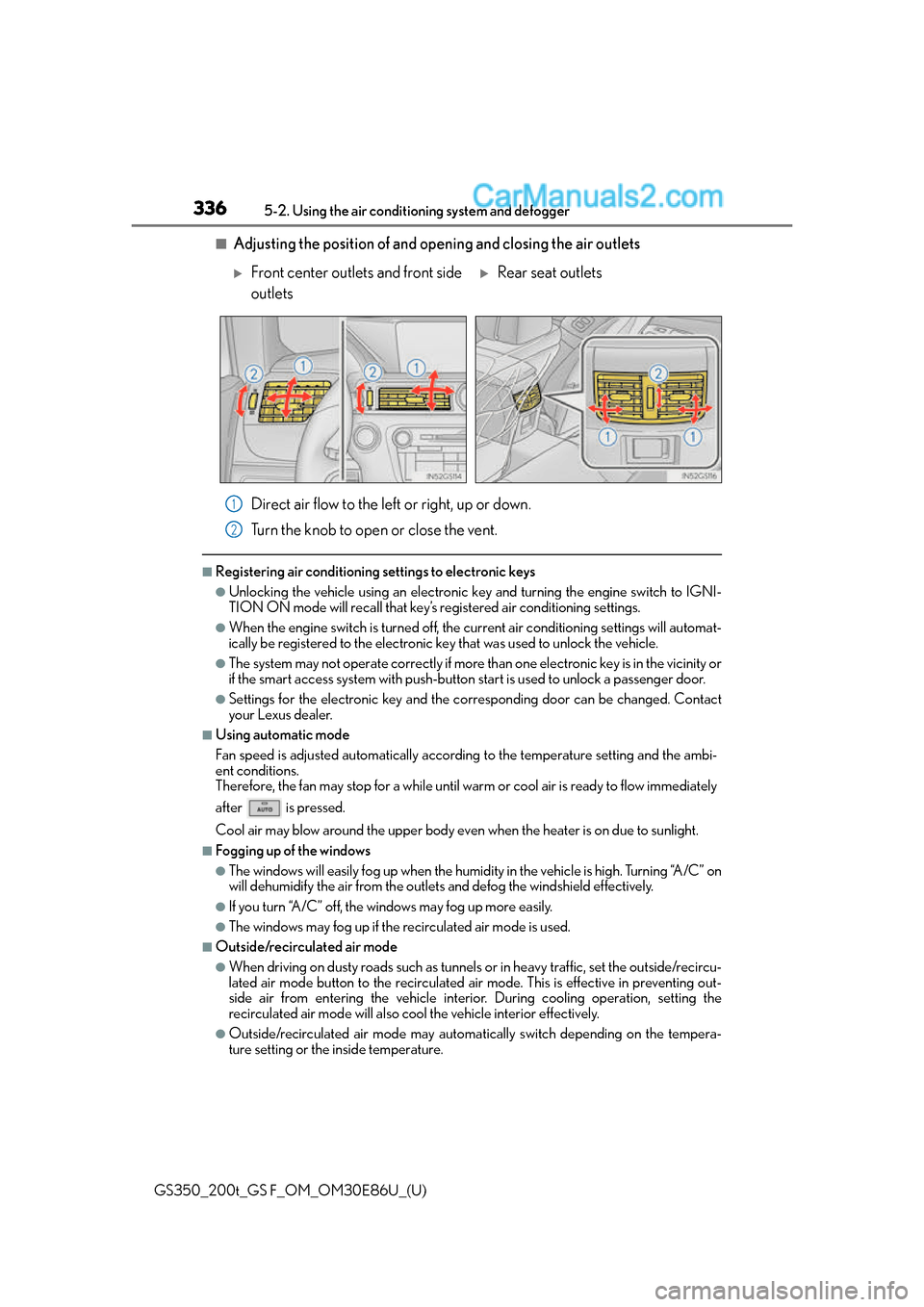
■Adjusting the position of and opening and closing the air outlets
Direct air flow to the left or right, up or down.
Turn the knob to open or close the vent.
■Registering air conditioning settings to electronic keys
●Unlocking the vehicle using an electronic ke y and turning the engine switch to IGNI-
TION ON mode will recall that key’s registered air conditioning settings.
●When the engine switch is tu rned off, the current air conditioning settings will automat-
ically be registered to the electronic key that was used to unlock the vehicle.
●The system may not operate correctly if more th an one electronic key is in the vicinity or
if the smart access system with push-button start is used to unlock a passenger door.
●Settings for the electronic key and the corresponding door can be changed. Contact
your Lexus dealer.
■Using automatic mode
Fan speed is adjusted automatically accordin g to the temperature setting and the ambi-
ent conditions.
Therefore, the fan may stop for a while until warm or cool air is ready to flow immediately
after is pressed.
Cool air may blow around the upper body even when the heater is on due to sunlight.
■Fogging up of the windows
●The windows will easily fog up when the humidity in the vehicle is high. Turning “A/C” on
will dehumidify the air from the outlets and defog the windshield effectively.
●If you turn “A/C” off, the windows may fog up more easily.
●The windows may fog up if the recirculated air mode is used.
■Outside/recirculated air mode
●When driving on dusty roads such as tunnels or in heavy traffic, set the outside/recircu-
lated air mode button to the recirculated ai r mode. This is effective in preventing out-
side air from entering the vehicle interior. During cooling operation, setting the
recirculated air mode will also cool the vehicle interior effectively.
●Outside/recirculated air mode may automa tically switch depending on the tempera-
ture setting or the inside temperature.
Front center outlets and front side
outletsRear seat outlets
1
2
Page 338 of 624
338
GS350_200t_GS F_OM_OM30E86U_(U)5-2. Using the air conditio
ning system and defogger
■Air conditioning filter
P. 4 2 7
■Customization
Settings (e.g. exhaust gas sensor sensitivity) can be changed.
(Customizable features: P. 5 6 8 )
WA R N I N G
■To prevent the windshield from fogging up
●Do not use during cool air operation in extremely humid weather. The differ-
ence between the temperature of the outside air and that of the windshield can cause
the outer surface of the windshield to fog up, blocking your vision.
■To prevent burns
●Do not touch the rear view mirror surfaces when the outside rear view mirror defog-
gers are on.
●Vehicles with windshield wiper de-icer: Do not touch the glass at lower part of the
windshield or to the side of the front pilla rs when the windshield wiper de-icer is on.
NOTICE
■To prevent battery discharge
Do not leave the air conditioning system on longer than necessary when the engine is
stopped.
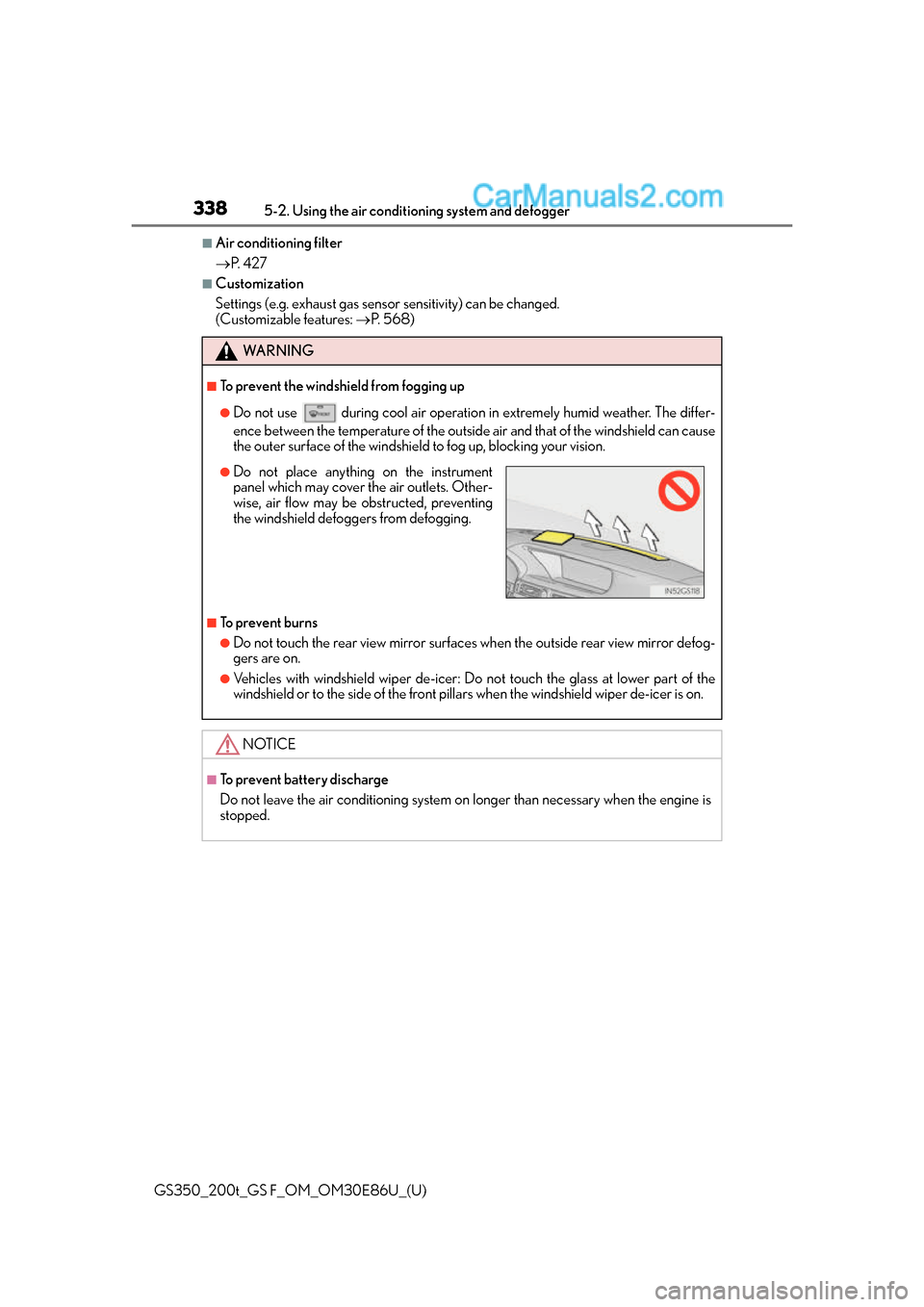
●Do not place anything on the instrument
panel which may cover the air outlets. Other-
wise, air flow may be obstructed, preventing
the windshield defoggers from defogging.
Page 341 of 624
GS350_200t_GS F_OM_OM30E86U_(U)
3415-2. Using the air conditioning system and defogger
5
Interior features
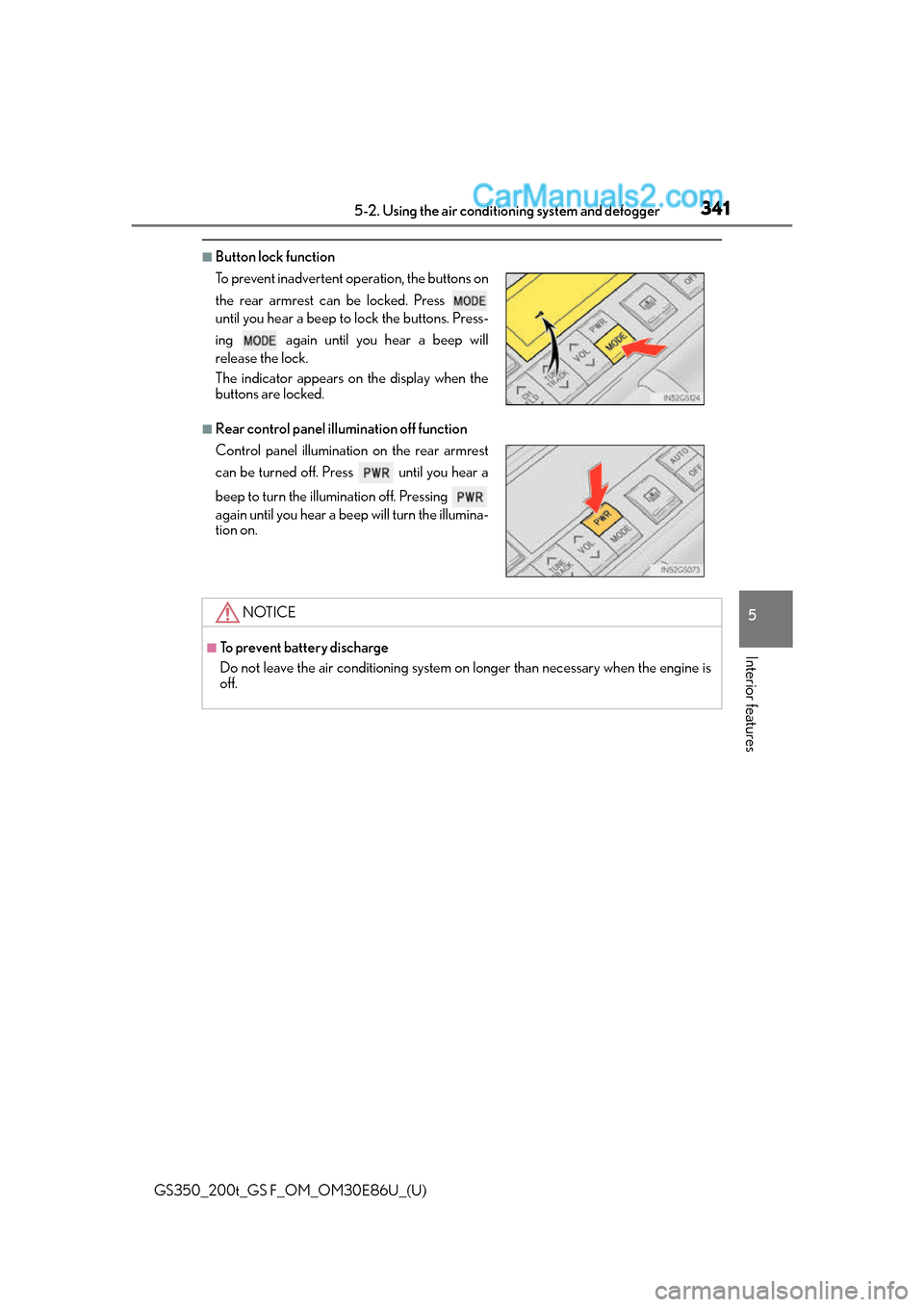
■Button lock function
■Rear control panel illumination off function To prevent inadvertent operation, the buttons on
the rear armrest can be locked. Press
until you hear a beep to lock the buttons. Press-
ing again until you hear a beep will
release the lock.
The indicator appears on the display when the
buttons are locked.
Control panel illumination on the rear armrest
can be turned off. Press until you hear a
beep to turn the illumination off. Pressing
again until you hear a beep will turn the illumina-
tion on.
NOTICE
■To prevent battery discharge
Do not leave the air conditioning system on longer than necessary when the engine is
off.
Page 346 of 624
346
GS350_200t_GS F_OM_OM30E86U_(U)5-2. Using the air conditio
ning system and defogger
■Automatic operation of the seat heater during Eco drive mode
If the driving mode select swit ch is switched to Eco drive mo de in cold temperatures, the
seat heater may be automatically oper ated to assist heating performance.
■Automatic operation during S-FLOW mode
The front seat heater and ventilator or the rear seat heater may automatically turn off
when S-FLOW mode is turned on during automatic mode. ( P. 3 2 9 )
■Button lock function (vehicle s with rear control panel)
To prevent inadvertent operation, some buttons on the rear armrest can be locked.
( P. 3 4 1 )
■When the switch is disabled (vehicles with rear control panel)
When the rear control panel switch cannot be operated even though the button lock
function is released, check whether the sw itch is disabled due to selecting on
Remote Touch screen. ( P. 335)
■Rear control panel illumination off functi on (vehicles with rear control panel)
Control panel illumination on the re ar armrest can be turned off. (P. 3 4 1 )
■Customization
The automatic mode settings for the front seat heaters and ventilators or the rear seat
heaters can be changed. (Customizable features: P. 5 6 8 )
Page 349 of 624
GS350_200t_GS F_OM_OM30E86U_(U)
3495-3. Using the interior lights
5
Interior features
●Illuminated entry system: The lights automatically turn on/off according to engine
switch mode, the presence of the electronic key, whether the doors are locked/
unlocked, and whether the doors are opened/closed.
●If the interior lights remain on when the engine switch is turned off, the lights will go off
automatically after 20 minutes.
●Setting (e.g. the time elapsed before lights turn off) can be changed.
(Customizable features: P. 5 6 8 )
NOTICE
To prevent battery discharge, do not leave the lights on longer than necessary when the
engine is off.
Page 351 of 624
GS350_200t_GS F_OM_OM30E86U_(U)
3515-4. Using the storage features
5
Interior features
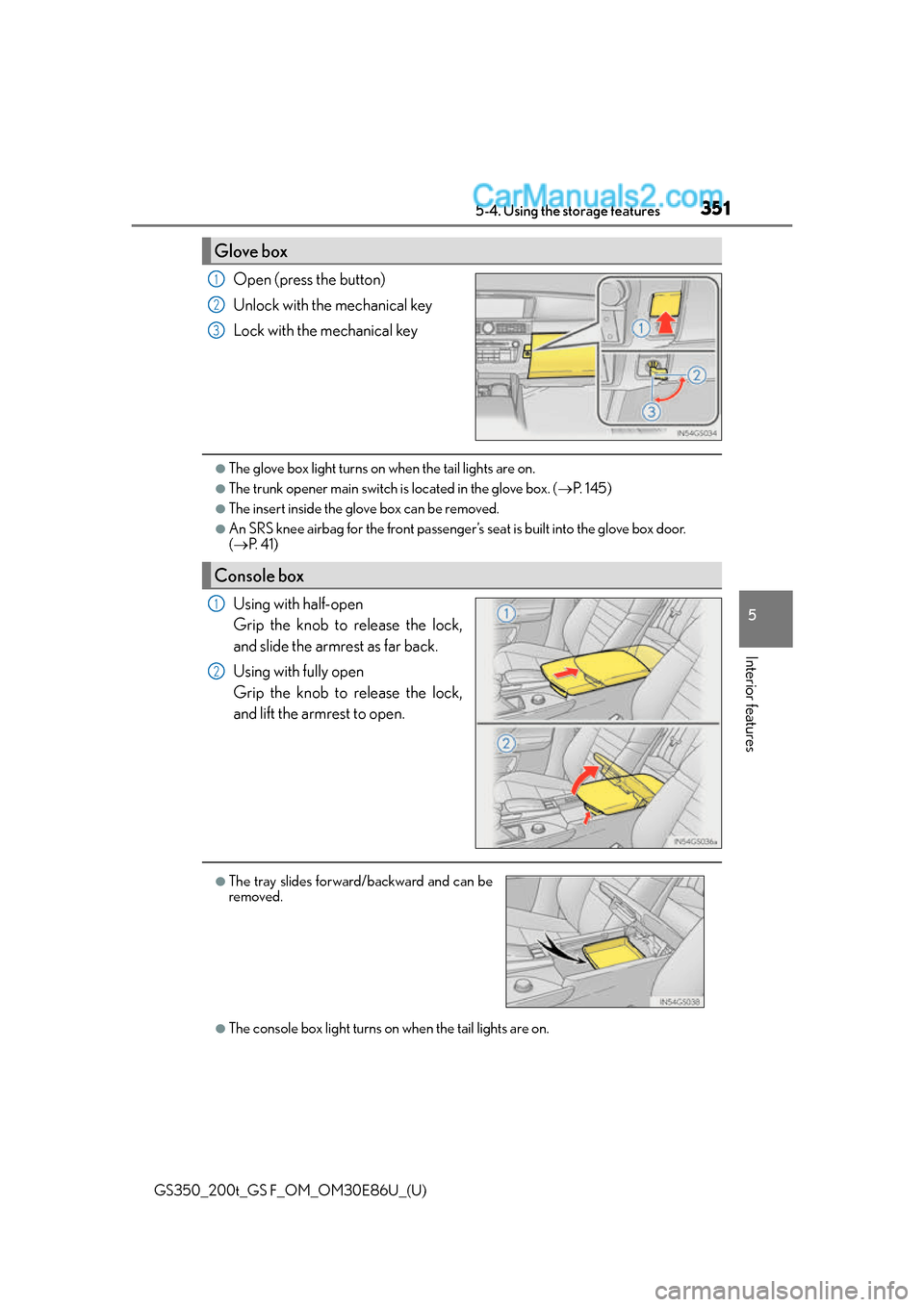
Open (press the button)
Unlock with the mechanical key
Lock with the mechanical key
●The glove box light turns on when the tail lights are on.
●The trunk opener main switch is located in the glove box. (P. 1 4 5 )
●The insert inside the glove box can be removed.
●An SRS knee airbag for the front passenger’s seat is built into the glove box door.
( P. 4 1 )
Using with half-open
Grip the knob to release the lock,
and slide the armrest as far back.
Using with fully open
Grip the knob to release the lock,
and lift the armrest to open.
●The console box light turns on when the tail lights are on.
Glove box
1
2
3
Console box
1
2
●The tray slides forward/backward and can be
removed.
Page 353 of 624
GS350_200t_GS F_OM_OM30E86U_(U)
3535-4. Using the storage features
5
Interior features
WA R N I N G
Do not place anything other than cups or beverage cans in the cup holders.
Other items may be thrown out of the holders in the event of an accident or sudden
braking, causing injury. If possible , cover hot drinks to prevent burns.
NOTICE
To prevent damage to the rear cup holder, stow the cup holder before stowing the arm-
rest.
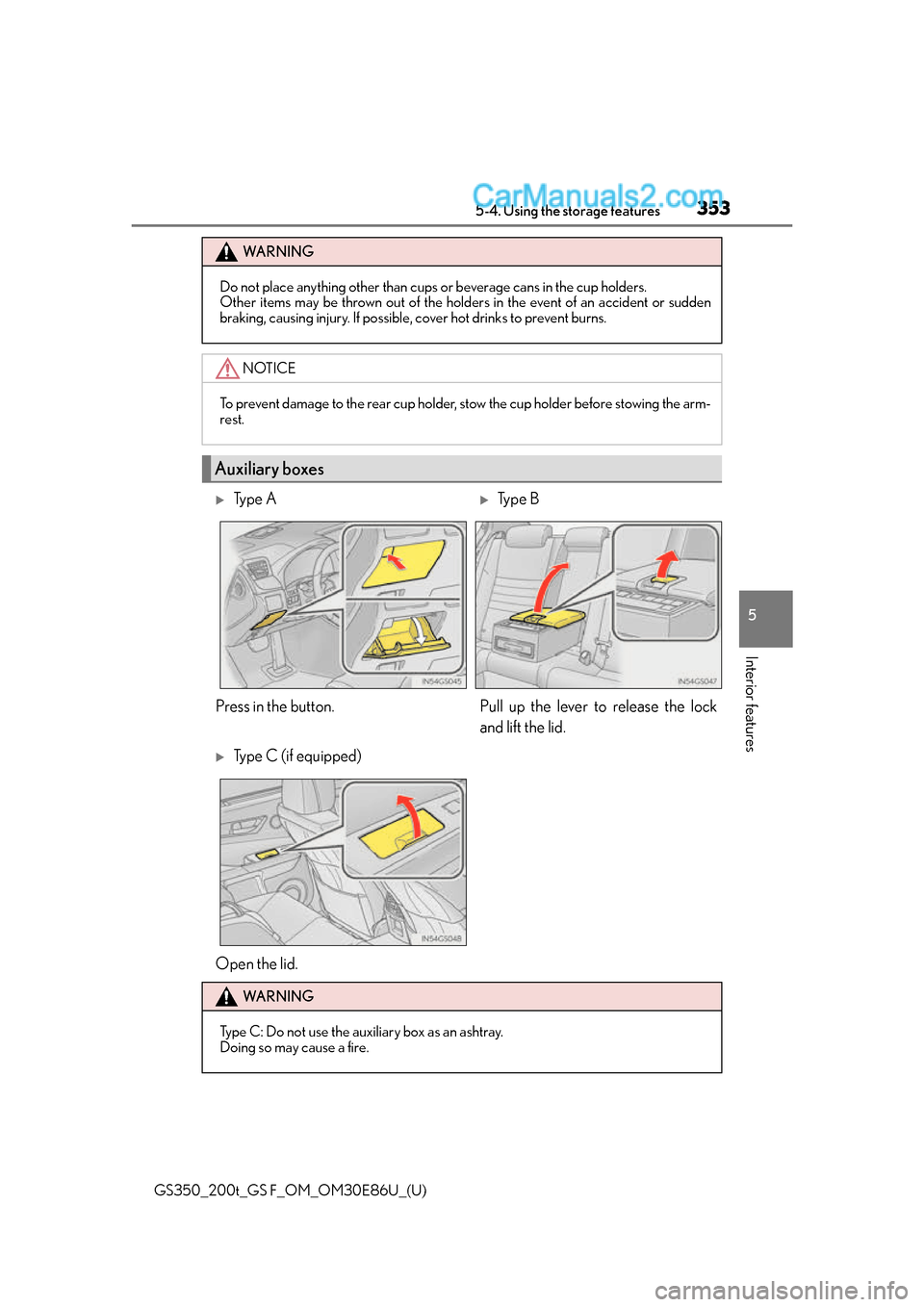
Auxiliary boxes
Ty p e ATy p e B
Press in the button. Pull up the lever to release the lock and lift the lid.
Type C (if equipped)
Open the lid.
WA R N I N G
Type C: Do not use the auxiliary box as an ashtray.
Doing so may cause a fire.