ignition Lexus GS350 2018 Owner's Guide
[x] Cancel search | Manufacturer: LEXUS, Model Year: 2018, Model line: GS350, Model: Lexus GS350 2018Pages: 602, PDF Size: 13.37 MB
Page 180 of 602
178
GS350_300_GS F_OM_OM30G34U_(U)3-5. Opening, closing the windows and moon roof
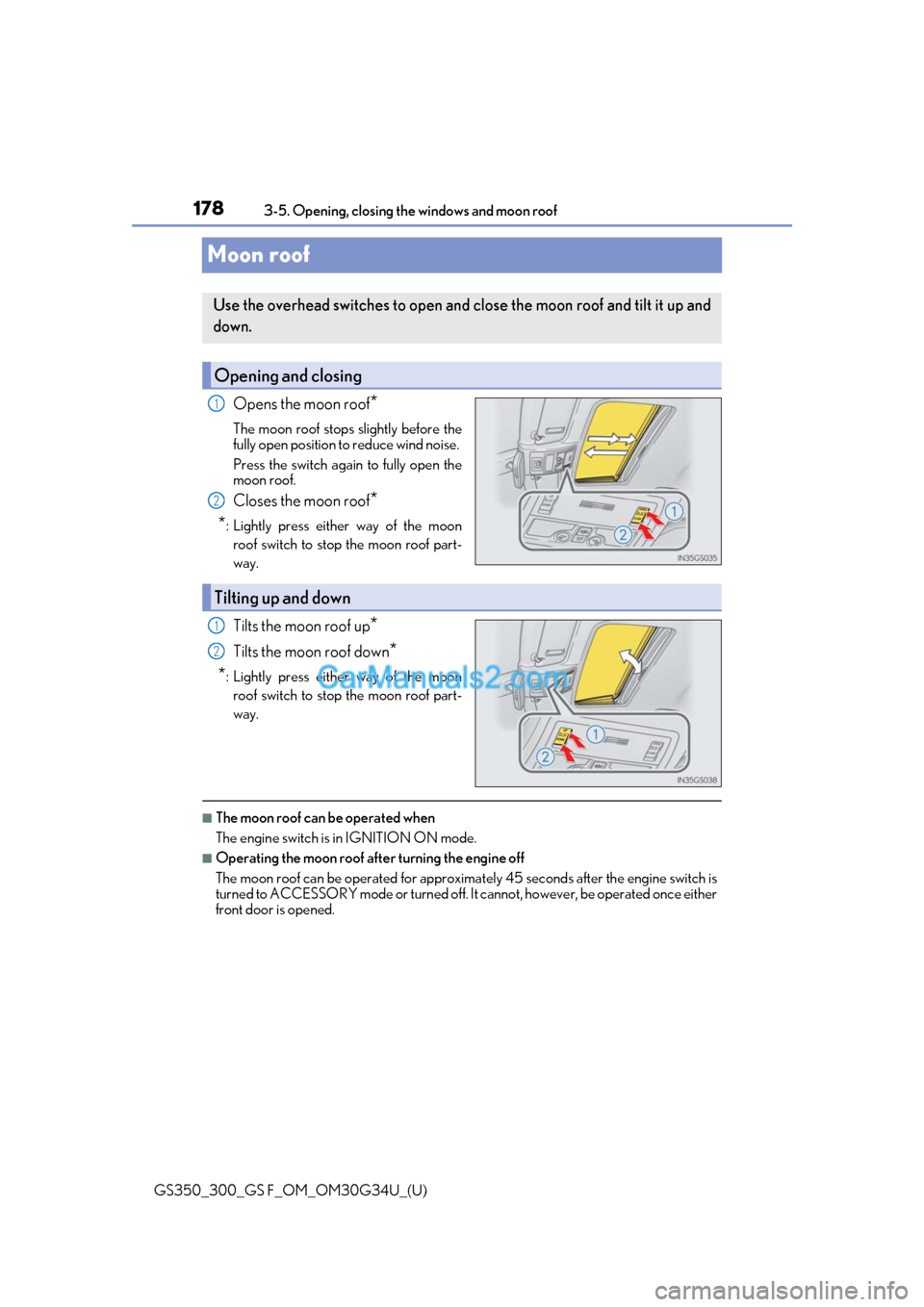
Moon roof
Opens the moon roof*
The moon roof stops slightly before the
fully open position to reduce wind noise.
Press the switch again to fully open the
moon roof.
Closes the moon roof*
*
: Lightly press either way of the moon roof switch to stop the moon roof part-
way.
Tilts the moon roof up*
Tilts the moon roof down*
*
: Lightly press either way of the moon roof switch to stop the moon roof part-
way.
■The moon roof can be operated when
The engine switch is in IGNITION ON mode.
■Operating the moon roof after turning the engine off
The moon roof can be operated for approximat ely 45 seconds after the engine switch is
turned to ACCESSORY mode or turned off. It cannot, however, be operated once either
front door is opened.
Use the overhead switches to open and close the moon roof and tilt it up and
down.
Opening and closing
1
2
Tilting up and down
1
2
Page 183 of 602
181
GS350_300_GS F_OM_OM30G34U_(U)
4Driving
4-1. Before drivingDriving the vehicle ...................... 182
Cargo and luggage ......................191
Vehicle load limits ....................... 194
Trailer towing ................................ 195
Dinghy towing .............................. 196
4-2. Driving procedures Engine (ignition) switch ............ 197
Automatic transmission...........202
Turn signal lever........................... 210
Parking brake .................................211
Brake Hold..................................... 213
ASC (Active Sound Control) (GS F) ........................................... 215
4-3. Operating the lights and wipers
Headlight switch .......................... 216
Automatic High Beam .............. 219
Windshield wipers and washer.................................223 4-4. Refueling
Opening the fuel tank cap ..... 228
4-5. Using the driving support systems
Lexus Safety System+ .............. 232
PCS (Pre-Collision System)........................................238
LKA (Lane-Keeping Assist) .......................................... 249
Dynamic radar cruise control with full-speed range .............258
Cruise control ............................. 270
Driving mode select switch ........................................... 273
BSM (Blind Spot Moni tor).............. 278
• The Blind Spot Monitor function ..................................... 281
• The Rear Cross Traffic
Alert function .........................283
TVD (Torque Vectoring Differential) (GS F) ................ 286
Driving assist systems ............. 288
4-6. Driving tips Winter driving tips ..................... 296
Page 199 of 602
197
GS350_300_GS F_OM_OM30G34U_(U)4-2. Driving procedures
4
Driving
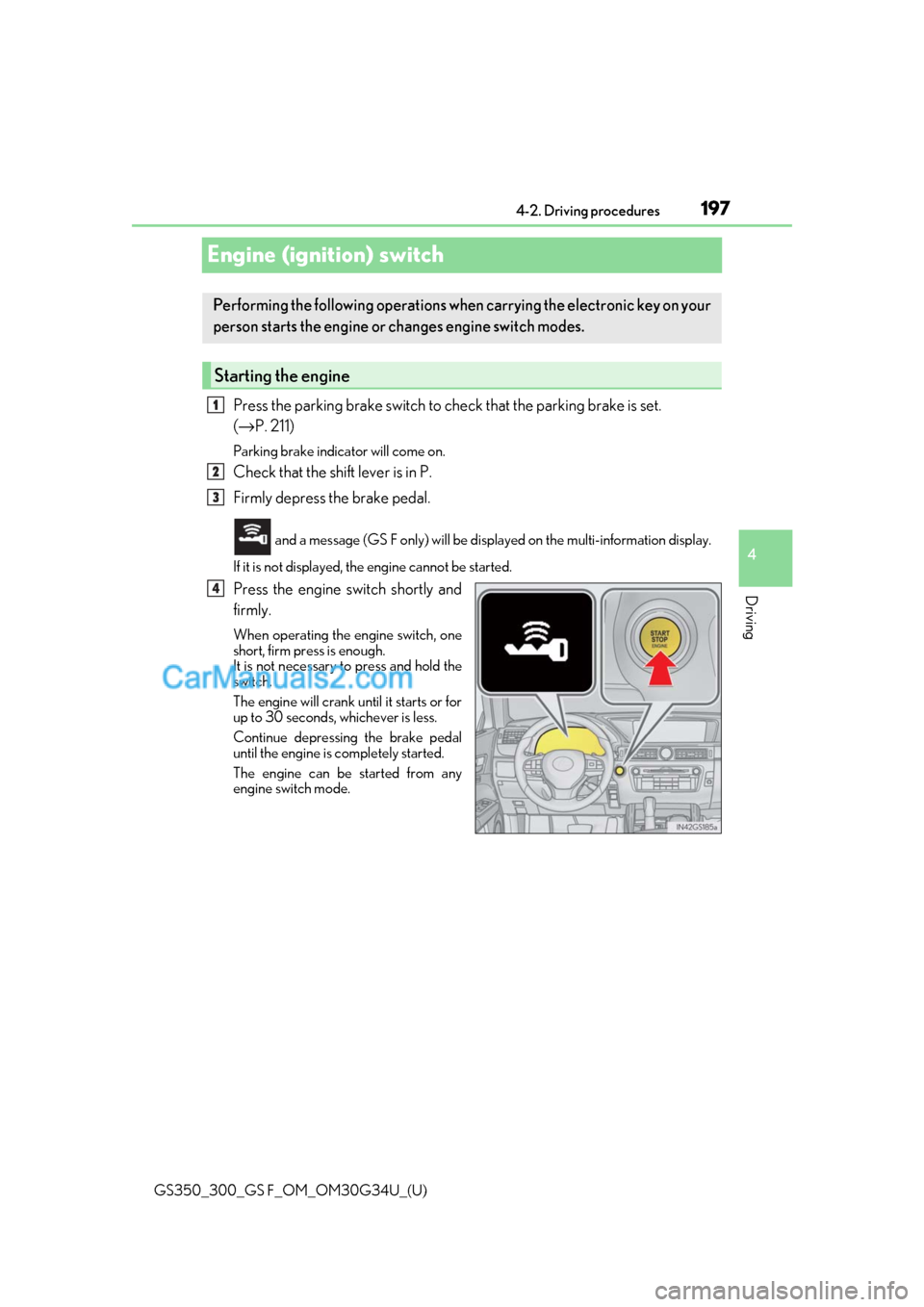
Engine (ignition) switch
Press the parking brake switch to check that the parking brake is set.
(→
P. 211)
Parking brake indicator will come on.
Check that the shift lever is in P.
Firmly depress the brake pedal.
and a message (GS F only) will be disp layed on the multi-information display.
If it is not displayed, th e engine cannot be started.
Press the engine switch shortly and
firmly.
When operating the engine switch, one
short, firm press is enough.
It is not necessary to press and hold the
switch.
The engine will crank until it starts or for
up to 30 seconds, whichever is less.
Continue depressing the brake pedal
until the engine is completely started.
The engine can be started from any
engine switch mode.
Performing the following operations wh en carrying the electronic key on your
person starts the engine or changes engine switch modes.
Starting the engine
1
2
3
4
Page 200 of 602
198
GS350_300_GS F_OM_OM30G34U_(U)4-2. Driving procedures
Stop the vehicle.
Set the parking brake (
→P. 211), and shift the shift lever to P.
Press the engine switch.
Release the brake pedal and check that “POWER ON” on the multi-informa-
tion display is off.
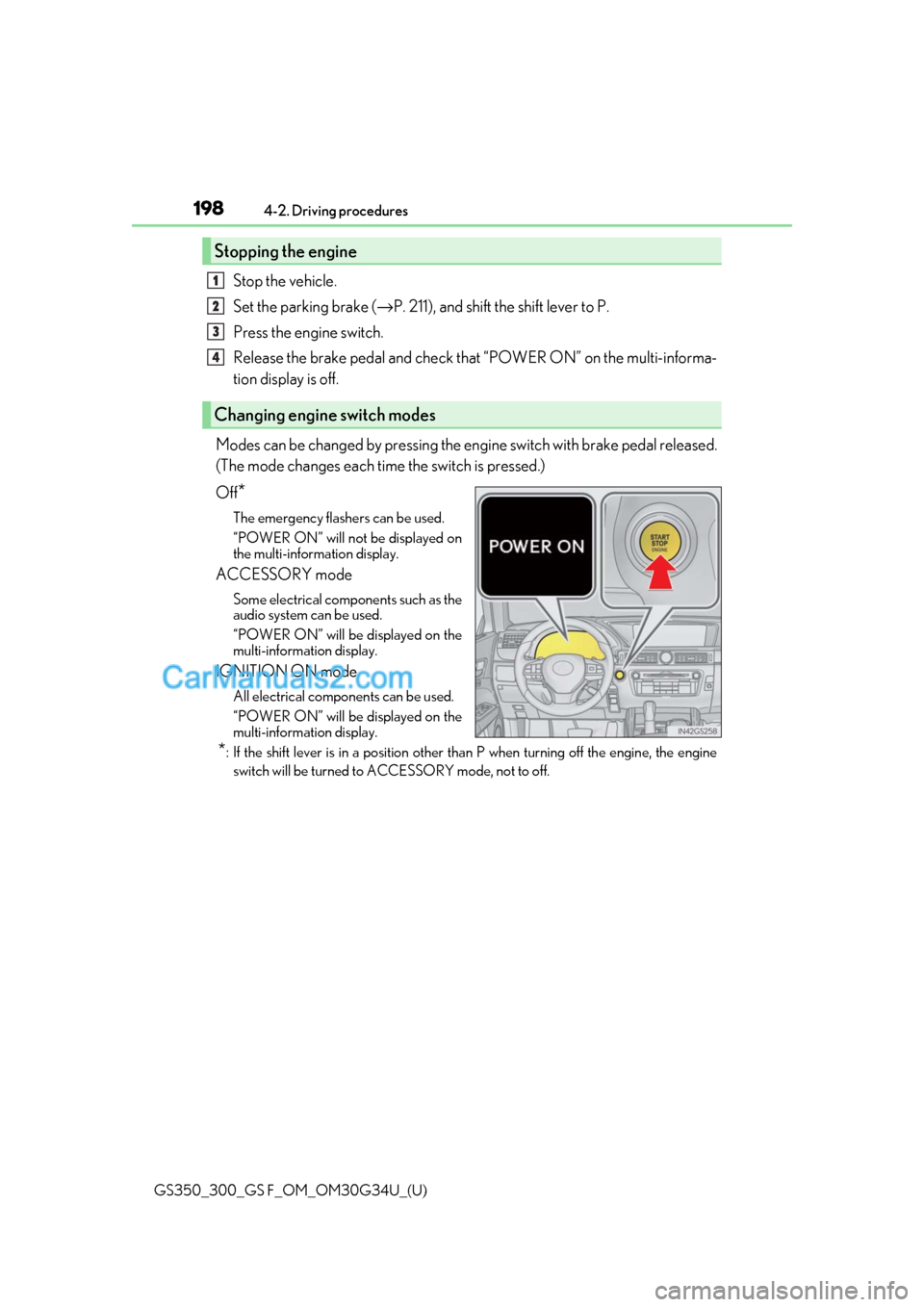
Modes can be changed by pressing the en gine switch with brake pedal released.
(The mode changes each time the switch is pressed.)
Off
*
The emergency flashers can be used.
“POWER ON” will not be displayed on
the multi-information display.
ACCESSORY mode
Some electrical components such as the
audio system can be used.
“POWER ON” will be displayed on the
multi-information display.
IGNITION ON mode
All electrical components can be used.
“POWER ON” will be displayed on the
multi-information display.
*: If the shift lever is in a position other than P when turning off the engine, the engine
switch will be turned to ACCESSORY mode, not to off.
Stopping the engine
Changing engine switch modes
1
2
3
4
Page 201 of 602
GS350_300_GS F_OM_OM30G34U_(U)
1994-2. Driving procedures
4
Driving
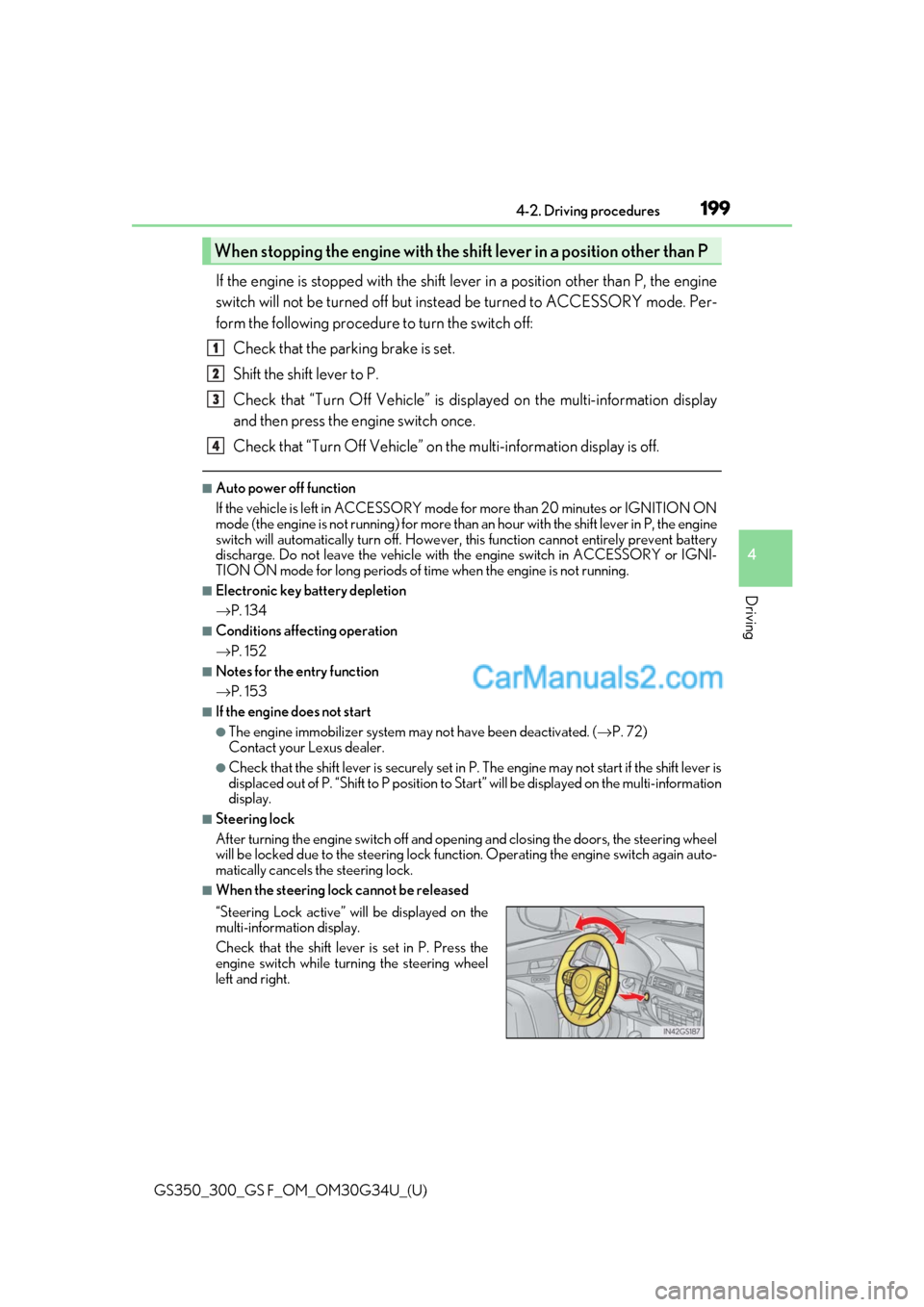
If the engine is stopped with the shift lever in a position other than P, the engine
switch will not be turned off but instead be turned to ACCESSORY mode. Per-
form the following procedure to turn the switch off:
Check that the parking brake is set.
Shift the shift lever to P.
Check that “Turn Off Vehicle” is disp layed on the multi-information display
and then press the engine switch once.
Check that “Turn Off Vehicle” on th e multi-information display is off.
■Auto power off function
If the vehicle is left in ACCESSORY mode for more than 20 minutes or IGNITION ON
mode (the engine is not running) for more than an hour with the shift lever in P, the engine
switch will automatically turn off. However, this function cannot entirely prevent battery
discharge. Do not leave the vehicle with the engine switch in ACCESSORY or IGNI-
TION ON mode for long periods of ti me when the engine is not running.
■Electronic key battery depletion
→P. 134
■Conditions affe cting operation
→ P. 152
■Notes for the entry function
→P. 153
■If the engine does not start
●The engine immobilizer system ma y not have been deactivated. (→P. 72)
Contact your Lexus dealer.
●Check that the shift lever is se curely set in P. The engine may not start if the shift lever is
displaced out of P. “Shift to P position to St art” will be displayed on the multi-information
display.
■Steering lock
After turning the engine switch off and opening and closing the doors, the steering wheel
will be locked due to the steering lock func tion. Operating the engine switch again auto-
matically cancels the steering lock.
■When the steering lock cannot be released
When stopping the engine with the shift lever in a position other than P
“Steering Lock active” will be displayed on the
multi-information display.
Check that the shift lever is set in P. Press the
engine switch while turning the steering wheel
left and right.
1
2
3
4
Page 203 of 602
GS350_300_GS F_OM_OM30G34U_(U)
2014-2. Driving procedures
4
Driving
NOTICE
■To prevent battery discharge
●Do not leave the engine switch in ACCESSORY or IGNITION ON mode for long
periods of time without the engine running.
●If “POWER ON” is displayed on the multi- information display, the engine switch is
not off. Exit the vehicle after turning the engine switch off.
●Do not stop the engine when the shift lever is in a position other than P. If the engine is
stopped in another shift lever position, the engine switch will not be turned off but
instead be turned to ACCESSORY mode. If the vehicle is left in ACCESSORY
mode, battery discharge may occur.
■When starting the engine
●Do not race a cold engine.
●If the engine becomes difficult to start or stalls frequently, have your vehicle checked
by your Lexus dealer immediately.
■Symptoms indicating a malfun ction with the engine switch
If the engine switch seems to be operating somewhat differen tly than usual, such as the
switch sticking slightly, ther e may be a malfunction. Contact your Lexus dealer immedi-
ately.
Page 204 of 602
202
GS350_300_GS F_OM_OM30G34U_(U)4-2. Driving procedures
Automatic transmission
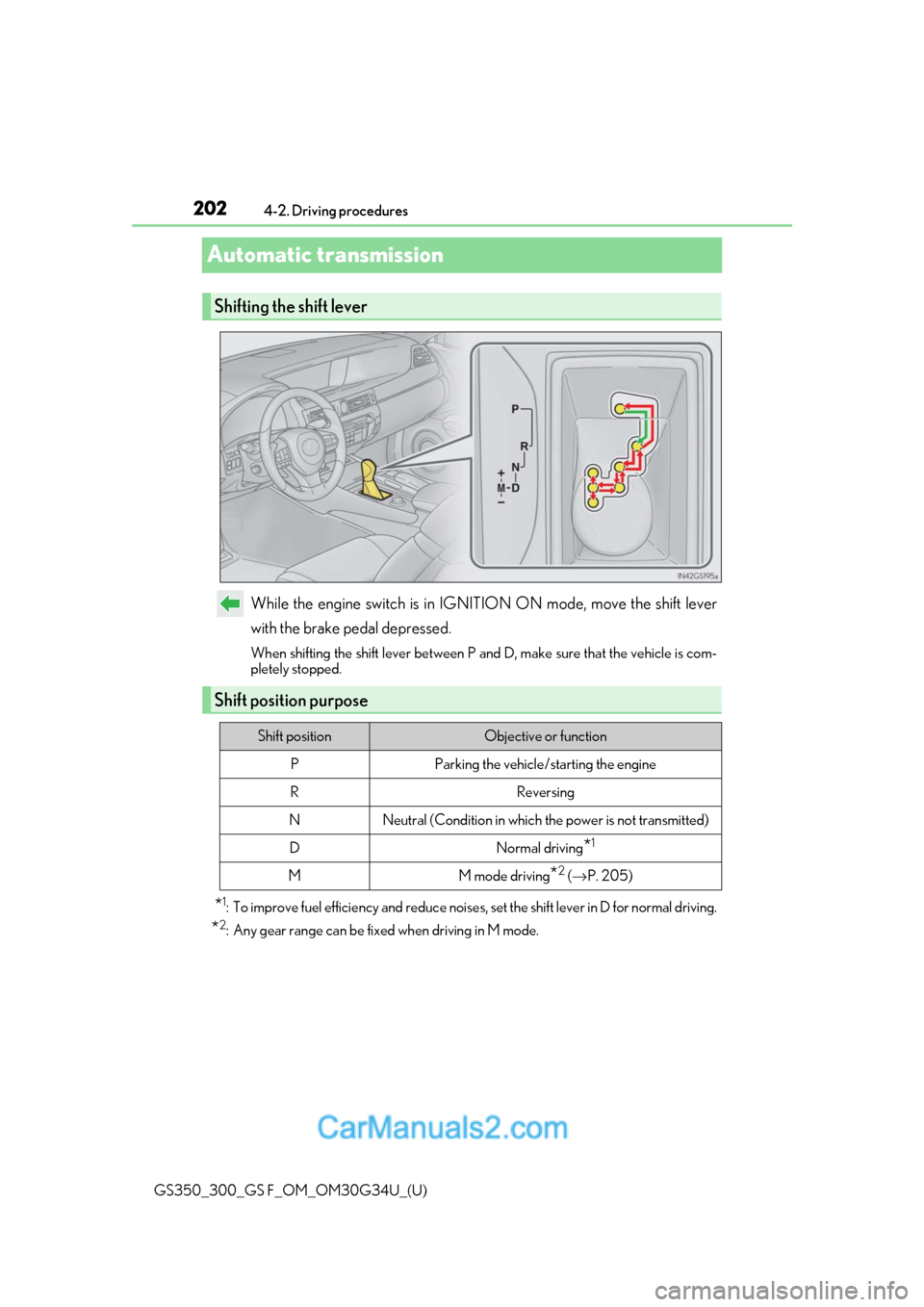
While the engine switch is in IGNITION ON mode, move the shift lever
with the brake pedal depressed.
When shifting the shift lever between P and D, make sure that the vehicle is com-
pletely stopped.
*1: To improve fuel efficiency and reduce noises
, set the shift lever in D for normal driving.
*2: Any gear range can be fixed when driving in M mode.
Shifting the shift lever
Shift position purpose
Shift positionObjective or function
PParking the vehicle/starting the engine
RReversing
NNeutral (Condition in which the power is not transmitted)
DNormal driving*1
MM mode driving*2 (→ P. 205)
Page 209 of 602
GS350_300_GS F_OM_OM30G34U_(U)
2074-2. Driving procedures
4
Driving
■Automatic deactivation of shift range selection in the D position
Shift range selection in the D position will be deactivated in the following situations:
●When the vehicle comes to a stop
●If the accelerator pedal is depressed fo r more than a certain period of time
●When the shift lever is shifted to other than D
■To protect automatic transmission
When the temperature of the transmission fluid becomes high, protection control is per-
formed temporarily. When “Transmission Fl uid Temp High See Owner’s Manual” is dis-
played on the multi-information display, have the vehicle inspected by your Lexus dealer.
■Downshifting restrictions warning buzzer
To help ensure safety and driving performance, downshifti ng operation may sometimes
be restricted. In some circum stances, downshifting may not be possible even when the
shift lever or paddle shif t switch is operated. (A buzzer will sound twice.)
■Snow mode automatic deactivation
Snow mode is automatically deactivated if the engine switch is turn ed off after driving in
snow mode.
■When driving with cruise control or dynamic radar cruise control with full-speed range
activated
Even when performing the following actions with the intent of enabling engine braking,
engine braking will not activate because crui se control or dynamic radar cruise control
with full-speed range will not be canceled.
●6-speed models: While driving in the D position, downshifting to 5 or 4.
(→ P. 258, 270)
8-speed models: While driving in the D posi tion, downshifting to 7, 6, 5 or 4.
( → P. 258, 270)
●When switching the driving mode to sport mode while driving in D position. ( →P. 273)
■Restraining sudden start (Drive-Start Control)
●When the following unusual operation is performed, the engine output may be
restrained.
• When the shift lever is shifted from R to D, D to R, N to R, P to D, or P to R (D includes M) with the accelerator pedal depressed, a warning message appears on
the multi-information display. ( →P. 441)
• When the accelerator pedal is depressed t oo much while the vehicle is in reverse.
■Shift lock system
The shift lock system is a system to prevent ac cidental operation of the shift lever in start-
ing.
The shift lever can be shifted from P only when the engine switch is in IGNITION ON
mode and the brake pedal is being depressed.
Page 212 of 602
210
GS350_300_GS F_OM_OM30G34U_(U)4-2. Driving procedures
Turn signal lever
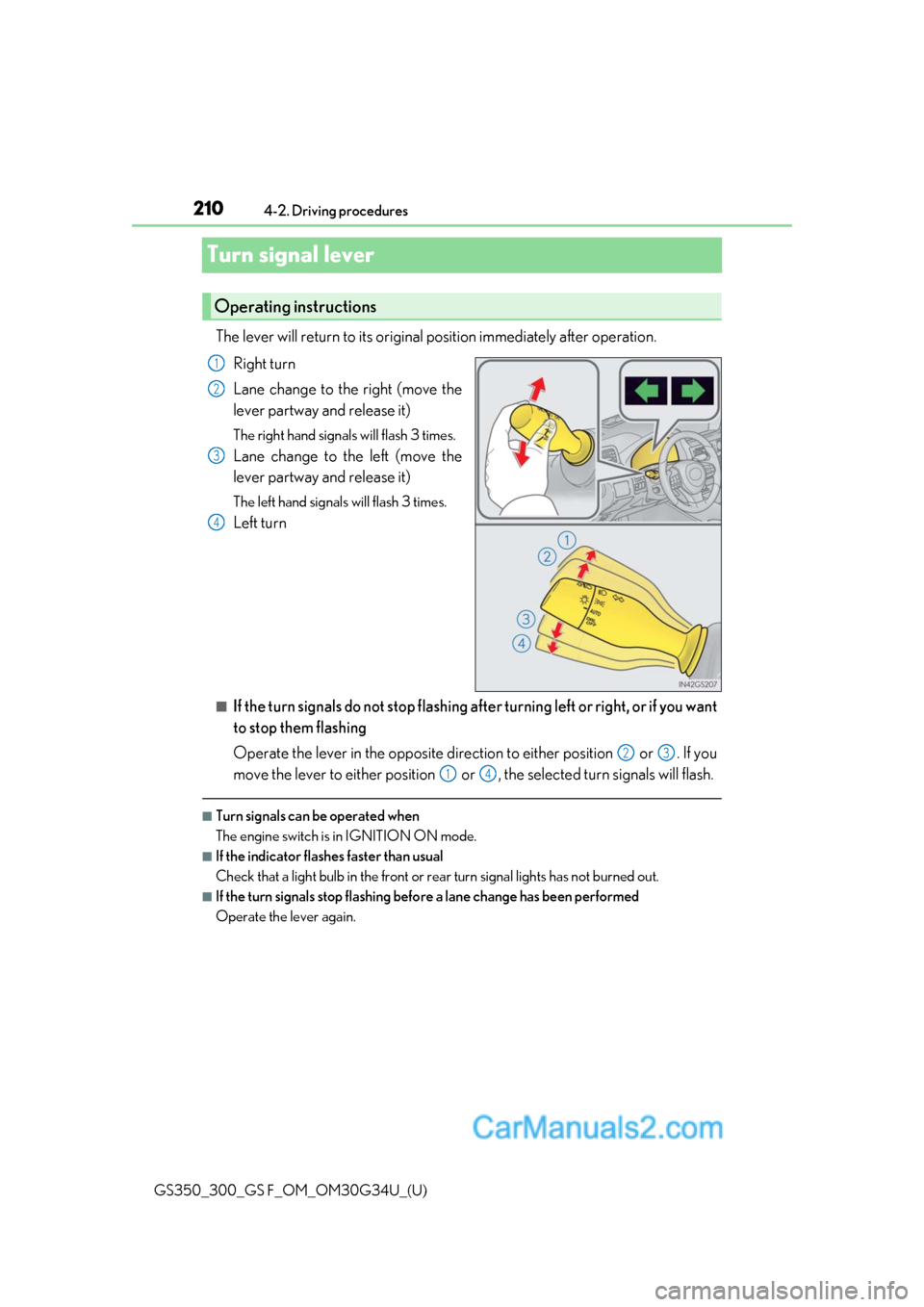
The lever will return to its original position immediately after operation.
Right turn
Lane change to the right (move the
lever partway and release it)
The right hand signals will flash 3 times.
Lane change to the left (move the
lever partway and release it)
The left hand signals will flash 3 times.
Left turn
■If the turn signals do not stop flashing af ter turning left or right, or if you want
to stop them flashing
Operate the lever in the opposite direct ion to either position or . If you
move the lever to either position or , the selected turn signals will flash.
■Turn signals can be operated when
The engine switch is in IGNITION ON mode.
■If the indicator flashes faster than usual
Check that a light bulb in the front or rear turn signal lights has not burned out.
■If the turn signals stop flashing befo re a lane change has been performed
Operate the lever again.
Operating instructions
1
2
3
4
23
14
Page 214 of 602
212
GS350_300_GS F_OM_OM30G34U_(U)4-2. Driving procedures
■Parking brake operation
●When the engine switch is not in IGNITION ON mode, the parking brake cannot be
released using the parking brake switch.
●When the engine switch is not in IGNITION ON mode, automatic mode (automatic
brake setting and releasing) is not available.
●If the parking brake is operated repeatedly over a short period of time, the system may
restrict operation to prevent overheating. If
this happens, refrain from operating the
parking brake. Normal operation will return after about 1 minute.
●In situations such as when parking on a steep slope*, the maximum amount of braking
force can be used by pressing the parking brake switch with the parking brake already
set.
*: Use wheel chocks when parking on a steep slope.
■Parking brake operation sound
When the parking brake operates, a motor so und (whirring sound) may be heard. This
does not indicate a malfunction.
■Parking brake indicator light
●Depending on the engine switch mode, the parking brake indicator light will come on
and stay on as described below:
IGNITION ON mode: Comes on unt il the parking brake is released.
Not in IGNITION ON mode: Stays on for approximately 15 seconds.
●When the engine switch is turned off with the parking brake set, the parking brake indi-
cator light will stay on for about 15 seconds. This does not in dicate a malfunction.
■When there is a malfunction in the system
Warning lights and/or warning message will turn on or flash. ( →P. 436, 442)
Depending on the condition, the park ing brake indicator light may flash.
■Parking the vehicle
→P. 182
■Parking brake engaged warning buzzer
→P. 445
■Usage in winter time
→P. 297
NOTICE
■When parking the vehicle
Before you leave the vehicle, set the parking brake, shift the shift lever to P and make
sure that the vehicle does not move.
■When the system malfunctions
Stop the vehicle in a safe place and check the warning messages.
■When the parking brake cannot be released due to a malfunction
Use the parking brake release tool to manually release the parking brake. (→P. 499)
Driving the vehicle with the parking brake se t will lead to brake components overheat-
ing, which may affect braking performance and increase brake wear.