reset Lexus GS350 2018 Owner's Guide
[x] Cancel search | Manufacturer: LEXUS, Model Year: 2018, Model line: GS350, Model: Lexus GS350 2018Pages: 602, PDF Size: 13.37 MB
Page 274 of 602
272
GS350_300_GS F_OM_OM30G34U_(U)4-5. Using the driving support systems
■Automatic cruise control cancelation
Cruise control will stop main
taining the vehicle speed in an y of the following situations.
●Actual vehicle speed falls more than appr oximately 10 mph (16 km/h) below the preset
vehicle speed.
At this time, the memorized set speed is not retained.
●Actual vehicle speed is below approximately 25 mph (40 km/h).
●VSC is activated.
●TRAC is activated for a period of time.
●When the VSC or TRAC system is turned off by pressing the VSC OFF switch.
■If the warning message for the cruise contro l is shown on the multi-information display
Press the “ON/OFF” button once to deactiv ate the system, and then press the button
again to reactivate the system.
If the cruise control speed cannot be set or if the cruise control cancels immediately after
being activated, there may be a malfunction in the cruise control system. Have the vehi-
cle inspected by your Lexus dealer.
WARNING
■To avoid operating the cruise control by mistake
Switch the cruise control off using th e “ON/OFF” button when not in use.
■Situations unsuitable for cruise control
Do not use cruise control in any of the following situations.
Doing so may result in loss of control and could cause an accident resulting in death or
serious injury.
●In heavy traffic
●On roads with sharp bends
●On winding roads
●On slippery roads, such as thos e covered with rain, ice or snow
●On steep hills
Vehicle speed may exceed the set speed when driving down a steep hill.
●During emergency towing
Page 368 of 602
366
GS350_300_GS F_OM_OM30G34U_(U)6-2. Maintenance
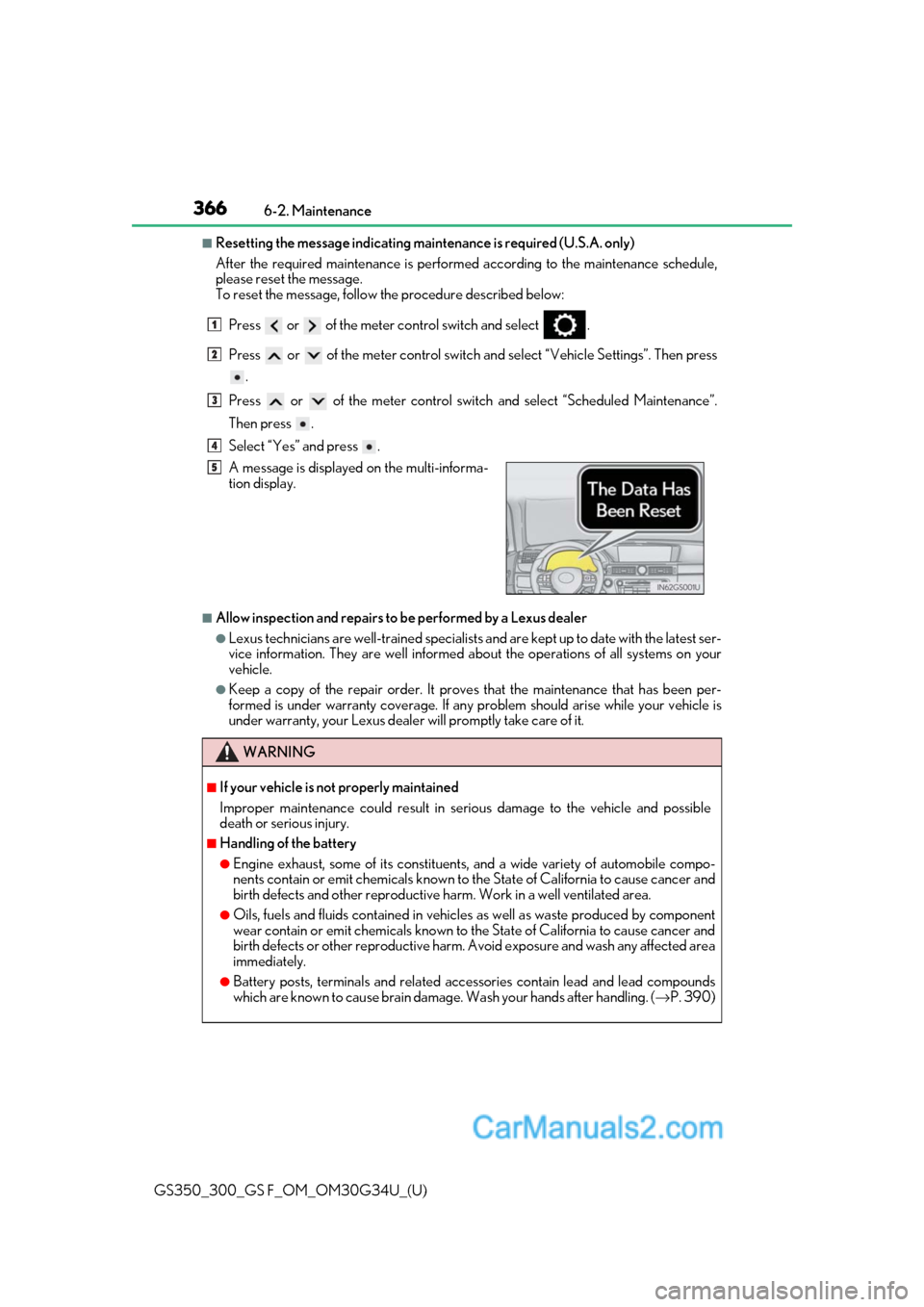
■Resetting the message indicating main
tenance is required (U.S.A. only)
After the required maintenanc e is performed according to the maintenance schedule,
please reset the message.
To reset the message, follow the procedure described below:
Press or of the meter co ntrol switch and select .
Press or of the meter control switch an d select “Vehicle Settings”. Then press
.
Press or of the meter control switch and select “Scheduled Maintenance”.
Then press .
Select “Yes” and press .
■Allow inspection and repairs to be performed by a Lexus dealer
●Lexus technicians are well-trained specialists and are kept up to date with the latest ser-
vice information. They are well informed about the operations of all systems on your
vehicle.
●Keep a copy of the repair order. It proves that the maintenance that has been per-
formed is under warranty coverage. If any problem should arise while your vehicle is
under warranty, your Lexus dealer will promptly take care of it. A message is displayed on the multi-informa-
tion display.
WARNING
■If your vehicle is not properly maintained
Improper maintenance could result in se rious damage to the vehicle and possible
death or serious injury.
■Handling of the battery
●Engine exhaust, some of its constituents, and a wide variety of automobile compo-
nents contain or emit chemicals known to th e State of California to cause cancer and
birth defects and other reproductive ha rm. Work in a well ventilated area.
●Oils, fuels and fluids contained in vehicles as well as waste produced by component
wear contain or emit chemicals known to the State of California to cause cancer and
birth defects or other reproductive harm. Avoid exposure and wash any affected area
immediately.
●Battery posts, terminals and related acce ssories contain lead and lead compounds
which are known to cause brain damage. Wash your hands after handling. ( →P. 390)
1
2
3
4
5
Page 386 of 602
384
GS350_300_GS F_OM_OM30G34U_(U)6-3. Do-it-yourself maintenance
■Engine oil consumption
A certain amount of engine oil will be consumed
while driving. In the following situations,
oil consumption may increase, and engine oil may need to be refilled in between oil
maintenance intervals.
●When the engine is new, for example directly after purchasing the vehicle or after
replacing the engine
●If low quality oil or oil of an inappropriate viscosity is used
●When driving at high engine speeds or with a heavy load, or when driving while accel-
erating or decelerating frequently
●When leaving the engine idling for a long time, or when driving frequently through
heavy traffic
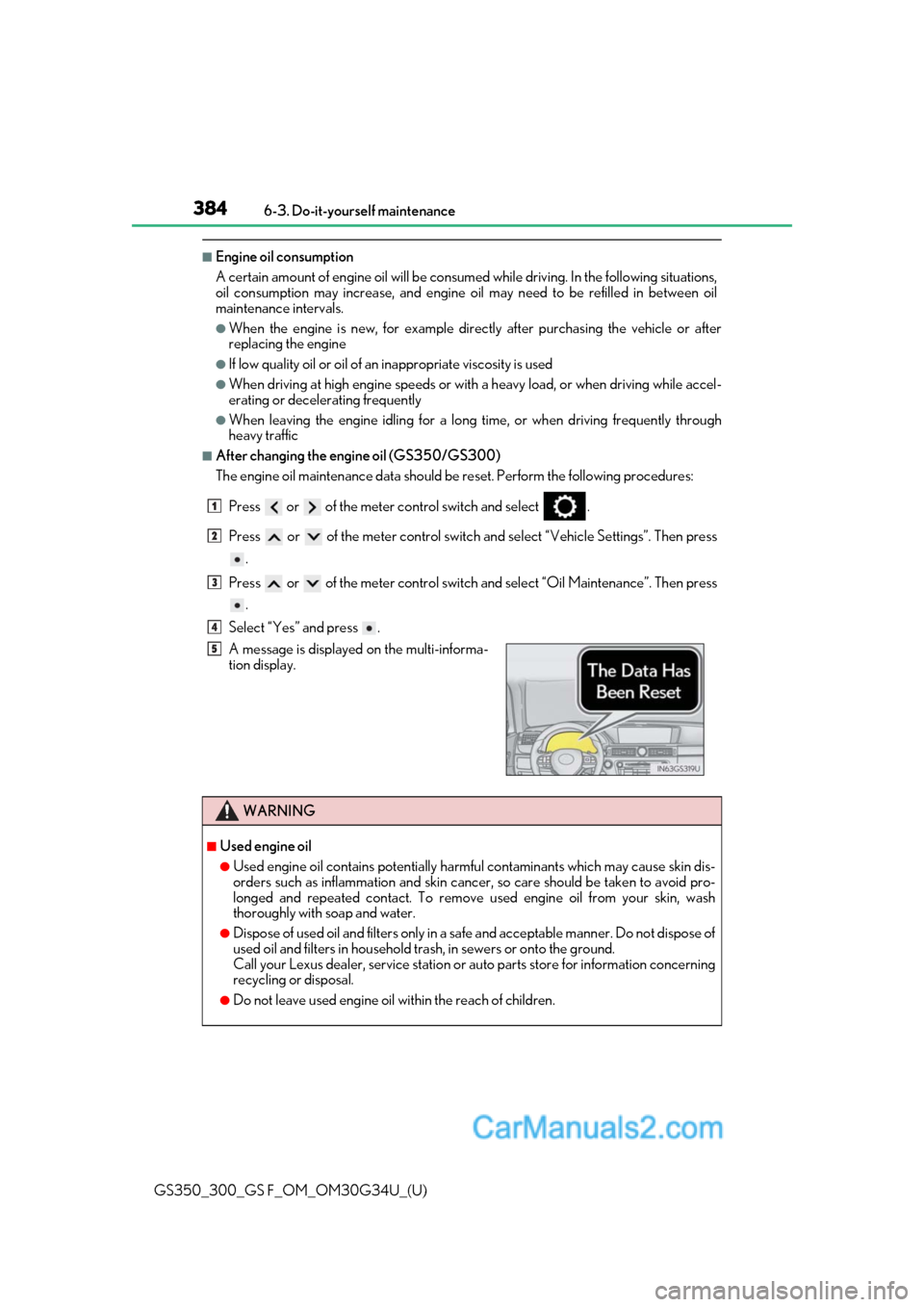
■After changing the engine oil (GS350/GS300)
The engine oil maintenance data should be reset. Perform the following procedures:
Press or of the meter co ntrol switch and select .
Press or of the meter control switch an d select “Vehicle Settings”. Then press
.
Press or of the meter control switch and select “Oil Maintenance”. Then press
.
Select “Yes” and press .
A message is displayed on the multi-informa-
tion display.
WARNING
■Used engine oil
●Used engine oil contains potentially harm ful contaminants which may cause skin dis-
orders such as inflammation and skin cance r, so care should be taken to avoid pro-
longed and repeated contact. To remove used engine oil from your skin, wash
thoroughly with soap and water.
●Dispose of used oil and filters only in a sa fe and acceptable manner. Do not dispose of
used oil and filters in household tras h, in sewers or onto the ground.
Call your Lexus dealer, service station or auto parts store for information concerning
recycling or disposal.
●Do not leave used engine oil within the reach of children.
1
2
3
4
5
Page 465 of 602
4637-2. Steps to take in an emergency
GS350_300_GS F_OM_OM30G34U_(U)
7
When trouble arises
*: Refer to the separate “Scheduled Mainte nance” or “Owner’s Manual Supplement”
for the maintenance interval applicable to your vehicle.
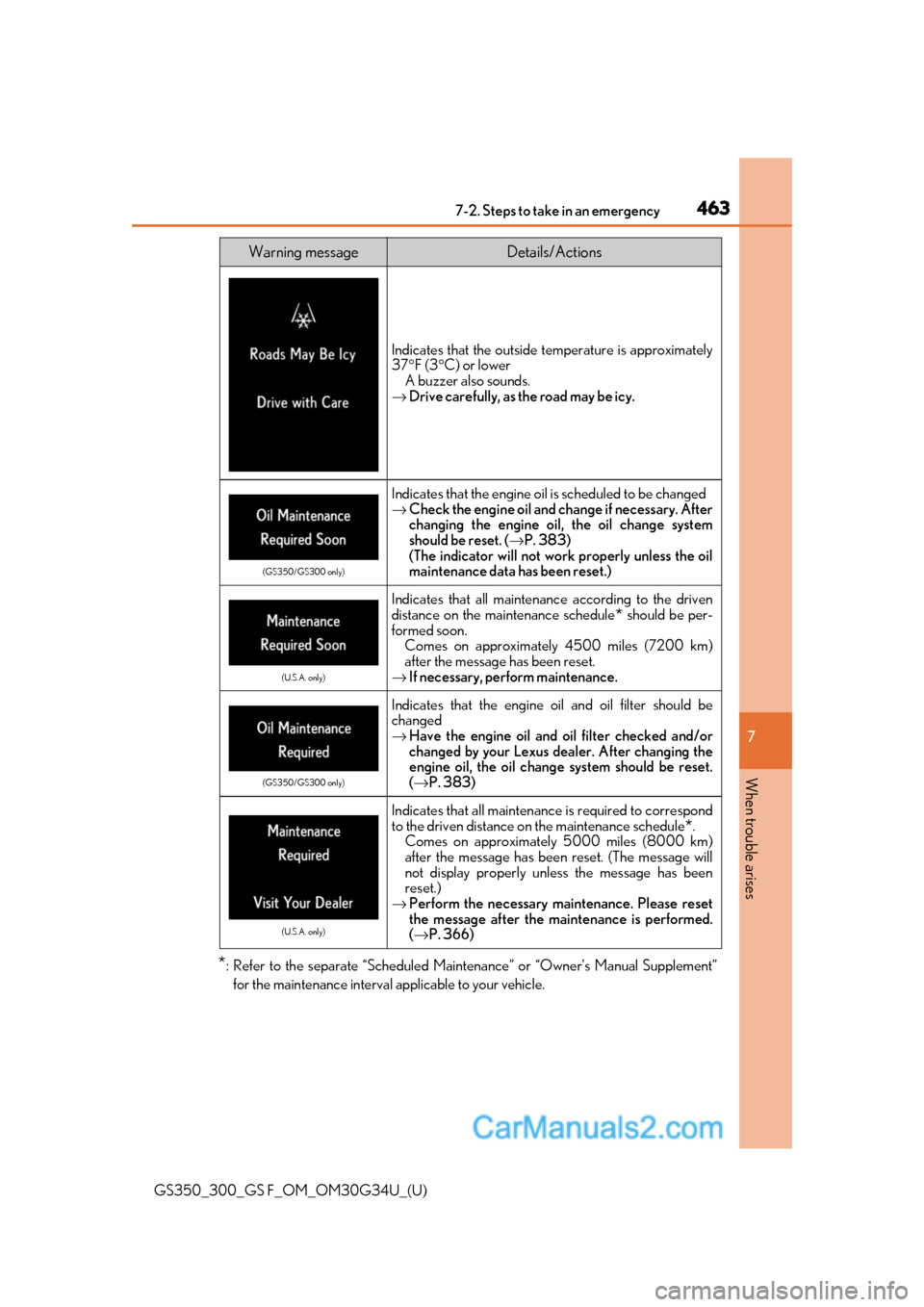
Indicates that the outside temperature is approximately
37° F (3 °C) or lower
A buzzer also sounds.
→ Drive carefully, as the road may be icy.
(GS350/GS300 only)
Indicates that the engine oil is scheduled to be changed
→Check the engine oil and change if necessary. After
changing the engine oil, the oil change system
should be reset. ( →P. 383)
(The indicator will not work properly unless the oil
maintenance data has been reset.)
(U.S.A. only)
Indicates that all maintenance according to the driven
distance on the maintenance schedule
* should be per-
formed soon. Comes on approximately 4500 miles (7200 km)
after the message has been reset.
→ If necessary, perform maintenance.
(GS350/GS300 only)
Indicates that the engine o il and oil filter should be
changed
→ Have the engine oil and oil filter checked and/or
changed by your Lexus dealer. After changing the
engine oil, the oil change system should be reset.
( → P. 383)
(U.S.A. only)
Indicates that all maintenanc e is required to correspond
to the driven distance on the maintenance schedule
*.
Comes on approximately 5000 miles (8000 km)
after the message has been reset. (The message will
not display properly unless the message has been
reset.)
→ Perform the necessary maintenance. Please reset
the message after the maintenance is performed.
(→ P. 366)
Warning messageDetails/Actions
Page 548 of 602
546
GS350_300_GS F_OM_OM30G34U_(U)8-2. Customization
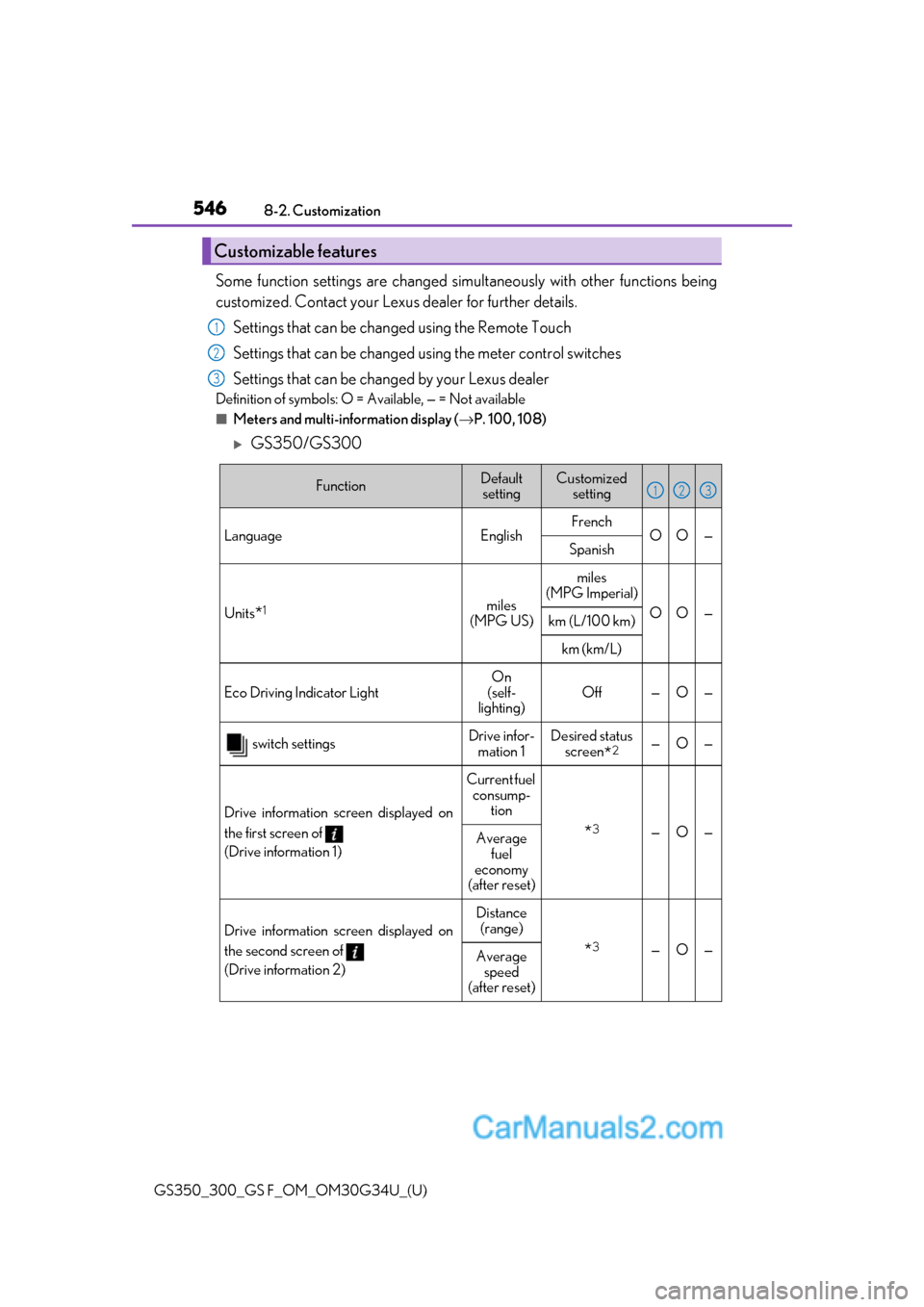
Some function settings are changed simultaneously with other functions being
customized. Contact your Lexu
s dealer for further details.
Settings that can be changed using the Remote Touch
Settings that can be changed using the meter control switches
Settings that can be changed by your Lexus dealer
Definition of symbols: O = Available, — = Not available
■Meters and multi-information display ( →P. 100, 108)
GS350/GS300
Customizable features
1
2
3
FunctionDefault
settingCustomized setting
LanguageEnglishFrenchOO—Spanish
Units*1miles
(MPG US)
miles
(MPG Imperial)
OO—km (L/100 km)
km (km/L)
Eco Driving Indicator Light On
(self-
lighting) Off — O —
switch settingsDrive infor-
mation 1Desired status screen
*2—O—
Drive information screen displayed on
the first screen of
(Drive information 1)
Current fuel
consump- tion
*3—O—Average fuel
economy
(after reset)
Drive information screen displayed on
the second screen of
(Drive information 2)
Distance (range)
*3—O—Average speed
(after reset)
123
Page 549 of 602
GS350_300_GS F_OM_OM30G34U_(U)
5478-2. Customization
8
Vehicle specifications
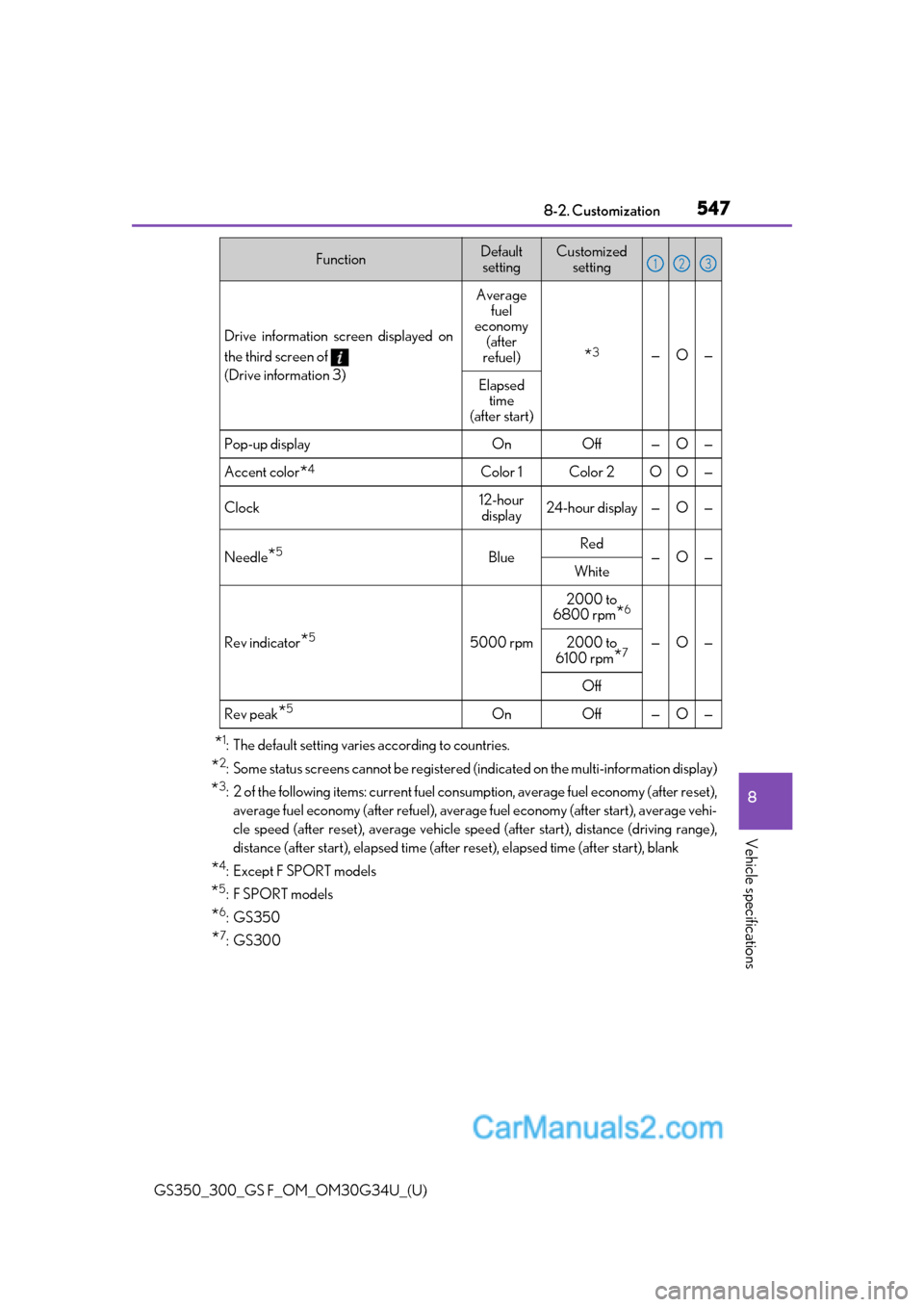
*1: The default setting varies according to countries.
*2: Some status screens cannot be registered (indicated on the multi-information display)
*3: 2 of the following items: current fuel consumption, average fuel economy (after reset),
average fuel economy (after refuel), average fuel economy (after start), average vehi-
cle speed (after reset), average vehicle spee d (after start), distance (driving range),
distance (after start), elapsed time (after reset), elapsed time (after start), blank
*4:Except F SPORT models
*5:F SPORT models
*6:GS350
*7:GS300
Drive information screen displayed on
the third screen of
(Drive information 3)
Average
fuel
economy (after
refuel)
*3—O—
Elapsed time
(after start)
Pop-up displayOnOff —O—
Accent color*4Color 1Color 2OO—
Clock12-hour
display24-hour display —O—
Needle*5BlueRed—O—White
Rev indicator*55000 rpm
2000 to
6800 rpm
*6
—O—2000 to
6100 rpm*7
Off
Rev peak*5OnOff —O—
FunctionDefault settingCustomized setting123
Page 550 of 602
548
GS350_300_GS F_OM_OM30G34U_(U)8-2. Customization
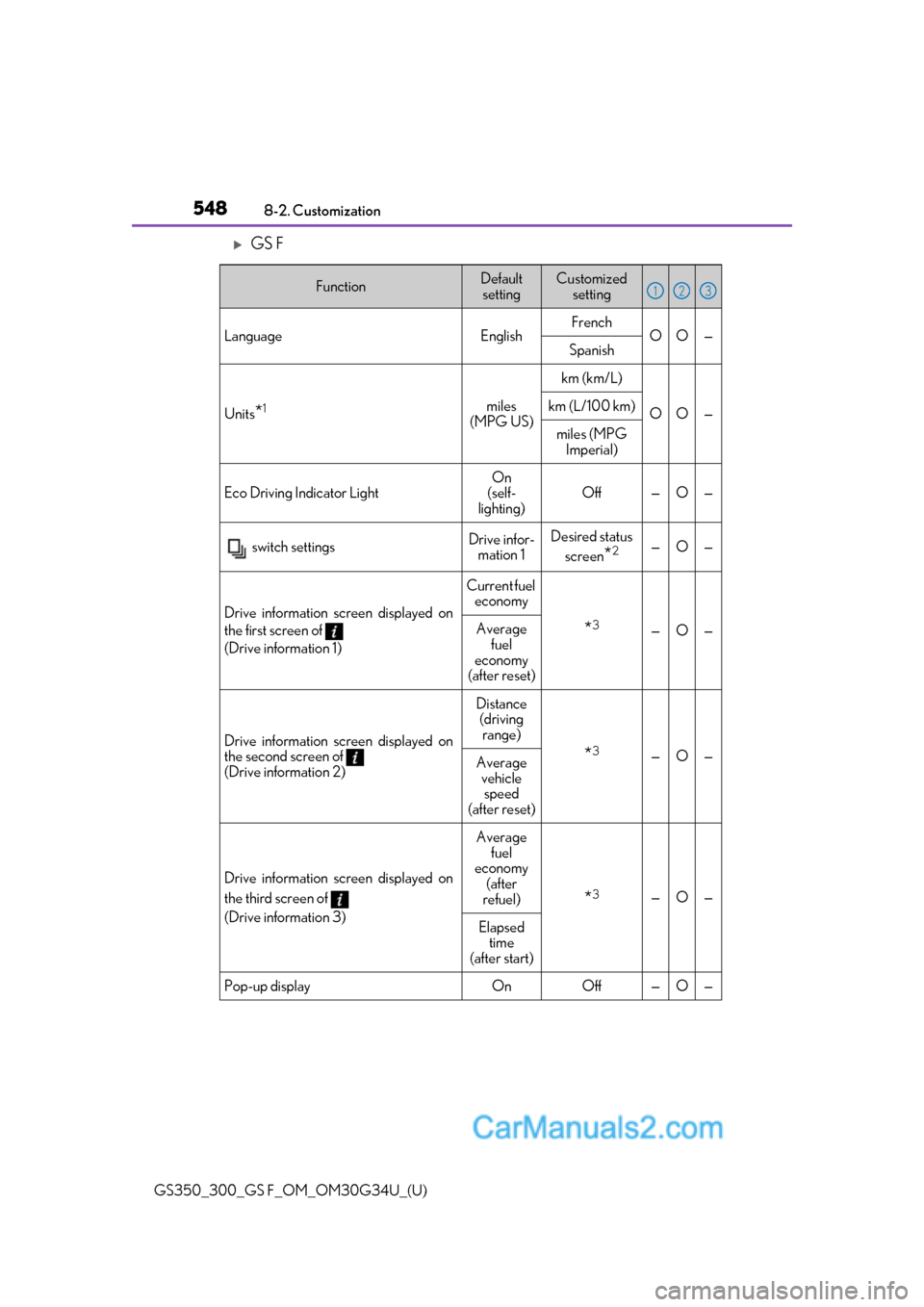
GS F
FunctionDefault
settingCustomized setting
LanguageEnglishFrenchOO—Spanish
Units*1miles
(MPG US)
km (km/L)
OO—km (L/100 km)
miles (MPG Imperial)
Eco Driving Indicator LightOn
(self-
lighting)Off—O—
switch settingsDrive infor- mation 1Desired status
screen
*2—O—
Drive information screen displayed on
the first screen of
(Drive information 1)
Current fuel economy
*3—O—Average
fuel
economy
(after reset)
Drive information screen displayed on
the second screen of
(Drive information 2)
Distance (driving
range)
*3—O—Average vehicle speed
(after reset)
Drive information screen displayed on
the third screen of
(Drive information 3)
Average fuel
economy
(after
refuel)
*3—O—
Elapsed time
(after start)
Pop-up displayOnOff—O—
123
Page 551 of 602
GS350_300_GS F_OM_OM30G34U_(U)
5498-2. Customization
8
Vehicle specifications
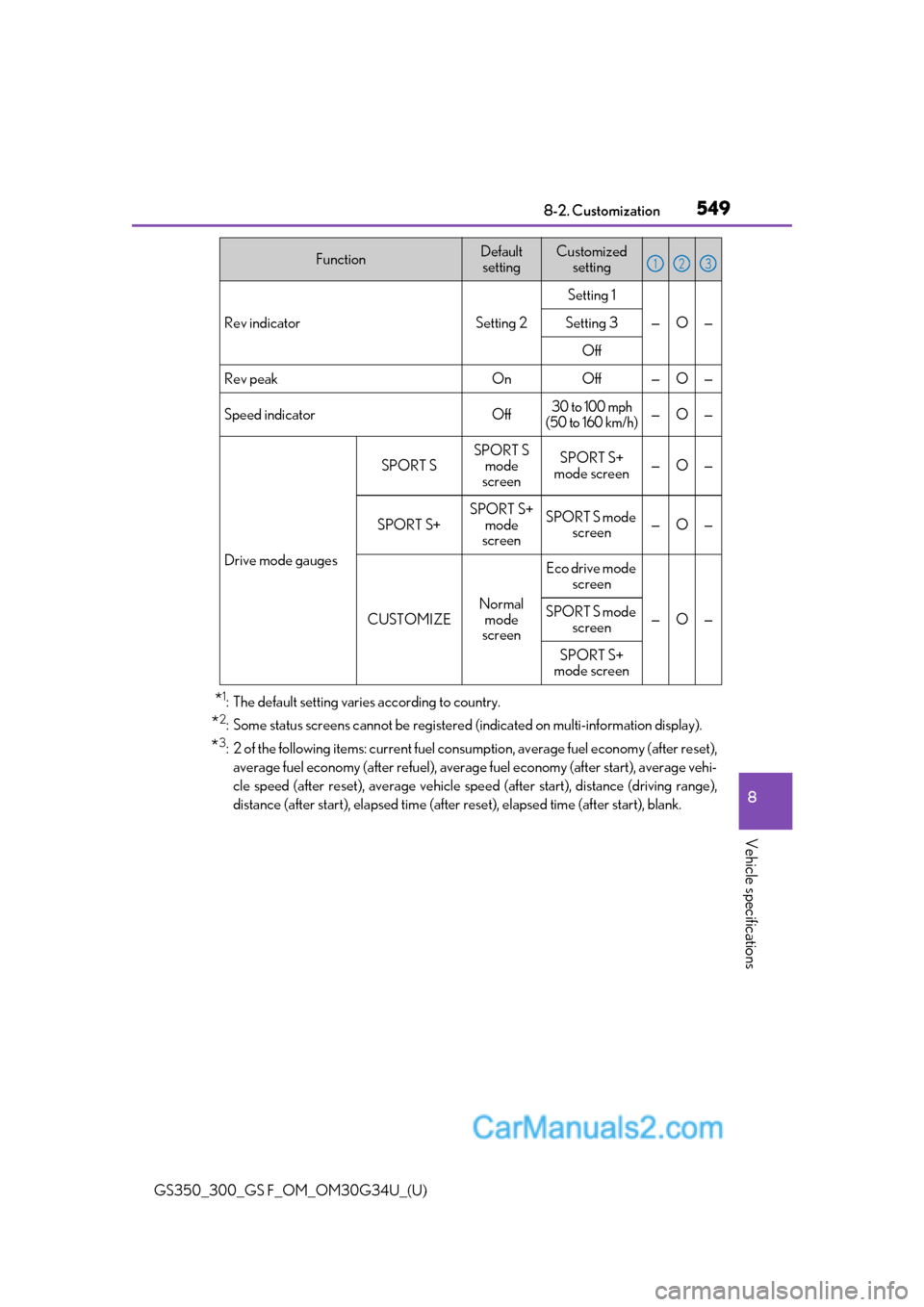
*1: The default setting varies according to country.
*2: Some status screens cannot be registered (indicated on multi-information display).
*3: 2 of the following items: current fuel cons umption, average fuel economy (after reset),
average fuel economy (after refuel), average fuel economy (after start), average vehi-
cle speed (after reset), average vehicle spee d (after start), distance (driving range),
distance (after start), elapsed time (after reset), elapsed time (after start), blank.
Rev indicatorSetting 2
Setting 1
—O—Setting 3
Off
Rev peakOnOff—O—
Speed indicatorOff30 to 100 mph
(50 to 160 km/h)—O—
Drive mode gauges
SPORT S
SPORT S mode
screenSPORT S+
mode screen—O—
SPORT S+
SPORT S+ mode
screenSPORT S mode screen—O—
CUSTOMIZE
Normal
mode
screen
Eco drive mode screen
—O—SPORT S mode
screen
SPORT S+
mode screen
FunctionDefault settingCustomized setting123
Page 585 of 602
583Alphabetical index
GS350_300_GS F_OM_OM30G34U_(U)
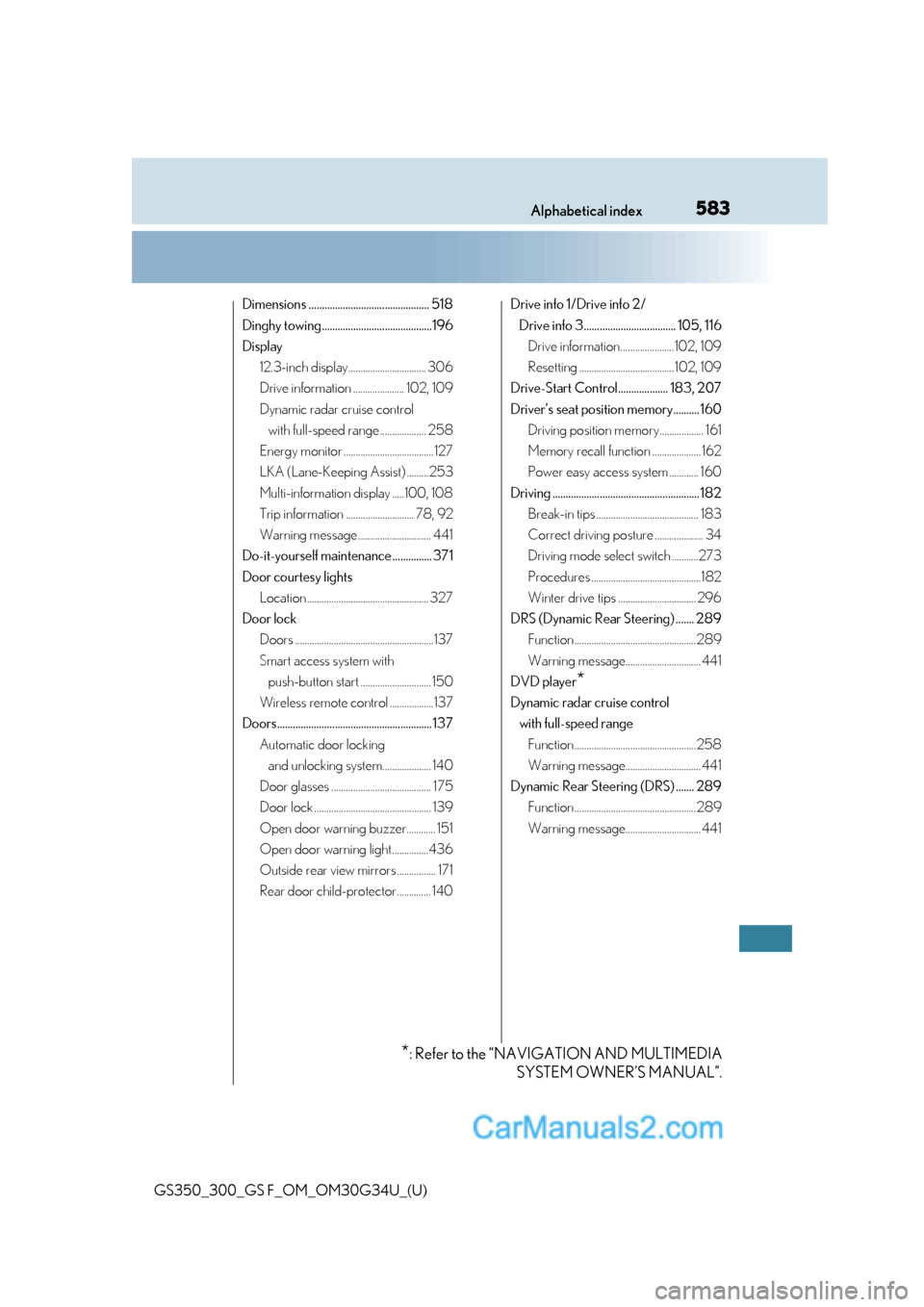
Dimensions .............................................. 518
Dinghy towing..........................................196
Display12.3-inch display................................ 306
Drive information ..................... 102, 109
Dynamic radar cruise control with full-speed range ................... 258
Energy monitor ..................................... 127
LKA (Lane-Keeping Assist) .........253
Multi-information display .....100, 108
Trip information ............................ 78, 92
Warning message .............................. 441
Do-it-yourself maintenance ............... 371
Door courtesy lights Location .................................................. 327
Door lock Doors .........................................................137
Smart access system with push-button start ............................. 150
Wireless remote control ..................137
Doors........................................................... 137 Automatic door locking and unlocking system.................... 140
Door glasses ......................................... 175
Door lock ................................................ 139
Open door warning buzzer............ 151
Open door warning light...............436
Outside rear view mirrors ................ 171
Rear door child-protector.............. 140 Drive info 1/Drive info 2/
Drive info 3................................... 105, 116 Drive information...................... 102, 109
Resetting ....................................... 102, 109
Drive-Start Control................... 183, 207
Driver’s seat position memory.......... 160 Driving position memory.................. 161
Memory recall function .................... 162
Power easy access system ............ 160
Driving ........................................................ 182 Break-in tips .......................................... 183
Correct driving posture .................... 34
Driving mode select switch ...........273
Procedures .............................................182
Winter drive tips ................................ 296
DRS (Dynamic Rear Steering) ....... 289 Function .................................................. 289
Warning message............................... 441
DVD player
*
Dynamic radar cruise control with full-speed range Function ..................................................258
Warning message............................... 441
Dynamic Rear Steering (DRS) ....... 289 Function .................................................. 289
Warning message............................... 441
*: Refer to the “NAVIGATION AND MULTIMEDIA SYSTEM OWNER’S MANUAL”.
Page 593 of 602
591Alphabetical index
GS350_300_GS F_OM_OM30G34U_(U)
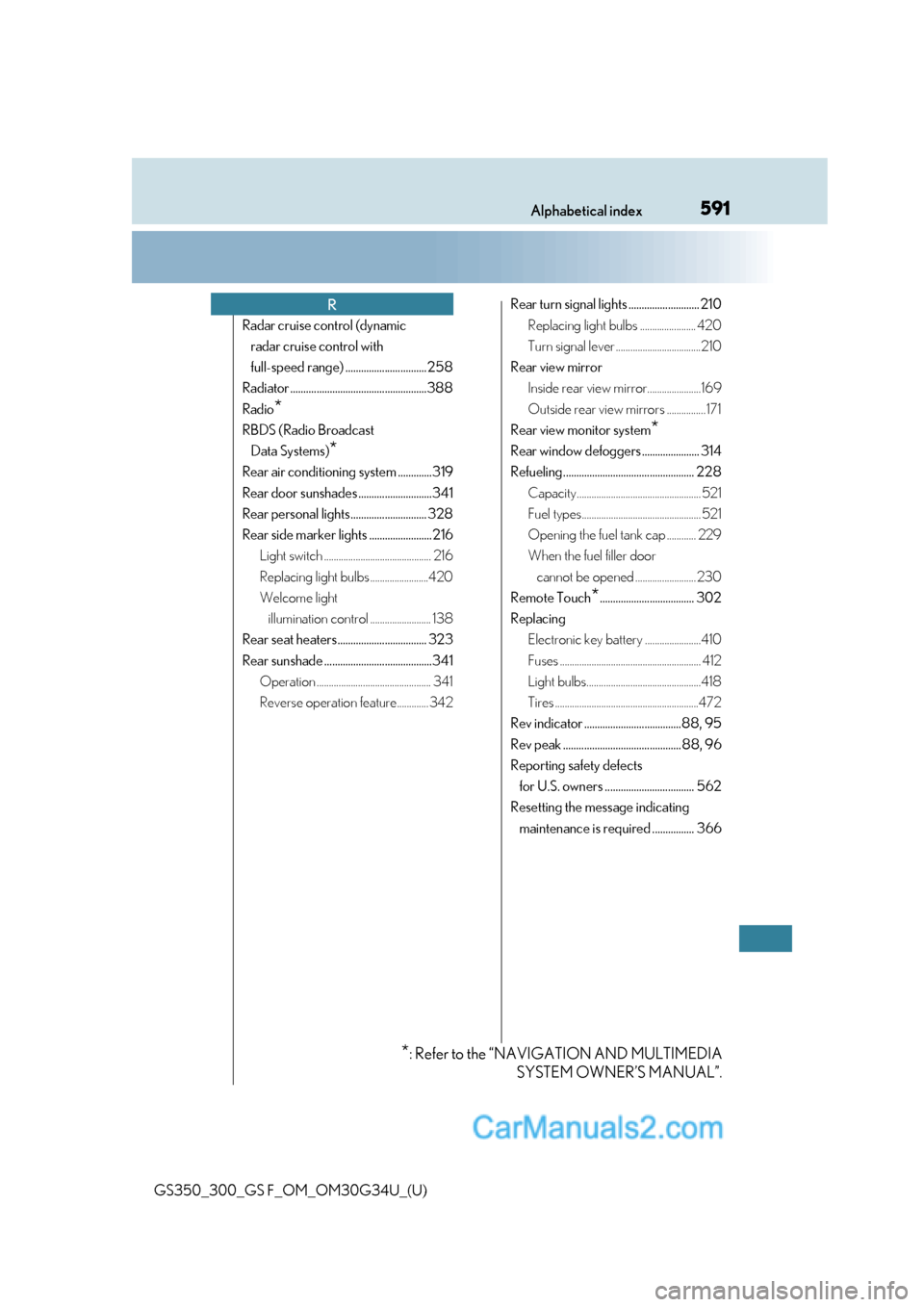
Radar cruise control (dynamic radar cruise control with
full-speed range) ............................... 258
Radiator ....................................................388
Radio
*
RBDS (Radio Broadcast Data Systems)
*
Rear air conditioning system .............319
Rear door sunshades ............................341
Rear personal lights............................. 328
Rear side marker lights ........................216 Light switch ............................................ 216
Replacing light bulbs ........................420
Welcome light illumination control ......................... 138
Rear seat heaters.................................. 323
Rear sunshade .........................................341 Operation ............................................... 341
Reverse operation feature............. 342 Rear turn signal lights ........................... 210
Replacing light bulbs ....................... 420
Turn signal lever ...................................210
Rear view mirror Inside rear view mirror......................169
Outside rear view mirrors ................ 171
Rear view monitor system
*
Rear window defoggers ...................... 314
Refueling.................................................. 228 Capacity................................................... 521
Fuel types................................................. 521
Opening the fuel tank cap ............ 229
When the fuel filler door cannot be opened ......................... 230
Remote Touch
*.................................... 302
Replacing Electronic key battery .......................410
Fuses .......................................................... 412
Light bulbs...............................................418
Tires ...........................................................472
Rev indicator .....................................88, 95
Rev peak ............................................. 88, 96
Reporting safety defects for U.S. owners .................................. 562
Resetting the message indicating maintenance is required ................ 366
R
*: Refer to the “NAVIGATION AND MULTIMEDIA SYSTEM OWNER’S MANUAL”.