cruise control Lexus GS350 2019 Owner's Guide
[x] Cancel search | Manufacturer: LEXUS, Model Year: 2019, Model line: GS350, Model: Lexus GS350 2019Pages: 604, PDF Size: 14.6 MB
Page 275 of 604
GS350_300_OM_OM30G96U_(U)
2754-5. Using the driving support systems
4
Driving
■Dynamic radar cruise control with full-speed range can be set when
●The shift lever is in D.
●Range 4 or higher of D has been selected by using the paddle shift switch.
●Vehicle speed is at or above approximately 30 mph (50 km/h).
However, when a preceding vehicle is detected, the dynamic radar cruise control with
full-speed range can be set even if the vehicle speed is below approximately 30 mph
(50 km/h).
■Accelerating after setting the vehicle speed
The vehicle can accelerate by operating the accelerator pedal. After accelerating, the
set speed resumes. However, during vehicle-to-vehicle distance control mode, the vehi-
cle speed may decrease below the set speed in order to maintain the distance to the pre-
ceding vehicle.
■When the vehicle stops while follow-up cruising
●Pushing the lever up while the vehicle ahead stops will resume follow-up cruising if the
vehicle ahead starts off within approximatel y 3 seconds after the lever is pushed up.
●If the vehicle ahead starts off within 3 seconds after your vehicle stops, follow-up cruis-
ing will be resumed.
■Automatic cancelation of vehicle- to-vehicle distance control mode
Vehicle-to-vehicle distance control mode is automatically canceled in the following situ-
ations.
●Actual vehicle speed falls at or below approximately 25 mph (40 km/h) when there are
no vehicles ahead.
●The preceding vehicle leaves the lane when yo ur vehicle is following at a vehicle speed
at or below approximately 25 mph (40 km/h). Otherwise, the sensor can not properly
detect the vehicle. (“CRUISE NOT AVAILA BLE No Preceding Vehicles” is displayed
on the multi-information display)
●VSC is activated.
●TRAC is activated for a period of time.
●When the VSC or TRAC system is turned off.
●When snow mode is set.
●The sensor cannot detect correctly because it is covered in some way.
●Pre-collision braking is activated.
●The parking brake is operated.
●The vehicle is stopped by system control on a steep incline.
●The following are detected when the vehicle has been stopped by system control:
• The driver is not wearing a seat belt.
• The driver’s door is opened.
• The vehicle has been stopped for about 3 minutes
If vehicle-to-vehicle distance control mode is automatically canceled for any other rea-
son, there may be a malfunction in th e system. Contact your Lexus dealer.
Page 276 of 604
276
GS350_300_OM_OM30G96U_(U)4-5. Using the driving support systems
■Automatic cancelation of co
nstant speed control mode
Constant speed control mode is automatica lly canceled in the following situations:
●Actual vehicle speed is more than approxim ately 10 mph (16 km/h) below the set vehi-
cle speed.
●Actual vehicle speed falls below approximately 25 mph (40 km/h).
●VSC is activated.
●TRAC is activated for a period of time.
●When the VSC or TRAC system is turned off.
●Pre-collision braking is activated.
If constant speed control mode is automati cally canceled for any other reason, there may
be a malfunction in the system . Contact your Lexus dealer.
■Brake system operation sound
If the brakes are applied automatically while the vehicle is in vehicle-to-vehicle distance
control mode, a brake system operation sound may be heard. This does not indicate a
malfunction.
■Warning messages and buzzers for dynamic radar cruise control with full-speed range
Warning messages and buzzers are used to indicate a system malfunction or to inform
the driver of the need for ca ution while driving. If a warning message is shown on the
multi-information display, read the message and follow the instructions. ( P. 444)
■When the sensor may not be correctly detecting the vehicle ahead
In the case of the following and depending on the conditions, operate the brake pedal
when deceleration of the system is insuff icient or operate the accelerator pedal when
acceleration is required.
As the sensor may not be able to correctly detect these types of vehicles, the approach
warning ( P. 273) may not be activated.
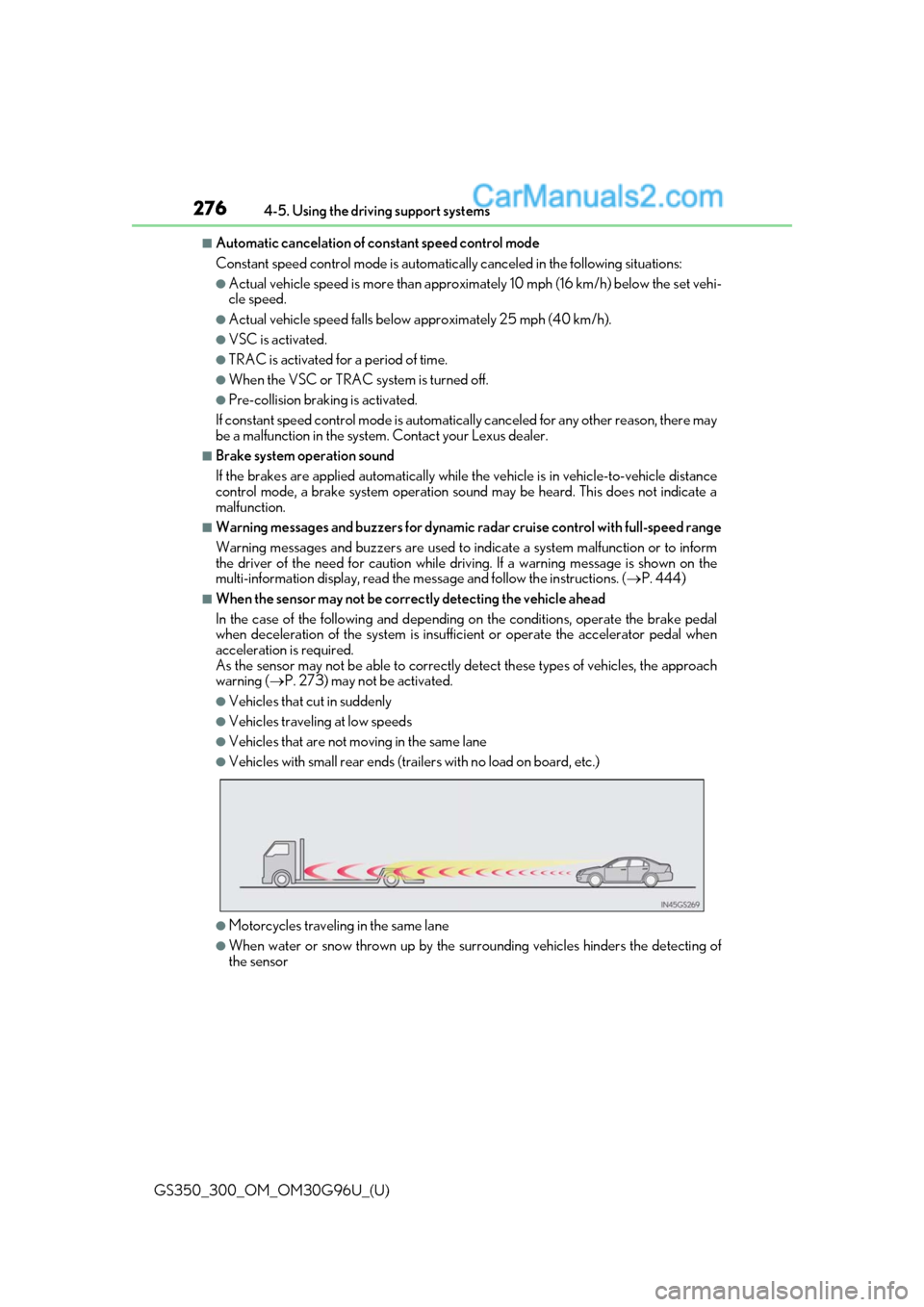
●Vehicles that cut in suddenly
●Vehicles traveling at low speeds
●Vehicles that are not moving in the same lane
●Vehicles with small rear ends (traile rs with no load on board, etc.)
●Motorcycles traveling in the same lane
●When water or snow thrown up by the surrounding vehicles hinders the detecting of
the sensor
Page 278 of 604
278
GS350_300_OM_OM30G96U_(U)4-5. Using the driving support systems
Cruise control
Use the cruise control to maintain a se
t speed without depressing the accelera-
tor pedal.
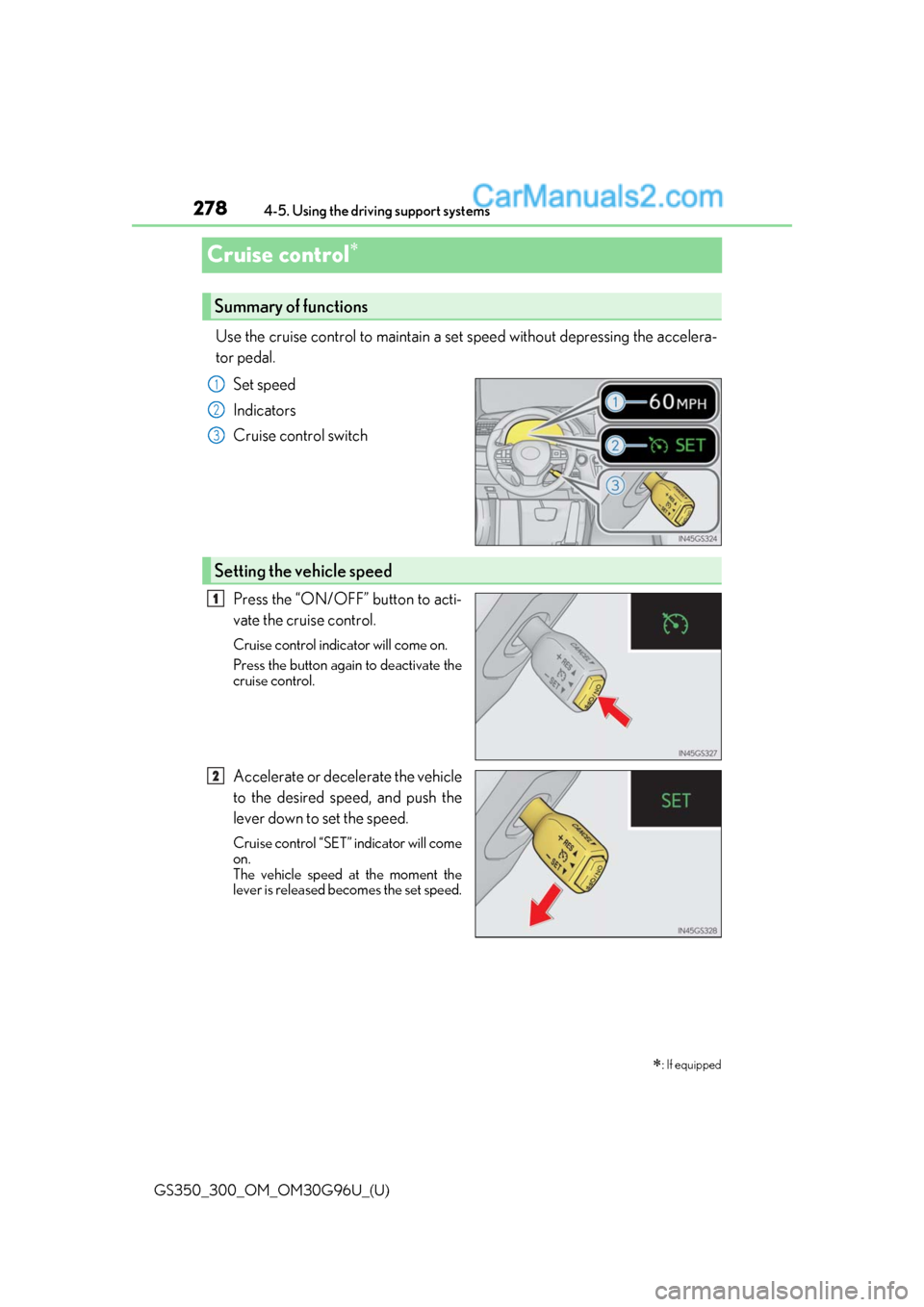
Set speed
Indicators
Cruise control switch
Press the “ON/OFF” button to acti-
vate the cruise control.
Cruise control indicator will come on.
Press the button again to deactivate the
cruise control.
Accelerate or decelerate the vehicle
to the desired speed, and push the
lever down to set the speed.
Cruise control “SET” indicator will come
on.
The vehicle speed at the moment the
lever is released becomes the set speed.
: If equipped
Summary of functions
1
2
3
Setting the vehicle speed
1
2
Page 279 of 604
GS350_300_OM_OM30G96U_(U)
2794-5. Using the driving support systems
4
Driving
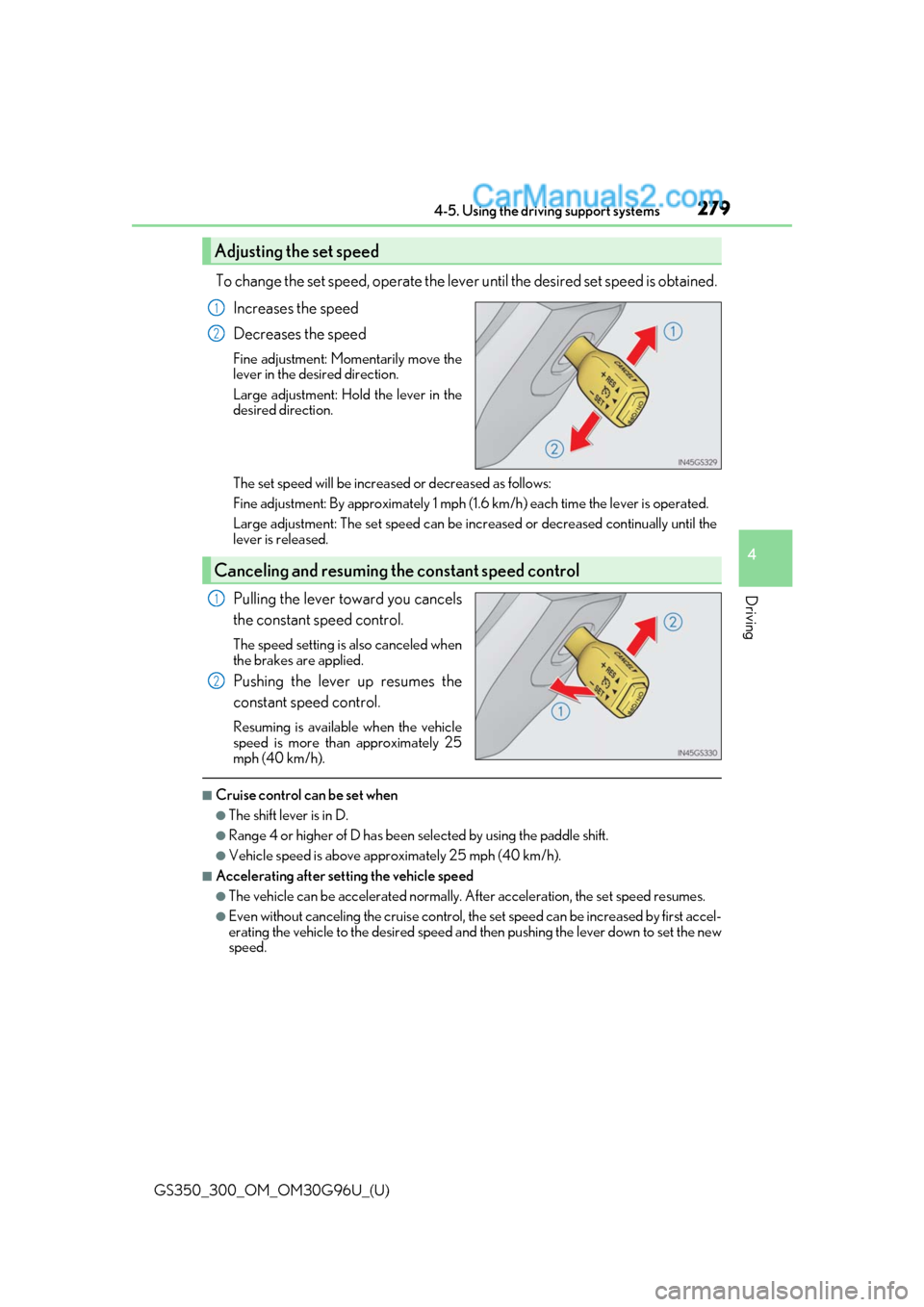
To change the set speed, operate the lever until the desired set speed is obtained.
Increases the speed
Decreases the speed
Fine adjustment: Momentarily move the
lever in the desired direction.
Large adjustment: Hold the lever in the
desired direction.
The set speed will be increased or decreased as follows:
Fine adjustment: By approximately 1 mph (1. 6 km/h) each time the lever is operated.
Large adjustment: The set speed can be increased or decreased continually until the
lever is released.
Pulling the lever toward you cancels
the constant speed control.
The speed setting is also canceled when
the brakes are applied.
Pushing the lever up resumes the
constant speed control.
Resuming is available when the vehicle
speed is more than approximately 25
mph (40 km/h).
■Cruise control can be set when
●The shift lever is in D.
●Range 4 or higher of D has been selected by using the paddle shift.
●Vehicle speed is above approximately 25 mph (40 km/h).
■Accelerating after setting the vehicle speed
●The vehicle can be accelerated normally. After acceleration, the set speed resumes.
●Even without canceling the cruise control, th e set speed can be increased by first accel-
erating the vehicle to the desired speed and then pushing the lever down to set the new
speed.
Adjusting the set speed
1
2
Canceling and resuming the constant speed control
1
2
Page 280 of 604
280
GS350_300_OM_OM30G96U_(U)4-5. Using the driving support systems
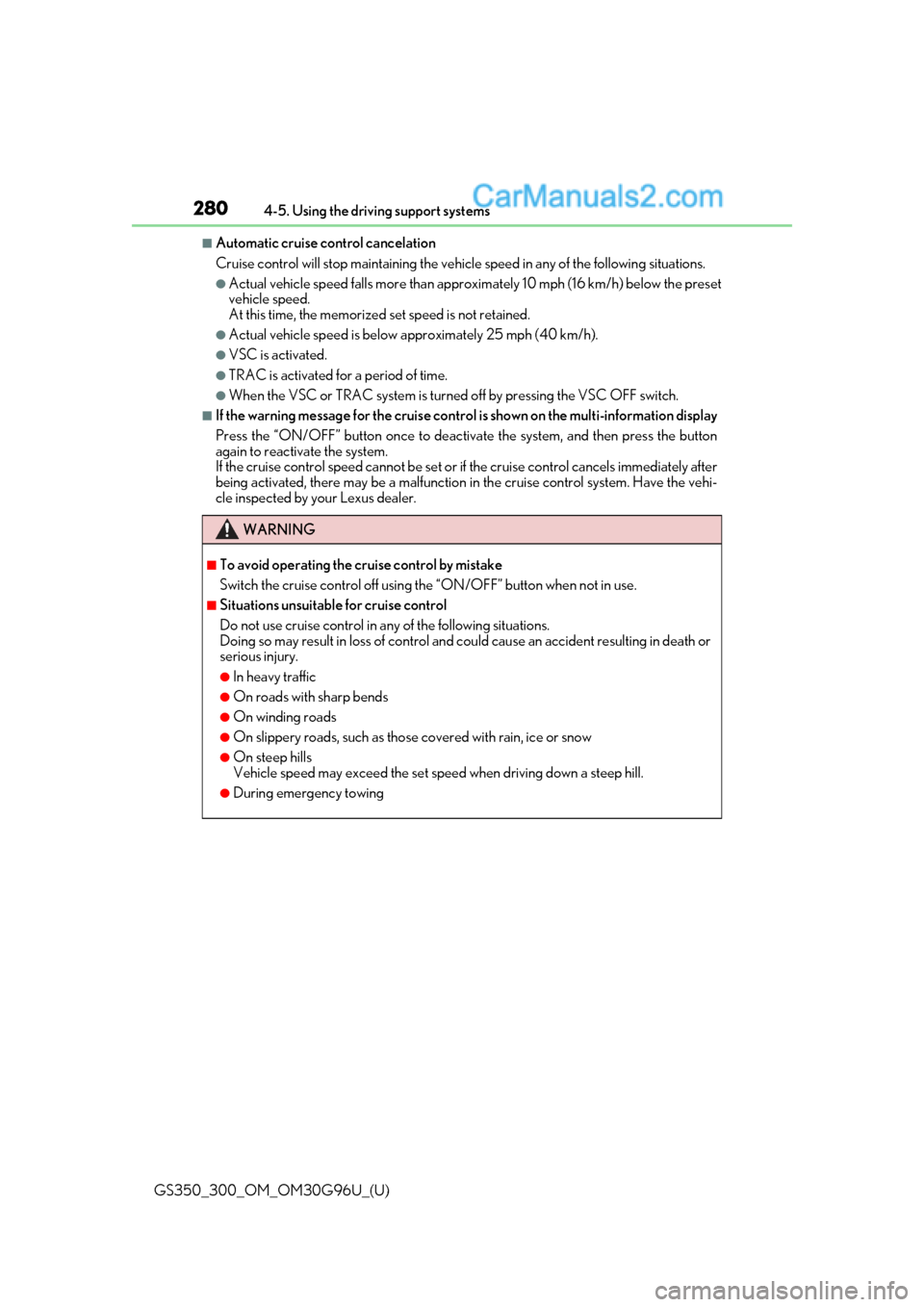
■Automatic cruise control cancelation
Cruise control will stop main
taining the vehicle speed in an y of the following situations.
●Actual vehicle speed falls more than appr oximately 10 mph (16 km/h) below the preset
vehicle speed.
At this time, the memorized set speed is not retained.
●Actual vehicle speed is below approximately 25 mph (40 km/h).
●VSC is activated.
●TRAC is activated for a period of time.
●When the VSC or TRAC system is turned off by pressing the VSC OFF switch.
■If the warning message for the cruise contro l is shown on the multi-information display
Press the “ON/OFF” button once to deactiv ate the system, and then press the button
again to reactivate the system.
If the cruise control speed cannot be set or if the cruise control cancels immediately after
being activated, there may be a malfunction in the cruise control system. Have the vehi-
cle inspected by your Lexus dealer.
WARNING
■To avoid operating the cruise control by mistake
Switch the cruise control off using th e “ON/OFF” button when not in use.
■Situations unsuitable for cruise control
Do not use cruise control in any of the following situations.
Doing so may result in loss of control and could cause an accident resulting in death or
serious injury.
●In heavy traffic
●On roads with sharp bends
●On winding roads
●On slippery roads, such as thos e covered with rain, ice or snow
●On steep hills
Vehicle speed may exceed the set speed when driving down a steep hill.
●During emergency towing
Page 453 of 604
4537-2. Steps to take in an emergency
GS350_300_OM_OM30G96U_(U)
7
When trouble arises
(If equipped)
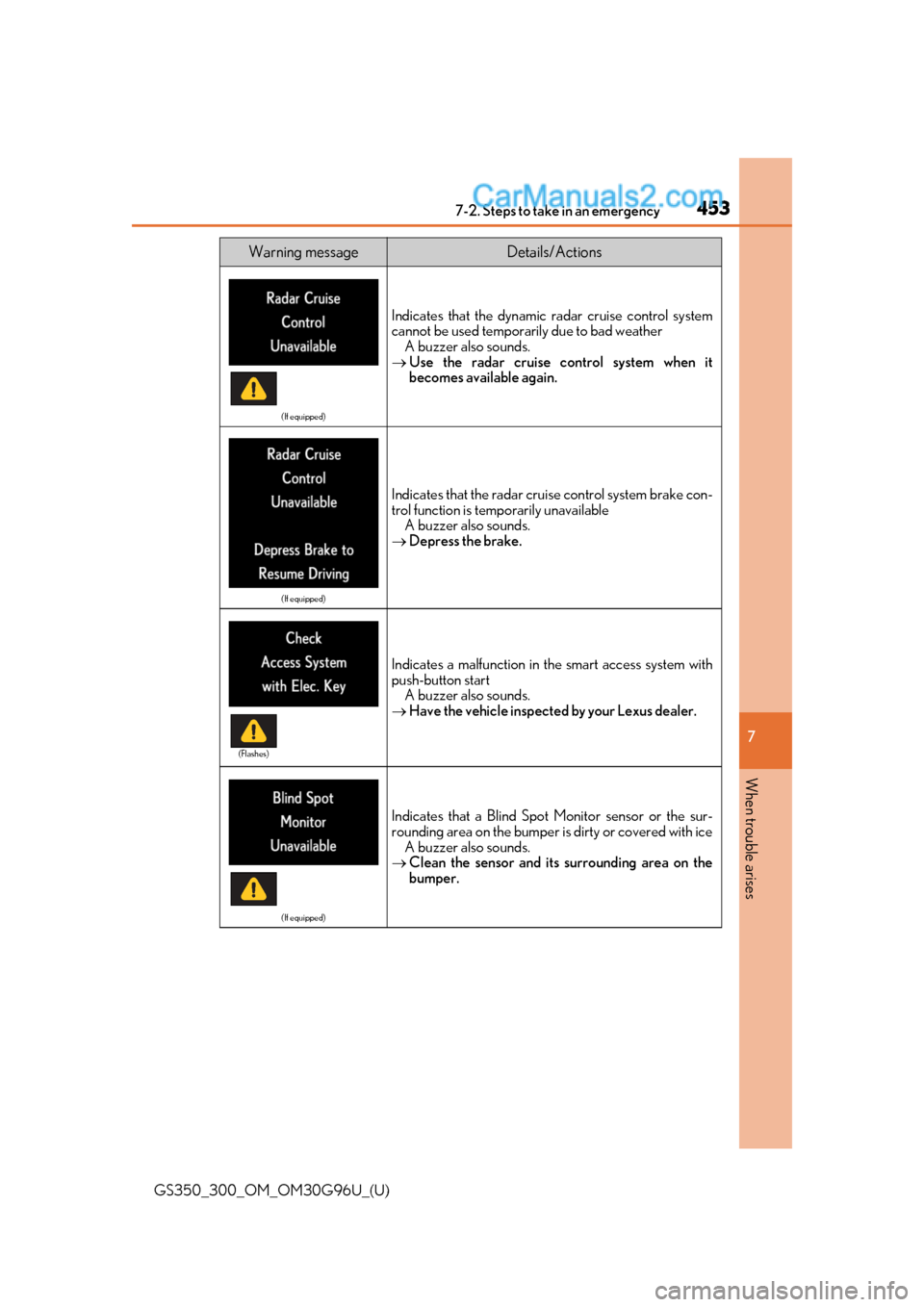
Indicates that the dynamic radar cruise control system
cannot be used temporarily due to bad weather A buzzer also sounds.
Use the radar cruise control system when it
becomes available again.
(If equipped)
Indicates that the radar cruise control system brake con-
trol function is temporarily unavailable
A buzzer also sounds.
Depress the brake.
Indicates a malfunction in the smart access system with
push-button start
A buzzer also sounds.
Have the vehicle inspected by your Lexus dealer.
(If equipped)
Indicates that a Blind Spot Monitor sensor or the sur-
rounding area on the bumper is dirty or covered with ice
A buzzer also sounds.
Clean the sensor and its surrounding area on the
bumper.
Warning messageDetails/Actions
(Flashes)
Page 454 of 604
4547-2. Steps to take in an emergency
GS350_300_OM_OM30G96U_(U)
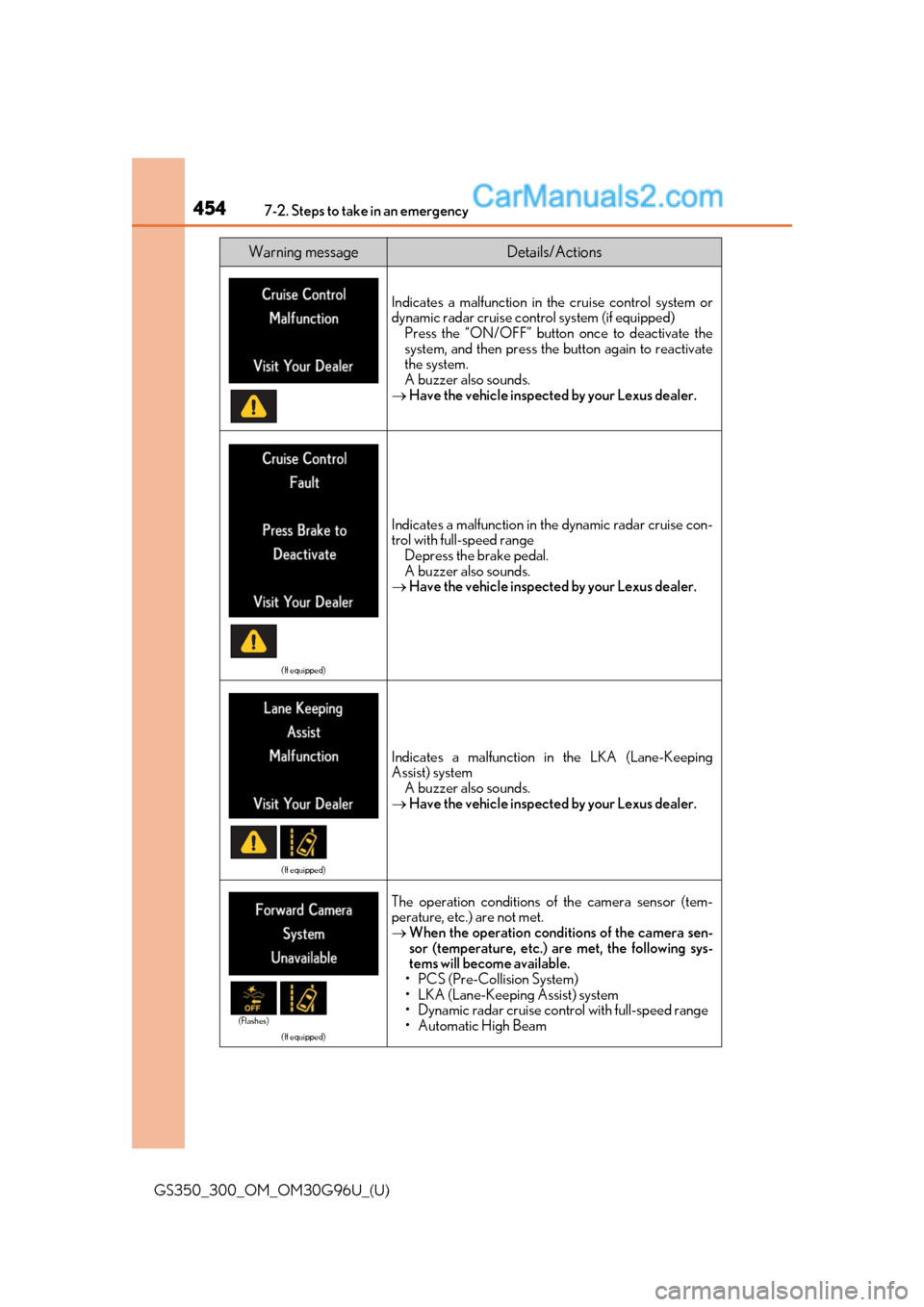
Indicates a malfunction in the cruise control system or
dynamic radar cruise control system (if equipped)
Press the “ON/OFF” button once to deactivate the
system, and then press the button again to reactivate
the system.
A buzzer also sounds.
Have the vehicle inspected by your Lexus dealer.
(If equipped)
Indicates a malfunction in the dynamic radar cruise con-
trol with full-speed range
Depress the brake pedal.
A buzzer also sounds.
Have the vehicle inspected by your Lexus dealer.
(If equipped)
Indicates a malfunction in the LKA (Lane-Keeping
Assist) system
A buzzer also sounds.
Have the vehicle inspected by your Lexus dealer.
(If equipped)
The operation conditions of the camera sensor (tem-
perature, etc.) are not met.
When the operation conditions of the camera sen-
sor (temperature, etc.) are met, the following sys-
tems will become available.
• PCS (Pre-Collision System)
• LKA (Lane-Keeping Assist) system
• Dynamic radar cruise control with full-speed range
•Automatic High Beam
Warning messageDetails/Actions
(Flashes)
Page 455 of 604
4557-2. Steps to take in an emergency
GS350_300_OM_OM30G96U_(U)
7
When trouble arises
(If equipped)
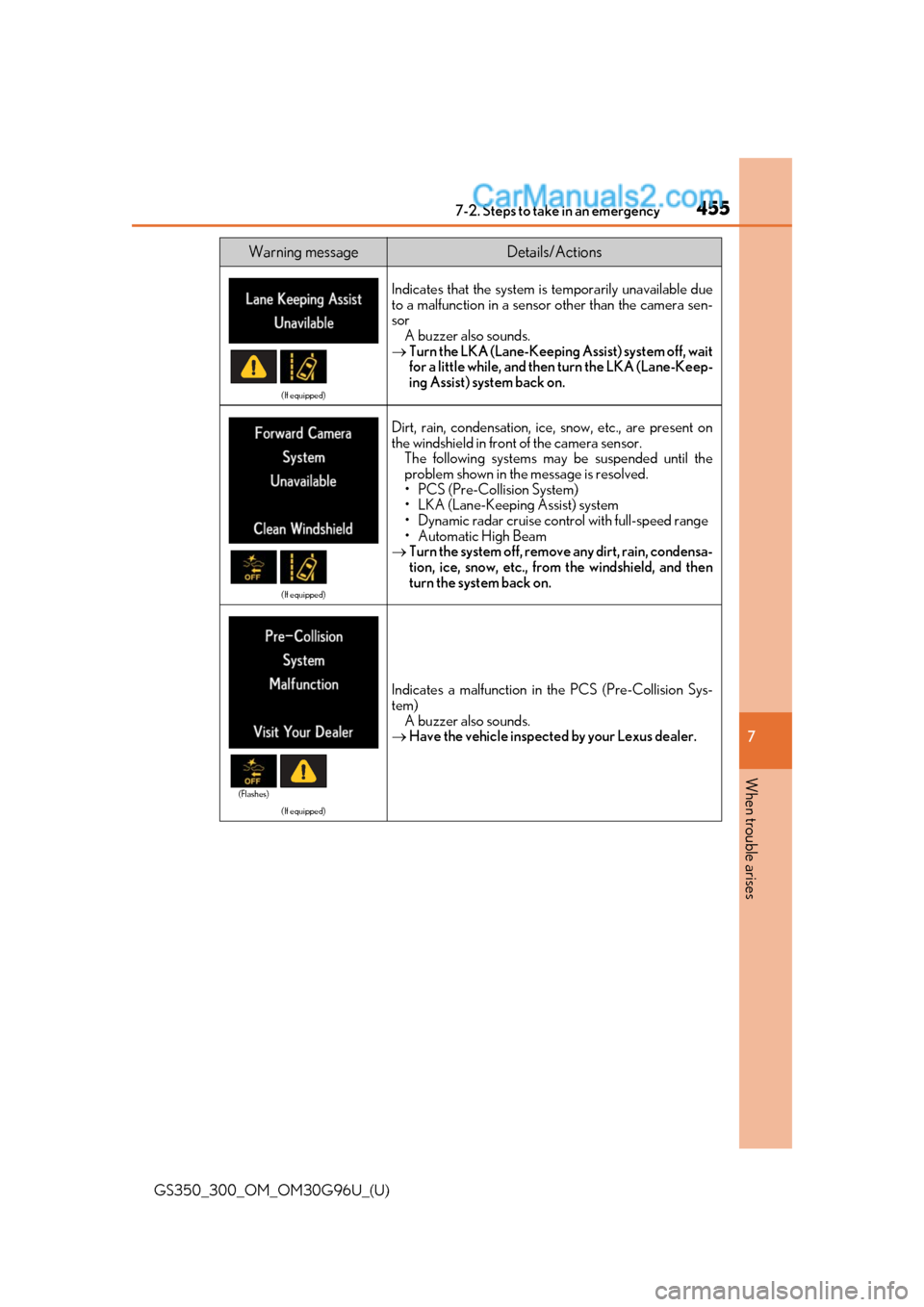
Indicates that the system is temporarily unavailable due
to a malfunction in a sensor other than the camera sen-
sor A buzzer also sounds.
Turn the LKA (Lane-Keeping Assist) system off, wait
for a little while, and then turn the LKA (Lane-Keep-
ing Assist) system back on.
(If equipped)
Dirt, rain, condensation, ice, snow, etc., are present on
the windshield in front of the camera sensor. The following systems may be suspended until the
problem shown in the message is resolved.
• PCS (Pre-Collision System)
• LKA (Lane-Keeping Assist) system
• Dynamic radar cruise control with full-speed range
•Automatic High Beam
Turn the system off, remove any dirt, rain, condensa-
tion, ice, snow, etc., from the windshield, and then
turn the system back on.
(If equipped)
Indicates a malfunction in the PCS (Pre-Collision Sys-
tem)
A buzzer also sounds.
Have the vehicle inspected by your Lexus dealer.
Warning messageDetails/Actions
(Flashes)
Page 469 of 604
4697-2. Steps to take in an emergency
GS350_300_OM_OM30G96U_(U)
7
When trouble arises
■Warning message in radar cruise mode (if equipped)
In the following cases, the wa rning message may not be displa yed even if vehicle-to-vehi-
cle distance decreases:
●When your vehicle and the vehicle ahead are traveling at the same speed or the vehicle
ahead is traveling more quickly than your vehicle
●When the vehicle ahead is traveling at a very low speed
●Immediately after cruise control speed is set
●At the instant the accelerator pedal is depressed
■Open door warning message (GS350/GS300 only)
The open door warning message continues to display until a door or the trunk is fully
closed, even if the engine switch is turned off. However, approximately 20 minutes after a
door or the trunk is not fully closed, the batt ery-saving function operates and the display
turns off even though a door or the trunk is not fully closed.
■Warning buzzer
In some cases, the buzzer may not be heard because of noisy place or an audio sound.
Page 485 of 604
4857-2. Steps to take in an emergency
GS350_300_OM_OM30G96U_(U)
7
When trouble arises
WARNING
■When the spare tire is attached
The vehicle speed may not be correctly detected, and the following systems may not
operate correctly:
Also, not only can the following system not be utilized fully, but it may even negatively
affect the drive-train components:
•AWD system
■Speed limit when using the spare tire
Do not drive at speeds in excess of 50 mp h (80 km/h) when a spare tire is installed on
the vehicle.
The spare tire is not designed for driving at high speeds. Failure to observe this precau-
tion may lead to an accident causing death or serious injury.
■After using the tools and jack
Before driving, make sure all the tools and jack are securely in place in their storage
location to reduce the possibilit y of personal injury during a collision or sudden brak-
ing.
NOTICE
■Be careful when driving over bumps with the spare tire installed on the vehicle.
The vehicle may become lower when driving with the spare tire compared to when
driving with standard tires. Be careful when driving over uneven road surfaces.
■Driving with tire chains and the spare tire
Do not fit tire chains to the spare tire.
Tire chains may damage the vehicle body and adversely affect driving performance.
■When replacing the tires
When removing or fitting the wheels, tires or the tire pressure warning valve and trans-
mitter, contact your Lexus dealer as the tire pressure warning valve and transmitter
may be damaged if not handled correctly.
• ABS & Brake assist
•VSC
•TRAC
• Cruise control
• Dynamic radar cruise control with
full-speed range (if equipped)
• PCS (Pre-Collision System)
(if equipped)
•EPS
• AFS (if equipped)
• Adaptive Variable Suspension system
(if equipped) • LKA (Lane-Keeping Assist)
(if equipped)
• Tire pressure warning system
•VDIM
• Lexus parking assist monitor
• Intuitive parking assist (if equipped)
• Navigation system (if equipped)
• DRS (if equipped)
• VGRS (if equipped)
• LDH (if equipped)