key battery Lexus GS350 2020 User Guide
[x] Cancel search | Manufacturer: LEXUS, Model Year: 2020, Model line: GS350, Model: Lexus GS350 2020Pages: 600, PDF Size: 13.38 MB
Page 159 of 600

GS350_GS F_OM_OM30J07U_(U)
1593-2. Opening, closing and locking the doors and trunk
3
Operation of each component
■Note for the entry function
●Even when the electronic key is within the effective range (detection areas), the system
may not operate properly in the following cases:
• The electronic key is too close to the window or outside door handle, near the ground, or in a high place when the doors are locked or unlocked.
• The electronic key is near the ground or in a high place, or too close to the rear
bumper center when the trunk is opened.
• The electronic key is on th e instrument panel, rear pack age tray or floor, or in the
door pockets or glove box when the engine is started or engine switch modes are
changed.
●Do not leave the electronic key on top of th e instrument panel or near the door pockets
when exiting the vehicle. Depending on the radio wave reception conditions, it may be
detected by the antenna outs ide the cabin and the door will become lockable from the
outside, possibly trapping the electronic key inside the vehicle.
●As long as the electronic key is within th e effective range, the doors may be locked or
unlocked by anyone. However, only the door s detecting the electronic key can be used
to unlock the vehicle.
●Even if the electronic key is not inside the vehicle, it may be possible to start the engine
if the electronic key is near the window.
●The doors may unlock or lock if a large amou nt of water splashes on the door handle,
such as in the rain or in a car wash when the electronic ke y is within the effective range.
(The doors will automatically be locked af ter approximately 60 seconds if the doors
are not opened and closed.)
●If the wireless remote control is used to lo ck the doors when the electronic key is near
the vehicle, there is a possibility that the d oor may not be unlocked by the entry func-
tion. (Use the wireless remote control to unlock the doors.)
●Touching the door lock sensor while wearin g gloves may delay or prevent lock opera-
tion.
●If the door handle becomes wet while the el ectronic key is within the effective range,
the door may lock and unlock repeatedly. In that case, follow the following correction
procedures to wash the vehicle:
• Place the electronic key in a location 6 ft. (2 m) or more away from the vehicle. (Take care to ensure that the key is not stolen.)
• Set the electronic key to battery-saving mode to disable the smart access system with push-button start. ( P. 158)
●If the electronic key is inside the vehicle and a door handle becomes wet during a car
wash, a message may be shown on the mult i-information display and a buzzer will
sound outside the vehicle. To turn off the alarm, lock all the doors.
●The lock sensor may not work properly if it comes into contact with ice, snow, mud, etc.
Clean the lock sensor and attempt to operate it again, or use the lock sensor on the
lower part of the door handle.
●A sudden approach to the effective range or door handle may prevent the doors from
being unlocked. In this case, return the door handle to the original position and check
that the doors unlock before pulling the door handle again.
●Gripping the door handle when wearing a glove may not unlock the door.
●If there is another electronic key in the de tection area, it may take slightly longer to
unlock the doors after the door handle is gripped.
Page 182 of 600

182
GS350_GS F_OM_OM30J07U_(U)3-5. Opening, closing the windows and moon roof
■When the window cannot be opened or closed
When the jam protection functi
on or catch protection function operates unusually and
the door window cannot be opened or closed, perform the following operations with the
power window switch of that door.
●Stop the vehicle. With the engine switch in IGNITION ON mode, within 4 seconds of
the jam protection function or catch protecti on function activating, continuously oper-
ate the power window switch in the one-to uch closing direction or one-touch opening
direction so that the door wind ow can be opened and closed.
●If the door window cannot be opened and closed even when performing the above
operations, perform the following procedure for function initialization.
Turn the engine switch to IGNITION ON mode.
Pull and hold the power window switch in the one-touch closing direction and com-
pletely close the door window.
Release the power window sw itch for a moment, resume pulling the switch in the
one-touch closing direction, and hold it there for approximately 6 seconds or more.
Press and hold the power window switch in the one-touch opening direction. After
the door window is completely opened, cont inue holding the switch for an additional
1 second or more.
Release the power window switch for a mome nt, resume pressing the switch in the
one-touch opening direction, and hold it there for approximately 4 seconds or
more.
Pull and hold the power window switch in the one-touch closing direction again.
After the door window is completely closed, continue holding the switch for a fur-
ther 1 second or more.
If you release the switch while the window is moving, start again from the beginning.
If the window reverses and cannot be fully cl osed or opened, have the vehicle inspected
by your Lexus dealer.
■Door lock linked window operation
●The power windows can be opened an d closed using the mechanical key.*( P. 502)
●The power windows can be opened using the wireless remote control.* ( P. 143)
*: These settings must be cust omized at your Lexus dealer.
■When the battery is disconnected
The window lock switch is disabled. If nece ssary, press the window lock switch after
reconnecting the battery.
■Power windows open warning buzzer
The buzzer sounds and a message is shown on the multi-information display in the instru-
ment cluster when the engine switch is turned off and the driver’s door is opened with the
power windows open.
■Customization
Settings (e.g. linked door lock operation) can be changed.
(Customizable features: P. 542)
1
2
3
4
5
6
Page 205 of 600

GS350_GS F_OM_OM30J07U_(U)
2054-2. Driving procedures
4
Driving
If the engine is stopped with the shift lever in a position other than P, the engine
switch will not be turned off but instead be turned to ACCESSORY mode. Per-
form the following procedure to turn the switch off:
Check that the parking brake is set.
Shift the shift lever to P.
Check that “Turn Off Vehicle” is disp layed on the multi-information display
and then press the engine switch once.
Check that “Turn Off Vehicle” on th e multi-information display is off.
■Auto power off function
If the vehicle is left in ACCESSORY mode for more than 20 minutes or IGNITION ON
mode (the engine is not running) for more than an hour with the shift lever in P, the engine
switch will automatically turn off. However, this function cannot entirely prevent battery
discharge. Do not leave the vehicle with the engine switch in ACCESSORY or IGNI-
TION ON mode for long periods of ti me when the engine is not running.
■Electronic key battery depletion
P. 140
■Conditions affe cting operation
P. 158
■Notes for the entry function
P. 159
■If the engine does not start
●The engine immobilizer system ma y not have been deactivated. (P. 77)
Contact your Lexus dealer.
●Check that the shift lever is se curely set in P. The engine may not start if the shift lever is
displaced out of P. “Shift to P position to St art” will be displayed on the multi-information
display.
■Steering lock
After turning the engine switch off and opening and closing the doors, the steering wheel
will be locked due to the steering lock func tion. Operating the engine switch again auto-
matically cancels the steering lock.
■When the steering lock cannot be released
When stopping the engine with the shift lever in a position other than P
“Steering Lock active” will be displayed on the
multi-information display.
Check that the shift lever is set in P. Press the
engine switch while turning the steering wheel
left and right.
1
2
3
4
Page 206 of 600

206
GS350_GS F_OM_OM30J07U_(U)4-2. Driving procedures
■Steering lock motor overheating prevention
To prevent the steering lock motor from overheating, the motor may be suspended if the
engine is turned on and off re
peatedly in a short period of time. In this case, refrain from
operating the engine. After about 10 seconds, the steering lock motor will resume func-
tioning.
■When “Check Access System with Elec. Key” will be displayed on the multi-informa-
tion display
The system may be malfunctio ning. Have the vehicle inspected by your Lexus dealer
immediately.
■If the electronic key battery is depleted
P. 411
■Operation of the engine switch
●If the switch is not pressed shortly and firmly, the engine switch mode may not change
or the engine may not start.
●If attempting to restart the engine immediately after turning the engine switch off, the
engine may not start in some cases. After turning the engine switch off, please wait a
few seconds before restarting the engine.
■If the smart access system with push-button start has been deactivated in a customized
setting
P. 502
WARNING
■When starting the engine
Always start the engine while sitting in the driver’s seat. Do not depress the accelerator
pedal while starting the engine under any circumstances.
Doing so may cause an accident resulting in death or serious injury.
■Caution while driving
If engine failure occurs while the vehicle is moving, do not lock or open the doors until
the vehicle reaches a safe and complete stop. Activation of the steering lock in this cir-
cumstance may lead to an accident, re sulting in death or serious injury.
■Stopping the engine in an emergency
If you want to stop the engine in an emergency while driving the vehicle, press and hold
the engine switch for more than 2 seconds, or press it briefly 3 times or more in succes-
sion. ( P. 425)
However, do not touch the engi ne switch while driving except in an emergency. Turning
the engine off while driving will not cause lo ss of steering or braking control, but the
power assist to these systems will be lost. Th is will make it more difficult to steer and
brake, so you should pull over and stop the vehicle as soon as it is safe to do so.
Page 224 of 600

224
GS350_GS F_OM_OM30J07U_(U)4-3. Operating the lights and wipers
■Headlight control sensor
■Automatic light off system
●When the headlights are on: The headlights and tail lights turn off 30 seconds after the
engine switch is turned off and a door is
opened and all of the doors and trunk are
closed. (The lights turn off immediately if on the key is pressed twice after all the
doors are closed.)
●When only the tail lights are on : The tail lights turn off automatically if the engine switch
is turned off and the driver’s door is opened.
To turn the lights on again, turn the engine switch to IGNITION ON mode, or turn the
light switch off once and then back to or .
If any of the doors or trunk lid is kept open , the lights automatically turn off after 20 min-
utes.
■Light reminder buzzer
A buzzer sounds when the engine switch is turned off or turned to ACCESSORY mode
and the driver’s door is opened while the lights are turned on.
■Automatic headlight leveling system
The level of the headlights is automatically adjusted accordi ng to the number of passen-
gers and the loading condition of the vehicle to ensure that the headlights do not inter-
fere with other road users.
■If the “AFS OFF” indicator flashes
It may indicate a malfunction in the system. Contact your Lexus dealer.
■Customization
Settings (e.g. light sensor sensitivity) can be changed.
(Customizable features: P. 542)
The sensor may not function properly if an
object is placed on the sensor, or anything that
blocks the sensor is affixed to the windshield.
Doing so interferes with the sensor detecting
the level of ambient li
ght and may cause the
automatic headlight system to malfunction.
NOTICE
■To prevent battery discharge
Do not leave the lights on longer than necessary when the engine is not running.
Page 339 of 600

GS350_GS F_OM_OM30J07U_(U)
3395-3. Using the interior lights
5
Interior features
●Illuminated entry system: The lights automatically turn on/off according to engine
switch mode, the presence of the electronic key, whether the doors are locked/
unlocked, and whether the doors are opened/closed.
●If the interior lights remain on when the engine switch is turned off, the lights will go off
automatically after 20 minutes.
●Setting (e.g. the time elapsed before lights turn off) can be changed.
(Customizable features: P. 542)
NOTICE
To prevent battery discharge, do not leave th e lights on longer than necessary when the
engine is off.
Page 361 of 600
361
GS350_GS F_OM_OM30J07U_(U)
6Maintenance and care
6-1. Maintenance and careCleaning and protecting the vehicle exterior ................ 362
Cleaning and protecting the vehicle interior.................. 367
6-2. Maintenance Maintenance requirements ... 370
General maintenance.............. 372
Emission inspection and maintenance (I/M)
programs .................................... 375
6-3. Do-it-yourself maintenance Do-it-yourself service precautions................................ 376
Hood ............................................... 378
Positioning a floor jack ............ 379
Engine compartment ................ 381
Tires ................................................. 394
Tire inflation pressure............... 404
Wheels ........................................... 407
Air conditioning filter ...............409
Electronic key battery ................. 411
Checking and replacing fuses ............................................... 413
Headlight aim (vehicles with single-beam headlights).........417
Light bulbs...................................... 419
Page 363 of 600
GS350_GS F_OM_OM30J07U_(U)
3636-1. Maintenance and care
6
Maintenance and care
■Automatic car washes
●Fold the mirrors before washing the vehicle. Start washing from the front of the vehicle.
Make sure to extend the mirrors before driving.
●Brushes used in automatic car washes may scratch the vehicle surface and harm your
vehicle’s paint.
●Rear spoiler (if equipped) may not be washable in some automatic car washes. There
may also be an increased risk of damage to vehicle.
■High-pressure car washes
●As water may enter the cabin, do not bring the nozzle tip near the gaps around the
doors or perimeter of the windows, or spray these areas continuously.
●Before using the car wash, check that the fuel filler door on your vehicle is closed prop-
erly.
■Notes for a smart access system with push-button start
If the door handle becomes wet while the electronic key is within the effective range, the
door may lock and unlock repeatedly. In that case, follow the following correction proce-
dures to wash the vehicle:
●Place the key in a position 6 ft. (2 m) or more separate from the vehicle while the vehi-
cle is being washed. (Take care to ensure that the key is not stolen.)
●Set the electronic key to battery-saving mode to disable the sm art access system with
push-button start. ( P. 158)
■Aluminum wheels (vehicles without matte black painted wheels)
●Remove any dirt immediately by using a neutral detergent.
●Wash detergent off with water immediately after use.
●To protect the paint from damage, make sure to observe the following precautions.
• Do not use acidic, alkaline or abrasive detergent
• Do not use hard brushes
• Do not use detergent on the wheels when they are hot, such as after driving or park- ing in hot weather
■Aluminum wheels (vehicles with matte black painted wheels)
As matte black painted wheels require differ ent cleaning methods than conventional alu-
minum wheels, be sure to observer the follo wing. For details, consult your Lexus dealer.
●Remove dirt using water. If the wheels are excessively dirty, use a sponge or soft cloth
dampened with a diluted neutral detergent to remove the dirt.
●When using detergent, make sure to rinse it off with water immediately. Then use a soft
cloth to wipe off the water.
●To prevent the matte black paint from being damaged, make sure to observe the follow-
ing precautions:
• Do not scrub or polish the wheels using a brush or dry cloth.
• Do not use any wheel coatings or abrasive detergents.
• When using an automatic car wash, disable/ do not select the wheel brush function
(if such an option is available).
• Do not use a high pressure washer or steam cleaner.
• Do not use detergent on the wheels when they are hot, such as after driving or park- ing in hot weather.
Page 391 of 600

GS350_GS F_OM_OM30J07U_(U)
3916-3. Do-it-yourself maintenance
6
Maintenance and care
Check the battery as follows.
■Battery exterior
Make sure that the battery terminals are not corroded and that there are no
loose connections, cracks, or loose clamps.
Terminals
Hold-down clamp
■Before recharging
When recharging, the battery produces hydrogen gas which is flammable and explosive.
Therefore, observe the following before recharging:
●If recharging with the battery installed on the vehicle, be sure to disconnect the ground
cable.
●Make sure the power switch on the charge r is off when connecting and disconnecting
the charger cables to the battery.
■After recharging/reconnecting the battery
The engine may not start. Follow the procedure below to initialize the system.
Shift the shift lever to P.
Open and close any of the doors.
Restart the engine.
●Unlocking the doors using the smart access system with push-button start may not be
possible immediately after reconnecting the battery. If this happens, use the wireless
remote control or the mechanical key to lock/unlock the doors.
●Start the engine with the engine switch in ACCESSORY mode. The engine may not
start with the engine switch turned off. However, the engine will operate normally from
the second attempt.
●The engine switch mode is recorded by the vehicle. If the battery is reconnected, the
vehicle will return the engine switch mode to the status it was in before the battery was
disconnected. Make sure to turn off the engine before disconnect the battery. Take
extra care when connecting the battery if the engine switch mode prior to discharge is
unknown.
If the engine will not start even after multiple attempts at both methods, contact your
Lexus dealer.
Battery
1
2
1
2
3
Page 411 of 600
411
GS350_GS F_OM_OM30J07U_(U)6-3. Do-it-yourself maintenance
6
Maintenance and care
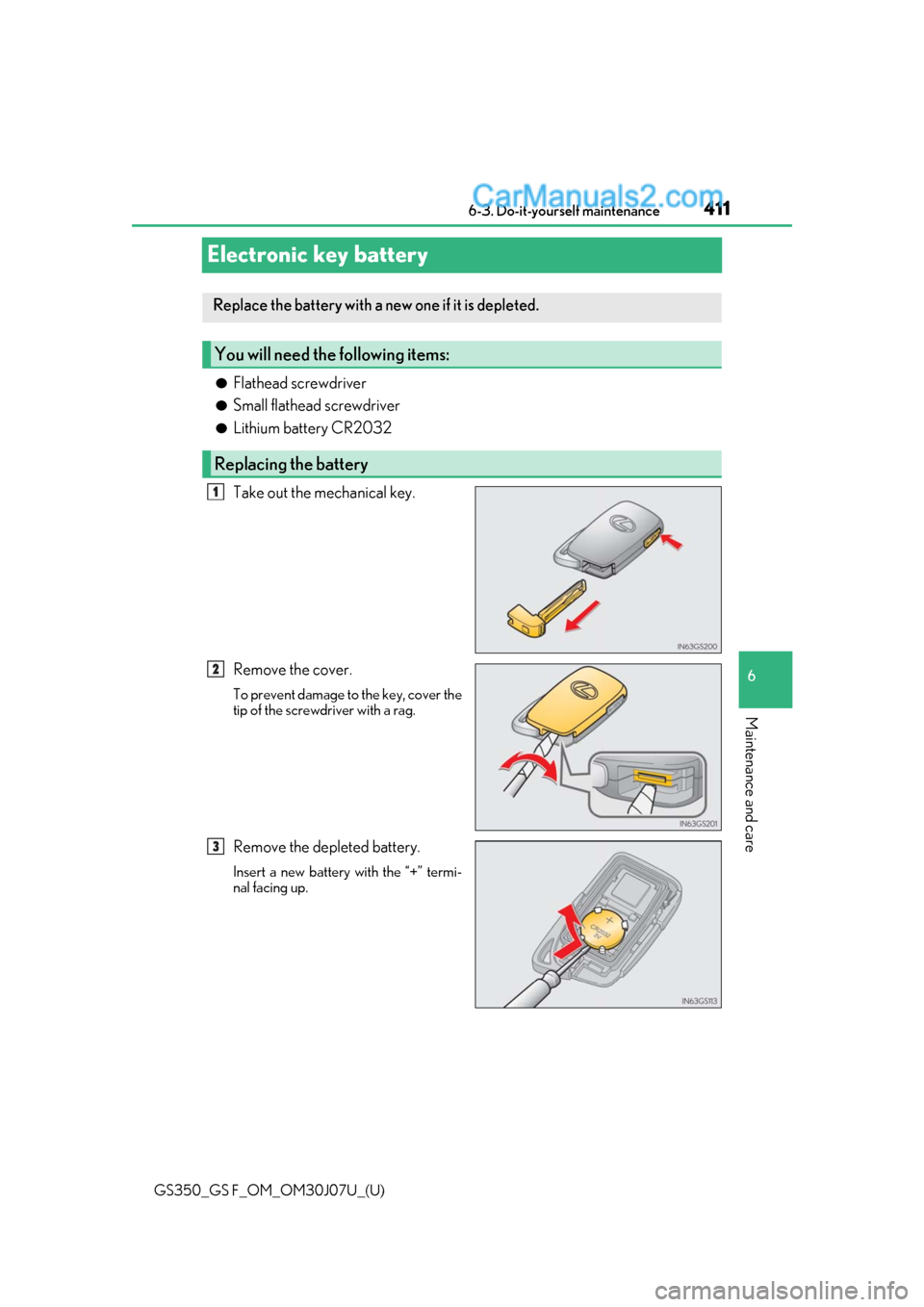
Electronic key battery
●Flathead screwdriver
●Small flathead screwdriver
●Lithium battery CR2032
Take out the mechanical key.
Remove the cover.
To prevent damage to the key, cover the
tip of the screwdriver with a rag.
Remove the depleted battery.
Insert a new battery with the “+” termi-
nal facing up.
Replace the battery with a new one if it is depleted.
You will need the following items:
Replacing the battery
1
2
3