ECO Lexus GS450h 2007 Instrument cluster / LEXUS 2007 GS450H THROUGH JUNE 2006 PROD. QUICK REFERENCE MANUAL
[x] Cancel search | Manufacturer: LEXUS, Model Year: 2007, Model line: GS450h, Model: Lexus GS450h 2007Pages: 58, PDF Size: 2.58 MB
Page 8 of 58
Topic 1
Entering and Exiting
8
Entering and Exiting
When Driving
Rain and
Night Driving
Driving Comfort
Opening and Closing
What to do if ...
Customizing
Yo u r L e x u s
Before DrivingBefore Driving
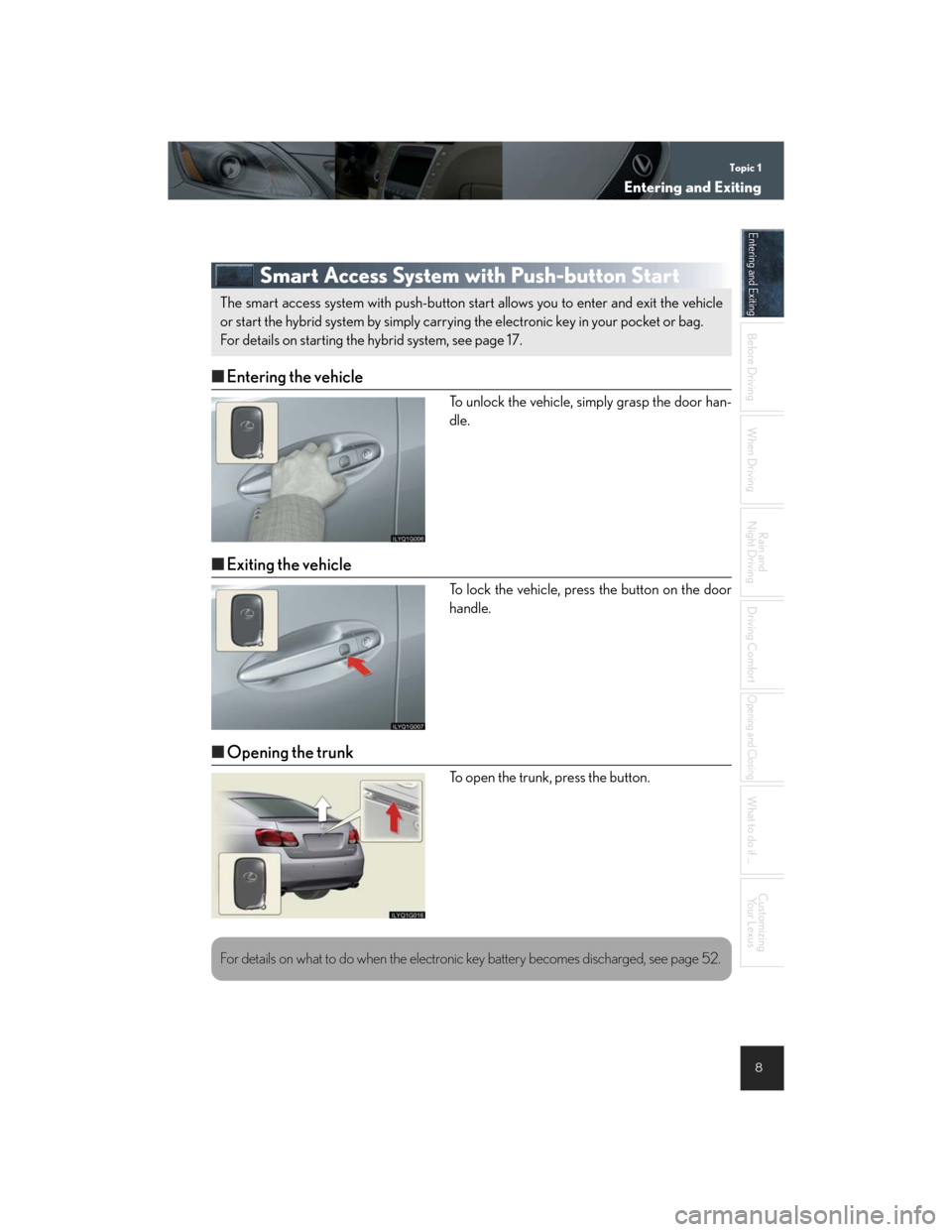
Smart Access System with Push-button Start
nEntering the vehicle
To unlock the vehicle, simply grasp the door han-
dle.
nExiting the vehicle
To lock the vehicle, press the button on the door
handle.
nOpening the trunk
To open the trunk, press the button.
The smart access system with push-button start allows you to enter and exit the vehicle
or start the hybrid system by simply carrying the electronic key in your pocket or bag.
For details on starting the hybrid system, see page 17.
For details on what to do when the electronic key battery becomes discharged, see page 52.
Page 9 of 58
Topic 1
Entering and Exiting
9
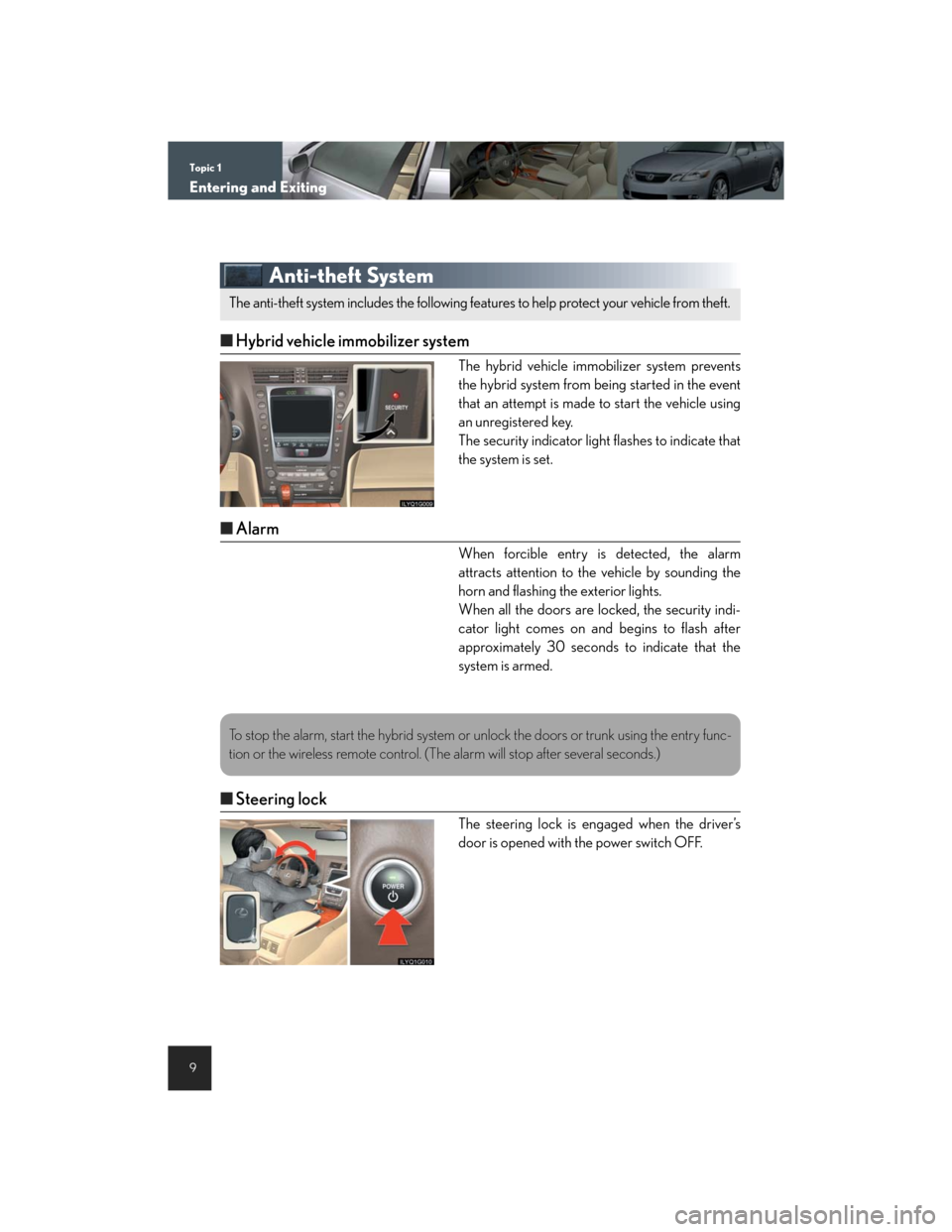
Anti-theft System
nHybrid vehicle immobilizer system
The hybrid vehicle immobilizer system prevents
the hybrid system from being started in the event
that an attempt is made to start the vehicle using
an unregistered key.
The security indicator light flashes to indicate that
the system is set.
nAlarm
When forcible entry is detected, the alarm
attracts attention to the vehicle by sounding the
horn and flashing the exterior lights.
When all the doors are locked, the security indi-
cator light comes on and begins to flash after
approximately 30 seconds to indicate that the
system is armed.
nSteering lock
The steering lock is engaged when the driver’s
door is opened with the power switch OFF.
The anti-theft system includes the following features to help protect your vehicle from theft.
To stop the alarm, start the hybrid system or unlock the doors or trunk using the entry func-
tion or the wireless remote control. (The alarm will stop after several seconds.)
Page 23 of 58

Topic 3
When Driving
23
Dynamic Radar Cruise Control (If Equipped)
nCruise control display
Cruise control settings are shown on the multi-
information display.
Vehicle ahead indicator
Vehicle-to-vehicle distance
Preset speed
nVehicle-to-vehicle distance control mode
Press the ON-OFF button.
Accelerate or decelerate to the desired
speed, and then push the lever down.
Following distance can be adjusted using the
vehicle-to-vehicle distance control switch.
nConventional (constant speed) cruise control mode
Press the ON-OFF button.
Push the lever forward and hold for at least
one second.
Accelerate or decelerate to the desired
speed, and then push the lever down.
nAdjusting the speed setting
To increase speed: push the lever up.
To decrease speed: push the lever down.
Release the lever when the desired speed is
reached
nCanceling
To temporarily cancel the dynamic radar cruise
control, pull the lever.
To turn the system off, press the ON-OFF button.
Dynamic radar cruise control supplements conventional cruise control with a vehicle-to-
vehicle distance control mode.
1
2
3
The vehicle-to-vehicle distance control mode maintains the preset cruising speed as long
as no vehicle is detected ahead.
Page 41 of 58

Topic 5
Driving Comfort
41
Interior Lights
ON
OFF
The light comes on if a door is opened.
Rear Sunshade
To raise the rear sunshade, press the switch.
Press the switch again to lower it.
The sunshade automatically lowers to ensure visi-
bility when reversing.
Compass
To display the compass, press and hold the AUTO
button for 3 or more seconds.
To cancel the display, press and hold the AUTO
button again for 3 or more seconds.
1
2
3
Page 52 of 58

52
Entering and Exiting
Before Driving
When Driving
Rain and
Night Driving
Driving Comfort
Opening and Closing
What to do if ...
Customizing
Yo u r L e x u s
If the electronic key battery becomes
discharged
nUnlocking and locking the doors
To unlock or lock the vehicle, use the mechanical
key. The mechanical key is stored inside the elec-
tronic key.
Unlocks
Locks
nStarting the hybrid system
Depress the brake pedal.
Hold the electronic key close to the power
switch (within 0.4 in. [10 mm]), making sure that
the button side of the key is facing toward you.
Press the power switch within 5 seconds after
the buzzer sounds, keeping the brake pedal
depressed.
1
2
For instructions on replacing the electronic key battery, refer to the Owner's Manual. If you
need further assistance, contact your Lexus dealer.
Page 54 of 58

54
Entering and Exiting
Before Driving
When Driving
Rain and
Night Driving
Driving Comfort
Opening and Closing
What to do if ...
Customizing
Yo u r L e x u s
Electronic Key Alarm
The electronic key alarm uses an alarm and warning messages to indicate that the electronic
key has been used improperly. Take appropriate measure in response to any warning mes-
sages that are displayed. In some cases, an alarm may sound without an accompanying
warning message. If so, follow the correction procedure in the table below.
AlarmSituationCorrection procedure
Exterior alarm sounds
once for 2 seconds
Tried to lock the doors
using the entry function
while the electronic key is
still inside the passenger
compartmentRetrieve the electronic key
from the passenger com-
partment and lock the
doors again.
Tried to exit the vehicle
with the electronic key and
lock the doors without first
turning the power switch
OFF
Tu r n t h e p o w e r s w i t c h O F F
and lock the doors again.
Closed the trunk while the
electronic key is still inside
and all doors are lockedRetrieve the electronic key
from the trunk and close
the trunk lid.
Exterior alarm sounds
once for 10 secondsTried to lock the vehicle
using the entry function
while a door is openClose all of the doors and
lock the doors again.
Interior alarm sounds
continuouslyTried to open the door and
exit the vehicle without
shifting the shift lever to P
Shift the shift lever to P.
Interior alarm rings
continuously
Switched to ACC mode
while the driver's door is
open (Opened the driver's
door when the power
switch is in ACC mode.)
Tu r n t h e p o w e r s w i t c h O F F
and close the driver's door.
Turned the power switch
OFF while the driver's
door is still open
Close the driver's door.
Page 55 of 58

Customizing Your Lexus
55
Your vehicle includes a variety of electronic features that can be personalized to your
preferences. Programming these preferences requires specialized equipment and may
be performed by an authorized Lexus dealership.
Some function settings are changed simultaneously with other functions being customized.
Contact your Lexus dealer for further details.
ItemFunctionDefault
settingCustomized
setting
Smart access
system with
push-button start
Smart access system with
push-button startONOFF
Operation signal
(Emergency flashers)ONOFF
Operation signal
(Buzzer)ONOFF
Wireless remote
control
Wireless remote controlONOFF
Unlocking operation
Driver's door
locked in one
step, all doors
locked in two
steps
All doors
locked in one
step.
Ti m e e l a p s e d b e f o r e a u t o -
matic door lock function is
activated if door is not opened
after being unlocked
30 seconds60 seconds
Operation indicator
(Emergency flashers)ONOFF
Operation indicator
(Buzzer)ONOFF
Tr u n k u n l o c k i n g f u n c t i o nONOFF
Trunk unlocking operationPush and hold Push twice
One short push
Panic functionONOFF
Page 56 of 58

56
Entering and Exiting
Before Driving
When Driving
Rain and
Night Driving
Driving Comfort
Opening and Closing
What to do if ...
Customizing
Yo u r L e x u s
*: Vehicles sold outside Canada
ItemFunctionDefault
settingCustomized
setting
Door lock
Unlocking using a key
Driver's door
locked in one
step, all doors
locked in two
steps
All doors
locked in one
step.
Speed-detecting automatic
door lock functionOFFON
Opening driver's door unlocks
all doors OFFON
Shift the shift lever to P unlocks
all doors.ONOFF
Shift the shift lever to position
other than P locks all doors.ONOFF
Po w e r w i n d o w s
Linked door lock operationONOFF
Linked door key operationOpen and
closeOpen only
Close only
Wireless remote control linked
operationONOFF
Moon roof
Linked door lock operationONOFF
Linked door key operationOpen and
closeOpen only
Close only
Linked operation of components
when door key is usedSlide onlyTilt only
Wireless remote control linked
operationONOFF
Linked operation of components
when wireless remote control
used
Slide onlyTilt only
Automatic light
control system
Light sensor sensitivityLevel 3Levels 1 to 5
Time elapsed before headlights
automatically turn off after
doors are closed
30 seconds
0 seconds
60 seconds
90 seconds
Day time running lightONOFF*
Page 57 of 58
57
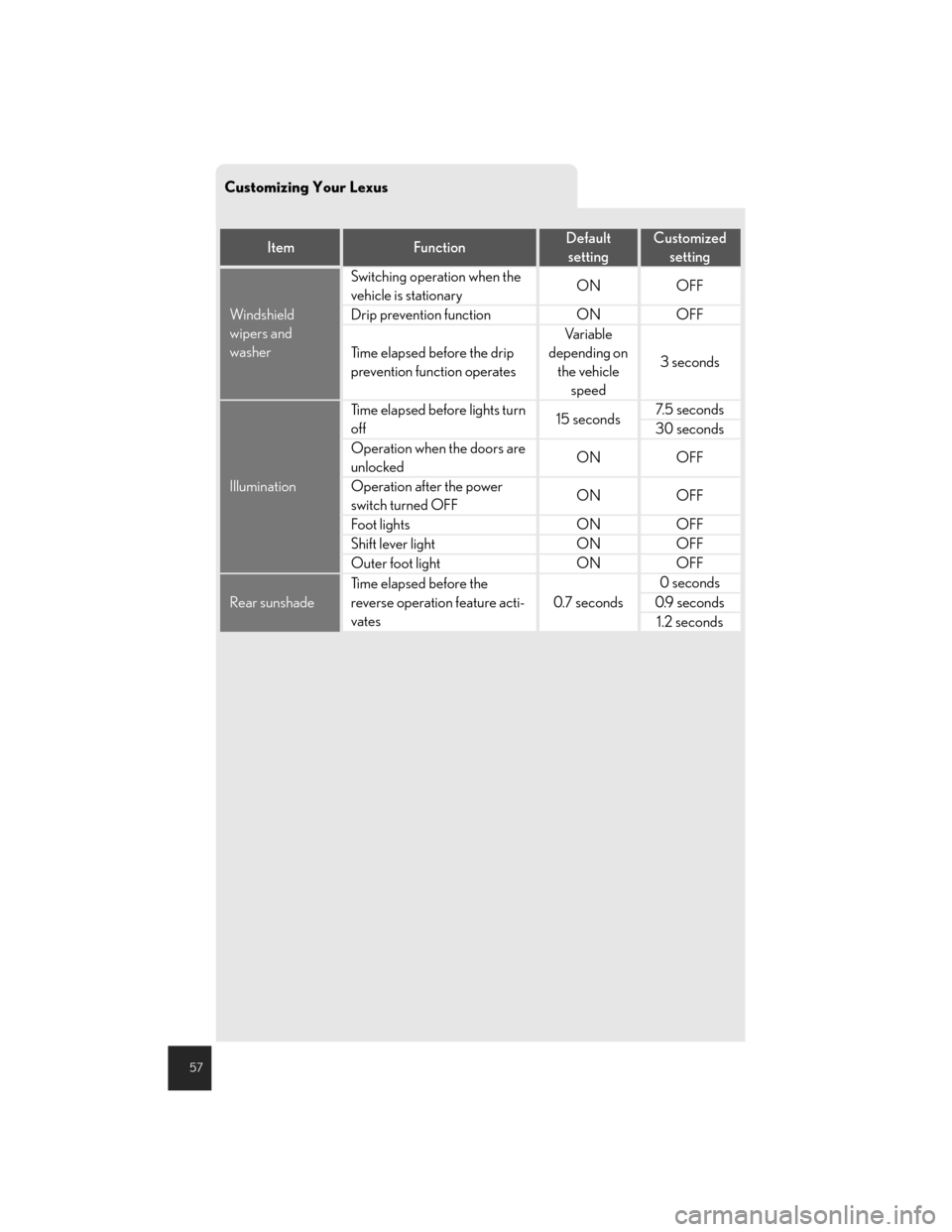
Customizing Your Lexus
ItemFunctionDefault
settingCustomized
setting
Windshield
wipers and
washer
Switching operation when the
vehicle is stationaryONOFF
Drip prevention functionONOFF
Time elapsed before the drip
prevention function operates
Va r i a b l e
depending on
the vehicle
speed
3 seconds
Illumination
Time elapsed before lights turn
off15 seconds7. 5 s e c o n d s
30 seconds
Operation when the doors are
unlockedONOFF
Operation after the power
switch turned OFFONOFF
Foot lightsONOFF
Shift lever lightONOFF
Outer foot lightONOFF
Rear sunshade
Time elapsed before the
reverse operation feature acti-
vates
0.7 seconds
0 seconds
0.9 seconds
1.2 seconds