ECO Lexus GS450h 2007 Scheduled Maintenance Guide / LEXUS 2007 GS450H FROM JULY 2006 PROD. OWNER'S MANUAL (OM30A05U)
[x] Cancel search | Manufacturer: LEXUS, Model Year: 2007, Model line: GS450h, Model: Lexus GS450h 2007Pages: 548, PDF Size: 16.31 MB
Page 5 of 548
1
2
3
4
5
6
7
v
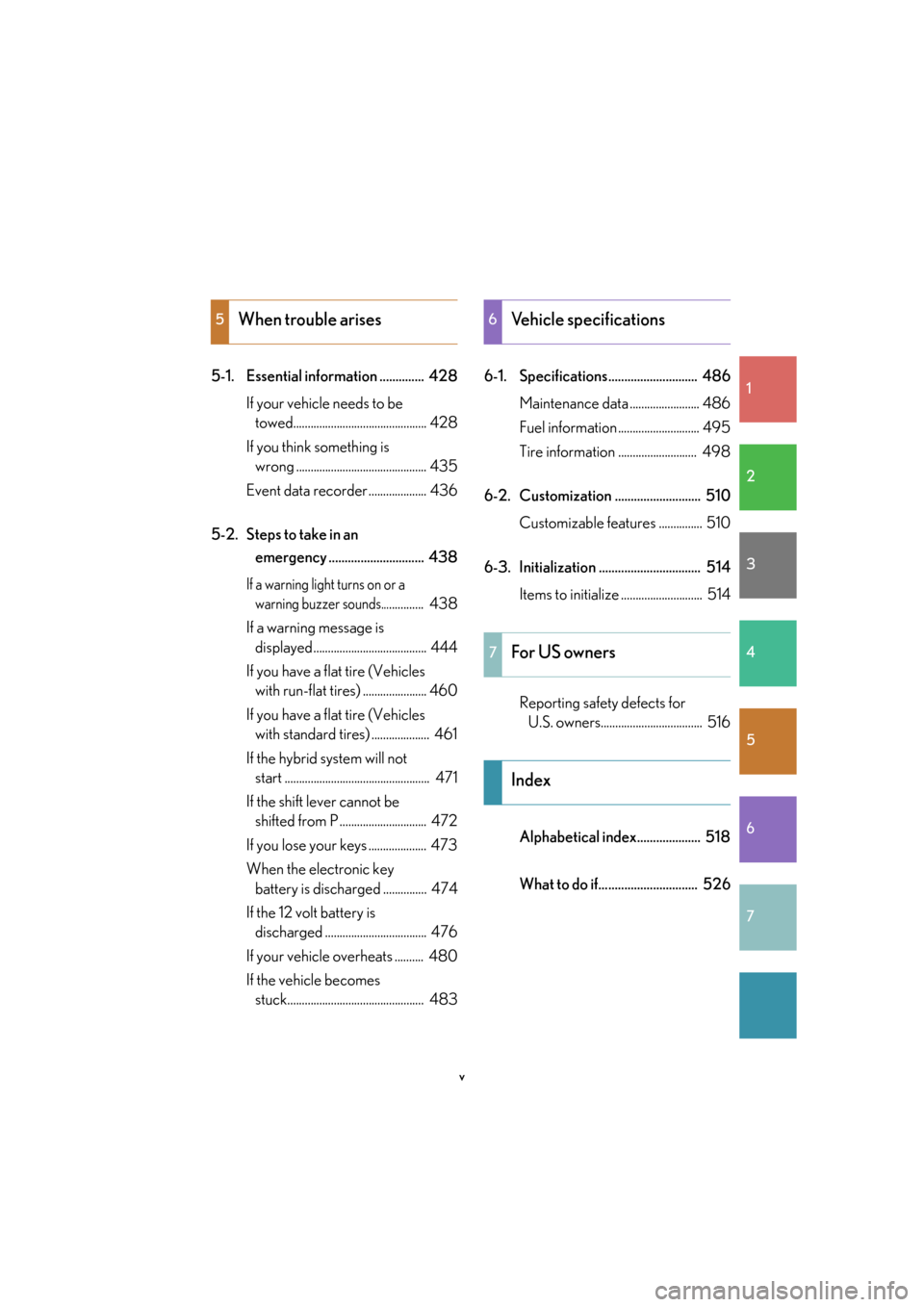
5-1. Essential information .............. 428If your vehicle needs to be
towed.............................................. 428
If you think something is
wrong ............................................. 435
Event data recorder .................... 436
5-2. Steps to take in an
emergency .............................. 438
If a warning light turns on or a
warning buzzer sounds............... 438
If a warning message is
displayed....................................... 444
If you have a flat tire (Vehicles
with run-flat tires) ...................... 460
If you have a flat tire (Vehicles
with standard tires) .................... 461
If the hybrid system will not
start .................................................. 471
If the shift lever cannot be
shifted from P .............................. 472
If you lose your keys .................... 473
When the electronic key
battery is discharged ............... 474
If the 12 volt battery is
discharged ................................... 476
If your vehicle overheats .......... 480
If the vehicle becomes
stuck............................................... 483 6-1. Specifications............................ 486
Maintenance data ........................ 486
Fuel information ............................ 495
Tire information ........................... 498
6-2. Customization ........................... 510 Customizable features ............... 510
6-3. Initialization ................................ 514 Items to initialize ............................ 514
Reporting safety defects for
U.S. owners................................... 516
Alphabetical index.................... 518
What to do if............................... 526
5When trouble arises6Vehicle specifications
7For US owners
Index
Page 24 of 548
4
1-1. Hybrid system
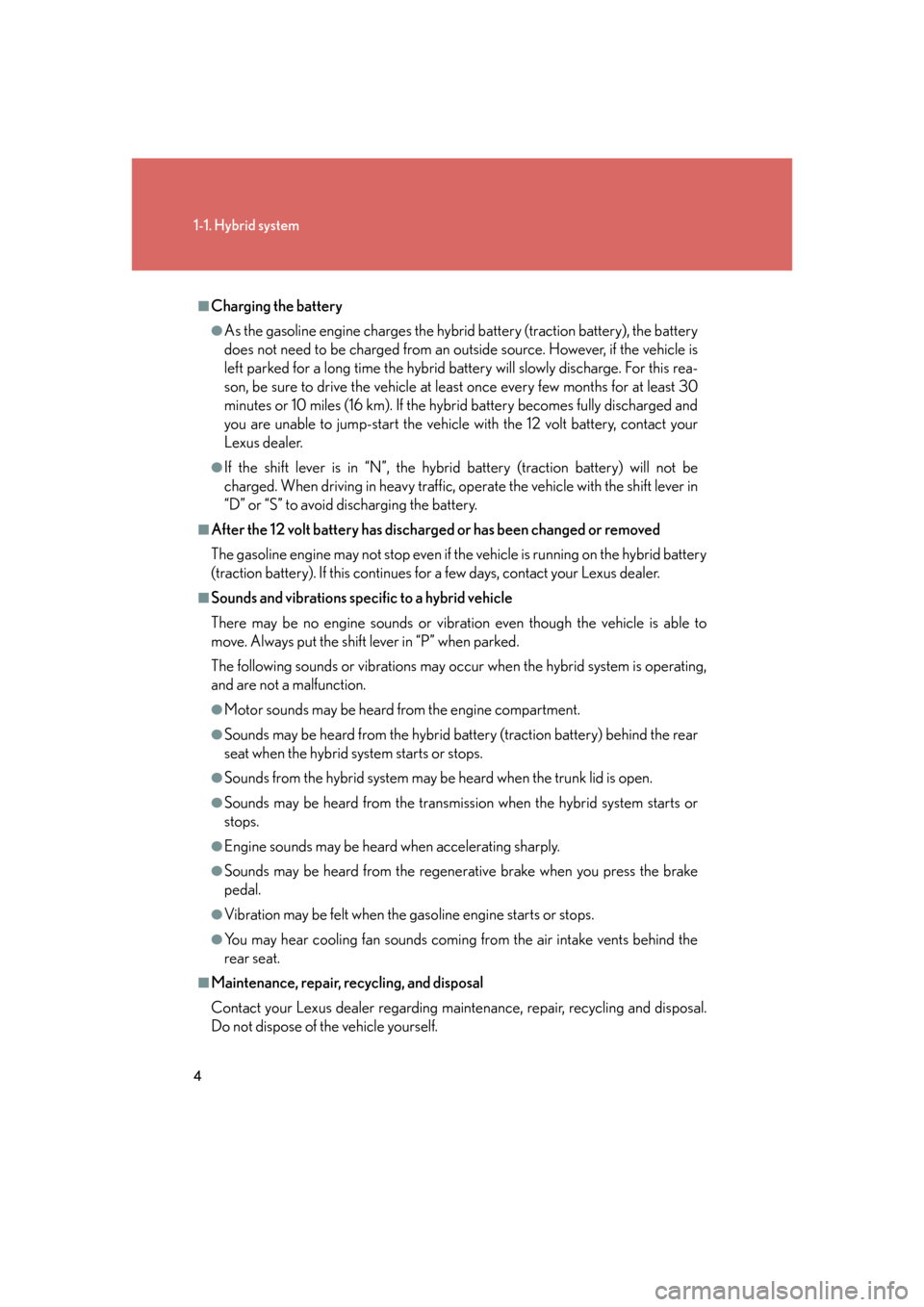
■Charging the battery
●As the gasoline engine charges the hybrid battery (traction battery), the battery
does not need to be charged from an outside source. However, if the vehicle is
left parked for a long time the hybrid battery will slowly discharge. For this rea-
son, be sure to drive the vehicle at least once every few months for at least 30
minutes or 10 miles (16 km). If the hybrid battery becomes fully discharged and
you are unable to jump-start the vehicle with the 12 volt battery, contact your
Lexus dealer.
●If the shift lever is in “N”, the hybrid battery (traction battery) will not be
charged. When driving in heavy traffic, operate the vehicle with the shift lever in
“D” or “S” to avoid discharging the battery.
■After the 12 volt battery has discharged or has been changed or removed
The gasoline engine may not st op even if the vehicle is running on the hybrid battery
(traction battery). If this continues for a few days, contact your Lexus dealer.
■Sounds and vibrations specific to a hybrid vehicle
There may be no engine sounds or vibrat ion even though the vehicle is able to
move. Always put the shift lever in “P” when parked.
The following sounds or vibrations may occu r when the hybrid system is operating,
and are not a malfunction.
●Motor sounds may be heard fr om the engine compartment.
●Sounds may be heard from the hybrid ba ttery (traction battery) behind the rear
seat when the hybrid system starts or stops.
●Sounds from the hybrid system may be heard when the trunk lid is open.
●Sounds may be heard from the transmissi on when the hybrid system starts or
stops.
●Engine sounds may be heard when accelerating sharply.
●Sounds may be heard from the regenerative brake when you press the brake
pedal.
●Vibration may be felt when the gasoline engine starts or stops.
●You may hear cooling fan sounds coming from the air intake vents behind the
rear seat.
■Maintenance, repair, recycling, and disposal
Contact your Lexus dealer regarding main tenance, repair, recycling and disposal.
Do not dispose of the vehicle yourself.
Page 25 of 548

5
1-1. Hybrid system
1
Before driving
High voltage componentsTake care when handling the hybrid sy stem, as it contains a high voltage
system (about 650V at maximum) as well as parts that become
extremely hot when the hybrid system is operating. Obey the caution
labels attached to the vehicle. Inverter unit
Air conditioning compressor
Hybrid battery (Traction bat-
tery)
DC/DC converter
Service plug
Electric motor (Traction motor)
High voltage cables (orange
color)
Caution label
Page 26 of 548
6
1-1. Hybrid system
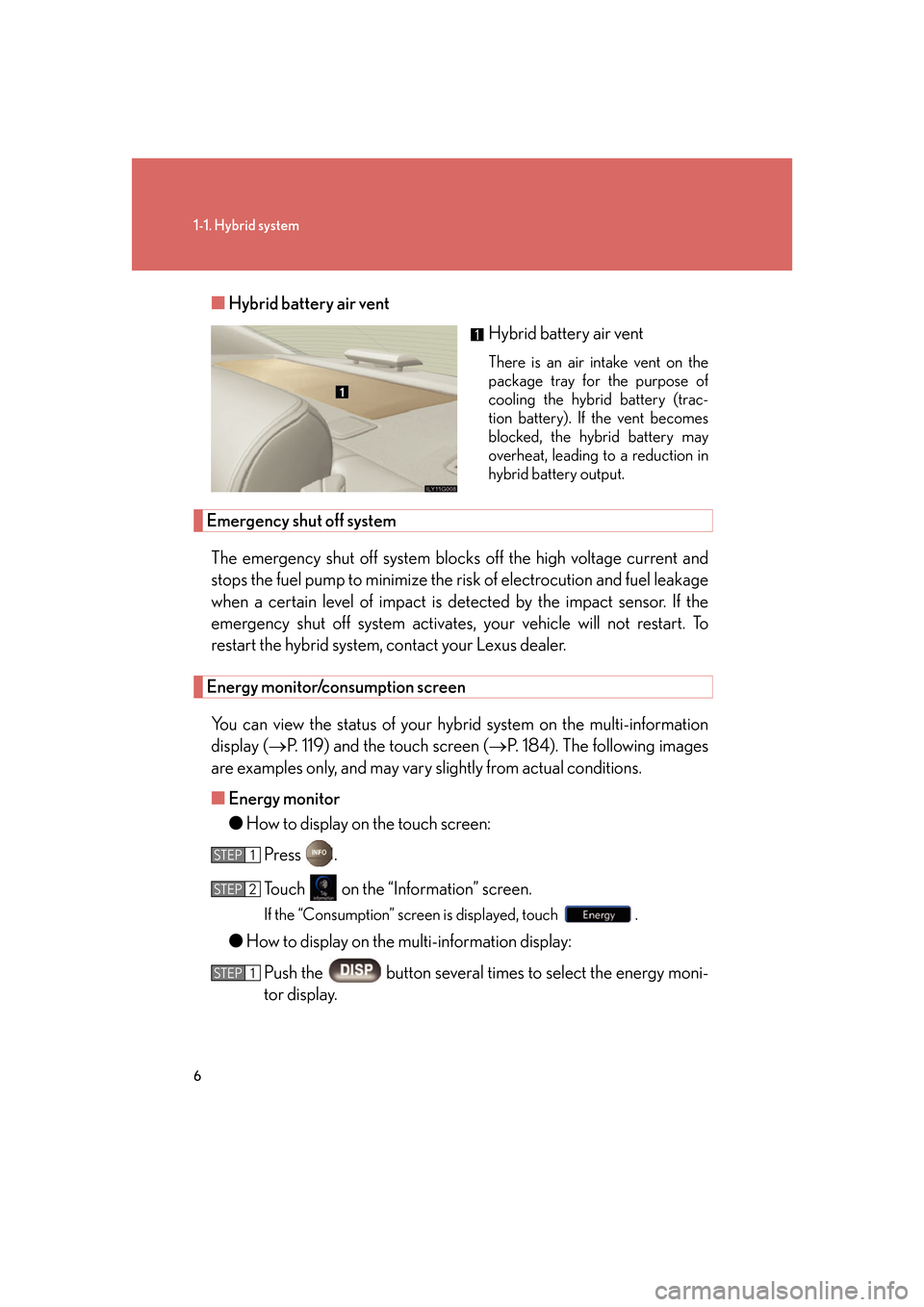
■Hybrid battery air vent
Hybrid battery air vent
There is an air intake vent on the
package tray for the purpose of
cooling the hybrid battery (trac-
tion battery). If the vent becomes
blocked, the hybrid battery may
overheat, leading to a reduction in
hybrid battery output.
Emergency shut off system
The emergency shut off system blocks off the high voltage current and
stops the fuel pump to minimize the risk of el ectrocution and fuel leakage
when a certain level of impact is detected by the impact sensor. If the
emergency shut off system activates, yo ur vehicle will not restart. To
restart the hybrid system, contact your Lexus dealer.
Energy monitor/consumption screen
You can view the status of your h ybrid system on the multi-information
display ( P. 119) and the touch screen ( P. 184). The following images
are examples only, and may vary slightly from actual conditions.
■ Energy monitor
●How to display on the touch screen:
Press .
Touch on the “Information” screen.
If the “Consumption” screen is displayed, touch .
●How to display on the multi-information display:
Push the button several times to select the energy moni-
tor display.
STEP1
STEP2
STEP1
Page 29 of 548

9
1-1. Hybrid system
1
Before driving
■If a warning light comes on or a warning message is displayed, or the 12 volt bat-
tery is disconnected
The hybrid system may not start. In that case, try to start the sy stem again. If the
“READY” light does not come on, contact your Lexus dealer.
CAUTION
■High voltage precautions
The vehicle has high voltage DC and AC systems as well as a 12 volt system. DC
and AC high voltage is very dangerous and can cause severe burns and electric
shock that may result in death or serious injury.
●Never touch, disassemble, remove or replace the high voltage parts, cables and
their connectors.
●The hybrid system will become hot after starting as the system uses high voltage.
Be careful of both the high voltage and the high temperature, and always obey
the caution labels attached to the vehicle.
●Never try to open the service plug acce ss hole located in the luggage compart-
ment. The service plug is used only when the vehicle is serviced and is subject to
high voltage.
■Nickel-metal hydride battery
Your vehicle contains a sealed nickel-metal hydride battery. If disposed of improp-
erly, it is hazardous to the environment and there is a risk of severe burns and elec-
trical shock that may result in death or serious injury.
■Emergency shut off system
●Carefully check to see if there are exposed high voltage parts or cables. Never
touch the parts or cables. (
P. 5 )
●Carefully inspect the ground under the vehicle. If you find that liquid has leaked
onto the ground, the fuel system may have been damaged. Leave the vehicle as
soon as possible.
Page 34 of 548

14
1-3. Opening, closing and locking the doors and trunk
Locking and unlocking the doorsPress the lock button to lock the
door.
Grip the handle to unlock the
door.
Make sure to touch the sensor on
the back of the handle.
The door cannot be unlocked for 3
seconds after the door is locked.
Unlocking the trunk
Press the button to unlock the
trunk.
Page 36 of 548

16
1-3. Opening, closing and locking the doors and trunk
■Switching the door unlock function
It is possible to set which doors the entry function unlocks. Turn the power switch “OFF”.
When the indicator on the key surface is turned off, push and
hold , , or for approximately 5 seconds while pushing the
button on the key.
The setting changes each time an operation is performed, as shown below. (Wait for
at least 5 seconds after each oper ation to continue an operation.)
Unlock the doors using the wireless remote control and open one of the
doors.
If a door is not opened within 60 seconds after is pressed, the doors
will be locked again and the alarm will automatically be set.
In case that the alarm is triggered, immediately stop the alarm. ( P. 6 1 )
STEP1
STEP2
Multi-information
displayUnlocking doorsBeep
Hold the driver’s door handle
to unlock only the driver’s
door
Exterior: Beeps 3 times
Interior: Rings once
Hold a passenger’s door han-
dle to unlock all the doors
Hold the door handle to
unlock the front and rear
doors on your sideExterior: Beeps 4 times
Interior: Rings once
Hold the door handle to
unlock the doorExterior: Beeps once
Interior: Rings once
Hold a door handle to unlock
all doorsExterior: Beeps twice
Interior: Rings once
STEP3
Page 37 of 548

17
1-3. Opening, closing and locking the doors and trunk
1
Before driving
■Battery-saving function
In the following circumstances, the entry function is disabled in order to prevent the
vehicle and electronic key batteries from discharging.
●When the entry function has not been used for 2 weeks or more
●When the electronic key has been left within approximately 3 ft. (1 m) of the
vehicle for 10 minutes or more
The system will resume operation when...
●The vehicle is locked using the door handle lock switch
●The vehicle is locked/unlocked using the wireless remote control function
( P. 22) or the mechanical key ( P. 4 74 )
■Electronic key battery depletion
●The standard battery life is 1 to 2 years. (The battery becomes depleted even if
the electronic key is not used.) If the smart access system with push-button start
or the wireless remote control function does not operate, or the detection area
becomes smaller, the battery may be depleted. Replace the battery when nec-
essary. ( P. 4 0 1 )
●To avoid serious deterioration, do not leave the electronic key within 3 ft. (1 m) of
the following electrical appliances.
•TVs
• Personal computers
• Recharging cellular phones or cordless phones
• Table lamps
■To operate the system properly
Make sure to carry the electronic key wh en operating the system. Do not get the
electronic key too close to the vehicle wh en operating the system from the outside
of the vehicle.
Depending on the position and holding condition of the electronic key, the key may
not be detected corr ectly and the system may not operate properly. (The alarm may
go off accidentally, or the door lock prevention may not function.)
Page 38 of 548

18
1-3. Opening, closing and locking the doors and trunk
■Note for the smart access system with push-button start
●The doors may unlock if a large amount of water splashes on the door handle,
such as in the rain or in a car wash. (The doors will automatically be locked after
approximately 60 seconds if the doors are not opened and closed.)
●Gripping the door handle when wearing a glove may not unlock the door.
●If the wireless remote control is used to lock the doors when the electronic key
is near the vehicle, there is a possibility that the door may not be unlocked by the
entry function. (Use the wireless re mote control to unlock the doors.)
■When the vehicle is not driven for extended periods
To prevent theft of the vehicle, do not leave the electronic key within 6 ft. (2 m) of
the vehicle.
■Security feature
If a door is not opened within approx imately 60 seconds after the vehicle is
unlocked, the theft deterrent system au tomatically locks the vehicle again.
Page 39 of 548
19
1-3. Opening, closing and locking the doors and trunk
1
Before driving
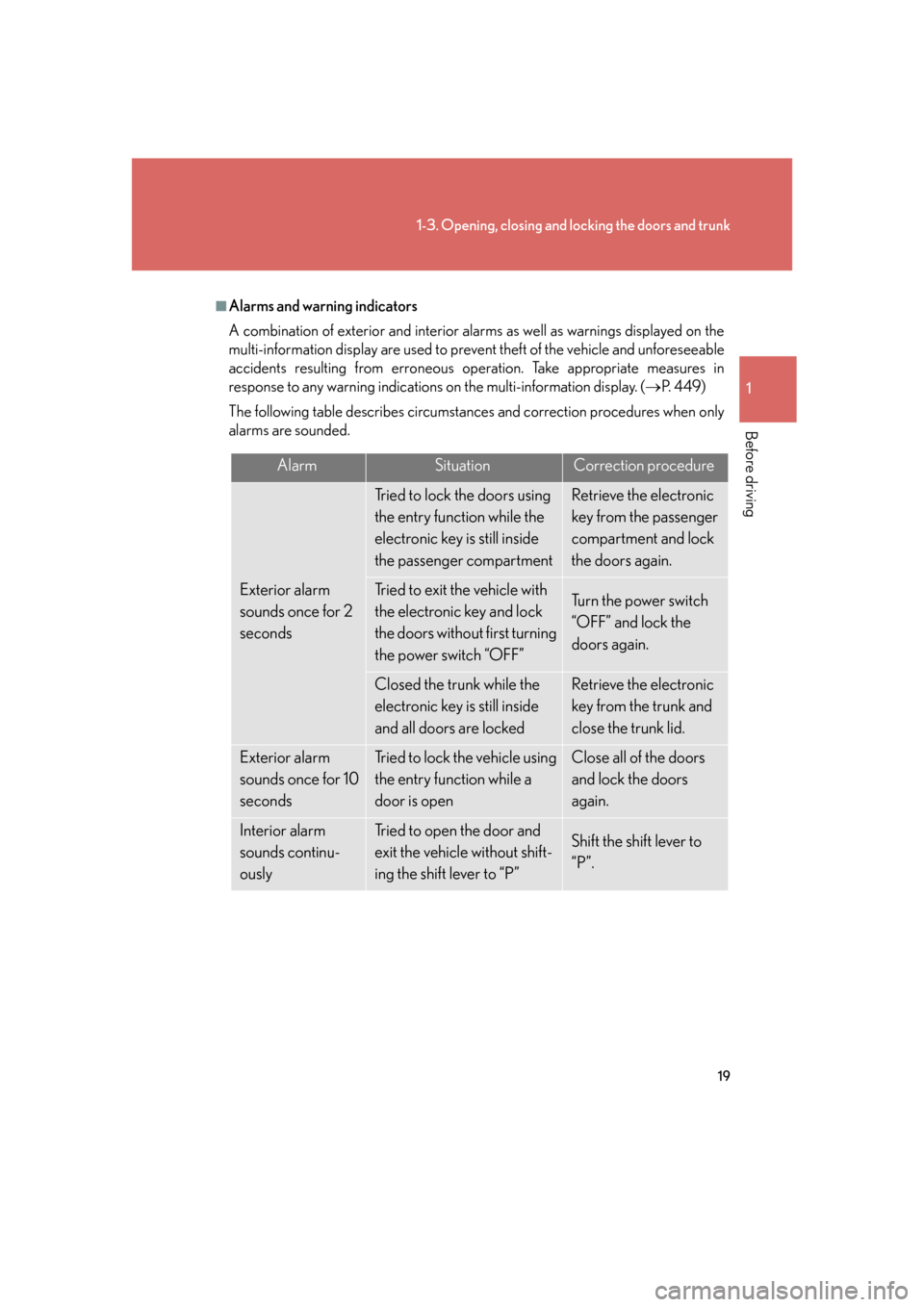
■Alarms and warning indicators
A combination of exterior and interior alarms as well as warnings displayed on the
multi-information display are used to prevent theft of the vehicle and unforeseeable
accidents resulting from erroneous operation. Take appropriate measures in
response to any warning indications on the multi-information display. (P. 4 4 9 )
The following table describes circumstances and correction procedures when only
alarms are sounded.
AlarmSituationCorrection procedure
Exterior alarm
sounds once for 2
seconds
Tried to lock the doors using
the entry function while the
electronic key is still inside
the passenger compartmentRetrieve the electronic
key from the passenger
compartment and lock
the doors again.
Tried to exit the vehicle with
the electronic key and lock
the doors without first turning
the power switch “OFF”Tu r n t h e p o w e r s w i t c h
“OFF” and lock the
doors again.
Closed the trunk while the
electronic key is still inside
and all doors are lockedRetrieve the electronic
key from the trunk and
close the trunk lid.
Exterior alarm
sounds once for 10
secondsTried to lock the vehicle using
the entry function while a
door is openClose all of the doors
and lock the doors
again.
Interior alarm
sounds continu-
ouslyTried to open the door and
exit the vehicle without shift-
ing the shift lever to “P”Shift the shift lever to
“P”.