change time Lexus GS450h 2008 User Guide
[x] Cancel search | Manufacturer: LEXUS, Model Year: 2008, Model line: GS450h, Model: Lexus GS450h 2008Pages: 599, PDF Size: 14.28 MB
Page 250 of 599
248
3-3. Using the audio system
GS_HV_U
June 19, 2008 1:15 pm
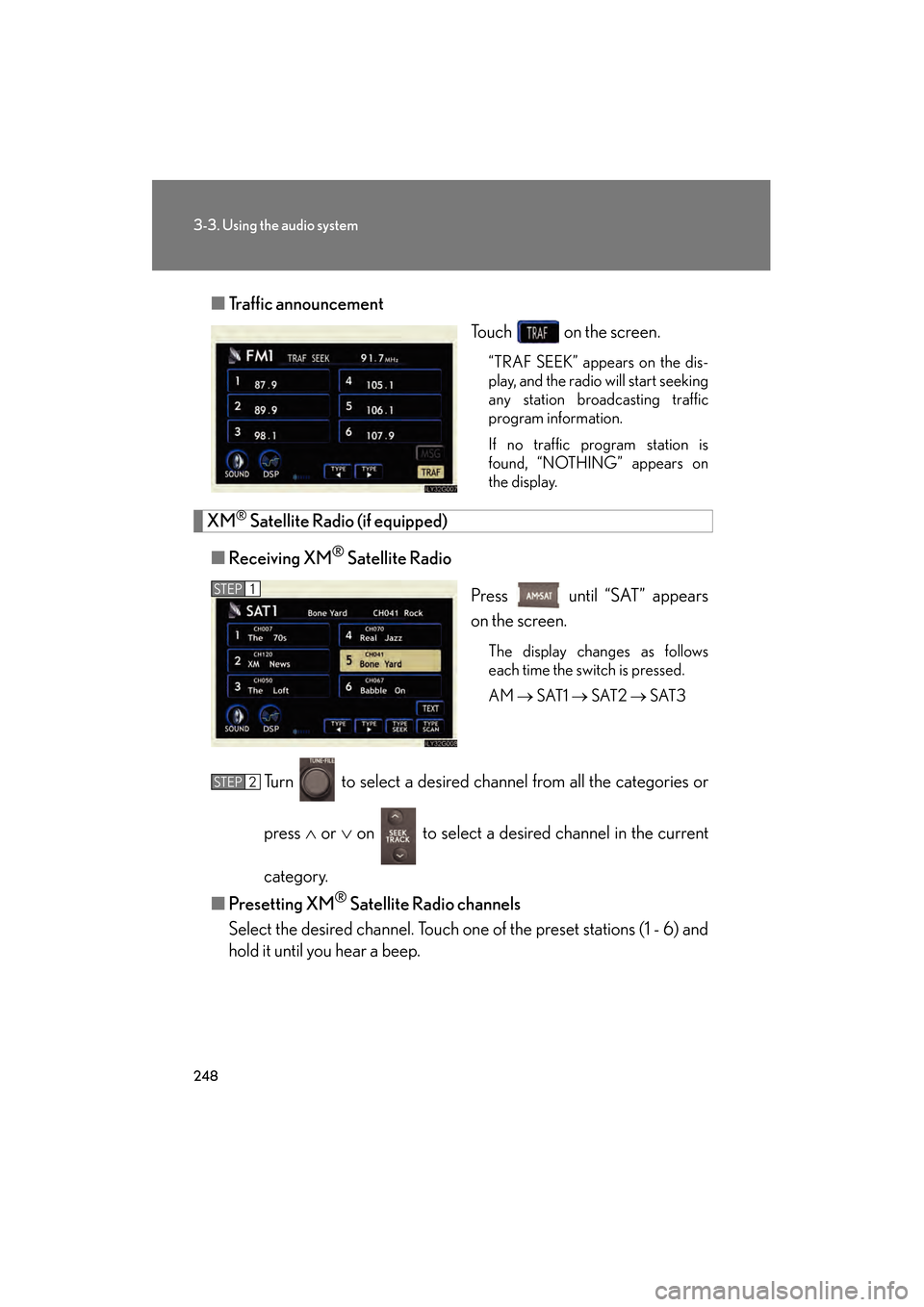
■Traffic announcement
Touch on the screen.
“TRAF SEEK” appears on the dis-
play, and the radio will start seeking
any station broadcasting traffic
program information.
If no traffic program station is
found, “NOTHING” appears on
the display.
XM® Satellite Radio (if equipped)
■ Receiving XM
® Satellite Radio
Press until “SAT” appears
on the screen.
The display changes as follows
each time the switch is pressed.
AM → SAT1 → SAT2 → SAT3
Turn to select a desired channel from all the categories or
press ∧ or ∨ on to select a desired channel in the current
category.
■ Presetting XM
® Satellite Radio channels
Select the desired channel. Touch one of the preset stations (1 - 6) and
hold it until you hear a beep.
STEP1
STEP2
GS450h_HV_U.book Page 248 Thursday, June 19, 2008 1:44 PM
Page 252 of 599
250
3-3. Using the audio system
GS_HV_U
June 19, 2008 1:15 pm
■When the 12 volt battery is disconnected
All preset stations are erased.
■Reception sensitivity
●Maintaining perfect radio reception at all times is difficult due to the continually
changing position of the antenna, differences in signal strength and surrounding
objects, such as trains, transmitters, etc.
●The radio antenna is mounted inside the rear window. To maintain clear radio
reception, do not attach metallic window tinting or other metallic objects to the
antenna wire mounted inside the rear window.
■Receiving XM® Satellite Radio
The optional Lexus genuine satellite radio tuner and antenna allows you to receive
and play XM
® Satellite Radio broadcasts. (Subscription is required. Not available
in Hawaii and Alaska.)
*
●XM® subscriptions
For detailed information about XM® Satellite Radio or to subscribe, visit XM®
on the web at www.xmradio.com or call (800) 967-2346.
●Radio ID
You will need the radio ID when activating XM
® service or reporting a prob-
lem. Select “CH000” using the dial, and the receiver’s 8-character ID
number will appear.
●Satellite tuner
The tuner supports only Audio Services (Music and Talk) and the accompany-
ing Text Information of XM
® Satellite Radio.
*: Terms and services provided by XM® Satellite Radio are subject to change with-
out notice.
GS450h_HV_U.book Page 250 Thursday, June 19, 2008 1:44 PM
Page 254 of 599
252
3-3. Using the audio system
GS_HV_U
June 19, 2008 1:15 pm
Contact the XM® Listener Care Center at (800) 967-2346 during the following
hours
*.
Monday - Saturday: 6 a.m. - 2 a.m. Eastern Time
Sunday: 8 a.m. - 8 p.m. Eastern Time
*: Subject to change without notice.
■Certifications for the radio tuner
This equipment has been tested and found to comply with the limits for a class B
digital device, pursuant to Part 15 of the FCC Rules. These limits are designed to
provide reasonable protection against harmful interference in a residential installa-
tion. This equipment generates, uses and can radiate radio frequency energy and, if
not installed and used in accordance with the instructions, may cause harmful inter-
ference to radio communications. However, there is no guarantee that interference
will not occur in a particular installation.
If this equipment does cause harmful interference to radio or television reception,
which can be determined by turning the equipment off and on, the user is encour-
aged to try to correct the interference by trying one or more of the following:
●Reorienting or relocating the receiving antenna.
●Increasing the separation between the equipment and receiver.
●Connecting the equipment into an outlet on a circuit different from that to which
the receiver is connected.
●Consulting the dealer or an experienced radio/TV technician for help.
-----
There is no song/program title or artist name/feature
associated with the channel at that time. No action
needed.
---
The channel you selected is no longer available. Wait
for about 2 seconds until the radio returns to the previ-
ous channel or “CH001”. If it does not change auto-
matically, select another channel.
GS450h_HV_U.book Page 252 Thursday, June 19, 2008 1:44 PM
Page 266 of 599
264
3-3. Using the audio system
GS_HV_U
June 19, 2008 1:15 pm
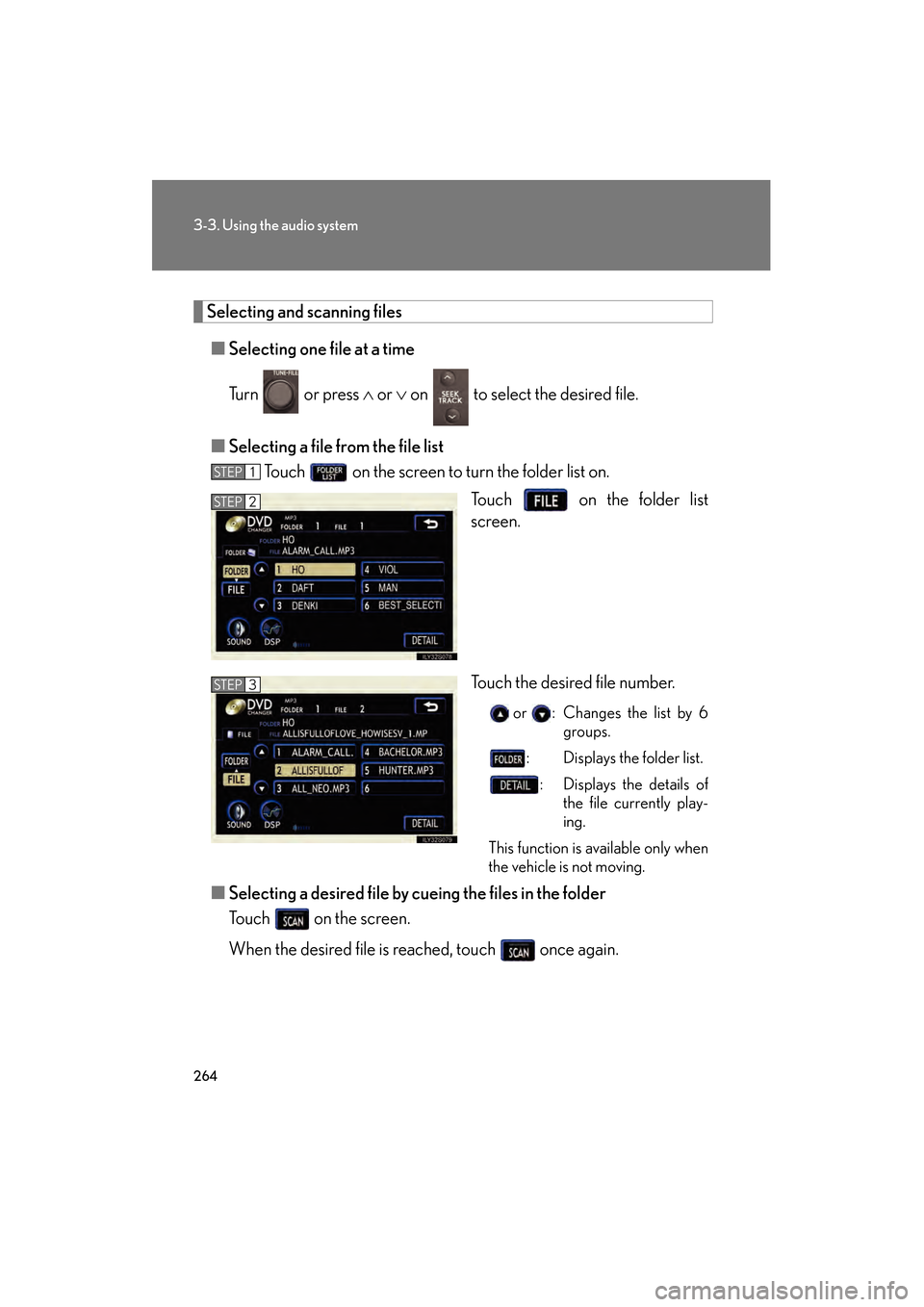
Selecting and scanning files■ Selecting one fi le at a time
Tu r n o r p r e s s ∧ or ∨ on to select the desired file.
■ Selecting a file fr om the file list
Touch on the screen to turn the folder list on.
Touch on the folder list
screen.
Touch the desired file number.
or : Changes the list by 6groups.
: Displays the folder list.
: Displays the details of the file currently play-
ing.
This function is available only when
the vehicle is not moving.
■ Selecting a desired file by cueing the files in the folder
Touch on the screen.
When the desired file is reached, touch once again.
STEP1
STEP2
STEP3
GS450h_HV_U.book Page 264 Thursday, June 19, 2008 1:44 PM
Page 278 of 599
276
3-3. Using the audio system
GS_HV_U
June 19, 2008 1:15 pm
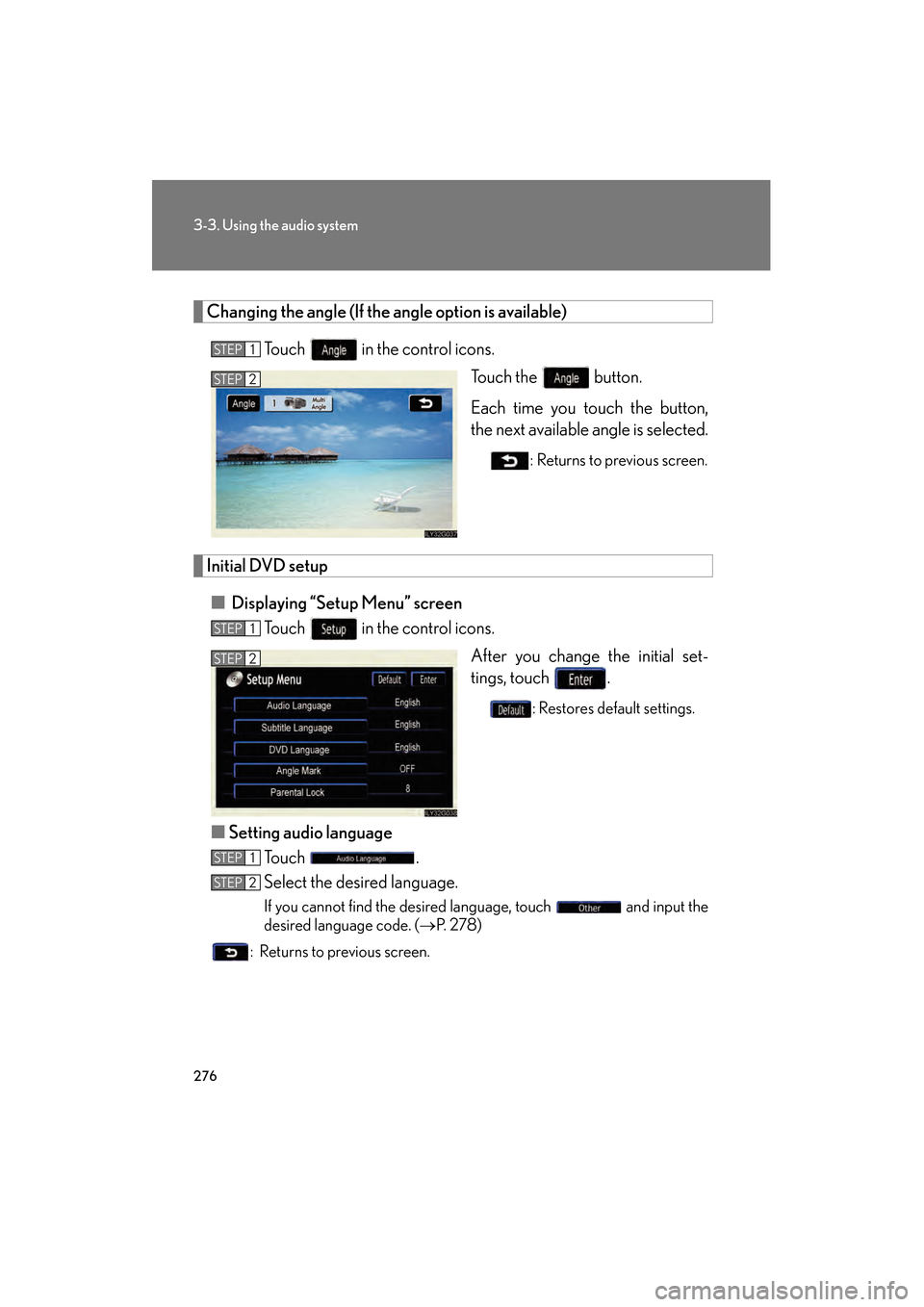
Changing the angle (If the angle option is available)
Touch in the control icons. Touch the button.
Each time you touch the button,
the next available angle is selected.
: Returns to previous screen.
Initial DVD setup
■ Displaying “Setup Menu” screen
Touch in the control icons.
After you change the initial set-
tings, touch .
: Restores default settings.
■Setting audio language
Touch .
Select the desired language.
If you cannot find the desired language, touch and input the
desired language code. ( →P. 2 7 8 )
: Returns to previous screen.
STEP1
STEP2
STEP1
STEP2
STEP1
STEP2
GS450h_HV_U.book Page 276 Thursday, June 19, 2008 1:44 PM
Page 302 of 599
300
3-3. Using the audio system
GS_HV_U
June 19, 2008 1:15 pm
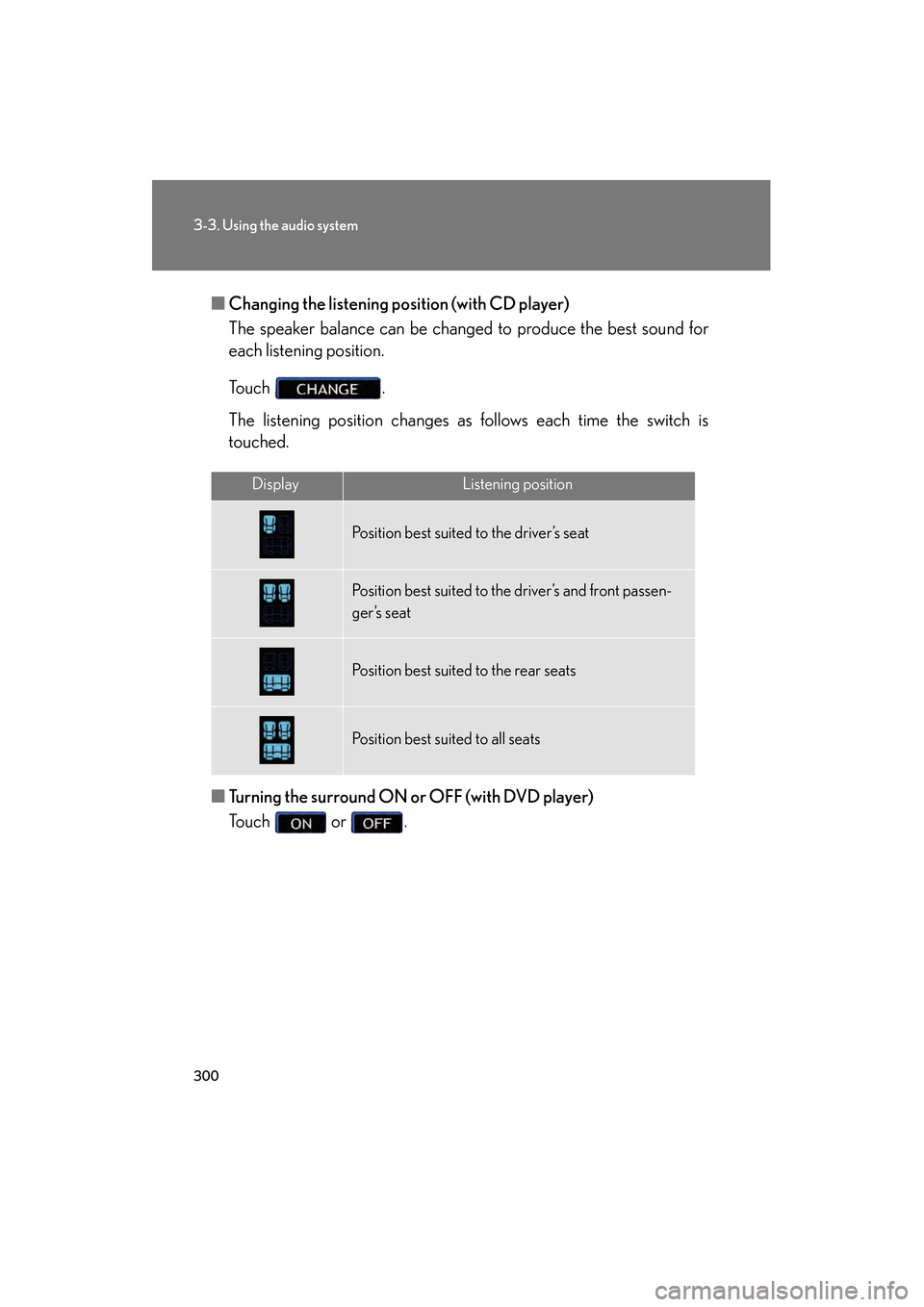
■Changing the listening po sition (with CD player)
The speaker balance can be changed to produce the best sound for
each listening position.
Touch .
The listening position changes as follows each time the switch is
touched.
■ Turning the surround ON or OFF (with DVD player)
Touch or .
DisplayListening position
Position best suited to the driver’s seat
Position best suited to the driver’s and front passen-
ger’s seat
Position best suited to the rear seats
Position best suited to all seats
GS450h_HV_U.book Page 300 Thursday, June 19, 2008 1:44 PM
Page 305 of 599
303
3-3. Using the audio system
3
Interior features
GS_HV_U
June 19, 2008 1:15 pm
Using the steering switches
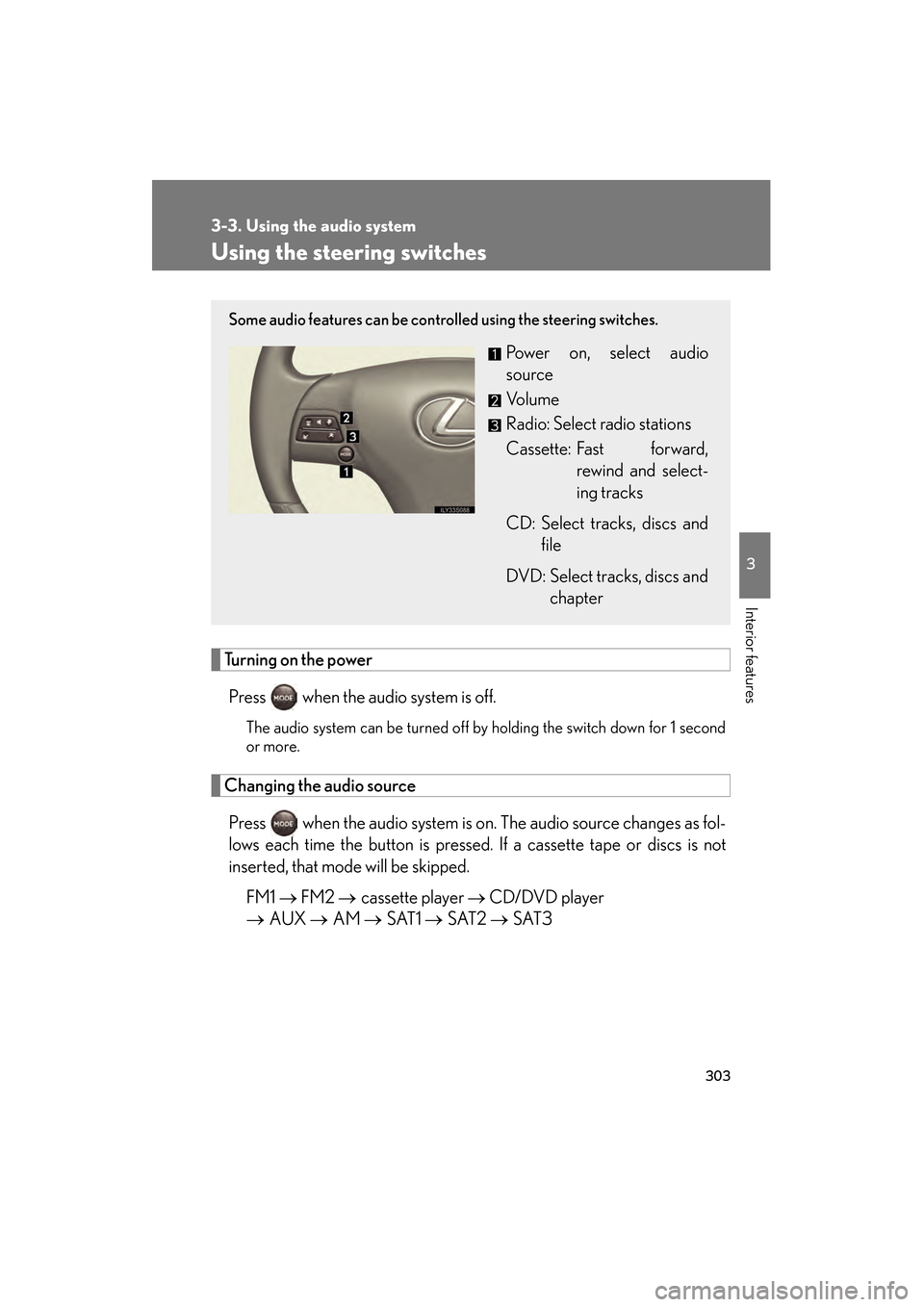
Turning on the powerPress when the audio system is off.
The audio system can be turned off by holding the switch down for 1 second
or more.
Changing the audio sourcePress when the audio system is on. The audio source changes as fol-
lows each time the button is pressed. If a cassette tape or discs is not
inserted, that mode will be skipped. FM1 → FM2 → cassette player → CD/DVD player
→ AUX → AM → SAT1 → SAT2 → SAT3
Some audio features can be controlled using the steering switches.
Power on, select audio
source
Vo l u m e
Radio: Select radio stations
Cassette: Fast forward,
rewind and select-
ing tracks
CD: Select tracks, discs and file
DVD: Select tracks, discs and chapter
GS450h_HV_U.book Page 303 Thursday, June 19, 2008 1:44 PM
Page 312 of 599
310
3-4. Using the hands-free system (for cellular phone)
GS_HV_U
June 19, 2008 1:15 pm
CAUTION
■FCC WARNING
Changes or modifications not expressly approved by the party responsible for
compliance could void the user’s authority to operate the equipment.
Radio Frequency Exposure. This device is approved for Mobile Application only
and, to comply with applicable FCC radio frequency exposure regulations, must be
used with a distance of at least 7.9 in. (20 cm) between the antenna and the body of
any person at all time during use.
■While driving
Do not use the mobile phone or connect the Bluetooth
® system.
NOTICE
■When leaving the vehicle
Do not leave your mobile phone in the vehicle. The inside of the vehicle may
become hot, causing damage to the phone.
GS450h_HV_U.book Page 310 Thursday, June 19, 2008 1:44 PM
Page 335 of 599
333
3-4. Using the hands-free system (for cellular phone)
3
Interior features
GS_HV_U
June 19, 2008 1:15 pm
Changing the screen settingsPress .
Touch on the “Information” screen.
Touch on the “Telephone” screen.
Touch on the “Settings” screen.
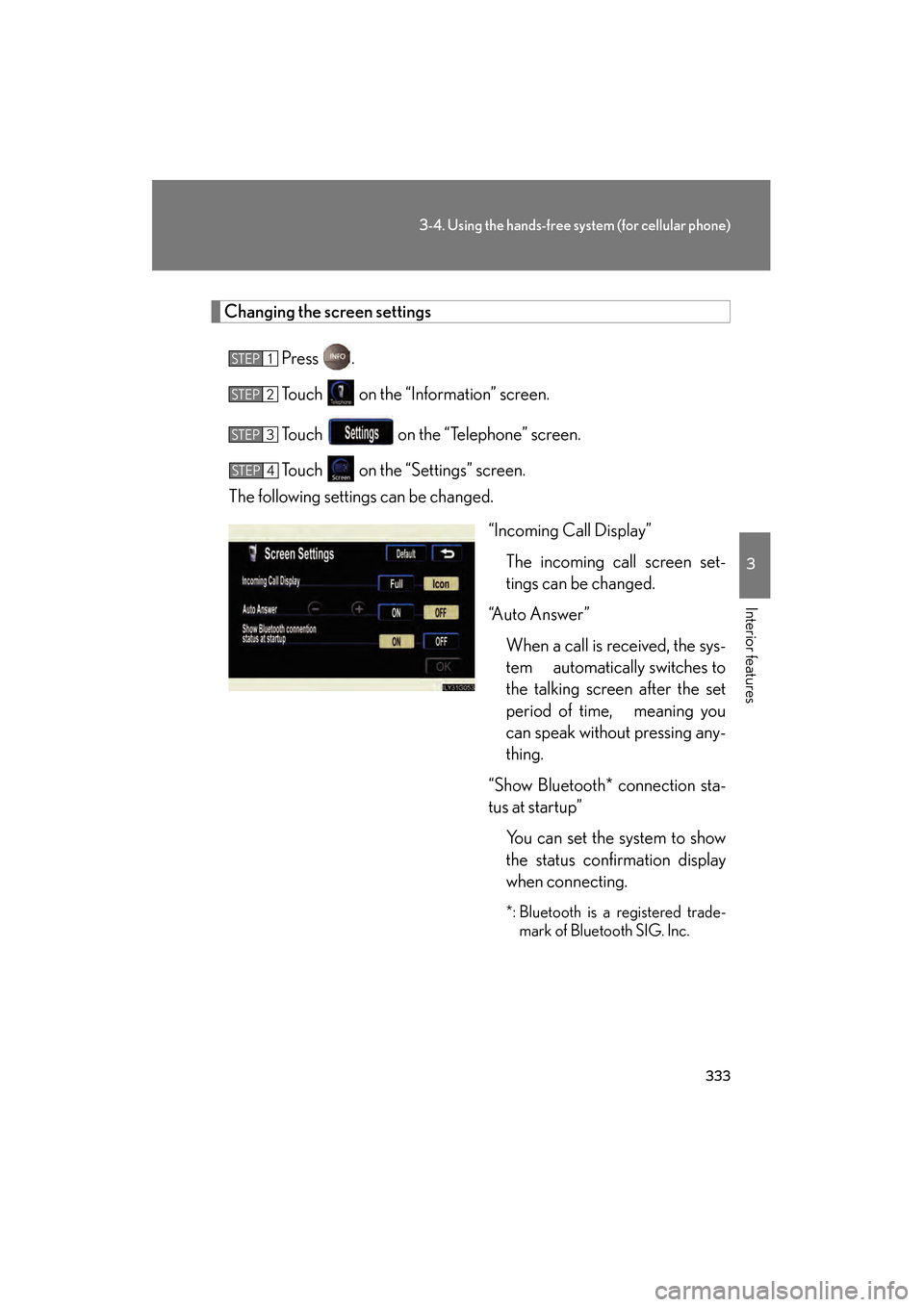
The following settings can be changed.
“Incoming Call Display”The incoming call screen set-
tings can be changed.
“Auto Answer”
When a call is received, the sys-
tem automatically switches to
the talking screen after the set
period of time, meaning you
can speak without pressing any-
thing.
“Show Bluetooth* connection sta-
tus at startup” You can set the system to show
the status confirmation display
when connecting.
*: Bluetooth is a registered trade-mark of Bluetooth SIG. Inc.
STEP1
STEP2
STEP3
STEP4
GS450h_HV_U.book Page 333 Thursday, June 19, 2008 1:44 PM
Page 355 of 599
353
3-5. Using the interior lights
3
Interior features
GS_HV_U
June 19, 2008 1:15 pm
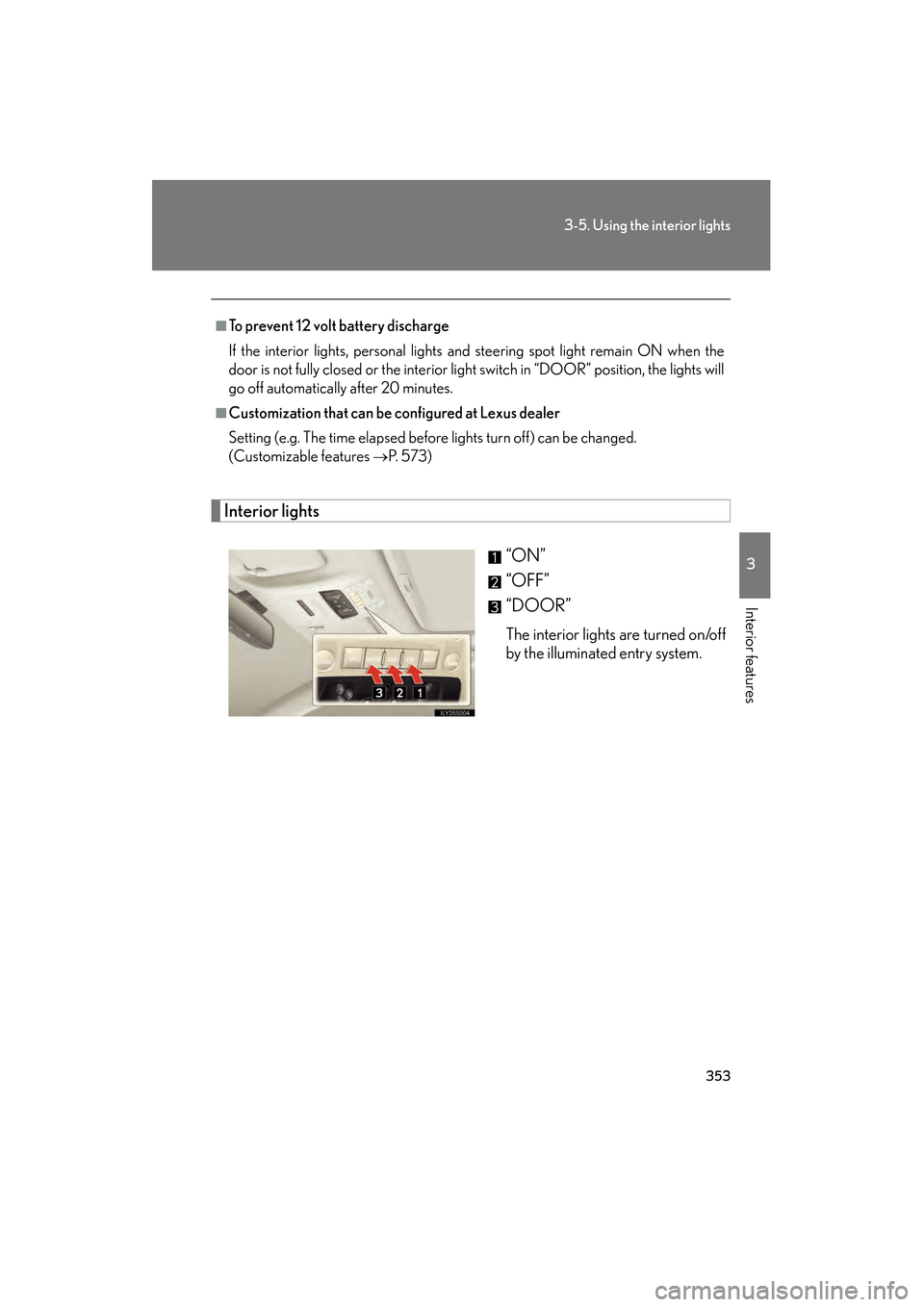
Interior lights“ON”
“OFF”
“DOOR”
The interior lights are turned on/off
by the illuminated entry system.
■To prevent 12 volt battery discharge
If the interior lights, personal lights and steering spot light remain ON when the
door is not fully closed or the interior light switch in “DOOR” position, the lights will
go off automatically after 20 minutes.
■Customization that can be configured at Lexus dealer
Setting (e.g. The time elapsed before lights turn off) can be changed.
(Customizable features
→P. 5 7 3 )
GS450h_HV_U.book Page 353 Thursday, June 19, 2008 1:44 PM