power steering Lexus GS450h 2008 User Guide
[x] Cancel search | Manufacturer: LEXUS, Model Year: 2008, Model line: GS450h, Model: Lexus GS450h 2008Pages: 599, PDF Size: 14.28 MB
Page 138 of 599
136
2-1. Driving procedures
GS_HV_U
June 19, 2008 1:15 pm
NOTICE
■While driving the vehicle
Do not use the accelerator pedal or depress accelerator and brake pedals together
to hold the vehicle on a hill.
■When parking the vehicle
Always put the shift lever in “P”. Failure to do so may cause the vehicle to move or
the vehicle may accelerate suddenly if the accelerator pedal is accidentally
depressed.
■Avoiding damage to vehicle parts
●Do not turn the steering wheel fully in either direction and hold it there for a long
time.
Doing so may damage the power steering motor.
●When driving over bumps in the road, drive as slowly as possible to avoid damag-
ing the wheels, underside of the vehicle, etc.
■If you hear a squealing or scraping noise (brake pad wear limit indicators)
Have your Lexus dealer check and replace the brake pads as soon as possible.
The rotor damage can result if the pads are not replaced when needed.
Front brake only: Moderate levels of the brake pad and disc wear allow enhanced
front braking power. As a result, the discs may wear more quickly than conventional
brake discs. Therefore, when replacing the brake pads, Lexus recommends that you
also have the thickness of the discs measured.
It is dangerous to drive the vehicle when the wear limits of the brake pads and/or
that of the brake discs are exceeded.
GS450h_HV_U.book Page 136 Thursday, June 19, 2008 1:44 PM
Page 142 of 599
140
2-1. Driving procedures
GS_HV_U
June 19, 2008 1:15 pm
■If the hybrid system does not start
The immobilizer system may not have been deactivated. (→P. 88)
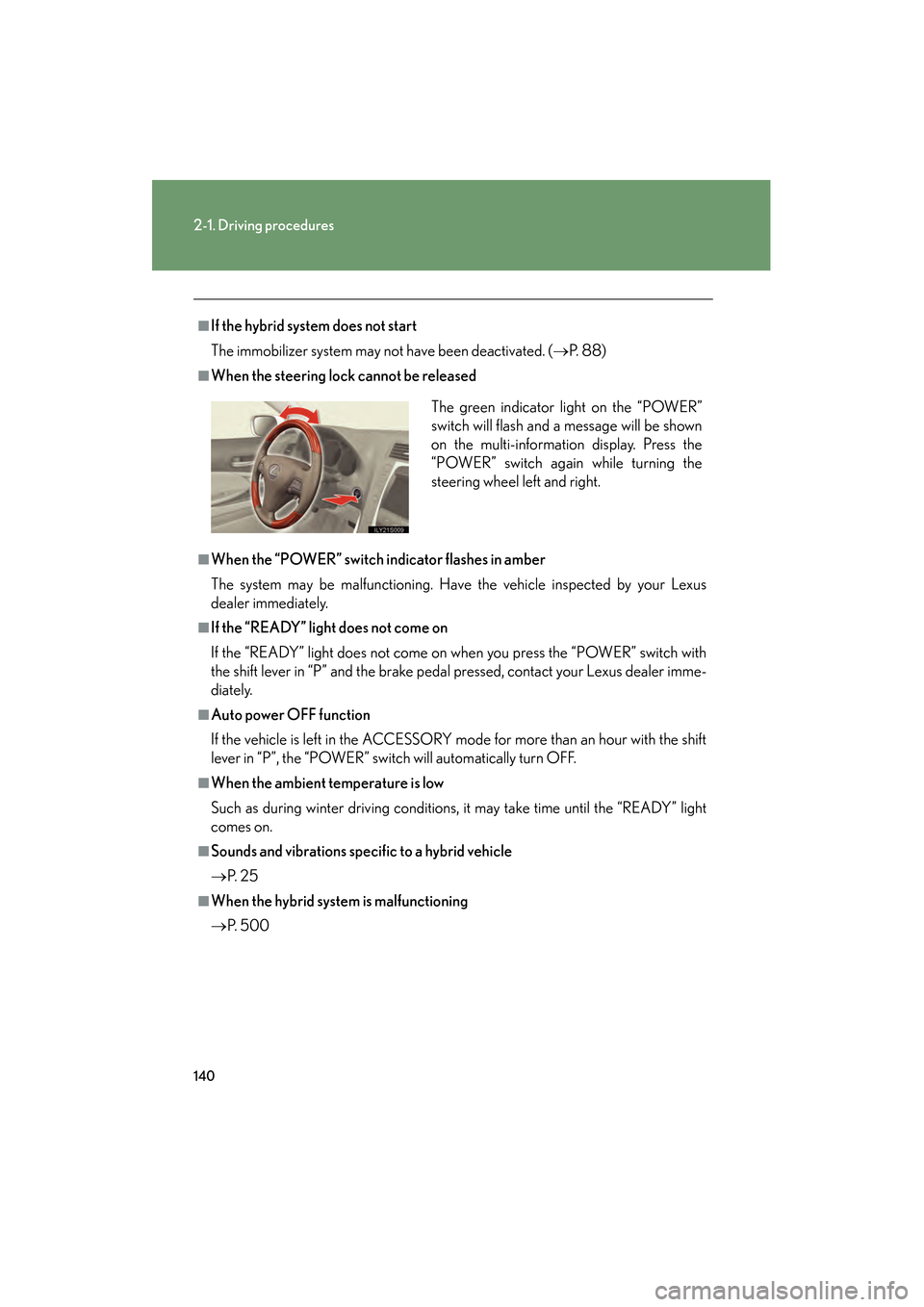
■When the steering lock cannot be released
■When the “POWER” switch indicator flashes in amber
The system may be malfunctioning. Have the vehicle inspected by your Lexus
dealer immediately.
■If the “READY” light does not come on
If the “READY” light does not come on when you press the “POWER” switch with
the shift lever in “P” and the brake pedal pressed, contact your Lexus dealer imme-
diately.
■Auto power OFF function
If the vehicle is left in the ACCESSORY mode for more than an hour with the shift
lever in “P”, the “POWER” switch will automatically turn OFF.
■When the ambient temperature is low
Such as during winter driving conditions, it may take time until the “READY” light
comes on.
■Sounds and vibrations specific to a hybrid vehicle
→ P. 2 5
■When the hybrid system is malfunctioning
→P. 5 0 0 The green indicator light on the “POWER”
switch will flash and a message will be shown
on the multi-information display. Press the
“POWER” switch again while turning the
steering wheel left and right.
GS450h_HV_U.book Page 140 Thursday, June 19, 2008 1:44 PM
Page 202 of 599
200
2-4. Using other driving systems
GS_HV_U
June 19, 2008 1:15 pm
Driving assist systems
To help enhance driving safety and performance, the following systems
operate automatically in response to various driving situations. Be aware,
however, that these systems are supplementary and should not be relied
upon too heavily when operating the vehicle.
■ ABS (Anti-lock Brake System)
Helps to prevent wheel lock when the brakes are applied suddenly, or if
the brakes are applied while driving on a slippery road surface.
■Brake assist
Generates an increased level of braking force after the brake pedal is
depressed, when the system detects a panic stop situation.
■VSC (Vehicle Stability Control)
Helps the driver to control skidding when swerving suddenly or turning on
slippery road surfaces.
■TRAC (Traction Control)
Maintains drive power and prevents the rear wheels from spinning when
starting the vehicle or accelerating on slippery roads.
■Hill-start assist control
Helps prevent the vehicle from rolling backwards when starting on an
incline or slippery slope. It operates for approximately 5 seconds at maxi-
mum.
■EPS (Electric Power Steering)
Employs an electric motor to reduce the amount of effort needed to turn
the steering wheel.
■Active stabilizer suspensi on system (if equipped)
Turns at smaller angles to maintain the stable vehicle posture.
GS450h_HV_U.book Page 200 Thursday, June 19, 2008 1:44 PM
Page 205 of 599
203
2-4. Using other driving systems
2
When driving
GS_HV_U
June 19, 2008 1:15 pm
■Automatic reactivation of TRAC and VSC
Turning the “POWER” switch OFF after turning off the TRAC and VSC systems will
automatically re-enable them.
■Automatic TRAC reactivation
If only the TRAC system is turned off, the TRAC system will turn on when the vehi-
cle speed increases.
■Automatic TRAC and VSC reactivation
If the TRAC and VSC systems are turned off, the systems will not turn on even when
the vehicle speed increases.
■Sounds and vibrations caused by the ABS, brake assist, VSC, TRAC, hill-start
assist control and VGRS systems
●A sound may be heard from the engine compartment when the hybrid system is
started or just after the vehicle begins to move. This sound does not indicate that
a malfunction has occurred in any of these systems.
●Any of the following conditions may occur when the above systems are operat-
ing. None of these indicates that a malfunction has occurred.
• Vibrations may be felt through the vehicle body and steering.
• A motor sound may be heard after the vehicle comes to a stop.
• The brake pedal may pulsate slightly after the ABS is activated.
• The brake pedal may move down slightly after the ABS is activated.
■Hill-start assist control operating conditions
This system comes into operation under the following conditions after the brake
pedal has been depressed and the vehicle has come to a stop:
●The shift lever is in the “D” or “S”.
●The system has detected that the vehicle is moving backwards.
GS450h_HV_U.book Page 203 Thursday, June 19, 2008 1:44 PM
Page 206 of 599
204
2-4. Using other driving systems
GS_HV_U
June 19, 2008 1:15 pm
■Reduced effectiveness of EPS
The effectiveness of EPS is reduced to prevent the system from overheating when
there is frequent steering input over an extended period of time. The steering wheel
may feel heavy as a result. Should this occur, refrain from excessive steering input or
stop the vehicle and turn the hybrid system off. The system should return to normal
about 10 minutes.
■VGRS is disabled in the following situations
●During stopping or the steering wheel has been moved for a long time while
driving at lower speeds.
●After the hybrid system is restarted at less than -22°F (-30°C).
CAUTION
Any of the following conditions may result in an accident which could cause death or
serious injury:
■The ABS does not operate effectively when
●The limits of tire gripping performance have been exceeded.
●The vehicle hydroplanes while driving at high speed on the wet or slick road.
■Stopping distance when the ABS is operating will exceed that of normal condi-
tions
The ABS is not designed to shorten the vehicle’s stopping distance. Always main-
tain a safe distance from the vehicle in front of you in the following situations.
●When driving on dirt, gravel or snow-covered roads
●When driving with tire chains
●When driving over bumps in the road
●When driving over roads with potholes or roads with uneven roads
■TRAC may not operate effectively when
Directional control and power may not be achievable while driving on slippery road
surfaces, even if the TRAC is operating.
Do not drive the vehicle in conditions where stability and power may be lost.
GS450h_HV_U.book Page 204 Thursday, June 19, 2008 1:44 PM
Page 225 of 599
Interior features3
223
GS_HV_U
December 12, 2007 3:30 pm
3-3. Using the audio system ............................ 241
Audio system type................... 241
Using the radio........................ 244
Using the cassette player .... 253
Using the CD player ............. 257
Playing MP3 and WMA discs............................ 262
Using the DVD player........... 266
Playing DVD video/audio............................ 269
Playing video CD .................... 281
DVD player and DVD video disc information ...... 285
Optimal use of the audio/video system ............. 297
Using the AUX adapter ...... 302
Using the steering
switches................................. 303
3-4. Using the hands-free system (for cellular
phone)........................... 306
Hands-free system (for cellular phone) ............. 306
Using the Bluetooth
®
phone ........................................ 311
Setting the hands-free system ..................................... 326 3-5. Using the interior
lights ............................. 352
Interior lights list .................... 352
3-6. Using the storage features ........................ 355
List of storage features......... 355
3-7. Other interior features ........................ 362
Sun visors ................................. 362
Vanity mirror ........................... 363
Clock ......................................... 364
Outside temperature
display..................................... 365
Ashtrays.................................... 366
Cigarette lighter ..................... 367
Power outlet ............................ 368
Seat heaters/ventilators ...... 369
Armrest ..................................... 371
Rear sunshade ........................ 372
Floor mats ................................. 374
Trunk features ......................... 375
Garage door opener ............. 377
Compass .................................. 383
Lexus Link System ................. 387
GS450h_HV_U.book Page 223 Thursday, June 19, 2008 1:44 PM
Page 305 of 599
303
3-3. Using the audio system
3
Interior features
GS_HV_U
June 19, 2008 1:15 pm
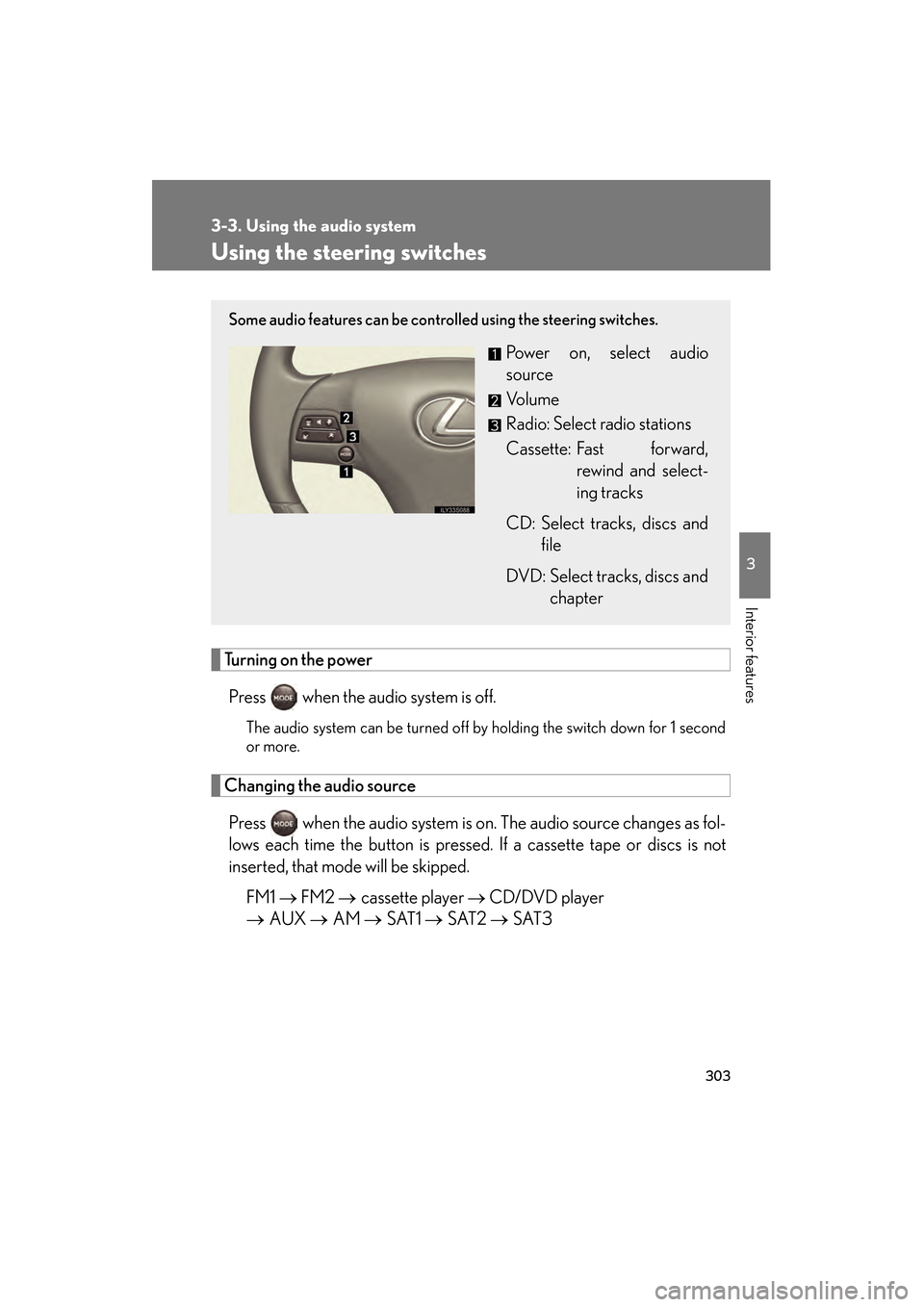
Using the steering switches
Turning on the powerPress when the audio system is off.
The audio system can be turned off by holding the switch down for 1 second
or more.
Changing the audio sourcePress when the audio system is on. The audio source changes as fol-
lows each time the button is pressed. If a cassette tape or discs is not
inserted, that mode will be skipped. FM1 → FM2 → cassette player → CD/DVD player
→ AUX → AM → SAT1 → SAT2 → SAT3
Some audio features can be controlled using the steering switches.
Power on, select audio
source
Vo l u m e
Radio: Select radio stations
Cassette: Fast forward,
rewind and select-
ing tracks
CD: Select tracks, discs and file
DVD: Select tracks, discs and chapter
GS450h_HV_U.book Page 303 Thursday, June 19, 2008 1:44 PM
Page 354 of 599
352
GS_HV_U
June 19, 2008 1:15 pm
3-5. Using the interior lights
Interior lights list
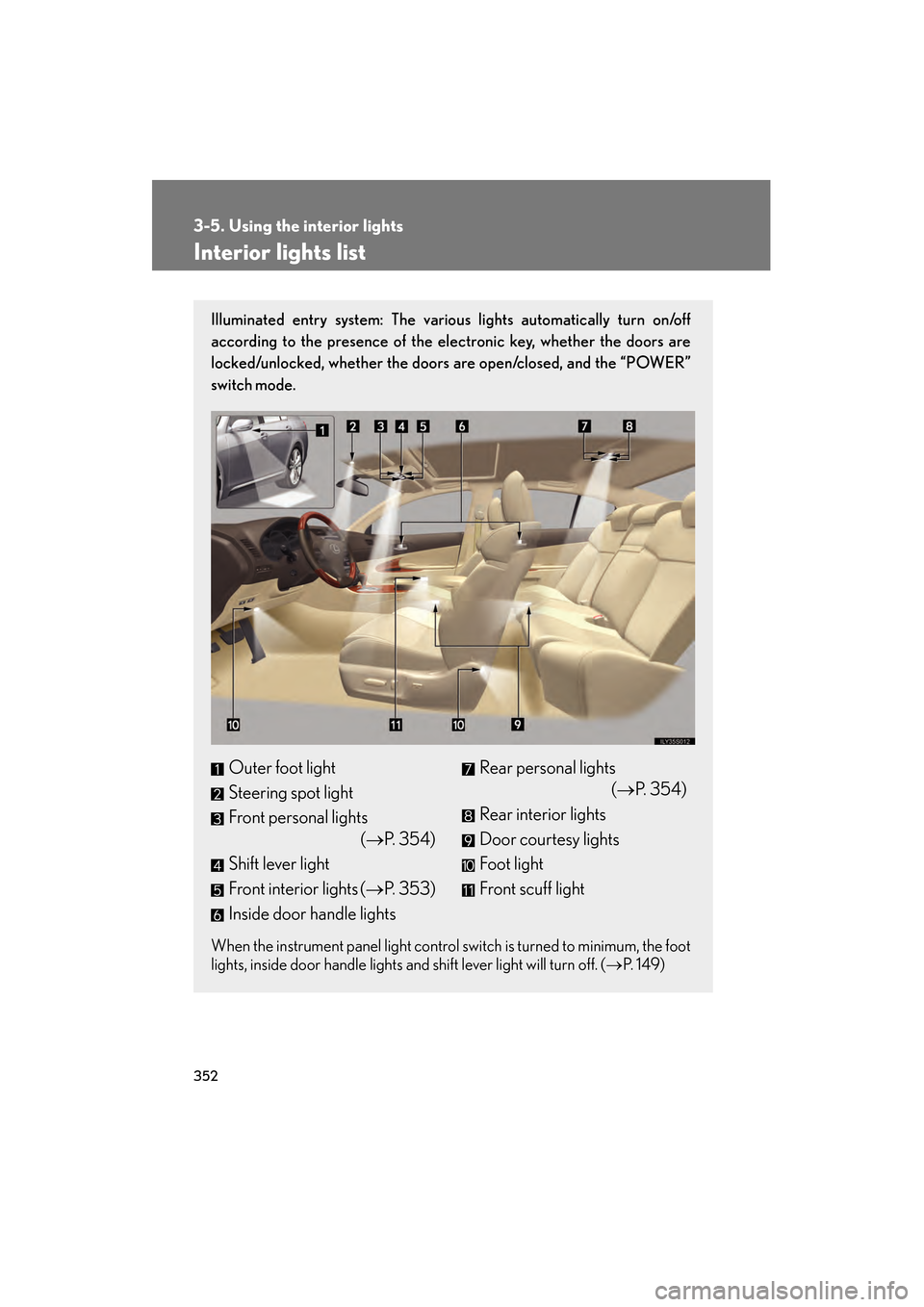
Illuminated entry system: The various lights automatically turn on/off
according to the presence of the electronic key, whether the doors are
locked/unlocked, whether the doors are open/closed, and the “POWER”
switch mode.
When the instrument panel light control switch is turned to minimum, the foot
lights, inside door handle lights and shift lever light will turn off. (→P. 1 4 9 )
Outer foot light
Steering spot light
Front personal lights
(→P. 3 5 4 )
Shift lever light
Front interior lights ( →P. 353)
Inside door handle lightsRear personal lights (→P. 3 5 4 )
Rear interior lights
Door courtesy lights
Foot light
Front scuff light
GS450h_HV_U.book Page 352 Thursday, June 19, 2008 1:44 PM
Page 463 of 599
461
4-3. Do-it-yourself maintenance
4
Maintenance and care
GS_HV_U
June 19, 2008 1:15 pm
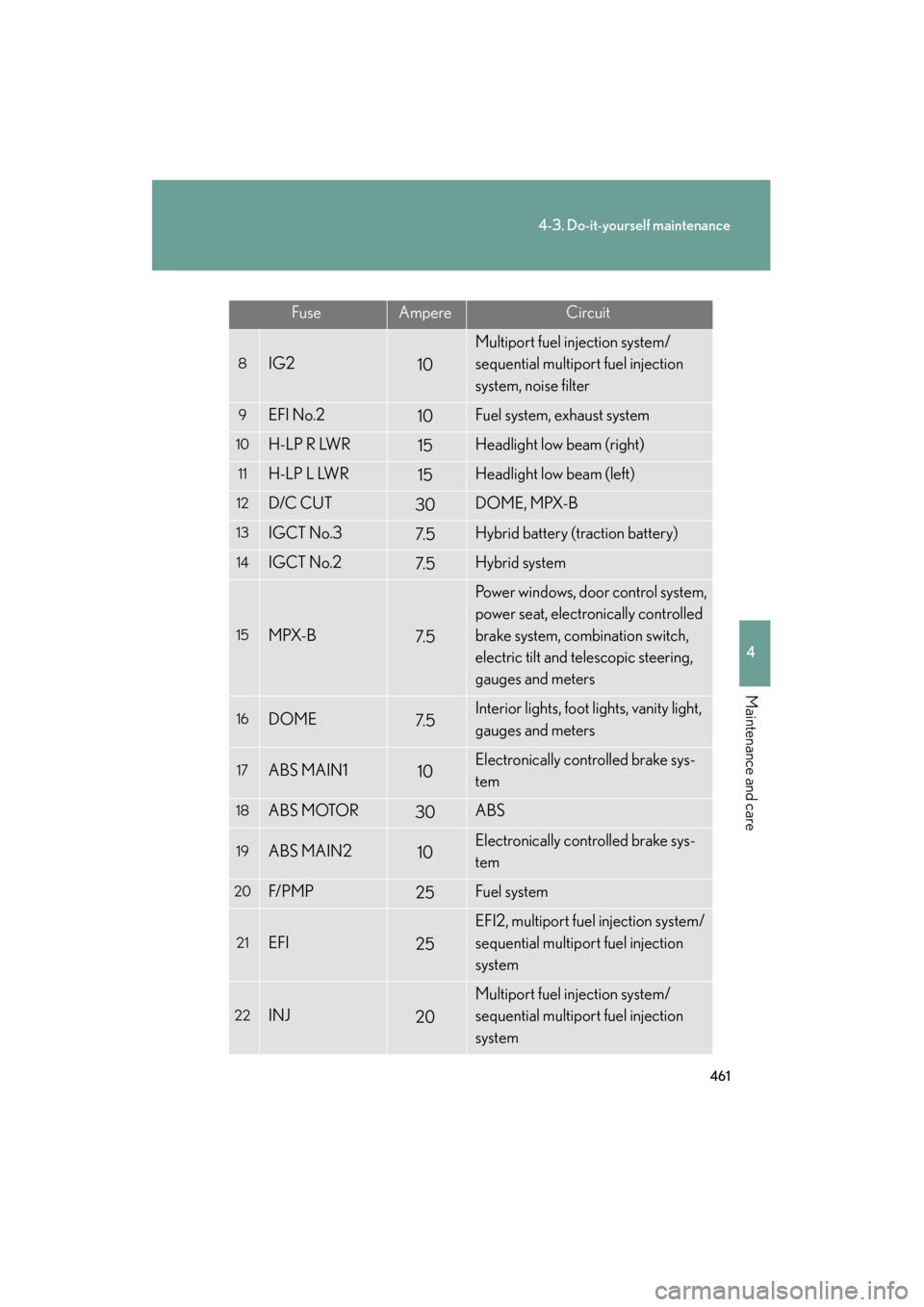
FuseAmpereCircuit
8IG210
Multiport fuel injection system/
sequential multiport fuel injection
system, noise filter
9EFI No.210Fuel system, exhaust system
10H-LP R LWR15Headlight low beam (right)
11H-LP L LWR15Headlight low beam (left)
12D/C CUT30DOME, MPX-B
13IGCT No.37. 5Hybrid battery (traction battery)
14IGCT No.27. 5Hybrid system
15MPX-B7. 5
Power windows, door control system,
power seat, electronically controlled
brake system, combination switch,
electric tilt and telescopic steering,
gauges and meters
16DOME7. 5Interior lights, foot lights, vanity light,
gauges and meters
17ABS MAIN110Electronically controlled brake sys-
tem
18ABS MOTOR30ABS
19ABS MAIN210Electronically controlled brake sys-
tem
20F/ P M P25Fuel system
21EFI25
EFI2, multiport fuel injection system/
sequential multiport fuel injection
system
22INJ20
Multiport fuel injection system/
sequential multiport fuel injection
system
GS450h_HV_U.book Page 461 Thursday, June 19, 2008 1:44 PM
Page 468 of 599
466
4-3. Do-it-yourself maintenance
GS_HV_U
June 19, 2008 1:15 pm
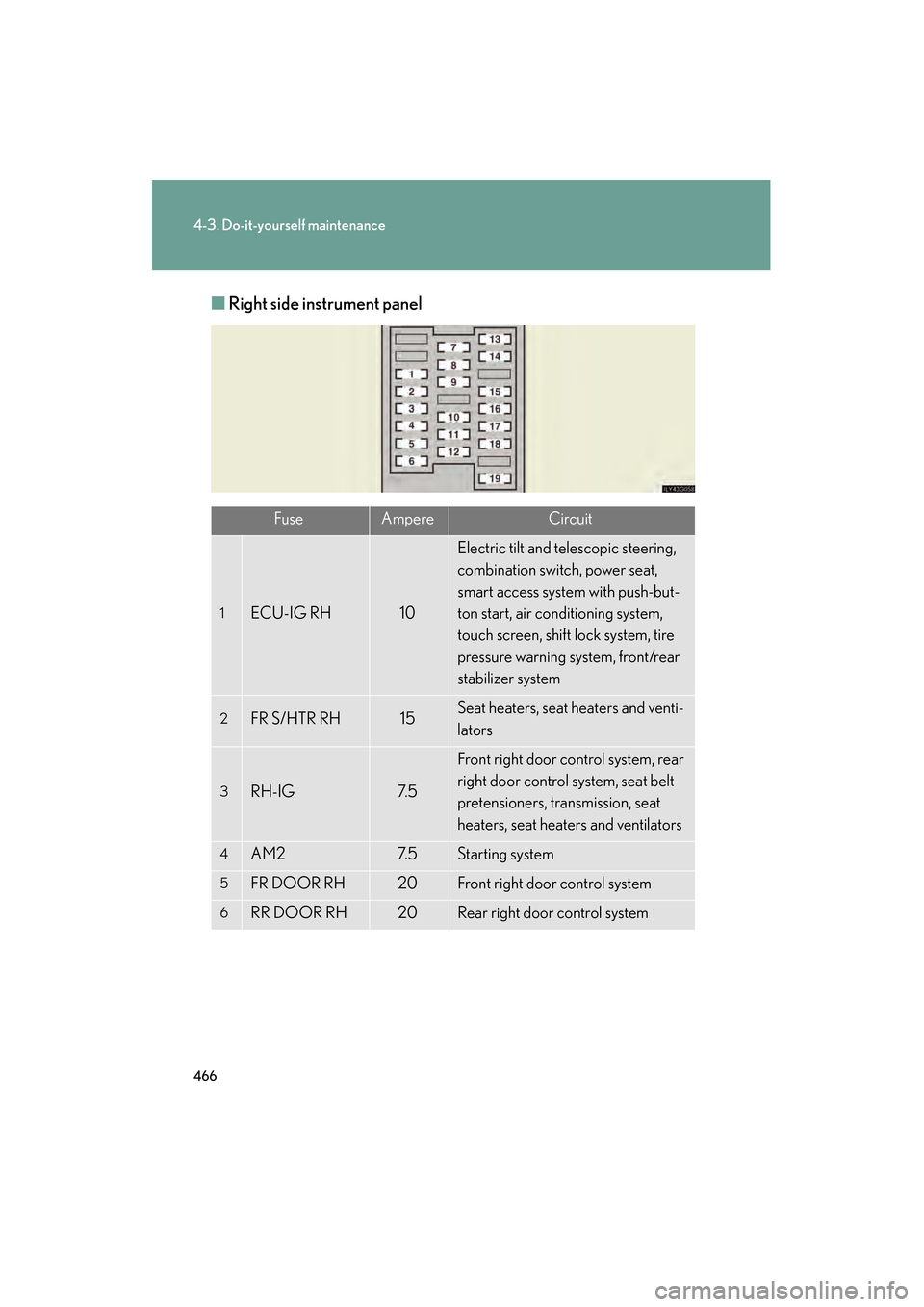
■Right side instrument panel
FuseAmpereCircuit
1ECU-IG RH10
Electric tilt and telescopic steering,
combination switch, power seat,
smart access system with push-but-
ton start, air conditioning system,
touch screen, shift lock system, tire
pressure warning system, front/rear
stabilizer system
2FR S/HTR RH15Seat heaters, seat heaters and venti-
lators
3RH-IG7. 5
Front right door control system, rear
right door control system, seat belt
pretensioners, transmission, seat
heaters, seat heaters and ventilators
4AM27. 5Starting system
5FR DOOR RH20Front right door control system
6RR DOOR RH20Rear right door control system
GS450h_HV_U.book Page 466 Thursday, June 19, 2008 1:44 PM