warning Lexus GS450h 2008 Owner's Guide
[x] Cancel search | Manufacturer: LEXUS, Model Year: 2008, Model line: GS450h, Model: Lexus GS450h 2008Pages: 599, PDF Size: 14.28 MB
Page 175 of 599
173
2-4. Using other driving systems
2
When driving
GS_HV_U
June 19, 2008 1:15 pm
Example of follow-up cruising
When following a vehicle driving slower than the set speed
The system continues follow-up cruising while adjusting for changes in the
speed of the vehicle ahead in order to maintain the vehicle-to-vehicle dis-
tance set by the driver.
Example of acceleration
When there are no longer vehicles driving slower than the set speed in
the lane ahead
When the vehicle ahead of you executes a lane change, the system slowly
accelerates until the set vehicle speed is reached. The system then returns to
fixed speed cruising.
Approach warningWhen your vehicle is too close to a vehicle ahead, and sufficient auto-
matic deceleration via the cruise control is not possible, the display will
flash and buzzer will sound to alert the driver. An example of this would
be if another driver cuts in front of you while you are following a vehicle.
Apply the brakes to ensure an appropriate vehicle-to-vehicle distance.
■Warning lights and messages for dynamic radar cruise control
Warning lights, messages and buzzers are used to indicate a system malfunction or
to inform the driver of the need for caution while driving. ( →P. 5 0 2 )
■Switching modes
The mode cannot be switched to constant speed control mode if vehicle-to-vehicle
distance control mode has been used. The mode also cannot be switched from
constant speed control to vehicle-to-vehicle control mode. Turn the system off by
pressing the “ON-OFF” button, and turn it on again.
GS450h_HV_U.book Page 173 Thursday, June 19, 2008 1:44 PM
Page 178 of 599
176
2-4. Using other driving systems
GS_HV_U
June 19, 2008 1:15 pm
■CertificationFor vehicles sold in the U.S.A.
For vehicles sold in Canada
FCC WARNING
Changes or modifications not expressly approved by the party responsible for
compliance could void the user’s authority to operate the equipment.
FCC RF exposure information
This device complies with the FCC RF exposure requirements.
Operation is subject to the following two conditions;
(1) This device may not cause interference, and
(2) This device must accept any interference received, including interference
that may cause undesired operation of the device.
GS450h_HV_U.book Page 176 Thursday, June 19, 2008 1:44 PM
Page 179 of 599
177
2-4. Using other driving systems
2
When driving
GS_HV_U
June 19, 2008 1:15 pm
CAUTION
■Before using dynamic radar cruise control
Do not overly rely on vehicle-to-vehicle distance control.
Be aware of the set vehicle speed. If automatic deceleration/acceleration is not
appropriate, adjust the vehicle speed, as well as the distance between your vehicle
and vehicles ahead by applying the brakes, etc.
■To avoid operating the dynamic radar cruise control by mistake
Keep the “ON-OFF” button off when not in use.
■Situations unsuitable for dynamic radar cruise control
Do not use dynamic radar cruise control in any of the following situations.
Doing so may result in inappropriate control of speed and could cause serious or
fatal accident.
●In heavy traffic
●On roads with sharp bends
●On winding roads
●On slippery roads, such as those covered with rain, ice or snow
●On steep downhills, where there are sudden changes between sharp up and
down gradients
Vehicle speed may exceed the set speed when driving down a steep hill.
●At entrances to expressways
●When weather conditions are bad enough that they may prevent the sensors
from functioning correctly (fog, snow, sandstorm, etc.)
●When the approach warning buzzer can be heard often
GS450h_HV_U.book Page 177 Thursday, June 19, 2008 1:44 PM
Page 182 of 599
180
2-4. Using other driving systems
GS_HV_U
June 19, 2008 1:15 pm
Intuitive parking assist (if equipped)
Intuitive parking assist uses sensors in the front and rear of the vehicle to
detect the distance between the vehicle and any obstacles, and informs the
driver of this distance using the mult i-information display, the touch screen,
and warning beeps.
The system may be used at speeds less than about 6 mph (10 km/h).
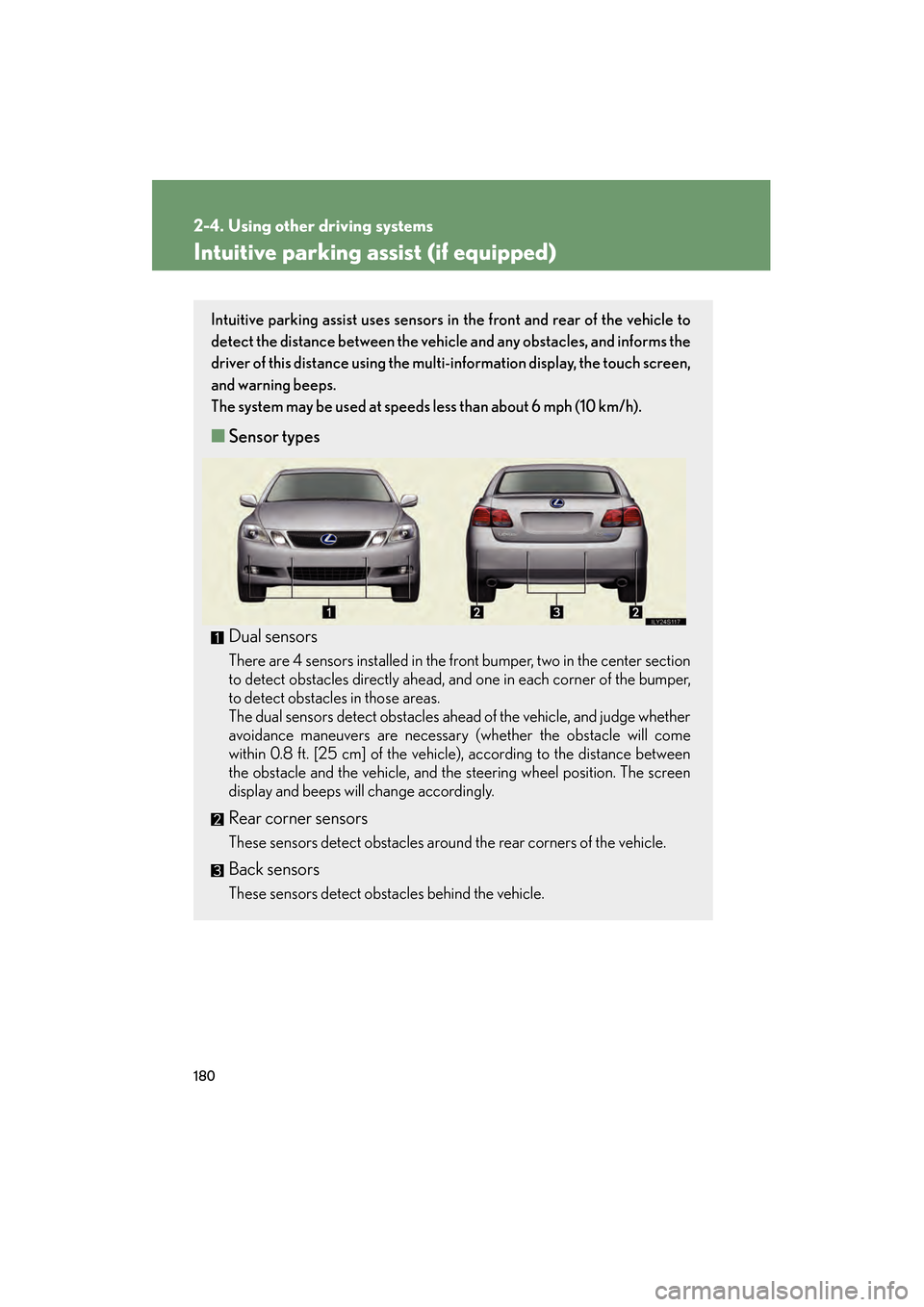
■ Sensor types
Dual sensors
There are 4 sensors installed in the front bumper, two in the center section
to detect obstacles directly ahead, and one in each corner of the bumper,
to detect obstacles in those areas.
The dual sensors detect obstacles ahead of the vehicle, and judge whether
avoidance maneuvers are necessary (whether the obstacle will come
within 0.8 ft. [25 cm] of the vehicle), according to the distance between
the obstacle and the vehicle, and the steering wheel position. The screen
display and beeps will change accordingly.
Rear corner sensors
These sensors detect obstacles around the rear corners of the vehicle.
Back sensors
These sensors detect obstacles behind the vehicle.
GS450h_HV_U.book Page 180 Thursday, June 19, 2008 1:44 PM
Page 185 of 599
183
2-4. Using other driving systems
2
When driving
GS_HV_U
June 19, 2008 1:15 pm
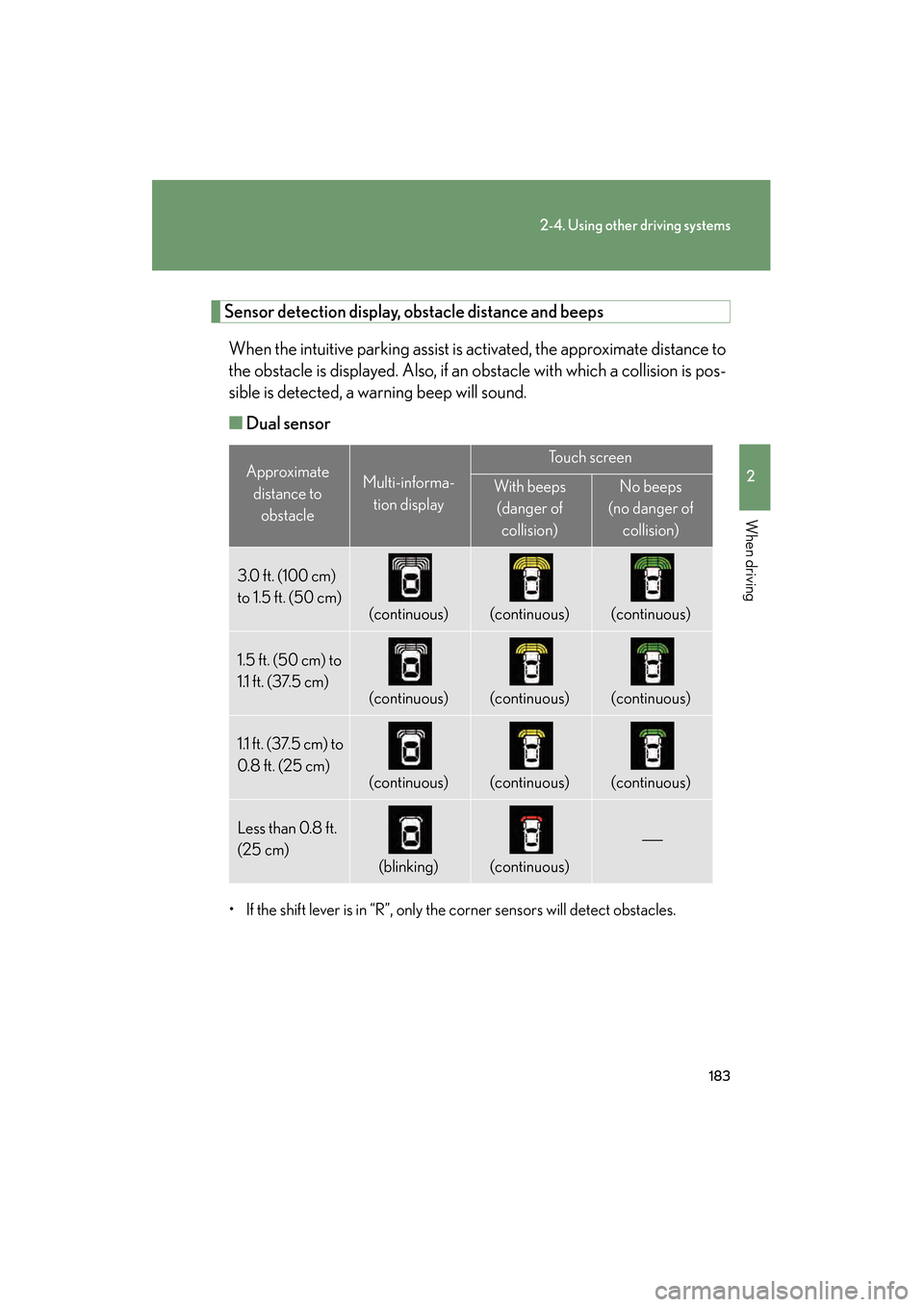
Sensor detection display, obstacle distance and beepsWhen the intuitive parking assist is activated, the approximate distance to
the obstacle is displayed. Also, if an obstacle with which a collision is pos-
sible is detected, a warning beep will sound.
■ Dual sensor
• If the shift lever is in “R”, only the corner sensors will detect obstacles.
Approximate
distance to obstacleMulti-informa-
tion display
To u c h s c r e e n
With beeps(danger of collision)No beeps
(no danger of collision)
3.0 ft. (100 cm)
to 1.5 ft. (50 cm)
(continuous)(continuous)(continuous)
1.5 ft. (50 cm) to
1.1 ft. (37.5 cm)
(continuous)(continuous)(continuous)
1.1 ft. (37.5 cm) to
0. 8 f t . (25 cm)
(continuous)(continuous)(continuous)
Less than 0.8 ft.
(25 cm)
(blinking)(continuous)
GS450h_HV_U.book Page 183 Thursday, June 19, 2008 1:44 PM
Page 189 of 599
187
2-4. Using other driving systems
2
When driving
GS_HV_U
June 19, 2008 1:15 pm
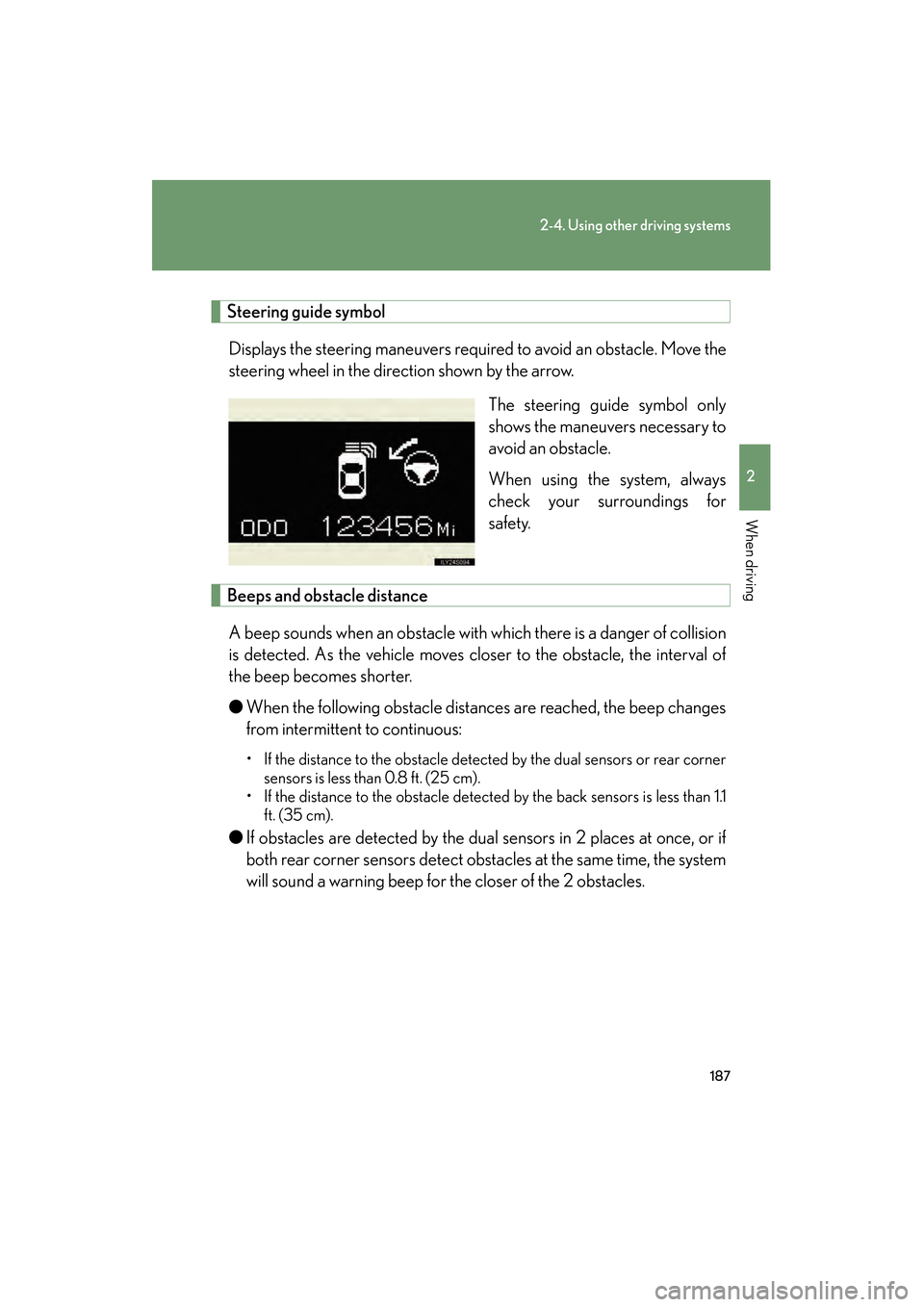
Steering guide symbolDisplays the steering maneuvers required to avoid an obstacle. Move the
steering wheel in the direction shown by the arrow. The steering guide symbol only
shows the maneuvers necessary to
avoid an obstacle.
When using the system, always
check your surroundings for
safety.
Beeps and obstacle distance
A beep sounds when an obstacle with which there is a danger of collision
is detected. As the vehicle moves closer to the obstacle, the interval of
the beep becomes shorter.
● When the following obstacle distances are reached, the beep changes
from intermittent to continuous:
• If the distance to the obstacle detected by the dual sensors or rear corner
sensors is less than 0.8 ft. (25 cm).
• If the distance to the obstacle detected by the back sensors is less than 1.1
ft. (35 cm).
● If obstacles are detected by the dual sensors in 2 places at once, or if
both rear corner sensors detect obstacles at the same time, the system
will sound a warning beep for the closer of the 2 obstacles.
GS450h_HV_U.book Page 187 Thursday, June 19, 2008 1:44 PM
Page 190 of 599
188
2-4. Using other driving systems
GS_HV_U
June 19, 2008 1:15 pm
●If multiple obstacles are detected in front and behind the vehicle at the
same time, the warning beep will change in the following manner:
• If an obstacle has been detected within 0.8 ft. (25 cm) of the front or rear
of the vehicle (a continuous beep is sounding), and a new obstacle is
detected near a different area of the vehicle, the warning beep will sound
6 beeps then one continuous beep.
• If an obstacle has been detected within 0.8 ft. (25 cm) of the front or rear of the vehicle (a continuous beep is sounding), and a new obstacle is
detected within 0.8 ft. (25 cm) of a different area of the vehicle, the warn-
ing beeps will sound 2 beeps then one continuous beep.
●You can change the volume of the warning beeps. ( →P. 1 8 9 )
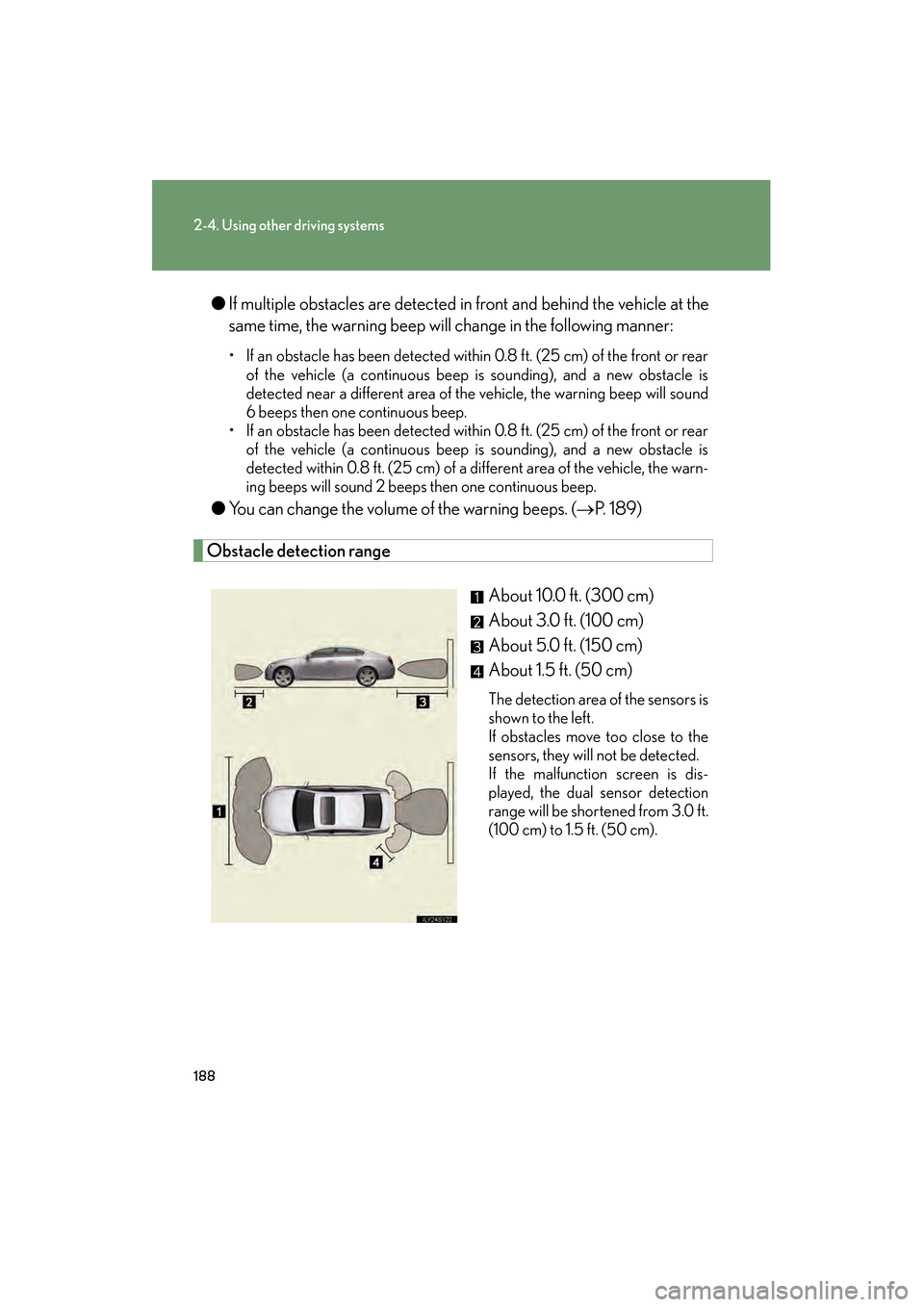
Obstacle detection range
About 10.0 ft. (300 cm)
About 3.0 ft. (100 cm)
About 5.0 ft. (150 cm)
About 1.5 ft. (50 cm)
The detection area of the sensors is
shown to the left.
If obstacles move too close to the
sensors, they will not be detected.
If the malfunction screen is dis-
played, the dual sensor detection
range will be shortened from 3.0 ft.
(100 cm) to 1.5 ft. (50 cm).
GS450h_HV_U.book Page 188 Thursday, June 19, 2008 1:44 PM
Page 191 of 599
189
2-4. Using other driving systems
2
When driving
GS_HV_U
June 19, 2008 1:15 pm
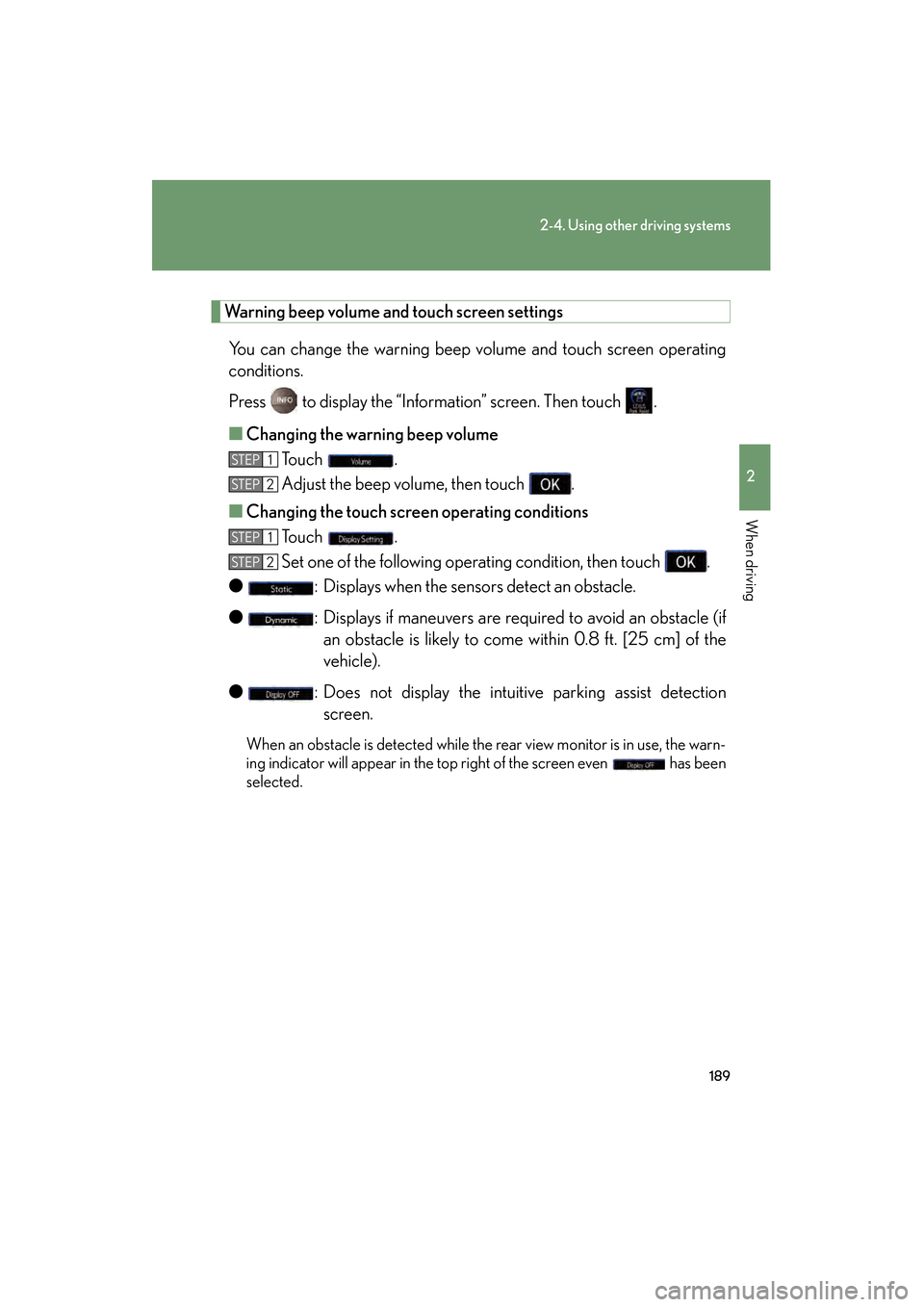
Warning beep volume and touch screen settingsYou can change the warning beep volume and touch screen operating
conditions.
Press to display the “Information” screen. Then touch .
■ Changing the warning beep volume
To u c h .
Adjust the beep volume, then touch .
■ Changing the touch scr een operating conditions
To u c h .
Set one of the following operating condition, then touch .
● : Displays when the sensors detect an obstacle.
● : Displays if maneuvers are required to avoid an obstacle (if
an obstacle is likely to come within 0.8 ft. [25 cm] of the
vehicle).
● : Does not display the intuitive parking assist detection
screen.
When an obstacle is detected while the rear view monitor is in use, the warn-
ing indicator will appear in the top right of the screen even has been
selected.
STEP1
STEP2
STEP1
STEP2
GS450h_HV_U.book Page 189 Thursday, June 19, 2008 1:44 PM
Page 192 of 599
190
2-4. Using other driving systems
GS_HV_U
June 19, 2008 1:15 pm
■The intuitive parking assist can be operated when
The “POWER” switch is in the ON mode.
■When the system malfunctions
●If a malfunction occurs and no obstacles have been detected, a warning is dis-
played, and a malfunction beep sounds for 7 seconds.
If an obstacle has been detected, or another malfunction occurs in a different
sensor, the malfunction beeps will not sound.
●In the following circumstances the displayed warning will disappear:
• If you switch the screen to a different mode.
• If you turn off the intuitive parking assist main switch.
• If the vehicle speed exceeds 6 mph (10 km/h). Once the vehicle speed dropsbelow 6 mph (10 km/h), the warning will be displayed again.
●If the malfunction screen is displayed, the detection range of the dual sensors is
shortened. In this case, the necessity for obstacle evasion (whether the obstacle
will come within 0.8 ft. [25 cm] of the vehicle or not) will not be calculated.
GS450h_HV_U.book Page 190 Thursday, June 19, 2008 1:44 PM
Page 193 of 599
191
2-4. Using other driving systems
2
When driving
GS_HV_U
June 19, 2008 1:15 pm
■When using the intuitive parking assist
●The sensors’ detection areas and reaction times are limited. When moving for-
ward or reversing, check the areas surrounding the vehicle (especially the sides
of the vehicle) for safety, and drive slowly, using the brake to control the vehicle’s
speed.
• The sensors’ detection areas are limited to the areas around the vehicle’s frontand rear bumpers.
• Depending on the shape of the obstacle and other factors, the detection dis- tance may shorten, or detection may be impossible.
• There will be a short delay between obstacle detection and display. Even at
slow speeds, there is a possibility that the obstacle will come within 0.8 ft. (25
cm) of the vehicle before the display is shown and the warning beep sounds.
• Braking distance may differ according to the road conditions (rain, gravel etc.).
• It might be difficult to hear beeps due to the volume of audio system or air flow noise of air conditioning system.
• For long obstacles such as walls, the obstacle warning may change as the obstacle gets closer.
GS450h_HV_U.book Page 191 Thursday, June 19, 2008 1:44 PM