wheel Lexus GS450h 2008 Workshop Manual
[x] Cancel search | Manufacturer: LEXUS, Model Year: 2008, Model line: GS450h, Model: Lexus GS450h 2008Pages: 599, PDF Size: 14.28 MB
Page 316 of 599
314
3-4. Using the hands-free system (for cellular phone)
GS_HV_U
June 19, 2008 1:15 pm
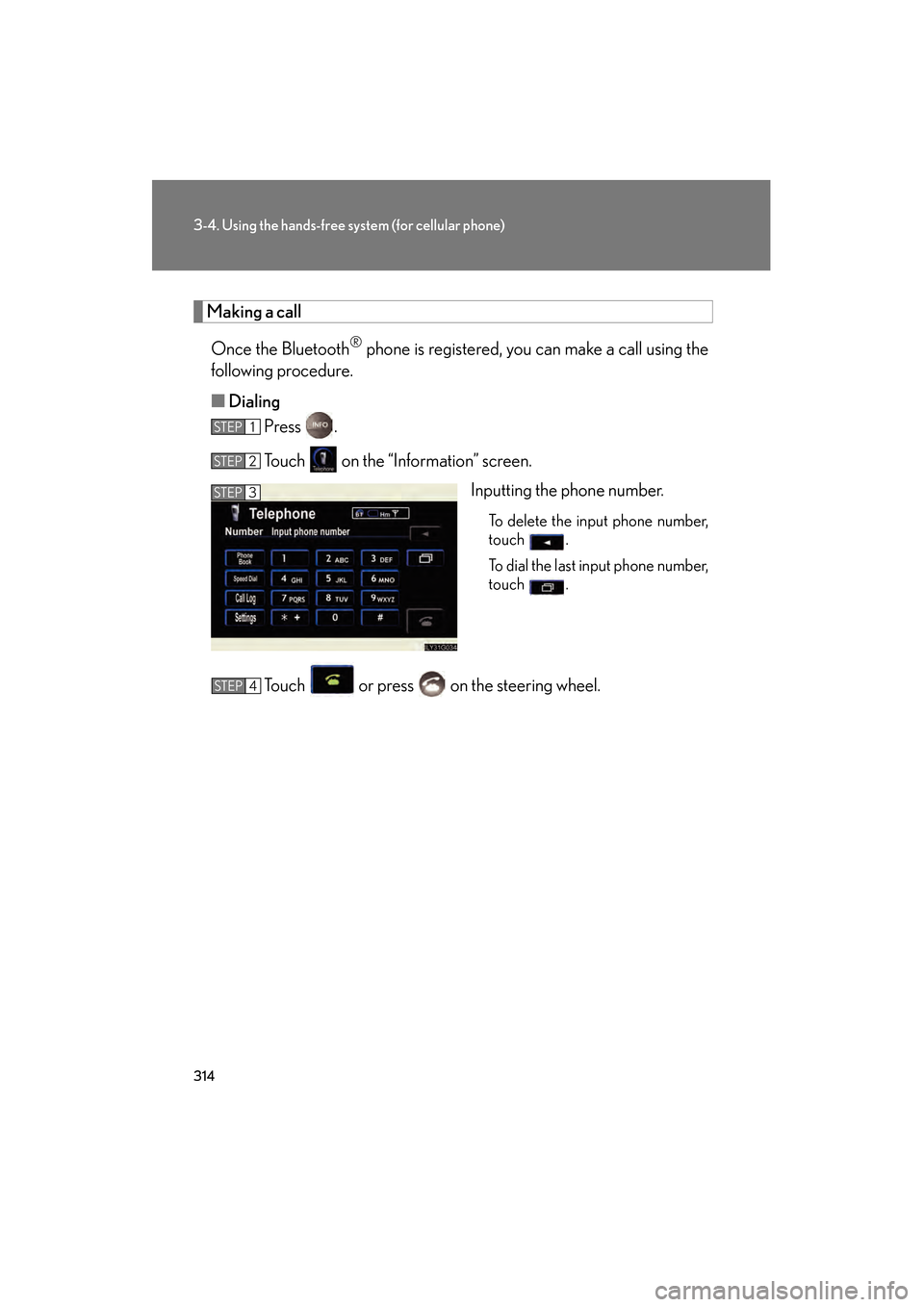
Making a call
Once the Bluetooth
® phone is registered, you can make a call using the
following procedure.
■ Dialing
Press .
Touch on the “Information” screen.
Inputting the phone number.
To delete the input phone number,
touch .
To dial the last input phone number,
touch .
Touch or press on the steering wheel.
STEP1
STEP2
STEP3
STEP4
GS450h_HV_U.book Page 314 Thursday, June 19, 2008 1:44 PM
Page 317 of 599
315
3-4. Using the hands-free system (for cellular phone)
3
Interior features
GS_HV_U
June 19, 2008 1:15 pm
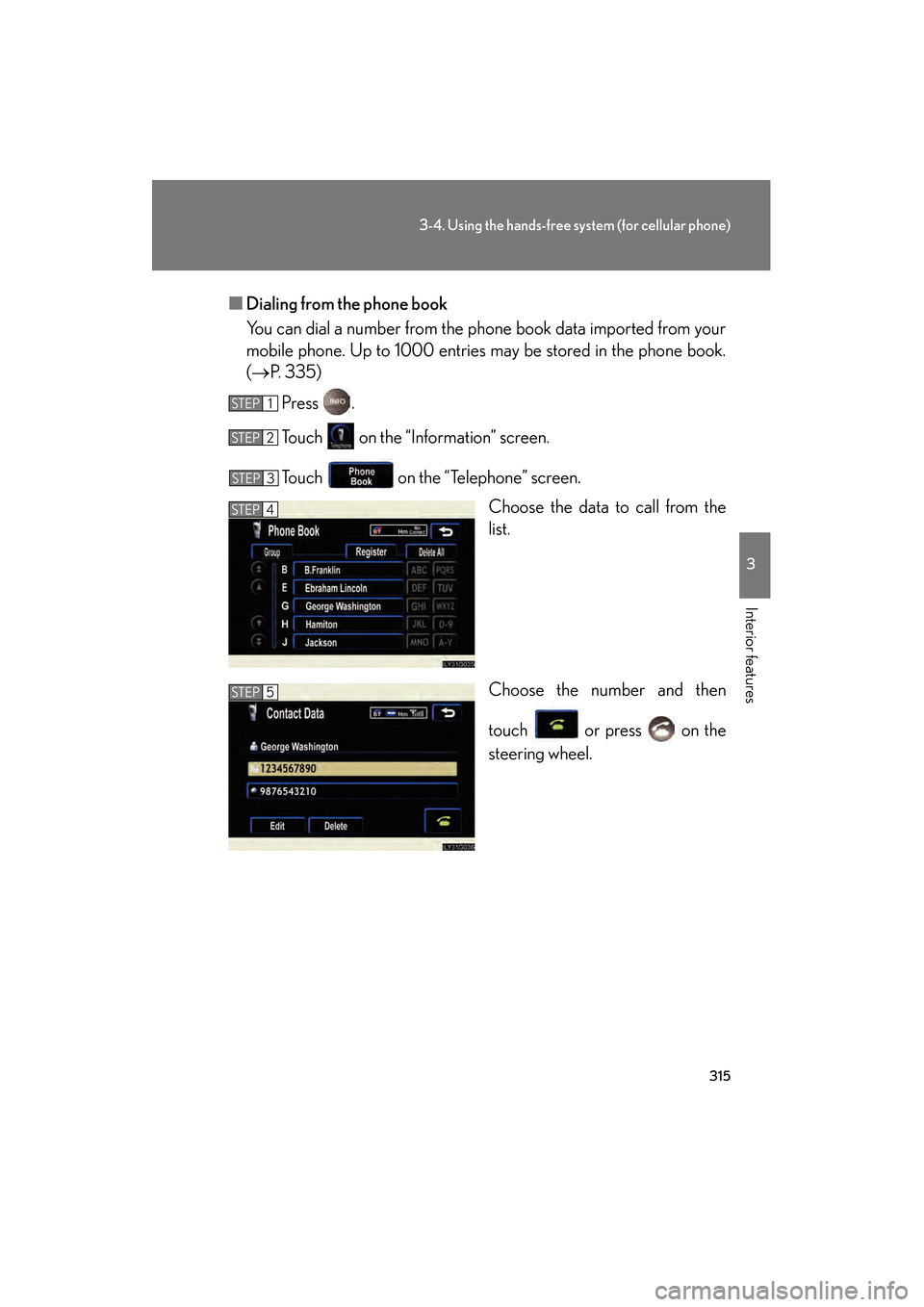
■Dialing from the phone book
You can dial a number from the phone book data imported from your
mobile phone. Up to 1000 entries may be stored in the phone book.
(→ P. 335)
Press .
Touch on the “Information” screen.
Touch on the “Telephone” screen. Choose the data to call from the
list.
Choose the number and then
touch or press on the
steering wheel.
STEP1
STEP2
STEP3
STEP4
STEP5
GS450h_HV_U.book Page 315 Thursday, June 19, 2008 1:44 PM
Page 318 of 599
316
3-4. Using the hands-free system (for cellular phone)
GS_HV_U
June 19, 2008 1:15 pm
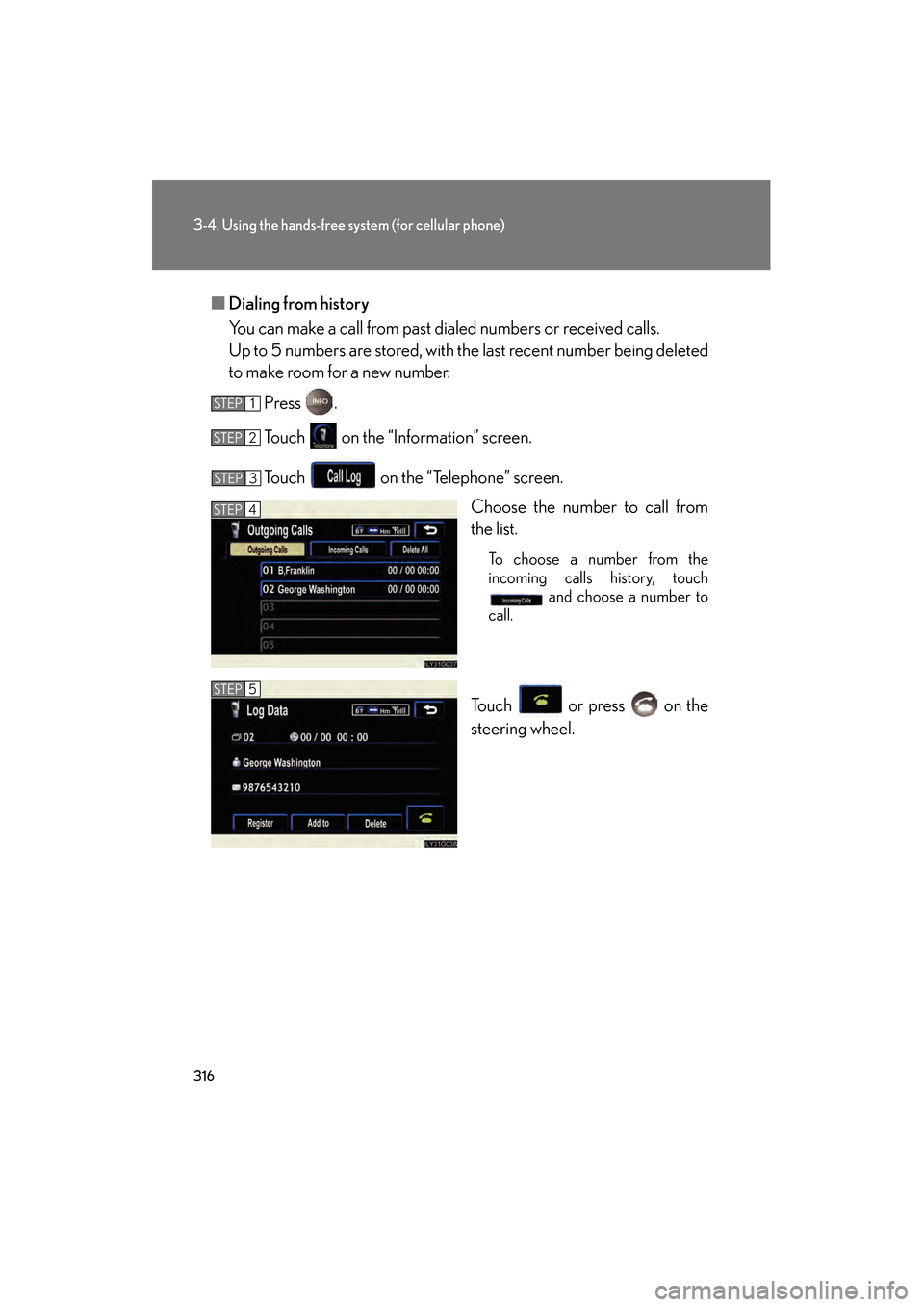
■Dialing from history
You can make a call from past dialed numbers or received calls.
Up to 5 numbers are stored, with the last recent number being deleted
to make room for a new number.
Press .
Touch on the “Information” screen.
Touch on the “Telephone” screen. Choose the number to call from
the list.
To choose a number from the
incoming calls history, touch and choose a number to
call.
Touch or press on the
steering wheel.
STEP1
STEP2
STEP3
STEP4
STEP5
GS450h_HV_U.book Page 316 Thursday, June 19, 2008 1:44 PM
Page 322 of 599
320
3-4. Using the hands-free system (for cellular phone)
GS_HV_U
June 19, 2008 1:15 pm
■Calling using POI
You can make a call using a Point Of Interest. ( →“Navigation System
Owner’s Manual”)
■Made/Received call history list
●If you make a call to or receive a call from a number registered in the phone
book, the name is displayed in the call history.
●If you make multiple calls to the same number, only the last call made is dis-
played in the made calls history.
● is displayed to the left of phone number for unanswered calls.
● is displayed to the left of the phone number for refused calls.
●Calls where the number is unavailable, such as public telephones, are not stored
in the call history.
■When driving
●The functions “Dialing”, “Dialing from the phone book”, and “Dialing from his-
tory” are unavailable.
●If you press on the steering wheel, the “Speed Dial” screen is displayed. At
this time phone numbers will not be displayed. Choose from the names dis-
played to make a call.
■International calls
You may not be able to make international calls, depending on the mobile phone in
use.
GS450h_HV_U.book Page 320 Thursday, June 19, 2008 1:44 PM
Page 323 of 599
321
3-4. Using the hands-free system (for cellular phone)
3
Interior features
GS_HV_U
June 19, 2008 1:15 pm
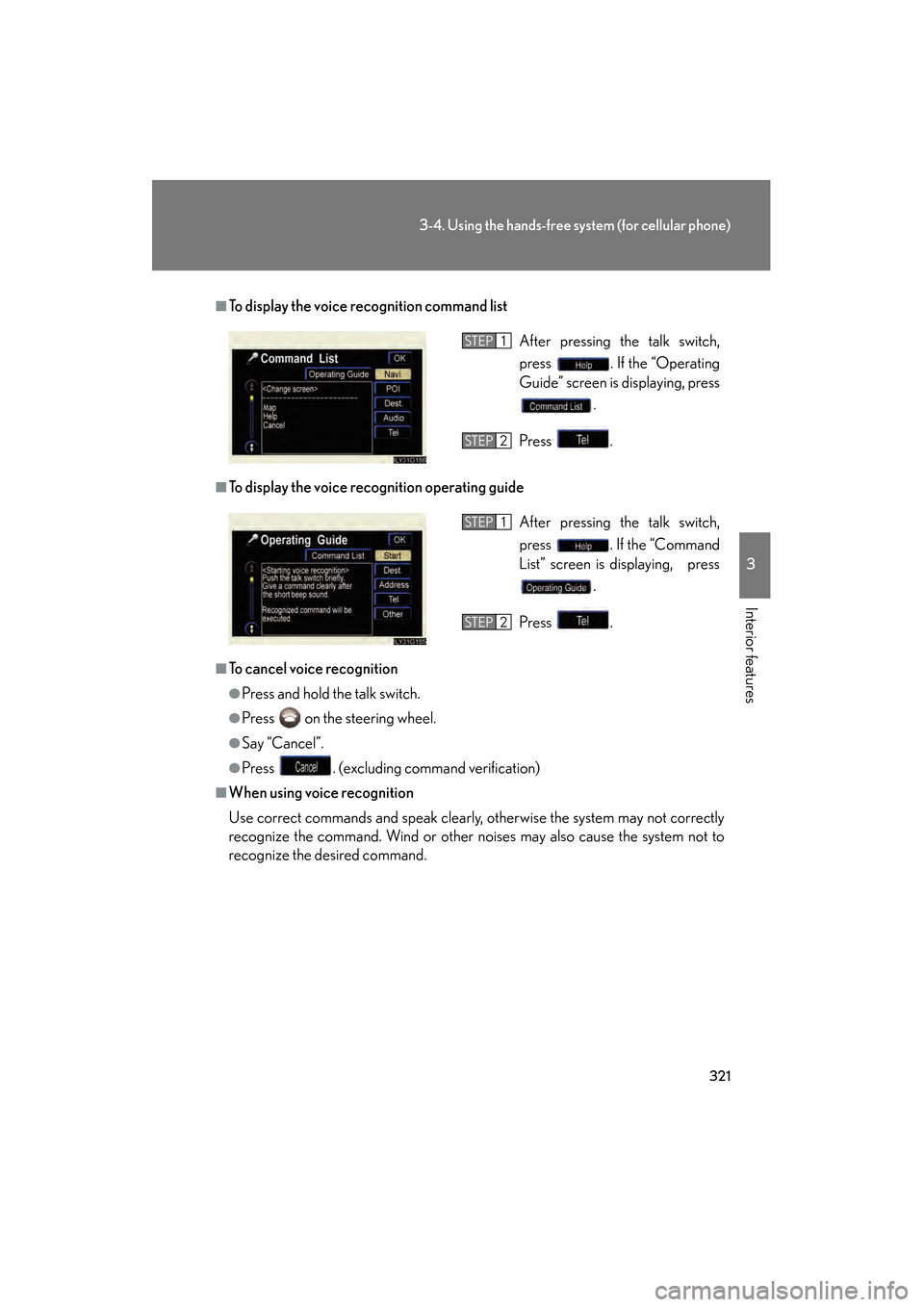
■To display the voice recognition command list
■To display the voice recognition operating guide
■To cancel voice recognition
●Press and hold the talk switch.
●Press on the steering wheel.
●Say “Cancel”.
●Press . (excluding command verification)
■When using voice recognition
Use correct commands and speak clearly, otherwise the system may not correctly
recognize the command. Wind or other noises may also cause the system not to
recognize the desired command. After pressing the talk switch,
press . If the “Operating
Guide” screen is displaying, press
.
Press .
STEP1
STEP2
After pressing the talk switch,
press . If the “Command
List” screen is displaying, press .
Press .STEP1
STEP2
GS450h_HV_U.book Page 321 Thursday, June 19, 2008 1:44 PM
Page 324 of 599
322
3-4. Using the hands-free system (for cellular phone)
GS_HV_U
June 19, 2008 1:15 pm
Receiving a call
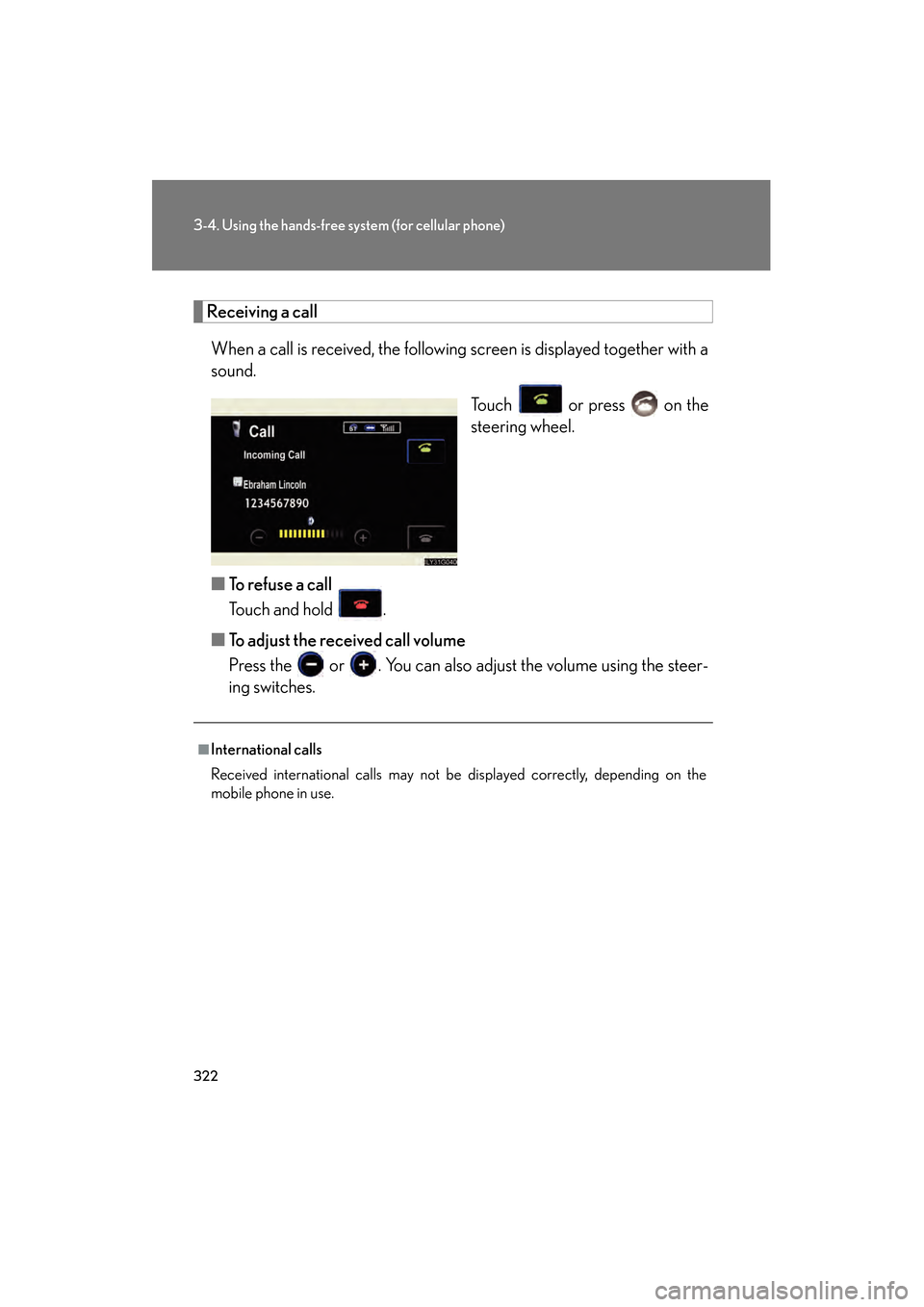
When a call is received, the following screen is displayed together with a
sound. Touch or press on the
steering wheel.
■ To refuse a call
Touch and hold .
■ To adjust the received call volume
Press the or . You can also adjust the volume using the steer-
ing switches.
■International calls
Received international calls may not be displayed correctly, depending on the
mobile phone in use.
GS450h_HV_U.book Page 322 Thursday, June 19, 2008 1:44 PM
Page 326 of 599
324
3-4. Using the hands-free system (for cellular phone)
GS_HV_U
June 19, 2008 1:15 pm
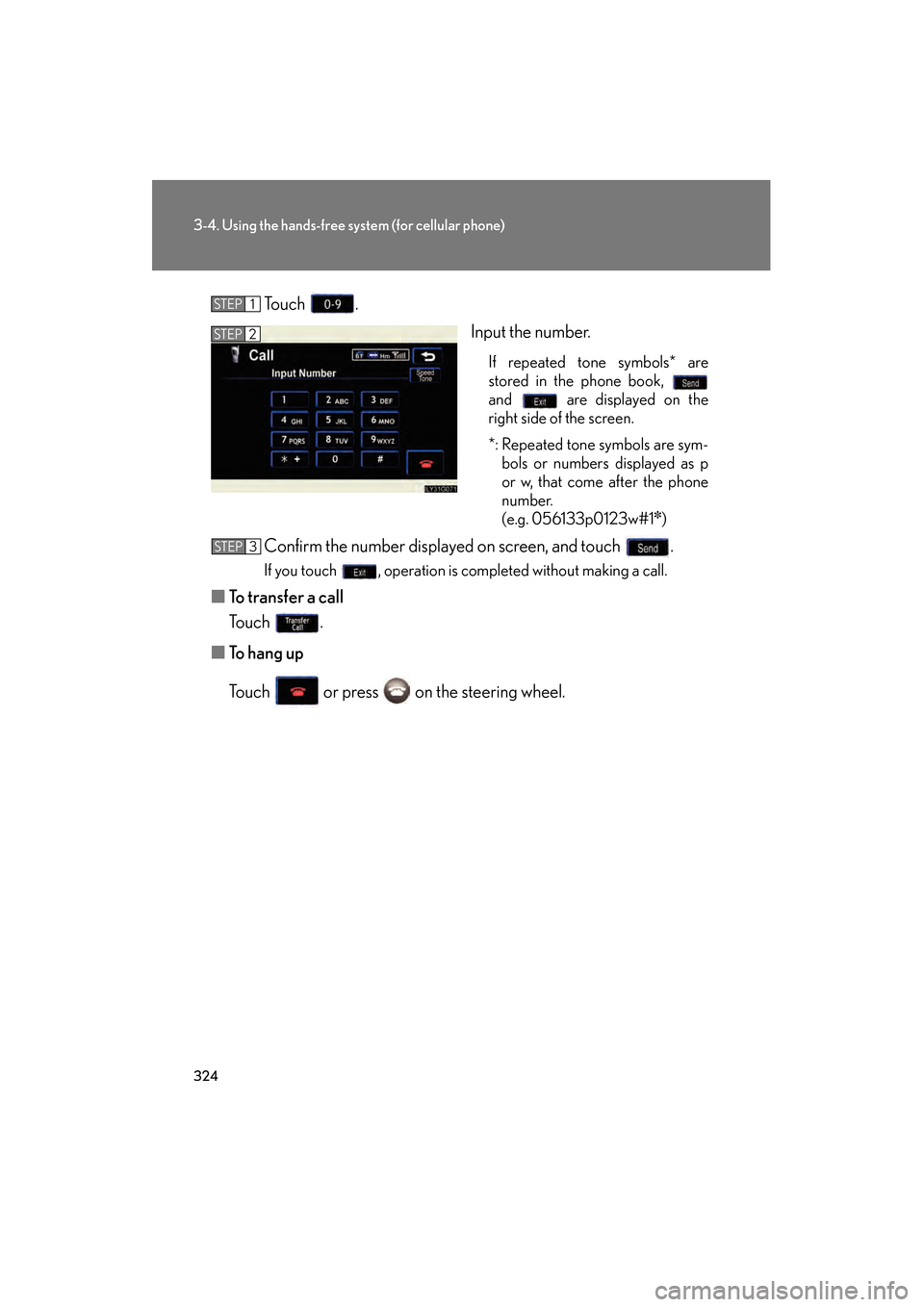
Touch .
Input the number.
If repeated tone symbols* are
stored in the phone book,
and are displayed on the
right side of the screen.
*: Repeated tone symbols are sym-bols or numbers displayed as p
or w, that come after the phone
number.
(e.g. 056133p0123w#1
✽)
Confirm the number displayed on screen, and touch .
If you touch , operation is completed without making a call.
■ To transfer a call
Touch .
■ To h a n g u p
Touch or press on the steering wheel.
STEP1
STEP2
STEP3
GS450h_HV_U.book Page 324 Thursday, June 19, 2008 1:44 PM
Page 403 of 599
Maintenance and care4
401
GS_HV_U
December 12, 2007 3:30 pm
4-1. Maintenance and care ............................... 402
Cleaning and protecting the vehicle exterior............ 402
Cleaning and protecting the vehicle interior ............. 405 4-2. Maintenance .................. 408
Maintenance requirements........................ 408
General maintenance ........... 410
Emission inspection and maintenance (I/M)
programs ................................ 413
4-3. Do-it-yourself maintenance ................. 414
Do-it-yourself service precautions ............................ 414
Hood ............................................ 417
Positioning a floor jack .......... 418
Engine compartment ........... 420
Tires............................................ 435
Tire inflation pressure........... 445
Wheels ...................................... 449
Air conditioning filter ............ 451
Electronic key battery.......... 454
Checking and replacing fuses ........................................ 456
Headlight aim ........................... 471
Light bulbs................................. 474
GS450h_HV_U.book Page 401 Thursday, June 19, 2008 1:44 PM
Page 404 of 599
402
GS_HV_U
May 13, 2008 2:19 pm
4-1. Maintenance and care
Cleaning and protecting the vehicle exterior
■Automatic car washes
●Fold the mirrors back before washing the vehicle.
●Brushes used in automatic car washes may scratch the vehicle surface and
harm your vehicle’s paint.
●Before entering an automatic car wash, check that the fuel filler door is closed.
■High pressure washers
Do not allow the nozzles of the washers to come within close proximity of the win-
dows and fuel filler door.
Perform the following to protect the vehicle and maintain it in prime condi-
tion.
●Working from top to bottom, liberally apply water to the vehicle
body, wheel wells and underside of the vehicle to remove any dirt
and dust.
Wash the vehicle body using a sponge or soft cloth, such as a chamois.
●For hard-to-remove marks, use car wash soap and rinse thor-
oughly with water.
● Wipe away any water.
● Wax the vehicle when the waterproof coating deteriorates.
If water does not bead on a clean surface, apply wax when the vehicle
body is cool.
GS450h_HV_U.book Page 402 Thursday, June 19, 2008 1:44 PM
Page 405 of 599
403
4-1. Maintenance and care
4
Maintenance and care
GS_HV_U
May 13, 2008 2:19 pm
■Aluminum wheels
Remove any dirt immediately by using a neutral detergent. Do not use hard brushes
or abrasive cleaners. Do not use strong or harsh chemical cleaners. Use the same
mild detergent and wax as used on the paint.
■Bumpers and side moldings
Do not scrub with abrasive cleaners.
■To prevent paint deterioration and corrosion on the body
●Wash the vehicle immediately in the following cases:
• After driving near the sea coast
• After driving on salted roads
• If you see coal tar or tree sap on the paint surface
• If you see dead insects, insect droppings or bird droppings on the paint
• After driving in an area contaminated with soot, oily smoke, mine dust, ironpowder or chemical substances
• If the vehicle becomes heavily soiled in dust or mud
• If liquids such as benzene and gasoline are spilled on the paint surface
●If the paint is chipped or scratched, have it repaired immediately.
■Touch-up paint (if equipped)
Apply the touch-up paint to cover small scratches or chips, and to prevent rust.
CAUTION
■Caution about the exhaust pipe
Exhaust gasses cause the exhaust pipe to become quite hot.
When washing the vehicle, be careful not to touch the pipe until it has cooled suffi-
ciently, as touching a hot exhaust pipe can cause burns.
GS450h_HV_U.book Page 403 Thursday, June 19, 2008 1:44 PM