battery Lexus GS450h 2009 User Guide
[x] Cancel search | Manufacturer: LEXUS, Model Year: 2009, Model line: GS450h, Model: Lexus GS450h 2009Pages: 622
Page 35 of 622
34
1-1. Hybrid system
GS_HV_U (OM30B44U)
April 27, 2009 10:09 am
NOTICE
■Hybrid battery air vent
●Do not put foreign objects over the air vent. The hybrid battery (traction battery)
may overheat and be damaged.
●Clean the air vent regularly to prevent the hybrid battery (traction battery) from
overheating.
●Do not wet the air vent. It may cause a short circuit and damage the hybrid bat-
tery (traction battery).
●Do not load a large amount of water such as an aquarium into the vehicle. If water
spills over the hybrid battery (traction battery), the battery may be damaged.
GS450h_HV_U.book Page 34 Monday, April 27, 2009 10:10 AM
Page 37 of 622

36
1-2. Key information
GS_HV_U (OM30B44U)
April 27, 2009 10:09 am
Using the mechanical keyTake out the mechanical key.
The mechanical key can only be
inserted in one direction, as the key
only has grooves on one side. If the
key cannot be inserted in a lock
cylinder, turn it over and re-attempt
to insert it.
After using the mechanical key,
store it in the electronic key. Carry
the mechanical key together with
the electronic key. If the electronic
key battery is depleted or the smart
access system with push-button
start does not operate properly,
you will need the mechanical key.
(→ P. 5 5 0 )
■Card key
●The mechanical key that is stored inside the card key should be used only if a
problem arises, such as when the key does not operate properly.
●If it is difficult to take out the mechanical key, push down the lock release button
using a pen tip etc. If it is difficult to pull it out, use a coin etc.
●To store the mechanical key in the card
key, insert it inside while pressing the
lock release button.
GS450h_HV_U.book Page 36 Monday, April 27, 2009 10:10 AM
Page 38 of 622

37
1-2. Key information
1
Before driving
GS_HV_U (OM30B44U)
April 27, 2009 10:09 am
●The card key is not waterproof.
■When required to leave a key to the vehicle with a parking attendant
Turn the trunk opener main switch OFF and lock the glove box as circumstances
demand. (→P. 5 9 , 3 7 3 )
Remove the mechanical key for your own use and provide the attendant with the
electronic key only.
■Key number plate
Keep the plate in a safe place such as your wallet, not in the vehicle. In the event that
a mechanical key is lost, a new key can be made at your Lexus dealer using the key
number plate. ( →P. 5 4 9 )
■When riding in an aircraft
When bringing an electronic key onto an aircraft, make sure you do not press any
buttons on the electronic key while inside the aircraft cabin. If you are carrying an
electronic key in your bag etc., ensure that the buttons are not likely to be pressed
accidentally. Pressing a button may cause the electronic key to emit radio waves
that could interfere with the operation of the aircraft.
●If the battery cover is not installed and
the battery falls out or if the battery was
removed because the key got wet, rein-
stall the battery with the positive termi-
nal facing the Lexus emblem.
GS450h_HV_U.book Page 37 Monday, April 27, 2009 10:10 AM
Page 39 of 622
38
1-2. Key information
GS_HV_U (OM30B44U)
April 27, 2009 10:09 am
NOTICE
■To prevent key damage
Observe the following:
●Do not drop the keys, subject them to strong shocks or bend them.
●Do not expose the keys to high temperatures for a long period of time.
●Do not get the keys wet or wash them in an ultrasonic washer etc.
●Do not attach metallic or magnetic materials to the keys or place the keys close to
such materials.
●Do not disassemble the keys.
●Do not place the keys near objects that produce magnetic fields, such as TVs,
audio system, glass top ranges, or medical electrical equipment, such as low-fre-
quency therapy equipment.
■Precautions for handling the card keys
●Do not apply excess force when inserting the mechanical key to the card key.
Doing so may damage the card key.
●If the battery or card key terminals get wet, the battery may corrode.
If the key is dropped into water, or if drinking water etc. is spilled on the key,
immediately remove the battery cover and wipe the battery and terminals. (To
remove the battery cover, lightly grasp and pull it.) If the battery is corroded, have
your Lexus dealer replace the battery.
●Do not crush the battery cover or use a screwdriver to remove the battery cover.
Forcibly removing the battery cover may bend or damage the key.
●If the battery cover is frequently removed, the battery cover may become loose.
●When installing the battery, make sure to check the direction of the battery.
Installing the battery in the wrong direction may cause the battery to deplete rap-
idly.
●The surface of the card key may be damaged, or its coating may peel off in the
following situations:
• The card key is carried together with hard objects, such as coins or keys.
• The card key is scraped with a sharp object, such as a tip of mechanical pencil.
• The surface of the card key is wiped with thinners or benzene.
GS450h_HV_U.book Page 38 Monday, April 27, 2009 10:10 AM
Page 44 of 622
43
1-3. Opening, closing and locking the doors and trunk
1
Before driving
GS_HV_U (OM30B44U)
April 27, 2009 10:09 am
■Operation signals
●Doors: A buzzer sounds and the emergency flashers flash to indicate that the
doors have been locked/unlocked. (Locked: Once; Unlocked: Twice)
●Windows and moon roof: A buzzer sounds when the windows and moon roof
begin to close.
■Conditions affecting operation
The smart access system with push-button start uses weak radio waves. In the fol-
lowing situations, the communication between the electronic key and the vehicle
may be affected, preventing the smart access system with push-button start. Wire-
less remote control, and immobilizer system from operating properly:
(Way of coping: →P. 5 5 0 )
●When the electronic key battery is depleted
●Near a TV tower, electric power plant, gas station, radio station, large display,
airport or other facility that generates strong radio waves or electrical noise
●When carrying a portable radio, cellular phone, cordless phone or other wire-
less communication devices
●When the electronic key is in contact with, or is covered by the following metal-
lic objects
• Cards to which aluminum foil is attached
• Cigarette boxes that have aluminum foil inside
• Metallic wallets or bags
•Coins
• Hand warmers made of metal
• Media such as CDs and DVDs
●When multiple electronic keys are in the vicinity
●When other wireless keys (that emit radio waves) are being used nearby
●When carrying or using the electronic key together with the following devices
that emit radio waves
• Another vehicle’s electronic key or a wireless key that emits radio waves
• Personal computers or personal digital assistants (PDAs)
• Digital audio players
• Portable game systems
●If window tint with a metallic content or metallic objects are attached to the rear
window
GS450h_HV_U.book Page 43 Monday, April 27, 2009 10:10 AM
Page 46 of 622

45
1-3. Opening, closing and locking the doors and trunk
1
Before driving
GS_HV_U (OM30B44U)
April 27, 2009 10:09 am
Unlock the doors using the wireless remote control and open one of the
doors.
If a door is not opened within 60 seconds after is pressed, the doors
will be locked again and the alarm will automatically be set.
In case that the alarm is triggered, immediately stop the alarm. (→P. 9 8 )
■Battery-saving function
In the following circumstances, the entry function is disabled in order to prevent the
vehicle and electronic key batteries from discharging.
●When the entry function has not been used for a month or more
●When the electronic key has been left within approximately 3 ft. (1 m) of the
vehicle for 10 minutes or more
The system will resume operation when...
●The vehicle is locked using the door handle lock switch
●The vehicle is locked/unlocked using the wireless remote control function
( → P. 51) or the mechanical key ( →P. 5 5 0 )
■Electronic key battery depletion
●The standard battery life is 1 to 2 years. (The card key battery life is about a year
and a half.)
●The battery becomes depleted even if the electronic key is not used because
the key always transmits radio waves. If the smart access system with push-but-
ton start or the wireless remote control does not operate, or the detection area
becomes smaller, the battery may be depleted. Replace the battery when nec-
essary.
( → P. 4 7 2 )
●To avoid serious deterioration, do not leave the electronic key within 3 ft. (1 m) of
the following electrical appliances that produce a magnetic field:
•TVs
• Personal computers
• Cellular phones, cordless phones and battery chargers
• Recharging cellular phones or cordless phones
• Glass top ranges
• Table lamps
STEP3
GS450h_HV_U.book Page 45 Monday, April 27, 2009 10:10 AM
Page 50 of 622
49
1-3. Opening, closing and locking the doors and trunk
1
Before driving
GS_HV_U (OM30B44U)
April 27, 2009 10:09 am
■If the smart access system with push-button start does not operate properly
●Locking and unlocking the doors and trunk: Use the mechanical key.
(→ P. 5 5 0 )
●Starting the hybrid system: →P. 551
■When the electronic key battery is fully depleted
→P. 4 7 2
■Customization that can be configured at Lexus dealer
Settings (e.g. smart access system with push-button start) can be changed.
(Customizable features →P. 5 9 0 )
■Certification for the smart access system with push-button start
For vehicles sold in the U.S.A.
NOTE:
This device complies with Part 15 of the FCC Rules. Operation is subject to the fol-
lowing two conditions: (1) this device may not cause harmful interference, and (2)
this device must accept any interference received, including interference that may
cause undesired operation.
FCC WARNING:
Changes or modifications not expressly approved by the party responsible for
compliance could void the user’s authority to operate the equipment. For vehicles sold in Canada
NOTE:
This device complies with RSS-210 of Industry Canada.
Operation is subject to the following two conditions: (1) this device may not cause
interference, and (2) this device must accept any interference, including interfer-
ence that may cause undesired operation of the device.
FCC ID: NI4TMLF-1
FCC ID: HYQ14AAB
FCC ID: HYQ14ABB
FCC ID: HYQ13BZLFCC ID: HYQ14ABK
FCC ID: HYQ14ABS
FCC ID: HYQ13BZT
GS450h_HV_U.book Page 49 Monday, April 27, 2009 10:10 AM
Page 53 of 622

52
1-3. Opening, closing and locking the doors and trunk
GS_HV_U (OM30B44U)
April 27, 2009 10:09 am
■Door lock buzzer
If a door is not fully closed, a buzzer sounds continuously for 10 seconds if an
attempt to lock the door is made. Fully close the door to stop the buzzer, and lock
the vehicle once more.
■Security feature
→P. 4 7
■If the wireless remote control does not operate properly
● Locking and unlocking the doors and trunk: Use the mechanical key.
(→ P. 5 5 0 )
●Starting the hybrid system. ( →P. 551)
■Electronic key battery depletion
→P. 4 5
■When the electronic key battery is fully depleted
→P. 4 7 2
■Conditions affecting operation
→P. 4 3
■Customization that can be configured at Lexus dealer
Settings (e.g. 2-step unlocking function, trunk unlocking function) can be changed.
(Customizable features →P. 5 9 0 )
GS450h_HV_U.book Page 52 Monday, April 27, 2009 10:10 AM
Page 70 of 622
69
1-4. Adjustable components (seats, mirrors, steering wheel)
1
Before driving
GS_HV_U (OM30B44U)
April 27, 2009 10:09 am
■Canceling the linked door unlock operationClose the driver’s door with the “POWER” switch set to the OFF.
Push the “SET” button and the button on the wireless remote control
at the same time for about 1 second until you hear 2 beeps.
■Retained accessory power
●Each memorized position (except for the tilt and telescopic steering column)
can be recalled within 3 minutes after the corresponding side door is opened,
even if the “POWER” switch is turned to OFF.
●Driver’s side: Each memorized position (except for the tilt and telescopic steer-
ing column) can be recalled within 60 seconds after the driver’s door is closed,
even if the “POWER” switch is turned to OFF.
■If any position memory button is push ed while the adjustments are being made
The operation will stop. To reactivate the system, push the desired button (“1”, “2” or
“3”) again.
■If the 12 volt battery is disconnected
The memorized positions must be reset because the computer’s memory is erased
when the battery is disconnected.
CAUTION
■Seat adjustment caution
Take care during seat adjustment so that the seat does not strike the rear passenger
or squeeze your body against the steering wheel.
If this happens, you can stop the movement by pressing another driving position
memory button.
STEP1
STEP2
GS450h_HV_U.book Page 69 Monday, April 27, 2009 10:10 AM
Page 100 of 622
99
1-7. Theft deterrent system
1
Before driving
GS_HV_U (OM30B44U)
April 27, 2009 10:09 am
■Items to check before locking the vehicle
To prevent unintended triggering of the alarm and vehicle theft, make sure of the
following:
●Nobody is in the vehicle.
●The windows and moon roof are closed before the alarm is set.
●No valuables or other personal items are left in the vehicle.
■Triggering of the alarm
The alarm may be triggered in the following situations.
(Stopping the alarm deactivates the alarm system.)
●A person inside the vehicle opens a door, the trunk or hood.
●The 12 volt battery is recharged or replaced when the vehicle is locked.
■When the 12 volt battery is disconnected
Be sure to cancel the alarm system.
If the 12 volt battery is disconnected before canceling the alarm, the system may be
triggered when the battery is reconnected.
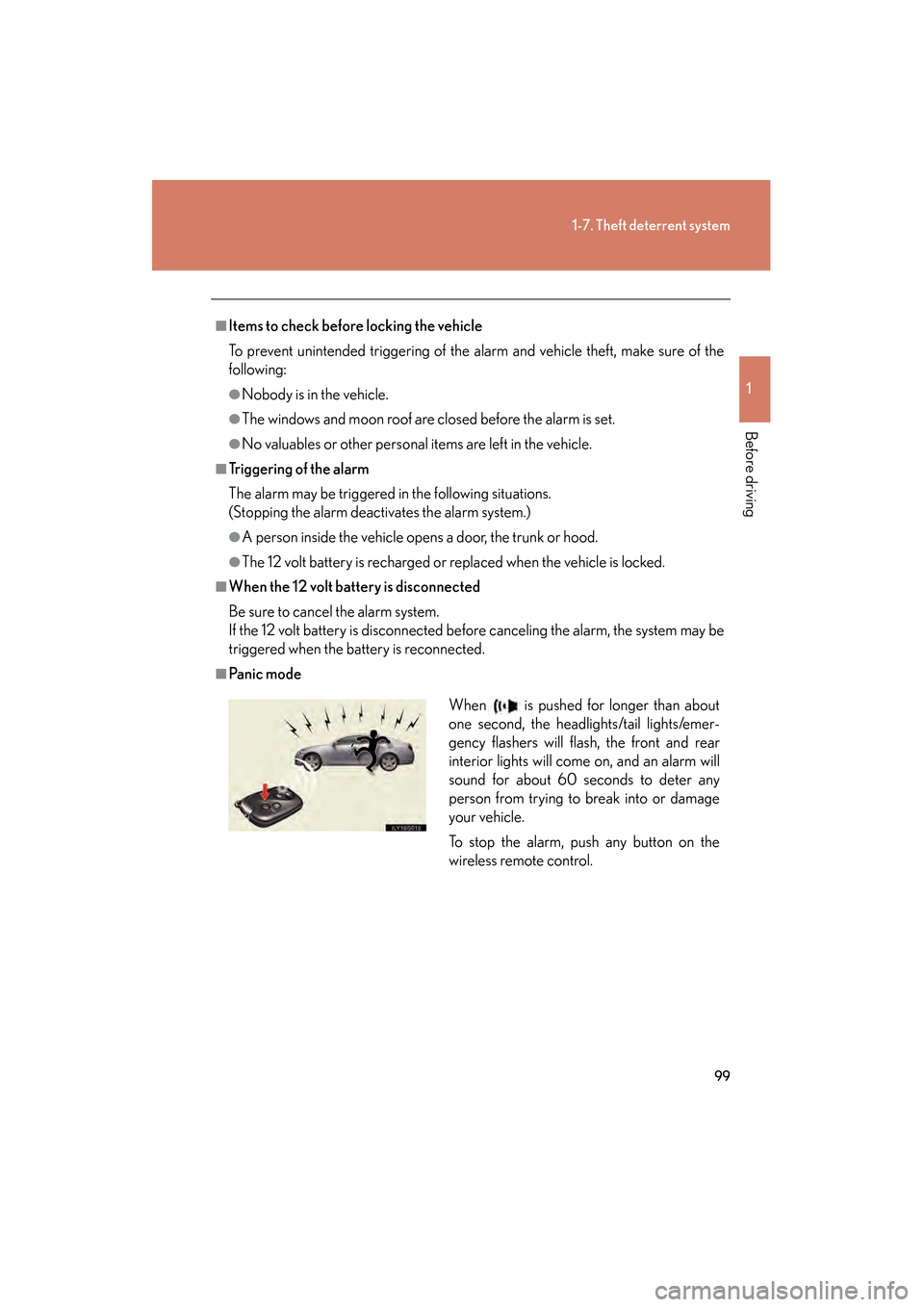
■Pa n i c m o d eWhen is pushed for longer than about
one second, the headlights/tail lights/emer-
gency flashers will flash, the front and rear
interior lights will come on, and an alarm will
sound for about 60 seconds to deter any
person from trying to break into or damage
your vehicle.
To stop the alarm, push any button on the
wireless remote control.
GS450h_HV_U.book Page 99 Monday, April 27, 2009 10:10 AM