bluetooth Lexus GS450h 2009 User Guide
[x] Cancel search | Manufacturer: LEXUS, Model Year: 2009, Model line: GS450h, Model: Lexus GS450h 2009Pages: 622
Page 332 of 622
331
3-4. Using the hands-free system (for cellular phone)
3
Interior features
GS_HV_U (OM30B44U)
April 27, 2009 10:09 am
Making a callOnce the Bluetooth
® phone is registered, you can make a call using the
following procedure.
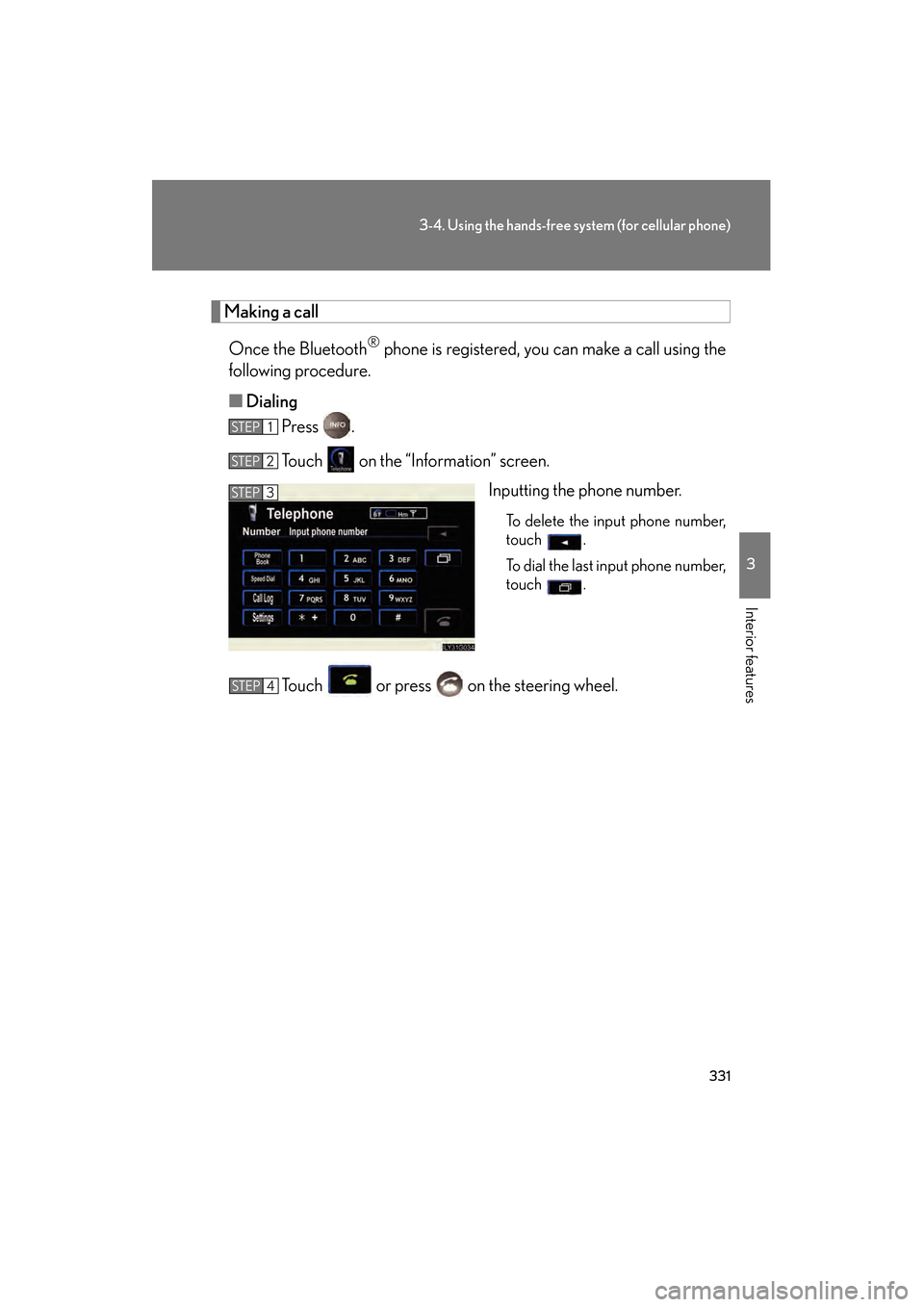
■ Dialing
Press .
Touch on the “Information” screen.
Inputting the phone number.
To delete the input phone number,
touch .
To dial the last input phone number,
touch .
Touch or press on the steering wheel.
STEP1
STEP2
STEP3
STEP4
GS450h_HV_U.book Page 331 Monday, April 27, 2009 10:10 AM
Page 344 of 622
343
3-4. Using the hands-free system (for cellular phone)
3
Interior features
GS_HV_U (OM30B44U)
April 27, 2009 10:09 am
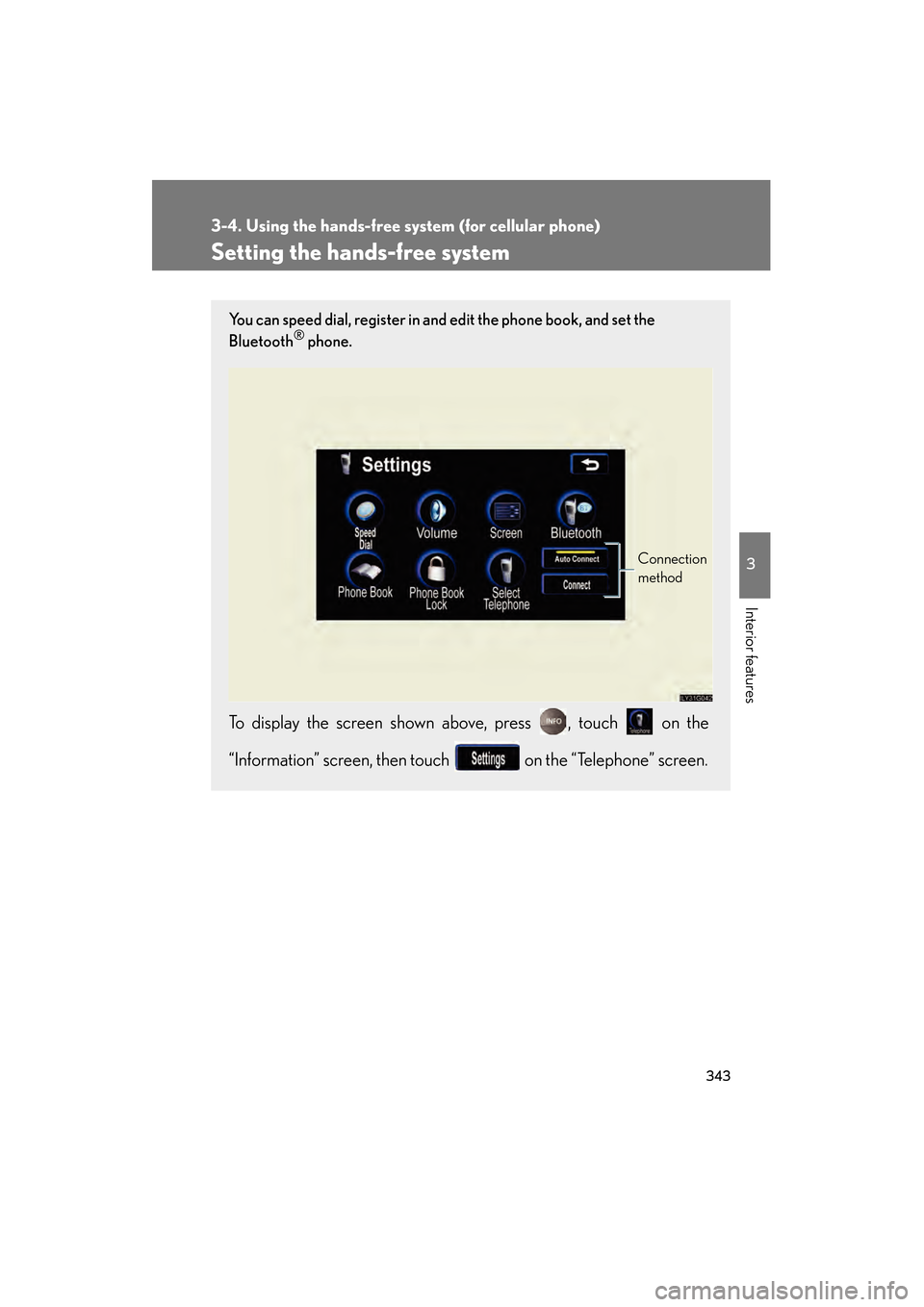
Setting the hands-free system
You can speed dial, register in and edit the phone book, and set the
Bluetooth® phone.
To display the screen shown above, press , touch on the
“Information” screen, then touch on the “Telephone” screen.
Connection
method
GS450h_HV_U.book Page 343 Monday, April 27, 2009 10:10 AM
Page 351 of 622
350
3-4. Using the hands-free system (for cellular phone)
GS_HV_U (OM30B44U)
April 27, 2009 10:09 am
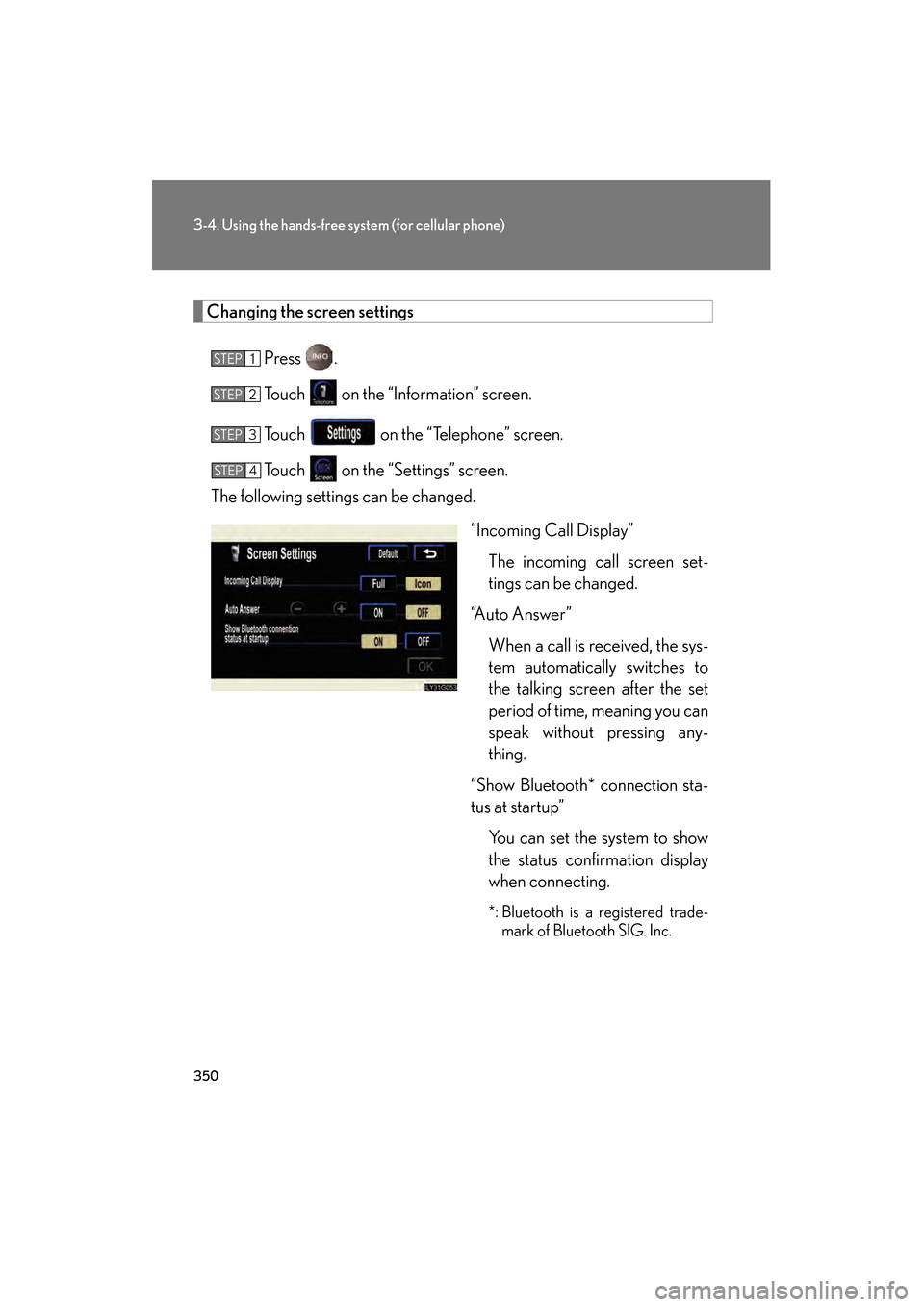
Changing the screen settings
Press .
Touch on the “Information” screen.
Touch on the “Telephone” screen.
Touch on the “Settings” screen.
The following settings can be changed.
“Incoming Call Display”The incoming call screen set-
tings can be changed.
“Auto Answer”
When a call is received, the sys-
tem automatically switches to
the talking screen after the set
period of time, meaning you can
speak without pressing any-
thing.
“Show Bluetooth* connection sta-
tus at startup” You can set the system to show
the status confirmation display
when connecting.
*: Bluetooth is a registered trade-mark of Bluetooth SIG. Inc.
STEP1
STEP2
STEP3
STEP4
GS450h_HV_U.book Page 350 Monday, April 27, 2009 10:10 AM
Page 352 of 622
351
3-4. Using the hands-free system (for cellular phone)
3
Interior features
GS_HV_U (OM30B44U)
April 27, 2009 10:09 am
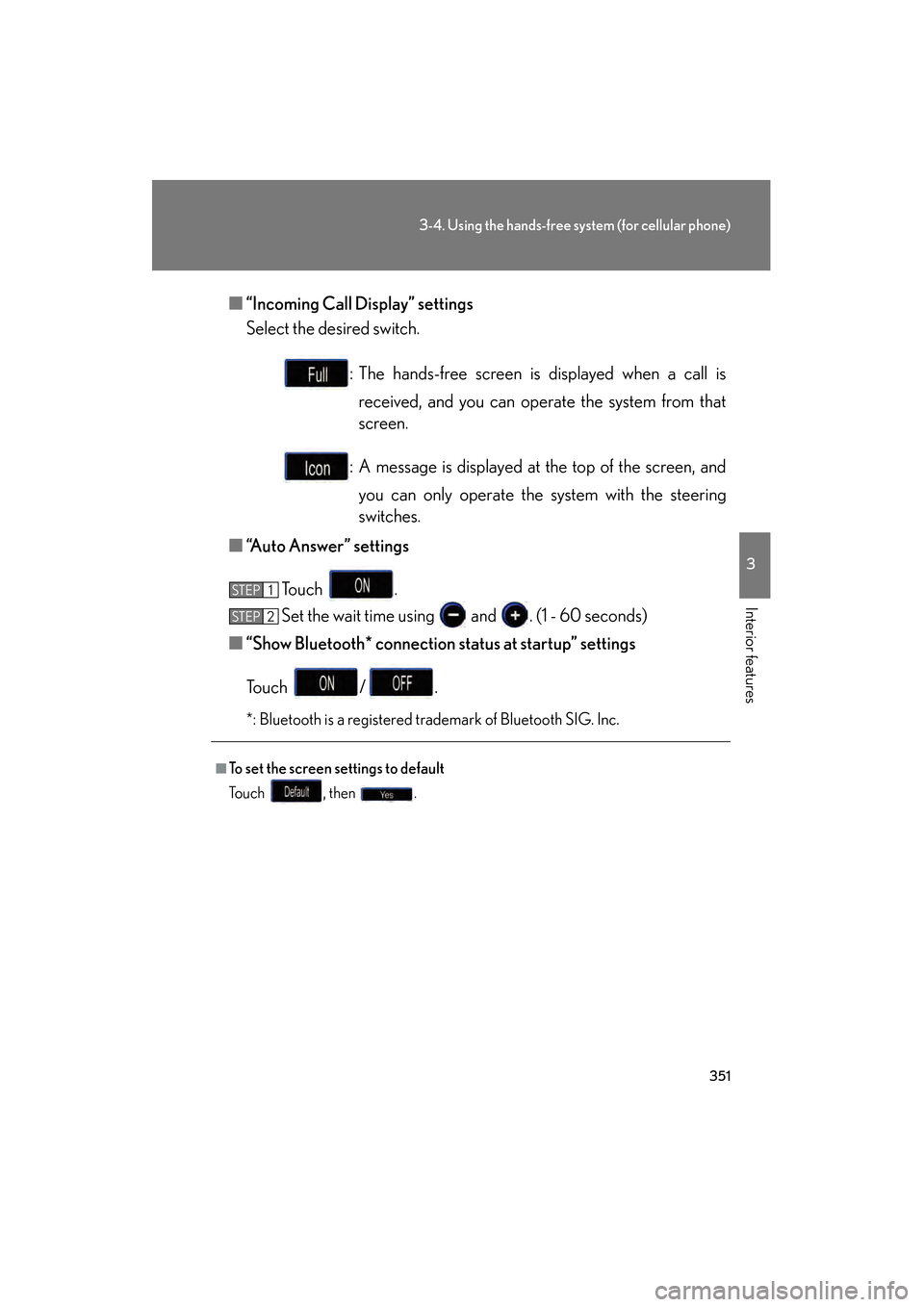
■“Incoming Call Display” settings
Select the desired switch.
: The hands-free screen is displayed when a call isreceived, and you can operate the system from that
screen.
: A message is displayed at the top of the screen, and you can only operate the system with the steering
switches.
■ “Auto Answer” settings
To u c h .
Set the wait time using and . (1 - 60 seconds)
■ “Show Bluetooth* connection status at startup” settings
To u c h / .
*: Bluetooth is a registered trademark of Bluetooth SIG. Inc.
■To set the screen settings to default
To u c h , t h e n .
STEP1
STEP6STEP2
GS450h_HV_U.book Page 351 Monday, April 27, 2009 10:10 AM
Page 366 of 622
365
3-4. Using the hands-free system (for cellular phone)
3
Interior features
GS_HV_U (OM30B44U)
April 27, 2009 10:09 am
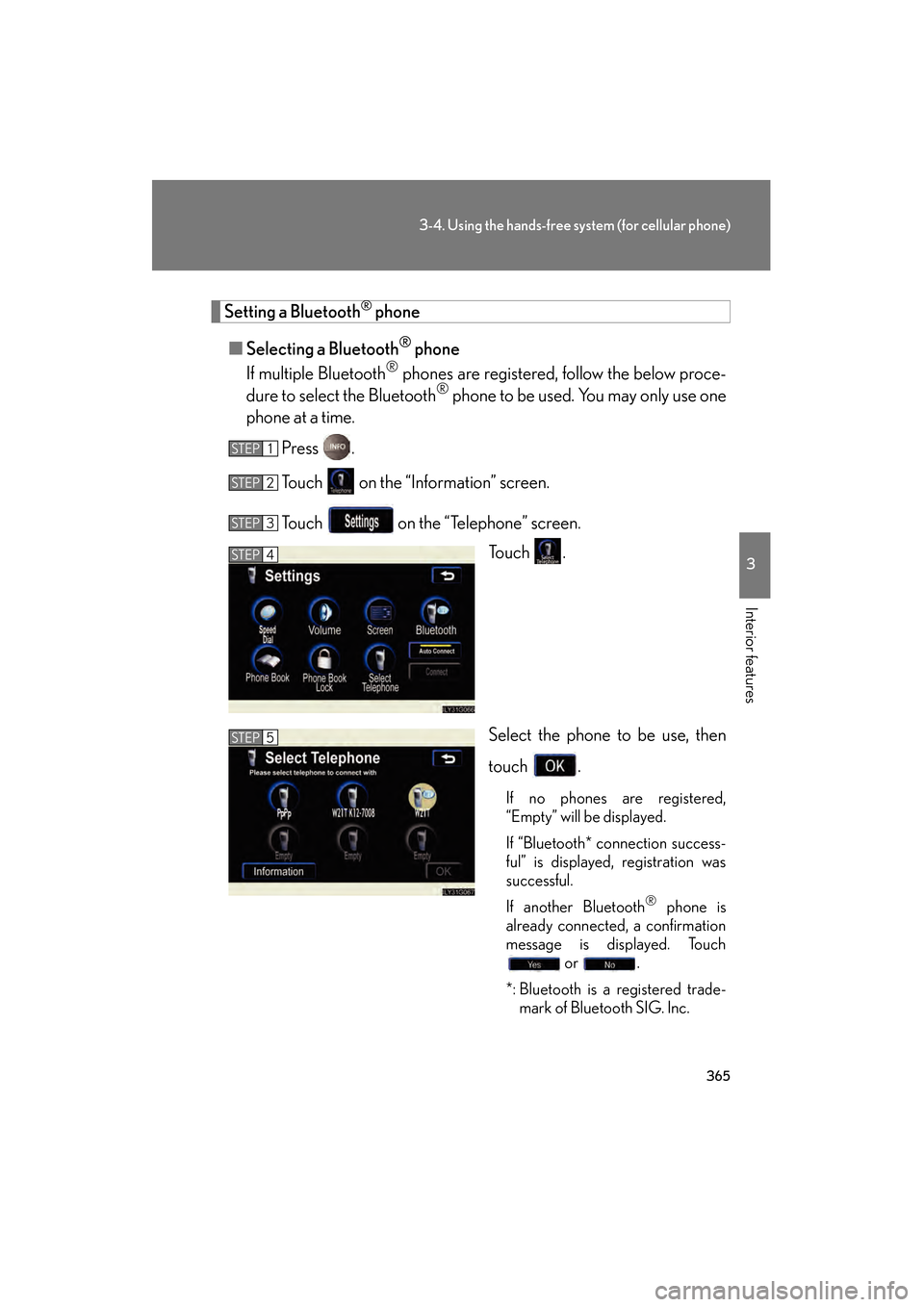
Setting a Bluetooth® phone
■ Selecting a Bluetooth
® phone
If multiple Bluetooth
® phones are registered, follow the below proce-
dure to select the Bluetooth® phone to be used. You may only use one
phone at a time.
Press .
Touch on the “Information” screen.
Touch on the “Telephone” screen. To u c h .
Select the phone to be use, then
touch .
If no phones are registered,
“Empty” will be displayed.
If “Bluetooth* connection success-
ful” is displayed, registration was
successful.
If another Bluetooth
® phone is
already connected, a confirmation
message is displayed. Touch or .
*: Bluetooth is a registered trade- mark of Bluetooth SIG. Inc.
STEP1
STEP2
STEP3
STEP4
STEP5
GS450h_HV_U.book Page 365 Monday, April 27, 2009 10:10 AM
Page 367 of 622
366
3-4. Using the hands-free system (for cellular phone)
GS_HV_U (OM30B44U)
April 27, 2009 10:09 am
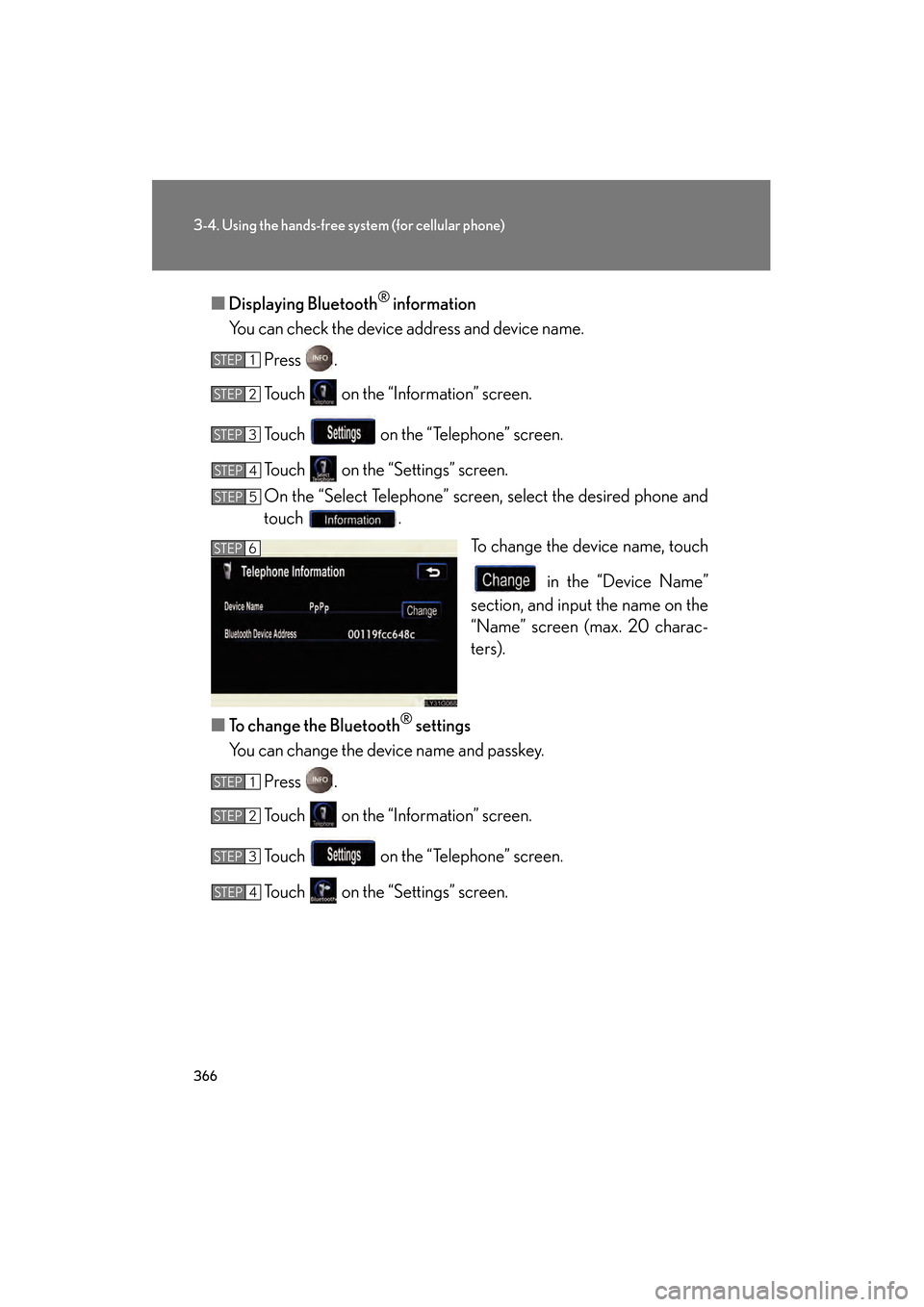
■Displaying Bluetooth® information
You can check the device address and device name.
Press .
Touch on the “Information” screen.
Touch on the “Telephone” screen.
Touch on the “Settings” screen.
On the “Select Telephone” screen, select the desired phone and
touch . To change the device name, touch
in the “Device Name”
section, and input the name on the
“Name” screen (max. 20 charac-
ters).
■ To change the Bluetooth
® settings
You can change the device name and passkey.
Press .
Touch on the “Information” screen.
Touch on the “Telephone” screen.
Touch on the “Settings” screen.
STEP1
STEP2
STEP3
STEP4
STEP5
STEP6
STEP1
STEP2
STEP3
STEP4
GS450h_HV_U.book Page 366 Monday, April 27, 2009 10:10 AM
Page 368 of 622
367
3-4. Using the hands-free system (for cellular phone)
3
Interior features
GS_HV_U (OM30B44U)
April 27, 2009 10:09 am
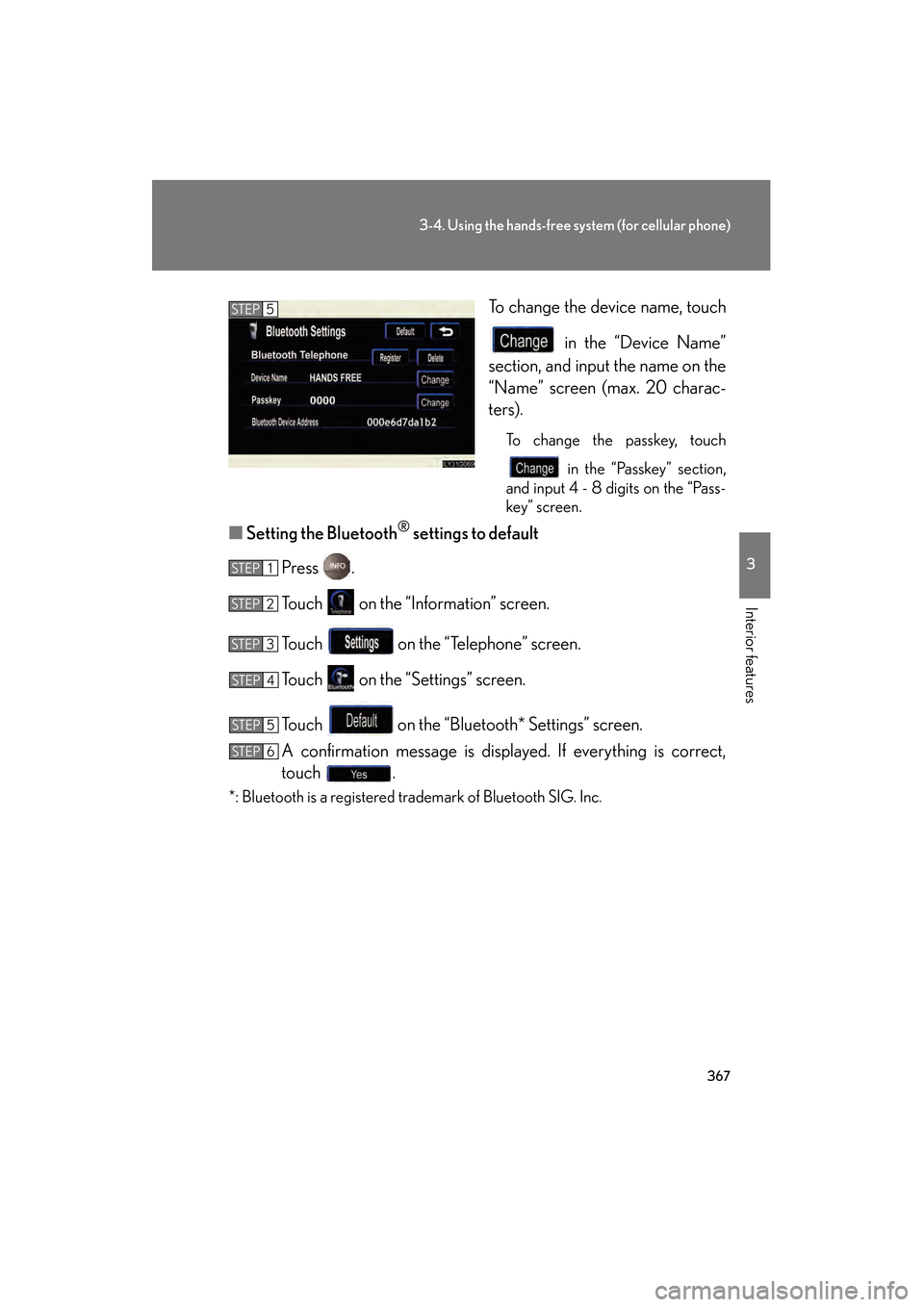
To change the device name, touch in the “Device Name”
section, and input the name on the
“Name” screen (max. 20 charac-
ters).
To change the passkey, touch
in the “Passkey” section,
and input 4 - 8 digits on the “Pass-
key” screen.
■ Setting the Bluetooth® settings to default
Press .
Touch on the “Information” screen.
Touch on the “Telephone” screen.
Touch on the “Settings” screen.
Touch on the “Bluetooth* Settings” screen.
A confirmation message is displayed. If everything is correct,
touch .
*: Bluetooth is a registered trademark of Bluetooth SIG. Inc.
STEP5
STEP1
STEP2
STEP3
STEP4
STEP5
STEP6
GS450h_HV_U.book Page 367 Monday, April 27, 2009 10:10 AM
Page 369 of 622
368
3-4. Using the hands-free system (for cellular phone)
GS_HV_U (OM30B44U)
April 27, 2009 10:09 am
■To delete the Bluetooth® settings
Press .
Touch on the “Information” screen.
Touch on the “Telephone” screen.
Touch on the “Settings” screen.
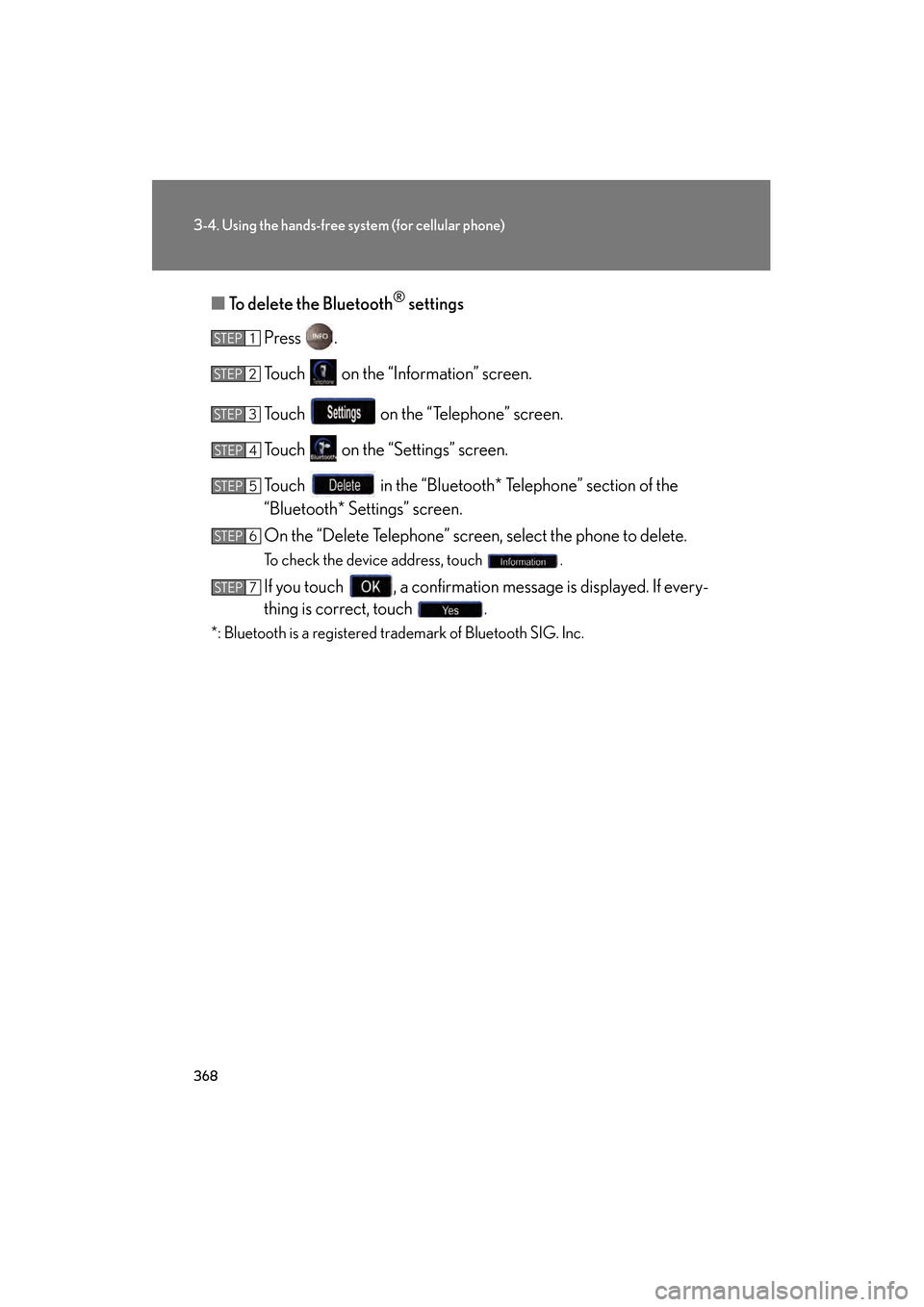
Touch in the “Bluetooth* Telephone” section of the
“Bluetooth* Settings” screen.
On the “Delete Telephone” screen, select the phone to delete.
To check the device address, touch .
If you touch , a confirmation message is displayed. If every-
thing is correct, touch .
*: Bluetooth is a registered trademark of Bluetooth SIG. Inc.
STEP1
STEP2
STEP3
STEP4
STEP5
STEP6
STEP7
GS450h_HV_U.book Page 368 Monday, April 27, 2009 10:10 AM
Page 405 of 622
404
3-7. Other interior features
GS_HV_U (OM30B44U)
April 27, 2009 10:09 am
Lexus Link System∗
∗: If equipped
The Lexus Link System is a communicati on service that uses Global Posi-
tioning System (GPS) data and cellular service to provide you with safety,
security and convenience. This system is only operational in GPS and cellu-
lar coverage areas. Button operation and voice commands are used to
operate the system. To operate the system, follow the voice guidance
instructions. For details about service and subscription, call the Lexus Link
Call Center at 1-800-25-LEXUS (1-800-255-3987) (toll-free).
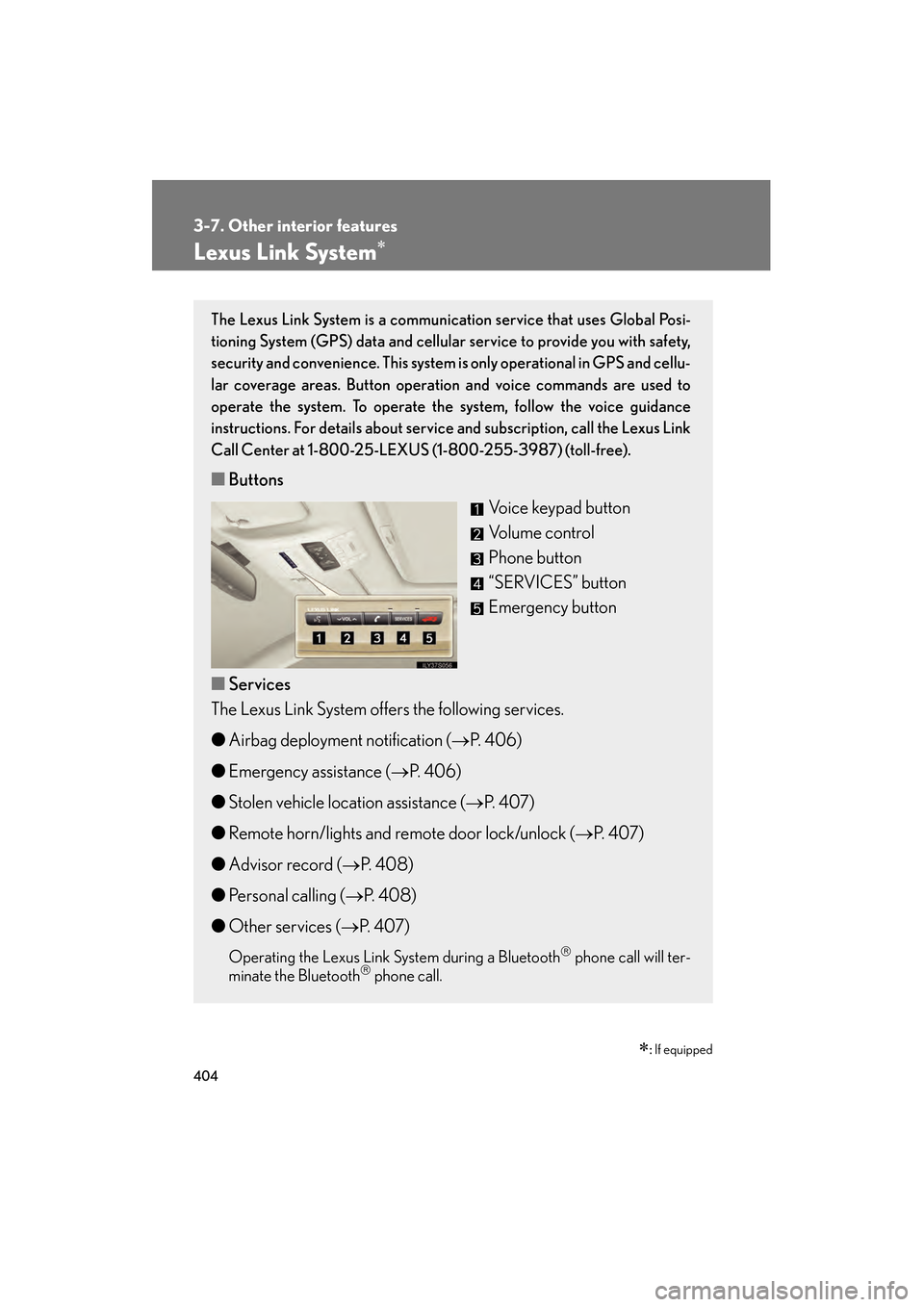
■ Buttons
Voice keypad button
Volume control
Phone button
“SERVICES” button
Emergency button
■ Services
The Lexus Link System offers the following services.
● Airbag deployment notification ( →P. 4 0 6 )
● Emergency assistance ( →P. 4 0 6 )
● Stolen vehicle location assistance ( →P. 4 0 7 )
● Remote horn/lights and remote door lock/unlock ( →P. 4 0 7 )
● Advisor record ( →P. 4 0 8 )
● Personal calling ( →P. 4 0 8 )
● Other services ( →P. 4 0 7 )
Operating the Lexus Link System during a Bluetooth phone call will ter-
minate the Bluetooth phone call.
GS450h_HV_U.book Page 404 Monday, April 27, 2009 10:10 AM
Page 605 of 622
604
GS_HV_U (OM30B44U)
April 27, 2009 10:09 am
Alphabetical index
Alphabetical index
A/C ............................................................248
ABS.............................................................. 214
ACCESSORY mode .......................... 149
Active stabilizer suspension system...................................................... 214
Adaptive variable
suspension system ............................. 213
Air conditioning system
Air conditioning filter .......................469
Automatic air conditioning system .................................................. 248
Airbags
Airbag operating conditions......... 106
Airbag precautions for your child............................................... 110
Airbag warning light ........................... 511
Curtain shield airbag precautions ...........................................113
General airbag pr ecautions ........... 110
Locations of airbags.......................... 103
Modification and disposal of airbags .....................................................114
Proper driving posture ...................... 101
Side airbag precautions .................... 110
Side and curtain shield airbags operating conditions ..................... 106
SRS airbags ........................................... 103
Alarm ............................................................98
Antenna .................................................... 267
Anti-lock brake system ....................... 214
Armrest.................................................... 388
Ashtrays ................................................... 383
Audio input ............................................... 319 Audio system
Antenna...................................................267
Audio input............................................. 319
Cassette player ...................................270
CD player/changer .......................... 274
DVD information .............................. 302
DVD player/changer ..................... 283
DVD video/audio............................. 286
MP3/WMA disc................................279
Optimal use ........................................... 314
Portable music player ....................... 319
Radio ......................................................... 261
Steering switches .............................. 320
Video CD ............................................. 298
Automatic headlight leveling system ....................................................... 171
Automatic light control system.........169
Back-up lights Wattage ..................................................573
Battery 12 volt battery .......................................447
Checking................................................447
Hybrid battery
(Traction battery)...............................28
If the 12 volt battery is
discharged ........................................ 553
Preparing and checking
before winter..................................... 232
Bluetooth
®.............................................. 328
Brake Fluid .......................................................... 446
Parking brake........................................ 157
Brake assist ...............................................214
A
B
GS450h_HV_U.book Page 604 Monday, April 27, 2009 10:10 AM