ESP Lexus GS450h 2009 Owner's Guide
[x] Cancel search | Manufacturer: LEXUS, Model Year: 2009, Model line: GS450h, Model: Lexus GS450h 2009Pages: 622
Page 207 of 622
206
2-4. Using other driving systems
GS_HV_U (OM30B44U)
April 27, 2009 10:09 am
■When using the intuitive parking assist
●The sensors’ detection areas and reaction times are limited. When moving for-
ward or reversing, check the areas surrounding the vehicle (especially the sides
of the vehicle) for safety, and drive slowly, using the brake to control the vehicle’s
speed.
• The sensors’ detection areas are limited to the areas around the vehicle’s frontand rear bumpers.
• Depending on the shape of the obstacle and other factors, the detection dis- tance may shorten, or detection may be impossible.
• There will be a short delay between obstacle detection and display. Even at
slow speeds, there is a possibility that the obstacle will come within 0.8 ft. (25
cm) of the vehicle before the display is shown and the warning beep sounds.
• Braking distance may differ according to the road conditions (rain, gravel etc.).
• It might be difficult to hear beeps due to the volume of audio system or air flow noise of air conditioning system.
• For long obstacles such as walls, the obstacle warning may change as the obstacle gets closer.
GS450h_HV_U.book Page 206 Monday, April 27, 2009 10:10 AM
Page 208 of 622
207
2-4. Using other driving systems
2
When driving
GS_HV_U (OM30B44U)
April 27, 2009 10:09 am
●In the following situations, the intuitive parking assist may not function correctly,
possibly leading to an accident.
• There is ice, snow or mud on the sensors. (Wiping the sensors will resolve thisproblem.)
• The sensor area is frozen. (Thawing the area will resolve this problem.) In especially cold weather, if a sensor is frozen the screen may show an abnor-
mal display, or obstacles may not be detected.
• The vehicle angle is especially wide.
• In harsh sunlight or intense cold weather.
• When driving on bumpy, sloped or gravel roads, or over grass.
• If there is something producing ultrasonic waves nearby, such as another vehicle’s horn, motorcycle engine noise, air braking sound from heavy-duty
vehicles, or another vehicle using the intuitive parking assist.
• In heavy rain, or if water is splashed on the sensors.
• If a commercial fender pole or radio antenna is installed.
• If towing eyelet is installed on your vehicle.
• If moving towards a high curb or a curb corner.
• Objects such as signs may cause the detection distance to shorten.
• The area directly under the bumpers is not detected. Objects lower than the sensors or thin stakes etc. may be detected initially,
but as they draw closer, they may cease to be detected.
• If obstacles draw too close to the sensor.
■Obstacles that may not be detected correctly
The following obstacles may not be detected.
●Thin objects such as wire, fencing or rope.
●Objects that absorb sound waves, such as cotton or snow.
●Objects with sharp corners.
●Objects where the upper section projects out over the lower section.
●Low objects.
■If the display flashes and a message is displayed
→ P. 5 3 1
GS450h_HV_U.book Page 207 Monday, April 27, 2009 10:10 AM
Page 215 of 622
214
2-4. Using other driving systems
GS_HV_U (OM30B44U)
April 27, 2009 10:09 am
Driving assist systems
To help enhance driving safety and performance, the following systems
operate automatically in response to various driving situations. Be aware,
however, that these systems are supplementary and should not be relied
upon too heavily when operating the vehicle.
■ ABS (Anti-lock Brake System)
Helps to prevent wheel lock when the brakes are applied suddenly, or if
the brakes are applied while driving on a slippery road surface.
■Brake assist
Generates an increased level of braking force after the brake pedal is
depressed, when the system detects a panic stop situation.
■Enhanced VSC (Enhanced Vehicle Stability Control)
Helps the driver to control skidding when swerving suddenly or turning on
slippery road surfaces.
■TRAC (Traction Control)
Helps to maintain drive power and prevents the rear wheels from spinning
when starting the vehicle or accelerating on slippery roads.
■Hill-start assist control
Helps prevent the vehicle from rolling backwards when starting on an
incline or slippery slope. It operates for approximately 5 seconds at maxi-
mum.
■EPS (Electric Power Steering)
Employs an electric motor to reduce the amount of effort needed to turn
the steering wheel.
■Active stabilizer suspensi on system (if equipped)
Reduces sway when cornering according to steering wheel movement
and the selected suspension damping mode, in order to maintain a stable
vehicle posture.
GS450h_HV_U.book Page 214 Monday, April 27, 2009 10:10 AM
Page 221 of 622
220
2-4. Using other driving systems
GS_HV_U (OM30B44U)
April 27, 2009 10:09 am
CAUTION
■The hill-start assist control may not operate effectively when
●On steep inclines.
●On icy surfaces.
■When the Enhanced VSC is activated
The slip indicator light flashes and a warning buzzer sounds. Always drive carefully.
Reckless driving may cause an accident. Exercise particular care when the indica-
tor light flashes and a buzzer sounds.
■When TRAC and Enhanced VSC are off
Be especially careful and drive at a speed appropriate to the road conditions. As
these are systems to ensure vehicle stability and driving force, do not turn off TRAC
and Enhanced VSC unless necessary.
■Replacing tires
Make sure that all tires are of the same size, brand, tread pattern and total load
capacity. In addition, make sure that the tires are inflated to the specified tire pres-
sure level.
The ABS and Enhanced VSC will not function correctly if different tires are fitted on
the vehicle.
Contact your Lexus dealer for further information when replacing tires or wheels.
■Handling of tires and suspension
Using tires with any kind of problem or modifying the suspension will affect the driv-
ing assist systems, and may cause the system to malfunction.
GS450h_HV_U.book Page 220 Monday, April 27, 2009 10:10 AM
Page 226 of 622
225
2-4. Using other driving systems
2
When driving
GS_HV_U (OM30B44U)
April 27, 2009 10:09 am
■CertificationFor vehicles sold in the U.S.A.
FCC ID: HYQDNMWR005
This device complies with Part 15 of the FCC Rules. Operation is subject to the fol-
lowing two conditions: (1) this device may not cause harmful interference, and (2)
this device must accept any interference received, including interference that may
cause undesired operation.
FCC WARNING
Changes or modifications not expressly approved by the party responsible for
compliance could void the user’s authority to operate the equipment.
Radio frequency radiation exposure Information:
This equipment complies with FCC radiatio n exposure limits set forth for an uncon-
trolled environment.
This equipment should be installed and operated with minimum distance of 20 cm
between the radiator and your body.
This transmitter must not be co-located or operating in conjunction with any other
antenna or transmitter.
For vehicles sold in Canada
Operation is subject to the following two conditions: (1) this device may not cause
interference, and (2) this device must accept any interference, including interfer-
ence that may cause undesired operation of the device.
GS450h_HV_U.book Page 225 Monday, April 27, 2009 10:10 AM
Page 242 of 622
241
3-1. Using the touch screen
3
Interior features
GS_HV_U (OM30B44U)
April 27, 2009 10:09 am
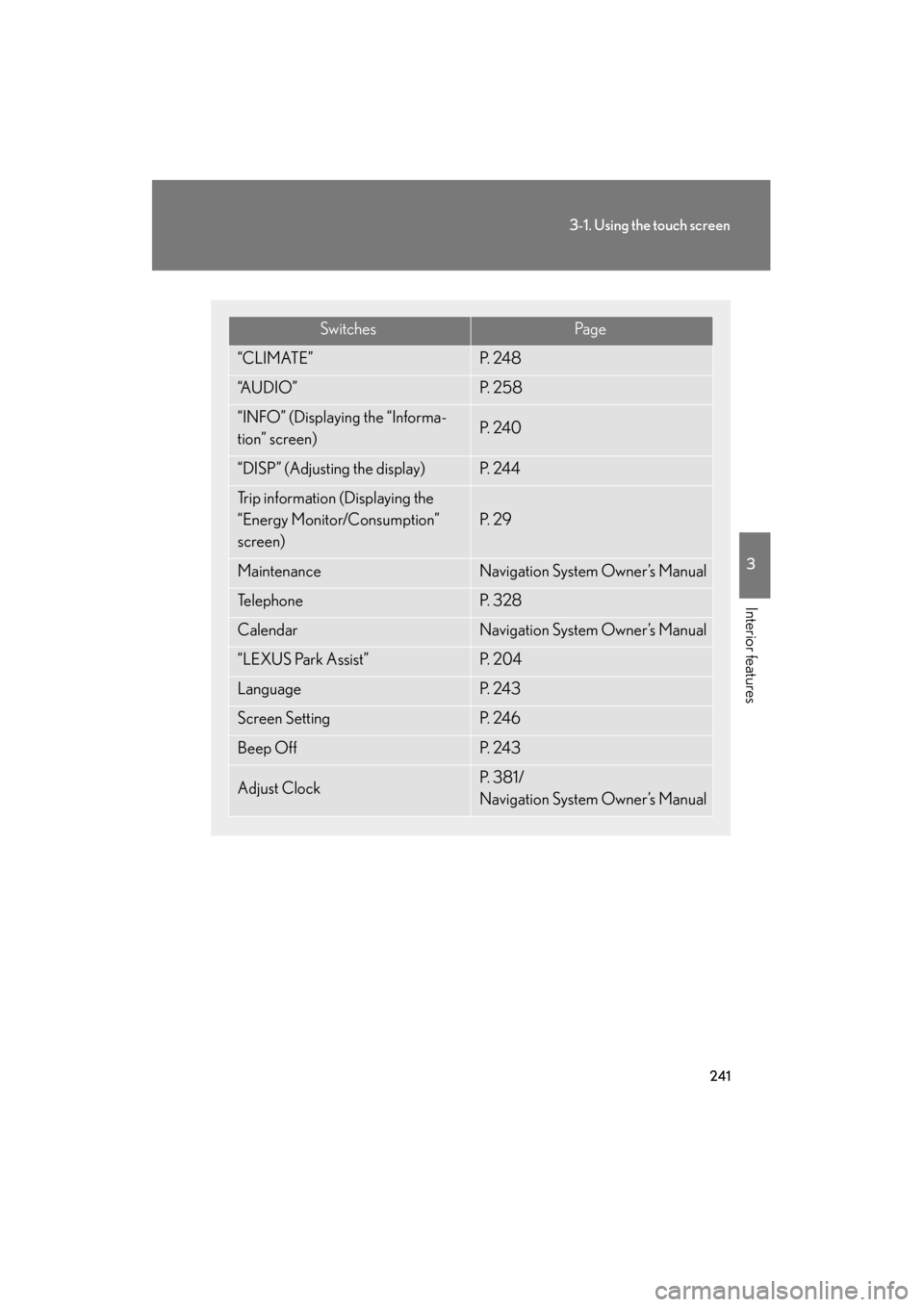
SwitchesPa g e
“CLIMATE”P. 2 4 8
“A U D I O ”P. 2 5 8
“INFO” (Displaying the “Informa-
tion” screen)P. 2 4 0
“DISP” (Adjusting the display)P. 2 4 4
Trip information (Displaying the
“Energy Monitor/Consumption”
screen)
P. 2 9
MaintenanceNavigation System Owner’s Manual
Te l e p h o n eP. 3 2 8
CalendarNavigation System Owner’s Manual
“LEXUS Park Assist”P. 2 0 4
LanguageP. 2 4 3
Screen SettingP. 2 4 6
Beep OffP. 2 4 3
Adjust ClockP. 3 8 1 /
Navigation System Owner’s Manual
GS450h_HV_U.book Page 241 Monday, April 27, 2009 10:10 AM
Page 243 of 622

242
3-1. Using the touch screen
GS_HV_U (OM30B44U)
April 27, 2009 10:09 am
The initial screenIf the “POWER” switch is set to
ACCESSORY or ON mode, the
initializing screen will be displayed
for a few seconds as the system
starts up.
■To avoid damaging the touch screen
●Touch the screen lightly with your finger. If there is no response, remove your fin-
ger from the screen and try again.
●Remove any dirt on the screen by wiping with a soft cloth. Do not use detergent.
■When using the touch screen
●If the screen is cold, the display may be dark, or the system may seem to be
operating slightly slower than normal.
●The screen may seem dark and hard to see when viewed through sunglasses.
Change your angle of viewing, adjust the display on the “Display” screen or
remove your sunglasses.
GS450h_HV_U.book Page 242 Monday, April 27, 2009 10:10 AM
Page 260 of 622
259
3-3. Using the audio system
3
Interior features
GS_HV_U (OM30B44U)
April 27, 2009 10:09 am
■Using cellular phones
Interference may be heard through the audio system’s speakers if a cellular phone is
being used inside or close to the vehicle while the audio system is operating.
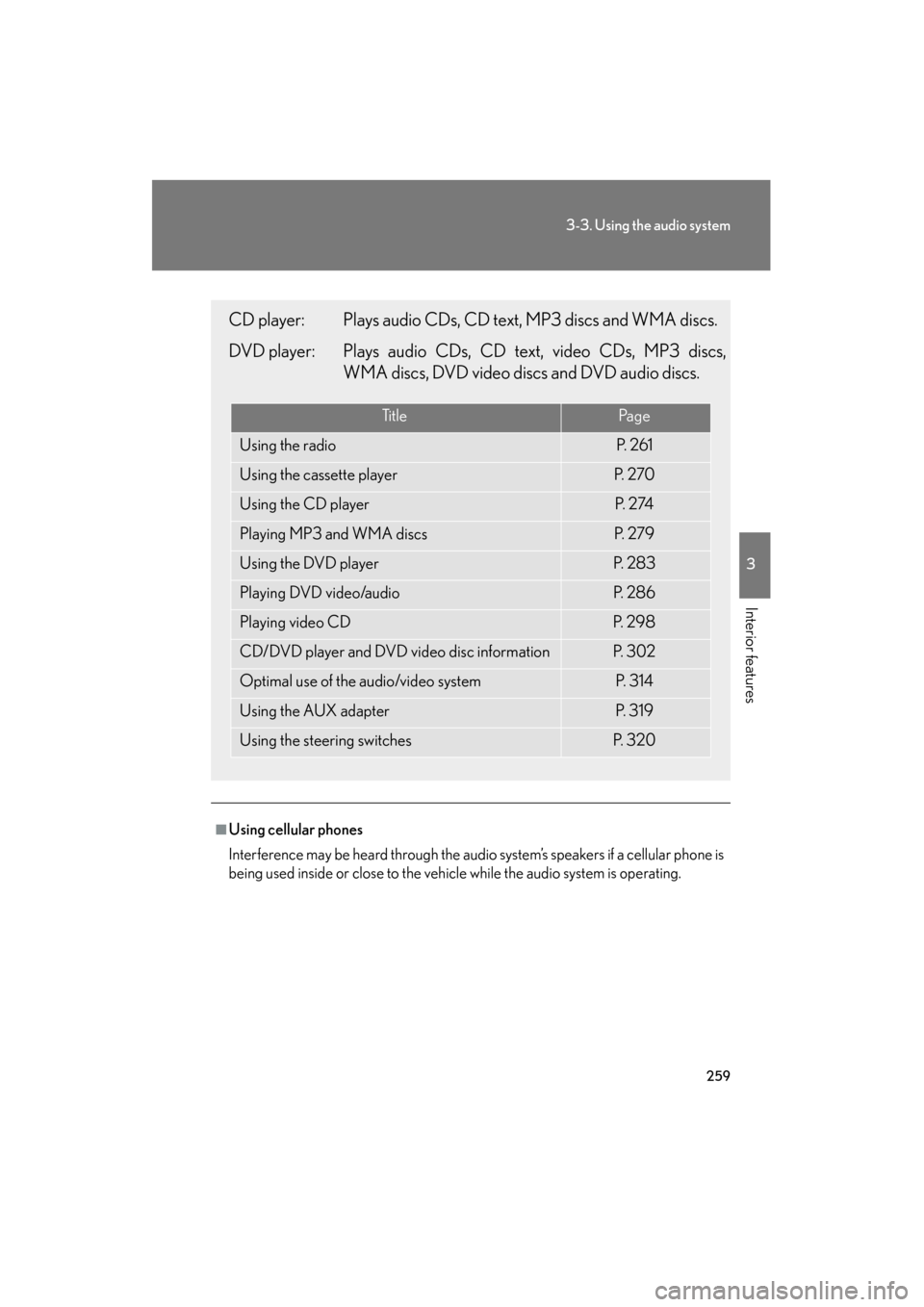
CD player: Plays audio CDs, CD text, MP3 discs and WMA discs.
DVD player: Plays audio CDs, CD text, video CDs, MP3 discs,WMA discs, DVD video discs and DVD audio discs.
Ti t l ePa g e
Using the radioP. 2 6 1
Using the cassette playerP. 2 7 0
Using the CD playerP. 2 74
Playing MP3 and WMA discsP. 2 7 9
Using the DVD playerP. 2 8 3
Playing DVD video/audioP. 2 8 6
Playing video CDP. 2 9 8
CD/DVD player and DVD video disc informationP. 3 0 2
Optimal use of the audio/video systemP. 3 1 4
Using the AUX adapterP. 3 1 9
Using the steering switchesP. 3 2 0
GS450h_HV_U.book Page 259 Monday, April 27, 2009 10:10 AM
Page 273 of 622
272
3-3. Using the audio system
GS_HV_U (OM30B44U)
April 27, 2009 10:09 am
Using Dolby® Noise Reduction
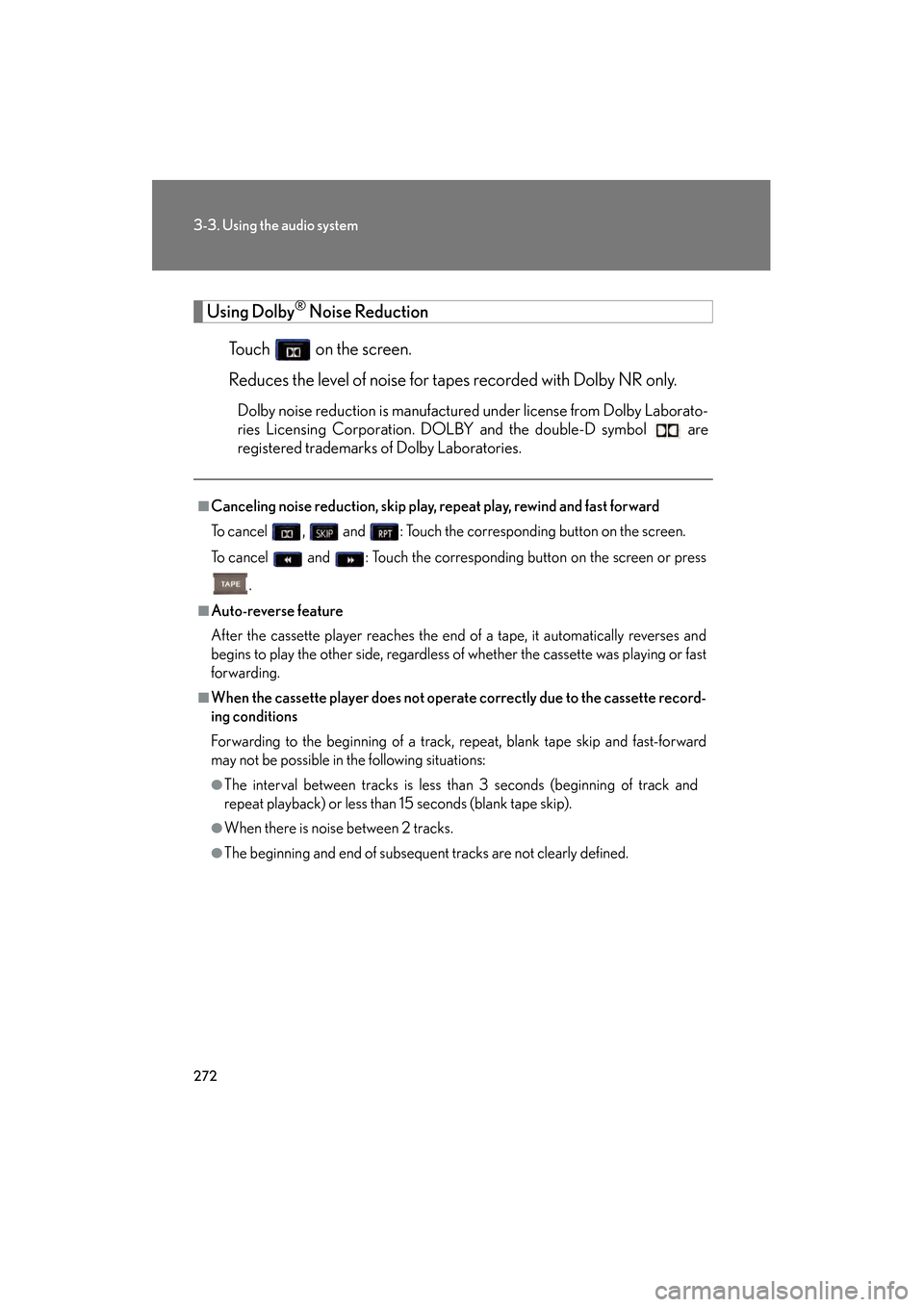
Touch on the screen.
Reduces the level of noise for tapes recorded with Dolby NR only.
Dolby noise reduction is manufactured under license from Dolby Laborato-
ries Licensing Corporation. DOLBY and the double-D symbol are
registered trademarks of Dolby Laboratories.
■Canceling noise reduction, skip play, repeat play, rewind and fast forward
To cancel , and : Touch the corresponding button on the screen.
To cancel and : Touch the corresponding button on the screen or press
.
■Auto-reverse feature
After the cassette player reaches the end of a tape, it automatically reverses and
begins to play the other side, regardless of whether the cassette was playing or fast
forwarding.
■When the cassette player does not operate correctly due to the cassette record-
ing conditions
Forwarding to the beginning of a track, repeat, blank tape skip and fast-forward
may not be possible in the following situations:
●The interval between tracks is less than 3 seconds (beginning of track and
repeat playback) or less than 15 seconds (blank tape skip).
●When there is noise between 2 tracks.
●The beginning and end of subsequent tracks are not clearly defined.
GS450h_HV_U.book Page 272 Monday, April 27, 2009 10:10 AM
Page 296 of 622
295
3-3. Using the audio system
3
Interior features
GS_HV_U (OM30B44U)
April 27, 2009 10:09 am
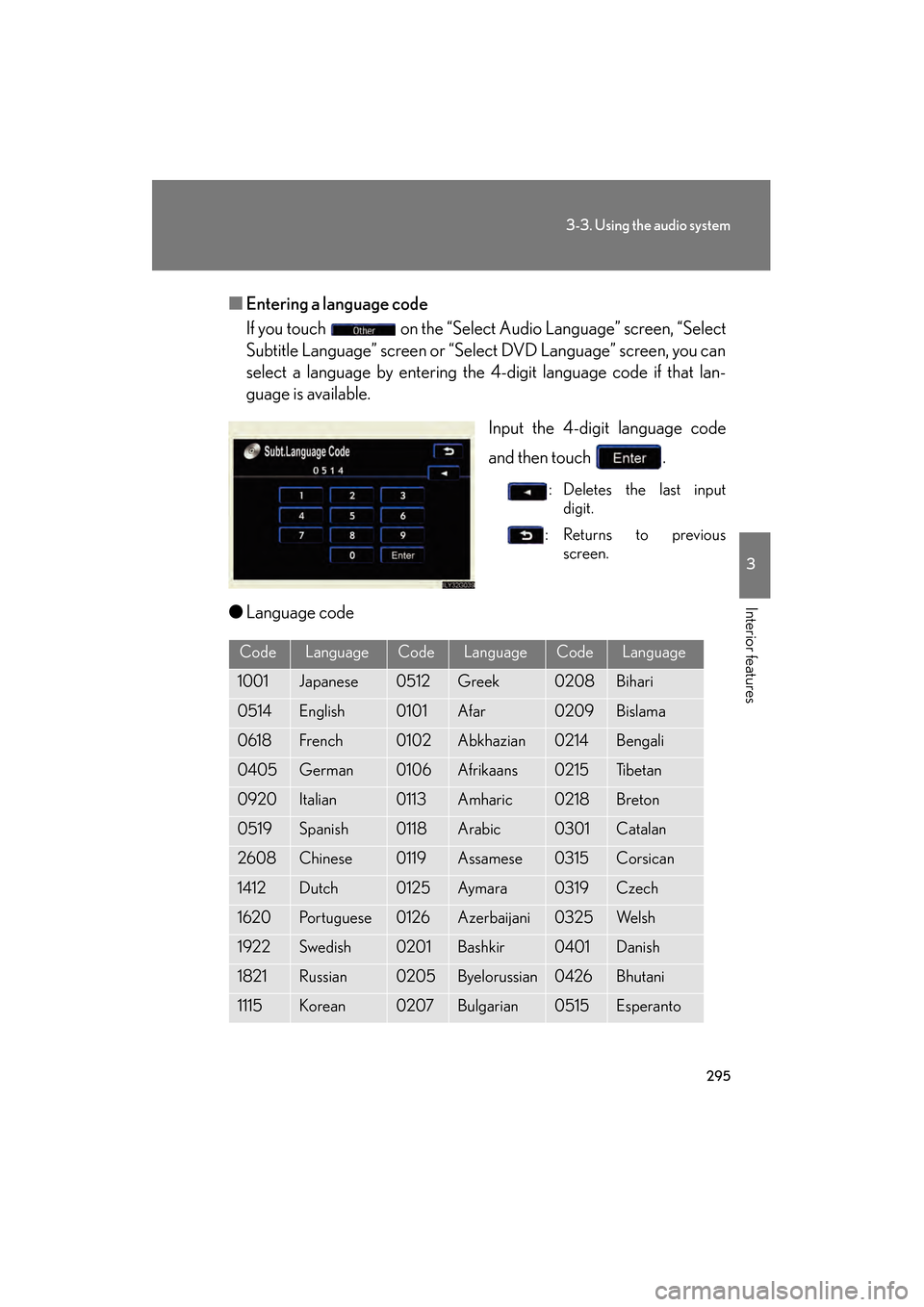
■Entering a language code
If you touch on the “Select Audio Language” screen, “Select
Subtitle Language” screen or “Select DVD Language” screen, you can
select a language by entering the 4-digit language code if that lan-
guage is available.
Input the 4-digit language code
and then touch .
: Deletes the last inputdigit.
:Returns to previous screen.
●Language code
CodeLanguageCodeLanguageCodeLanguage
1001Japanese0512Greek0208Bihari
0514English0101Afar0209Bislama
0618French0102Abkhazian0214Bengali
0405German0106Afrikaans0215Ti b e t a n
0920Italian0113Amharic0218Breton
0519Spanish0118Arabic0301Catalan
2608Chinese0119Assamese0315Corsican
1412Dutch0125Aym a ra0319Czech
1620Portuguese0126Azerbaijani0325We l s h
1922Swedish0201Bashkir0401Danish
1821Russian0205Byelorussian0426Bhutani
1115Korean0207Bulgarian0515Esperanto
GS450h_HV_U.book Page 295 Monday, April 27, 2009 10:10 AM