lock Lexus GS450h 2009 Manual PDF
[x] Cancel search | Manufacturer: LEXUS, Model Year: 2009, Model line: GS450h, Model: Lexus GS450h 2009Pages: 622
Page 231 of 622
230
2-5. Driving information
GS_HV_U (OM30B44U)
April 27, 2009 10:09 am
CAUTION
■Things that must not be carried in the trunk
The following things may cause a fire if loaded in the trunk.
●Receptacles containing gasoline
●Aerosol cans
■Storage precautions
Observe the following precautions.
Failing to do so may result in death or serious injury.
●Do not place cargo or luggage in or on the following locations as the item may
get under the brake or accelerator pedal and prevent the pedals from being
depressed properly, block the driver’s vision, or hit the driver or passengers,
causing an accident.
• Driver’s feet
• Front passenger or rear seats (when stacking items)
• Package tray
• Instrument panel
•Dashboard
●Secure all items in the occupant compartment, as they may shift and injure some-
one during sudden braking, sudden swerving or an accident.
■Weight of the load
●Improper loading may cause deterioration of steering or braking control result-
ing in an accident which may cause death or serious injury.
●Do not exceed the maximum axle weight rating or the total vehicle weight rating.
●Even if the total load of occupant’s weight and the cargo load is less than the total
load capacity, do not apply the load unevenly. Improper loading may cause dete-
rioration of steering or braking control which may cause death or serious injury.
GS450h_HV_U.book Page 230 Monday, April 27, 2009 10:10 AM
Page 234 of 622
233
2-5. Driving information
2
When driving
GS_HV_U (OM30B44U)
April 27, 2009 10:09 am
Regulations on the use of tire chains
● Regulations regarding the use of tire chains vary according to location
and type of road. Always check local regulations before installing
chains.
● Use SAE Class “S” type radial tire chains, with the exception of radial
cable chains or V-bar type chains.
• Install the chains on the rear tires.
• Refer to the explanation that comes with the tire chains for installa-
tion instructions.
● Retighten the chains after driving 1 /4 - 1 /2 mile (0.5 - 1.0 km).
■When driving the vehicle
Accelerate the vehicle slowly and drive at a reduced speed suitable
to road conditions.
■ When parking the vehicle
Park the vehicle and move the shift lever to “P” without setting the
parking brake. The parking brake may freeze up, preventing it from
being released. If necessary, block the wheels to prevent inadvert-
ent sliding or creeping.
GS450h_HV_U.book Page 233 Monday, April 27, 2009 10:10 AM
Page 240 of 622
Interior features3
239
GS_HV_U (OM30B44U)
April 27, 2009 10:09 am
3-3. Using the audio systemAudio system type................. 258
Using the radio......................... 261
Using the cassette player .... 270
Using the CD player .............. 274
Playing MP3 and WMA discs............................ 279
Using the DVD player.......... 283
Playing DVD video/audio .... 286
Playing video CD (with DVD player) .............. 298
CD/DVD player and DVD video disc information ...... 302
Optimal use of the
audio/video system .............. 314
Using the AUX adapter ........ 319
Using the steering switches................................. 320
3-4. Using the hands-free system (for cellular phone)
Hands-free system (for cellular phone) ............ 323
Using the Bluetooth
®
phone ..................................... 328
Setting the hands-free
system .................................... 343 3-5. Using the interior lights
Interior lights list .................... 369
3-6. Using the storage features List of storage features......... 372
3-7. Other interior features Sun visors ................................. 379
Vanity mirrors ......................... 380
Clock .......................................... 381
Outside temperature
display..................................... 382
Ashtrays.................................... 383
Cigarette lighter .................... 384
Power outlet ............................ 385
Seat heaters/ventilators ...... 386
Armrest .................................... 388
Rear sunshade ........................ 389
Floor mats ................................. 391
Trunk features ......................... 392
Garage door opener ............ 394
Compass .................................. 400
Lexus Link System ................. 404
GS450h_HV_U.book Page 239 Monday, April 27, 2009 10:10 AM
Page 242 of 622
241
3-1. Using the touch screen
3
Interior features
GS_HV_U (OM30B44U)
April 27, 2009 10:09 am
SwitchesPa g e
“CLIMATE”P. 2 4 8
“A U D I O ”P. 2 5 8
“INFO” (Displaying the “Informa-
tion” screen)P. 2 4 0
“DISP” (Adjusting the display)P. 2 4 4
Trip information (Displaying the
“Energy Monitor/Consumption”
screen)
P. 2 9
MaintenanceNavigation System Owner’s Manual
Te l e p h o n eP. 3 2 8
CalendarNavigation System Owner’s Manual
“LEXUS Park Assist”P. 2 0 4
LanguageP. 2 4 3
Screen SettingP. 2 4 6
Beep OffP. 2 4 3
Adjust ClockP. 3 8 1 /
Navigation System Owner’s Manual
GS450h_HV_U.book Page 241 Monday, April 27, 2009 10:10 AM
Page 256 of 622
255
3-2. Using the air conditioning system and defogger
3
Interior features
GS_HV_U (OM30B44U)
April 27, 2009 10:09 am
■Automatic mode for air intake control
In automatic mode, the system detects exhaust gas and other pollutants and auto-
matically switches between outside air and recirculated air modes.
When the air conditioning is off, and the fan is operating, turning the auto mode on
will activate the air conditioning system.
■Micro dust and pollen filter
●In order to prevent the windows from fogging up when the outside air is cold,
the following may occur.
• Outside air mode does not switch to .
• The air conditioning system operates automatically.
• The operation cancels after 1 minute.
●In rainy weather, the windows may fog up. Press .
CAUTION
■To prevent the windshield from fogging up
Do not use during cool air operation in extremely humid weather. The differ-
ence between the temperature of the outside air and that of the windshield can
cause the outer surface of the windshield to fog up, blocking your vision.
NOTICE
■To prevent 12 volt battery discharge
Do not leave the automatic air conditioning system on longer than necessary when
the hybrid system is off.
GS450h_HV_U.book Page 255 Monday, April 27, 2009 10:10 AM
Page 295 of 622
294
3-3. Using the audio system
GS_HV_U (OM30B44U)
April 27, 2009 10:09 am
■Setting subtitle language
Touch .
Select the desired language.
If you cannot find the desired language, touch and input the
desired language code. ( →P. 2 9 5 )
: Returns to previous screen.
■ Setting menu language
Touch .
Select the desired language.
If you cannot find the desired language, touch and input the
desired language code. ( →P. 2 9 5 )
: Returns to previous screen.
■ Setting angle mark ON or OFF
If the DVD has angle options, you can turn the angle mark on or off.
Touch . Each time you touch the button, the multi angle
mark on the screen turns on or off alternately.
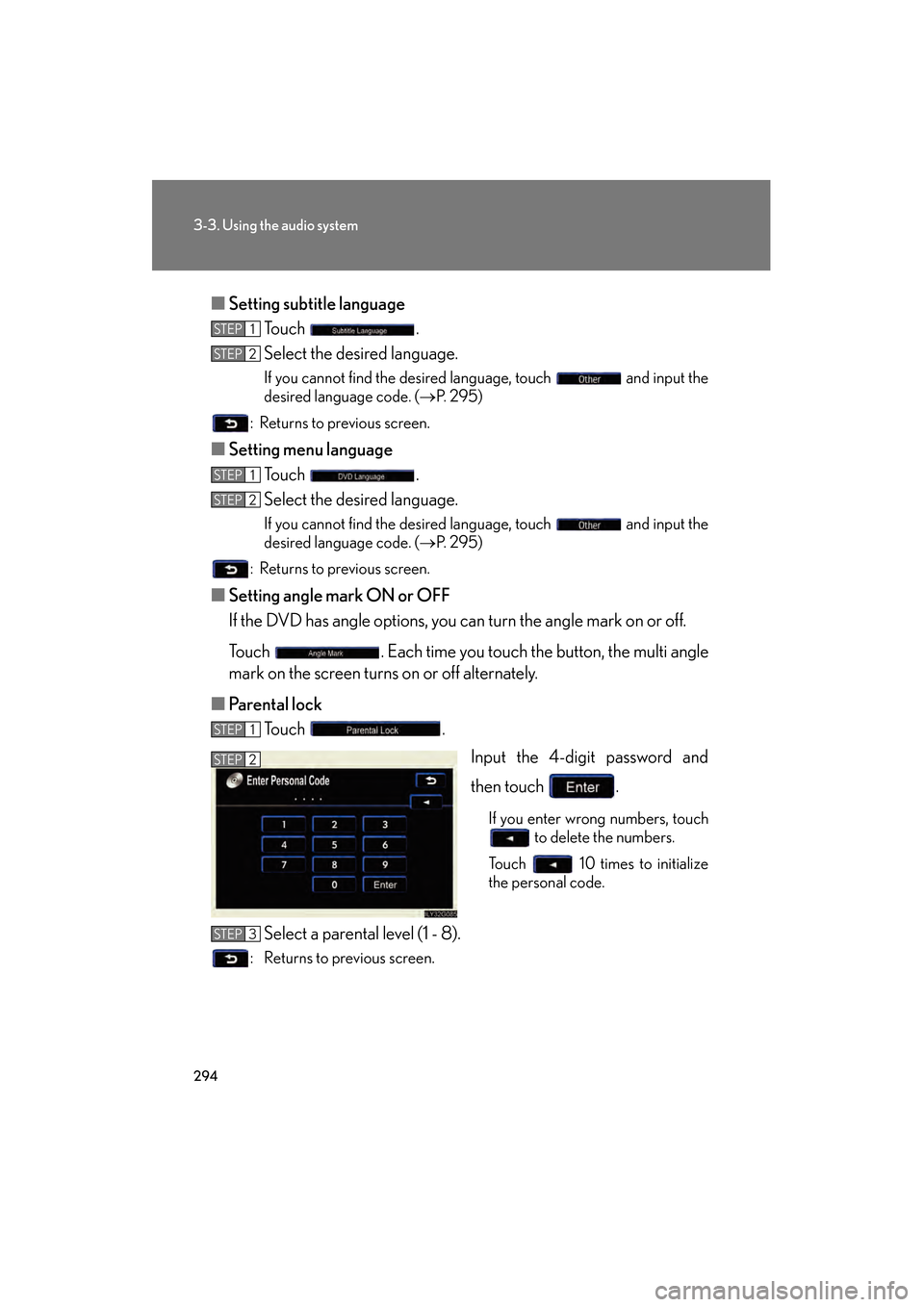
■ Parental lock
Touch .
Input the 4-digit password and
then touch .
If you enter wrong numbers, touch to delete the numbers.
Touch 10 times to initialize
the personal code.
Select a parental level (1 - 8).
: Returns to previous screen.
STEP1
STEP2
STEP1
STEP2
STEP1
STEP2
STEP3
GS450h_HV_U.book Page 294 Monday, April 27, 2009 10:10 AM
Page 363 of 622
362
3-4. Using the hands-free system (for cellular phone)
GS_HV_U (OM30B44U)
April 27, 2009 10:09 am
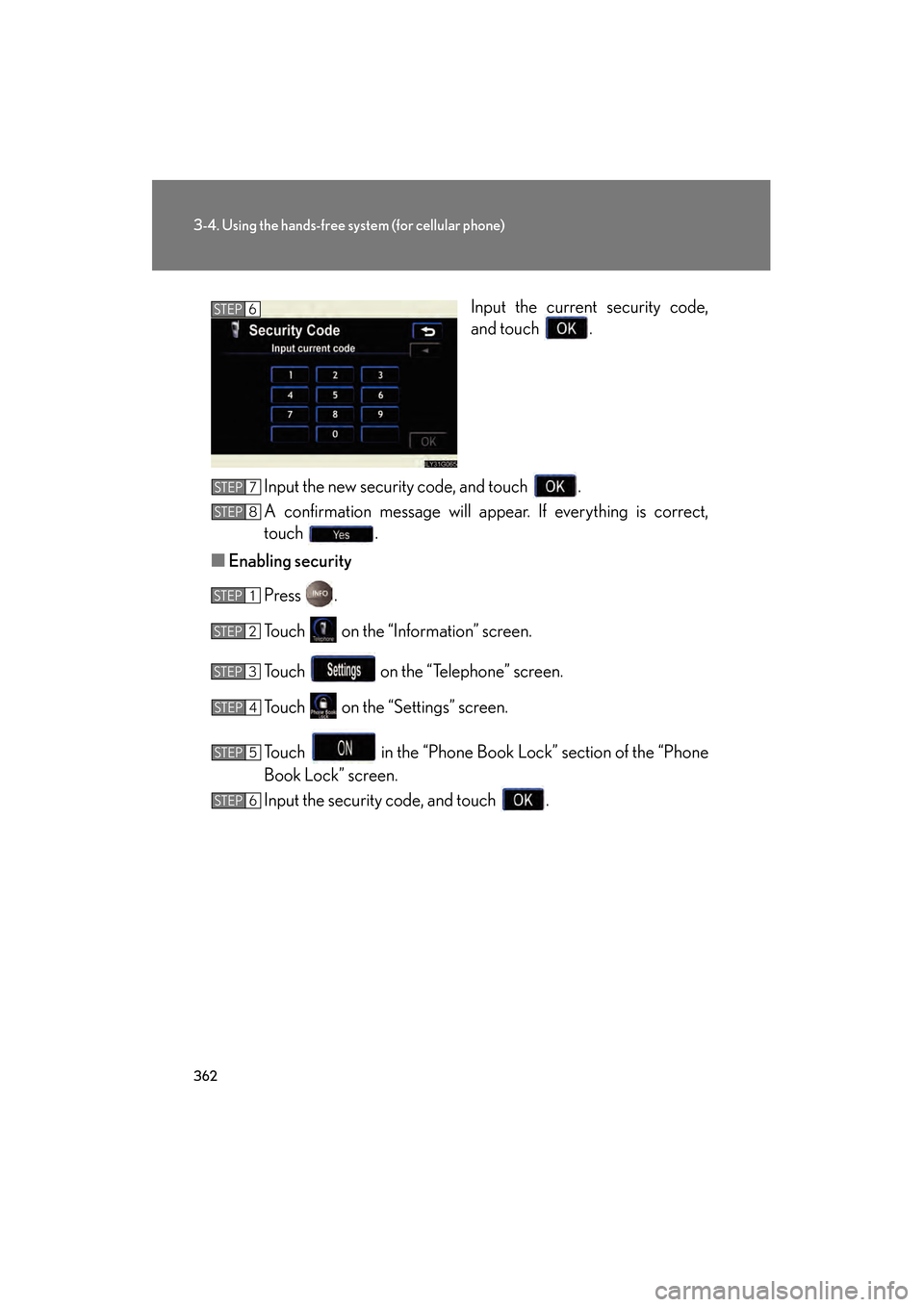
Input the current security code,
and touch .
Input the new security code, and touch .
A confirmation message will appear. If everything is correct,
touch .
■ Enabling security
Press .
Touch on the “Information” screen.
Touch on the “Telephone” screen.
Touch on the “Settings” screen.
Touch in the “Phone Book Lock” section of the “Phone
Book Lock” screen.
Input the security code, and touch .STEP6
STEP7
STEP8
STEP1
STEP2
STEP3
STEP4
STEP5
STEP6
GS450h_HV_U.book Page 362 Monday, April 27, 2009 10:10 AM
Page 364 of 622
363
3-4. Using the hands-free system (for cellular phone)
3
Interior features
GS_HV_U (OM30B44U)
April 27, 2009 10:09 am
■Setting the security code to default
Press .
Touch on the “Information” screen.
Touch on the “Telephone” screen.
Touch on the “Settings” screen.
Touch on the “Phone Book Lock” screen.
Input the security code on the “Security Code” screen, then
touch .
A confirmation message will appear. If everything is correct,
touch .
STEP1
STEP2
STEP3
STEP4
STEP5
STEP6
STEP7
GS450h_HV_U.book Page 363 Monday, April 27, 2009 10:10 AM
Page 365 of 622
364
3-4. Using the hands-free system (for cellular phone)
GS_HV_U (OM30B44U)
April 27, 2009 10:09 am
■If the “Phone Book Lock” is set
If the security code is input and the “Phone Book Lock” set, the following functions
are locked.
●Display of the phone book screen and transferring, registering, editing, deleting
the phone book data.
●Display of speed dial screen, registering, deleting the speed dial and speed dial-
ing.
●Display of the other party’s name for calls being received or made.
●Displayed of dialed numbers screen and received calls screen, deleting dialed
numbers and received numbers.
●Display of phone information screen.
●Changing the security code.
The speed dial screen is not displayed while driving.
■When changing the security code
●Be sure to choose a number difficult for strangers to guess.
●Do not forget the security code. Even your Lexus dealer will be unable to dis-
able the security. If you do forget the code, initialize all personal data.
( → P. 2 4 6 )
GS450h_HV_U.book Page 364 Monday, April 27, 2009 10:10 AM
Page 370 of 622
369
3
Interior features
GS_HV_U (OM30B44U)
April 27, 2009 10:09 am
3-5. Using the interior lights
Interior lights list
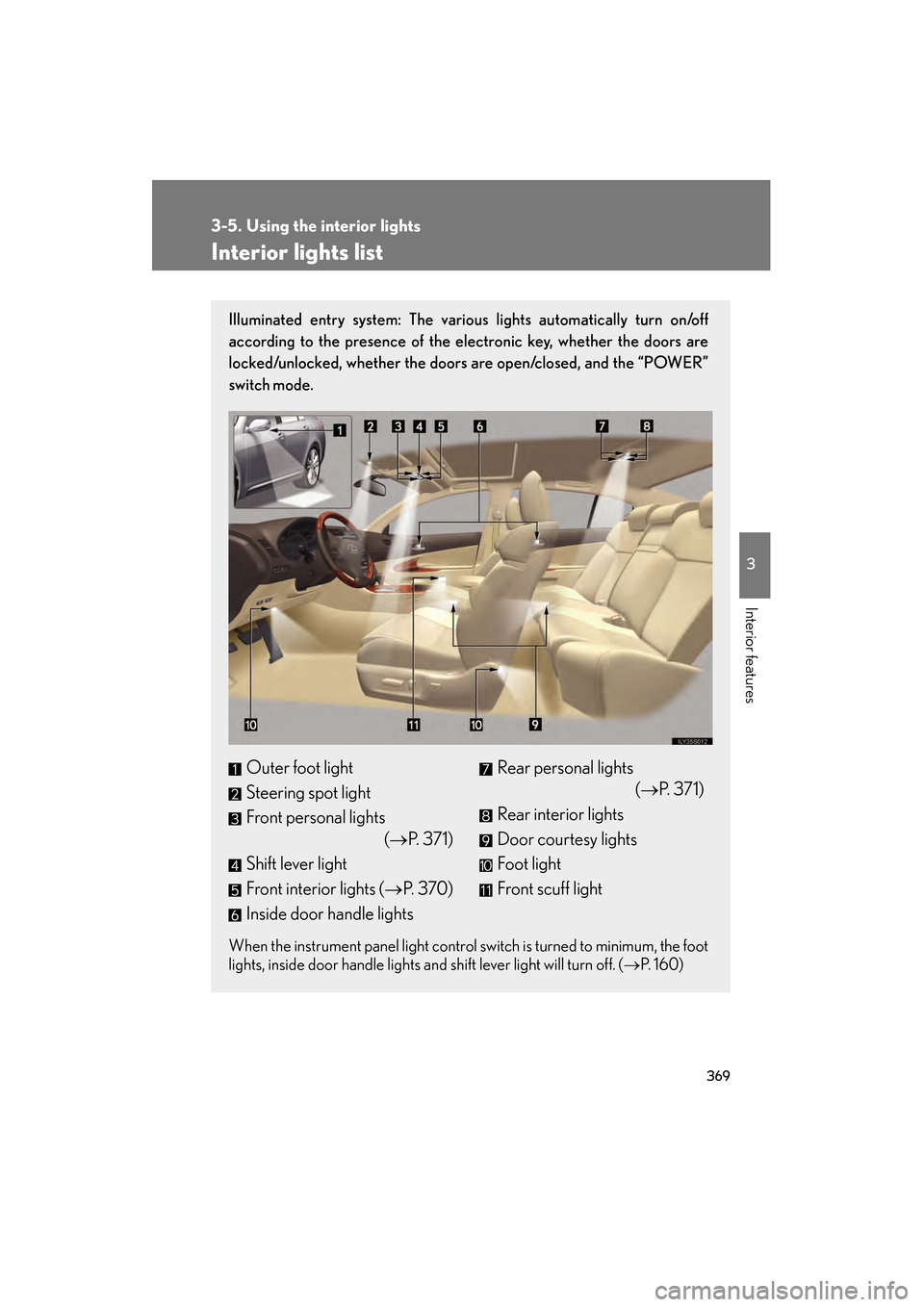
Illuminated entry system: The various lights automatically turn on/off
according to the presence of the electronic key, whether the doors are
locked/unlocked, whether the doors are open/closed, and the “POWER”
switch mode.
When the instrument panel light control switch is turned to minimum, the foot
lights, inside door handle lights and shift lever light will turn off. (→P. 1 6 0 )
Outer foot light
Steering spot light
Front personal lights
(→P. 3 7 1 )
Shift lever light
Front interior lights ( →P. 3 7 0 )
Inside door handle lightsRear personal lights (→P. 371)
Rear interior lights
Door courtesy lights
Foot light
Front scuff light
GS450h_HV_U.book Page 369 Monday, April 27, 2009 10:10 AM